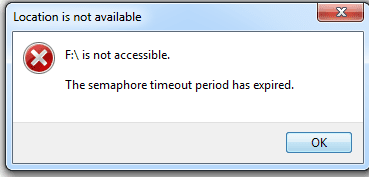
SD Card semaphore Timeout?

TheUnseen

New member
Member
Local time
3:38 AM
Messages
90
Tried to load my 16GB SD card (which usually always worked before on this laptop with Windows 7 64 bit) but now get the error shown in screenshot.

Specs:

Transcent SD HC 16GB
Windows 7 64 bit
Sony Vaio laptop
 

Attachments

  • 1.png
    1.png
    5 KB · Views: 26

My Computer

OS
W7

My Computer

Computer Manufacturer/Model Number
Custom Build
OS
7 Home Premium (64bit)
CPU
AMD FX4100 3.6Ghz - OC'd to 4Ghz
Motherboard
Gigabyte - GA-78LMT-S2P
Memory
8GB Crucial Ballistix
Graphics Card(s)
nVidia GeForce 440 1GB
Monitor(s) Displays
Acer X223w
Screen Resolution
1680x1050
Hard Drives
1TB Internal - WD Caviar Blue
640GB Internal - WD Caviar Green
2TB External - WD Caviar Green
2TB External WD Caviar Green
PSU
575
Case
Mid ATX
Cooling
6x 120mm Internal +60mm CPU Cooler
Keyboard
Microsoft
Mouse
Microsoft
Internet Speed
Cable
the only time i had that error was when i had an external usb hard drive with faulty sectors, it seems to be a timeout error. Is the SD card definately ok?
 

My Computer

Computer Manufacturer/Model Number
HP dv6519tx
OS
Windows 7 Ultimate x64
CPU
1.80 GHz Intel Core 2 Duo processor T7100
Memory
3 gig ddr2
Graphics Card(s)
NVIDIA GeForce 8400M GS
Sound Card
Realtek High Definition Audio
Monitor(s) Displays
15.4” WXGA High Definition BrightView Widescreen
Screen Resolution
1280 x 800
Hard Drives
Hitachi 320 GB (5400 rpm)
PSU
90 W AC Power Adapter
Cooling
Kitchen plate under the lappy
Keyboard
101 key compatible
Mouse
Touch Pad with On/Off button and dedicated vertical Scroll
Internet Speed
Three Wireless internet prepaid using E160G USB dongle
1. It may be a problem with the connection. Try hooking up the card some other way say through an external card reader.

2. Does the card read right on another machine?

3. Does this error occur while copying files? That can happen with too long filenames or paths that are too long. Try renaming the file or folder and/or moving it up a directory or two before copying it.
 

My Computer

Computer Manufacturer/Model Number
Too many to describe...
OS
Windows 7 x64 pro/ Windows 7 x86 Pro/ XP SP3 x86
Thread necromancy doesn't make for a wonderful first post I admit. But this is the first google result, nobody on the entire internet has solved this problem, and I found out something new about it.

First: The fix I used. Mount the SD cards under any linux distribution (i used a kanotix livecd). That's it. Then they'll work under Windows again. This worked for one of my cards and made it usable again, but not the other. It's strange.

Second: What a semaphore is. from https://www-304.ibm.com/support/docview.wss?uid=swg21094630. Essentially a semaphore timeout means the multitasking is being pre-empted by something else on a fairly low level.

The fact that this is a card-by-card error, and the fact that chkdsk reports the filesystem as raw (my error was only upon file access, not entire disk access, but other than that the symptoms are identical), makes me believe a faulty SD reader driver is altering something on the card itself, which when read back, causes some driver process to to hang. This was later fixed upon mounting and dismounting it under Linux. Now, with both of my cards, my mp3 player (and Linux on the same machine) were still perfectly able to make use of them with no timeout issues whatsoever so this is very exclusively a windows driver error.

To clarify: After mounting it and dismounting it under linux, one card returned to a normal usable state, the other did not. Both were able to function under Linux, where I obviously backed up the data on each. I then backed up the data AGAIN under windows to make sure the timeout error was gone (it was occurring on SPECIFIC files, so being able to do a full backup under windows with one card indicated the error was gone).

This is with a Thinkpad T510 which uses the Ricoh 4-in-1 card reader, which I believe is the same one Sony uses in their Vaio line.

 
Last edited:

My Computer

OS
Windows 7 Ultimate 64-Bit
CPU
Intel Core i5-560M
Motherboard
Thinkpad T510
Memory
8GB DDR3-1066
Graphics Card(s)
NVidia Quadro NVS 3100
Sound Card
Intel onboard
Monitor(s) Displays
1600x900
Hard Drives
OCZ Vertex Turbo 64 GB
PSU
9-Cell battery
Case
Stock
Cooling
Stock
I'm having the same error, with some SD cards and not others, using a Lenovo T510 laptop with a Ricoh card reader. Win7 Pro SP1 32-bit. The Win7 provided SD card reader driver, as well as the Ricoh SD card reader driver, issue the same semaphore timeout error for the cards that can't be read.

ALL cards I've tried to date are read and written correctly from my camera, my EeePC's card reader [not a Ricoh] and using a cheap four year old USB multi-card reader plugged in to any machine including the Lenovo T510 laptop.

The suggestion to mount and read using kanotix livecd hasn't helped yet (darn!) -- I'll keep trying. But I must concur the error lies with the Ricoh hardware and/or drivers, not the cards.
 

My Computer

Computer type
PC/Desktop
OS
Win7 Pro SP1 64-bit
Back
Top