Solved seagate 3tb expansion with windows 7 dont work

stealthmode

New member
Local time
9:37 PM
Messages
19
Location
Sydney
About 3 months ago i purchased seagate 3TB expansion USB 3.0 external hard drive.
all worked well apart from windows 7 not being able to see that hard drive to do a back up which at this stage im not Concerned with this issue.

Now i have a 250Gb SSD with the same OS installed, now i plug in the external hard drive into a usb 3 slot & windows 7 shows there is a seagate external hard drive connected as "H drive" but will not read it.according to windows 7 the driver is working properly. i have uninstalled the usb driver & reinstalled with no luck, i have also tried to open up my computer management but it just freezes whilst i have the external hard drive pluged in. i have also plug the external hard drive into all available usb slots with the same issue.

Now i took the extnernal hard drive into work & pluged it into a windows XP works great, so im now 100% sure there is no problem with the external drive. i have also downloaded all the seagate tools for the hard drive & whilst the drive is plug into the computer the programs just freeze.

i have done extenive research online to try & find a solution to this & cant find anyone with the same problem. except one on the seagates forum & the seagate responed with its a windows 7 problem. i will post that link if needed.

i will upload some SS when i get home from work.
 

My Computer My Computer

At a glance

windows 7 home 64 bitintel 3.18GB DDR3amd radeon 7800 2GB
Computer Manufacturer/Model Number
Stealthy special
OS
windows 7 home 64 bit
CPU
intel 3.1
Motherboard
i5
Memory
8GB DDR3
Graphics Card(s)
amd radeon 7800 2GB
Sound Card
onboard
Monitor(s) Displays
samsung lcd
Hard Drives
Sandisk SSD Extreme 240G
Segate SATA 2TB
Case
thermaltake
Keyboard
microsoft
Mouse
microsoft

My Computer My Computer

At a glance

Windows 7 Ultimate SP1 x64Intel Core i7 2700K @ 4.515 Ghz16GB GSkill Ripjaws X DDR3-16002 x MSI R6870HAWK 1GB TwinFrozr III CrossFire...
Computer Manufacturer/Model Number
Built By ELiTEFX 2012
OS
Windows 7 Ultimate SP1 x64
CPU
Intel Core i7 2700K @ 4.515 Ghz
Motherboard
ASUS P8P67 Deluxe
Memory
16GB GSkill Ripjaws X DDR3-1600
Graphics Card(s)
2 x MSI R6870HAWK 1GB TwinFrozr III CrossFire Enabled
Monitor(s) Displays
Samsung 27" LED 2ms Syncmaster S27B350
Screen Resolution
1920 x 1080
Hard Drives
Mushkin Chronos MKNSSDCR120GB SSD 550/515 MB/sec
Seagate ST31000528AS 1TB HDD
PSU
Corsair TX850W
Case
Coolermaster CM690
Cooling
Coolermaster V8
Keyboard
Logitech G510
Mouse
Razer DeathAdder
Internet Speed
18mbps/.512mbps
Other Info
Samsung SH-S243D DVD+RW/DVD-RW Optical Drive
5x120mm Blue LED Case Fans
Logitech Z4 2.1 80 Watt Sound System
Cisco DPC3008 Docsis 3 Cable Modem
TP-Link TL-WR1043ND Wireless N Gigabit Router
Thank you Elitefx that it the seagate link that i was going to post if needed but that is for the back up of windows 7. not my problem.

my problem is that now since i did have this external hard drive working & now i have installed on a new SSD i dont beleive windows 7 supports my external hard drive on a SSD. thats the only conclusion i can come up with.

P.S. i got this SSD to only play games on but then my SATA HDD died.
 

My Computer My Computer

At a glance

windows 7 home 64 bitintel 3.18GB DDR3amd radeon 7800 2GB
Computer Manufacturer/Model Number
Stealthy special
OS
windows 7 home 64 bit
CPU
intel 3.1
Motherboard
i5
Memory
8GB DDR3
Graphics Card(s)
amd radeon 7800 2GB
Sound Card
onboard
Monitor(s) Displays
samsung lcd
Hard Drives
Sandisk SSD Extreme 240G
Segate SATA 2TB
Case
thermaltake
Keyboard
microsoft
Mouse
microsoft
my problem is that now since i did have this external hard drive working & now i have installed on a new SSD i dont beleive windows 7 supports my external hard drive on a SSD. thats the only conclusion i can come up with.

That is a mystery. I'm running Win7 x64 Ult SP1 on a Mushkin Chronos 120GB SSD and my external USB2 drive works, my Brother Laser printer works, my external USB2 Hard Drive dock works etc.

Have you upgraded to SP1? Also, I read somewhere that Win7 does not natively support USB3. Have you tried USB2?

All I can think of.....:cool:
 

My Computer My Computer

At a glance

Windows 7 Ultimate SP1 x64Intel Core i7 2700K @ 4.515 Ghz16GB GSkill Ripjaws X DDR3-16002 x MSI R6870HAWK 1GB TwinFrozr III CrossFire...
Computer Manufacturer/Model Number
Built By ELiTEFX 2012
OS
Windows 7 Ultimate SP1 x64
CPU
Intel Core i7 2700K @ 4.515 Ghz
Motherboard
ASUS P8P67 Deluxe
Memory
16GB GSkill Ripjaws X DDR3-1600
Graphics Card(s)
2 x MSI R6870HAWK 1GB TwinFrozr III CrossFire Enabled
Monitor(s) Displays
Samsung 27" LED 2ms Syncmaster S27B350
Screen Resolution
1920 x 1080
Hard Drives
Mushkin Chronos MKNSSDCR120GB SSD 550/515 MB/sec
Seagate ST31000528AS 1TB HDD
PSU
Corsair TX850W
Case
Coolermaster CM690
Cooling
Coolermaster V8
Keyboard
Logitech G510
Mouse
Razer DeathAdder
Internet Speed
18mbps/.512mbps
Other Info
Samsung SH-S243D DVD+RW/DVD-RW Optical Drive
5x120mm Blue LED Case Fans
Logitech Z4 2.1 80 Watt Sound System
Cisco DPC3008 Docsis 3 Cable Modem
TP-Link TL-WR1043ND Wireless N Gigabit Router
Have you upgraded to SP1? Also, I read somewhere that Win7 does not natively support USB3. Have you tried USB2?

All I can think of.....:cool:


There is no more updates i can do with my windows 7.

i also run a 1TB USB 2 samung external HDD & that runs great.

i think i read the same forum as you about the USB 3 but its still not 100% certain on this as i dont understand way MS would make an OS that isnt USB3 ready.

P.S. i am taking in all you cents in :)
 

My Computer My Computer

At a glance

windows 7 home 64 bitintel 3.18GB DDR3amd radeon 7800 2GB
Computer Manufacturer/Model Number
Stealthy special
OS
windows 7 home 64 bit
CPU
intel 3.1
Motherboard
i5
Memory
8GB DDR3
Graphics Card(s)
amd radeon 7800 2GB
Sound Card
onboard
Monitor(s) Displays
samsung lcd
Hard Drives
Sandisk SSD Extreme 240G
Segate SATA 2TB
Case
thermaltake
Keyboard
microsoft
Mouse
microsoft
Drives bigger than 2TB need to be initialized using GPT instead of MBR, and sometimes still have issues with UEFI, Samsung says they have pretty much ironed the bugs out, so who knows.
 

My Computer My Computer

At a glance

Windows 7 Professional 64bit SP1Intel Core i5-3570K @ 4.5GHzCorsair Vengeance 16GB (4x4) @1866MHz CL 9-9-...EVGA GTX 750 Ti FTW
Computer type
PC/Desktop
Computer Manufacturer/Model Number
Custom Built
OS
Windows 7 Professional 64bit SP1
CPU
Intel Core i5-3570K @ 4.5GHz
Motherboard
Asus Sabertooth Z77
Memory
Corsair Vengeance 16GB (4x4) @1866MHz CL 9-9-9-24 1T
Graphics Card(s)
EVGA GTX 750 Ti FTW
Sound Card
Onboard Audio
Monitor(s) Displays
Dell S2309W
Screen Resolution
1920x1080
Hard Drives
Samsung 830 128GB SSD - OS
(4) Seagate 5TB HDD
(1) Seagate 2TB HDD
PSU
Seasonic X750 80+ Gold Full Modular
Case
Antec Eleven Hundred Super Mid Tower
Cooling
Intel Liquid Cooler
Keyboard
Max Nighthawk X8 Mechanical keyboard
Mouse
Mionix Naos 7000
Internet Speed
50 Mbps Down / 10 Mbps Up
Antivirus
Microsoft Security Essentials/Malwarebytes Anti-Malware
Browser
Chrome/Firefox
Other Info
Klipsch ProMedia 2.1's
Asus RT-N66R Wireless Router
Thank you Kbrady1979 for that idea however i cant even do that because windows wont even read the HDD.
 

My Computer My Computer

At a glance

windows 7 home 64 bitintel 3.18GB DDR3amd radeon 7800 2GB
Computer Manufacturer/Model Number
Stealthy special
OS
windows 7 home 64 bit
CPU
intel 3.1
Motherboard
i5
Memory
8GB DDR3
Graphics Card(s)
amd radeon 7800 2GB
Sound Card
onboard
Monitor(s) Displays
samsung lcd
Hard Drives
Sandisk SSD Extreme 240G
Segate SATA 2TB
Case
thermaltake
Keyboard
microsoft
Mouse
microsoft
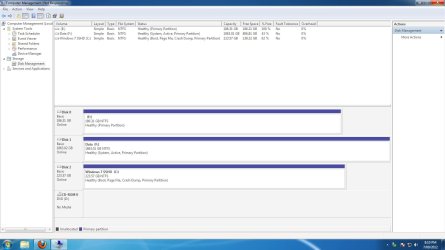
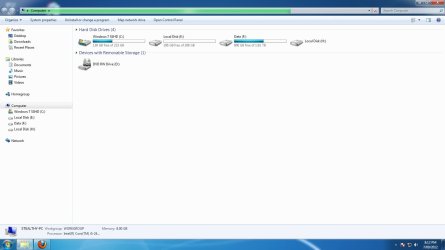
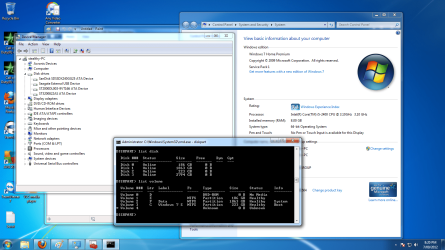
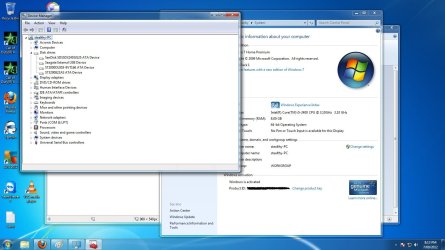
4 pictures attached i hope i don't confuse anyone :)
 

Attachments

  • windows 7 computer manament.jpg
    windows 7 computer manament.jpg
    89.9 KB · Views: 141
  • windows 7 my computer.jpg
    windows 7 my computer.jpg
    60.8 KB · Views: 97
  • windows 7.png
    windows 7.png
    181.1 KB · Views: 124
  • windows 7 device manager.jpg
    windows 7 device manager.jpg
    127 KB · Views: 97
Last edited:

My Computer My Computer

At a glance

windows 7 home 64 bitintel 3.18GB DDR3amd radeon 7800 2GB
Computer Manufacturer/Model Number
Stealthy special
OS
windows 7 home 64 bit
CPU
intel 3.1
Motherboard
i5
Memory
8GB DDR3
Graphics Card(s)
amd radeon 7800 2GB
Sound Card
onboard
Monitor(s) Displays
samsung lcd
Hard Drives
Sandisk SSD Extreme 240G
Segate SATA 2TB
Case
thermaltake
Keyboard
microsoft
Mouse
microsoft
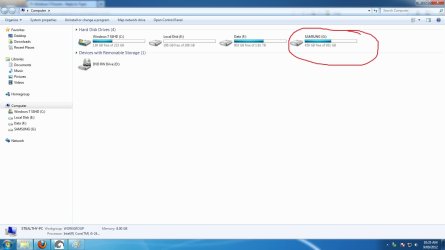
Attached i have shown that windows 7 can recognize the external USB 3 device but also cant open it any more ideas?

thank for all that have helped at the moment, has anyone else got another idea???
 

My Computer My Computer

At a glance

windows 7 home 64 bitintel 3.18GB DDR3amd radeon 7800 2GB
Computer Manufacturer/Model Number
Stealthy special
OS
windows 7 home 64 bit
CPU
intel 3.1
Motherboard
i5
Memory
8GB DDR3
Graphics Card(s)
amd radeon 7800 2GB
Sound Card
onboard
Monitor(s) Displays
samsung lcd
Hard Drives
Sandisk SSD Extreme 240G
Segate SATA 2TB
Case
thermaltake
Keyboard
microsoft
Mouse
microsoft
hmmm, betting on hardware/driver issues.
I'd watch the part of device manager about usb 3.0 controllers and see if there is some issue outside the HDD itself.

Also check manufacturer site of your mobo for any drivers or BIOS updates that talk about USB 3.0. Have you installed chipset drivers?

I'd also get nosy and check that the USB 3 ports work correctly. Connect other USB 3 devices or if you have none connect USB 2 devices.

Let's see how this goes.
 

My Computer My Computer

At a glance

Win 7 Pro 64-bit 7601AMD Phenom 9650 QuadCore, revision DR-B35 GB yes I run 2x 2GB and 1x 1GB, different b...NVIDIA GeForce 9800 GT 512 Mb, unknown manufa...
Computer type
PC/Desktop
Computer Manufacturer/Model Number
custom built
OS
Win 7 Pro 64-bit 7601
CPU
AMD Phenom 9650 QuadCore, revision DR-B3
Motherboard
ASUS M4A78
Memory
5 GB yes I run 2x 2GB and 1x 1GB, different brand, spank me.
Graphics Card(s)
NVIDIA GeForce 9800 GT 512 Mb, unknown manufacturer.
Sound Card
Crappy Realtek Integrated Audio
Monitor(s) Displays
Fujitsu Siemens P19-3P
Screen Resolution
1280 x 1024 x 32 bits @ 60 Hz Oh yeah, 4:3 rocks!
Hard Drives
(1) MAXTOR S TM3320613AS SATA Disk Device (2) STM35004 18AS SATA Disk Device (3) TOSHIBA USB 2.5"-HDD
PSU
whatever, around 450w
Case
Scavenged from old company PC, 10+ years old
Cooling
CPU fan, GPU fan, case fan, nothing fancy
Keyboard
Microsoft, PS/2, white.
Mouse
Optical, logitec.
Internet Speed
effective max speeds: 70-ish kB/s down 30-ish kB/s up
Antivirus
Avira, free edition.
Browser
Firefox with FXChrome to make it look like Google Chrome :P
Other Info
Was discarded by previous owner due to "horrible performance".
Was running Win Xp from a IDE drive. Yeah. Was a pain.
SATA II drive and Win7 and it zips away! Yay!
Hello Boafetthotmail & thank you for your thoughts

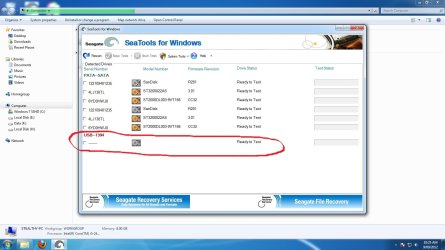
OK the manufacturer "seagate" i have the latest firmware & i have downloaded all their software. this picture attached shows that the seagate tools don't even work. yes i have installed the chipset have just reinstalled my driver for usb 3.

i dont have any other usb 3 devices.

i pluged in a usb 2 device into a usb 3 port & works great.

like i have stated before this external driver works on XP so i know its good. & it used to work on this computer until i changed hard drives. now im so confused.
 

Attachments

  • seagate tools.jpg
    seagate tools.jpg
    120.8 KB · Views: 49
  • usb2 in usb3 port.jpg
    usb2 in usb3 port.jpg
    66.5 KB · Views: 39

My Computer My Computer

At a glance

windows 7 home 64 bitintel 3.18GB DDR3amd radeon 7800 2GB
Computer Manufacturer/Model Number
Stealthy special
OS
windows 7 home 64 bit
CPU
intel 3.1
Motherboard
i5
Memory
8GB DDR3
Graphics Card(s)
amd radeon 7800 2GB
Sound Card
onboard
Monitor(s) Displays
samsung lcd
Hard Drives
Sandisk SSD Extreme 240G
Segate SATA 2TB
Case
thermaltake
Keyboard
microsoft
Mouse
microsoft
Ok an update of those who might be able to help i have also tryed it on other windows 7 machines & the external HDD dont work & they are running on standard hard drives not SSH. however tried it on another XP machine on the weekend & works without a drama. windows 7 has an issue with 3TB external I think.

no driver updates with seagate web site. i am totally run out of idea's.
 
Last edited:

My Computer My Computer

At a glance

windows 7 home 64 bitintel 3.18GB DDR3amd radeon 7800 2GB
Computer Manufacturer/Model Number
Stealthy special
OS
windows 7 home 64 bit
CPU
intel 3.1
Motherboard
i5
Memory
8GB DDR3
Graphics Card(s)
amd radeon 7800 2GB
Sound Card
onboard
Monitor(s) Displays
samsung lcd
Hard Drives
Sandisk SSD Extreme 240G
Segate SATA 2TB
Case
thermaltake
Keyboard
microsoft
Mouse
microsoft
......
 
Last edited:

My Computer My Computer

At a glance

windows 7 home 64 bitintel 3.18GB DDR3amd radeon 7800 2GB
Computer Manufacturer/Model Number
Stealthy special
OS
windows 7 home 64 bit
CPU
intel 3.1
Motherboard
i5
Memory
8GB DDR3
Graphics Card(s)
amd radeon 7800 2GB
Sound Card
onboard
Monitor(s) Displays
samsung lcd
Hard Drives
Sandisk SSD Extreme 240G
Segate SATA 2TB
Case
thermaltake
Keyboard
microsoft
Mouse
microsoft
Is there anyone having trouble like this???

is it something so simple i have missed???
 

My Computer My Computer

At a glance

windows 7 home 64 bitintel 3.18GB DDR3amd radeon 7800 2GB
Computer Manufacturer/Model Number
Stealthy special
OS
windows 7 home 64 bit
CPU
intel 3.1
Motherboard
i5
Memory
8GB DDR3
Graphics Card(s)
amd radeon 7800 2GB
Sound Card
onboard
Monitor(s) Displays
samsung lcd
Hard Drives
Sandisk SSD Extreme 240G
Segate SATA 2TB
Case
thermaltake
Keyboard
microsoft
Mouse
microsoft
My Seagate 3TB is now working with Backup/restore.

Hi all:

I've read all the posts and had the same problems with the 3TB drive from Seagate. I could not get my windows backup to start working due to the 4k limitation that windows backup does not recognize. However, I downloaded the Seagate backup software for a free trial (Memeo Instant backup) and started to use it for a while (and of course it works . . .). But today I decided to give my Windows backup another try, and low and behold it started to work with my old settings still place !!!

Not sure what happened. Either there was an automatic update to windows seven that fixed the backup issue or just by using the Seagate software it converted the disk to a useable windows format. I restored some files just to make sure all worked perfectly. I'll keep using my windows seven from now on and see what happens.

I hope someone else gives this a try, I'm curious to see why it started to work.

:D
 

My Computer My Computer

At a glance

Windows 7 Ultimate x64
OS
Windows 7 Ultimate x64
Sorry for the previous post . . . .It doesn't work. Any backup greater that 40 G will crap out with the same error message as before. Very strange indeed. I thought we had some hope, looks like we look for a good backup software that works and is FREE !!
 

My Computer My Computer

At a glance

Windows 7 Ultimate x64
OS
Windows 7 Ultimate x64
Thank you for your input masic2000. however i am not trying to use my device as a back up, i am using this as a storage device. the strange thing is that it was working & now it only works on XP i dont know about any devices later then XP.
 

My Computer My Computer

At a glance

windows 7 home 64 bitintel 3.18GB DDR3amd radeon 7800 2GB
Computer Manufacturer/Model Number
Stealthy special
OS
windows 7 home 64 bit
CPU
intel 3.1
Motherboard
i5
Memory
8GB DDR3
Graphics Card(s)
amd radeon 7800 2GB
Sound Card
onboard
Monitor(s) Displays
samsung lcd
Hard Drives
Sandisk SSD Extreme 240G
Segate SATA 2TB
Case
thermaltake
Keyboard
microsoft
Mouse
microsoft
I have fixed this problem myself.

Ubuntu Fixed my issue.
 

My Computer My Computer

At a glance

windows 7 home 64 bitintel 3.18GB DDR3amd radeon 7800 2GB
Computer Manufacturer/Model Number
Stealthy special
OS
windows 7 home 64 bit
CPU
intel 3.1
Motherboard
i5
Memory
8GB DDR3
Graphics Card(s)
amd radeon 7800 2GB
Sound Card
onboard
Monitor(s) Displays
samsung lcd
Hard Drives
Sandisk SSD Extreme 240G
Segate SATA 2TB
Case
thermaltake
Keyboard
microsoft
Mouse
microsoft
Hello stealthmode

I'm having the same issue with my Seagate Expansion drive 3TB.
It seems that you solved your issue with Ubuntu. Do you mean that you just run Ubuntu instead of Windows, or you did something with Ubuntu that fixed your drive?

Thanks a lot!
Samuel
 

My Computer My Computer

At a glance

Windows 7 Pro 64 biti7-2630QM @ 2.00Ghz8GNVidia
Computer type
Laptop
Computer Manufacturer/Model Number
Asus
OS
Windows 7 Pro 64 bit
CPU
i7-2630QM @ 2.00Ghz
Motherboard
Asus
Memory
8G
Graphics Card(s)
NVidia
Hard Drives
OCZ-Agility3 - 64G

My Computer My Computer

At a glance

Windows 7 Ultimate x64Intel7 4790K8 GB DDR3GTX 980Ti G1
Computer type
PC/Desktop
OS
Windows 7 Ultimate x64
CPU
Intel7 4790K
Motherboard
Gigabyte GA-Z97X UD5H
Memory
8 GB DDR3
Graphics Card(s)
GTX 980Ti G1
Sound Card
SoundBlaster X-FI XtremeGamer
Monitor(s) Displays
Samsung UE40JU6550 UHD
Screen Resolution
3840 X 2160
Hard Drives
1 SSD Intel 330
2 x Western Digital 6400 AAKS
1 x Western Digital 3200 AAKS
PSU
Corsair 750W
Case
Cooler Master HAF 922
Back
Top