
Solved Search message text Windows Live Mail 2011

gogreen

New member
Power User
VIP
Local time
5:15 PM
Messages
544
Location
Florida
I need to search one of my WLM 2011 folders for a word that appears in the text of the folder's messages. I see that in 2009, there was some concern about doing this, which directed people to LiveMailFix.reg, but since I have WLM 2011 and that thread is some years old, I'm guessing that problem has been fixed. Correct?

In any case, how do I perform this search? I admit I need some hand-holding on this one.

Thanks.
 

My Computer My Computer

At a glance

Windows 10 Home, 64 bitIntel Core i7 860 @ 2.8 GHz8.0 GB Dual Channel DDR3 @ 664 MHz (9-9-9-24)nVidia GeForce GTS 240
Computer type
PC/Desktop
Computer Manufacturer/Model Number
Dell Studio XPS 8100, Dell XPS 15 laptop
OS
Windows 10 Home, 64 bit
CPU
Intel Core i7 860 @ 2.8 GHz
Motherboard
Dell 0T568R (CPU1)
Memory
8.0 GB Dual Channel DDR3 @ 664 MHz (9-9-9-24)
Graphics Card(s)
nVidia GeForce GTS 240
Sound Card
M-Audio Delta Audiophile 2496
Monitor(s) Displays
Dell 2407WFP
Screen Resolution
1920x1200
Hard Drives
977 GB Western Digital WDC WD1001FAES-75W7A0 (SCSI)
Antivirus
Windows Defender, MalwareBytes Anti-Malware, AdwCleaner
Browser
Firefox, occasionally IE and Edge
Other Info
Mozilla Firefox, Mozilla Thunderbird. Western Digital Passport 250 GB external HD, two Mushkin Enhanced Mulholland 32GB USB flash drives, AKG K240 Studio headphones, Asus AC-1900 dual band wireless router.
...how do I perform this search?...
The registry patch has to do with using "Windows Search" for email. I have not had any problem using the WLM feature "Edit/Find/Message" (instead of Windows Search) for WLM 2009. First click on the folder you want to search within WLM. Then, in the dialog box that pops up you enter the text you're searching for in the "Message" box.

(As a matter of fact, I had to tell Windows Search not to include email when doing normal indexing/searching for documents, pictures, favorites, etc. because I have so many messages saved that the email results swamp out everything else. When I want to search email I do it within the email program as described above.)
 

My Computer My Computer

At a glance

Windows 8 Pro w/MC 32-bitIntel Atom 1.86 GHz2 GBIntel GMA 500
Computer type
PC/Desktop
Computer Manufacturer/Model Number
OQO 2+
OS
Windows 8 Pro w/MC 32-bit
CPU
Intel Atom 1.86 GHz
Motherboard
OQO 2+
Memory
2 GB
Graphics Card(s)
Intel GMA 500
Sound Card
IDT
Monitor(s) Displays
LCD
Screen Resolution
800 x 480 (portable) 1280 x 1024 (docked)
Hard Drives
64 GB SSD
PSU
9 Ah Battery (portable) or OQO Brick (docked)
Case
Shirt Pocket Sized
Cooling
Tiny Fan
Keyboard
Slide out (portable) DiNovo Edge (docked)
Mouse
Eraser head (portable) Logitech Bluetooth (docked)
Internet Speed
WWAN or 802.11G (portable) T1 (docked)
Browser
IE 10
Other Info
DVD-RW OQO Docking Station
Hi roncerr. Thanks. I'll give this a try.
 

My Computer My Computer

At a glance

Windows 10 Home, 64 bitIntel Core i7 860 @ 2.8 GHz8.0 GB Dual Channel DDR3 @ 664 MHz (9-9-9-24)nVidia GeForce GTS 240
Computer type
PC/Desktop
Computer Manufacturer/Model Number
Dell Studio XPS 8100, Dell XPS 15 laptop
OS
Windows 10 Home, 64 bit
CPU
Intel Core i7 860 @ 2.8 GHz
Motherboard
Dell 0T568R (CPU1)
Memory
8.0 GB Dual Channel DDR3 @ 664 MHz (9-9-9-24)
Graphics Card(s)
nVidia GeForce GTS 240
Sound Card
M-Audio Delta Audiophile 2496
Monitor(s) Displays
Dell 2407WFP
Screen Resolution
1920x1200
Hard Drives
977 GB Western Digital WDC WD1001FAES-75W7A0 (SCSI)
Antivirus
Windows Defender, MalwareBytes Anti-Malware, AdwCleaner
Browser
Firefox, occasionally IE and Edge
Other Info
Mozilla Firefox, Mozilla Thunderbird. Western Digital Passport 250 GB external HD, two Mushkin Enhanced Mulholland 32GB USB flash drives, AKG K240 Studio headphones, Asus AC-1900 dual band wireless router.

When I right-click the folder name, "Find..." is available beneath "Open," and I assume then we're talking about the same option, different WLM version. When I click on find, there are search options, but even when I insert a word into "Messages" that I know appears many, many times in that folder's messages and click"Find Now," there are still no results. Any idea what's going on here? Thanks.
 

My Computer My Computer

At a glance

Windows 10 Home, 64 bitIntel Core i7 860 @ 2.8 GHz8.0 GB Dual Channel DDR3 @ 664 MHz (9-9-9-24)nVidia GeForce GTS 240
Computer type
PC/Desktop
Computer Manufacturer/Model Number
Dell Studio XPS 8100, Dell XPS 15 laptop
OS
Windows 10 Home, 64 bit
CPU
Intel Core i7 860 @ 2.8 GHz
Motherboard
Dell 0T568R (CPU1)
Memory
8.0 GB Dual Channel DDR3 @ 664 MHz (9-9-9-24)
Graphics Card(s)
nVidia GeForce GTS 240
Sound Card
M-Audio Delta Audiophile 2496
Monitor(s) Displays
Dell 2407WFP
Screen Resolution
1920x1200
Hard Drives
977 GB Western Digital WDC WD1001FAES-75W7A0 (SCSI)
Antivirus
Windows Defender, MalwareBytes Anti-Malware, AdwCleaner
Browser
Firefox, occasionally IE and Edge
Other Info
Mozilla Firefox, Mozilla Thunderbird. Western Digital Passport 250 GB external HD, two Mushkin Enhanced Mulholland 32GB USB flash drives, AKG K240 Studio headphones, Asus AC-1900 dual band wireless router.
...when I insert a word into "Messages" that I know appears many, many times in that folder's messages and click"Find Now," there are still no results...
My dialog box has a space labled "Message:" not it's plural. And there is another box at the top labled "Look in:" that says in which folder the typed text in the message box is going to be searched. If it doesn't work I'd do a repair of Windows Live Essentials via Programs and Features. It should repair all installed components of the Essentials package, including Mail.
 

My Computer My Computer

At a glance

Windows 8 Pro w/MC 32-bitIntel Atom 1.86 GHz2 GBIntel GMA 500
Computer type
PC/Desktop
Computer Manufacturer/Model Number
OQO 2+
OS
Windows 8 Pro w/MC 32-bit
CPU
Intel Atom 1.86 GHz
Motherboard
OQO 2+
Memory
2 GB
Graphics Card(s)
Intel GMA 500
Sound Card
IDT
Monitor(s) Displays
LCD
Screen Resolution
800 x 480 (portable) 1280 x 1024 (docked)
Hard Drives
64 GB SSD
PSU
9 Ah Battery (portable) or OQO Brick (docked)
Case
Shirt Pocket Sized
Cooling
Tiny Fan
Keyboard
Slide out (portable) DiNovo Edge (docked)
Mouse
Eraser head (portable) Logitech Bluetooth (docked)
Internet Speed
WWAN or 802.11G (portable) T1 (docked)
Browser
IE 10
Other Info
DVD-RW OQO Docking Station
I'll try repairing the installation. But to confirm, when I right-click a folder, what appears is in the uploaded png. I see only "Find," where your WLM version has other choices. Correct? Am I looking in the same location as are you?

Thanks, roncerr.

I completed the repair installation. No changes--same dialog box options.
 

Attachments

  • mail.png
    mail.png
    6.4 KB · Views: 31
Last edited:

My Computer My Computer

At a glance

Windows 10 Home, 64 bitIntel Core i7 860 @ 2.8 GHz8.0 GB Dual Channel DDR3 @ 664 MHz (9-9-9-24)nVidia GeForce GTS 240
Computer type
PC/Desktop
Computer Manufacturer/Model Number
Dell Studio XPS 8100, Dell XPS 15 laptop
OS
Windows 10 Home, 64 bit
CPU
Intel Core i7 860 @ 2.8 GHz
Motherboard
Dell 0T568R (CPU1)
Memory
8.0 GB Dual Channel DDR3 @ 664 MHz (9-9-9-24)
Graphics Card(s)
nVidia GeForce GTS 240
Sound Card
M-Audio Delta Audiophile 2496
Monitor(s) Displays
Dell 2407WFP
Screen Resolution
1920x1200
Hard Drives
977 GB Western Digital WDC WD1001FAES-75W7A0 (SCSI)
Antivirus
Windows Defender, MalwareBytes Anti-Malware, AdwCleaner
Browser
Firefox, occasionally IE and Edge
Other Info
Mozilla Firefox, Mozilla Thunderbird. Western Digital Passport 250 GB external HD, two Mushkin Enhanced Mulholland 32GB USB flash drives, AKG K240 Studio headphones, Asus AC-1900 dual band wireless router.
...I see only "Find," where your WLM version has other choices. Correct? Am I looking in the same location as are you?
I see the same list as you when I right click on a folder. I was describing the dialog box I see after left clicking on "find...". It has the "look in" box and "message box" among other optional search parameters.
 

My Computer My Computer

At a glance

Windows 8 Pro w/MC 32-bitIntel Atom 1.86 GHz2 GBIntel GMA 500
Computer type
PC/Desktop
Computer Manufacturer/Model Number
OQO 2+
OS
Windows 8 Pro w/MC 32-bit
CPU
Intel Atom 1.86 GHz
Motherboard
OQO 2+
Memory
2 GB
Graphics Card(s)
Intel GMA 500
Sound Card
IDT
Monitor(s) Displays
LCD
Screen Resolution
800 x 480 (portable) 1280 x 1024 (docked)
Hard Drives
64 GB SSD
PSU
9 Ah Battery (portable) or OQO Brick (docked)
Case
Shirt Pocket Sized
Cooling
Tiny Fan
Keyboard
Slide out (portable) DiNovo Edge (docked)
Mouse
Eraser head (portable) Logitech Bluetooth (docked)
Internet Speed
WWAN or 802.11G (portable) T1 (docked)
Browser
IE 10
Other Info
DVD-RW OQO Docking Station
OK. Yeah. I was just checking to make sure I was looking at the same thing you were. Search is still not working. Any ideas?
 

My Computer My Computer

At a glance

Windows 10 Home, 64 bitIntel Core i7 860 @ 2.8 GHz8.0 GB Dual Channel DDR3 @ 664 MHz (9-9-9-24)nVidia GeForce GTS 240
Computer type
PC/Desktop
Computer Manufacturer/Model Number
Dell Studio XPS 8100, Dell XPS 15 laptop
OS
Windows 10 Home, 64 bit
CPU
Intel Core i7 860 @ 2.8 GHz
Motherboard
Dell 0T568R (CPU1)
Memory
8.0 GB Dual Channel DDR3 @ 664 MHz (9-9-9-24)
Graphics Card(s)
nVidia GeForce GTS 240
Sound Card
M-Audio Delta Audiophile 2496
Monitor(s) Displays
Dell 2407WFP
Screen Resolution
1920x1200
Hard Drives
977 GB Western Digital WDC WD1001FAES-75W7A0 (SCSI)
Antivirus
Windows Defender, MalwareBytes Anti-Malware, AdwCleaner
Browser
Firefox, occasionally IE and Edge
Other Info
Mozilla Firefox, Mozilla Thunderbird. Western Digital Passport 250 GB external HD, two Mushkin Enhanced Mulholland 32GB USB flash drives, AKG K240 Studio headphones, Asus AC-1900 dual band wireless router.
May want to look here: http://www.sevenforums.com/browsers-mail/121270-windows-live-mail-11-64-bit-search.html . (Some people say it does work and some say it doesn't.) Here is the most recent post:

"SOOO close
StarSkull, you had me SOOOO pumped! I have been having the exact same issue since moving to a new laptop, and windows 7, and Live mail all at once. I always just assumed it didn't have the same features as good ol Mail in Vista. But here you are with the answer! However, after going through all of Noel's suggestions 3 times, still no joy here in Ohio.......... rats. I've check, double checked, and rechecked, and still no search in message content. At least (THANKS) I found out about the "find" feature, so net/net, I "can" get to the message i need, just not simply through the "search" window. Oh well. Anyone else try this fix, and still have the same issue? Thanks all!!! "
 

My Computer My Computer

At a glance

Windows 8 Pro w/MC 32-bitIntel Atom 1.86 GHz2 GBIntel GMA 500
Computer type
PC/Desktop
Computer Manufacturer/Model Number
OQO 2+
OS
Windows 8 Pro w/MC 32-bit
CPU
Intel Atom 1.86 GHz
Motherboard
OQO 2+
Memory
2 GB
Graphics Card(s)
Intel GMA 500
Sound Card
IDT
Monitor(s) Displays
LCD
Screen Resolution
800 x 480 (portable) 1280 x 1024 (docked)
Hard Drives
64 GB SSD
PSU
9 Ah Battery (portable) or OQO Brick (docked)
Case
Shirt Pocket Sized
Cooling
Tiny Fan
Keyboard
Slide out (portable) DiNovo Edge (docked)
Mouse
Eraser head (portable) Logitech Bluetooth (docked)
Internet Speed
WWAN or 802.11G (portable) T1 (docked)
Browser
IE 10
Other Info
DVD-RW OQO Docking Station
OK, roncerr, thanks. I'll try the solution from the other thread. Thanks again.
 

My Computer My Computer

At a glance

Windows 10 Home, 64 bitIntel Core i7 860 @ 2.8 GHz8.0 GB Dual Channel DDR3 @ 664 MHz (9-9-9-24)nVidia GeForce GTS 240
Computer type
PC/Desktop
Computer Manufacturer/Model Number
Dell Studio XPS 8100, Dell XPS 15 laptop
OS
Windows 10 Home, 64 bit
CPU
Intel Core i7 860 @ 2.8 GHz
Motherboard
Dell 0T568R (CPU1)
Memory
8.0 GB Dual Channel DDR3 @ 664 MHz (9-9-9-24)
Graphics Card(s)
nVidia GeForce GTS 240
Sound Card
M-Audio Delta Audiophile 2496
Monitor(s) Displays
Dell 2407WFP
Screen Resolution
1920x1200
Hard Drives
977 GB Western Digital WDC WD1001FAES-75W7A0 (SCSI)
Antivirus
Windows Defender, MalwareBytes Anti-Malware, AdwCleaner
Browser
Firefox, occasionally IE and Edge
Other Info
Mozilla Firefox, Mozilla Thunderbird. Western Digital Passport 250 GB external HD, two Mushkin Enhanced Mulholland 32GB USB flash drives, AKG K240 Studio headphones, Asus AC-1900 dual band wireless router.
The odd thing is that I went into the WLM storage folders and in folder options included them in indexed items. So now at least I can search WLM folders through Windows Explorer. This is cumbersome, though. I'd prefer to be able to search my WLM folders in WLM, which is the crux of this problem.

I tried applying the solution from the other thread. Services.msc reports that the indexing service status is "started" with "automatic" startup type. Windows search service shows a blank status with "automatic" startup type.

In the Windows search properties (see png), when I try to start the service, it starts momentarily and then stops with the boxed warning (see png). Is this normal behavior?

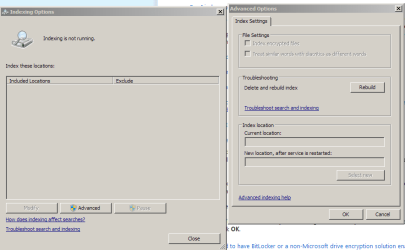
I also cannot get indexing to start (2nd png), even though services.msc reports that it is started.

I tried a repair install of WLM 2011 to no avail, and chkdsk reports everything is OK.

I'm completely stumped. Anyone have any suggestions on how to get these two services working normally?

Thanks.
 

Attachments

  • search.png
    search.png
    15.1 KB · Views: 18
  • search2.png
    search2.png
    13.4 KB · Views: 14

My Computer My Computer

At a glance

Windows 10 Home, 64 bitIntel Core i7 860 @ 2.8 GHz8.0 GB Dual Channel DDR3 @ 664 MHz (9-9-9-24)nVidia GeForce GTS 240
Computer type
PC/Desktop
Computer Manufacturer/Model Number
Dell Studio XPS 8100, Dell XPS 15 laptop
OS
Windows 10 Home, 64 bit
CPU
Intel Core i7 860 @ 2.8 GHz
Motherboard
Dell 0T568R (CPU1)
Memory
8.0 GB Dual Channel DDR3 @ 664 MHz (9-9-9-24)
Graphics Card(s)
nVidia GeForce GTS 240
Sound Card
M-Audio Delta Audiophile 2496
Monitor(s) Displays
Dell 2407WFP
Screen Resolution
1920x1200
Hard Drives
977 GB Western Digital WDC WD1001FAES-75W7A0 (SCSI)
Antivirus
Windows Defender, MalwareBytes Anti-Malware, AdwCleaner
Browser
Firefox, occasionally IE and Edge
Other Info
Mozilla Firefox, Mozilla Thunderbird. Western Digital Passport 250 GB external HD, two Mushkin Enhanced Mulholland 32GB USB flash drives, AKG K240 Studio headphones, Asus AC-1900 dual band wireless router.
Try "Troubleshoot Search and Indexing" to fix "Windows Search". I don't know if that is important to get WLM's "find" dialog box working normally. Try, at a command prompt, to type in "sfc /scannow". If that doesn't fix it you could do a complete uninstall of the Mail part of "Windows Live Essentials" and then reinstall it.
 

My Computer My Computer

At a glance

Windows 8 Pro w/MC 32-bitIntel Atom 1.86 GHz2 GBIntel GMA 500
Computer type
PC/Desktop
Computer Manufacturer/Model Number
OQO 2+
OS
Windows 8 Pro w/MC 32-bit
CPU
Intel Atom 1.86 GHz
Motherboard
OQO 2+
Memory
2 GB
Graphics Card(s)
Intel GMA 500
Sound Card
IDT
Monitor(s) Displays
LCD
Screen Resolution
800 x 480 (portable) 1280 x 1024 (docked)
Hard Drives
64 GB SSD
PSU
9 Ah Battery (portable) or OQO Brick (docked)
Case
Shirt Pocket Sized
Cooling
Tiny Fan
Keyboard
Slide out (portable) DiNovo Edge (docked)
Mouse
Eraser head (portable) Logitech Bluetooth (docked)
Internet Speed
WWAN or 802.11G (portable) T1 (docked)
Browser
IE 10
Other Info
DVD-RW OQO Docking Station
Thanks, roncerr. SFC reports no integrity violations. I'll try the complete uninstall. But I think this problem goes beyond WLM. I think it's a Windows issue.

Do you know if there is a registry change I can make to put Windows search and indexing back to their default states?
 

My Computer My Computer

At a glance

Windows 10 Home, 64 bitIntel Core i7 860 @ 2.8 GHz8.0 GB Dual Channel DDR3 @ 664 MHz (9-9-9-24)nVidia GeForce GTS 240
Computer type
PC/Desktop
Computer Manufacturer/Model Number
Dell Studio XPS 8100, Dell XPS 15 laptop
OS
Windows 10 Home, 64 bit
CPU
Intel Core i7 860 @ 2.8 GHz
Motherboard
Dell 0T568R (CPU1)
Memory
8.0 GB Dual Channel DDR3 @ 664 MHz (9-9-9-24)
Graphics Card(s)
nVidia GeForce GTS 240
Sound Card
M-Audio Delta Audiophile 2496
Monitor(s) Displays
Dell 2407WFP
Screen Resolution
1920x1200
Hard Drives
977 GB Western Digital WDC WD1001FAES-75W7A0 (SCSI)
Antivirus
Windows Defender, MalwareBytes Anti-Malware, AdwCleaner
Browser
Firefox, occasionally IE and Edge
Other Info
Mozilla Firefox, Mozilla Thunderbird. Western Digital Passport 250 GB external HD, two Mushkin Enhanced Mulholland 32GB USB flash drives, AKG K240 Studio headphones, Asus AC-1900 dual band wireless router.
For default mail search, check the indexing options an make sure the "users" folder is included along with the sub-folder "app data" since that is where Windows Live Mail keeps it's message store. You can also select "rebuild" within indexing options. But keep in mind that I purposely unchecked that folder because I do not want email to show up in normal search. That did not change the operation of the "find" feature of WLM which I use all the time.
 

My Computer My Computer

At a glance

Windows 8 Pro w/MC 32-bitIntel Atom 1.86 GHz2 GBIntel GMA 500
Computer type
PC/Desktop
Computer Manufacturer/Model Number
OQO 2+
OS
Windows 8 Pro w/MC 32-bit
CPU
Intel Atom 1.86 GHz
Motherboard
OQO 2+
Memory
2 GB
Graphics Card(s)
Intel GMA 500
Sound Card
IDT
Monitor(s) Displays
LCD
Screen Resolution
800 x 480 (portable) 1280 x 1024 (docked)
Hard Drives
64 GB SSD
PSU
9 Ah Battery (portable) or OQO Brick (docked)
Case
Shirt Pocket Sized
Cooling
Tiny Fan
Keyboard
Slide out (portable) DiNovo Edge (docked)
Mouse
Eraser head (portable) Logitech Bluetooth (docked)
Internet Speed
WWAN or 802.11G (portable) T1 (docked)
Browser
IE 10
Other Info
DVD-RW OQO Docking Station
roncerr: I can't get to the indexing options I need (see png in previous post). I think this problem is actually a Windows issue, not WLM anymore. I'll repost this problem in the General Discussion Forum. Thanks.
 

My Computer My Computer

At a glance

Windows 10 Home, 64 bitIntel Core i7 860 @ 2.8 GHz8.0 GB Dual Channel DDR3 @ 664 MHz (9-9-9-24)nVidia GeForce GTS 240
Computer type
PC/Desktop
Computer Manufacturer/Model Number
Dell Studio XPS 8100, Dell XPS 15 laptop
OS
Windows 10 Home, 64 bit
CPU
Intel Core i7 860 @ 2.8 GHz
Motherboard
Dell 0T568R (CPU1)
Memory
8.0 GB Dual Channel DDR3 @ 664 MHz (9-9-9-24)
Graphics Card(s)
nVidia GeForce GTS 240
Sound Card
M-Audio Delta Audiophile 2496
Monitor(s) Displays
Dell 2407WFP
Screen Resolution
1920x1200
Hard Drives
977 GB Western Digital WDC WD1001FAES-75W7A0 (SCSI)
Antivirus
Windows Defender, MalwareBytes Anti-Malware, AdwCleaner
Browser
Firefox, occasionally IE and Edge
Other Info
Mozilla Firefox, Mozilla Thunderbird. Western Digital Passport 250 GB external HD, two Mushkin Enhanced Mulholland 32GB USB flash drives, AKG K240 Studio headphones, Asus AC-1900 dual band wireless router.
Back
Top