search

gerribol

New member
Local time
1:39 PM
Messages
22
Location
Australia
When I do a search a number of results appear. I click on one result. It might not be the one I want. But I cannot get back to the other search results. I have to enter the details in the search box again.

I'm sure I'm missing something. Any assistance gratefully accepted.
 

My Computer

Computer type
Laptop
Computer Manufacturer/Model Number
Toshiba Sattelite C850/02D
OS
Microsoft Windows 7 Home Premium 64-bit 7601 Multiprocessor Free Service Pack 1
CPU
Intel(R) Core(TM) i5-2450M CPU @ 2.50GHz
Motherboard
Type2 - Board Vendor Name1 Type2 - Board Product Name1
Memory
4.00 GB
Graphics Card(s)
AMD Radeon HD 7610M
Sound Card
(1) AMD High Definition Audio Device (2) Realtek High Defi
Hard Drives
TOSHIBA MK5075GSX
When I do a search a number of results appear. I click on one result. It might not be the one I want. But I cannot get back to the other search results. I have to enter the details in the search box again.

I'm sure I'm missing something. Any assistance gratefully accepted.

Have you tried using the Back button?

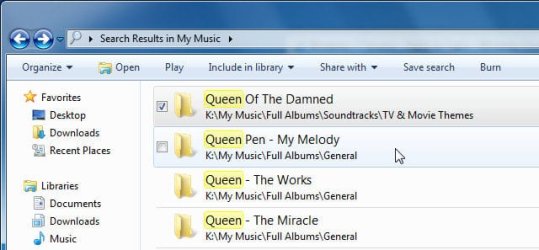
Inte the following screenshots, I searched for all folders containing the word "queen", using the search query "queen kind:folder" (without the quotes):

Image1.jpg
Search Results

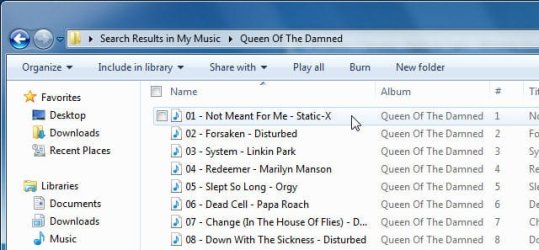
Image2.jpg
The display after I double-clicked on the result "Queen of the Damed". This is not the folder I was looking for...

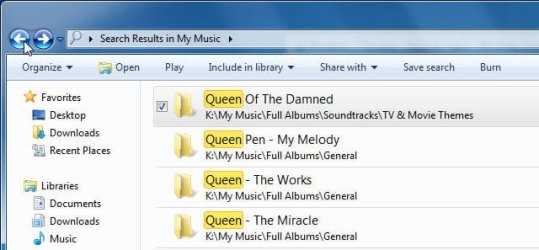
Image3.jpg
...so I click the "Back" button in the top left of the window...

Image4.jpg
...which takes me back to the results page.
 

My Computer

Computer type
PC/Desktop
Computer Manufacturer/Model Number
Virtual Machine
OS
Windows 7 Professional 32-bit SP1
CPU
AMD A4/A6
Motherboard
Intel Corporation 440BX Desktop Reference Platform
Memory
3.00GB EDO
Graphics Card(s)
VMware SVGA 3D
Sound Card
High Definition Audio Device
Monitor(s) Displays
Generic Non-PnP Monitor on VMware SVGA 3D
Screen Resolution
1440x900
Hard Drives
1 x 60GB VMware Virtual SATA Hard Drive ATA Device
Antivirus
Kaspersky Total Security
Thankyou Domzli...
No I haven't tried the back button. So I'm sure your reply has the correct info and I will try the back button next time I do a search
Thanks once again
 

My Computer

Computer type
Laptop
Computer Manufacturer/Model Number
Toshiba Sattelite C850/02D
OS
Microsoft Windows 7 Home Premium 64-bit 7601 Multiprocessor Free Service Pack 1
CPU
Intel(R) Core(TM) i5-2450M CPU @ 2.50GHz
Motherboard
Type2 - Board Vendor Name1 Type2 - Board Product Name1
Memory
4.00 GB
Graphics Card(s)
AMD Radeon HD 7610M
Sound Card
(1) AMD High Definition Audio Device (2) Realtek High Defi
Hard Drives
TOSHIBA MK5075GSX
Inte the following screenshots, I searched for all folders containing the word "queen", using the search query "queen kind:folder" (without the quotes):

Just out of curiosity : is there some particular syntax to "search queries" ? I have been just putting in the file/folder name indiscriminately and more often than not -not found what I've been looking for.
 

My Computer

Computer Manufacturer/Model Number
Store Assembled
OS
Win 7
CPU
AMD Phenom™ II X6 1090T
Motherboard
ASUS M4A89GTD PRO/USB3 with AMD® 890GX/SB850 chipset
Memory
8 GB Corsair (2X4Gb)
Graphics Card(s)
Included in AMD® 890GX/SB850 chipset on MB
Sound Card
Included in AMD® 890GX/SB850 chipset on MB
Monitor(s) Displays
Dell ST 2210 21.5inch LCD
Hard Drives
Seagate Barracuda 7200.12 1TB SATA
PSU
500 W
Case
Zebronic ATX
Cooling
No extra cooling
Inte the following screenshots, I searched for all folders containing the word "queen", using the search query "queen kind:folder" (without the quotes):

Just out of curiosity : is there some particular syntax to "search queries" ? I have been just putting in the file/folder name indiscriminately and more often than not -not found what I've been looking for.

As a matter of fact, there is plenty. I created the Advanced Searches tutorial back on the Vista Forums that answers your question.
 

My Computer

Computer type
PC/Desktop
Computer Manufacturer/Model Number
Virtual Machine
OS
Windows 7 Professional 32-bit SP1
CPU
AMD A4/A6
Motherboard
Intel Corporation 440BX Desktop Reference Platform
Memory
3.00GB EDO
Graphics Card(s)
VMware SVGA 3D
Sound Card
High Definition Audio Device
Monitor(s) Displays
Generic Non-PnP Monitor on VMware SVGA 3D
Screen Resolution
1440x900
Hard Drives
1 x 60GB VMware Virtual SATA Hard Drive ATA Device
Antivirus
Kaspersky Total Security
As a matter of fact, there is plenty. I created the Advanced Searches tutorial back on the Vista Forums that answers your question.

Wow ! That's an eye-opener !! Thanks for that detailed and exhaustive clarification. Couldn't have asked for more :D
 

My Computer

Computer Manufacturer/Model Number
Store Assembled
OS
Win 7
CPU
AMD Phenom™ II X6 1090T
Motherboard
ASUS M4A89GTD PRO/USB3 with AMD® 890GX/SB850 chipset
Memory
8 GB Corsair (2X4Gb)
Graphics Card(s)
Included in AMD® 890GX/SB850 chipset on MB
Sound Card
Included in AMD® 890GX/SB850 chipset on MB
Monitor(s) Displays
Dell ST 2210 21.5inch LCD
Hard Drives
Seagate Barracuda 7200.12 1TB SATA
PSU
500 W
Case
Zebronic ATX
Cooling
No extra cooling
As a matter of fact, there is plenty. I created the Advanced Searches tutorial back on the Vista Forums that answers your question.

Wow ! That's an eye-opener !! Thanks for that detailed and exhaustive clarification. Couldn't have asked for more :D

Glad to have been of help.

Honestly, in recent times I can't remember searching for a filename. The advanced search facilities of Vista and 7 has almost made filenames obsolete.

Even though I do keep proper folder and filename structures for everything, Windows 7 has so vastly improved the performance and scope of search compared to even Vista, that it has become one of my primary tools of file management.
 

My Computer

Computer type
PC/Desktop
Computer Manufacturer/Model Number
Virtual Machine
OS
Windows 7 Professional 32-bit SP1
CPU
AMD A4/A6
Motherboard
Intel Corporation 440BX Desktop Reference Platform
Memory
3.00GB EDO
Graphics Card(s)
VMware SVGA 3D
Sound Card
High Definition Audio Device
Monitor(s) Displays
Generic Non-PnP Monitor on VMware SVGA 3D
Screen Resolution
1440x900
Hard Drives
1 x 60GB VMware Virtual SATA Hard Drive ATA Device
Antivirus
Kaspersky Total Security
I wish I could say the same. I had a lot better results with Vista search. 7 is super slow for me, and I have rebuilt the index twice.
 

My Computer

Computer Manufacturer/Model Number
Dell XPS17 laptop
OS
Windows 7 Pro 64
CPU
i7 2760QM 2.4GHz
Memory
8GB
Graphics Card(s)
Intel HD/Nvidia GeForce 555M
Sound Card
RealTek
Monitor(s) Displays
Ntrig DuoSense digitzer, touchscreen
Hard Drives
750GB
Mouse
Synaptics touchpad
Back
Top