seatools test failed, could that be why not responding issues?

rbico

New member
Local time
10:03 AM
Messages
31
I am helping a friend with her PC. she has been getting not responding problems for a few years. I do minor tweaks every once and awhile,which help but never solve the problem. She finally gave me her PC to spend a few days with it and a 14 hour memtest came out clean, but seatoools short test failed on her c-drive. I did the boot short-test and it failed, too. I am probably going to do a long test to try to fix the bad sectors, but I want to know if she should just replace the hard drive regardless of the outcome. It's a 250 gb seagate barracuda

This may sound like a stupid question, but can not responding issues be caused by a bad harddrive?

She has a q6600 with 4 gb ram running windows 7. She has an onboard graphics controller, but she doesn't play any games - just watches tv via the web. her N/R issues come whenever she tries to look up emails or contracts, browse around or try to do too many things at once.

Any advice would be helpful!
thanks!
 

My Computer My Computer

OS
windows 7
Unresponsive issues can definitely have to do with a failing hard drive. In fact, that's often one of the giveaways of a failing drive or bad sectors. You can attempt to recover/fix the bad sectors so she can use it in the meantime, but I would certainly be looking at performing a return (if it's still covered under warranty) or buying a new drive.
 

My Computer My Computer

OS
XP / Win7 x64 Pro
CPU
Intel Quad-Core Q9450 @ 3.2GHz
Motherboard
Asus P5-E
Memory
2x2GB GSkill DDR2
Graphics Card(s)
NVIDIA GeForce 8600 GTS (EVGA)
Monitor(s) Displays
Dell 2408WFP
Screen Resolution
1920x1200
thank you for the quick response. I will let her know and try to run the temporary fix.
 

My Computer My Computer

OS
windows 7
Hi,

Here is my advice. First, back up everything on the hdd. There is a possibility that the drive could die completely at any moment. As mentioned, the drive might be replaceable under warranty.

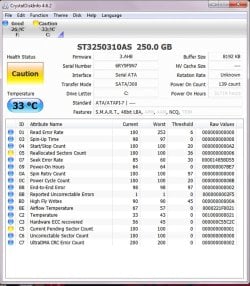
If possible, download this program on the problem PC and then post a screen shot of the program back here.

Hope this helps
Stephen
 

My Computer My Computer

Computer Manufacturer/Model Number
Dell XPS 15 L502x
OS
Windows 7 Home Premium 64bit (O.E.M)
CPU
Intel Core i7 2630QM @2.00GHz
Memory
6GB DDR3
Graphics Card(s)
Intel Intergrated Graphics 3000, nVidia GT525M (1GB)
Screen Resolution
1366x768
Hard Drives
750GB Seagate 7200rpm
Keyboard
Backlit Dell XPS 15 L502x Keyboard
Mouse
Microsoft Wireless Mobile Mouse 4000
Internet Speed
2.5 Mb/s down, 0.36 up
Here you go.
 

Attachments

  • HDD.jpg
    HDD.jpg
    145.3 KB · Views: 74

My Computer My Computer

OS
windows 7
Whilst looking online I found this. Not my work but though I would post it to help you.
It's so sad that SMART is so poorly understood; I think SMART tells alot about the drive and is the best drive diagnostic available. Sadly, few people know how to interpret the SMART data, and programs that try to interpret for the user do a poor job at it.

Realloacted Sector Count = INVISIBLE bad sectors that have been swapped with reserve sectors. These sectors are NO LONGER VISIBLE to your operating system and as such can NEVER cause any more problems.

Current Pending Sector = ACTIVE VISIBLE bad sectors that CANNOT BE READ but are still visible to the operating system. These are VERY DANGEROUS and cause ALOT of problems!

However, the value 200 you're seeing is a normalized value where the higher = better. You have to look at the RAW VALUE instead! For example, a raw value of 0 reallocated sectors might be the equivalent of a 200 normalized value. If the normalized value drops below the THRESHOLD value, that SMART attribute counts as a FAILURE. So if the normalized value is 200 and the threshold value is 100, that would be perfect, while the normalized value being 98 and the threshold being 100 would mean that attribute signals a FAILURE.

My advice: do not look at the normalized values at all. Only look at the RAW values!

Important SMART attributes:
- Reallocated Sector Count = bad sectors in the past; this might have caused problems in the past but does not have to; drives replace weak sectors as a precaution which may never have caused any problems.
- Current Pending Sector = THE MOST DANGEROUS smart attribute; this should ALWAYS BE ZERO or you have severe problems! This can be either weak electric charge with insufficient ECC correction ability -OR- it can be physical damage. Writing to this sector will solve the problem; if there was physical damage it will be realloacted by a reserve sector and the Reallocated Sector Count raw value will increase.
- UDMA CRC Error Count = cabling errors; if this is higher than 1000 and increasing you have severe cabling problems; under 100 does not need to trigger any alarm. Technically this means the receiving end did receive a corrupted version of the data that was sent by the transmitter; the corruption was detected by CRC which means the data is NOT accepted and the request will be sent again. Unless you see very high values or it keeps increasing steadily, this usually is not a big issue.
As you have a raw value of one on the current pending sectors count you have issues. The drive needs replacing.

Hope this helps
Stephen

EDIT - Just for the record I found this here. Reallocated sector count: How important is this, really? - Ars Technica OpenForum. Don't want to be accused of plagiarism.
 

My Computer My Computer

Computer Manufacturer/Model Number
Dell XPS 15 L502x
OS
Windows 7 Home Premium 64bit (O.E.M)
CPU
Intel Core i7 2630QM @2.00GHz
Memory
6GB DDR3
Graphics Card(s)
Intel Intergrated Graphics 3000, nVidia GT525M (1GB)
Screen Resolution
1366x768
Hard Drives
750GB Seagate 7200rpm
Keyboard
Backlit Dell XPS 15 L502x Keyboard
Mouse
Microsoft Wireless Mobile Mouse 4000
Internet Speed
2.5 Mb/s down, 0.36 up
That doesn't really make sense to me (all Greek), but I will suggest that my friend replace her drive to be safe.

My fear is that I suggest my friend buy a new HDD, reinstall everything, which takes forever, and then still have not responding issues. I will feel like a fool.
 

My Computer My Computer

OS
windows 7
If you take the time to download all necessary motherboard drivers from the motherboard manufacturer's website before-hand and properly format and install the OS with all of the necessary drivers, that situation is very unlikely.
 

My Computer My Computer

OS
XP / Win7 x64 Pro
CPU
Intel Quad-Core Q9450 @ 3.2GHz
Motherboard
Asus P5-E
Memory
2x2GB GSkill DDR2
Graphics Card(s)
NVIDIA GeForce 8600 GTS (EVGA)
Monitor(s) Displays
Dell 2408WFP
Screen Resolution
1920x1200
If you take the time to download all necessary motherboard drivers from the motherboard manufacturer's website before-hand and properly format and install the OS with all of the necessary drivers, that situation is very unlikely.

You mean update drivers and install the new HDD and I should see no more "not responding" problems?
 

My Computer My Computer

OS
windows 7
Yes, update all of the necessary drivers from the website after OS installation. Windows tries to make its best guess, which sometimes works and sometimes does not. This is why it's easier to download them all before-hand and put them on a thumb drive so if the network drivers don't work and you can't get to the internet, you can install the appropriate drivers to let you do so.
 

My Computer My Computer

OS
XP / Win7 x64 Pro
CPU
Intel Quad-Core Q9450 @ 3.2GHz
Motherboard
Asus P5-E
Memory
2x2GB GSkill DDR2
Graphics Card(s)
NVIDIA GeForce 8600 GTS (EVGA)
Monitor(s) Displays
Dell 2408WFP
Screen Resolution
1920x1200
That doesn't really make sense to me (all Greek), but I will suggest that my friend replace her drive to be safe.

My fear is that I suggest my friend buy a new HDD, reinstall everything, which takes forever, and then still have not responding issues. I will feel like a fool.

If you install a new HDD you shouldn't get any more not responding issues. With the info you gave me for CrystalDiskInfo it seems extremely likely that the HDD is causing the issue. If for some strange reason you have any more not responding issues, we should be able to solve it.:geek: :p

Stephen
 

My Computer My Computer

Computer Manufacturer/Model Number
Dell XPS 15 L502x
OS
Windows 7 Home Premium 64bit (O.E.M)
CPU
Intel Core i7 2630QM @2.00GHz
Memory
6GB DDR3
Graphics Card(s)
Intel Intergrated Graphics 3000, nVidia GT525M (1GB)
Screen Resolution
1366x768
Hard Drives
750GB Seagate 7200rpm
Keyboard
Backlit Dell XPS 15 L502x Keyboard
Mouse
Microsoft Wireless Mobile Mouse 4000
Internet Speed
2.5 Mb/s down, 0.36 up
Thank you all so much. I will get my friend to get a new HDD and start from scratch.

FYI: I ran the HP diagnostic HDD tool and it failed and also recommended a replacing the hard drive.
 

My Computer My Computer

OS
windows 7
You're welcome. If you have any more questions, feel free to ask.

Stephen
 

My Computer My Computer

Computer Manufacturer/Model Number
Dell XPS 15 L502x
OS
Windows 7 Home Premium 64bit (O.E.M)
CPU
Intel Core i7 2630QM @2.00GHz
Memory
6GB DDR3
Graphics Card(s)
Intel Intergrated Graphics 3000, nVidia GT525M (1GB)
Screen Resolution
1366x768
Hard Drives
750GB Seagate 7200rpm
Keyboard
Backlit Dell XPS 15 L502x Keyboard
Mouse
Microsoft Wireless Mobile Mouse 4000
Internet Speed
2.5 Mb/s down, 0.36 up
Back
Top