Second Hard Drive Doesn't Show Up

AGrocker

New member
Member
Local time
6:07 PM
Messages
27
I just built a computer and I have a 64GB Crucial M4 SSD as my primary drive and a 500GB WD Caviar Blue as my secondary drive. The issue is that Windows 7 doesn't recognize the WD Caviar Blue, only the SSD. Both the BIOS and the Device Manager recognize the WD Hard Drive it just doesn't show up in Windows 7.
 

My Computer

OS
Windows 7 Professional x64
CPU
Intel Core i3 560 @ 3.33GHz
Motherboard
Intel DH55HC
Memory
8GB DDR3 @1333MHz PNY Optima
Graphics Card(s)
Nvidia Geforce GT440
Sound Card
Realtek 8-Channel ALC888S
Hard Drives
Intel 320 Series 80GB SSD
Western Digital Caviar Black 500GB @ 7200rpm
PSU
Antec EarthWatts
Case
Antec Sonata III
Cooling
Cooler Master Hyper 212 Plus
Does it show up in Disk Management?? Can you assign a drive letter to it there?
 

My Computer

Computer type
PC/Desktop
Computer Manufacturer/Model Number
Ignatz Special; 4 speed manual gearbox; factory air conditioning; one of one
OS
Windows 7 Home Premium SP1, 64-bit
CPU
Intel Skylake i5-6600K, not overclocked
Motherboard
AsRock Z170M Extreme 4, micro ATX
Memory
8 GB HyperX DDR4-2666 (2 x 4 GB)
Graphics Card(s)
none; graphics are integrated on CPU
Sound Card
onboard: Realtek ALC1150; external: USB Behringer UF0-202
Monitor(s) Displays
Dell S2340M 23 inch IPS
Screen Resolution
1600 x 900
Hard Drives
System: Crucial MX100 series SSD, 128 GB;
Data: Samsung Spinpoint 103SJ, 1 TB;
Backup: WD Caviar Green WD30EZRX-00D8PB0, 3 TB
PSU
Rosewill SilentNight 500 watt fanless, semi-modular
Case
Antec Solo II
Cooling
Noctua NH-U12S; Noctua F12 intake, Noctua S12A exhaust
Keyboard
Microsoft 200 6JH-00001 USB
Mouse
Dell or Microsoft optical wired; USB
Antivirus
Microsoft Security Essentials and Malwarebytes Premium
Browser
Pale Moon
Other Info
All fans PWM; speeds at idle: CPU circa 500 rpm; intake circa 600 rpm; exhaust circa 600 rpm; CPU temps 27 idle and 47 C load in a warm room (27 C/81 F) when running Intel Extreme Tuning Utility stress test.
Im going to try to do that right now
 

My Computer

OS
Windows 7 Professional x64
CPU
Intel Core i3 560 @ 3.33GHz
Motherboard
Intel DH55HC
Memory
8GB DDR3 @1333MHz PNY Optima
Graphics Card(s)
Nvidia Geforce GT440
Sound Card
Realtek 8-Channel ALC888S
Hard Drives
Intel 320 Series 80GB SSD
Western Digital Caviar Black 500GB @ 7200rpm
PSU
Antec EarthWatts
Case
Antec Sonata III
Cooling
Cooler Master Hyper 212 Plus
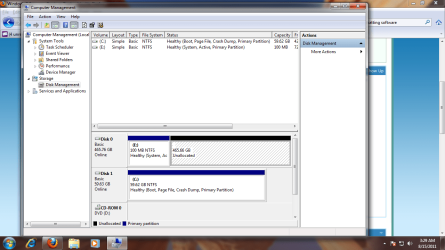
It's actually not in there. I'll post a picture of my disk management then you analyze it.
 

Attachments

  • Untitled.png
    Untitled.png
    65.3 KB · Views: 1,504

My Computer

OS
Windows 7 Professional x64
CPU
Intel Core i3 560 @ 3.33GHz
Motherboard
Intel DH55HC
Memory
8GB DDR3 @1333MHz PNY Optima
Graphics Card(s)
Nvidia Geforce GT440
Sound Card
Realtek 8-Channel ALC888S
Hard Drives
Intel 320 Series 80GB SSD
Western Digital Caviar Black 500GB @ 7200rpm
PSU
Antec EarthWatts
Case
Antec Sonata III
Cooling
Cooler Master Hyper 212 Plus
It needs to be formatted and then assigned a drive letter. It looks like you may have the SATA ports reversed as well, since the installer picked up the WD drive before your SSD.
 

My Computer

OS
Windows 7 Ultimate x64 SP1
CPU
Intel Core i7-2600
Motherboard
Gigabyte GA-P67A-UD3P-B3
Memory
12 GB Patriot Extreme DDR3-1333
Graphics Card(s)
Nvidia GTX 470
Monitor(s) Displays
Dell UltraSharp 2209WA
Hard Drives
OCZ Agility3 240 GB, WD5001AALS, WD7501AALS
PSU
OCZ ModStream 700W
Case
CoolerMaster HAF 912 Advanced
Cooling
CoolerMaster Hyper 212 Plus
What do you mean by the SATA ports? They are both plugged innto SATA 6GB's sockets as they're both SATA 6GB's drives.
 

My Computer

OS
Windows 7 Professional x64
CPU
Intel Core i3 560 @ 3.33GHz
Motherboard
Intel DH55HC
Memory
8GB DDR3 @1333MHz PNY Optima
Graphics Card(s)
Nvidia Geforce GT440
Sound Card
Realtek 8-Channel ALC888S
Hard Drives
Intel 320 Series 80GB SSD
Western Digital Caviar Black 500GB @ 7200rpm
PSU
Antec EarthWatts
Case
Antec Sonata III
Cooling
Cooler Master Hyper 212 Plus
Not sure how you got that 100 MB E partition. I'm guessing you had the 500 GB drive plugged in when you installed Windows onto the SSD??

I thought you meant you couldn't see the drive at all. Looks like it there OK and just needs to be formatted as the Deacon says.
 

My Computer

Computer type
PC/Desktop
Computer Manufacturer/Model Number
Ignatz Special; 4 speed manual gearbox; factory air conditioning; one of one
OS
Windows 7 Home Premium SP1, 64-bit
CPU
Intel Skylake i5-6600K, not overclocked
Motherboard
AsRock Z170M Extreme 4, micro ATX
Memory
8 GB HyperX DDR4-2666 (2 x 4 GB)
Graphics Card(s)
none; graphics are integrated on CPU
Sound Card
onboard: Realtek ALC1150; external: USB Behringer UF0-202
Monitor(s) Displays
Dell S2340M 23 inch IPS
Screen Resolution
1600 x 900
Hard Drives
System: Crucial MX100 series SSD, 128 GB;
Data: Samsung Spinpoint 103SJ, 1 TB;
Backup: WD Caviar Green WD30EZRX-00D8PB0, 3 TB
PSU
Rosewill SilentNight 500 watt fanless, semi-modular
Case
Antec Solo II
Cooling
Noctua NH-U12S; Noctua F12 intake, Noctua S12A exhaust
Keyboard
Microsoft 200 6JH-00001 USB
Mouse
Dell or Microsoft optical wired; USB
Antivirus
Microsoft Security Essentials and Malwarebytes Premium
Browser
Pale Moon
Other Info
All fans PWM; speeds at idle: CPU circa 500 rpm; intake circa 600 rpm; exhaust circa 600 rpm; CPU temps 27 idle and 47 C load in a warm room (27 C/81 F) when running Intel Extreme Tuning Utility stress test.
The 100MB partition is from the 500GB drive it's the system file partition. BUt how do I format the drive. There isn't that option...
 

My Computer

OS
Windows 7 Professional x64
CPU
Intel Core i3 560 @ 3.33GHz
Motherboard
Intel DH55HC
Memory
8GB DDR3 @1333MHz PNY Optima
Graphics Card(s)
Nvidia Geforce GT440
Sound Card
Realtek 8-Channel ALC888S
Hard Drives
Intel 320 Series 80GB SSD
Western Digital Caviar Black 500GB @ 7200rpm
PSU
Antec EarthWatts
Case
Antec Sonata III
Cooling
Cooler Master Hyper 212 Plus
The SATA port thing probably doesn't matter, but you might swap cables on two ports you are using so that the SSD shows up first as drive 0 rather than drive 1. As I say, it may not matter. I have had a system running with the OS partition as drive 1 for years with no issues.
 

My Computer

Computer type
PC/Desktop
Computer Manufacturer/Model Number
Ignatz Special; 4 speed manual gearbox; factory air conditioning; one of one
OS
Windows 7 Home Premium SP1, 64-bit
CPU
Intel Skylake i5-6600K, not overclocked
Motherboard
AsRock Z170M Extreme 4, micro ATX
Memory
8 GB HyperX DDR4-2666 (2 x 4 GB)
Graphics Card(s)
none; graphics are integrated on CPU
Sound Card
onboard: Realtek ALC1150; external: USB Behringer UF0-202
Monitor(s) Displays
Dell S2340M 23 inch IPS
Screen Resolution
1600 x 900
Hard Drives
System: Crucial MX100 series SSD, 128 GB;
Data: Samsung Spinpoint 103SJ, 1 TB;
Backup: WD Caviar Green WD30EZRX-00D8PB0, 3 TB
PSU
Rosewill SilentNight 500 watt fanless, semi-modular
Case
Antec Solo II
Cooling
Noctua NH-U12S; Noctua F12 intake, Noctua S12A exhaust
Keyboard
Microsoft 200 6JH-00001 USB
Mouse
Dell or Microsoft optical wired; USB
Antivirus
Microsoft Security Essentials and Malwarebytes Premium
Browser
Pale Moon
Other Info
All fans PWM; speeds at idle: CPU circa 500 rpm; intake circa 600 rpm; exhaust circa 600 rpm; CPU temps 27 idle and 47 C load in a warm room (27 C/81 F) when running Intel Extreme Tuning Utility stress test.
So seeing my disk management, what would you say to do?
 

My Computer

OS
Windows 7 Professional x64
CPU
Intel Core i3 560 @ 3.33GHz
Motherboard
Intel DH55HC
Memory
8GB DDR3 @1333MHz PNY Optima
Graphics Card(s)
Nvidia Geforce GT440
Sound Card
Realtek 8-Channel ALC888S
Hard Drives
Intel 320 Series 80GB SSD
Western Digital Caviar Black 500GB @ 7200rpm
PSU
Antec EarthWatts
Case
Antec Sonata III
Cooling
Cooler Master Hyper 212 Plus
You may have them reversed in order...meaning the WD drive could be in Port 0 and the SSD could be in Port 1.
 

My Computer

OS
Windows 7 Ultimate x64 SP1
CPU
Intel Core i7-2600
Motherboard
Gigabyte GA-P67A-UD3P-B3
Memory
12 GB Patriot Extreme DDR3-1333
Graphics Card(s)
Nvidia GTX 470
Monitor(s) Displays
Dell UltraSharp 2209WA
Hard Drives
OCZ Agility3 240 GB, WD5001AALS, WD7501AALS
PSU
OCZ ModStream 700W
Case
CoolerMaster HAF 912 Advanced
Cooling
CoolerMaster Hyper 212 Plus
I'd want to get rid of that 100 MB E partition on the spinning drive. No need for it.

So I'd shut down and disconnect the spinning drive. Then I would plug the SSD into port 0 on the motherboard (the port that the spinning drive is now connected to.


Then I would reinstall Windows with the spinning drive disconnected. Then reconnect the spinning drive when you are done.

There is probably a simpler way to get rid of that E partition on the spinning drive, but it only takes a half hour or so to reinstall Windows and I'd guess you don't have much time invested on it yet--your SSD probably just has a bare install with no or few apps installed.
 

My Computer

Computer type
PC/Desktop
Computer Manufacturer/Model Number
Ignatz Special; 4 speed manual gearbox; factory air conditioning; one of one
OS
Windows 7 Home Premium SP1, 64-bit
CPU
Intel Skylake i5-6600K, not overclocked
Motherboard
AsRock Z170M Extreme 4, micro ATX
Memory
8 GB HyperX DDR4-2666 (2 x 4 GB)
Graphics Card(s)
none; graphics are integrated on CPU
Sound Card
onboard: Realtek ALC1150; external: USB Behringer UF0-202
Monitor(s) Displays
Dell S2340M 23 inch IPS
Screen Resolution
1600 x 900
Hard Drives
System: Crucial MX100 series SSD, 128 GB;
Data: Samsung Spinpoint 103SJ, 1 TB;
Backup: WD Caviar Green WD30EZRX-00D8PB0, 3 TB
PSU
Rosewill SilentNight 500 watt fanless, semi-modular
Case
Antec Solo II
Cooling
Noctua NH-U12S; Noctua F12 intake, Noctua S12A exhaust
Keyboard
Microsoft 200 6JH-00001 USB
Mouse
Dell or Microsoft optical wired; USB
Antivirus
Microsoft Security Essentials and Malwarebytes Premium
Browser
Pale Moon
Other Info
All fans PWM; speeds at idle: CPU circa 500 rpm; intake circa 600 rpm; exhaust circa 600 rpm; CPU temps 27 idle and 47 C load in a warm room (27 C/81 F) when running Intel Extreme Tuning Utility stress test.
You may not be able to safely delete the E drive, but for the rest of the drive, you should be able to right click on the Unallocated portion and create the partition you want.
 

My Computer

OS
Windows 7 Ultimate x64 SP1
CPU
Intel Core i7-2600
Motherboard
Gigabyte GA-P67A-UD3P-B3
Memory
12 GB Patriot Extreme DDR3-1333
Graphics Card(s)
Nvidia GTX 470
Monitor(s) Displays
Dell UltraSharp 2209WA
Hard Drives
OCZ Agility3 240 GB, WD5001AALS, WD7501AALS
PSU
OCZ ModStream 700W
Case
CoolerMaster HAF 912 Advanced
Cooling
CoolerMaster Hyper 212 Plus
Back
Top