
Firstly apologies if I have posted this query in the wrong section.
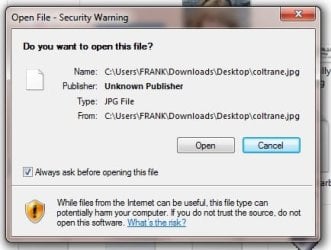
I am running Windows 7 Home Premium and totally out of the blue I am now faced with a Security Warning every time I try to open a JPG file from within Windows Explorer. Having tried a number of experiments I have noted the following:
Having searched Google it would seem the only fix for this annoying message is a fairly complicated routine involving changing settings in the registry, which I am a bit worried about doing. Obviously I could simply untick the "Always ask before opening this file" box but I would need to do this with every other affected file individually. Is there no way this could be done 'en-mass'?
I am running Windows 7 Home Premium and totally out of the blue I am now faced with a Security Warning every time I try to open a JPG file from within Windows Explorer. Having tried a number of experiments I have noted the following:
- only files that I have downloaded from the internet appear to be affected
- files that I have had on my hard drive for quite some time do not trigger the warning but only the more recent ones
- the warning message does not show if I open the JPG from within my graphics program (I'm using Paint Shop Pro)
Having searched Google it would seem the only fix for this annoying message is a fairly complicated routine involving changing settings in the registry, which I am a bit worried about doing. Obviously I could simply untick the "Always ask before opening this file" box but I would need to do this with every other affected file individually. Is there no way this could be done 'en-mass'?
Attachments
My Computer
At a glance
Windows 7 Home Premium
- OS
- Windows 7 Home Premium


