That long as heck number is most likely the Product Key. Never post the Product Key on a public forum.
Since you have created an image of your current drive, you should be able to restore that image onto your new hdd and not need to worry about drivers and such.
If you plan instead to freshly install the OS then you will need to obtain the OS install disk, determine the Win 7 Product Key and you will want to make sure you have all the drivers you will need on-hand when you setup the machine. You will also need to re-install all of your apps.
Hello Strollin and thank you for yours, no I have not pulled a image yet, and I do not have OM disk that it came with but thanks to many here I
got a ton of other customization's done and wow THANK YOU all.
Glad I had a hunch about that product key.
frankly i got very tiered of feeling was I was taking way to long to get info out to all you "All So Ready To Run With it Folks", so I found a program that dug into my mach for many details
plus i opened it up to photograph the hard drive but the flat desk top design had drive buried under a dvd-cd drive,but to help you all as much as you have me, I got the following
Factory stamp says it was made
july 2007 (after the great MB capacitor scandal had been corrected)
Machine says WIN XP on side, so i guess joker who told me it was a newer machine lied.
but the mother board looked very healthy, no brown resistors, very clean, no Cigg smoke and very flat cap heads, and it did sit in a corner for 3 years never used, so it has some life
Any case here is what I got, which appears to be a ATA drive with a 7 OS dropped in.
I pray I can get a good Brand New ATA DRIVE

as i really wanted a sata.
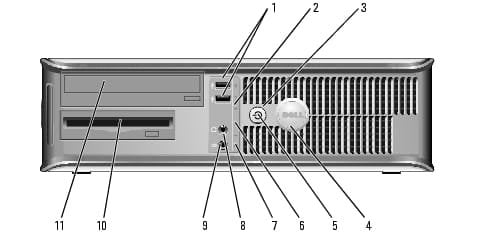
General DELL OPTIPLEX 745
Operating System Microsoft Windows 7 Home Premium
System Type 32 bit
Central Processor Intel(R) Pentium(R) 4 CPU 3.00GHz x2
User Name Owner
Graphics
Video Adapter Intel(R) Q965/Q963 Express Chipset Family
Video Memory 384.00 MB
Screen Resolution 1024 x 768
Video Adapter Intel(R) Q965/Q963 Express Chipset Family
Video Memory Unknown
Screen Resolution NULL x NULL
Storage
Total Memory 1.99 GB
Free Memory 1.30 GB
Total Hard disk 74.41 GB
Free Hard disk 47.65 GB
I/O
Mouse USB Input Device
Keyboard USB Input Device
Computer System
Computer Name OWNER-PC
User Name Owner
Organization N/A
Operating System
OS Name Microsoft Windows 7 Home Premium
OS Version 6.1.7601
Service Pack 1.0
Product ID 00359-OEM-8992687-00095
System Up Time 6/1/2020 9:50:33 PM
Internet Explorer Version 9.11.9600.19596
Microsoft DirectX Version 4.09.00.0904
OpenGL Version 6.1.7600.16385 (win7_rtm.090713-1255)
Registry
Maximum Size 682 MB
Current Size 59 MB
Status OK
Memory Resource
Total Memory 1.99 GB
Used Memory 713.84 MB
Free Memory 1.29 GB
Memory Usage 35%
Physical Memory
Memory Bank N/A
Description Physical Memory 0
Device Locator DIMM_1
Capacity 512.00 MB
Speed 667 Mhz
Manufacturer CE00000000000000
Data Width 64 bit
Memory Type DDR
Form Factor DIMM
Physical Memory
Memory Bank N/A
Description Physical Memory 1
Device Locator DIMM_3
Capacity 512.00 MB
Speed 667 Mhz
Manufacturer AD00000000000000
Data Width 64 bit
Memory Type DDR
Form Factor DIMM
Physical Memory
Memory Bank N/A
Description Physical Memory 2
Device Locator DIMM_2
Capacity 512.00 MB
Speed 667 Mhz
Manufacturer 2C00000000000000
Data Width 64 bit
Memory Type DDR
Form Factor DIMM
Physical Memory
Memory Bank N/A
Description Physical Memory 3
Device Locator DIMM_4
Capacity 512.00 MB
Speed 667 Mhz
Manufacturer 2C00000000000000
Data Width 64 bit
Memory Type DDR
Form Factor DIMM
Central Processor
CPU Name Intel(R) Pentium(R) 4 CPU 3.00GHz x2
Code Name Model 4, Stepping 1
Manufacturer GenuineIntel
Current Clock Speed 2990 Mhz
Max Clock Speed 2990 Mhz
Voltage 1.8V
External Clock 800 Mhz
Serial Number BFEBFBFF00000F41
CPU ID x86 Family 15 Model 4 Stepping 1
Socket Designation Microprocessor
N/A 16 KB
N/A 1024 KB
Motherboard
Model 0MM599
Manufacturer Dell Inc.
Serial Number ..CN1374077404JM.
BIOS Name Phoenix ROM BIOS PLUS Version 1.10 2.3.1
BIOS Vendor Dell Inc.
SMBIOS Version 2.3.1
BIOS Date 5/21/2007
BIOS Features
PCI is supported Yes
Plug and Play is supported Yes
APM is supported Yes
BIOS is Upgradable (Flash) Yes
BIOS shadowing is allowed Yes
Boot from CD is supported Yes
Selectable Boot is supported Yes
EDD (Enhanced Disk Drive) Specification is supported Yes
Int 13h - Japanese Floppy for Toshiba 1.2mb (3.5, 360 RPM) is supported Yes
Int 5h, Print Screen Service is supported Yes
Int 9h, 8042 Keyboard services are supported Yes
Int 14h, Serial Services are supported Yes
Int 17h, printer services are supported Yes
ACPI supported Yes
USB Legacy is supported Yes
LS-120 boot is supported Yes
Disk Drives
Name WDC WD800JD-75MSA3 ATA Device
Media Type Fixed hard disk media
Capability 74.50 GB
Interface Type IDE
Partitions 2
Total Cylinders 9726
Total Heads 255
Total Sectors 156248190
Total Tracks 2480130
Tracks Per Cylinder 255
Bytes Per Sector 512
Sectors Per Track 63
S.M.A.R.T Support Yes
Current Temperature 0C (32F)