Self Sleeping

Have you tried changing your power plan to Balanced or High Performance?
Do you have any 3rd party programs installed that a particular key on the keyboard is designated to put the computer to sleep?
 

My Computer

Computer type
PC/Desktop
Computer Manufacturer/Model Number
Home made Desktop
OS
Windows 10 Pro. 64/ version 1709 Windows 7 Pro/64
CPU
Intel i7-6800K @ 4.3
Motherboard
ASUS X-99 Deluxe II
Memory
Corsair Platinum 16 gig @2400
Graphics Card(s)
EVGA GTX 1070 OC
Monitor(s) Displays
Asus 27" LED LCD/VE278Q
Screen Resolution
1920-1080 or 1280-720 HDMI
Hard Drives
INTEL SSD 730-240 Gb Sata 3.0/
PSU
EVGA Platium 1200W
Case
Phanteks Luxe Tempered Glass 8 fans/ one radiator
Cooling
XSPC/ Water Cooled CPU
Keyboard
Das 4 Professional
Mouse
Logitech M705/MX Anywhere 2-S
Internet Speed
100 mbits
Antivirus
Microsoft Security Essentials/ Malwarebytes Premium 3.0/ SAS
Browser
I.E. 11 default/Firefox/ ISP Time Warner Cable/Spectrum
Other Info
LG BluRay Burner/
Sound system-KLipsch-THX/
Icy Dock ssd Hot Swap bays.
Have you tried changing your power plan to Balanced or High Performance?
Do you have any 3rd party programs installed that a particular key on the keyboard is designated to put the computer to sleep?
Yes, I tried changing the power plan as on my second post, but no effect when changing or changing back. I don't have any programmed key on my keyboard. It is an old Safeway-20 (on my specs). It does have 21 special multimedia and sleep keys, all with their original settings, which I never needed to change. I have had it for about 12 years without any problem. Sleep ans Power keys work according to what is set on the power plan, so no need to program them.


You could try using a trace to see if it shows what causes the sleep.
http://www.sevenforums.com/tutorial...up-shutdown-sleep-hibernate-reboot-trace.html

fwiw, i have a Win 7 32 Bit system with Avast and no problems with Sleep or Hibernate.
I have good news. After cleaning some rubbish and another trial I could install SDK. Please, don't ask me why it failed before because I have no idea. I can now proceed with what you wanted me to do, and will be back with the results. That may take some time because most often I have to type on the On-Screen Keyboard.

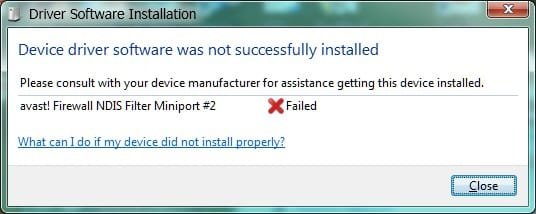
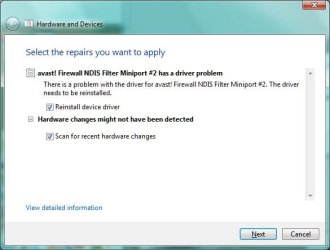
Yesterday, after answering your question about Avast, I found a new issue with Avast (about two weeks after this self sleep case, so hardly connected). On Device Manager, under Network adapters, there is a new entry saying avast! Firewall NDIS Filter Miniport #2 with a yellow danger road sign. At boot the PC tries to install a driver for that, but fails. Please see the attached snap shots. I should look this up at Avast forum, but I put it here as a late answer to your question, and it appeared after my answered.


Thank you for trying to help. Maybe this time we will find out what throws the PC into sleep.


Edit: Added information. If you've read this post before, please note that there are additions. I couldn't include them because the computer was in a non stop self sleep cycle and I was extremely fed up of mouse-typing on the the On-Screen Keyboard and waited until a a break on the self sleep – now – to complete. Sorry for the inconvenience.
 

Attachments

  • avast1.jpg
    avast1.jpg
    24.7 KB · Views: 5
  • avast2.jpg
    avast2.jpg
    18.3 KB · Views: 4
Last edited:

My Computer

Computer type
PC/Desktop
Computer Manufacturer/Model Number
Home assembled
OS
Windows 7 Ultimate 64-bit SP1
CPU
AMD Athlon 64 II X3 440
Motherboard
M4A785TD-V EVO
Memory
Kingston kit 4GB DDR3 1333MHz (KVR1333D3N9K2/4)
Monitor(s) Displays
ASUS AS VH198S
Screen Resolution
1440x900
Hard Drives
Crucial MX300 2.5" SSD SATA,
Western Digital Caviar Black WD1002FAEX SATA-III,
Samsung HD161HJ SATA-II,
Seagate Barracuda ST3120022A ATA,
Western Digital WD800BB ATA.
Case
Standard
Cooling
Standard
Keyboard
Safeway SW-20
Mouse
Logitech Anywhere, Logitech MX Anywhere 2S, Technet M006
Internet Speed
130 Mbs fiber
Antivirus
Avast Premier
Browser
Firefox, Ice Dragon and Opera
Other Info
PCI ATA-133 Adapter,
Parallel Port Card PCI - PU005V2.
Neophile from your 2nd post.
hen I followed your suggestion. I changed power settings from my Custom to Power saver, living the original settings untouched. I rebooted and the same story again (no changes, no need to repeat). The, I changed back to my Custom plan, which is based on Power saver, only with shorter times, respecting the necessary delays between each and rebooted again. Nothing changed.
-----------------------
I have read your post and specs several times and I do apologize if I missed something.
That is why I suggested Balanced or High performance. I don't see that that has been tried. How ever I do see Custom and Power Savings has been tried. I have did some research using Google and found that some but not all solved a problem such as yours doing this. Of course this is just a suggest. I didn't mean to be a bother.
Have a nice day.
 

My Computer

Computer type
PC/Desktop
Computer Manufacturer/Model Number
Home made Desktop
OS
Windows 10 Pro. 64/ version 1709 Windows 7 Pro/64
CPU
Intel i7-6800K @ 4.3
Motherboard
ASUS X-99 Deluxe II
Memory
Corsair Platinum 16 gig @2400
Graphics Card(s)
EVGA GTX 1070 OC
Monitor(s) Displays
Asus 27" LED LCD/VE278Q
Screen Resolution
1920-1080 or 1280-720 HDMI
Hard Drives
INTEL SSD 730-240 Gb Sata 3.0/
PSU
EVGA Platium 1200W
Case
Phanteks Luxe Tempered Glass 8 fans/ one radiator
Cooling
XSPC/ Water Cooled CPU
Keyboard
Das 4 Professional
Mouse
Logitech M705/MX Anywhere 2-S
Internet Speed
100 mbits
Antivirus
Microsoft Security Essentials/ Malwarebytes Premium 3.0/ SAS
Browser
I.E. 11 default/Firefox/ ISP Time Warner Cable/Spectrum
Other Info
LG BluRay Burner/
Sound system-KLipsch-THX/
Icy Dock ssd Hot Swap bays.
Layback Bear, I am sorry, I am the one to be excused and not you. You are right, I didn't mention I tried the Balanced plan, not the the Power saver because my Custom plan is based on that. I have typed some posts on the On-Screen Keyboard, and that one was ine of them. It takes so long that I lose the continuity and miss things. At this moment is not self sleeping. I am waiting for the next cycle to do the trace as per DavidW7ncus's instruction because I don't know if it makes a difference.
 

My Computer

Computer type
PC/Desktop
Computer Manufacturer/Model Number
Home assembled
OS
Windows 7 Ultimate 64-bit SP1
CPU
AMD Athlon 64 II X3 440
Motherboard
M4A785TD-V EVO
Memory
Kingston kit 4GB DDR3 1333MHz (KVR1333D3N9K2/4)
Monitor(s) Displays
ASUS AS VH198S
Screen Resolution
1440x900
Hard Drives
Crucial MX300 2.5" SSD SATA,
Western Digital Caviar Black WD1002FAEX SATA-III,
Samsung HD161HJ SATA-II,
Seagate Barracuda ST3120022A ATA,
Western Digital WD800BB ATA.
Case
Standard
Cooling
Standard
Keyboard
Safeway SW-20
Mouse
Logitech Anywhere, Logitech MX Anywhere 2S, Technet M006
Internet Speed
130 Mbs fiber
Antivirus
Avast Premier
Browser
Firefox, Ice Dragon and Opera
Other Info
PCI ATA-133 Adapter,
Parallel Port Card PCI - PU005V2.
Back
Top