Send To Context Menu - Remove or Restore Default Items

How to Remove and Restore Default "Send To" Context Menu Items in Windows 7 and Windows 8

   Information
This will show you how to either remove or restore the default Send To context (right click) menu. This includes the Compressed (zipped) Folder, Desktop (create shortcut), Documents, Fax recipient, and Mail recipient menu items.

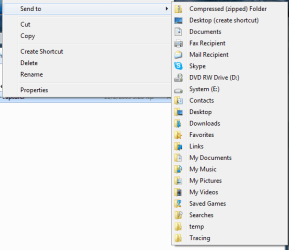
You can press and hold SHIFT + Right Click and release SHIFT on a item to see an expanded Sent To context menu.

   Note
The hidden SendTo system folder is located at the path below:

C:\Users\(user-name)\AppData\Roaming\Microsoft\Windows\SendTo

OR (shorter)

Shell:SendTo


EXAMPLE: Default Send To Context Menu
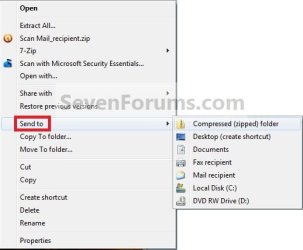
Context_menu.jpg
EXAMPLE: Expanded Send To Context Menu
NOTE: The expanded Send To context menu is opened by pressing and holding Shift before right clicking on the file or folder, then clicking on Send To.
sendto2.png


OPTION ONE

To Manually Restore Send to Context Menu Items


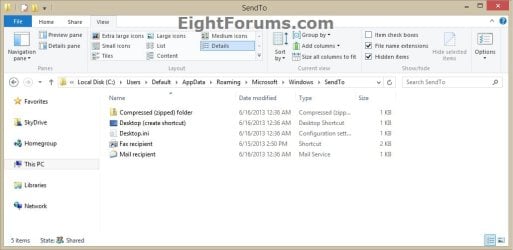
1. Go to the hidden folder location below, and do step 2 or 3 below for what you would like to do.
C:\Users\Default\AppData\Roaming\Microsoft\Windows
Default_SendTo.jpg
2. To Restore SendTo Folder and All Send to Context Menu Items
A) Copy the SendTo folder.

B) Go to the hidden folder (shell:sendto) location below.
C:\Users\(your user-name)\AppData\Roaming\Microsoft\Windows

C) Paste the SendTo folder, and approve.
3. To Restore Specific Send to Context Menu Item(s)
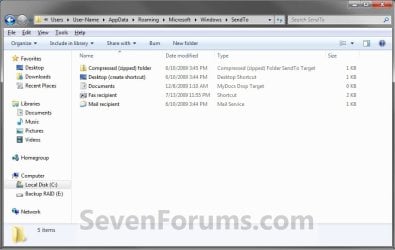
A) Open the SendTo folder.

B) Copy the shortcuts that you want to restore.

C) Go to the hidden folder (shell:sendto) location below.
C:\Users\(your user-name)\AppData\Roaming\Microsoft\Windows\SendTo
D) Paste the shortcuts into your SendTo folder, and approve.
Send_To.jpg


OPTION TWO

To Restore a Send to Context Menu Item with a Download


1. To Restore Compressed (zipped) Folder
A) Click on the download button below to download the Compressed_(zipped)_folder.zip file.

Download


2. To Restore Desktop (create shortcut)
A) Click/tap on the download button below to download the Desktop_(create shortcut).zip file.

Download


3. To Restore Documents
A) Click/tap on the download button below to download the Documents.zip file.

Download


4. To Restore Fax Recipient
A) Click/tap on the download button below to download the Fax_Recipient .zip file.

Download


5. To Restore Mail Recipient
A) Click/tap on the download button below to download the Mail_Recipient .zip file.

Download


6. Save the ZIP file to your Desktop.

7. Open the .zip file and extract (drag and drop) the shortcut file to your desktop.

8. Right click on the shortcut, then click/tap on Properties, General tab, and on the Unblock button. (see screenshot below)
NOTE: If you do not have a Unblock button under the General tab, then the shortcut is already unblocked and you can continue on to step 9.
Unblock.jpg
9. Press the Windows + R keys to open the Run dialog, type shell:sendto, and press Enter.

10. Move the extracted shortcut(s) (step 7) into the SentTo folder. (see screenshot below)
NOTE: If you wanted to remove a Send To context menu item, then right click on a shortcut in the SendTo folder and click on Delete and Yes.
Send_To.jpg
11. When done, close the SendTo folder and delete the ZIP file on the desktop if you would like to.
That's it,
Shawn


Attachments

Last edited:
If they still continue to disappear on you, then as a test, create a new user account, and use it for a bit to see if it happens in the new account as well.

If not, then you could use the new account instead.
 

My Computer

Computer type
PC/Desktop
Computer Manufacturer/Model Number
Self built custom
OS
64-bit Windows 11 Pro for Workstations
CPU
Intel i7-8700K OC'd to 5 GHz
Motherboard
ASUS ROG Maximus XI Formula Z390
Memory
64 GB (4x16GB) G.SKILL TridentZ RGB DDR4 3600 MHz
Graphics Card(s)
ASUS ROG-STRIX-GTX1080TI-O11G-GAMING
Sound Card
Integrated
Monitor(s) Displays
2 x Samsung Odyssey G7 27"
Screen Resolution
2560x1440
Hard Drives
1TB Samsung 990 PRO M.2,
4TB Samsung 990 PRO PRO M.2,
TerraMaster F8 SSD Plus NAS
PSU
Seasonic Prime Titanium 850W
Case
Thermaltake Core P3
Cooling
Corsair Hydro H115i
Keyboard
Logitech wireless K800
Mouse
Logitech MX Master 4
Internet Speed
2 Gb/s Download and 100 Mb/s Upload
Antivirus
Malwarebyte Anti-Malware Premium
Browser
Google Chrome
Other Info
Logitech Z625 speaker system,
Logitech BRIO 4K Pro webcam,
HP Color LaserJet Pro MFP M477fdn,
APC SMART-UPS RT 1000 XL - SURT1000XLI,
Galaxy S23 Plus phone
I did it manually by creating a shortcut and copying it in the send to folder, thank you.
 

My Computer

Computer type
PC/Desktop
Computer Manufacturer/Model Number
Custom build
OS
Windows 7 Ultimate x64
CPU
Intel i5-6600K 3.50GHz
Motherboard
Asus Pro Z170 Gaming
Memory
Corsair DDR4 2x8GB
Graphics Card(s)
MSI GeForce GTX1070 Gaming X
Sound Card
On board Realtek
Monitor(s) Displays
Dell SP2309W
Screen Resolution
1920x1080
Hard Drives
OS Samsung 850 EVO 500GB SATA III SSD
2x Hitachi Deskstar 1GB SATA data drives
1x Western Digital Caviar Black 1TB SATA data drive
PSU
Corsair HX650W
Case
CoolerMaster CM 690 III
Cooling
Coolermaster Hyper 212 EVO 1x200mm 1x140mm 2x120mm case fan
Keyboard
Logitech usb keyboard
Mouse
Logitech G500 $27 bargain :)
Internet Speed
ADSL2
Antivirus
Microsoft Security Essential, MalwareBytes
Browser
SRWare Iron, Internet Explorer
Other Info
Very happy with this buid.
I struggled a lot to find all compatible parts since I wanted an Intel 1151 based motherboard so to be able to install Windows 7.
I chose this case because it has amazing air flow, it's sturdy and looks good.
The case included 1x 200mm front and 1x 120mm back fans, I added 1x 200mm on the top and 1x120 bottom fans and modded the panels with black stockings for women s
Compressed Folder Not showing up

Hi,

I found your site while trying to figure out why I can't use the compressed folder from Send To. I have followed all of the steps, and it is in there, however I still don't see it when I right click. I think that it is not associated correctly or something as it does not show as a compressed folder but a white page as the icon for the file. I am attaching a screen shot so you can see it.

I believe that file has been this way since I got my computer a few years ago, so I don't have a "good" backup to go to.

Thanks,
M0rw3n
 

Attachments

  • SendTo Folder.PNG
    SendTo Folder.PNG
    5.8 KB · Views: 231

My Computer

Computer type
PC/Desktop
Computer Manufacturer/Model Number
Gateway
OS
Windows 7 Home 32bit

My Computer

Computer type
PC/Desktop
Computer Manufacturer/Model Number
Self built custom
OS
64-bit Windows 11 Pro for Workstations
CPU
Intel i7-8700K OC'd to 5 GHz
Motherboard
ASUS ROG Maximus XI Formula Z390
Memory
64 GB (4x16GB) G.SKILL TridentZ RGB DDR4 3600 MHz
Graphics Card(s)
ASUS ROG-STRIX-GTX1080TI-O11G-GAMING
Sound Card
Integrated
Monitor(s) Displays
2 x Samsung Odyssey G7 27"
Screen Resolution
2560x1440
Hard Drives
1TB Samsung 990 PRO M.2,
4TB Samsung 990 PRO PRO M.2,
TerraMaster F8 SSD Plus NAS
PSU
Seasonic Prime Titanium 850W
Case
Thermaltake Core P3
Cooling
Corsair Hydro H115i
Keyboard
Logitech wireless K800
Mouse
Logitech MX Master 4
Internet Speed
2 Gb/s Download and 100 Mb/s Upload
Antivirus
Malwarebyte Anti-Malware Premium
Browser
Google Chrome
Other Info
Logitech Z625 speaker system,
Logitech BRIO 4K Pro webcam,
HP Color LaserJet Pro MFP M477fdn,
APC SMART-UPS RT 1000 XL - SURT1000XLI,
Galaxy S23 Plus phone
Hi Shawn

Thanks so much!!!! That fixed it!!!!
 

My Computer

Computer type
PC/Desktop
Computer Manufacturer/Model Number
Gateway
OS
Windows 7 Home 32bit
You're most welcome. :)
 

My Computer

Computer type
PC/Desktop
Computer Manufacturer/Model Number
Self built custom
OS
64-bit Windows 11 Pro for Workstations
CPU
Intel i7-8700K OC'd to 5 GHz
Motherboard
ASUS ROG Maximus XI Formula Z390
Memory
64 GB (4x16GB) G.SKILL TridentZ RGB DDR4 3600 MHz
Graphics Card(s)
ASUS ROG-STRIX-GTX1080TI-O11G-GAMING
Sound Card
Integrated
Monitor(s) Displays
2 x Samsung Odyssey G7 27"
Screen Resolution
2560x1440
Hard Drives
1TB Samsung 990 PRO M.2,
4TB Samsung 990 PRO PRO M.2,
TerraMaster F8 SSD Plus NAS
PSU
Seasonic Prime Titanium 850W
Case
Thermaltake Core P3
Cooling
Corsair Hydro H115i
Keyboard
Logitech wireless K800
Mouse
Logitech MX Master 4
Internet Speed
2 Gb/s Download and 100 Mb/s Upload
Antivirus
Malwarebyte Anti-Malware Premium
Browser
Google Chrome
Other Info
Logitech Z625 speaker system,
Logitech BRIO 4K Pro webcam,
HP Color LaserJet Pro MFP M477fdn,
APC SMART-UPS RT 1000 XL - SURT1000XLI,
Galaxy S23 Plus phone
Still don't have a send to mail option

I followed option 2 and reinstalled the "Send To" zip file. I can see the Send To in the shell:send to folder. However, when I right-click on a file and click "send to," "Mail recipient" is still not an option.
 

My Computer

Computer type
Laptop
Computer Manufacturer/Model Number
HP Envy
OS
Windows 8.1
Hello casherman, and welcome to Seven Forums.

Just a few questions. :)

What Send to options do you have?

Do you have a 3rd party email client program (ex: Windows Live Mail) installed that may have replaced "Mail recipient" with itself?
 

My Computer

Computer type
PC/Desktop
Computer Manufacturer/Model Number
Self built custom
OS
64-bit Windows 11 Pro for Workstations
CPU
Intel i7-8700K OC'd to 5 GHz
Motherboard
ASUS ROG Maximus XI Formula Z390
Memory
64 GB (4x16GB) G.SKILL TridentZ RGB DDR4 3600 MHz
Graphics Card(s)
ASUS ROG-STRIX-GTX1080TI-O11G-GAMING
Sound Card
Integrated
Monitor(s) Displays
2 x Samsung Odyssey G7 27"
Screen Resolution
2560x1440
Hard Drives
1TB Samsung 990 PRO M.2,
4TB Samsung 990 PRO PRO M.2,
TerraMaster F8 SSD Plus NAS
PSU
Seasonic Prime Titanium 850W
Case
Thermaltake Core P3
Cooling
Corsair Hydro H115i
Keyboard
Logitech wireless K800
Mouse
Logitech MX Master 4
Internet Speed
2 Gb/s Download and 100 Mb/s Upload
Antivirus
Malwarebyte Anti-Malware Premium
Browser
Google Chrome
Other Info
Logitech Z625 speaker system,
Logitech BRIO 4K Pro webcam,
HP Color LaserJet Pro MFP M477fdn,
APC SMART-UPS RT 1000 XL - SURT1000XLI,
Galaxy S23 Plus phone
I have Thunderbird installed.
 

My Computer

Computer type
Laptop
Computer Manufacturer/Model Number
HP Envy
OS
Windows 8.1
What Send to options do you have?
 

My Computer

Computer type
PC/Desktop
Computer Manufacturer/Model Number
Self built custom
OS
64-bit Windows 11 Pro for Workstations
CPU
Intel i7-8700K OC'd to 5 GHz
Motherboard
ASUS ROG Maximus XI Formula Z390
Memory
64 GB (4x16GB) G.SKILL TridentZ RGB DDR4 3600 MHz
Graphics Card(s)
ASUS ROG-STRIX-GTX1080TI-O11G-GAMING
Sound Card
Integrated
Monitor(s) Displays
2 x Samsung Odyssey G7 27"
Screen Resolution
2560x1440
Hard Drives
1TB Samsung 990 PRO M.2,
4TB Samsung 990 PRO PRO M.2,
TerraMaster F8 SSD Plus NAS
PSU
Seasonic Prime Titanium 850W
Case
Thermaltake Core P3
Cooling
Corsair Hydro H115i
Keyboard
Logitech wireless K800
Mouse
Logitech MX Master 4
Internet Speed
2 Gb/s Download and 100 Mb/s Upload
Antivirus
Malwarebyte Anti-Malware Premium
Browser
Google Chrome
Other Info
Logitech Z625 speaker system,
Logitech BRIO 4K Pro webcam,
HP Color LaserJet Pro MFP M477fdn,
APC SMART-UPS RT 1000 XL - SURT1000XLI,
Galaxy S23 Plus phone
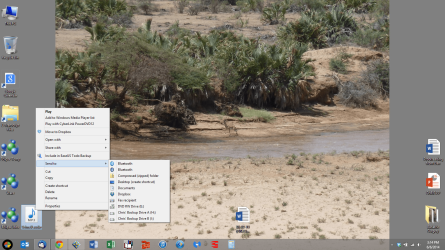
Hopefully this screenshot attaches.
 

Attachments

  • Screenshot (14).png
    Screenshot (14).png
    1.9 MB · Views: 206

My Computer

Computer type
Laptop
Computer Manufacturer/Model Number
HP Envy
OS
Windows 8.1
Well, that looks good other than "Mail recipient" missing.

Go ahead and post a screenshot showing both of your Sendto folders from Option One to see what they look like.

C:\Users\Default\AppData\Roaming\Microsoft\Windows

C:\Users\(your user-name)\AppData\Roaming\Microsoft\Windows
 

My Computer

Computer type
PC/Desktop
Computer Manufacturer/Model Number
Self built custom
OS
64-bit Windows 11 Pro for Workstations
CPU
Intel i7-8700K OC'd to 5 GHz
Motherboard
ASUS ROG Maximus XI Formula Z390
Memory
64 GB (4x16GB) G.SKILL TridentZ RGB DDR4 3600 MHz
Graphics Card(s)
ASUS ROG-STRIX-GTX1080TI-O11G-GAMING
Sound Card
Integrated
Monitor(s) Displays
2 x Samsung Odyssey G7 27"
Screen Resolution
2560x1440
Hard Drives
1TB Samsung 990 PRO M.2,
4TB Samsung 990 PRO PRO M.2,
TerraMaster F8 SSD Plus NAS
PSU
Seasonic Prime Titanium 850W
Case
Thermaltake Core P3
Cooling
Corsair Hydro H115i
Keyboard
Logitech wireless K800
Mouse
Logitech MX Master 4
Internet Speed
2 Gb/s Download and 100 Mb/s Upload
Antivirus
Malwarebyte Anti-Malware Premium
Browser
Google Chrome
Other Info
Logitech Z625 speaker system,
Logitech BRIO 4K Pro webcam,
HP Color LaserJet Pro MFP M477fdn,
APC SMART-UPS RT 1000 XL - SURT1000XLI,
Galaxy S23 Plus phone
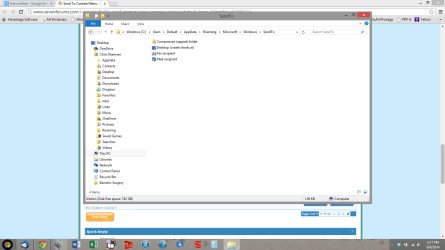
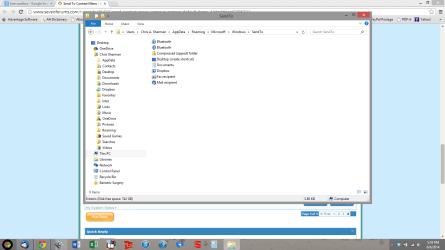
Here they are...
 

Attachments

  • Screenshot (15).png
    Screenshot (15).png
    166.3 KB · Views: 207
  • Screenshot (16).png
    Screenshot (16).png
    169.7 KB · Views: 216

My Computer

Computer type
Laptop
Computer Manufacturer/Model Number
HP Envy
OS
Windows 8.1
Yep, it's Thunderbird causing it. You can tell by the icon that you have for your Mail recipient shortcut instead of the default one. :(
 

My Computer

Computer type
PC/Desktop
Computer Manufacturer/Model Number
Self built custom
OS
64-bit Windows 11 Pro for Workstations
CPU
Intel i7-8700K OC'd to 5 GHz
Motherboard
ASUS ROG Maximus XI Formula Z390
Memory
64 GB (4x16GB) G.SKILL TridentZ RGB DDR4 3600 MHz
Graphics Card(s)
ASUS ROG-STRIX-GTX1080TI-O11G-GAMING
Sound Card
Integrated
Monitor(s) Displays
2 x Samsung Odyssey G7 27"
Screen Resolution
2560x1440
Hard Drives
1TB Samsung 990 PRO M.2,
4TB Samsung 990 PRO PRO M.2,
TerraMaster F8 SSD Plus NAS
PSU
Seasonic Prime Titanium 850W
Case
Thermaltake Core P3
Cooling
Corsair Hydro H115i
Keyboard
Logitech wireless K800
Mouse
Logitech MX Master 4
Internet Speed
2 Gb/s Download and 100 Mb/s Upload
Antivirus
Malwarebyte Anti-Malware Premium
Browser
Google Chrome
Other Info
Logitech Z625 speaker system,
Logitech BRIO 4K Pro webcam,
HP Color LaserJet Pro MFP M477fdn,
APC SMART-UPS RT 1000 XL - SURT1000XLI,
Galaxy S23 Plus phone
So what can I do to fix it? Any ideas??
 

My Computer

Computer type
Laptop
Computer Manufacturer/Model Number
HP Envy
OS
Windows 8.1

My Computer

Computer type
PC/Desktop
Computer Manufacturer/Model Number
Self built custom
OS
64-bit Windows 11 Pro for Workstations
CPU
Intel i7-8700K OC'd to 5 GHz
Motherboard
ASUS ROG Maximus XI Formula Z390
Memory
64 GB (4x16GB) G.SKILL TridentZ RGB DDR4 3600 MHz
Graphics Card(s)
ASUS ROG-STRIX-GTX1080TI-O11G-GAMING
Sound Card
Integrated
Monitor(s) Displays
2 x Samsung Odyssey G7 27"
Screen Resolution
2560x1440
Hard Drives
1TB Samsung 990 PRO M.2,
4TB Samsung 990 PRO PRO M.2,
TerraMaster F8 SSD Plus NAS
PSU
Seasonic Prime Titanium 850W
Case
Thermaltake Core P3
Cooling
Corsair Hydro H115i
Keyboard
Logitech wireless K800
Mouse
Logitech MX Master 4
Internet Speed
2 Gb/s Download and 100 Mb/s Upload
Antivirus
Malwarebyte Anti-Malware Premium
Browser
Google Chrome
Other Info
Logitech Z625 speaker system,
Logitech BRIO 4K Pro webcam,
HP Color LaserJet Pro MFP M477fdn,
APC SMART-UPS RT 1000 XL - SURT1000XLI,
Galaxy S23 Plus phone
It is set as the default program. I actually have already uninstalled and reinstalled, which didn't help. That's why I am so stumped!!
 

My Computer

Computer type
Laptop
Computer Manufacturer/Model Number
HP Envy
OS
Windows 8.1
If you only uninstall Thunderbird, does it work properly afterwards?
 

My Computer

Computer type
PC/Desktop
Computer Manufacturer/Model Number
Self built custom
OS
64-bit Windows 11 Pro for Workstations
CPU
Intel i7-8700K OC'd to 5 GHz
Motherboard
ASUS ROG Maximus XI Formula Z390
Memory
64 GB (4x16GB) G.SKILL TridentZ RGB DDR4 3600 MHz
Graphics Card(s)
ASUS ROG-STRIX-GTX1080TI-O11G-GAMING
Sound Card
Integrated
Monitor(s) Displays
2 x Samsung Odyssey G7 27"
Screen Resolution
2560x1440
Hard Drives
1TB Samsung 990 PRO M.2,
4TB Samsung 990 PRO PRO M.2,
TerraMaster F8 SSD Plus NAS
PSU
Seasonic Prime Titanium 850W
Case
Thermaltake Core P3
Cooling
Corsair Hydro H115i
Keyboard
Logitech wireless K800
Mouse
Logitech MX Master 4
Internet Speed
2 Gb/s Download and 100 Mb/s Upload
Antivirus
Malwarebyte Anti-Malware Premium
Browser
Google Chrome
Other Info
Logitech Z625 speaker system,
Logitech BRIO 4K Pro webcam,
HP Color LaserJet Pro MFP M477fdn,
APC SMART-UPS RT 1000 XL - SURT1000XLI,
Galaxy S23 Plus phone
I did not try that. I really don't want to uninstall again because even though I had a MozBackup, it was a lot of work to get everything set up and working again. Shoot!
 

My Computer

Computer type
Laptop
Computer Manufacturer/Model Number
HP Envy
OS
Windows 8.1
Back
Top