Server execution failed

bertie11

New member
Member
VIP
Local time
12:58 PM
Messages
254
I get this message sometimes when I click on a desktop folder, it comes up with the path c:\Users\Mike\Desktop\System Utilities (which is the folder I am trying to open when fault showed). It can happen when I try to open any desktop folder.

The odd thing is (to me!) is that I had this fault before I re-installed windows 7 5 days ago, and I still have it. I assumed that the new install would create a new registry so I shouldn't be getting this message, unless it is due to another reason?

I've read a load of threads but they seem to mainly relate to Windows Media which I still have on the system but I don't use it. I had a Remote Assistance with Microsoft yesterday and it came up when he was trying to open a folder. The 'hourglass' goes for 2-3 minutes before the message comes up. After that, I can open folders with no problems (until the next time).

Any ideas please?
 

My Computer

Computer type
Laptop
Computer Manufacturer/Model Number
HP Envy 15
OS
Windows 8.1.1
CPU
AMD A10-5750M APU with Radeon(tm) HD Graphics
Memory
8gb
Hard Drives
1TB Serial ATA 16mb buffer
Last edited by a moderator:

My Computer

Computer type
Laptop
Computer Manufacturer/Model Number
ASUS
OS
Microsoft Windows 7 Home Premium 64-bit 7601 Multiprocessor Free Service Pack 1
CPU
AMD C-60 APU with Radeon(tm) HD Graphics
Motherboard
ASUSTeK COMPUTER INC. X501U
Memory
4.00 GB
Graphics Card(s)
AMD Radeon HD 6290 Graphics
Sound Card
(1) AMD High Definition Audio Device (2) Realtek High Defi
Screen Resolution
1366 x 768 x 32 bits (4294967296 colors) @ 60 Hz
Hard Drives
Hitachi HTS545050A7E380 SATA Disk Device
Antivirus
Comodo CIS & FW, SecureAplus App Whitelisting, Threatfire
Browser
Cyberfox 64bit, Opera 64bit, Airfox
Other Info
Spy-The-Spy, HitmanPro.Alert, Norton Connect Safe, MJRegWatcher, BitDefender TrafficLight, Voodoo Shield, Zemana AntiMalware
Hi Callender

I've looked at both those registry keys, they both take me to C:\Users\Mike\Desktop so I'm assuming they
are both OK, if I understood you correctly you just wanted me to check the paths?

I haven't made any registry changes since I installed Windows.

Thanks.
 

My Computer

Computer type
Laptop
Computer Manufacturer/Model Number
HP Envy 15
OS
Windows 8.1.1
CPU
AMD A10-5750M APU with Radeon(tm) HD Graphics
Memory
8gb
Hard Drives
1TB Serial ATA 16mb buffer
Looks okay

Yes that looks as if it's correct.

I wonder if you could upload copies of those two registry keys?

HKEY_CURRENT_USER\Software\Microsoft\Windows\CurrentVersion\Explorer\Shell Folders

HKEY_CURRENT_USER\Software\Microsoft\Windows\CurrentVersion\Explorer\User Shell Folders

Right click and choose "Export" then choose a file name and "Save As" .txt file. Attach the two text files just so that we can see if there are any obvious problems.
 

My Computer

Computer type
Laptop
Computer Manufacturer/Model Number
ASUS
OS
Microsoft Windows 7 Home Premium 64-bit 7601 Multiprocessor Free Service Pack 1
CPU
AMD C-60 APU with Radeon(tm) HD Graphics
Motherboard
ASUSTeK COMPUTER INC. X501U
Memory
4.00 GB
Graphics Card(s)
AMD Radeon HD 6290 Graphics
Sound Card
(1) AMD High Definition Audio Device (2) Realtek High Defi
Screen Resolution
1366 x 768 x 32 bits (4294967296 colors) @ 60 Hz
Hard Drives
Hitachi HTS545050A7E380 SATA Disk Device
Antivirus
Comodo CIS & FW, SecureAplus App Whitelisting, Threatfire
Browser
Cyberfox 64bit, Opera 64bit, Airfox
Other Info
Spy-The-Spy, HitmanPro.Alert, Norton Connect Safe, MJRegWatcher, BitDefender TrafficLight, Voodoo Shield, Zemana AntiMalware
Of course, I haven't had the fault since...
 

Attachments

My Computer

Computer type
Laptop
Computer Manufacturer/Model Number
HP Envy 15
OS
Windows 8.1.1
CPU
AMD A10-5750M APU with Radeon(tm) HD Graphics
Memory
8gb
Hard Drives
1TB Serial ATA 16mb buffer
User Shell Folders

Shell Folders.reg looks fine

User Shell Folders.reg looks wrong. Would you confirm that the method used to export was as follows?

Right click registry key> Export> Type File Name> Save As Type> Registration Files (*.reg)

Also would it be possible to post a screenshot of the registry key - it should look something like this?


[Image Removed]

EDIT: It all looks fine. My mistake!

EDIT: Are you saying that the problem might be intermittent and that sometimes it's possible to open any folder located on your desktop successfully?

Have you been using any external drives by any chance?
 
Last edited:

My Computer

Computer type
Laptop
Computer Manufacturer/Model Number
ASUS
OS
Microsoft Windows 7 Home Premium 64-bit 7601 Multiprocessor Free Service Pack 1
CPU
AMD C-60 APU with Radeon(tm) HD Graphics
Motherboard
ASUSTeK COMPUTER INC. X501U
Memory
4.00 GB
Graphics Card(s)
AMD Radeon HD 6290 Graphics
Sound Card
(1) AMD High Definition Audio Device (2) Realtek High Defi
Screen Resolution
1366 x 768 x 32 bits (4294967296 colors) @ 60 Hz
Hard Drives
Hitachi HTS545050A7E380 SATA Disk Device
Antivirus
Comodo CIS & FW, SecureAplus App Whitelisting, Threatfire
Browser
Cyberfox 64bit, Opera 64bit, Airfox
Other Info
Spy-The-Spy, HitmanPro.Alert, Norton Connect Safe, MJRegWatcher, BitDefender TrafficLight, Voodoo Shield, Zemana AntiMalware
Yes, most of the time I can open folders on the desktop without any problems, but then sometimes I have to sit and wait, and wait, until the 'Server Execution failed' message appears. If I try several times to open the same folder, once I've cleared the Server fault window, the folder opens a window for each opening click, so I might get six windows open. Like a logjam, once the faulty log has gone...

Yes, I do use a 500gb external USB drive as I do several backups through the day. I cannot be sure though that it was on at the time of every fault message but there have been times when it was on and the fault appeared.
 

My Computer

Computer type
Laptop
Computer Manufacturer/Model Number
HP Envy 15
OS
Windows 8.1.1
CPU
AMD A10-5750M APU with Radeon(tm) HD Graphics
Memory
8gb
Hard Drives
1TB Serial ATA 16mb buffer
External Drive

Well I'm guessing that if you've got shortcuts stored on your desktop (or possibly anywhere else) to anything located on your external drive then it could cause the problem at times when the drive is not in use or disconnected.

There's quite a detailed thread on the problem here:

http://www.sevenforums.com/general-discussion/10524-explorer-exe-server-execution-failed-4.html

If you can read the entire thread from the first post through to the last it might give you a clue.

I asked about those registry keys as I had the same problem and one of the paths had somehow changed from the default path. In your case, as stated, there's nothing to worry about!
 

My Computer

Computer type
Laptop
Computer Manufacturer/Model Number
ASUS
OS
Microsoft Windows 7 Home Premium 64-bit 7601 Multiprocessor Free Service Pack 1
CPU
AMD C-60 APU with Radeon(tm) HD Graphics
Motherboard
ASUSTeK COMPUTER INC. X501U
Memory
4.00 GB
Graphics Card(s)
AMD Radeon HD 6290 Graphics
Sound Card
(1) AMD High Definition Audio Device (2) Realtek High Defi
Screen Resolution
1366 x 768 x 32 bits (4294967296 colors) @ 60 Hz
Hard Drives
Hitachi HTS545050A7E380 SATA Disk Device
Antivirus
Comodo CIS & FW, SecureAplus App Whitelisting, Threatfire
Browser
Cyberfox 64bit, Opera 64bit, Airfox
Other Info
Spy-The-Spy, HitmanPro.Alert, Norton Connect Safe, MJRegWatcher, BitDefender TrafficLight, Voodoo Shield, Zemana AntiMalware
Another thought re: your external drive.

You say that it's plugged in but sometimes it's switched on and sometimes it's switched off.

Suggestion: When it's switched on and everything seems to be working go to My Computer and take a look at the drive letter that's assigned to your external drive and make a note of it.

Next time you see the "Server Execution Failed" message just have a quick check to see if Windows assigned a new drive letter to your external drive somehow! If this is the case - it's very likely to be the reason for the error message.
 

My Computer

Computer type
Laptop
Computer Manufacturer/Model Number
ASUS
OS
Microsoft Windows 7 Home Premium 64-bit 7601 Multiprocessor Free Service Pack 1
CPU
AMD C-60 APU with Radeon(tm) HD Graphics
Motherboard
ASUSTeK COMPUTER INC. X501U
Memory
4.00 GB
Graphics Card(s)
AMD Radeon HD 6290 Graphics
Sound Card
(1) AMD High Definition Audio Device (2) Realtek High Defi
Screen Resolution
1366 x 768 x 32 bits (4294967296 colors) @ 60 Hz
Hard Drives
Hitachi HTS545050A7E380 SATA Disk Device
Antivirus
Comodo CIS & FW, SecureAplus App Whitelisting, Threatfire
Browser
Cyberfox 64bit, Opera 64bit, Airfox
Other Info
Spy-The-Spy, HitmanPro.Alert, Norton Connect Safe, MJRegWatcher, BitDefender TrafficLight, Voodoo Shield, Zemana AntiMalware
Thanks for those suggestions Callender, I haven't been able to do any more investigation but I will check out your suggestions. my system has started to run slow so I'm trying to find out why and what I've done! I know it is overheating and I'm waiting doe a laptop cooling tray and some compressed air to arrive to see if that helps!

The server fault hasn't re-appeared since.
 

My Computer

Computer type
Laptop
Computer Manufacturer/Model Number
HP Envy 15
OS
Windows 8.1.1
CPU
AMD A10-5750M APU with Radeon(tm) HD Graphics
Memory
8gb
Hard Drives
1TB Serial ATA 16mb buffer
I just did a quick test, clicking on a desktop folder, I right clicked to open then left clicked to open again, and after a minute or so I got the fault. The external drive was switched off, so I wouldn't have seen it.

I tried the same test again, and the folder opened instantly.

Sigh.
 

My Computer

Computer type
Laptop
Computer Manufacturer/Model Number
HP Envy 15
OS
Windows 8.1.1
CPU
AMD A10-5750M APU with Radeon(tm) HD Graphics
Memory
8gb
Hard Drives
1TB Serial ATA 16mb buffer
More thoughts

Perhaps if you always leave the external drive switched on when the computer is in use you might not see the fault appear. You can test this theory anyway!

On another note also try checking the following:

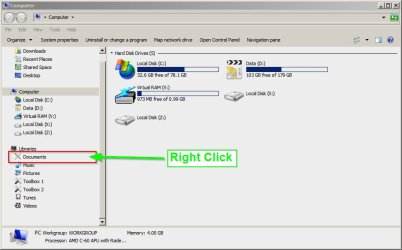
Open an Explorer window and in the left pane expand "Libraries" then right click on your Documents Library and click "Properties" - it should point to "My Documents" like this:

My Documents.jpg

In the screenshot where is says "Chris" you should see your user name in it's place. If that's not the case or more than one location is shown post a screenshot if you can.

Are you the sole user of this machine? If not - try logging into another user's account to see if the same problem occurs.
 

My Computer

Computer type
Laptop
Computer Manufacturer/Model Number
ASUS
OS
Microsoft Windows 7 Home Premium 64-bit 7601 Multiprocessor Free Service Pack 1
CPU
AMD C-60 APU with Radeon(tm) HD Graphics
Motherboard
ASUSTeK COMPUTER INC. X501U
Memory
4.00 GB
Graphics Card(s)
AMD Radeon HD 6290 Graphics
Sound Card
(1) AMD High Definition Audio Device (2) Realtek High Defi
Screen Resolution
1366 x 768 x 32 bits (4294967296 colors) @ 60 Hz
Hard Drives
Hitachi HTS545050A7E380 SATA Disk Device
Antivirus
Comodo CIS & FW, SecureAplus App Whitelisting, Threatfire
Browser
Cyberfox 64bit, Opera 64bit, Airfox
Other Info
Spy-The-Spy, HitmanPro.Alert, Norton Connect Safe, MJRegWatcher, BitDefender TrafficLight, Voodoo Shield, Zemana AntiMalware
I can't actually see Chris on that pic!

However, when I rightclick on do****s, then properties, I get C:\Users\Mike.

I could leave the external on but I would rather not. I find it odd that the fault seems to be a 'one off' as It diesn't happen for some time evn though I'm opening folders.

I'm the sole user, nobody gets to use my system!
 

My Computer

Computer type
Laptop
Computer Manufacturer/Model Number
HP Envy 15
OS
Windows 8.1.1
CPU
AMD A10-5750M APU with Radeon(tm) HD Graphics
Memory
8gb
Hard Drives
1TB Serial ATA 16mb buffer
Server Execution Failed

There was supposed to be another picture attached to that last post but I didn't attach it! Anyway from what you've reported your Documents Library seems fine.

Now I'm wondering how your backup runs and how often? What software is being used and how are backups scheduled? Also did you manage to keep any eye on the drive letter that's being assigned to your external drive?
 

My Computer

Computer type
Laptop
Computer Manufacturer/Model Number
ASUS
OS
Microsoft Windows 7 Home Premium 64-bit 7601 Multiprocessor Free Service Pack 1
CPU
AMD C-60 APU with Radeon(tm) HD Graphics
Motherboard
ASUSTeK COMPUTER INC. X501U
Memory
4.00 GB
Graphics Card(s)
AMD Radeon HD 6290 Graphics
Sound Card
(1) AMD High Definition Audio Device (2) Realtek High Defi
Screen Resolution
1366 x 768 x 32 bits (4294967296 colors) @ 60 Hz
Hard Drives
Hitachi HTS545050A7E380 SATA Disk Device
Antivirus
Comodo CIS & FW, SecureAplus App Whitelisting, Threatfire
Browser
Cyberfox 64bit, Opera 64bit, Airfox
Other Info
Spy-The-Spy, HitmanPro.Alert, Norton Connect Safe, MJRegWatcher, BitDefender TrafficLight, Voodoo Shield, Zemana AntiMalware
One more suggestiion

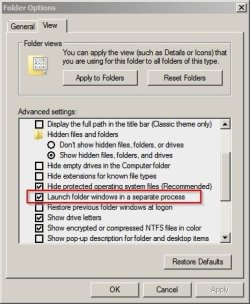
I don't think that this could be a problem but try checking/ unchecking the checkbox shown in the screenshot below. Just reverse your current settings - check the box if currently unchecked or uncheck it if currently checked. Then test for a while after a reboot.

Start> Computer> Organize> Folder Options> View

Folder Options.jpg
 

My Computer

Computer type
Laptop
Computer Manufacturer/Model Number
ASUS
OS
Microsoft Windows 7 Home Premium 64-bit 7601 Multiprocessor Free Service Pack 1
CPU
AMD C-60 APU with Radeon(tm) HD Graphics
Motherboard
ASUSTeK COMPUTER INC. X501U
Memory
4.00 GB
Graphics Card(s)
AMD Radeon HD 6290 Graphics
Sound Card
(1) AMD High Definition Audio Device (2) Realtek High Defi
Screen Resolution
1366 x 768 x 32 bits (4294967296 colors) @ 60 Hz
Hard Drives
Hitachi HTS545050A7E380 SATA Disk Device
Antivirus
Comodo CIS & FW, SecureAplus App Whitelisting, Threatfire
Browser
Cyberfox 64bit, Opera 64bit, Airfox
Other Info
Spy-The-Spy, HitmanPro.Alert, Norton Connect Safe, MJRegWatcher, BitDefender TrafficLight, Voodoo Shield, Zemana AntiMalware
Back
Top