Solved Set delay for Hibernating from Sleep

cbrookej

New member
Local time
5:40 AM
Messages
8
Is there any way I can dely the onset of Hibernation from Sleep mode? Power options allow me to set the delay to turn the monitor off, and the delay before going to Sleep. But the computer seems to go from Sleep to Hibernate fairly quickly. I would like it to stay in Sleep mode for a few hours before switching to Hibernate.

Brooke Jennings
 

My Computer

Computer type
PC/Desktop
Computer Manufacturer/Model Number
Custom built in Salt Lake City by PCLaptops
OS
Windows 7 Professional x86
CPU
AMD, don't know model
Motherboard
5 Gigs
Memory
Ram = 8 Gigs
Graphics Card(s)
Unknown--I do not play games
Hard Drives
256 Gig solid state
Antivirus
ESET NOD 32 + Malwarebytes Premium
Browser
Duck Duck Go and others
Hello Brooke, and welcome to Seven Forums. :)

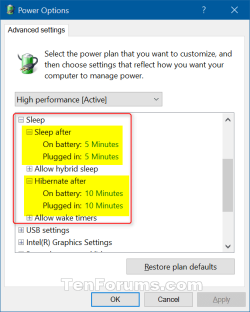
You can set this for "Hibernate after" in your advanced power plan settings under "Sleep". To do so, set the minutes for "Hibernate after" to be more than the minutes for "Sleep after" for what you want.

Power Plan Settings - Change

advanced_power_plan_settins.png
 

My Computer

Computer type
PC/Desktop
Computer Manufacturer/Model Number
Self built custom
OS
64-bit Windows 11 Pro for Workstations
CPU
Intel i7-8700K OC'd to 5 GHz
Motherboard
ASUS ROG Maximus XI Formula Z390
Memory
64 GB (4x16GB) G.SKILL TridentZ RGB DDR4 3600 MHz
Graphics Card(s)
ASUS ROG-STRIX-GTX1080TI-O11G-GAMING
Sound Card
Integrated
Monitor(s) Displays
2 x Samsung Odyssey G7 27"
Screen Resolution
2560x1440
Hard Drives
1TB Samsung 990 PRO M.2,
4TB Samsung 990 PRO PRO M.2,
TerraMaster F8 SSD Plus NAS
PSU
Seasonic Prime Titanium 850W
Case
Thermaltake Core P3
Cooling
Corsair Hydro H115i
Keyboard
Logitech wireless K800
Mouse
Logitech MX Master 4
Internet Speed
2 Gb/s Download and 100 Mb/s Upload
Antivirus
Malwarebyte Anti-Malware Premium
Browser
Google Chrome
Other Info
Logitech Z625 speaker system,
Logitech BRIO 4K Pro webcam,
HP Color LaserJet Pro MFP M477fdn,
APC SMART-UPS RT 1000 XL - SURT1000XLI,
Galaxy S23 Plus phone
It worked

Brink

Thank you for your help. I followed your instructions without difficulty, and reset the Hibernate delay. Again, Thank you.

Now I can't figure out how to check "Resolved" at the top of this thread How can I get to the top? (Sorry for being so dumb. I'm 73, and my mind is slippiing.)
 

My Computer

Computer type
PC/Desktop
Computer Manufacturer/Model Number
Custom built in Salt Lake City by PCLaptops
OS
Windows 7 Professional x86
CPU
AMD, don't know model
Motherboard
5 Gigs
Memory
Ram = 8 Gigs
Graphics Card(s)
Unknown--I do not play games
Hard Drives
256 Gig solid state
Antivirus
ESET NOD 32 + Malwarebytes Premium
Browser
Duck Duck Go and others
Check "Solved"

I can be quite literal; I have a touch of Aspergers. Now I see that I must actualy check at the bottom! Done.
 

My Computer

Computer type
PC/Desktop
Computer Manufacturer/Model Number
Custom built in Salt Lake City by PCLaptops
OS
Windows 7 Professional x86
CPU
AMD, don't know model
Motherboard
5 Gigs
Memory
Ram = 8 Gigs
Graphics Card(s)
Unknown--I do not play games
Hard Drives
256 Gig solid state
Antivirus
ESET NOD 32 + Malwarebytes Premium
Browser
Duck Duck Go and others
You're most welcome. :)
 

My Computer

Computer type
PC/Desktop
Computer Manufacturer/Model Number
Self built custom
OS
64-bit Windows 11 Pro for Workstations
CPU
Intel i7-8700K OC'd to 5 GHz
Motherboard
ASUS ROG Maximus XI Formula Z390
Memory
64 GB (4x16GB) G.SKILL TridentZ RGB DDR4 3600 MHz
Graphics Card(s)
ASUS ROG-STRIX-GTX1080TI-O11G-GAMING
Sound Card
Integrated
Monitor(s) Displays
2 x Samsung Odyssey G7 27"
Screen Resolution
2560x1440
Hard Drives
1TB Samsung 990 PRO M.2,
4TB Samsung 990 PRO PRO M.2,
TerraMaster F8 SSD Plus NAS
PSU
Seasonic Prime Titanium 850W
Case
Thermaltake Core P3
Cooling
Corsair Hydro H115i
Keyboard
Logitech wireless K800
Mouse
Logitech MX Master 4
Internet Speed
2 Gb/s Download and 100 Mb/s Upload
Antivirus
Malwarebyte Anti-Malware Premium
Browser
Google Chrome
Other Info
Logitech Z625 speaker system,
Logitech BRIO 4K Pro webcam,
HP Color LaserJet Pro MFP M477fdn,
APC SMART-UPS RT 1000 XL - SURT1000XLI,
Galaxy S23 Plus phone
Hello Brooke, and welcome to Seven Forums. :)

You can set this for "Hibernate after" in your advanced power plan settings under "Sleep". To do so, set the minutes for "Hibernate after" to be more than the minutes for "Sleep after" for what you want.

Power Plan Settings - Change

View attachment 392634

:shock: I have already done this. The problem is that the machine is ignoring the settings. Set for 300 minutes, it went from sleep to hibernate in less than 110 minutes.

I just checked Power options, and this time the setting has remained as I set it, as it did before the two auto resets.
 

My Computer

Computer type
PC/Desktop
Computer Manufacturer/Model Number
Custom built in Salt Lake City by PCLaptops
OS
Windows 7 Professional x86
CPU
AMD, don't know model
Motherboard
5 Gigs
Memory
Ram = 8 Gigs
Graphics Card(s)
Unknown--I do not play games
Hard Drives
256 Gig solid state
Antivirus
ESET NOD 32 + Malwarebytes Premium
Browser
Duck Duck Go and others
Hello Brooke, :)

Do you have "hybrid sleep" turned off?

If applicable, do you have it set the way you want for both "On battery" and "Plugged in"?

Do you have any 3rd party power management software installed that could be overriding what you have set in Power Options? For example, OEM software.
 

My Computer

Computer type
PC/Desktop
Computer Manufacturer/Model Number
Self built custom
OS
64-bit Windows 11 Pro for Workstations
CPU
Intel i7-8700K OC'd to 5 GHz
Motherboard
ASUS ROG Maximus XI Formula Z390
Memory
64 GB (4x16GB) G.SKILL TridentZ RGB DDR4 3600 MHz
Graphics Card(s)
ASUS ROG-STRIX-GTX1080TI-O11G-GAMING
Sound Card
Integrated
Monitor(s) Displays
2 x Samsung Odyssey G7 27"
Screen Resolution
2560x1440
Hard Drives
1TB Samsung 990 PRO M.2,
4TB Samsung 990 PRO PRO M.2,
TerraMaster F8 SSD Plus NAS
PSU
Seasonic Prime Titanium 850W
Case
Thermaltake Core P3
Cooling
Corsair Hydro H115i
Keyboard
Logitech wireless K800
Mouse
Logitech MX Master 4
Internet Speed
2 Gb/s Download and 100 Mb/s Upload
Antivirus
Malwarebyte Anti-Malware Premium
Browser
Google Chrome
Other Info
Logitech Z625 speaker system,
Logitech BRIO 4K Pro webcam,
HP Color LaserJet Pro MFP M477fdn,
APC SMART-UPS RT 1000 XL - SURT1000XLI,
Galaxy S23 Plus phone
Back
Top