Solved Setup was unable to create a new system partition

Is the BIOS set to UEFI? If so are you following the special steps in UEFI (Unified Extensible Firmware Interface) - Install Windows 7 with - Windows 7 Forums and UEFI Bootable USB Flash Drive - Create in Windows ?

Set the HDD first to boot, then trigger the flash stick to boot using the Lenovo one-time BIOS Boot Menu key.

Did you successfully create and mark Active the partition using the Diskpart commands in Step 2.2 of SSD - HDD Optimize for Windows Reinstallation? Does the partition show up in Diskpart? Does it show up during install on the drive selection screen?

Does the HD show up at all during install? Does it show up in BIOS setup? If not try reinstalling the HD to get it to show up, or if necessary replace the HD.

If the HD shows up then test your HD with the maker's HD Diagnostic extended CD scan, followed by a full Disk Check on the partition you defined.

BIOS is not set to UEFI. I followed all the steps to create partition as well. I gave up on using the USB boot and found an old boot DVD I had created for Win 7. I was able to install Win 7 successfully with the DVD so I think it was the USB all along. Thanks for your suggestion.
 

My Computer My Computer

At a glance

Windows 7 Professional SP1Core 2 Duo
Computer type
Laptop
Computer Manufacturer/Model Number
Lenovo
OS
Windows 7 Professional SP1
CPU
Core 2 Duo
Hard Drives
Hitachi Travelstar 160GB
In that case I'd have used a new ISO written to stick from Steps 1 and 2 of Clean Reinstall - Factory OEM Windows 7.

If you stick with those same steps in the blue link you'll get and keep a perfect install.

Using an pre-SP1 installer will require hours of WIndows Updates, so after enabling Automatically deliver drivers via Windows Update (Step 3) I would run all round of Important and Optional Updates. After requested reboots go back to check for UPdates until there are no more. Only then would I import any drivers still missing in Device Manager. This can avoid problems.
 
Hey there

I am trying the exact same solutions as above but not working for me. After doing the stuff in #47 I got a note saying my drivers were missing. I changed USB port and restarted and now I am back in the message saying " Setup was unable to create a new system partition or locate an existing system partition. See the Setup log files for more information."

What else can I try? I think I have bios and not uefi since at startup my pc says bios in the screen below dell.

I put windows on an USB drive using windows tool for windows 7.

Thanks in advance

Ezra

P.S.

I did make a backup using a special windows tool meant to prepare for going to windows 7. Unfortunately I forgot the name... It had three words

But I can't manage to even get the backup back on my pc.

Thanks again
 
Last edited:

My Computer My Computer

At a glance

Windows XPDuo core 2 quad q6600??2 GHz??
Computer type
PC/Desktop
Computer Manufacturer/Model Number
Dell Vostro 410
OS
Windows XP
CPU
Duo core 2 quad q6600??
Motherboard
??
Memory
2 GHz
Graphics Card(s)
??
Hard Drives
232.8 GB
Antivirus
not yet
Browser
chrome
Windows Easy Transfer is not entirely safe as the data can be lost during transfer. Much better to backup your active User folders into which you've sorted all of your data. Everything that must be considered is in http://www.sevenforums.com/tutorials/219487-clean-reinstall-factory-oem-windows-7-a.html#post1839164.

Being prompted for drivers almost always means a bad installer. Start over with new ISO burned to disk or flash stick from Steps 1 and 2 in tutorial above.

It isn't good enough to just guess if you have a UEFI BIOS. Enter BIOS setup at boot to see if there are Legacy BIOS or Compatibility Service Module settings which must be enabled to avoid UEFI install if you have a UEFI BIOS. Google the specs for your PC or mobo to see if it features UEFI. When you boot the installer does it offer UEFI devices to boot?

If not then wipe the HD with http://www.sevenforums.com/tutorials/52129-disk-clean-clean-all-diskpart-command.html and try again with a new installer. If that fails format an Active partition using the steps in Post #47.
 
Thanks a bunch for your quick reply!

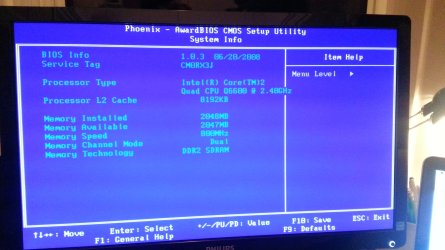
I didn't know how to see which bios I have but when I press f2 during startup it brings me to the bios. Then when I look at the system info it tells me I have Bios 1.0.3 with the date 06/20/2008. In the top of the screen it says " Phoenix- AwardBIOS CMOS Setup Utility." I guess this means I have bios and not something else?

I am now trying to burn a DVD. Will let you know how that goes

Thanks again
 

My Computer My Computer

At a glance

Windows XPDuo core 2 quad q6600??2 GHz??
Computer type
PC/Desktop
Computer Manufacturer/Model Number
Dell Vostro 410
OS
Windows XP
CPU
Duo core 2 quad q6600??
Motherboard
??
Memory
2 GHz
Graphics Card(s)
??
Hard Drives
232.8 GB
Antivirus
not yet
Browser
chrome
No that does not mean it is a standard BIOS.

You need to familiarize yourself with the various tabs to look at the settings, for UEFI, Legacy BIOS or Compatibility Mode. If you want to post back camera snaps we can advise you better.

However if you're booting a known-good Win7 installer and there is no choice for UEFI device in the one-time BIOS boot menu accessed on Dell via F12 key, then its doubtful you have UEFI. I also see nothing about UEFI when I google your model for specs as you could have done: Dell Vostro 410 Desktop Computer Specs (Intel Core 2 Duo E7300 2.66GHz, DDR2 SDRAM 2GB, 250GB) - Desktops - CNET Reviews
 
Hey

Actually I did google it but got confused because I have a different processor. I have an q6600 I believe. But then again I do have the dell vostro 410.

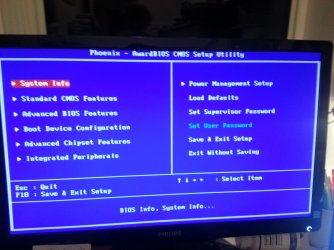
Here I have some shots of my screen when I am in the Bios setup. I looked under each tab and nowhere I can find anything similar to legacy etc.
 

Attachments

  • 20131215_215751-1.jpg
    20131215_215751-1.jpg
    410 KB · Views: 0
  • 20131215_215930.jpg
    20131215_215930.jpg
    531 KB · Views: 0

My Computer My Computer

At a glance

Windows XPDuo core 2 quad q6600??2 GHz??
Computer type
PC/Desktop
Computer Manufacturer/Model Number
Dell Vostro 410
OS
Windows XP
CPU
Duo core 2 quad q6600??
Motherboard
??
Memory
2 GHz
Graphics Card(s)
??
Hard Drives
232.8 GB
Antivirus
not yet
Browser
chrome
Those settings would be on Boot or Advanced BIOS settings pages. If you don't see them there and there is no UEFI device offered when you boot the installer, then assume you have standard BIOS and follow the steps again in Post #47 but with a new installer formatted as given.
 
Will do. No I need to find a pc with a working optical drive cause my laptop is broken. Won't get around to it until Wednesday. But I will keep you updated asap.

Thanks again
 

My Computer My Computer

At a glance

Windows XPDuo core 2 quad q6600??2 GHz??
Computer type
PC/Desktop
Computer Manufacturer/Model Number
Dell Vostro 410
OS
Windows XP
CPU
Duo core 2 quad q6600??
Motherboard
??
Memory
2 GHz
Graphics Card(s)
??
Hard Drives
232.8 GB
Antivirus
not yet
Browser
chrome
Hello fellow Windows users. :)

It seems I have ran into the same problem described here, and I decided making a new thread would be unnecessary.

So, I have tried using a couple of different ISOs for Windows 7 (not the upgrade ones), and every time I get the same error: "Setup was unable to create a new system partition or locate an existing system partition. See the Setup log files for more information."

What's really wierd is that when the installer let's me select where I want to install Windows, it shows one of my hard drives as being a "Primary" type. I have tried both the method decribed in post #6 and the one in post #47.

Any help will be much appreciated. :)
 

My Computer My Computer

At a glance

Windows Home x64
Computer type
PC/Desktop
OS
Windows Home x64
Are you installing windows to it`s own dedicated hard drive ? Did you delete the partitions down to unallocated space ?

Once you do that you simply click next and the install will begin.

You have to boot from the dvd, put the dvd in the tray and restart the pc, when you see the words "Press any key to boot from dvd" press any key and the install will begin, it sounds like you`re already in windows when you try to start the install.

http://www.sevenforums.com/tutorials/1649-clean-install-windows-7-a.html
 

My Computer My Computer

At a glance

Windows 10 Pro x64Intel Core i7 6700KGSkill TridentZ RGB 16GB 3600 16-16-16-36EVGA GTX 980 Ti SC x2
Computer type
PC/Desktop
Computer Manufacturer/Model Number
Skylake Special #666
OS
Windows 10 Pro x64
CPU
Intel Core i7 6700K
Motherboard
Asus Sabertooth Z170 Mark 1
Memory
GSkill TridentZ RGB 16GB 3600 16-16-16-36
Graphics Card(s)
EVGA GTX 980 Ti SC x2
Sound Card
Realtek High Definition
Monitor(s) Displays
AOC G2460PG
Screen Resolution
1920 x 1080 144Hz
Hard Drives
Samsung 860 Pro 256GB, Seagate Barracuda 4TB x2
PSU
EVGA 1000 P2, EVGA White Custom Braided Cables
Case
Corsair Vengeance C70 Gunmetal Black
Cooling
Corsair H100i v2, Corsair ML120 x2, Thermal Grizzly Kryonaut
Keyboard
Logitech G910 Orion Spectrum
Mouse
Logitech G700s
Internet Speed
Verizon Fios Quantum Gateway 75/75
Antivirus
Windows Defender, Malwarebytes Free 3.8.3
Browser
Chrome
Other Info
Corsair SP120 x4, LG Blu-ray Drive, Durabrand HT-395 100 Watt Dolby Digital Amp, Corsair H2100 Wireless 7.1 Headset
Thanks for your quick reply. :)

To answer your question: Yes, I'm installing Windows to a dedicated SSD.

Also, I have tried deleting the partitions of that SSD down to unallocated space, but sadly that didn't work either and the installer showed the same message I described in my previous post.
 

My Computer My Computer

At a glance

Windows Home x64
Computer type
PC/Desktop
OS
Windows Home x64
Yes, this can happen to a new ssd, happened to me with my 1st ssd, boy that was fun.

http://www.sevenforums.com/tutorials/113967-ssd-alignment.html


WHS is our expert on installing to an ssd. I will PM him to see if he can help.

Meanwhile, read the Tutorial please :)

If your current windows 7 is on the hard drive, you need to set up your ssd 1st as explained in the tutorial. It needs to be aligned.
It`s real easy to do.
 

My Computer My Computer

At a glance

Windows 10 Pro x64Intel Core i7 6700KGSkill TridentZ RGB 16GB 3600 16-16-16-36EVGA GTX 980 Ti SC x2
Computer type
PC/Desktop
Computer Manufacturer/Model Number
Skylake Special #666
OS
Windows 10 Pro x64
CPU
Intel Core i7 6700K
Motherboard
Asus Sabertooth Z170 Mark 1
Memory
GSkill TridentZ RGB 16GB 3600 16-16-16-36
Graphics Card(s)
EVGA GTX 980 Ti SC x2
Sound Card
Realtek High Definition
Monitor(s) Displays
AOC G2460PG
Screen Resolution
1920 x 1080 144Hz
Hard Drives
Samsung 860 Pro 256GB, Seagate Barracuda 4TB x2
PSU
EVGA 1000 P2, EVGA White Custom Braided Cables
Case
Corsair Vengeance C70 Gunmetal Black
Cooling
Corsair H100i v2, Corsair ML120 x2, Thermal Grizzly Kryonaut
Keyboard
Logitech G910 Orion Spectrum
Mouse
Logitech G700s
Internet Speed
Verizon Fios Quantum Gateway 75/75
Antivirus
Windows Defender, Malwarebytes Free 3.8.3
Browser
Chrome
Other Info
Corsair SP120 x4, LG Blu-ray Drive, Durabrand HT-395 100 Watt Dolby Digital Amp, Corsair H2100 Wireless 7.1 Headset
Thanks for the help. :)

The wierd thing is that when i first built this PC, Windows installed without any problems. After a while I installed Ubuntu and when I wanted to revert back to Windows 7, this issue arised. I have no idea why it's happening. When I first tried to make a bootable USB drive via Ubuntu, the installer started showing a "Missing CD/DVD driver" error, even though I don't have a CD/DVD device. Then once I made the USB drive via the Windows 7 USB - DVD tool, it didn't give this error, but it started showing the current one. :(

What's even stranger is that it won't even install on my HDD, no matter how much I format it.


EDIT: Tried the alignment tutorial and that didn't work either.
 

My Computer My Computer

At a glance

Windows Home x64
Computer type
PC/Desktop
OS
Windows Home x64

My Computer My Computer

At a glance

Windows 10 Pro x64Intel Core i7 6700KGSkill TridentZ RGB 16GB 3600 16-16-16-36EVGA GTX 980 Ti SC x2
Computer type
PC/Desktop
Computer Manufacturer/Model Number
Skylake Special #666
OS
Windows 10 Pro x64
CPU
Intel Core i7 6700K
Motherboard
Asus Sabertooth Z170 Mark 1
Memory
GSkill TridentZ RGB 16GB 3600 16-16-16-36
Graphics Card(s)
EVGA GTX 980 Ti SC x2
Sound Card
Realtek High Definition
Monitor(s) Displays
AOC G2460PG
Screen Resolution
1920 x 1080 144Hz
Hard Drives
Samsung 860 Pro 256GB, Seagate Barracuda 4TB x2
PSU
EVGA 1000 P2, EVGA White Custom Braided Cables
Case
Corsair Vengeance C70 Gunmetal Black
Cooling
Corsair H100i v2, Corsair ML120 x2, Thermal Grizzly Kryonaut
Keyboard
Logitech G910 Orion Spectrum
Mouse
Logitech G700s
Internet Speed
Verizon Fios Quantum Gateway 75/75
Antivirus
Windows Defender, Malwarebytes Free 3.8.3
Browser
Chrome
Other Info
Corsair SP120 x4, LG Blu-ray Drive, Durabrand HT-395 100 Watt Dolby Digital Amp, Corsair H2100 Wireless 7.1 Headset
Whoops. Sorry about that.

As I said, I tried both clean and clean all to no avail. Other things that I have tried are: switching SATA mode from AHCI to IDE, disconnecting unneeded hard drives, switching USB ports, when (if) asked for CD/DVD drivers installing SATA drivers for the motherboard, resetting BIOS settings to default, using other ISO's. All of the above lead to the same problem.
 

My Computer My Computer

At a glance

Windows Home x64
Computer type
PC/Desktop
OS
Windows Home x64
If the install asks for sata drivers it`s usually a bad burn job.

I have never, ever once had windows ask me to install sata drivers during an install, not even with xp on new hardware.

Hopefully Greg will join in with some ideas. :)

The 1 thing you can`t do is start making a bunch of changes to the bios, once you`ve installed windows in the past (in this instance) it worked fine, so don`t start changing things, the problem is with the hard drive or the dvd`s your using, have these dvd`s worked fine before ?
 

My Computer My Computer

At a glance

Windows 10 Pro x64Intel Core i7 6700KGSkill TridentZ RGB 16GB 3600 16-16-16-36EVGA GTX 980 Ti SC x2
Computer type
PC/Desktop
Computer Manufacturer/Model Number
Skylake Special #666
OS
Windows 10 Pro x64
CPU
Intel Core i7 6700K
Motherboard
Asus Sabertooth Z170 Mark 1
Memory
GSkill TridentZ RGB 16GB 3600 16-16-16-36
Graphics Card(s)
EVGA GTX 980 Ti SC x2
Sound Card
Realtek High Definition
Monitor(s) Displays
AOC G2460PG
Screen Resolution
1920 x 1080 144Hz
Hard Drives
Samsung 860 Pro 256GB, Seagate Barracuda 4TB x2
PSU
EVGA 1000 P2, EVGA White Custom Braided Cables
Case
Corsair Vengeance C70 Gunmetal Black
Cooling
Corsair H100i v2, Corsair ML120 x2, Thermal Grizzly Kryonaut
Keyboard
Logitech G910 Orion Spectrum
Mouse
Logitech G700s
Internet Speed
Verizon Fios Quantum Gateway 75/75
Antivirus
Windows Defender, Malwarebytes Free 3.8.3
Browser
Chrome
Other Info
Corsair SP120 x4, LG Blu-ray Drive, Durabrand HT-395 100 Watt Dolby Digital Amp, Corsair H2100 Wireless 7.1 Headset
Thanks for the help. :)

The wierd thing is that when i first built this PC, Windows installed without any problems. After a while I installed Ubuntu and when I wanted to revert back to Windows 7, this issue arised. I have no idea why it's happening. When I first tried to make a bootable USB drive via Ubuntu, the installer started showing a "Missing CD/DVD driver" error, even though I don't have a CD/DVD device. Then once I made the USB drive via the Windows 7 USB - DVD tool, it didn't give this error, but it started showing the current one. :(

What's even stranger is that it won't even install on my HDD, no matter how much I format it.


EDIT: Tried the alignment tutorial and that didn't work either.

Ugh, why didn`t you mention you had Ubuntu involved ? That brings up a whole nother set of issues :rolleyes:

http://www.sevenforums.com/tutorials/52129-disk-clean-clean-all-diskpart-command.html

:ditto:

Whoops. Sorry about that.

As I said, I tried both clean and clean all to no avail. Other things that I have tried are: switching SATA mode from AHCI to IDE, disconnecting unneeded hard drives, switching USB ports, when (if) asked for CD/DVD drivers installing SATA drivers for the motherboard, resetting BIOS settings to default, using other ISO's. All of the above lead to the same problem.

Never use CLEAN ALL on a SSD.

1) Boot CD or DVD & open a command prompt.
http://www.sevenforums.com/tutorials/682-command-prompt-startup.html

Try one
2) type> fixmbr

Try two
3)type> bootsect /nt60 SYS /mbr
 

My Computer My Computer

At a glance

ME/XP/Vista/Win7
OS
ME/XP/Vista/Win7
Thank You Ray :D
 

My Computer My Computer

At a glance

Windows 10 Pro x64Intel Core i7 6700KGSkill TridentZ RGB 16GB 3600 16-16-16-36EVGA GTX 980 Ti SC x2
Computer type
PC/Desktop
Computer Manufacturer/Model Number
Skylake Special #666
OS
Windows 10 Pro x64
CPU
Intel Core i7 6700K
Motherboard
Asus Sabertooth Z170 Mark 1
Memory
GSkill TridentZ RGB 16GB 3600 16-16-16-36
Graphics Card(s)
EVGA GTX 980 Ti SC x2
Sound Card
Realtek High Definition
Monitor(s) Displays
AOC G2460PG
Screen Resolution
1920 x 1080 144Hz
Hard Drives
Samsung 860 Pro 256GB, Seagate Barracuda 4TB x2
PSU
EVGA 1000 P2, EVGA White Custom Braided Cables
Case
Corsair Vengeance C70 Gunmetal Black
Cooling
Corsair H100i v2, Corsair ML120 x2, Thermal Grizzly Kryonaut
Keyboard
Logitech G910 Orion Spectrum
Mouse
Logitech G700s
Internet Speed
Verizon Fios Quantum Gateway 75/75
Antivirus
Windows Defender, Malwarebytes Free 3.8.3
Browser
Chrome
Other Info
Corsair SP120 x4, LG Blu-ray Drive, Durabrand HT-395 100 Watt Dolby Digital Amp, Corsair H2100 Wireless 7.1 Headset
fixmbr returns: 'fixmbr' is not recognized as an internal or external command, operable program or batch file.
bootsect /nt60 SYS /mbr says that the requested system device can't be found. Disconnecting all other hard drives and running the command with ALL instead of SYS is successful, although doesn't make any difference when it comes to fixing the error.
 

My Computer My Computer

At a glance

Windows Home x64
Computer type
PC/Desktop
OS
Windows Home x64
Back
Top