Solved Setup was unable to create a new system partition

Is it possible to post a picture of Disk Management. Then we have a clearer picture of what's going on.
 

My Computer My Computer

At a glance

Vista, Windows7, Mint Mate, Zorin, Windows 8from 1.6GHz Duo to i7
Computer Manufacturer/Model Number
HP, Dell, Gateway, Toshiba - 4 laptops and 2 desktops
OS
Vista, Windows7, Mint Mate, Zorin, Windows 8
CPU
from 1.6GHz Duo to i7
Monitor(s) Displays
2x HP w2207
Hard Drives
5x HDD, 7x SSD, 12x Externals
Keyboard
with trackball - no mices
Mouse
Trackball mice
Internet Speed
DSL 6000
Try this.
Open diskpart.

For Legacy:
type> list disk
Select disk 0
Clean
Convert mbr

For UEFI:
type> list disk
Select disk 0
Clean
Convert gpt
 

My Computer My Computer

At a glance

ME/XP/Vista/Win7
OS
ME/XP/Vista/Win7
I don`t think he`s been able to install windows yet, Wolfgang. That`s his issue right now.
 

My Computer My Computer

At a glance

Windows 10 Pro x64Intel Core i7 6700KGSkill TridentZ RGB 16GB 3600 16-16-16-36EVGA GTX 980 Ti SC x2
Computer type
PC/Desktop
Computer Manufacturer/Model Number
Skylake Special #666
OS
Windows 10 Pro x64
CPU
Intel Core i7 6700K
Motherboard
Asus Sabertooth Z170 Mark 1
Memory
GSkill TridentZ RGB 16GB 3600 16-16-16-36
Graphics Card(s)
EVGA GTX 980 Ti SC x2
Sound Card
Realtek High Definition
Monitor(s) Displays
AOC G2460PG
Screen Resolution
1920 x 1080 144Hz
Hard Drives
Samsung 860 Pro 256GB, Seagate Barracuda 4TB x2
PSU
EVGA 1000 P2, EVGA White Custom Braided Cables
Case
Corsair Vengeance C70 Gunmetal Black
Cooling
Corsair H100i v2, Corsair ML120 x2, Thermal Grizzly Kryonaut
Keyboard
Logitech G910 Orion Spectrum
Mouse
Logitech G700s
Internet Speed
Verizon Fios Quantum Gateway 75/75
Antivirus
Windows Defender, Malwarebytes Free 3.8.3
Browser
Chrome
Other Info
Corsair SP120 x4, LG Blu-ray Drive, Durabrand HT-395 100 Watt Dolby Digital Amp, Corsair H2100 Wireless 7.1 Headset
Yes, I currently have no OS on that machine.
I saw a suggestion in another thread to use RUFUS to make the USB drive for UEFI systems and I'm going to try that to see if it works. Then if it doesn't, I'm going to try what theog suggested in post #82.

Thank you all for your patience and suggestions. :)
 

My Computer My Computer

At a glance

Windows Home x64
Computer type
PC/Desktop
OS
Windows Home x64
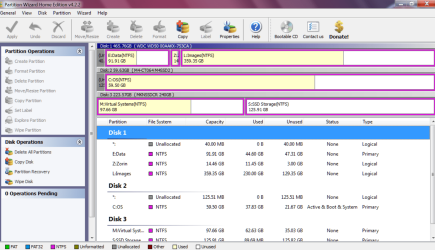
Use the bootable CD of Partition Wizard (last box on the website). Burn that .iso to CD and boot with that CD. Then take a readable picture with a camera and post that here. It should look something like this:
 

Attachments

  • 2013-12-27_1204.png
    2013-12-27_1204.png
    136 KB · Views: 1

My Computer My Computer

At a glance

Vista, Windows7, Mint Mate, Zorin, Windows 8from 1.6GHz Duo to i7
Computer Manufacturer/Model Number
HP, Dell, Gateway, Toshiba - 4 laptops and 2 desktops
OS
Vista, Windows7, Mint Mate, Zorin, Windows 8
CPU
from 1.6GHz Duo to i7
Monitor(s) Displays
2x HP w2207
Hard Drives
5x HDD, 7x SSD, 12x Externals
Keyboard
with trackball - no mices
Mouse
Trackball mice
Internet Speed
DSL 6000
Lost Partition

  1. Set your PC to boot from DVD via BIOS
  2. Put the DVD in and let it load until you get to this screen:
    windows7haltscreen.png
  3. Once at this screen, press: (SHIFT+F10) to get a CMD window
    002-shift-F10-command-prompt-install-windows-7-Server-2008R2-from-VHD.png
  4. MAKE SURE YOU SELECT THE DRIVE YOUR INSTALLING WINDOWS TO NOT ANOTHER. In the CMD window, type in Each Command and Press <ENTER> Key as follows:

    DiskPart <ENTER>
    list disk <ENTER>
    select disk 0 <ENTER>
    clean <ENTER>
    create partition primary align=1024 <ENTER>
    format fs=ntfs <ENTER> (Will Take a While)
    assign <ENTER>
    active <ENTER>
    exit <ENTER>
    exit <ENTER>
  5. After it completes, exit the INSTALL COMPLETELY and reboot.
  6. Once you are back in, go about installing Windows just DO NOT ALLOW Windows to create a new partition, use the only one there.
    installwindows711driveo.jpg
  7. Windows will now install
Hope this helps! Post back if you need further instructions or help :)

I followed This and now i seem to have lost my Ubuntu partition of 30 GB that's After installing Windows again, now i am missing 30 GB and it cant be located by use of partition manager
 
Last edited by a moderator:

My Computer My Computer

At a glance

Windows 7 HomeBasic x64Duo-core500gb
Computer type
Laptop
Computer Manufacturer/Model Number
HP
OS
Windows 7 HomeBasic x64
CPU
Duo-core
Memory
500gb
Antivirus
Avast
Browser
Mozilla,Chrome
Lost Partition

I followed This and now i seem to have lost my Ubuntu partition of 30 GB that's After installing Windows again, now i am missing 30 GB and it cant be located by use of partition manager​

My System Specs
 

My Computer My Computer

At a glance

Windows 7 HomeBasic x64Duo-core500gb
Computer type
Laptop
Computer Manufacturer/Model Number
HP
OS
Windows 7 HomeBasic x64
CPU
Duo-core
Memory
500gb
Antivirus
Avast
Browser
Mozilla,Chrome
Unfortunately running Diskpart Clean All command as suggested by Harltron wipes the hard drive clean. This is why it is effective for installation problems, but there should have been more of a warning in his post.

In the middle of this thread I corrected that the command used should be Diskpart Clean command which only takes seconds and is as effective as the longer Clean All command for installation issues but doesn't require hours to write zeros to every sector - which is only really needed to make data unrecoverable by all but forensics means. I also warned that it is destructive so to back up all data.

I am sorry you missed the warning.
 
I don't mind bout the data deletion that has occurred but my problem became that i am not able to get the 30 GB and cant locate it even when i use Partition managers...meaning my hard drive is now 470 GB instead of 500 GB.
 

My Computer My Computer

At a glance

Windows 7 HomeBasic x64Duo-core500gb
Computer type
Laptop
Computer Manufacturer/Model Number
HP
OS
Windows 7 HomeBasic x64
CPU
Duo-core
Memory
500gb
Antivirus
Avast
Browser
Mozilla,Chrome
I don't mind bout the data deletion that has occurred but my problem became that i am not able to get the 30 GB and cant locate it even when i use Partition managers...meaning my hard drive is now 470 GB instead of 500 GB.
I think your disk is still 500GB (that is probably a decimal number). The 470 is a binary number wich is exactly 500GB.
 

My Computer My Computer

At a glance

Vista, Windows7, Mint Mate, Zorin, Windows 8from 1.6GHz Duo to i7
Computer Manufacturer/Model Number
HP, Dell, Gateway, Toshiba - 4 laptops and 2 desktops
OS
Vista, Windows7, Mint Mate, Zorin, Windows 8
CPU
from 1.6GHz Duo to i7
Monitor(s) Displays
2x HP w2207
Hard Drives
5x HDD, 7x SSD, 12x Externals
Keyboard
with trackball - no mices
Mouse
Trackball mice
Internet Speed
DSL 6000
Okay that I'm aware. Let me be precise. My Laptop came with 3 partitions when purchased (System=100mb, HP Tools= 1gb, Recovery partition= 27gb, Local Disk C=470gb) I decided to use the Recovery Partition to use Ubuntu there. I had a problem with a system crash then Decided to re-install windows from CD. Did that then it messed up my System partition and deleted grub...though using ubuntu live cd i recovered ubuntu easily. I decided that i needed the system partition back and I tried to install windows using that method then when i cleaned all I remained with 1 disk partition, then created the system partition. Now on installation The 27 GB and 1 gb vanished and used partition managers and can only read 1 partition which is 470 gb minus system partition. Any way available to get a partition the computer is not aware it has?
 

My Computer My Computer

At a glance

Windows 7 HomeBasic x64Duo-core500gb
Computer type
Laptop
Computer Manufacturer/Model Number
HP
OS
Windows 7 HomeBasic x64
CPU
Duo-core
Memory
500gb
Antivirus
Avast
Browser
Mozilla,Chrome
Where is the Disk Mgmt screenshot requested?

The HP factory is the worst install one can have on top of the other mess you have. Look over the steps in Clean Reinstall link below to see how to get the best. We can link you a tutorial for Dual Boot with Linux if you want that later.

Otherwise we can help you sort what you have once we see picture.
 
on "Lost Partition"

Posted by hArLtRoN...

THANK YOU!!! I was crying blood for a few hours! Your post made total sense and easy to follow. Problem was fixed. Thank you!!!
 

My Computer My Computer

At a glance

Win7 Prof 64 Sp1AMD Phenom(tm) II X4 940 Processor 3.00 Ghz8.00GB Dual-Channel DDR2 @ 401MHz (5-5-5-18)2047MB NVIDIA GeForce GT 640 (Gigabyte)
Computer type
PC/Desktop
Computer Manufacturer/Model Number
IBUYPOWER
OS
Win7 Prof 64 Sp1
CPU
AMD Phenom(tm) II X4 940 Processor 3.00 Ghz
Motherboard
Gigabyte Technology Co., Ltd. GA-MA790X-UD4P (Socket M2)
Memory
8.00GB Dual-Channel DDR2 @ 401MHz (5-5-5-18)
Graphics Card(s)
2047MB NVIDIA GeForce GT 640 (Gigabyte)
Hard Drives
465GB Hitachi HDP725050GLA360 ATA Device (SATA)
Antivirus
Bitdefender (Free)
Browser
Google Chrome, Opera & IE
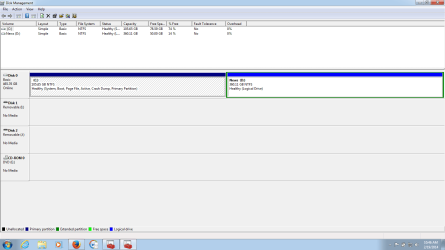
Here is The Screen Shot of My Disk Management
disk management.png
 

My Computer My Computer

At a glance

Windows 7 HomeBasic x64Duo-core500gb
Computer type
Laptop
Computer Manufacturer/Model Number
HP
OS
Windows 7 HomeBasic x64
CPU
Duo-core
Memory
500gb
Antivirus
Avast
Browser
Mozilla,Chrome
I don't mind bout the data deletion that has occurred but my problem became that i am not able to get the 30 GB and cant locate it even when i use Partition managers...meaning my hard drive is now 470 GB instead of 500 GB.
I think your disk is still 500GB (that is probably a decimal number). The 470 is a binary number wich is exactly 500GB.

A 500 GB hard drive is actually only 465 GBs, it`s just marketing. ;) the manufacturers use 1000 MB where windows uses 1024 MB

A 1 TB drive is actually 931 GBs

A 320 GB drive is actually 298 GBs

A 250 GB drive is actually 232 GBs etc
 

My Computer My Computer

At a glance

Windows 10 Pro x64Intel Core i7 6700KGSkill TridentZ RGB 16GB 3600 16-16-16-36EVGA GTX 980 Ti SC x2
Computer type
PC/Desktop
Computer Manufacturer/Model Number
Skylake Special #666
OS
Windows 10 Pro x64
CPU
Intel Core i7 6700K
Motherboard
Asus Sabertooth Z170 Mark 1
Memory
GSkill TridentZ RGB 16GB 3600 16-16-16-36
Graphics Card(s)
EVGA GTX 980 Ti SC x2
Sound Card
Realtek High Definition
Monitor(s) Displays
AOC G2460PG
Screen Resolution
1920 x 1080 144Hz
Hard Drives
Samsung 860 Pro 256GB, Seagate Barracuda 4TB x2
PSU
EVGA 1000 P2, EVGA White Custom Braided Cables
Case
Corsair Vengeance C70 Gunmetal Black
Cooling
Corsair H100i v2, Corsair ML120 x2, Thermal Grizzly Kryonaut
Keyboard
Logitech G910 Orion Spectrum
Mouse
Logitech G700s
Internet Speed
Verizon Fios Quantum Gateway 75/75
Antivirus
Windows Defender, Malwarebytes Free 3.8.3
Browser
Chrome
Other Info
Corsair SP120 x4, LG Blu-ray Drive, Durabrand HT-395 100 Watt Dolby Digital Amp, Corsair H2100 Wireless 7.1 Headset
Here:
Okay that I'm aware. Let me be precise. My Laptop came with 3 partitions when purchased (System=100mb, HP Tools= 1gb, Recovery partition= 27gb, Local Disk C=470gb) I decided to use the Recovery Partition to use Ubuntu there. I had a problem with a system crash then Decided to re-install windows from CD. Did that then it messed up my System partition and deleted grub...though using ubuntu live cd i recovered ubuntu easily. I decided that i needed the system partition back and I tried to install windows using that method then when i cleaned all I remained with 1 disk partition, then created the system partition. Now on installation The 27 GB and 1 gb vanished and used partition managers and can only read 1 partition which is 470 gb minus system partition. Any way available to get a partition the computer is not aware it has?
 

My Computer My Computer

At a glance

Windows 7 HomeBasic x64Duo-core500gb
Computer type
Laptop
Computer Manufacturer/Model Number
HP
OS
Windows 7 HomeBasic x64
CPU
Duo-core
Memory
500gb
Antivirus
Avast
Browser
Mozilla,Chrome
Here:
Okay that I'm aware. Let me be precise. My Laptop came with 3 partitions when purchased (System=100mb, HP Tools= 1gb, Recovery partition= 27gb, Local Disk C=470gb) I decided to use the Recovery Partition to use Ubuntu there. I had a problem with a system crash then Decided to re-install windows from CD. Did that then it messed up my System partition and deleted grub...though using ubuntu live cd i recovered ubuntu easily. I decided that i needed the system partition back and I tried to install windows using that method then when i cleaned all I remained with 1 disk partition, then created the system partition. Now on installation The 27 GB and 1 gb vanished and used partition managers and can only read 1 partition which is 470 gb minus system partition. Any way available to get a partition the computer is not aware it has?


Okaka,

What he is saying is that your whole hard drive is accounted for there. No space is missing. Your disk management is showing the exact amount of space it should for a "500GB" drive (as the manufacturers call it). Your entire drive was wiped clean and new partitions made, and those partions add up to the exact number they should. Please do not fret, you lost nothing except data. Your 500 GB drive is actually a 465.66128730773926 GiB (GiB, Gibibytes, are what the operating system reports as Gigabytes) drive as far as the OS is concerned, and that is exactly what the disk manager is showing. You must be mistaken on the sizes you thought the partitions were before you did this. If your added all the numbers of the partitions up before and you are saying the numbers added up to 500 GiB then it means that your drive is a 536.870912 GB drive (according to manufacturer gigabytes) which is not a drive size I have ever heard about.
 

My Computer My Computer

At a glance

Windows 7 Home Premium 64 bitIntel core i5 2500k8GB DDR3 (2 x 4GB)ATi Radeon HD 6870
Computer type
PC/Desktop
Computer Manufacturer/Model Number
Custom build
OS
Windows 7 Home Premium 64 bit
CPU
Intel core i5 2500k
Motherboard
AS Rock Z68 Pro3
Memory
8GB DDR3 (2 x 4GB)
Graphics Card(s)
ATi Radeon HD 6870
Sound Card
Realtek HD Audio, AMD HD audio
Monitor(s) Displays
Samsung 27" LED LCD
Screen Resolution
1920x1280
Hard Drives
Intel 120GB SSD
Antivirus
Norton Antivirus provided by Comcast (recently removed), MSE
Browser
Chrom and Internet Explorer
Back
Top