Solved Setup was unable to create a new system partition

btw all this came about because i decided i should update to 8.1 ... and samsung apparently hates it... i should have looked into it first.
 

My Computer My Computer

At a glance

Windows 7 Home Premium 64bit
Computer type
Laptop
Computer Manufacturer/Model Number
Samsung
OS
Windows 7 Home Premium 64bit
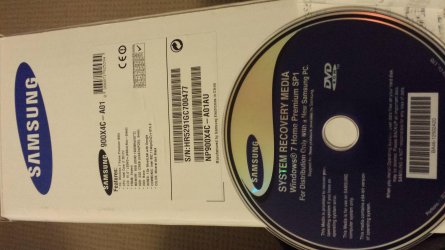
I do have a samsung laptop, but there is no sticker anywhere! I'm a little worried about that.. this was brand new shipped from samsung. It did have a recovery partition on it, but that got deleted with the windows 8.1 upgrade attempt but I would still think they should have given me the key somewhere?
 

My Computer My Computer

At a glance

Windows 7 Home Premium 64bit
Computer type
Laptop
Computer Manufacturer/Model Number
Samsung
OS
Windows 7 Home Premium 64bit
The model is 9004xc-a01
it came with windows 7 home premium 64bit and I bought it during a period where MS were offering free upgrades to windows 8 (so I have a windows 8 key, possibly only upgrade?)

Ther eis no key sticker... anywhere.. not in the box, not on the box, not on the laptop...would you suggest i ring samsung and ask why not?
 

Attachments

  • 20140715_210530.jpg
    20140715_210530.jpg
    801.4 KB · Views: 2

My Computer My Computer

At a glance

Windows 7 Home Premium 64bit
Computer type
Laptop
Computer Manufacturer/Model Number
Samsung
OS
Windows 7 Home Premium 64bit
ok this is a little strange.. while searching on this computer for ways to solve my issue.. the other computer completed the install of windows without any more hassles...

I just have 0 drivers for anything .. so i guess this is a start!
 

My Computer My Computer

At a glance

Windows 7 Home Premium 64bit
Computer type
Laptop
Computer Manufacturer/Model Number
Samsung
OS
Windows 7 Home Premium 64bit
Check at Computer>Properties because it's most likely the disk activated the install.

How much Samsung bloatware is installed? Look in Control Panel>Programs and Features. I'd gradually Clean Up Factory Bloatware to uninstall and clean up after Samsung bloatware and duplicate utilities which conflict with better versions built into Win7. But you may decide you use and want some. Most don't.

The disk should have provided drivers but if not enable Automatically deliver drivers via Windows Update (Step 3) then Check for Updates and install all Important and Optional (except Bingware), with requested reboots, then keep going back to Check for Updates until there are no more. This will deliver most drivers as well as critical patches for your system, then any still missing can be imported from Samsung Support Downloads webpage for your model.

Skip to the steps here for setting up and keeping a perfect Clean Reinstall - Factory OEM Windows 7 which compiles everything that works best in tens of thousands of installs we've directly helped with here without a single complaint or return here with issues.
 
its a completely empty install of windows... no drivers.. no software.. nothing installed. No programs.. nothing.
Samsung has their SW update tool which I'm using on here to put all the drivers onto a usb stick to get it started.

Or at least get me the ethernet controller driver so I can get on the net and do the windows updates like you suggested.. either or.. both should work.

Now I just need to decide if I want to go back to windows 8
 

My Computer My Computer

At a glance

Windows 7 Home Premium 64bit
Computer type
Laptop
Computer Manufacturer/Model Number
Samsung
OS
Windows 7 Home Premium 64bit
Yes, only install the network driver to get online and do the exact steps I gave above to sequence smooth and thorough install of drivers that Win7 wants, and patches that may be needed to make them work correctly. This is not XP, but the first driver-complete OS which will not respond well to a bunch of drivers forced on it.

Any OEM's crapware including drivers are suspect and should be used only as a last resort. None of them are anywhere close to being in a league with Win7 which is a perfect OS that decides what drivers it wants and needs.
 
Figured it out

I think I might have figured it out. I was having the same problem I went in a I clicked fix boot and now it is working.
 

My Computer My Computer

At a glance

Windows 7 Ultamate x64
Computer type
PC/Desktop
OS
Windows 7 Ultamate x64
Something so simple and immediate fixed this frustratingly monotonous.

Please bear with me, I am by no stretch a techie or IT wiz. I managed to corrupt/destroy /delete my OS (Windows 7) from my laptop attempting.... Well long ago now, I hardly remember what I was trying to do. Anyway, I could no longer boot my laptop so decided to create a bootable usb to do a clean install of windows 7. I knew it wasn't an issue with my USB as I successfully updated the OS on my other laptop the day I created the flash drive at the beginning of this saga. Hours and hours of researching my way to creating my USB, formatting and reformatting usb, laptop hard drive, changing bios settings and scratching my head (read:beating my head against a brick wall) I stumbled across this little beaut.


Tricky methods to solve "Setup was unable to create a new system partition..."

Above solutions require manipulations with your disk (eg. formating, changing partition structure, etc.), following are tricky methods.

Method 1

When you see the error information - remove the flash drive from the computer first.Press exit (red cross in the top right corner).
Start installation from the beginning (without reboot).
After selecting Windows 7 edition you will get new error.
Neglect it.Press OK in error window, you will be redirected to installation main menu.
Insert your USB flash drive into the computer.
Install Windows.
Finished


Found here:
Methods to Solve "Setup Was Unable to Create a New System Pa

Hallelujah, a tiny post with the easiest, instant fix. (trust me this was a blessing after the days and hours spent waiting for formatting, downloading blah blah blah) I removed the flash drive and waited for the error that there was no media attached, reinserted it and it started installing!!

I just want to say a huge thanks to everyone posting responses to aid others in fixing the issues they are having. And wanted to say that I tried each and every single step I could find regarding this error and nothing worked before finding this implementation trick.
;)
 

My Computer My Computer

At a glance

Win 7
Computer type
Laptop
Computer Manufacturer/Model Number
Dell
OS
Win 7
Problem

  1. Set your PC to boot from DVD via BIOS
  2. Put the DVD in and let it load until you get to this screen:
    windows7haltscreen.png
  3. Once at this screen, press: (SHIFT+F10) to get a CMD window
    002-shift-F10-command-prompt-install-windows-7-Server-2008R2-from-VHD.png
  4. MAKE SURE YOU SELECT THE DRIVE YOUR INSTALLING WINDOWS TO NOT ANOTHER. In the CMD window, type in Each Command and Press <ENTER> Key as follows:

    DiskPart <ENTER>
    list disk <ENTER>
    select disk 0 <ENTER>
    clean <ENTER>
    create partition primary align=1024 <ENTER>
    format fs=ntfs <ENTER> (Will Take a While)
    assign <ENTER>
    active <ENTER>
    exit <ENTER>
    exit <ENTER>
  5. After it completes, exit the INSTALL COMPLETELY and reboot.
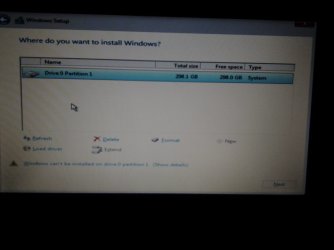
  6. Once you are back in, go about installing Windows just DO NOT ALLOW Windows to create a new partition, use the only one there.
    installwindows711driveo.jpg
  7. Windows will now install
Hope this helps! Post back if you need further instructions or help :)


I just installed a new hard drive into my computer and I am trying to install windows on the new hard drive. I started doing everything in the above steps with the DISKPART. However there was a power out in the middle of the format part and the computer shut off. Now when I try it again after I do the clean step and type in the create partition primary align=1024 step it says "This request could not be performed because of an I/O error".

What do I do? I do not really know a whole lot about fixing these kinds of things on computers, so if there is another step by step instruction that could fix this it would be greatly appreciated.
 
Last edited:

My Computer My Computer

At a glance

Windows 7 Home Premium
Computer type
PC/Desktop
Computer Manufacturer/Model Number
Sony Vaio
OS
Windows 7 Home Premium
I encountered the same problem. I found on a link, it was because of Kingston usb. I changed the usb drive and problem solved!!
 

My Computer My Computer

At a glance

windows 7 ultimate x64
Computer type
Laptop
Computer Manufacturer/Model Number
HP
OS
windows 7 ultimate x64
I am not using a Kingston USB. I am reinstalling from CD-ROM.
 

My Computer My Computer

At a glance

Windows 7 Home Premium
Computer type
PC/Desktop
Computer Manufacturer/Model Number
Sony Vaio
OS
Windows 7 Home Premium
Something to check first for this issue

I struggled off and on with this "Setup was unable to create a new system partition" or words to that effect when trying to install a newly purchased copy of Win 7 Pro on a new internal hard drive because the original drive had ended its useful life. I looked at all of the threads I could find and tried all of the solutions but could not get by the problem. I could partition and format the drive with no issues but still when I told the Win 7 setup to use that one and only partition it set it could not.

Finally I saw a thread where a tech guy asked to see the whole setupact.log and when I found mine and compared it to the one the other fellow posted I saw right away what my problem was!

When my internal hard drive went bad and I did not have a replacement, I was running Ubuntu from a USB stick and I had changed the BIOS Boot options to boot that first. That was the problem. Windows setup will not install unless the boot disk in the BIOS is an internal hard disk drive. Once I reset the BIOS to boot the hard disk first Windows Setup proceeded normally to a successful conclusion.
 

My Computer My Computer

At a glance

Windows 7 Pro 32-bitIntel Core Duo T5750 @2.00 GHz3 GBMobile Intel 965 Expresss
Computer type
PC/Desktop
Computer Manufacturer/Model Number
Dell Studio Hybrid 140g
OS
Windows 7 Pro 32-bit
CPU
Intel Core Duo T5750 @2.00 GHz
Memory
3 GB
Graphics Card(s)
Mobile Intel 965 Expresss
Hard Drives
500GB ST500L T012-9WS142 ATA Device
Antivirus
Norton
Browser
Firefox and IE
i tried but....

Hello,
I tried whatever screenshot described but after than it is same.. Can't go further.. There is no any option which last screen shot has..
Let me know please
 

Attachments

  • 1444325997215.jpg
    1444325997215.jpg
    120.5 KB · Views: 1

My Computer My Computer

At a glance

windows 10 32
Computer type
Laptop
Computer Manufacturer/Model Number
Acer
OS
windows 10 32
So none of this worked for me.. Days of work got me no where. I appreciate the steps however it didn't work. I eventually got lucky and figured out the real fix. And validated on 3 other systems. Simply when you are running into the issue at the partition screen of Windows install, just remove the USB drive, try installing and it fails again but different error, now plug the USB drive back in again and give it 10 seconds to recognize and then it will now work perfectly.

That's all folks! Now you can use the install to create the partitions and continue with the install
 

My Computer My Computer

At a glance

Win 10 x64
Computer type
PC/Desktop
OS
Win 10 x64
So none of this worked for me.. Days of work got me no where. I appreciate the steps however it didn't work. I eventually got lucky and figured out the real fix. And validated on 3 other systems. Simply when you are running into the issue at the partition screen of Windows install, just remove the USB drive, try installing and it fails again but different error, now plug the USB drive back in again and give it 10 seconds to recognize and then it will now work perfectly.

That's all folks! Now you can use the install to create the partitions and continue with the install

I can validate this fix. Its important that you have not clicked next on the partition screen. Just unplug the USB you booted from to install, then click next. you get an error. Re-insert the USB drive. I waited until the light stopped flashing, and clicked next.

Kring should make it a habit of buying powerball tickets.
 

My Computer My Computer

At a glance

Windows 7 Ultimate x64
Computer type
PC/Desktop
OS
Windows 7 Ultimate x64
Hello. In my case, this error was caused by the usb stick "transcend JetFlash®620 with SecureDrive". When I changed it to another "Transcend JetFlash®780" the problem is gone.
 

My Computer My Computer

At a glance

windows7 ultimate x32DualCore Intel Core 2 Duo E8400, 3000 MHz (9 ...4Gb (1x4 DDR2-800 DDR2 SDRAM)NVIDIA GeForce 9600 GT (512 mb)
OS
windows7 ultimate x32
CPU
DualCore Intel Core 2 Duo E8400, 3000 MHz (9 x 333)
Motherboard
ASRock 4Core1333-GLAN (3 PCI,1 PCI-E x16,4 DDR2 DIMM...)
Memory
4Gb (1x4 DDR2-800 DDR2 SDRAM)
Graphics Card(s)
NVIDIA GeForce 9600 GT (512 mb)
Sound Card
onboard
Monitor(s) Displays
lg flatron w2242t
Screen Resolution
1680 x 1050
Hard Drives
WDC WD5000AAJS-00YFA0 ATA Device
PSU
-
Case
-
Cooling
-
Other Info
d-link dir100
Back
Top