Severe performance issues

endotech

New member
Local time
6:23 PM
Messages
4
Hi everyone, thanks for reading my post!
I purchased a Compaq Presario CQ60 - 320SA specs are as follows:

32bit Vista Home premium,
4GB RAM,
AMD Turion Dual Core RM-72 2.10GHz,
250GB HDD.

When first bought HD playback (online) was sometimes a bit choppy but it was fine when offline and sometimes flash games would severely lag. Anyway I performed a clean install of Windows 7 Professional 64 bit and hoped it would all be ok. I was wrong. Recently streaming media, lovefilm for eg, will start ok then grind to a choppy halt even with HD turned off. Playing stored HD media on the laptop has the same issue. Flash games have become un-playable as it slows until flash crashes completely. All of this is usually accompanied by excessive heat build up.
To attempt to resolve this I have scanned thoroughly for viruses, malware etc. Opened laptop up and removed all dust using anti-static vacuum and ensured everything is seated etc. Uninstalled flash, tried alternative media players, defragged hdd and everything else I can think of!
I am considering applying fresh thermal paste to processor but I'm unsure if this would really help.

Any ideas or help you can offer will be greatly appreciated! Thanks in advance!
 

My Computer

OS
Windows 7
What is your internet line speed.
 

My Computer

Computer Manufacturer/Model Number
HP, Dell, Gateway, Toshiba - 4 laptops and 2 desktops
OS
Vista, Windows7, Mint Mate, Zorin, Windows 8
CPU
from 1.6GHz Duo to i7
Monitor(s) Displays
2x HP w2207
Hard Drives
5x HDD, 7x SSD, 12x Externals
Keyboard
with trackball - no mices
Mouse
Trackball mice
Internet Speed
DSL 6000
Hiyya endotech you mention excessive heat mate have you any idea what temp the CPU is running at? if not check in the BIOS or run Speccy - that will also give you system temps too.

Speccy - System Information - Free Download

I did Google your machine but I only found one with Intel inside and not being that much of an AMD fan am wondering if the CPU is up to it?
 

My Computer

Computer type
PC/Desktop
Computer Manufacturer/Model Number
Own build (new) Desk1 / Asus ROG Win 7 / Desk2 1st build
OS
Desk1 7 Home Prem / Desk2 10 Pro / Main lap Asus ROG 10 Pro 2 laptop Toshiba 7 Pro Asus P2520 7 & 10
CPU
Desk1 i5 3750K / Laptop i7 GTX 860M / Desk2 i5 2500
Motherboard
Desk1 Asus P877-V / Desk2 Gigabyte H67 UD3H / Laptop ?
Memory
Desk1 8GB (1866) / Desk2 16GB (1333) / Laptop 8Gb DDR3
Graphics Card(s)
Desk 1& 2NVidia GTX 650 & Laptops on board Intel
Sound Card
Desk 1 & 2 -XONAR DG Realtek High Def audio Laptop
Monitor(s) Displays
Desk 1 Benq HD 2450 / Desk2 Philips 24" / Laptop 17.5"
Screen Resolution
1920x1080 D1 & D2 & Laptop 1
Hard Drives
Desk1 Samsung 120GB 830 SSD
Asus ROG 256GB 850 Pro SSD
Desk2 Samsung 840 256 SSD
Toshiba 120GB EVO
PSU
Desk 1 Corsair HX 1050/ Laptop ? / Desk 2 Corsair HX 650
Case
Desk 1 Cooler HAF XM ? Toshiba laptop / Desk2 Coolermaster
Cooling
Fans on all Desk1 -2 Desk2 - all Coolermasters 5 Laptop ?
Keyboard
Desk 1 MS Sidewinder X6 Desk 2 MS Sidewinder X 4
Mouse
Desk 1&2 - Gigabyte MS 900 gamer - laptop - Logitec wireless
Internet Speed
ADSL2+
Other Info
One other Desktop (tester) and spare Toshba laptop both with SSD's
Running Kaspersky 2016 ISS on all machines config'd identically
Logitec audio stereo systems on each machine (x3)
Canon MG5250MFC
Router/modem TP-Link running WPA2SK
Thanks

Thanks for the responses!
My line speed is around 19Mb just now and my other devices can stream HD with no problems.
I got Speccy, quite a handy wee tool!
CPU temp is 65C
Graphics is 75C
Motherboard is 59C
I have taken these readings just after boot without putting any strain on the system other than browsing.
I found a review of my laptop here HP CQ60-320SA laptop reviews, prices and deals - 15.6" - 4GB of Memory - 320GB Storage - Reevoo
Hopefully this will help!
Thanks again for the assist, it's greatly appreciated!
 

My Computer

OS
Windows 7
Hello endotech I forgot to say welcome last time - very remiss of me LOL!!


Your CPU temp seems reasonably average temp mate as lappy's tend to run a tad hotter cos of the cramped conditions and smaller cooling areas. Mobo looks ok too.

As WHS says maybe it is just down to your download speed - have you checked it at all? I have Florian Gilles NetSpeedMonitor on my machines which give me a visual of the down and up speeds as you use the net (on the taskbar). Only thing is for some reason it does not work that well if at all sometimes on my laptop. But it might be worth a try.

FlorianGilles.com - NetSpeedMonitor

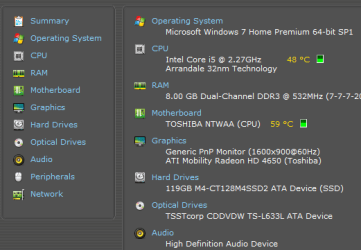
My Toshiba readout is as per pic.

Let us know how you go:)
 

Attachments

  • SPECCY.PNG
    SPECCY.PNG
    12.4 KB · Views: 10

My Computer

Computer type
PC/Desktop
Computer Manufacturer/Model Number
Own build (new) Desk1 / Asus ROG Win 7 / Desk2 1st build
OS
Desk1 7 Home Prem / Desk2 10 Pro / Main lap Asus ROG 10 Pro 2 laptop Toshiba 7 Pro Asus P2520 7 & 10
CPU
Desk1 i5 3750K / Laptop i7 GTX 860M / Desk2 i5 2500
Motherboard
Desk1 Asus P877-V / Desk2 Gigabyte H67 UD3H / Laptop ?
Memory
Desk1 8GB (1866) / Desk2 16GB (1333) / Laptop 8Gb DDR3
Graphics Card(s)
Desk 1& 2NVidia GTX 650 & Laptops on board Intel
Sound Card
Desk 1 & 2 -XONAR DG Realtek High Def audio Laptop
Monitor(s) Displays
Desk 1 Benq HD 2450 / Desk2 Philips 24" / Laptop 17.5"
Screen Resolution
1920x1080 D1 & D2 & Laptop 1
Hard Drives
Desk1 Samsung 120GB 830 SSD
Asus ROG 256GB 850 Pro SSD
Desk2 Samsung 840 256 SSD
Toshiba 120GB EVO
PSU
Desk 1 Corsair HX 1050/ Laptop ? / Desk 2 Corsair HX 650
Case
Desk 1 Cooler HAF XM ? Toshiba laptop / Desk2 Coolermaster
Cooling
Fans on all Desk1 -2 Desk2 - all Coolermasters 5 Laptop ?
Keyboard
Desk 1 MS Sidewinder X6 Desk 2 MS Sidewinder X 4
Mouse
Desk 1&2 - Gigabyte MS 900 gamer - laptop - Logitec wireless
Internet Speed
ADSL2+
Other Info
One other Desktop (tester) and spare Toshba laptop both with SSD's
Running Kaspersky 2016 ISS on all machines config'd identically
Logitec audio stereo systems on each machine (x3)
Canon MG5250MFC
Router/modem TP-Link running WPA2SK
Thanks for the welcome, I've used this forum soo many times at college but never signed up, better late than never I suppose :)
I had a 50Mb connection until I moved house (changed ISP) now it's around 19Mb, I have no problem with my other devices and have tried both wired and wireless connections. Also the problems happen with stored HD media offline hence the reason I'm guessing it's a hardware related problem. Standard definition media and music play no problem offline. I forgot to mention though that the battery started going after all the problems and now it needs to be plugged in constantly.
 

My Computer

OS
Windows 7
Hum well endotech maybe you could try a memtest my friend as you say it certainly sounds like a hardware problem if this happens off line as well.

Make a bootable disk and let it run for as long as you like I have sometimes let this run overnight so it can get as many passes as possible in but you can do it for as long as you wish.

Worth a try mate it could just be a simple thing as a faulty stick.

Memtest86+ - Advanced Memory Diagnostic Tool

Suppose all the drivers for your machine are up to date graphics etc?

Just as an afterthought what did you scan for malware with mate?
 
Last edited:

My Computer

Computer type
PC/Desktop
Computer Manufacturer/Model Number
Own build (new) Desk1 / Asus ROG Win 7 / Desk2 1st build
OS
Desk1 7 Home Prem / Desk2 10 Pro / Main lap Asus ROG 10 Pro 2 laptop Toshiba 7 Pro Asus P2520 7 & 10
CPU
Desk1 i5 3750K / Laptop i7 GTX 860M / Desk2 i5 2500
Motherboard
Desk1 Asus P877-V / Desk2 Gigabyte H67 UD3H / Laptop ?
Memory
Desk1 8GB (1866) / Desk2 16GB (1333) / Laptop 8Gb DDR3
Graphics Card(s)
Desk 1& 2NVidia GTX 650 & Laptops on board Intel
Sound Card
Desk 1 & 2 -XONAR DG Realtek High Def audio Laptop
Monitor(s) Displays
Desk 1 Benq HD 2450 / Desk2 Philips 24" / Laptop 17.5"
Screen Resolution
1920x1080 D1 & D2 & Laptop 1
Hard Drives
Desk1 Samsung 120GB 830 SSD
Asus ROG 256GB 850 Pro SSD
Desk2 Samsung 840 256 SSD
Toshiba 120GB EVO
PSU
Desk 1 Corsair HX 1050/ Laptop ? / Desk 2 Corsair HX 650
Case
Desk 1 Cooler HAF XM ? Toshiba laptop / Desk2 Coolermaster
Cooling
Fans on all Desk1 -2 Desk2 - all Coolermasters 5 Laptop ?
Keyboard
Desk 1 MS Sidewinder X6 Desk 2 MS Sidewinder X 4
Mouse
Desk 1&2 - Gigabyte MS 900 gamer - laptop - Logitec wireless
Internet Speed
ADSL2+
Other Info
One other Desktop (tester) and spare Toshba laptop both with SSD's
Running Kaspersky 2016 ISS on all machines config'd identically
Logitec audio stereo systems on each machine (x3)
Canon MG5250MFC
Router/modem TP-Link running WPA2SK
Thanks for all the help! I will run memtest for as long as I can and see what results I get.
Yeah all drivers up to date etc, for malware I have been using malwarebytes and microsoft security essentials for virus protection. I had been using Norton but it was only a years license.
 

My Computer

OS
Windows 7
Thanks for all the help! I will run memtest for as long as I can and see what results I get.
Yeah all drivers up to date etc, for malware I have been using malwarebytes and microsoft security essentials for virus protection. I had been using Norton but it was only a years license.
Ok endo hope it works out. If you need to there are a fair number of on line scanners too mate.

Just a by the by if you are running MSE then just use the Malwarebytes free only as two security apps can conflict mate. MBAM (Malwarebytes) is best run as the small free version and in addition to the MSE.

There are a few free security apps should you feel like a change and there are plenty to advise you on them. Me I use Comodo Premium free for folks I fix for - it's good but whatever you use make sure you thoroughly uninstall anything you have on first. Most apps have their own uninstall tool.
As an afterthought if you had Norton on you need to run the Norton uninstall tool to make sure it is all cleared from the machine - it might be clogging up the works too!
https://www-secure.symantec.com/nor...roduct=home&pvid=f-home&version=1&lg=en&ct=us

Let us know how you go:)
 

My Computer

Computer type
PC/Desktop
Computer Manufacturer/Model Number
Own build (new) Desk1 / Asus ROG Win 7 / Desk2 1st build
OS
Desk1 7 Home Prem / Desk2 10 Pro / Main lap Asus ROG 10 Pro 2 laptop Toshiba 7 Pro Asus P2520 7 & 10
CPU
Desk1 i5 3750K / Laptop i7 GTX 860M / Desk2 i5 2500
Motherboard
Desk1 Asus P877-V / Desk2 Gigabyte H67 UD3H / Laptop ?
Memory
Desk1 8GB (1866) / Desk2 16GB (1333) / Laptop 8Gb DDR3
Graphics Card(s)
Desk 1& 2NVidia GTX 650 & Laptops on board Intel
Sound Card
Desk 1 & 2 -XONAR DG Realtek High Def audio Laptop
Monitor(s) Displays
Desk 1 Benq HD 2450 / Desk2 Philips 24" / Laptop 17.5"
Screen Resolution
1920x1080 D1 & D2 & Laptop 1
Hard Drives
Desk1 Samsung 120GB 830 SSD
Asus ROG 256GB 850 Pro SSD
Desk2 Samsung 840 256 SSD
Toshiba 120GB EVO
PSU
Desk 1 Corsair HX 1050/ Laptop ? / Desk 2 Corsair HX 650
Case
Desk 1 Cooler HAF XM ? Toshiba laptop / Desk2 Coolermaster
Cooling
Fans on all Desk1 -2 Desk2 - all Coolermasters 5 Laptop ?
Keyboard
Desk 1 MS Sidewinder X6 Desk 2 MS Sidewinder X 4
Mouse
Desk 1&2 - Gigabyte MS 900 gamer - laptop - Logitec wireless
Internet Speed
ADSL2+
Other Info
One other Desktop (tester) and spare Toshba laptop both with SSD's
Running Kaspersky 2016 ISS on all machines config'd identically
Logitec audio stereo systems on each machine (x3)
Canon MG5250MFC
Router/modem TP-Link running WPA2SK
Here is another test I suggest. When you encounter the problem, run the DPC Latency Checker. If you get red bars, that would point to a driver problem.
 

My Computer

Computer Manufacturer/Model Number
HP, Dell, Gateway, Toshiba - 4 laptops and 2 desktops
OS
Vista, Windows7, Mint Mate, Zorin, Windows 8
CPU
from 1.6GHz Duo to i7
Monitor(s) Displays
2x HP w2207
Hard Drives
5x HDD, 7x SSD, 12x Externals
Keyboard
with trackball - no mices
Mouse
Trackball mice
Internet Speed
DSL 6000
If all of the excellent suggestions made thusfar don't resolve it, here are other Troubleshooting Steps for Windows 7 to go over it even more thoroughly. I would want a Clean Boot, scour the logs for repeat errors, utilize System Resources which may have already found solutions, check System File integrity and make sure you used Best Practices for your Clean Reinstall.
 
Back
Top