Solved SFC Fail to Repair Files; Don't Understand Log CBS.log

jagster936

New member
Local time
12:24 AM
Messages
16
I am new to these forums so I hope this is the right place to post this. I'm pretty good with computers I think...The scan will not complete in windows, says service cannot be started. I am able to complete it offline in recovery environment, but it fails to repair the files it finds. I don't understand the log results. This all started I think when my old hard drive began to crash and I had bad sectors in it. I transferred win7 to a new SSD drive (which is amazing!). Windows runs fine but there are corrupt system files for some reason and I would like to resolve. Only pay attention to 7/14 entrees..there are more on 7/15 don't know why the scan was done on 7/14. Please see attached.

I don't know what is a healthy looking log file but the scan results said system files corrupt and some could not be repaired.

Thanks!
 

My Computer My Computer

At a glance

Windows 7 Home 64 bit
OS
Windows 7 Home 64 bit
Your log appears to be incomplete. Here are the steps I usually give for SFC:
Run http://www.sevenforums.com/tutorials/1538-sfc-scannow-command-system-file-checker.html up to three times to fix all errors with a restart in between each. Post back if it continues to show errors after a fourth run or if the first run comes back with no integrity violations. Use OPTION THREE of http://www.sevenforums.com/tutorials/1538-sfc-scannow-command-system-file-checker.html to provide us with the sfcdetails.txt file if errors occur.
 

My Computer My Computer

At a glance

Windows 7 Home Premium 64 BitIntel(R) Core(TM)2 Quad CPU Q9550 @ 2.83GHz6.00 GB Hundai HMT125U6BFR8C-H9ATI Radeon HD 4850
Computer Manufacturer/Model Number
HP Pavilion e9110t
OS
Windows 7 Home Premium 64 Bit
CPU
Intel(R) Core(TM)2 Quad CPU Q9550 @ 2.83GHz
Motherboard
Pegatron IPIEL-LA3
Memory
6.00 GB Hundai HMT125U6BFR8C-H9
Graphics Card(s)
ATI Radeon HD 4850
Sound Card
Realtek High Definition Audio/ATI High Definition Audio
Monitor(s) Displays
Acer AL2216W
Screen Resolution
1680x1050
Hard Drives
Hitachi HDP725050GLA360 ATA Device 500 GB
PSU
Unknown/installed by HP
Case
HP generic case
Cooling
Intel Stock Cooling
Keyboard
HP Keyboard
Mouse
HP Mouse
Internet Speed
Download: 19.15 Mbps Upload: 1.67 Mbps
Other Info
Network Adapter Realtek RTL8168D/8111D Family PCI-E Gigabit Ethernet NIC (NDIS 6.20)
Network Adapter 802.11n Wireless PCI Express Card LAN Adapter
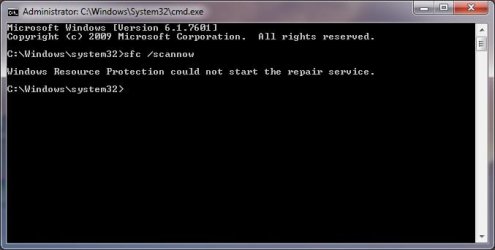
Hmm well it won't run in windows says (I forget exactly) service won't start. Trusted installer service is running. I tried the sfcdetail thing and it wrote a blank file lol. This was all offline in recovery environment though! I am running with admin cmd and all. The original cmd.exe was corrupt so I copied one from c:\windows\syswow64. This doesn't affect it does it?

Does sfcdetail.txt have different info or filtered info than CBS.log?

I can try the scan offline couple times but is a restart needed since its offline?

Weird stuff.
 

My Computer My Computer

At a glance

Windows 7 Home 64 bit
OS
Windows 7 Home 64 bit

My Computer My Computer

At a glance

Windows 7 Home Premium 64 BitIntel(R) Core(TM)2 Quad CPU Q9550 @ 2.83GHz6.00 GB Hundai HMT125U6BFR8C-H9ATI Radeon HD 4850
Computer Manufacturer/Model Number
HP Pavilion e9110t
OS
Windows 7 Home Premium 64 Bit
CPU
Intel(R) Core(TM)2 Quad CPU Q9550 @ 2.83GHz
Motherboard
Pegatron IPIEL-LA3
Memory
6.00 GB Hundai HMT125U6BFR8C-H9
Graphics Card(s)
ATI Radeon HD 4850
Sound Card
Realtek High Definition Audio/ATI High Definition Audio
Monitor(s) Displays
Acer AL2216W
Screen Resolution
1680x1050
Hard Drives
Hitachi HDP725050GLA360 ATA Device 500 GB
PSU
Unknown/installed by HP
Case
HP generic case
Cooling
Intel Stock Cooling
Keyboard
HP Keyboard
Mouse
HP Mouse
Internet Speed
Download: 19.15 Mbps Upload: 1.67 Mbps
Other Info
Network Adapter Realtek RTL8168D/8111D Family PCI-E Gigabit Ethernet NIC (NDIS 6.20)
Network Adapter 802.11n Wireless PCI Express Card LAN Adapter
Screenshot attached.

Getting what file from another source? You mean cbs.log vs sfcdetails.txt or cmd.exe?

Thanks!
 

Attachments

  • SFC Error.jpg
    SFC Error.jpg
    18.2 KB · Views: 34

My Computer My Computer

At a glance

Windows 7 Home 64 bit
OS
Windows 7 Home 64 bit
Ah, I misunderstood. I thought you copied the log from syswow64. I see it was just the cmd.exe. I am actually not sure what problems that might cause... :confused:

Anyway, the error you get indicates some pretty bad corruption on the system. I would recommend a repair install.
http://www.sevenforums.com/tutorials/3413-repair-install.html Windows 7.

Steps 1-3 and 5-7 of http://www.sevenforums.com/tutorials/219487-clean-reinstall-factory-oem-windows-7-a.html#post1839164 will help you get installation media, backup any important files (just in case), and obtain your license keys for software (just in case) and the Windows license key (you will need this key).​
 

My Computer My Computer

At a glance

Windows 7 Home Premium 64 BitIntel(R) Core(TM)2 Quad CPU Q9550 @ 2.83GHz6.00 GB Hundai HMT125U6BFR8C-H9ATI Radeon HD 4850
Computer Manufacturer/Model Number
HP Pavilion e9110t
OS
Windows 7 Home Premium 64 Bit
CPU
Intel(R) Core(TM)2 Quad CPU Q9550 @ 2.83GHz
Motherboard
Pegatron IPIEL-LA3
Memory
6.00 GB Hundai HMT125U6BFR8C-H9
Graphics Card(s)
ATI Radeon HD 4850
Sound Card
Realtek High Definition Audio/ATI High Definition Audio
Monitor(s) Displays
Acer AL2216W
Screen Resolution
1680x1050
Hard Drives
Hitachi HDP725050GLA360 ATA Device 500 GB
PSU
Unknown/installed by HP
Case
HP generic case
Cooling
Intel Stock Cooling
Keyboard
HP Keyboard
Mouse
HP Mouse
Internet Speed
Download: 19.15 Mbps Upload: 1.67 Mbps
Other Info
Network Adapter Realtek RTL8168D/8111D Family PCI-E Gigabit Ethernet NIC (NDIS 6.20)
Network Adapter 802.11n Wireless PCI Express Card LAN Adapter
I assume it was the same cmd.exe. It seems to do the same thing lol.

That's the thing it doesn't do anything weird system boots and acts fine! So I'm not too motivated to do a repair install sounds like a pain. Was hoping I could just overwrite whatever is failing outside of windows (such as trusted installer service) so the scan will run properly. I don't know what to overwrite though.

But if sfc cannot repair it offline then maybe sfc related components itself are damaged? I wish I could fix just them. Repair install sounds like it might make a lot of errors.
 

My Computer My Computer

At a glance

Windows 7 Home 64 bit
OS
Windows 7 Home 64 bit
Since the scan does work in recovery environment is interesting. I could try copying cmd.exe from a good computer to see if it changes anything. Does 64 or 32 bit matter?
 

My Computer My Computer

At a glance

Windows 7 Home 64 bit
OS
Windows 7 Home 64 bit
Ha! I figured out the problem; the cmd.exe indeed is 32 bit cmd processor; I overwrote the 64bit one. That's why sfc does not work. I download TCC some third party command processor the 64bit version and the scan is working now :).

Do you know where I can download my proper c:\windows\system32 64 bit cmd.exe? I do not have a windows 7 64 bit iso though I suppose I could download one.
 

My Computer My Computer

At a glance

Windows 7 Home 64 bit
OS
Windows 7 Home 64 bit
The one in \syswow64 is 32 bit..very misleading lol
 

My Computer My Computer

At a glance

Windows 7 Home 64 bit
OS
Windows 7 Home 64 bit
OK now I still got the corrupted files result and repair failed. See attached the real sfcdetails.txt you requested earlier. I will try rebooting and doing it a couple of more times I suppose but I don't think it will work.
 

Attachments

My Computer My Computer

At a glance

Windows 7 Home 64 bit
OS
Windows 7 Home 64 bit
I also have a question regarding the repair install. I read the thing from this forum saying how to do it; it links a windows 7 sp1 iso. This iso will work with a 64 bit system like mine? How do I know I have sp1? I just assume I do? That will be a last resort I want to try to fix all this without going through a repair install.

Thanks
 

My Computer My Computer

At a glance

Windows 7 Home 64 bit
OS
Windows 7 Home 64 bit
I can also fix the files manuall if I can understand what that crazy log is saying. Any help?

I noticed some DLL file and cmd.exe it is flagging; I will grab those from win7 iso maybe if I can. I can copy and overwrite them in cmd line recovery mode.
 

My Computer My Computer

At a glance

Windows 7 Home 64 bit
OS
Windows 7 Home 64 bit
So I tried it 2 or 3 times its messed up every time. Is there any way to repair or overwrite my "store" with a healthy store from a healthy windows 7 system or the install cd? This would solve my problem and allow it to repair. After reviewing the log in more detail I notice it says cmd.exe in store is also corrupt.

If this all fails and I am forced to do a repair install, can I do it using windows home premium 64 bit iso? I am downloading that now. I don't know about all the service pack stuff or the one that is linked in the tutorial.

Sorry for so many posts, thanks :)
 

My Computer My Computer

At a glance

Windows 7 Home 64 bit
OS
Windows 7 Home 64 bit
http://www.sevenforums.com/tutorials/1538-sfc-scannow-command-system-file-checker.html OPTION THREE gives options for manually replacing individual files that SFC finds are corrupted. You can try that method first, if you like. The sfcdetails.txt gives the locations of the corrupted files. You can also search for them with the following commands in an http://www.sevenforums.com/tutorials/783-elevated-command-prompt.html :
Code:
cd ..\..
dir /a /s <filename>
For instance, for cmd.exe:
Code:
cd ..\..
dir /a /s cmd.exe

The dir /a /s command may take a while to run depending on how many files and directories exist on your system. If it does, go get a meal or coffee while you wait. :)


And yes, you can do a repair install with the Windows DVD you burn from the ISO. Just make sure the Windows version you download is the same as the version installed on your system, and make sure you can find your Windows license key.
 

My Computer My Computer

At a glance

Windows 7 Home Premium 64 BitIntel(R) Core(TM)2 Quad CPU Q9550 @ 2.83GHz6.00 GB Hundai HMT125U6BFR8C-H9ATI Radeon HD 4850
Computer Manufacturer/Model Number
HP Pavilion e9110t
OS
Windows 7 Home Premium 64 Bit
CPU
Intel(R) Core(TM)2 Quad CPU Q9550 @ 2.83GHz
Motherboard
Pegatron IPIEL-LA3
Memory
6.00 GB Hundai HMT125U6BFR8C-H9
Graphics Card(s)
ATI Radeon HD 4850
Sound Card
Realtek High Definition Audio/ATI High Definition Audio
Monitor(s) Displays
Acer AL2216W
Screen Resolution
1680x1050
Hard Drives
Hitachi HDP725050GLA360 ATA Device 500 GB
PSU
Unknown/installed by HP
Case
HP generic case
Cooling
Intel Stock Cooling
Keyboard
HP Keyboard
Mouse
HP Mouse
Internet Speed
Download: 19.15 Mbps Upload: 1.67 Mbps
Other Info
Network Adapter Realtek RTL8168D/8111D Family PCI-E Gigabit Ethernet NIC (NDIS 6.20)
Network Adapter 802.11n Wireless PCI Express Card LAN Adapter
Yea I may try to do that. You don't know where the system file store is located for the sfc replacing algorithm? If like to repair it if possible.

Thanks
 

My Computer My Computer

At a glance

Windows 7 Home 64 bit
OS
Windows 7 Home 64 bit
Looks like winsxs is the folder. I will look into repairing this manually. Have you heard of anyone doing this?
 

My Computer My Computer

At a glance

Windows 7 Home 64 bit
OS
Windows 7 Home 64 bit
OK! Solved! After much hardship and research, here is what I did.

CMD.exe and MTXCLU.DLL were corrupt. I have win7 SP1. I extracted the install.wml or whatever as instructed on this site from the win7 SP1 ISO and got the winsxs folder out of it. Comparing those version numbers and what the log sfcdetails.txt said, I repaired the store using the take ownership thing. I think the DLL file had the same file size just different version appended to it, which made it fail also. After this was done I regave ownership back to the trusted installer and ran the scan and it ran without issue, no mismatches found.

Thanks for all the help I have learned a lot!
 

My Computer My Computer

At a glance

Windows 7 Home 64 bit
OS
Windows 7 Home 64 bit
Back
Top