Sfc will not run

alzan135

New member
Local time
6:56 PM
Messages
9
Hello everybody. I have been trying to run sfc because i have been a couple of minor problems with my setup.

My problem is that if i try to run it from the command prompt as administrator it hangs for a couple of minutes then gives the following message.

Windows Resource Protection could not start the repair process.

I am running Windows 7 Home Premium SP1
 

My Computer

Computer type
PC/Desktop
Computer Manufacturer/Model Number
home build
OS
windows 7 home premium 32 bit
CPU
AMD FX4100
Motherboard
Asus
Memory
2 GB
Antivirus
AVG
Browser
Firefox

My Computer

Computer type
PC/Desktop
Computer Manufacturer/Model Number
Home Built Desktop By DataTech
OS
Windows 7 Ultimate X64 SP1
CPU
Intel i5-2550K, Differing ~4.4-4.8GHz No built in GPU
Motherboard
ASUS P8Z68-V PRO/GEN3
Memory
16GB G.Skill Sniper 1866MHz @ 2133MHz 2x8GB
Graphics Card(s)
ASUS GTX650TIB-DC2OC-2GD5, (650TI Boost)
Sound Card
Onboard Realtek 5-1
Monitor(s) Displays
Samsung P2570HD
Screen Resolution
1920x1080
Hard Drives
Samsung 840 Pro 256GB SSD for OS, 500GB Seagate Constellation (Enterprise drive) for Data
PSU
Corsair HX650W
Case
Inwin Dragon Rider
Cooling
Hyper 212 EVO w/two Noctua fans, push-pull, @1300 RPM
Keyboard
E-Z Eyes, bright yellow keys with large characters
Mouse
steelseries SENSEI Laser Pro Gaming
Internet Speed
48-51Mbs Mbs down, 11 Mbs up Xfinity Cable
Antivirus
Norton Internet Security 2013
Browser
IE 10, Opera, Pale Moon if needed
Other Info
4 case fans, LG BluRay-RE, ASUS DVD-RW, Mr. Fusion power supply, 1.21 gigawatts.

My Computer

Computer type
PC/Desktop
Computer Manufacturer/Model Number
Own build (new) Desk1 / Asus ROG Win 7 / Desk2 1st build
OS
Desk1 7 Home Prem / Desk2 10 Pro / Main lap Asus ROG 10 Pro 2 laptop Toshiba 7 Pro Asus P2520 7 & 10
CPU
Desk1 i5 3750K / Laptop i7 GTX 860M / Desk2 i5 2500
Motherboard
Desk1 Asus P877-V / Desk2 Gigabyte H67 UD3H / Laptop ?
Memory
Desk1 8GB (1866) / Desk2 16GB (1333) / Laptop 8Gb DDR3
Graphics Card(s)
Desk 1& 2NVidia GTX 650 & Laptops on board Intel
Sound Card
Desk 1 & 2 -XONAR DG Realtek High Def audio Laptop
Monitor(s) Displays
Desk 1 Benq HD 2450 / Desk2 Philips 24" / Laptop 17.5"
Screen Resolution
1920x1080 D1 & D2 & Laptop 1
Hard Drives
Desk1 Samsung 120GB 830 SSD
Asus ROG 256GB 850 Pro SSD
Desk2 Samsung 840 256 SSD
Toshiba 120GB EVO
PSU
Desk 1 Corsair HX 1050/ Laptop ? / Desk 2 Corsair HX 650
Case
Desk 1 Cooler HAF XM ? Toshiba laptop / Desk2 Coolermaster
Cooling
Fans on all Desk1 -2 Desk2 - all Coolermasters 5 Laptop ?
Keyboard
Desk 1 MS Sidewinder X6 Desk 2 MS Sidewinder X 4
Mouse
Desk 1&2 - Gigabyte MS 900 gamer - laptop - Logitec wireless
Internet Speed
ADSL2+
Other Info
One other Desktop (tester) and spare Toshba laptop both with SSD's
Running Kaspersky 2016 ISS on all machines config'd identically
Logitec audio stereo systems on each machine (x3)
Canon MG5250MFC
Router/modem TP-Link running WPA2SK
I am here looking for help with same issue ,don't mean to hijack this thread ,on a Toshiba laptop it will not run for me from any of the places suggested ,not even windows repair disk,and I just did a long chkdsk and tried to run sfc and same error message as before
 

My Computer

Computer Manufacturer/Model Number
Dell optiplex 745 sff
OS
win8pro 32 bit win 7Ulitmate 32 bit
CPU
intel duel core 2.13
Motherboard
dell
Memory
3 gig ddr2
Graphics Card(s)
ATI Radeon 5400 series 1gig ddr3
Sound Card
onboard Intel hd
Monitor(s) Displays
ViewSonic LCD 19"
Screen Resolution
1680x1050
Hard Drives
320 gig external
Keyboard
Microsoft curve 2000
Mouse
lenovo
Internet Speed
20high speed
I am here looking for help with same issue ,don't mean to hijack this thread ,on a Toshiba laptop it will not run for me from any of the places suggested ,not even windows repair disk,and I just did a long chkdsk and tried to run sfc and same error message as before
Jack did you try the options in Option 2 of this
http://www.sevenforums.com/tutorials/433-disk-check.html< if necessary include the /f and /r in the command line as per Option2
You haven't said if can get into safe mode either - do that if you can and run it.

To Alzan can you get into safe mode and run sfc and what I have suggested to Jack??
 

My Computer

Computer type
PC/Desktop
Computer Manufacturer/Model Number
Own build (new) Desk1 / Asus ROG Win 7 / Desk2 1st build
OS
Desk1 7 Home Prem / Desk2 10 Pro / Main lap Asus ROG 10 Pro 2 laptop Toshiba 7 Pro Asus P2520 7 & 10
CPU
Desk1 i5 3750K / Laptop i7 GTX 860M / Desk2 i5 2500
Motherboard
Desk1 Asus P877-V / Desk2 Gigabyte H67 UD3H / Laptop ?
Memory
Desk1 8GB (1866) / Desk2 16GB (1333) / Laptop 8Gb DDR3
Graphics Card(s)
Desk 1& 2NVidia GTX 650 & Laptops on board Intel
Sound Card
Desk 1 & 2 -XONAR DG Realtek High Def audio Laptop
Monitor(s) Displays
Desk 1 Benq HD 2450 / Desk2 Philips 24" / Laptop 17.5"
Screen Resolution
1920x1080 D1 & D2 & Laptop 1
Hard Drives
Desk1 Samsung 120GB 830 SSD
Asus ROG 256GB 850 Pro SSD
Desk2 Samsung 840 256 SSD
Toshiba 120GB EVO
PSU
Desk 1 Corsair HX 1050/ Laptop ? / Desk 2 Corsair HX 650
Case
Desk 1 Cooler HAF XM ? Toshiba laptop / Desk2 Coolermaster
Cooling
Fans on all Desk1 -2 Desk2 - all Coolermasters 5 Laptop ?
Keyboard
Desk 1 MS Sidewinder X6 Desk 2 MS Sidewinder X 4
Mouse
Desk 1&2 - Gigabyte MS 900 gamer - laptop - Logitec wireless
Internet Speed
ADSL2+
Other Info
One other Desktop (tester) and spare Toshba laptop both with SSD's
Running Kaspersky 2016 ISS on all machines config'd identically
Logitec audio stereo systems on each machine (x3)
Canon MG5250MFC
Router/modem TP-Link running WPA2SK
in my first post I said I tried all places suggested ,this includes safe mode ,sorry, yes I did the chkds /r and it still will not run sfc ,I gave the laptop back to its owner ,I will format drive and reinstall windows I later f needed, thanks for you input
 

My Computer

Computer Manufacturer/Model Number
Dell optiplex 745 sff
OS
win8pro 32 bit win 7Ulitmate 32 bit
CPU
intel duel core 2.13
Motherboard
dell
Memory
3 gig ddr2
Graphics Card(s)
ATI Radeon 5400 series 1gig ddr3
Sound Card
onboard Intel hd
Monitor(s) Displays
ViewSonic LCD 19"
Screen Resolution
1680x1050
Hard Drives
320 gig external
Keyboard
Microsoft curve 2000
Mouse
lenovo
Internet Speed
20high speed
in my first post I said I tried all places suggested ,this includes safe mode ,sorry, yes I did the chkds /r and it still will not run sfc ,I gave the laptop back to its owner ,I will format drive and reinstall windows I later f needed, thanks for you input
Ok Jack you might like to try this if you have no actual media
http://www.sevenforums.com/tutorials/219487-clean-reinstall-factory-oem-windows-7-a.html#post1839164
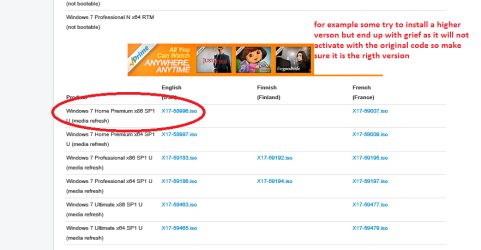
make sure it is the right version as the original and the same language see my pic

Oh meant to say you might lie this too
http://www.sevenforums.com/tutorials/11728-optimize-windows-7-a.html
 

Attachments

  • ISO.PNG
    ISO.PNG
    22.2 KB · Views: 1

My Computer

Computer type
PC/Desktop
Computer Manufacturer/Model Number
Own build (new) Desk1 / Asus ROG Win 7 / Desk2 1st build
OS
Desk1 7 Home Prem / Desk2 10 Pro / Main lap Asus ROG 10 Pro 2 laptop Toshiba 7 Pro Asus P2520 7 & 10
CPU
Desk1 i5 3750K / Laptop i7 GTX 860M / Desk2 i5 2500
Motherboard
Desk1 Asus P877-V / Desk2 Gigabyte H67 UD3H / Laptop ?
Memory
Desk1 8GB (1866) / Desk2 16GB (1333) / Laptop 8Gb DDR3
Graphics Card(s)
Desk 1& 2NVidia GTX 650 & Laptops on board Intel
Sound Card
Desk 1 & 2 -XONAR DG Realtek High Def audio Laptop
Monitor(s) Displays
Desk 1 Benq HD 2450 / Desk2 Philips 24" / Laptop 17.5"
Screen Resolution
1920x1080 D1 & D2 & Laptop 1
Hard Drives
Desk1 Samsung 120GB 830 SSD
Asus ROG 256GB 850 Pro SSD
Desk2 Samsung 840 256 SSD
Toshiba 120GB EVO
PSU
Desk 1 Corsair HX 1050/ Laptop ? / Desk 2 Corsair HX 650
Case
Desk 1 Cooler HAF XM ? Toshiba laptop / Desk2 Coolermaster
Cooling
Fans on all Desk1 -2 Desk2 - all Coolermasters 5 Laptop ?
Keyboard
Desk 1 MS Sidewinder X6 Desk 2 MS Sidewinder X 4
Mouse
Desk 1&2 - Gigabyte MS 900 gamer - laptop - Logitec wireless
Internet Speed
ADSL2+
Other Info
One other Desktop (tester) and spare Toshba laptop both with SSD's
Running Kaspersky 2016 ISS on all machines config'd identically
Logitec audio stereo systems on each machine (x3)
Canon MG5250MFC
Router/modem TP-Link running WPA2SK
in my first post I said I tried all places suggested ,this includes safe mode ,sorry, yes I did the chkds /r and it still will not run sfc ,I gave the laptop back to its owner ,I will format drive and reinstall windows I later f needed, thanks for you input
Ok Jack you might like to try this if you have no actual media
http://www.sevenforums.com/tutorials/219487-clean-reinstall-factory-oem-windows-7-a.html#post1839164
make sure it is the right version as the original and the same language see my pic

Oh meant to say you might lie this too
http://www.sevenforums.com/tutorials/11728-optimize-windows-7-a.html
thank you for the links, the laptop belonged to my brother in-law,Its likely that I will get it back agin one day,and I will do a fresh install ,I have a msdn acct for now through the mvp program so access to win7 iso file no problem for now.
the win7 optimize will come in handy to ,I think I will duel boot [win8 and win7 ]my own tower soon ,thanks again
 

My Computer

Computer Manufacturer/Model Number
Dell optiplex 745 sff
OS
win8pro 32 bit win 7Ulitmate 32 bit
CPU
intel duel core 2.13
Motherboard
dell
Memory
3 gig ddr2
Graphics Card(s)
ATI Radeon 5400 series 1gig ddr3
Sound Card
onboard Intel hd
Monitor(s) Displays
ViewSonic LCD 19"
Screen Resolution
1680x1050
Hard Drives
320 gig external
Keyboard
Microsoft curve 2000
Mouse
lenovo
Internet Speed
20high speed
Back
Top