Shadow Copies - Delete

How to Delete Shadow Copies in Vista and Windows 7

   Information
Shadow Copies (Previous versions) are copies of files and folders created by Windows Backup when you back up your files, and copies of files and folders that Windows automatically saves as part of a restore point. When system protection is turned on, Windows will only automatically create previous versions of files and folders that have been modified since the last restore point was made.

This will show you how to delete shadow copies in Vista Ultimate, Business, and Enterprise editions, and all editions of Windows 7.

   Warning
Deleting a shadow copy will also delete the restore point it was part of.


BEFORE YOU START

To View Volume Shadow Copies Details


NOTE: You will need to do this first to know what drives/volumes letters you have shadow copies on, and for how much disk space the shadow copies use before conitnuing on to the options below. The example shadow copies below contain two restore points on drive C: , and two backups on drive F: .
1. vssadmin list shadows
NOTE: This command lists existing volume shadow copies, the time the shadow copy was created and its location. You need this to see and know the Shadow Copy ID needed in OPTION TWO and OPTION THREE below, and to see how many shadow copies are on each hard drive letter.
A) Open a elevated command prompt.

B) In the elevated command prompt, type the command below and press enter.
vssadmin list shadows
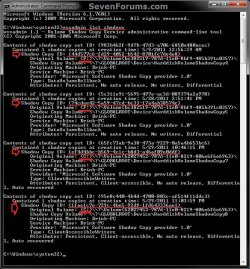
Shadows.jpg
2. vssadmin list shadowstorage
NOTE: This command lists the volume shadow storage space usage, the allocated space while a shadow copy is active and the maximum space that can be used. This is useful to see how much total space is being used on each hard drive letter by the shadow copies on it.
A) Open another elevated command prompt.

B) In the elevated command prompt, type the command below and press enter.
vssadmin list shadowstorage
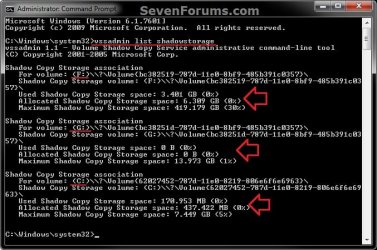
shadowstorage.jpg
3. Set these command windows aside for easy reference when you do either OPTION ONE, OPTION TWO, or OPTION THREE below for what you would like to do to delete the shadow copies.


OPTION ONE

Delete Shadow Copies Using "Disk Cleanup"


NOTE: Disk Cleanup will delete all shadow copies and restore points saved to the selected hard drive letter except the most recent copy.
1. Open the Start Menu, type cleanmgr into the search box, and press Enter.

2. Select the drive/volume letter that you want to delete shadow copies on, and click on OK. (see screenshot below)
NOTE: You will not see this window unless you have more than one drive or partition on your computer.
DC-1.jpg
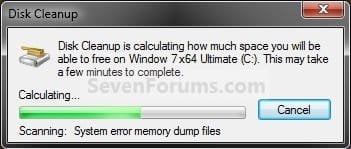
3. You will now see this screenshot below for a moment. (see screenshot below)
DC-2.jpg
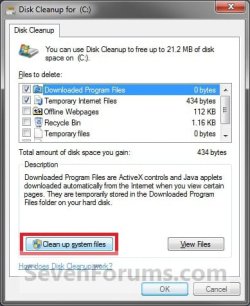
4. Click on the Clean up system files button. (see screenshot below)
DC-3.jpg
5. If prompted by UAC, then click on Yes (Windows 7) or Continue (Vista)

6. Repeat steps 2 and 3.

7. Click on the More Options tab, and click on the Clean up button in the bottom System Restore and Shadow Copies section. (see screenshot below)
DC-4.jpg
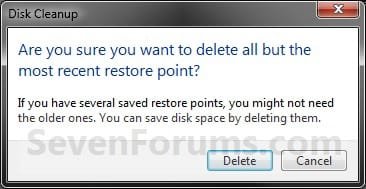
8. Click on the Delete button. (see screenshot below)
DC-5.jpg
9. Click on OK. (see screenshot below step 7)

10. Click on the Delete Files button for the final confirmation. (see screenshot below)
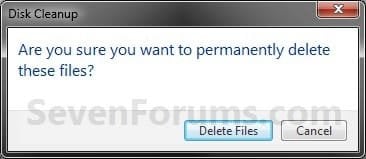
DC-6.jpg
11. When the shadow copies and restore points are finished being deleted, Disk Cleanup will close.


OPTION TWO

Delete Shadow Copies Using "wmic shadowcopy delete" Command


WARNING: This option is for advanced users, and should not be tried by beginners.
1. Be sure you do the "BEFORE YOU START" section at the top first.

2. Open a elevated command prompt.

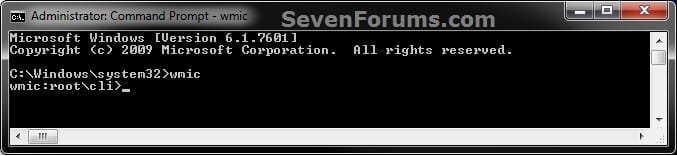
3. In the elevated command prompt, type wmic and press Enter. After a few seconds wmic:root\cli> will appear.
Shadow-1.jpg
4. Copy and paste the command below and press enter.
shadowcopy delete
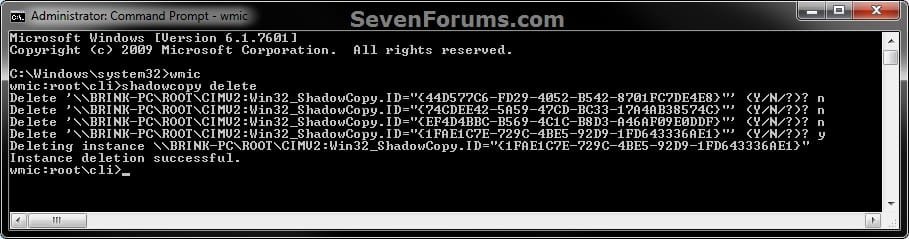
5. You will now be asked Y/N for if you wanted to delete the available shadow copies one by one. Type your answer and press Enter after each one. (see screenshot below)
Shadow-2.jpg

   Note
The listed shadow copies that you answer Y/N to delete or not are referenced by their Shadow Copy ID number. You can compare this Shadow Copy ID number with the ones listed from step 1 in the "BEFORE YOU START" section to know for sure which one you are deleting or not.

For example, the Shadow Copy ID below for the one I deleted in step 5 above is the bottom shadow copy listed in my examples in step 1 of the "BEFORE YOU START" section for the C: drive. You can also compare the Shadow Copy Volume number between step 1 and step 2 in the "BEFORE YOU START" section for additional information about the shadow copy.

Shadow Copy ID
{1FAE1C7E-729C-4BE5-92D9-1FD643336AE1}

Shadow Copy Volume
{62027452-787d-11e0-8219-806e6f6e6963}


6. When finished, close all command prompts.


OPTION THREE

Delete Shadow Copies with "vssadmin delete shadows" Command


WARNING: This option is for advanced users, and should not be tried by beginners.

   Note
Only shadow copies that have the ClientAccessible type can be deleted using this command.

For example, if you look at my examples in step 1 in the "BEFORE YOU START" section, you will notice that only the C: drive/volume shadow copies have Client-accessible listed in their Attributes, and not the F: drive/volume shadow copies. This means that I can only delete the C: drive/volume shadow copies using this command. I would have to use OPTION TWO to be able to delete the F: drive/volume shadow copies instead.

1. Be sure you do the "BEFORE YOU START" section at the top first.

2. Open a elevated command prompt.

3. Do step 4, 5, or 6 below for how you would like to delete the shadow copies.

4. To Delete the Oldest Shadow Copy on a Specific Volume
NOTE: This can be handy if you have more than one shadow copy on a drive/volume letter, and wanted to only delete the oldest one.
A) Type the command below and press Enter.
NOTE: Substitute C: in the command below for the drive letter that you want to delete the oldest shadow copy in instead.
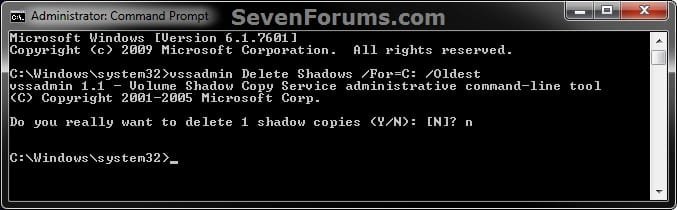
vssadmin Delete Shadows /For=C: /Oldest
B) Type Y or N to delete the shadow copy or not. (see screenshot below)
vssadmin-4.jpg
C) Go to step 7.
5. To Delete All Shadow Copies on a Specific Volume
A) Type the command below and press Enter.
NOTE: Substitute C: in the command below for the drive letter that you want to delete the oldest shadow copy in instead.
vssadmin Delete Shadows /For=C: /All
B) Type Y or N to delete the shadow copies or not. (see screenshot below)
vssadmin-5.jpg
C) Go to step 7.
6. To Delete a Specific Shadow Copy from Any Volume
A) Type the command below and press Enter.
NOTE: Substitute {Shadow Copy ID} in the command below with the actual Shadow Copy ID number of the shadow copy that you want to delete from step 1 of the "BEFORE YOU START" section.
vssadmin Delete Shadows /shadow={Shadow Copy ID}
For example, if I wanted to delete the 3rd shadow copy with the Shadow Copy ID of {ef4d4bbc-b569-4c1c-b8d3-a46af09e0ddf} in my example in step 1 of the "BEFORE YOU START" section, I would type this below.
Code:
vssadmin Delete Shadows /shadow=[B][COLOR=red]{ef4d4bbc-b569-4c1c-b8d3-a46af09e0ddf}[/COLOR][/B]
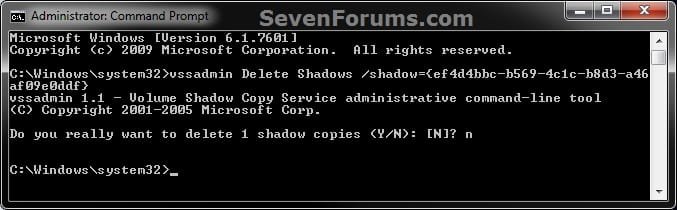
B) Type Y or N to delete the shadow copy or not. (see screenshot below)
vssadmin-6.jpg
C) Continue on to step 7.
7. When finished, close all command prompts.
That's it,
Shawn


Last edited:
wow... awesome post, I had no idea that stuff existed

however, this doesn't seem to be my problem, i have two physical HDD... a drive C and a drive P, using the above vssadmin list shadows.. i find there are 8 shadow copies, all on drive C, nothing on drive P

using the vssadmin list shadowstorage, i find drive C has 9.72 Gb of 10 Gb used, 1%, and again nothing for P

any other ideas? thank you for posting
 

My Computer

Computer Manufacturer/Model Number
built.. not bought ;)
OS
windows 7 64 bit pro
CPU
athlon 64 x2 4400
Motherboard
asus a8n-sli premium
Memory
2Gb
Graphics Card(s)
nVidia 7800 GT something
Sound Card
onboard junk
Monitor(s) Displays
24"
Screen Resolution
1920 x 1200
Hard Drives
all hdd are SATA
WD 320 caviar black (boot)
4 Seagate 250's in raid 5 on promise TX4310 (big data)
Seagate 320 (extra triple backup data for pics)
PSU
550w from china i'm sure
Case
antec aluminum buzzbox
Cooling
umm... fans?
Keyboard
Logitech with annoying as !%^* enhanced F keys
Mouse
MX1000
Internet Speed
LOL
Other Info
Promise SX-150 raid card (only supported until XP...)
Promise TX4310 raid card (only bought because of the above)
Another great tutorial. Well done, Shawn. :)
 

My Computer

Computer Manufacturer/Model Number
Custom Build
OS
Windows 7 Ultimate x64/Windows 8 Consumer Preview x64/Ubuntu 11.04
CPU
Intel Pentium Dual Core E6700 3.2GHz
Motherboard
ASUS P5G41T-M LX
Memory
Strontium 8192MB DDR3 1333Mhz
Graphics Card(s)
msi GeForce N560GTX-M2D1GD5 1GB
Sound Card
Realtek HD Audio
Monitor(s) Displays
CHIMEI CMV 221D 22"
Screen Resolution
1680x1050
Hard Drives
Seagate Barracuda LP Green 3.5'' 2TB Internal HDD 5900RPM + WD Elements Desktop 1TB External HDD 7200RPM
PSU
SHAW Viper-1500w Gaming PSU
Case
Black eMaxx ATX Mini Tower Case
Keyboard
Microsoft Wireless Keyboard 1000
Mouse
Microsoft Wireless Optical Mouse 2000
Internet Speed
100GB @ 4.76Mbps
wow... awesome post, I had no idea that stuff existed

however, this doesn't seem to be my problem, i have two physical HDD... a drive C and a drive P, using the above vssadmin list shadows.. i find there are 8 shadow copies, all on drive C, nothing on drive P

using the vssadmin list shadowstorage, i find drive C has 9.72 Gb of 10 Gb used, 1%, and again nothing for P

any other ideas? thank you for posting

Hello WhatttupG, and welcome to Seven Forums.

You will not have one for the P: drive unless you have turned on system protection for the P: drive, then created a restore point.
 

My Computer

Computer type
PC/Desktop
Computer Manufacturer/Model Number
Self built custom
OS
64-bit Windows 11 Pro for Workstations
CPU
Intel i7-8700K OC'd to 5 GHz
Motherboard
ASUS ROG Maximus XI Formula Z390
Memory
64 GB (4x16GB) G.SKILL TridentZ RGB DDR4 3600 MHz
Graphics Card(s)
ASUS ROG-STRIX-GTX1080TI-O11G-GAMING
Sound Card
Integrated
Monitor(s) Displays
2 x Samsung Odyssey G7 27"
Screen Resolution
2560x1440
Hard Drives
1TB Samsung 990 PRO M.2,
4TB Samsung 990 PRO PRO M.2,
TerraMaster F8 SSD Plus NAS
PSU
Seasonic Prime Titanium 850W
Case
Thermaltake Core P3
Cooling
Corsair Hydro H115i
Keyboard
Logitech wireless K800
Mouse
Logitech MX Master 4
Internet Speed
2 Gb/s Download and 100 Mb/s Upload
Antivirus
Malwarebyte Anti-Malware Premium
Browser
Google Chrome
Other Info
Logitech Z625 speaker system,
Logitech BRIO 4K Pro webcam,
HP Color LaserJet Pro MFP M477fdn,
APC SMART-UPS RT 1000 XL - SURT1000XLI,
Galaxy S23 Plus phone

My Computer

Computer type
PC/Desktop
Computer Manufacturer/Model Number
Self built custom
OS
64-bit Windows 11 Pro for Workstations
CPU
Intel i7-8700K OC'd to 5 GHz
Motherboard
ASUS ROG Maximus XI Formula Z390
Memory
64 GB (4x16GB) G.SKILL TridentZ RGB DDR4 3600 MHz
Graphics Card(s)
ASUS ROG-STRIX-GTX1080TI-O11G-GAMING
Sound Card
Integrated
Monitor(s) Displays
2 x Samsung Odyssey G7 27"
Screen Resolution
2560x1440
Hard Drives
1TB Samsung 990 PRO M.2,
4TB Samsung 990 PRO PRO M.2,
TerraMaster F8 SSD Plus NAS
PSU
Seasonic Prime Titanium 850W
Case
Thermaltake Core P3
Cooling
Corsair Hydro H115i
Keyboard
Logitech wireless K800
Mouse
Logitech MX Master 4
Internet Speed
2 Gb/s Download and 100 Mb/s Upload
Antivirus
Malwarebyte Anti-Malware Premium
Browser
Google Chrome
Other Info
Logitech Z625 speaker system,
Logitech BRIO 4K Pro webcam,
HP Color LaserJet Pro MFP M477fdn,
APC SMART-UPS RT 1000 XL - SURT1000XLI,
Galaxy S23 Plus phone

My Computer

Computer type
Laptop
Computer Manufacturer/Model Number
Hewlett-Packard/G62-107SA Notebook
OS
Microsoft Windows 7 Home Premium 64-bit Service Pack 1
CPU
Intel(R) Core(TM) i3 CPU M 330 @ 2.13GHz
Motherboard
Hewlett-Packard 1425
Memory
8 GB DDR3
Graphics Card(s)
Intel(R) HD Graphics
Sound Card
Realtek High Definition Audio
Monitor(s) Displays
Builtin
Screen Resolution
1366 x 768 x 32 bits (4294967296 colors) @ 60 Hz
Hard Drives
250 GB SATA Hard Disk Drive 7200 rpm
2TB Seagate GoFlex USB 2 Drive
1TB Iomega Prestige USB 2 Drive
1.5TB Iomega Prestige USB 2 Drive (Samsung)
2TB WD MyBook Live NAS.
Mouse
Logitech Anywhere MX
Internet Speed
152 Mbs download 10 Mbs upload
Antivirus
Norton 360
Browser
Chrome

My Computer

Computer type
PC/Desktop
Computer Manufacturer/Model Number
Self built custom
OS
64-bit Windows 11 Pro for Workstations
CPU
Intel i7-8700K OC'd to 5 GHz
Motherboard
ASUS ROG Maximus XI Formula Z390
Memory
64 GB (4x16GB) G.SKILL TridentZ RGB DDR4 3600 MHz
Graphics Card(s)
ASUS ROG-STRIX-GTX1080TI-O11G-GAMING
Sound Card
Integrated
Monitor(s) Displays
2 x Samsung Odyssey G7 27"
Screen Resolution
2560x1440
Hard Drives
1TB Samsung 990 PRO M.2,
4TB Samsung 990 PRO PRO M.2,
TerraMaster F8 SSD Plus NAS
PSU
Seasonic Prime Titanium 850W
Case
Thermaltake Core P3
Cooling
Corsair Hydro H115i
Keyboard
Logitech wireless K800
Mouse
Logitech MX Master 4
Internet Speed
2 Gb/s Download and 100 Mb/s Upload
Antivirus
Malwarebyte Anti-Malware Premium
Browser
Google Chrome
Other Info
Logitech Z625 speaker system,
Logitech BRIO 4K Pro webcam,
HP Color LaserJet Pro MFP M477fdn,
APC SMART-UPS RT 1000 XL - SURT1000XLI,
Galaxy S23 Plus phone
Ah. I missed that one Shawn.
 

My Computer

Computer type
Laptop
Computer Manufacturer/Model Number
Hewlett-Packard/G62-107SA Notebook
OS
Microsoft Windows 7 Home Premium 64-bit Service Pack 1
CPU
Intel(R) Core(TM) i3 CPU M 330 @ 2.13GHz
Motherboard
Hewlett-Packard 1425
Memory
8 GB DDR3
Graphics Card(s)
Intel(R) HD Graphics
Sound Card
Realtek High Definition Audio
Monitor(s) Displays
Builtin
Screen Resolution
1366 x 768 x 32 bits (4294967296 colors) @ 60 Hz
Hard Drives
250 GB SATA Hard Disk Drive 7200 rpm
2TB Seagate GoFlex USB 2 Drive
1TB Iomega Prestige USB 2 Drive
1.5TB Iomega Prestige USB 2 Drive (Samsung)
2TB WD MyBook Live NAS.
Mouse
Logitech Anywhere MX
Internet Speed
152 Mbs download 10 Mbs upload
Antivirus
Norton 360
Browser
Chrome
No problem mate. Thank you for mentioning it though. :)
 

My Computer

Computer type
PC/Desktop
Computer Manufacturer/Model Number
Self built custom
OS
64-bit Windows 11 Pro for Workstations
CPU
Intel i7-8700K OC'd to 5 GHz
Motherboard
ASUS ROG Maximus XI Formula Z390
Memory
64 GB (4x16GB) G.SKILL TridentZ RGB DDR4 3600 MHz
Graphics Card(s)
ASUS ROG-STRIX-GTX1080TI-O11G-GAMING
Sound Card
Integrated
Monitor(s) Displays
2 x Samsung Odyssey G7 27"
Screen Resolution
2560x1440
Hard Drives
1TB Samsung 990 PRO M.2,
4TB Samsung 990 PRO PRO M.2,
TerraMaster F8 SSD Plus NAS
PSU
Seasonic Prime Titanium 850W
Case
Thermaltake Core P3
Cooling
Corsair Hydro H115i
Keyboard
Logitech wireless K800
Mouse
Logitech MX Master 4
Internet Speed
2 Gb/s Download and 100 Mb/s Upload
Antivirus
Malwarebyte Anti-Malware Premium
Browser
Google Chrome
Other Info
Logitech Z625 speaker system,
Logitech BRIO 4K Pro webcam,
HP Color LaserJet Pro MFP M477fdn,
APC SMART-UPS RT 1000 XL - SURT1000XLI,
Galaxy S23 Plus phone
Hello Shawn

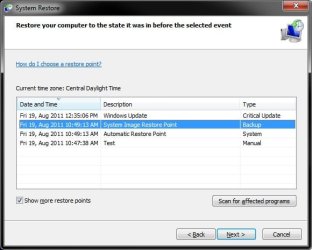
Will this delete those annoying "system image restore points" under show more restore points. The only way Ive found to delete these is to redirect my windows backup to my image drive and then delete the images from there, but that forces windows backup to perform a full back up next time its scheduled.

Danny
 

My Computer

Computer Manufacturer/Model Number
acer aspire 5935g
OS
Windows 7 Home Premium x64 SP1
CPU
intel(R)core(TM)2 duo CPU T6600 @ 2.20GHz
Motherboard
intel gm45/gm47 revision 07
Memory
3 gb ddr3
Graphics Card(s)
ati radeon hd4570/512mb
Monitor(s) Displays
lop156wh2-tle1 15.3 flat
Screen Resolution
1366x768
Hard Drives
OCZ-Agility3 60gig ssd
320gig external hdd
500gig external hdd
Mouse
Optical
Internet Speed
30Mbps Down/30Mbps Up
Danny,

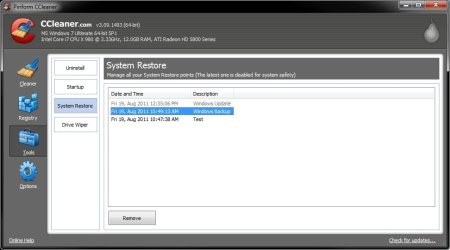
Sorry about the late reply. Yes, CCleaner will make it easier to delete restore points from a system image. The one I have below is displayed as "Windows Backup", but it I had only created a separate system image and never a normal backup.

CCleaner.jpg
 

My Computer

Computer type
PC/Desktop
Computer Manufacturer/Model Number
Self built custom
OS
64-bit Windows 11 Pro for Workstations
CPU
Intel i7-8700K OC'd to 5 GHz
Motherboard
ASUS ROG Maximus XI Formula Z390
Memory
64 GB (4x16GB) G.SKILL TridentZ RGB DDR4 3600 MHz
Graphics Card(s)
ASUS ROG-STRIX-GTX1080TI-O11G-GAMING
Sound Card
Integrated
Monitor(s) Displays
2 x Samsung Odyssey G7 27"
Screen Resolution
2560x1440
Hard Drives
1TB Samsung 990 PRO M.2,
4TB Samsung 990 PRO PRO M.2,
TerraMaster F8 SSD Plus NAS
PSU
Seasonic Prime Titanium 850W
Case
Thermaltake Core P3
Cooling
Corsair Hydro H115i
Keyboard
Logitech wireless K800
Mouse
Logitech MX Master 4
Internet Speed
2 Gb/s Download and 100 Mb/s Upload
Antivirus
Malwarebyte Anti-Malware Premium
Browser
Google Chrome
Other Info
Logitech Z625 speaker system,
Logitech BRIO 4K Pro webcam,
HP Color LaserJet Pro MFP M477fdn,
APC SMART-UPS RT 1000 XL - SURT1000XLI,
Galaxy S23 Plus phone
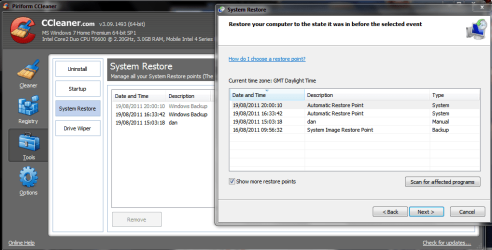
Thats odd my "system image restore points" don't show up in ccleaners list. The problem I had was I had 17 of these system image restore points in there at 1 point some from months ago some where the image had already been manually deleted. I have my data backup on a separate external partition to my images so they don't show in the manage back up space option because obviously that's pointing the data back up partition.
I had a play with this the other day and the only way I could remove them was to change my backup settings and direct them to the system image partition, which forced a backup to run which I quickly cancelled.Then I renamed my images one at a time back to the default name, and they showed up in the manage space section so they could be deleted that way which in turn removed each restore point entry.The problem is when I redirected the backup back to my data backup partition the damn thing wanted to do another full backup so it was ages backing up 200+ gigs worth of data.
There has to be another way to remove them.I know there harmless just sat there but its damned annoying when you know their there.

Capture.PNG

Danny
 

My Computer

Computer Manufacturer/Model Number
acer aspire 5935g
OS
Windows 7 Home Premium x64 SP1
CPU
intel(R)core(TM)2 duo CPU T6600 @ 2.20GHz
Motherboard
intel gm45/gm47 revision 07
Memory
3 gb ddr3
Graphics Card(s)
ati radeon hd4570/512mb
Monitor(s) Displays
lop156wh2-tle1 15.3 flat
Screen Resolution
1366x768
Hard Drives
OCZ-Agility3 60gig ssd
320gig external hdd
500gig external hdd
Mouse
Optical
Internet Speed
30Mbps Down/30Mbps Up
Redirecting or renaming the WindowsImageBackup folder for them may have been why.

171076d1313782034-shadow-copies-delete-ccleaner.jpg


System_restore.jpg
 

My Computer

Computer type
PC/Desktop
Computer Manufacturer/Model Number
Self built custom
OS
64-bit Windows 11 Pro for Workstations
CPU
Intel i7-8700K OC'd to 5 GHz
Motherboard
ASUS ROG Maximus XI Formula Z390
Memory
64 GB (4x16GB) G.SKILL TridentZ RGB DDR4 3600 MHz
Graphics Card(s)
ASUS ROG-STRIX-GTX1080TI-O11G-GAMING
Sound Card
Integrated
Monitor(s) Displays
2 x Samsung Odyssey G7 27"
Screen Resolution
2560x1440
Hard Drives
1TB Samsung 990 PRO M.2,
4TB Samsung 990 PRO PRO M.2,
TerraMaster F8 SSD Plus NAS
PSU
Seasonic Prime Titanium 850W
Case
Thermaltake Core P3
Cooling
Corsair Hydro H115i
Keyboard
Logitech wireless K800
Mouse
Logitech MX Master 4
Internet Speed
2 Gb/s Download and 100 Mb/s Upload
Antivirus
Malwarebyte Anti-Malware Premium
Browser
Google Chrome
Other Info
Logitech Z625 speaker system,
Logitech BRIO 4K Pro webcam,
HP Color LaserJet Pro MFP M477fdn,
APC SMART-UPS RT 1000 XL - SURT1000XLI,
Galaxy S23 Plus phone
mmmmmm didn't think of that just running one now see if that shows up.

Thanks Shawn
 

My Computer

Computer Manufacturer/Model Number
acer aspire 5935g
OS
Windows 7 Home Premium x64 SP1
CPU
intel(R)core(TM)2 duo CPU T6600 @ 2.20GHz
Motherboard
intel gm45/gm47 revision 07
Memory
3 gb ddr3
Graphics Card(s)
ati radeon hd4570/512mb
Monitor(s) Displays
lop156wh2-tle1 15.3 flat
Screen Resolution
1366x768
Hard Drives
OCZ-Agility3 60gig ssd
320gig external hdd
500gig external hdd
Mouse
Optical
Internet Speed
30Mbps Down/30Mbps Up
wow... awesome post, I had no idea that stuff existed

however, this doesn't seem to be my problem, i have two physical HDD... a drive C and a drive P, using the above vssadmin list shadows.. i find there are 8 shadow copies, all on drive C, nothing on drive P

using the vssadmin list shadowstorage, i find drive C has 9.72 Gb of 10 Gb used, 1%, and again nothing for P

any other ideas? thank you for posting

Hello WhatttupG, and welcome to Seven Forums.

You will not have one for the P: drive unless you have turned on system protection for the P: drive, then created a restore point.


thanks brink, i actually replyed in the wrong place.. pilot error lol

killer tutorial though, imma look for the rep button for you
 

My Computer

Computer Manufacturer/Model Number
built.. not bought ;)
OS
windows 7 64 bit pro
CPU
athlon 64 x2 4400
Motherboard
asus a8n-sli premium
Memory
2Gb
Graphics Card(s)
nVidia 7800 GT something
Sound Card
onboard junk
Monitor(s) Displays
24"
Screen Resolution
1920 x 1200
Hard Drives
all hdd are SATA
WD 320 caviar black (boot)
4 Seagate 250's in raid 5 on promise TX4310 (big data)
Seagate 320 (extra triple backup data for pics)
PSU
550w from china i'm sure
Case
antec aluminum buzzbox
Cooling
umm... fans?
Keyboard
Logitech with annoying as !%^* enhanced F keys
Mouse
MX1000
Internet Speed
LOL
Other Info
Promise SX-150 raid card (only supported until XP...)
Promise TX4310 raid card (only bought because of the above)
LOL, you're welcome. Thank you. :)
 

My Computer

Computer type
PC/Desktop
Computer Manufacturer/Model Number
Self built custom
OS
64-bit Windows 11 Pro for Workstations
CPU
Intel i7-8700K OC'd to 5 GHz
Motherboard
ASUS ROG Maximus XI Formula Z390
Memory
64 GB (4x16GB) G.SKILL TridentZ RGB DDR4 3600 MHz
Graphics Card(s)
ASUS ROG-STRIX-GTX1080TI-O11G-GAMING
Sound Card
Integrated
Monitor(s) Displays
2 x Samsung Odyssey G7 27"
Screen Resolution
2560x1440
Hard Drives
1TB Samsung 990 PRO M.2,
4TB Samsung 990 PRO PRO M.2,
TerraMaster F8 SSD Plus NAS
PSU
Seasonic Prime Titanium 850W
Case
Thermaltake Core P3
Cooling
Corsair Hydro H115i
Keyboard
Logitech wireless K800
Mouse
Logitech MX Master 4
Internet Speed
2 Gb/s Download and 100 Mb/s Upload
Antivirus
Malwarebyte Anti-Malware Premium
Browser
Google Chrome
Other Info
Logitech Z625 speaker system,
Logitech BRIO 4K Pro webcam,
HP Color LaserJet Pro MFP M477fdn,
APC SMART-UPS RT 1000 XL - SURT1000XLI,
Galaxy S23 Plus phone
There has to be another way to remove them.
Yeah as you found already danny System Image Restore Points Backups can be found and [obliterated] via wbadmin as I recently posted here.

Too many different terms to search on--I didn't find-out about ccleaner until you told me by PM, thanks!

I find these "shadow copies" to be a complete mystery myself. Further, I wonder about any utility that promises to remove intermediate System Restore points like CCleaner. Isn't it the case that each of these Restore points is dependent on every other, or at least the prior-and-after? Is there a clear explanation somewhere of exactly how these work?

I frankly can become lost w/SR points e.g. what if you restore to a 10-day old SR point and then decide to try a 2-day old. Makes me dizzy to think about it! :p
 

My Computer

Computer type
Laptop
Computer Manufacturer/Model Number
Dell Latitude E6540 Laptop
OS
Windows 7 Professional 64bit
CPU
Intel Core i7 4600M @ 2.90GHz
Motherboard
Dell Inc. 0CYT5F (SOCKET 0)
Memory
16.0GB Dual-Channel DDR3 @ 797MHz (11-11-11-28)
Graphics Card(s)
Intel HD Graphics 4600 (Dell) 2048MB ATI AMD Radeon HD 8790M
Sound Card
Realtek High Definition Audio
Monitor(s) Displays
HP ZR30w (2560x1600@60Hz)
Hard Drives
256GB LITEONIT LMT-256M6M-41 mm SATA (SSD)
1TB Samsung SSD 860 EVO mSATA SATA (SSD)
2TB USB 3.0 USB Device
115GB SanDisk Ultra Fit USB
Other Info
Multiple Dell E-Port Plus II Port Replicator/Docking Stations 0Y72NH USB 3.0 + 130W AC Adapters
What happens if I have restore points on disk C and delete one? for example:
restore point 1 : date 1 jan
restore point 2 : date 2 jan
restore point 3 : date 3 jan
restore point 4 : date 4 jan
restore point 5 : date 5 jan

All restore points are incremental changes (on block level) AFAIK. If I delete restore point 3 and 4, system restore to restore point 1 and 2 is impossible. Unless restore point 3 and 4 merges to restore point 2 automatically.

Is this how it works?
 

My Computer

Computer type
Laptop
Computer Manufacturer/Model Number
ACER ASPIRE 5742G
OS
Microsoft Windows 7 Home Premium 64-bits 7601 Multiprocessor Free Service Pack 1
CPU
Intel(R) Core(TM) i3 CPU M 370 @ 2.40GHz
Motherboard
Acer Aspire 5742G
Memory
4,00 GB
Graphics Card(s)
ATI Mobility Radeon HD 5400 Series
Sound Card
(1) AMD High Definition Audio Device (2) Realtek High Defi
Screen Resolution
1366 x 768 x 32 bits (4294967296 colors) @ 60 Hz
Hard Drives
WDC WD5000BEVT-22ZAT0
There has to be another way to remove them.
Yeah as you found already danny System Image Restore Points Backups can be found and [obliterated] via wbadmin as I recently posted here.

Too many different terms to search on--I didn't find-out about ccleaner until you told me by PM, thanks!

I find these "shadow copies" to be a complete mystery myself. Further, I wonder about any utility that promises to remove intermediate System Restore points like CCleaner. Isn't it the case that each of these Restore points is dependent on every other, or at least the prior-and-after? Is there a clear explanation somewhere of exactly how these work?

I frankly can become lost w/SR points e.g. what if you restore to a 10-day old SR point and then decide to try a 2-day old. Makes me dizzy to think about it! :p
If you restore to "10-day old SR point" this is actually sort of installation and a new restore point will be created. You can rollback to this restore point and your back to day 0. or rollback to any other restore points. If you perform a system restore from "safe mode", recovery disk, recovery environment a new restore point will NOT be created! But all changes will be included in the most recent restore point
 

My Computer

Computer type
Laptop
Computer Manufacturer/Model Number
ACER ASPIRE 5742G
OS
Microsoft Windows 7 Home Premium 64-bits 7601 Multiprocessor Free Service Pack 1
CPU
Intel(R) Core(TM) i3 CPU M 370 @ 2.40GHz
Motherboard
Acer Aspire 5742G
Memory
4,00 GB
Graphics Card(s)
ATI Mobility Radeon HD 5400 Series
Sound Card
(1) AMD High Definition Audio Device (2) Realtek High Defi
Screen Resolution
1366 x 768 x 32 bits (4294967296 colors) @ 60 Hz
Hard Drives
WDC WD5000BEVT-22ZAT0
What happens if I have restore points on disk C and delete one? for example:
restore point 1 : date 1 jan
restore point 2 : date 2 jan
restore point 3 : date 3 jan
restore point 4 : date 4 jan
restore point 5 : date 5 jan

All restore points are incremental changes (on block level) AFAIK. If I delete restore point 3 and 4, system restore to restore point 1 and 2 is impossible. Unless restore point 3 and 4 merges to restore point 2 automatically.

Is this how it works?


Hello Kaktussoft,

This tutorial is about shadow copies instead of specific restore points. For restore points, you could use the tutorial below to delete them instead. I like OPTION FOUR in the tutorial below best since you could also use it to mount the restore point to see what's in it before deleting it.

http://www.sevenforums.com/tutorials/336-system-protection-restore-points-delete.html
 

My Computer

Computer type
PC/Desktop
Computer Manufacturer/Model Number
Self built custom
OS
64-bit Windows 11 Pro for Workstations
CPU
Intel i7-8700K OC'd to 5 GHz
Motherboard
ASUS ROG Maximus XI Formula Z390
Memory
64 GB (4x16GB) G.SKILL TridentZ RGB DDR4 3600 MHz
Graphics Card(s)
ASUS ROG-STRIX-GTX1080TI-O11G-GAMING
Sound Card
Integrated
Monitor(s) Displays
2 x Samsung Odyssey G7 27"
Screen Resolution
2560x1440
Hard Drives
1TB Samsung 990 PRO M.2,
4TB Samsung 990 PRO PRO M.2,
TerraMaster F8 SSD Plus NAS
PSU
Seasonic Prime Titanium 850W
Case
Thermaltake Core P3
Cooling
Corsair Hydro H115i
Keyboard
Logitech wireless K800
Mouse
Logitech MX Master 4
Internet Speed
2 Gb/s Download and 100 Mb/s Upload
Antivirus
Malwarebyte Anti-Malware Premium
Browser
Google Chrome
Other Info
Logitech Z625 speaker system,
Logitech BRIO 4K Pro webcam,
HP Color LaserJet Pro MFP M477fdn,
APC SMART-UPS RT 1000 XL - SURT1000XLI,
Galaxy S23 Plus phone
Back
Top