I apologize in advance for the length of the quote below, but it seemed necessary to put a proper focus on my question:
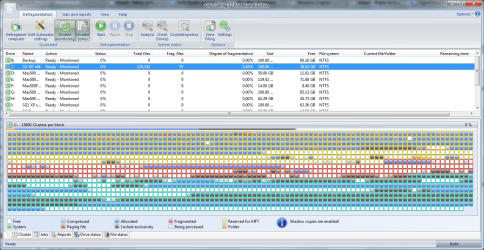
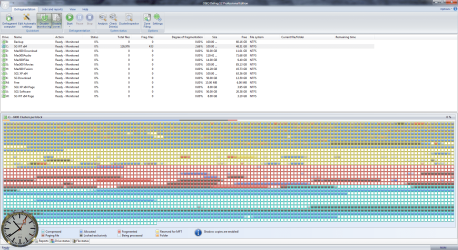
For this reason, I guess I have to leave the shadow copy function enabled, but looking in my file manager, there are ~28 items listed and looking at O&O's graphical analysis, they are taking up a fair number of GBs of the partitions space.
Since these locked files have a tendency to increase fragmentation of other files on the partition, I've been trying to figure if there is a good and safe way to determine which, if any of these shadow copies can be deleted? Those 28 copies were created on only 4 days, so I'm guessing that each partion got it's own shadow made, or they are only incremental portions of a whole.
How would one predetermine the effect of deleting any particular shadow copy?
If I comprehend what was said, the shadow copies are necessary for the proper functioning of the backup system and System Restore points, but while I do care about the restore points, I don't care about the W7's backup system, because I use third party software for that purpose.The operating systems Windows 7, Windows Vista, Windows XP64, Windows Server 2003 and 2008 offer users the ability to create "Shadow Copies" for protecting their data. This new feature automatically creates copies of files currently in use at regular time intervals. Since Windows only captures changes in the files, not a lot of additional space is normally needed. Accidentally deleted files and folders or previous versions of documents can be easily restored using a convenient command accessible through the context menu. Simply right-click the object you want to restore and click "Restore Previous Versions".
At the moment of installation Windows Vista (or newer) the shadow copy mechanism is set as default. With Windows XP64 and Windows Server 2003/2008 systems it is deactivated by default.
During defragmentation, files on a volume get moved. Vista perceives this as a deletion and creates a new Shadow Copy for the moved file. Because defragmentation requires the moving of multiple files, many Shadow Copies are created, which in turn leads to the higher demand on disk space. This behaviour may overwrite older shadow copies with newer ones. Unfortunately, this can also lead to the deletion of the system recovery points! These consequences are most frequent when using the COMPLETE method.
Shadow copies are filed in the folder “System Volume Information” and cannot be defragmented. This can end up having a negative influence on the result of the defragmentation. There is, on the other hand, almost hardly any loss in performance caused by fragmented shadow copies. Although these files will be displayed as fragmented, they still have only a minimal influence on the operating speed of your system.
You could disable the shadow copies to achieve improved defragmentation results but you would then wind up losing the operating system’s built-in backup functionality. That’s why we recommend your leaving the shadow copies enabled.
Microsoft is already aware of this problem, as this issue also occurs in the Windows native defragmentation software. More details may be found in this article from Microsoft: Shadow copies may be lost when you defragment a volume
In Windows XP64 and Windows 2003 Server, this problem will not occur as long as storage volumes have been formatted with a cluster size of 16KB or larger. If this cannot be changed or Windows Vista is in use, this issue can be avoided by first performing a STEALTH defragmentation followed by a SPACE defragmentation.
For this reason, I guess I have to leave the shadow copy function enabled, but looking in my file manager, there are ~28 items listed and looking at O&O's graphical analysis, they are taking up a fair number of GBs of the partitions space.
Since these locked files have a tendency to increase fragmentation of other files on the partition, I've been trying to figure if there is a good and safe way to determine which, if any of these shadow copies can be deleted? Those 28 copies were created on only 4 days, so I'm guessing that each partion got it's own shadow made, or they are only incremental portions of a whole.
How would one predetermine the effect of deleting any particular shadow copy?
My Computer
- Computer Manufacturer/Model Number
- DIY
- OS
- W7x64 Pro, SuSe 12.1/** W7 x64 Pro, XP MCE
- CPU
- Phenom II 1090T w/Noctua NH-D14 /**4400+ X2 w/CM Hyper TX 3
- Motherboard
- ASRock 890FX Deluxe 4/**A8N-SLI
- Memory
- 2 x 2GB Patriot PGS34g1600LLKA/**4x1GB Corsair VS
- Graphics Card(s)
- EVGA GTX460 SC/**EVGA 8800GTS
- Sound Card
- Asus Xonar D2X/**Xonar D1
- Monitor(s) Displays
- Acer X233H, Dell E152FPc /**LG M237-WD
- Screen Resolution
- 1920x1080 & 1024x768/**1980x1080
- Hard Drives
- WDC 2TB, 1.5TB, 1TB, 500GB,Seagate 500GB , Maxtor 80GB /**500GB Seagate & WDC 1TB Black
- PSU
- CM RS600 w/ APC BX1000G/**Antec 500 TP w/ APC BX1000
- Case
- HAF922/**Antec 1040IIB
- Cooling
- 3x200mm, 1x140 and 1x120mm/**5x80mm fans
- Keyboard
- Logitech Media USB/**Saitek Eclipse
- Mouse
- Cordless Trackman Wheel/**Ditto
- Internet Speed
- 3.3Mbps
- Other Info
- SB 560 5.1 w/ Sennheiser RS140/**Creative T20 speakers, Dvico FusionHDTV7 Gold RT, Cisco E3000, HP 5510V AIO, Linksys E3000, Belkin F5U237 hub and **F5D8055 adapter
(** = 2nd rig)