
Shadow Copies

seekermeister

Old School
Guru
VIP
Local time
6:30 PM
Messages
6,618
Location
Indian Territory
I apologize in advance for the length of the quote below, but it seemed necessary to put a proper focus on my question:

The operating systems Windows 7, Windows Vista, Windows XP64, Windows Server 2003 and 2008 offer users the ability to create "Shadow Copies" for protecting their data. This new feature automatically creates copies of files currently in use at regular time intervals. Since Windows only captures changes in the files, not a lot of additional space is normally needed. Accidentally deleted files and folders or previous versions of documents can be easily restored using a convenient command accessible through the context menu. Simply right-click the object you want to restore and click "Restore Previous Versions".

At the moment of installation Windows Vista (or newer) the shadow copy mechanism is set as default. With Windows XP64 and Windows Server 2003/2008 systems it is deactivated by default.

During defragmentation, files on a volume get moved. Vista perceives this as a deletion and creates a new Shadow Copy for the moved file. Because defragmentation requires the moving of multiple files, many Shadow Copies are created, which in turn leads to the higher demand on disk space. This behaviour may overwrite older shadow copies with newer ones. Unfortunately, this can also lead to the deletion of the system recovery points! These consequences are most frequent when using the COMPLETE method.

Shadow copies are filed in the folder “System Volume Information” and cannot be defragmented. This can end up having a negative influence on the result of the defragmentation. There is, on the other hand, almost hardly any loss in performance caused by fragmented shadow copies. Although these files will be displayed as fragmented, they still have only a minimal influence on the operating speed of your system.

You could disable the shadow copies to achieve improved defragmentation results but you would then wind up losing the operating system’s built-in backup functionality. That’s why we recommend your leaving the shadow copies enabled.

Microsoft is already aware of this problem, as this issue also occurs in the Windows native defragmentation software. More details may be found in this article from Microsoft: Shadow copies may be lost when you defragment a volume

In Windows XP64 and Windows 2003 Server, this problem will not occur as long as storage volumes have been formatted with a cluster size of 16KB or larger. If this cannot be changed or Windows Vista is in use, this issue can be avoided by first performing a STEALTH defragmentation followed by a SPACE defragmentation.
If I comprehend what was said, the shadow copies are necessary for the proper functioning of the backup system and System Restore points, but while I do care about the restore points, I don't care about the W7's backup system, because I use third party software for that purpose.

For this reason, I guess I have to leave the shadow copy function enabled, but looking in my file manager, there are ~28 items listed and looking at O&O's graphical analysis, they are taking up a fair number of GBs of the partitions space.

Since these locked files have a tendency to increase fragmentation of other files on the partition, I've been trying to figure if there is a good and safe way to determine which, if any of these shadow copies can be deleted? Those 28 copies were created on only 4 days, so I'm guessing that each partion got it's own shadow made, or they are only incremental portions of a whole.

How would one predetermine the effect of deleting any particular shadow copy?
 

My Computer

Computer Manufacturer/Model Number
DIY
OS
W7x64 Pro, SuSe 12.1/** W7 x64 Pro, XP MCE
CPU
Phenom II 1090T w/Noctua NH-D14 /**4400+ X2 w/CM Hyper TX 3
Motherboard
ASRock 890FX Deluxe 4/**A8N-SLI
Memory
2 x 2GB Patriot PGS34g1600LLKA/**4x1GB Corsair VS
Graphics Card(s)
EVGA GTX460 SC/**EVGA 8800GTS
Sound Card
Asus Xonar D2X/**Xonar D1
Monitor(s) Displays
Acer X233H, Dell E152FPc /**LG M237-WD
Screen Resolution
1920x1080 & 1024x768/**1980x1080
Hard Drives
WDC 2TB, 1.5TB, 1TB, 500GB,Seagate 500GB , Maxtor 80GB /**500GB Seagate & WDC 1TB Black
PSU
CM RS600 w/ APC BX1000G/**Antec 500 TP w/ APC BX1000
Case
HAF922/**Antec 1040IIB
Cooling
3x200mm, 1x140 and 1x120mm/**5x80mm fans
Keyboard
Logitech Media USB/**Saitek Eclipse
Mouse
Cordless Trackman Wheel/**Ditto
Internet Speed
3.3Mbps
Other Info
SB 560 5.1 w/ Sennheiser RS140/**Creative T20 speakers, Dvico FusionHDTV7 Gold RT, Cisco E3000, HP 5510V AIO, Linksys E3000, Belkin F5U237 hub and **F5D8055 adapter
(** = 2nd rig)
Since these locked files have a tendency to increase fragmentation of other files on the partition...

Don't have an answer for your question really. But no Shadow Copies don't actually case fragmentation until the HDD is almost filled. Windows actually places the Shadow Copies at the far right end of the HDD away from the main data.

What the quote you referenced is about how defragmentation has a negative effect with Shadow Copies (SC). When the defrag moves a file on the HDD, SC sees that as a deletion and copy operation causing SC to create a copy.
 

My Computer

Computer type
PC/Desktop
Computer Manufacturer/Model Number
Alienware Aurora ALX R4
OS
Windows 10 Pro (x64)
CPU
Intel Core i7-3930K (3.2GHz - 4.5GHz)
Motherboard
Alienware Aurora-R4 x79
Memory
4x Samsung 4GB PC3-12800 DDR3 (16GB 1600MHz)
Graphics Card(s)
Nvidia Geforce GTX 690
Sound Card
SteelSeries Siberia Elite
Monitor(s) Displays
Dell UltraSharp U3011
Screen Resolution
2560x1600
Hard Drives
Samsung 850 Pro 256 GB, Seagate 1TB Desktop Hybrid HDD, 2x Western Digital 4TB Green HDD
PSU
875W Some Dell PSU <.<
Case
Alienware Aurora ALX
Cooling
Custom Liquid Cooling (EK CPU & GPU blocks) dual EK 480RAD
Keyboard
Logitech G710+ Mechanical
Mouse
Logitech G700s
Internet Speed
Verizon Fios (50 mbps average)
Other Info
Server: Intel NUC D54250WYK: i5-4250U, 16GB, 256 GB mSATA, Windows Server 2012 R2
Don't have an answer for your question really. But no Shadow Copies don't actually case fragmentation until the HDD is almost filled. Windows actually places the Shadow Copies at the far right end of the HDD away from the main data.

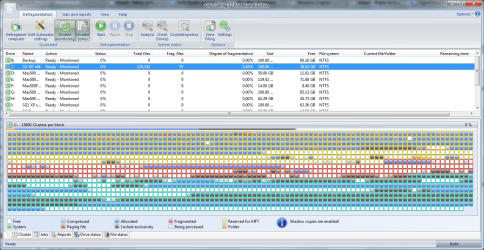
Not altogether, in the attachment, almost all of the gray blocks are System Volume Information, which is composed mostly of shadow copies (plus many of the other color blocks contain system volume information files also).
What the quote you referenced is about how defragmentation has a negative effect with Shadow Copies (SC). When the defrag moves a file on the HDD, SC sees that as a deletion and copy operation causing SC to create a copy.
Yes, but it seems that it goes both ways...defrag effect copies...multiple copies scattered across the partition effect fragmentation.

Those blue block at the very bottom of the graph are from a game that I installed recently, and I'm pretty sure that doesn't include all of the game's files.
 

Attachments

  • O&O Defrag.png
    O&O Defrag.png
    76.6 KB · Views: 243

My Computer

Computer Manufacturer/Model Number
DIY
OS
W7x64 Pro, SuSe 12.1/** W7 x64 Pro, XP MCE
CPU
Phenom II 1090T w/Noctua NH-D14 /**4400+ X2 w/CM Hyper TX 3
Motherboard
ASRock 890FX Deluxe 4/**A8N-SLI
Memory
2 x 2GB Patriot PGS34g1600LLKA/**4x1GB Corsair VS
Graphics Card(s)
EVGA GTX460 SC/**EVGA 8800GTS
Sound Card
Asus Xonar D2X/**Xonar D1
Monitor(s) Displays
Acer X233H, Dell E152FPc /**LG M237-WD
Screen Resolution
1920x1080 & 1024x768/**1980x1080
Hard Drives
WDC 2TB, 1.5TB, 1TB, 500GB,Seagate 500GB , Maxtor 80GB /**500GB Seagate & WDC 1TB Black
PSU
CM RS600 w/ APC BX1000G/**Antec 500 TP w/ APC BX1000
Case
HAF922/**Antec 1040IIB
Cooling
3x200mm, 1x140 and 1x120mm/**5x80mm fans
Keyboard
Logitech Media USB/**Saitek Eclipse
Mouse
Cordless Trackman Wheel/**Ditto
Internet Speed
3.3Mbps
Other Info
SB 560 5.1 w/ Sennheiser RS140/**Creative T20 speakers, Dvico FusionHDTV7 Gold RT, Cisco E3000, HP 5510V AIO, Linksys E3000, Belkin F5U237 hub and **F5D8055 adapter
(** = 2nd rig)
Shadowcopies cannot be deleted individually. Depending on the size of your OS partition, shadowstorage will use 5, 10 or 15% of your partition space. A shadow is written every time you install or uninstall something (even updates) and one is written per day. If you had 28 shadows in 4 days, you must have been installing a lot. If you want to look at the size of your shadowstorage, go into elevated cmd and type vssadmin list shadowstorage and hit Enter. That will give you 3 numbers - used, which is relatively irrelevant, allocated, which is the amount VSS has currently grabbed and maximum, which is what it will ultimately grab. If you want to look at individual shadows (restore points), type vssadmin list shadows and hit Enter. If you want to resize the shadowstorage, type vssadmin Resize ShadowStorage /For=C: /On=C: /MaxSize=300MB - note, the minimum size is 300MB but you can choose any amount larger than 300MB - e.g. 5GB. Also note the blanks in front of the slashes.
 

My Computer

Computer Manufacturer/Model Number
HP, Dell, Gateway, Toshiba - 4 laptops and 2 desktops
OS
Vista, Windows7, Mint Mate, Zorin, Windows 8
CPU
from 1.6GHz Duo to i7
Monitor(s) Displays
2x HP w2207
Hard Drives
5x HDD, 7x SSD, 12x Externals
Keyboard
with trackball - no mices
Mouse
Trackball mice
Internet Speed
DSL 6000
It seems that mine is set a bit larger (20%-20GBs). The used and allocated are 19.+GBs each. If I were to resize this, what would happen to the copies already made, would they be deleted? I'm not necessarily against that, because that is the purpose of this thread, but I really like to know what to expect. Is there some ratio to expect as far as the number of restore points would be possible with any given size? I want System Restore to be able to go back more than a day or two.
 

My Computer

Computer Manufacturer/Model Number
DIY
OS
W7x64 Pro, SuSe 12.1/** W7 x64 Pro, XP MCE
CPU
Phenom II 1090T w/Noctua NH-D14 /**4400+ X2 w/CM Hyper TX 3
Motherboard
ASRock 890FX Deluxe 4/**A8N-SLI
Memory
2 x 2GB Patriot PGS34g1600LLKA/**4x1GB Corsair VS
Graphics Card(s)
EVGA GTX460 SC/**EVGA 8800GTS
Sound Card
Asus Xonar D2X/**Xonar D1
Monitor(s) Displays
Acer X233H, Dell E152FPc /**LG M237-WD
Screen Resolution
1920x1080 & 1024x768/**1980x1080
Hard Drives
WDC 2TB, 1.5TB, 1TB, 500GB,Seagate 500GB , Maxtor 80GB /**500GB Seagate & WDC 1TB Black
PSU
CM RS600 w/ APC BX1000G/**Antec 500 TP w/ APC BX1000
Case
HAF922/**Antec 1040IIB
Cooling
3x200mm, 1x140 and 1x120mm/**5x80mm fans
Keyboard
Logitech Media USB/**Saitek Eclipse
Mouse
Cordless Trackman Wheel/**Ditto
Internet Speed
3.3Mbps
Other Info
SB 560 5.1 w/ Sennheiser RS140/**Creative T20 speakers, Dvico FusionHDTV7 Gold RT, Cisco E3000, HP 5510V AIO, Linksys E3000, Belkin F5U237 hub and **F5D8055 adapter
(** = 2nd rig)
When you resize, all shadows will be deleted. But that should not be a problem because you will quickly get new ones. Each shadow is about 1GB +/- in size. So that gives you an idea how many you get with the shadowstorage you plan to allocate.
One thing you should know is that the Volume Shadow Copy function (VSS) of Vista is not very reliable. Very often you will be unable to reset to a prior restore point - it just does not always work. But they are handy in case you accidently deleted files that you did not want to delete. With Shadow Explorer ( ShadowExplorer.com - About ) you can then reimport those lost files from prior shadows.
For the emergency system restore I suggest imaging. I use different imaging programs for my different systems, but Macrium ( Image your system with free Macrium - Vista Forums ) is by far the easiest, fastest and most reliable.

PS: I am puzzled that you think your shadowstorage takes 20% - it should not be more than 15%. How big is your OS disk?
 

My Computer

Computer Manufacturer/Model Number
HP, Dell, Gateway, Toshiba - 4 laptops and 2 desktops
OS
Vista, Windows7, Mint Mate, Zorin, Windows 8
CPU
from 1.6GHz Duo to i7
Monitor(s) Displays
2x HP w2207
Hard Drives
5x HDD, 7x SSD, 12x Externals
Keyboard
with trackball - no mices
Mouse
Trackball mice
Internet Speed
DSL 6000
whs,

PS: I am puzzled that you think your shadowstorage takes 20% - it should not be more than 15%. How big is your OS disk?
The partition that W7 is on is 100GB, and the Command Prompt commands that you gave me said that the maximum size is 20GB...and and the used and allocated were over 19GBs. That works out to 20% of the partition size as maximum.

As far as Imaging, I'm using Paragon 2010 and TI 2010. They are more than adequate for their jobs.

EDIT: Going off in a bit of a tangent, when I first started using TI a few years ago, I asked on their forum whether the partititon containing the .tib files should be defragged or not? The responses that I got were not to, but I got the feeling that those who replied were speaking from their gut, rather than actual knowledge.

I haven't gotten around to using TI yet, but I have Paragon, and just as before, the image file that it produced it solid red (fragmented). Until told otherwise, I'll leave it that way, but I would like to hear what you have to say about it?
 

My Computer

Computer Manufacturer/Model Number
DIY
OS
W7x64 Pro, SuSe 12.1/** W7 x64 Pro, XP MCE
CPU
Phenom II 1090T w/Noctua NH-D14 /**4400+ X2 w/CM Hyper TX 3
Motherboard
ASRock 890FX Deluxe 4/**A8N-SLI
Memory
2 x 2GB Patriot PGS34g1600LLKA/**4x1GB Corsair VS
Graphics Card(s)
EVGA GTX460 SC/**EVGA 8800GTS
Sound Card
Asus Xonar D2X/**Xonar D1
Monitor(s) Displays
Acer X233H, Dell E152FPc /**LG M237-WD
Screen Resolution
1920x1080 & 1024x768/**1980x1080
Hard Drives
WDC 2TB, 1.5TB, 1TB, 500GB,Seagate 500GB , Maxtor 80GB /**500GB Seagate & WDC 1TB Black
PSU
CM RS600 w/ APC BX1000G/**Antec 500 TP w/ APC BX1000
Case
HAF922/**Antec 1040IIB
Cooling
3x200mm, 1x140 and 1x120mm/**5x80mm fans
Keyboard
Logitech Media USB/**Saitek Eclipse
Mouse
Cordless Trackman Wheel/**Ditto
Internet Speed
3.3Mbps
Other Info
SB 560 5.1 w/ Sennheiser RS140/**Creative T20 speakers, Dvico FusionHDTV7 Gold RT, Cisco E3000, HP 5510V AIO, Linksys E3000, Belkin F5U237 hub and **F5D8055 adapter
(** = 2nd rig)
1. I guess you are right. It is using 20% - but it should not. But you can always resize it. My win7 partition is 75GB and the shadowstorage is 5%.
2. Paragon is a good product - very fast but also not so easy to use. But if that does the job for you, what more can one ask for.
3. I have no clue regarding the fragmentation. I would check with WinDirStat ( WinDirStat - Windows Directory Statistics ) It gives you a little better picture than O&O.
 

My Computer

Computer Manufacturer/Model Number
HP, Dell, Gateway, Toshiba - 4 laptops and 2 desktops
OS
Vista, Windows7, Mint Mate, Zorin, Windows 8
CPU
from 1.6GHz Duo to i7
Monitor(s) Displays
2x HP w2207
Hard Drives
5x HDD, 7x SSD, 12x Externals
Keyboard
with trackball - no mices
Mouse
Trackball mice
Internet Speed
DSL 6000
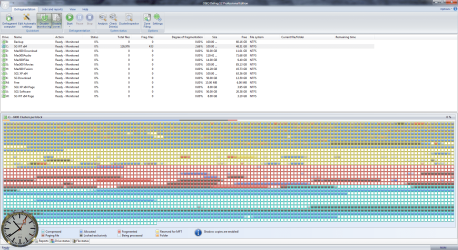
I decided to reduce the size to 10GB, since that seemed like a reasonable compromise, but it didn't have the effect that I hoped for. Instead of eliminating the scattered portions of the System Volume Information, it got rid of the more consolidated portion at the end of the drive, as can be seen in the attachment below. Looking in the file manager, there is now only 3 files, rather than 28, which is good, but I don't understand why there are even 3?
 

Attachments

  • O&O Defrag 2.png
    O&O Defrag 2.png
    105.7 KB · Views: 70

My Computer

Computer Manufacturer/Model Number
DIY
OS
W7x64 Pro, SuSe 12.1/** W7 x64 Pro, XP MCE
CPU
Phenom II 1090T w/Noctua NH-D14 /**4400+ X2 w/CM Hyper TX 3
Motherboard
ASRock 890FX Deluxe 4/**A8N-SLI
Memory
2 x 2GB Patriot PGS34g1600LLKA/**4x1GB Corsair VS
Graphics Card(s)
EVGA GTX460 SC/**EVGA 8800GTS
Sound Card
Asus Xonar D2X/**Xonar D1
Monitor(s) Displays
Acer X233H, Dell E152FPc /**LG M237-WD
Screen Resolution
1920x1080 & 1024x768/**1980x1080
Hard Drives
WDC 2TB, 1.5TB, 1TB, 500GB,Seagate 500GB , Maxtor 80GB /**500GB Seagate & WDC 1TB Black
PSU
CM RS600 w/ APC BX1000G/**Antec 500 TP w/ APC BX1000
Case
HAF922/**Antec 1040IIB
Cooling
3x200mm, 1x140 and 1x120mm/**5x80mm fans
Keyboard
Logitech Media USB/**Saitek Eclipse
Mouse
Cordless Trackman Wheel/**Ditto
Internet Speed
3.3Mbps
Other Info
SB 560 5.1 w/ Sennheiser RS140/**Creative T20 speakers, Dvico FusionHDTV7 Gold RT, Cisco E3000, HP 5510V AIO, Linksys E3000, Belkin F5U237 hub and **F5D8055 adapter
(** = 2nd rig)
I think you worry too much. If anything, the impact will be so minute that you will never know it. If you like performance, use an SSD. Have a look at the transfer rate and access time of mine - and everything is instant. Fragmentation is no SSD problem - you never defrag. Check your HDD with HD Tune ( http://www.snapfiles.com/get/hdtune.html ).

Intel.png
 

My Computer

Computer Manufacturer/Model Number
HP, Dell, Gateway, Toshiba - 4 laptops and 2 desktops
OS
Vista, Windows7, Mint Mate, Zorin, Windows 8
CPU
from 1.6GHz Duo to i7
Monitor(s) Displays
2x HP w2207
Hard Drives
5x HDD, 7x SSD, 12x Externals
Keyboard
with trackball - no mices
Mouse
Trackball mice
Internet Speed
DSL 6000
That would be nice, if I could afford one of those...but I can't. I don't consider attempting to understand and control an OS worrying. I know from experience when I allowed previous versions of Windows to do whatever they liked, I paid the price by having to start from scratch, over and over. If learning from experience, or learning by trying to gain insight into Windows is worrying, then I shall worry alot and feel no guilt about it. Beyond that, Que Sera Sera.
 

My Computer

Computer Manufacturer/Model Number
DIY
OS
W7x64 Pro, SuSe 12.1/** W7 x64 Pro, XP MCE
CPU
Phenom II 1090T w/Noctua NH-D14 /**4400+ X2 w/CM Hyper TX 3
Motherboard
ASRock 890FX Deluxe 4/**A8N-SLI
Memory
2 x 2GB Patriot PGS34g1600LLKA/**4x1GB Corsair VS
Graphics Card(s)
EVGA GTX460 SC/**EVGA 8800GTS
Sound Card
Asus Xonar D2X/**Xonar D1
Monitor(s) Displays
Acer X233H, Dell E152FPc /**LG M237-WD
Screen Resolution
1920x1080 & 1024x768/**1980x1080
Hard Drives
WDC 2TB, 1.5TB, 1TB, 500GB,Seagate 500GB , Maxtor 80GB /**500GB Seagate & WDC 1TB Black
PSU
CM RS600 w/ APC BX1000G/**Antec 500 TP w/ APC BX1000
Case
HAF922/**Antec 1040IIB
Cooling
3x200mm, 1x140 and 1x120mm/**5x80mm fans
Keyboard
Logitech Media USB/**Saitek Eclipse
Mouse
Cordless Trackman Wheel/**Ditto
Internet Speed
3.3Mbps
Other Info
SB 560 5.1 w/ Sennheiser RS140/**Creative T20 speakers, Dvico FusionHDTV7 Gold RT, Cisco E3000, HP 5510V AIO, Linksys E3000, Belkin F5U237 hub and **F5D8055 adapter
(** = 2nd rig)
Back
Top