Shadowstorage in Win7

whs

New member
Guru
Gold Member
VIP
Local time
7:53 PM
Messages
26,200
Location
Florida in winter, Black Forest/Germany
I have noticed that Win7 assigned a default of 5% for maximum shadowstorage on my C:. I am wondering whether this is now the Win7 standard allocation. In Vista it used to be a default 15% maximum.
Could somebody check on their system with VSSADMIN LIST SHADOWSTORAGE in elevated command prompt. Thanks.

PS: My C: is 75GB and it resides on an SSD.
 

My Computer

Computer Manufacturer/Model Number
HP, Dell, Gateway, Toshiba - 4 laptops and 2 desktops
OS
Vista, Windows7, Mint Mate, Zorin, Windows 8
CPU
from 1.6GHz Duo to i7
Monitor(s) Displays
2x HP w2207
Hard Drives
5x HDD, 7x SSD, 12x Externals
Keyboard
with trackball - no mices
Mouse
Trackball mice
Internet Speed
DSL 6000
Hello Wolfgang,

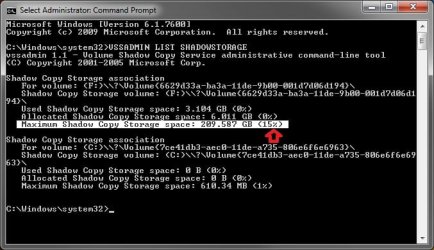
It shows as 15% for my F: drive by default and 1% for my C: drive, but I changed the C: drive to that when turning it off so I believe it was 15% originally as well.

Max.jpg
 

My Computer

Computer type
PC/Desktop
Computer Manufacturer/Model Number
Self built custom
OS
64-bit Windows 11 Pro for Workstations
CPU
Intel i7-8700K OC'd to 5 GHz
Motherboard
ASUS ROG Maximus XI Formula Z390
Memory
64 GB (4x16GB) G.SKILL TridentZ RGB DDR4 3600 MHz
Graphics Card(s)
ASUS ROG-STRIX-GTX1080TI-O11G-GAMING
Sound Card
Integrated
Monitor(s) Displays
2 x Samsung Odyssey G7 27"
Screen Resolution
2560x1440
Hard Drives
1TB Samsung 990 PRO M.2,
4TB Samsung 990 PRO PRO M.2,
TerraMaster F8 SSD Plus NAS
PSU
Seasonic Prime Titanium 850W
Case
Thermaltake Core P3
Cooling
Corsair Hydro H115i
Keyboard
Logitech wireless K800
Mouse
Logitech MX Master 4
Internet Speed
2 Gb/s Download and 100 Mb/s Upload
Antivirus
Malwarebyte Anti-Malware Premium
Browser
Google Chrome
Other Info
Logitech Z625 speaker system,
Logitech BRIO 4K Pro webcam,
HP Color LaserJet Pro MFP M477fdn,
APC SMART-UPS RT 1000 XL - SURT1000XLI,
Galaxy S23 Plus phone
Thank you very much for the info. Maybe they allocate less for SSDs because of the small nature of them. It does not really matter to me because i take frequent images. I was just curious.

BTW: You may want to consider a beautification of your cmd window - LOL. Here is how: Command Prompt on Vimeo

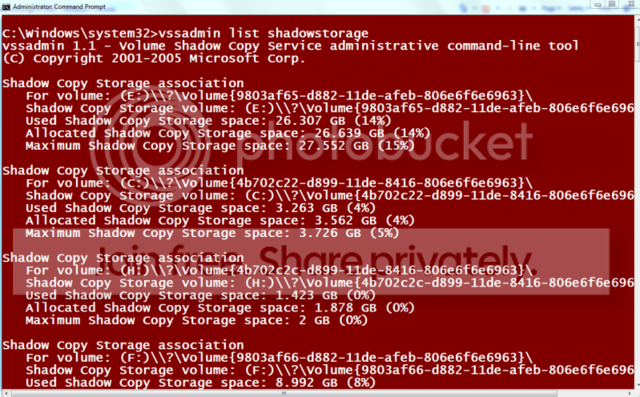
Mine looks like this: E: is my Vista OS disk and C: is the SSD in question.

ss.png
 

My Computer

Computer Manufacturer/Model Number
HP, Dell, Gateway, Toshiba - 4 laptops and 2 desktops
OS
Vista, Windows7, Mint Mate, Zorin, Windows 8
CPU
from 1.6GHz Duo to i7
Monitor(s) Displays
2x HP w2207
Hard Drives
5x HDD, 7x SSD, 12x Externals
Keyboard
with trackball - no mices
Mouse
Trackball mice
Internet Speed
DSL 6000
I have noticed that Win7 assigned a default of 5% for maximum shadowstorage on my C:. I am wondering whether this is now the Win7 standard allocation. In Vista it used to be a default 15% maximum.
Could somebody check on their system with VSSADMIN LIST SHADOWSTORAGE in elevated command prompt. Thanks.

PS: My C: is 75GB and it resides on an SSD.

Hi whs

I believe max is 15% mine in snip


Kenn J++
 
Last edited:

My Computer

Computer Manufacturer/Model Number
HP Pavillion dv-7 1005 Tx
OS
Win 8 Release candidate 8400
CPU
[email protected]
Memory
4 gigs
Graphics Card(s)
Nvidia 9600M
Sound Card
HD built-in
Monitor(s) Displays
17" Wxga
Screen Resolution
1440x900
Cooling
none
Internet Speed
45Mb down 5Mb up
In Win 7 on computers with HD'S> 64 GB, System Restore can take up to 5 percent of the disk or a maximum of 10 GB of the disk space, whichever is less. On computers with hard drives of < 64 GB , System Restore can take at most 3 percent of the disk space.

At some point it then goes up again to (I think) 10%, then 15%.
 
Last edited:

My Computers

System One System Two

  • Computer type
    PC/Desktop
    OS
    7 X64
    CPU
    i5 8400
    Motherboard
    gigabyte b365m ds3h
    Memory
    2x8gb 3200mhz
    Hard Drives
    various
    PSU
    pure power 11 400w cm
    Case
    Coolermaster
    Cooling
    cryorig m9i
  • Computer type
    PC/Desktop
    OS
    7x64
    CPU
    g5400
    Motherboard
    ga b365m ds3h
    Memory
    8gb ddr4 2400
    PSU
    xfx pro 450w
I have noticed that Win7 assigned a default of 5% for maximum shadowstorage on my C:. I am wondering whether this is now the Win7 standard allocation. In Vista it used to be a default 15% maximum.
Could somebody check on their system with VSSADMIN LIST SHADOWSTORAGE in elevated command prompt. Thanks.

PS: My C: is 75GB and it resides on an SSD.

Hi whs

I believe max is 15% mine in snip


Kenn J++

Hi Kenn, I think yours reads 10%. If I add what SIW2 says, there seems to be total confusion. Anything goes.
 

My Computer

Computer Manufacturer/Model Number
HP, Dell, Gateway, Toshiba - 4 laptops and 2 desktops
OS
Vista, Windows7, Mint Mate, Zorin, Windows 8
CPU
from 1.6GHz Duo to i7
Monitor(s) Displays
2x HP w2207
Hard Drives
5x HDD, 7x SSD, 12x Externals
Keyboard
with trackball - no mices
Mouse
Trackball mice
Internet Speed
DSL 6000
LOL.

Sorry , not very clear.

The default will be 3% if the drive is under 64gb.

It will be 5% as soon as you go above 64gb.

At some size drive ( I haven't checked) the default goes up again - I think to 10%.

Then at an even larger size drive ( not sure yet what size that is ) , it goes up again to 15%.
 

My Computers

System One System Two

  • Computer type
    PC/Desktop
    OS
    7 X64
    CPU
    i5 8400
    Motherboard
    gigabyte b365m ds3h
    Memory
    2x8gb 3200mhz
    Hard Drives
    various
    PSU
    pure power 11 400w cm
    Case
    Coolermaster
    Cooling
    cryorig m9i
  • Computer type
    PC/Desktop
    OS
    7x64
    CPU
    g5400
    Motherboard
    ga b365m ds3h
    Memory
    8gb ddr4 2400
    PSU
    xfx pro 450w
LOL.

Sorry , not very clear.

The default will be 3% if the drive is under 64gb.

It will be 5% as soon as you go above 64gb.

At some size drive ( I haven't checked) the default goes up again - I think to 10%.

Then at an even larger size drive ( not sure yet what size that is ) , it goes up again to 15%.


Hmm, that could be it. My drive is exactly 74.5MB - so it could fall into the 5% category.
Do you have any link where that is described on more detail?
 

My Computer

Computer Manufacturer/Model Number
HP, Dell, Gateway, Toshiba - 4 laptops and 2 desktops
OS
Vista, Windows7, Mint Mate, Zorin, Windows 8
CPU
from 1.6GHz Duo to i7
Monitor(s) Displays
2x HP w2207
Hard Drives
5x HDD, 7x SSD, 12x Externals
Keyboard
with trackball - no mices
Mouse
Trackball mice
Internet Speed
DSL 6000
Back
Top