Solved Share between two computers

flogit

New member
I have two PC's running windows 7 home premium.One is a desktop and other is a laptop.
Homegroup all set up and running.
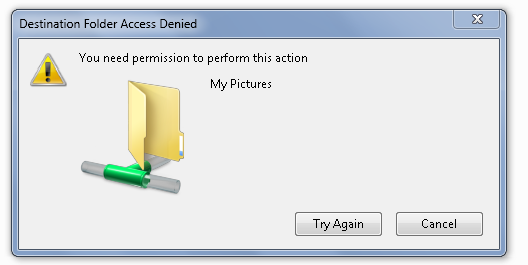
Now when I want to copy and paste a photo from laptop to desktop when I select paste on the picture folder on the desktop through the homegroup i get a box comes on screen, (see image supplied).
But if I do the opposite copy and paste from desktop to laptop all works okay,The problem is from laptop to desktop.:confused:
Any help please.
Image here.
Y1dAgLa.png


Many thanks in advance.
 

My Computer

Computer Manufacturer/Model Number
compaq presario CQ61
OS
windows 7 home premium 64bit
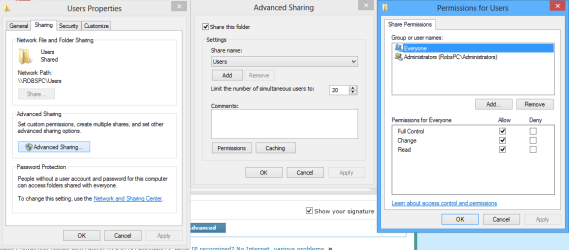
You should first make sure that the C:>Users folder is shared through the Sharing tab as per the first picture below. You need click Advanced Sharing then put in the check mark, hit the permission button and add more check marks for read/write access as required, click apply ok etc.

Although it appears as if you already have the pictures files shared out the share won't work correctly unless the C:>Users folder is also shared because of the folder hierarchy.

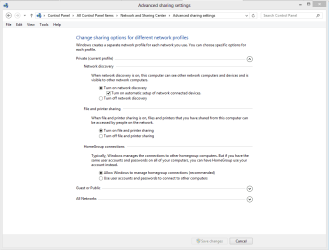
You might also want to look in the Advanced Sharing Settings to make sure that Network Discovery and Printer and File Sharing etc. are turned on as in the second picture. :)
 

Attachments

  • sharing tab full permissions.PNG
    sharing tab full permissions.PNG
    43.7 KB · Views: 4
  • Advance Sharing Settings.PNG
    Advance Sharing Settings.PNG
    40.6 KB · Views: 1

My Computer

Computer type
PC/Desktop
Computer Manufacturer/Model Number
Home built
OS
Windows 7 Ult, Windows 8.1 Pro,
CPU
Q9650-4.275GHz, E8600 4.5GHz, E6750-3.8GHz
Motherboard
Evga 780i FTW
Memory
G.Skill PC2 9600 1200Mhz 5 5 5 15 2T
Graphics Card(s)
GTX480
Sound Card
Asus Xonar D2
Monitor(s) Displays
HannsG
Screen Resolution
1680X1050
Hard Drives
GSkill Phoenix Pro 120GB SSD
PSU
ThermalTake Toughpower 1000Watt modular
Case
ThermalTake XaserV
Cooling
Xigmatek S1283
Keyboard
Logitech G15
Mouse
Logitech G9
Internet Speed
T1
Thanks have double checked as per images you gave and all is okay.
Any further help Please.
 

My Computer

Computer Manufacturer/Model Number
compaq presario CQ61
OS
windows 7 home premium 64bit
Thanks have double checked as per images you gave and all is okay.
Any further help Please.

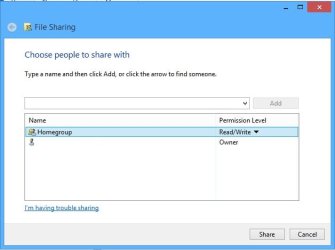
You might also check that the Homegroup read/write permissions are enabled for the Library folders.

Just right click one of the Library folders, choose Share With, Specific People, right click Homegroup to add write permissions.

Without the write permission it won't allow you to change the files and the default setting is just read access.

You might want to also make sure that the date and time settings are in sync on all machines in the network.
 

Attachments

  • library read and write.jpg
    library read and write.jpg
    50.2 KB · Views: 1

My Computer

Computer type
PC/Desktop
Computer Manufacturer/Model Number
Home built
OS
Windows 7 Ult, Windows 8.1 Pro,
CPU
Q9650-4.275GHz, E8600 4.5GHz, E6750-3.8GHz
Motherboard
Evga 780i FTW
Memory
G.Skill PC2 9600 1200Mhz 5 5 5 15 2T
Graphics Card(s)
GTX480
Sound Card
Asus Xonar D2
Monitor(s) Displays
HannsG
Screen Resolution
1680X1050
Hard Drives
GSkill Phoenix Pro 120GB SSD
PSU
ThermalTake Toughpower 1000Watt modular
Case
ThermalTake XaserV
Cooling
Xigmatek S1283
Keyboard
Logitech G15
Mouse
Logitech G9
Internet Speed
T1
sorry wrong forum
 
Last edited:

My Computer

Computer type
PC/Desktop
Computer Manufacturer/Model Number
Home Build windows 7 Home premium.Built by a local computer shop.
OS
Summary Operating System Windows 7 Home Premium 64-bit SP1 CPU AMD Athlon II X2 250 23 °C
CPU
AMD Athlon II X2 250
Motherboard
Manufacturer BIOSTAR Group Model N61PB-M2S (Socket AM2 )
Memory
Total memory slots 4 Used memory slots 2 Free memory slots 2
Graphics Card(s)
Name Generic Non-PnP Monitor on NVIDIA GeForce 6150SE nForce
Sound Card
Realtek High Definition Audio Playback Devices Realtek Dig
Monitor(s) Displays
Acer
Hard Drives
Main C drive is now a 120GB SSD With only operating system and programs.
Second HDD 1TB with all documents etc.
Keyboard
HID Keyboard Device Device Kind Keyboard Device Name HID K
Antivirus
Karsersky
Browser
Google
Other Info
Summary
Operating System
Windows 7 Home Premium 64-bit SP1
CPU
AMD Athlon II X2 250 23 °C
Regor 45nm Technology
RAM
4.00GB Dual-Channel DDR2 @ 401MHz (6-6-6-18)
Motherboard
BIOSTAR Group N61PB-M2S (Socket AM2 ) 40 °C
Graphics
Generic Non-PnP Monitor (1024x768@60Hz)
128MB NVIDIA GeForce 6150SE nForce 430 (Biostar Microtech Int'l)
Storage
1863GB West
Chev.Thanks for the reply.problem solved I went to check both computers again and followed your images,And found on the desktop that one of the boxes was unchecked,I thought that the problem was with the laptop not the desktop.
Anyway all is working well this end thanks for your assistance.
many thanks.
Diolch yn fawr from south wales ''Very wet here''
 

My Computer

Computer Manufacturer/Model Number
compaq presario CQ61
OS
windows 7 home premium 64bit
Chev.Thanks for the reply.problem solved I went to check both computers again and followed your images,And found on the desktop that one of the boxes was unchecked,I thought that the problem was with the laptop not the desktop.
Anyway all is working well this end thanks for your assistance.
many thanks.
Diolch yn fawr from south wales ''Very wet here''

Very good flogit, I figured it was the Homegroup write settings but first had to make sure the C:>Users folder wasn't part of the problem. :)
 

My Computer

Computer type
PC/Desktop
Computer Manufacturer/Model Number
Home built
OS
Windows 7 Ult, Windows 8.1 Pro,
CPU
Q9650-4.275GHz, E8600 4.5GHz, E6750-3.8GHz
Motherboard
Evga 780i FTW
Memory
G.Skill PC2 9600 1200Mhz 5 5 5 15 2T
Graphics Card(s)
GTX480
Sound Card
Asus Xonar D2
Monitor(s) Displays
HannsG
Screen Resolution
1680X1050
Hard Drives
GSkill Phoenix Pro 120GB SSD
PSU
ThermalTake Toughpower 1000Watt modular
Case
ThermalTake XaserV
Cooling
Xigmatek S1283
Keyboard
Logitech G15
Mouse
Logitech G9
Internet Speed
T1
Back
Top