Sharing a folder for a particular user in a particular machine,

Jamal NUMAN

New member
[FONT=&quot]Sharing a folder for a particular user in a particular machine,[/FONT]
[FONT=&quot] [/FONT]
[FONT=&quot] [/FONT]
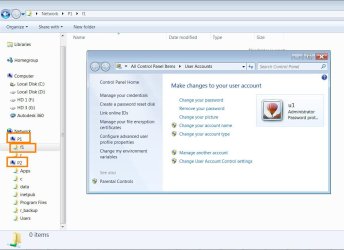
[FONT=&quot]1. [/FONT][FONT=&quot]Suppose that I have a folder F1 in the computer P1 (attached)
[/FONT]
[FONT=&quot]2. [/FONT][FONT=&quot]Users of P1 are u1, u2, u3[/FONT]
[FONT=&quot]3. [/FONT][FONT=&quot]Users of P2 are e1, e2, e3[/FONT]
[FONT=&quot]4. [/FONT][FONT=&quot]Then how the folder F1 can be shared ONLY with the user e2 that is on the computer P2?[/FONT]
[FONT=&quot] [/FONT]
[FONT=&quot]Thank you[/FONT]
[FONT=&quot] [/FONT]
[FONT=&quot]Best[/FONT]
[FONT=&quot] [/FONT]
[FONT=&quot]Jamal[/FONT]
 

Attachments

  • Clip_1119.jpg
    Clip_1119.jpg
    186.1 KB · Views: 1

My Computer

OS
Windows 7 Ultimate x64

My Computer

Computer type
Laptop
Computer Manufacturer/Model Number
DELL
OS
Windows 8 Enterprise 32 bit
CPU
AMD Athlon II P360 2.3
Memory
3 GB
Graphics Card(s)
ATI Mobility Radeon HD4200
Antivirus
Kaspersky Internet Security 2013
Browser
Mozilla Firefox
Jamal, you can only share a folder with a particular user on the same machine.

Per machine sharing is only possible if you use the Homegroup to create a local Domain.

A Homegroup is actually a Domain within a Workgroup, in fact in Windows 8 the Homegroup is referred to as a local Domain.

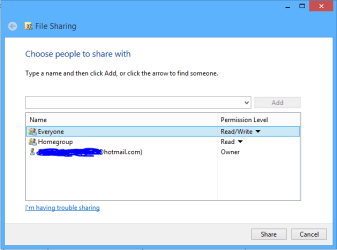
Using the "Everyone" share will share folders on the Homegroup machines with the other Workgroup machines "machines not included in the Homegroup but in the same network".

With out the Everyone share "picture below" then only the machines included in the Homegroup will have access to the other Homegroup machines shared folders. So any machines that you wish to selectively share with must be left out of the Homegroup.
 

Attachments

  • share with Everyone.PNG
    share with Everyone.PNG
    15.5 KB · Views: 5

My Computer

Computer type
PC/Desktop
Computer Manufacturer/Model Number
Home built
OS
Windows 7 Ult, Windows 8.1 Pro,
CPU
Q9650-4.275GHz, E8600 4.5GHz, E6750-3.8GHz
Motherboard
Evga 780i FTW
Memory
G.Skill PC2 9600 1200Mhz 5 5 5 15 2T
Graphics Card(s)
GTX480
Sound Card
Asus Xonar D2
Monitor(s) Displays
HannsG
Screen Resolution
1680X1050
Hard Drives
GSkill Phoenix Pro 120GB SSD
PSU
ThermalTake Toughpower 1000Watt modular
Case
ThermalTake XaserV
Cooling
Xigmatek S1283
Keyboard
Logitech G15
Mouse
Logitech G9
Internet Speed
T1
Jamal, you can only share a folder with a particular user on the same machine.

Per machine sharing is only possible if you use the Homegroup to create a local Domain.

A Homegroup is actually a Domain within a Workgroup, in fact in Windows 8 the Homegroup is referred to as a local Domain.

Using the "Everyone" share will share folders on the Homegroup machines with the other Workgroup machines "machines not included in the Homegroup but in the same network".

With out the Everyone share "picture below" then only the machines included in the Homegroup will have access to the other Homegroup machines shared folders. So any machines that you wish to selectively share with must be left out of the Homegroup.


Thank you chev65 for the help,

Then the only possible way to selectively share a folder for particular users is the Domain.

I’ll try and see if I can manage to sort it out over domain

Best

Jamal
 

My Computer

OS
Windows 7 Ultimate x64
Back
Top