Solved Sharing apps and files between Windows 8/7 dual boot

dorruk

New member
Member
Local time
6:34 PM
Messages
60
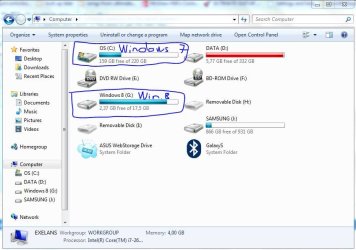
Hey guys, I had this Windows 8 installed on a separate drive volume I reserved 18000MB to it which appears as drive G: in Win 7. In this way, I could keep both Windows 8 and 7 separately.

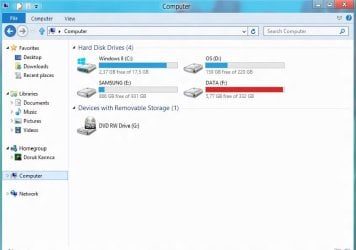
Now the problem is, when I boot into Windows 8, the system does not see the normal drive C. Instead it sees its own volume G: as a drive C, and does not actually see the bigger drive C: that is tied to Windows 7. So I cannot access the Program Files in Windows 7 and open Google Chrome from Win 8. I just don't want to install everything twice, one for each operating system.

Any help on making the "Windows 7 drive" look visible on "Windows 8" will be appreciated.
 

Attachments
  • windows 7.JPG
    windows 7.JPG
    64 KB · Views: 23

My Computer My Computer

Computer Manufacturer/Model Number
Asus N53SN
OS
Win 8 duals Win 7 64bit
CPU
2.90GHz with Intel TurboBoost
Memory
4 GB
Graphics Card(s)
Nvidia GForce GT 550M Cuda 2GB
Sound Card
Realtek
Screen Resolution
1366x768
Hard Drives
640 GB SATA Internal
1 TB Samsung External
Internet Speed
9.2 Mbit
You can't run programs that are installed in Win 7 in Win8 without first Re-Installing them in Win 8. Most all programs add something to the registry when they are installed. So they are installed in 7 with those entries added to the 7 registry. Trying to run them in 8 will fail because those same reg entries are not present in the 8 registry.

As to not being able to see the Win 7 install drive that is odd. It should show up as some other drive letter than C but it should be there.
 

My Computer My Computer

OS
7 x64
It's just that my 640GB internal hard drive looks smaller on Win 8. The Windows 7 partition is gone. At least if I can access the Windows 7 "Program Files (x86)" then run GoogleChrome.exe on Win 8 then I think I could most likely run it without worrying about the registries, because some exception handler will just re-create the registries for Win 8 from sketch.

I will post the same "My Computer" screenshot view from Windows 8 as well so you can see how it looks from both sides, just hold a sec.
 

My Computer My Computer

Computer Manufacturer/Model Number
Asus N53SN
OS
Win 8 duals Win 7 64bit
CPU
2.90GHz with Intel TurboBoost
Memory
4 GB
Graphics Card(s)
Nvidia GForce GT 550M Cuda 2GB
Sound Card
Realtek
Screen Resolution
1366x768
Hard Drives
640 GB SATA Internal
1 TB Samsung External
Internet Speed
9.2 Mbit
Yes post a SS from Win 8.

Als a SS from Disk Management from win 8
 

My Computer My Computer

OS
7 x64
sorry for late reply, having a hard time figuring out Windows 8.
Here are the screens. So what happened to my 220GB C: drive that is meant to be there?
 

Attachments

  • Windows 8.jpg
    Windows 8.jpg
    38.3 KB · Views: 22
  • Windows 8 diskmgmt.jpg
    Windows 8 diskmgmt.jpg
    77.7 KB · Views: 24

My Computer My Computer

Computer Manufacturer/Model Number
Asus N53SN
OS
Win 8 duals Win 7 64bit
CPU
2.90GHz with Intel TurboBoost
Memory
4 GB
Graphics Card(s)
Nvidia GForce GT 550M Cuda 2GB
Sound Card
Realtek
Screen Resolution
1366x768
Hard Drives
640 GB SATA Internal
1 TB Samsung External
Internet Speed
9.2 Mbit
holy s**t, it's there! Sorry bro, it wasnt there the first time. I see all I needed was a reboot on Win 8.
Now I feel stupid.
I shoulda looked more carefully before taking the screens.
You can make fun of me.
I'm cool with that.
 

My Computer My Computer

Computer Manufacturer/Model Number
Asus N53SN
OS
Win 8 duals Win 7 64bit
CPU
2.90GHz with Intel TurboBoost
Memory
4 GB
Graphics Card(s)
Nvidia GForce GT 550M Cuda 2GB
Sound Card
Realtek
Screen Resolution
1366x768
Hard Drives
640 GB SATA Internal
1 TB Samsung External
Internet Speed
9.2 Mbit
No fun of you. I knew it would be there. Sometimes you just skip over stuff. Like making the same Math mistake over and over when it is right in front of your face.
 

My Computer My Computer

OS
7 x64
True. Btw, I opened Chrome and it opened with factory settings. My ChromeAppData was gone. So I had to re-customize it. Just a note for those who are going to dual boot Win 8 and 7 after me, copy down the AppData.
Thanks dude.
 

My Computer My Computer

Computer Manufacturer/Model Number
Asus N53SN
OS
Win 8 duals Win 7 64bit
CPU
2.90GHz with Intel TurboBoost
Memory
4 GB
Graphics Card(s)
Nvidia GForce GT 550M Cuda 2GB
Sound Card
Realtek
Screen Resolution
1366x768
Hard Drives
640 GB SATA Internal
1 TB Samsung External
Internet Speed
9.2 Mbit
Back
Top