Solved Sharing between Windows 7 and XP

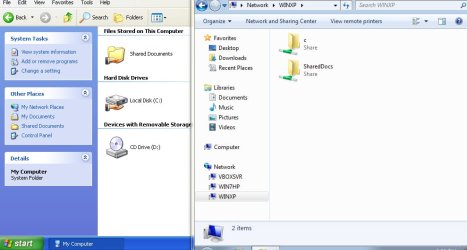
Oh, and after you are done, it should look something like the screenshot below, note the hand under the drive in XP on the left and the c share in Win7 on the right:
 

Attachments

  • xp2.jpg
    xp2.jpg
    229 KB · Views: 2

My Computer

Computer type
PC/Desktop
OS
Windows 7 Pro
Great! I knew we'd get it going...eventually :)

XP doesn't have security tab, it's called Sharing. Right-click on the drive and select "Sharing and Security..."
Screenshot:

Doctore--

Yes, I know that. That's what makes it so frustrating. I've looked and looked. All five drives are configured identically in that Share tab. Yet, three of them are accessed with no problem, and the other two cannot be accessed. That's why I went looking for the Security tab--thought maybe there was a different level of access there for just those two drives. Common sense tells me that there has to be some property or permission for the two problem drives that is different from the other three. If I can get back to the problem setup tomorrow, I'll copy down the exact wording of the error message I get when I try to access those two drives.
 

My Computer

Computer Manufacturer/Model Number
Dell
OS
Windows 7 Ultimate 64
CPU
Intel i7-975
Memory
12 GB
Graphics Card(s)
ATI Radeon HD 5870
Sound Card
Sound Blaster X-Fi Titanium
Monitor(s) Displays
Dell U2410
Hard Drives
3, SATA 1.5 TB each
I can't really think of any reason why those drives would not share...Post the error message, it may shed some light.
 

My Computer

Computer type
PC/Desktop
OS
Windows 7 Pro
I can't really think of any reason why those drives would not share...Post the error message, it may shed some light.

Doctore--

OK. Went back to my sister's house, and double checked everything again. I can't find anything different comparing how the two drives that are not accessible compare to the three drives that are accessible. But I did copy down the error message. Note that when I click on the XP computer under Networking on the Win 7 computer, all of the drives and folders that I have enabled sharing on appear. But if I click on either the D drive, or the H drive, I get the following error message (after a delay of about 30 seconds).


\\Computer Name\data (D) is not accessible. You might not have permission to use this network resource. Contact the administrator of the server to find out if you have access permissions.

Then just below that is the following message:

Not enough server storage is available to process this command.

Does any of that give a hint as to what might be wrong?
 

My Computer

Computer Manufacturer/Model Number
Dell
OS
Windows 7 Ultimate 64
CPU
Intel i7-975
Memory
12 GB
Graphics Card(s)
ATI Radeon HD 5870
Sound Card
Sound Blaster X-Fi Titanium
Monitor(s) Displays
Dell U2410
Hard Drives
3, SATA 1.5 TB each
Never ran across this myself, but these may help (don't know how far you want to take it, it's quite risky modifying the registry):

http://support.microsoft.com/kb/106167

How to fix "Not enough server storage is available to process this command"

Doctore--

Interesting. I found the same two articles myself after posting the note. Since it looks EXACTLY like what I'm experiencing, I think it may be the answer. I'm comfortable editing the registry (at least, this kind of edit, which is easily reversed, if the key is saved before the editing is done). So I'm going to give it a try, hopefully tomorrow (though we have snow forecast for tomorrow, and my sister lives on top of a hill, so there may be a delay getting back to her house). In any case, I'll let you know whether or not it does the trick.
 

My Computer

Computer Manufacturer/Model Number
Dell
OS
Windows 7 Ultimate 64
CPU
Intel i7-975
Memory
12 GB
Graphics Card(s)
ATI Radeon HD 5870
Sound Card
Sound Blaster X-Fi Titanium
Monitor(s) Displays
Dell U2410
Hard Drives
3, SATA 1.5 TB each
Well, good news. Did the registry edit, and it fixed the problem. Can now access all the shared folders on either computer from the other. Still don't understand exactly why the Win 7 machine is buried so deeply under Network on the XP machine (on my other setup, it appears on the first level under Network in Windows Explorer). But that is more of a curiosity question than it is a problem.

In any case, the problem is now solved. I appreciate very much the help provided by those who commented on this thread. It was a great help in getting this issue resolved.
 

My Computer

Computer Manufacturer/Model Number
Dell
OS
Windows 7 Ultimate 64
CPU
Intel i7-975
Memory
12 GB
Graphics Card(s)
ATI Radeon HD 5870
Sound Card
Sound Blaster X-Fi Titanium
Monitor(s) Displays
Dell U2410
Hard Drives
3, SATA 1.5 TB each
Glad to hear. Good job
 

My Computer

Computer type
PC/Desktop
Computer Manufacturer/Model Number
dell xps 9000
OS
win 10
Back
Top