Sharing between Win 7 and XP

LarryStroup

New member
Local time
3:30 PM
Messages
2
I have my C drive fully shared on my Win 7 Pro x64 laptop with full priviledges for all groups. I have the C drive on mky XP machine also fully shared. I have them connected via ethernet. The machines can see eash other when the network window is opened. The Win 7 machine can access and open files on the XP machinbe however the XP machine is denied access to the C drive share on the Win 7 laptop. I have security also open on the Win 7 machine. The message I get on the XP machine when I try to open the share on the Win 7 machine is "sHARE IS NOT ACCESSIBLE." What can I do to access the Win 7 share?
 

My Computer

Computer Manufacturer/Model Number
Dell InspironR15
OS
Windows 7 Pro x64
CPU
Intel i5
Memory
8GB
Graphics Card(s)
1GB
Hard Drives
659 GB
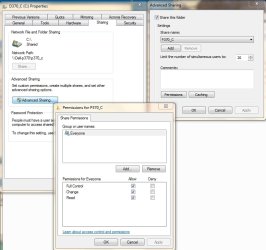
Create an Everyone user name and give it full access.

Win7ShareCDrive.jpg
 

My Computer

Computer type
PC/Desktop
Computer Manufacturer/Model Number
Lenovo IdeaCenter 450
OS
Windows 10 Pro X64
CPU
Intel Quad Core i7-4770 @ 3.4Ghz
Memory
16.0GB PC3-12800 DDR3 SDRAM 1600 MHz
Graphics Card(s)
Intel Integrated HD Graphics
Sound Card
Realtek HD Audio
Monitor(s) Displays
HP 22" LCD
Screen Resolution
1680 x 1050
Hard Drives
250GB Samsung EVO SATA-3 SSD
2TB Seagate ST2000DM001 SATA-2
1.5TB Seagate ST3150041AS SATA
Keyboard
Dell USB
Mouse
Lenovo USB
Internet Speed
Cable via Road Runner 3MB Upload, 30MB Download
Antivirus
Windows Defender, MBAM Pro, MBAE
Browser
Seamonkey
Other Info
UEFI/GPT
PLDS DVD-RW DH16AERSH
I thought you might like a copy of the notes I have written to share files between Win 7 and XP computers. I also use it to get full two way control between Win 7 computers.

Network Windows 7 and XP Computers

There should be no need to make changes to the network settings on the XP computer.

Run Windows Explorer on the Windows 7 computer.
Under Computer right click on drive C and select Share with, Advanced sharing.
Select Advance Sharing and check Share this folder.
Under permissions for Everyone check Full Control then click Apply.
Click OK then OK again.
Under Password Protection click on Network and Sharing Center.
Select Home or Work and turn off Password protected sharing.
Click on Save changes and then click Close.
Exit Windows Explorer.

Double click on the Network icon.
Select Network, right click on drive C of the Windows 7 computer and select Properties.

Open the Security tab and click Edit.
Click on Add and type Everyone and then click OK.
A user icon should appear in the box with Everyone beside it.
Allow Full permission for Everyone. (This excludes Special permissions.)
Click OK.
The computer should then go through the process of setting permissions for the drive folders. The process stops half a dozen times with errors but just click Continue.
Click OK to finish.

Good luck.
 

My Computer

OS
Windows 7 32 bit
Perfect Solution

Your process solved my problem. Thanks
 

My Computer

Computer Manufacturer/Model Number
Dell InspironR15
OS
Windows 7 Pro x64
CPU
Intel i5
Memory
8GB
Graphics Card(s)
1GB
Hard Drives
659 GB
Yes you need to use the sharing tab and also the Security tab to share the entire drive, although from a security stand point it's safer to share the User folder rather than the entire drive.
 

My Computer

Computer type
PC/Desktop
Computer Manufacturer/Model Number
Home built
OS
Windows 7 Ult, Windows 8.1 Pro,
CPU
Q9650-4.275GHz, E8600 4.5GHz, E6750-3.8GHz
Motherboard
Evga 780i FTW
Memory
G.Skill PC2 9600 1200Mhz 5 5 5 15 2T
Graphics Card(s)
GTX480
Sound Card
Asus Xonar D2
Monitor(s) Displays
HannsG
Screen Resolution
1680X1050
Hard Drives
GSkill Phoenix Pro 120GB SSD
PSU
ThermalTake Toughpower 1000Watt modular
Case
ThermalTake XaserV
Cooling
Xigmatek S1283
Keyboard
Logitech G15
Mouse
Logitech G9
Internet Speed
T1
Glad you are sorted.

Over successive operating systems Microsoft made it easier to network computers together until by XP it was a doddle. Then the Security Brigade stepped in, rather like the dreaded Health and Safety, and made the process much more difficult again. Let's hope by Windows 8 they revert back to nearer the XP method.
 

My Computer

OS
Windows 7 32 bit
Back
Top