Sharing C Drive between 2 Win7 PC's

Megalos

New member
Local time
9:08 AM
Messages
21
Hi,

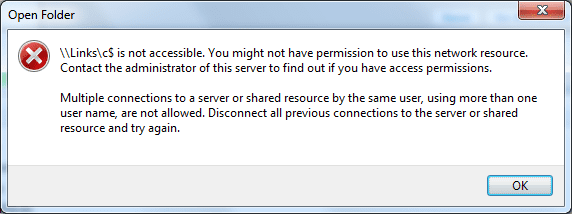
I'm trying to share the C Drive of a Win7 PC (The name of that PC is LINKS). I set full permissions for the 'Everyone' group. When, from another Win7 PC, I click on 'Network', I can see LINKS and I can see the C Drive on LINKS. But when I try to open that C Drive, a message pops up saying I do not have permission (see picture).

error1.png

How can I access that C Drive on LINKS?

Thanks in advance.
 
Last edited:

My Computer

Computer Manufacturer/Model Number
Lenovo ThinkPad T60P
OS
Windows 7 Professional 32-bit
CPU
Intel Core2 T7200@2GHz
Memory
2024MB
Graphics Card(s)
ATI MOBILITY FireGL V5250
Got the same problem. I can share a folder, but can not share the entie "C" drive. Have tried everything I know.

Need Help
 

My Computer

Computer Manufacturer/Model Number
Home
OS
Win 7 64
CPU
I7 860
Motherboard
Asus
Memory
OCZ pc12800
Graphics Card(s)
gigabyte 4670
Sound Card
system
Monitor(s) Displays
Acer 2216w
Hard Drives
WD terabyte
PSU
corsair 650tx
Figured mine out...hope it helps. I created a user on 1 machine "joe" (no password) and gave it admin control. Made sure "C" was shared. From the other machine, when mapping, to access the drive, i typed in "\\machine_name\C$". When asked for user name and password, enterd "machine_name\joe" and no password. Drive mapped with all admin rights.
 

My Computer

Computer Manufacturer/Model Number
Home
OS
Win 7 64
CPU
I7 860
Motherboard
Asus
Memory
OCZ pc12800
Graphics Card(s)
gigabyte 4670
Sound Card
system
Monitor(s) Displays
Acer 2216w
Hard Drives
WD terabyte
PSU
corsair 650tx
This worked from 1 machine to another machine. Mapped entire "C" drive.
 

My Computer

Computer Manufacturer/Model Number
Home
OS
Win 7 64
CPU
I7 860
Motherboard
Asus
Memory
OCZ pc12800
Graphics Card(s)
gigabyte 4670
Sound Card
system
Monitor(s) Displays
Acer 2216w
Hard Drives
WD terabyte
PSU
corsair 650tx
I tried typing "\\LINKS\C$", and then a box popped up where I should enter username and password. For the username, I typed "LINKS\Verhees", and for the password nothing. But then I still get an error messagebox (this time another one, see picture) saying I have no permission to access.

error2.png
 

My Computer

Computer Manufacturer/Model Number
Lenovo ThinkPad T60P
OS
Windows 7 Professional 32-bit
CPU
Intel Core2 T7200@2GHz
Memory
2024MB
Graphics Card(s)
ATI MOBILITY FireGL V5250
Did you create "Verhees" as a new user on the machine you are trying to map?
 

My Computer

Computer Manufacturer/Model Number
Home
OS
Win 7 64
CPU
I7 860
Motherboard
Asus
Memory
OCZ pc12800
Graphics Card(s)
gigabyte 4670
Sound Card
system
Monitor(s) Displays
Acer 2216w
Hard Drives
WD terabyte
PSU
corsair 650tx
not trying to hijack the thread...

I have similar issues to the OP, but 2 of the 5 hard drives on the orginal PC running Vista Home Premium are shared, and can be accessed by the Windows 7 machine, any clues?
I get the same pop ups as the OP on the other drives, btw.
THis is doing my head in, I am yet to try the new user solution, as I do not want to jeopardise the limited connectivity I do have between machines.
 

My Computer

OS
Win 7 Ultimate Signature Edition
CPU
I920
Motherboard
Asus P6T Deluxe V2
Memory
6 GB Geil 2000 MHz
Graphics Card(s)
GTX 285
Sound Card
on board
Monitor(s) Displays
Dell 2407 Samsung 2233
Hard Drives
You must be joking, smallest is a 300 GB Velociraptor, biggest a 1.5 TB WD Green
PSU
Antec 850W
Case
Coolermaster HAF 932
Cooling
TRUE with Scythe S-Flex fans
Did you create "Verhees" as a new user on the machine you are trying to map?
No, 'Verhees' is the only user on that PC, it also has Administrator control and has no password. I guess I cannot create a second user named 'Verhees', right?

Another thing: The 'Verhees'-PC is in a Workgroup called TUE, and the other Win7-PC is in a domain called TUE.
 

My Computer

Computer Manufacturer/Model Number
Lenovo ThinkPad T60P
OS
Windows 7 Professional 32-bit
CPU
Intel Core2 T7200@2GHz
Memory
2024MB
Graphics Card(s)
ATI MOBILITY FireGL V5250
You have to create a different user. The same user can not log in to the same machine at the same time. You are already using the machine locally. Create a new user and see...
 

My Computer

Computer Manufacturer/Model Number
Home
OS
Win 7 64
CPU
I7 860
Motherboard
Asus
Memory
OCZ pc12800
Graphics Card(s)
gigabyte 4670
Sound Card
system
Monitor(s) Displays
Acer 2216w
Hard Drives
WD terabyte
PSU
corsair 650tx
I found a pretty easy fix for this.


Right click on your C: drive in My Computer and go to properties.

Click the security tab. Then click Edit to change permissions.

Click Add, type Everyone, then click ok. Check the box for Full Control, then hit apply.


After adding "Everyone" to the permissions on both computers of mine I am able to share the C: drive like any other drive in my computer.

Just be careful doing this. It opens your root drive up to anybody that can get on your network.
 

My Computer

Computer Manufacturer/Model Number
HP DV9
OS
Windows 7 Professional
CPU
Turion X2
Memory
2 GB DDR667
Graphics Card(s)
Geforce 7150
After applying tmarte's fix, I was indeed able to access the C Drive. However, when I then try to open the Program Files folder, I again get the message that access is denied :huh:
 

My Computer

Computer Manufacturer/Model Number
Lenovo ThinkPad T60P
OS
Windows 7 Professional 32-bit
CPU
Intel Core2 T7200@2GHz
Memory
2024MB
Graphics Card(s)
ATI MOBILITY FireGL V5250

My Computer

Computer Manufacturer/Model Number
self built
OS
7600.20510 x86
CPU
P4 550 3.4 GHz HT running at 3.5 GHz
Motherboard
MSI PM8M3-V (MS-7211 v1.x) Micro-ATX mainboard
Memory
OCZ 2 GB(2x1GB) DDR400mHz running @ 414 mHz
Graphics Card(s)
HIS Radeon HD 3850 IceQ 3 Turbo HDMI Dual DL-DVI AGP
Sound Card
MOTU Traveler firewire studio interface 192 kHz 24 bit
Monitor(s) Displays
22" widescreen Acer X223W LCD, 17" Compaq P75 CRT
Screen Resolution
1680x1050 and 1280x1024
Hard Drives
SATA I x2 WD, 400 GB and 120 GB, SATA 2 WD Caviar Black 1 TB
PSU
350W generic
Case
Cybertronpc, it glows blue
Cooling
stock cpu fan, Ice-Q 3 gpu and system, many case fans
Keyboard
Logitch Classical Keyboard 200
Mouse
Logitech Mediaplay cordless
Internet Speed
1792/448 kbits/sec
Other Info
SATA II PCI fake RAID adapter, 1 GB Readyboost, original ATI Remote Wonder (even works with WMC perfectly), Logitech Rumblepad 2 game controller x2
I did exactly what you wrote in post #7. But still the same message.
 

My Computer

Computer Manufacturer/Model Number
Lenovo ThinkPad T60P
OS
Windows 7 Professional 32-bit
CPU
Intel Core2 T7200@2GHz
Memory
2024MB
Graphics Card(s)
ATI MOBILITY FireGL V5250
Back
Top