Sharing files between Windows 7 and XP Home

nandrews

New member
Local time
11:53 AM
Messages
4
(sorry if this is answered elsewhere, but I couldn't find it)

I am unable to share files from my XP Home PC on Windows 7. I can however share those from Windows 7 on the XP PC!
I have explored all the relevant settings I can find in Windows 7 and no change.

I have both PC's in the same workgroup and I login into each with the same username/password. I have file sharing set-up on both.
I have tried it with Network discovery turned on and turned off.

I haven't created a Homegroup on Windows 7 as I asume that is just for sharing with another W7 PC. In any case it tells me I can't set it up without IPv6 configured. Tho' puzzlingly the n/w card shows that IPv6 IS configured!

Both have the same security installed i.e., Windows firewall and AVG Free.

Any ideas would be very welcome.

Thanks
Nigel
 

My Computer My Computer

OS
Widows 7
Hi there
test with firewalls switched off (both machines) as this introduces extra complications. Also switch off AV software as this can get in the way as well.

After testing you can re-enable both firewall and av software again.

Networking from XP is STILL "Iffy"

the best way is
1) re-run Networking Wizard on the XP machine AND REBOOT IT.
2) ensure both machines have the same workgroup name say MYNETORK
3) you have the same userid and password on both machines.

4) XP files are enabled as SHARED.


Now on the W7 computer - even if it doesn't see the XP machine use Windows explorer to connect a network drive for example Drive D on your windows machine

so manually enter in \\XPMACHINE\D

you should then see the drive on the W7 machine.

You can do the same on the XP machine if the drives / computers aren't seen in the My network places map.


Why XP sometimes hides itself I haven't a clue but you can usually share the drives by manually doing it like I've explained above.

Cheers
jimbo
 

My Computer My Computer

Computer type
PC/Desktop
Computer Manufacturer/Model Number
Custom built, several laptops HP/ASUS
OS
Linux CENTOS 7 / various Windows OS'es and servers
CPU
Intel i7 Intel i5
Memory
8GB, 16GB
Graphics Card(s)
On Motherboard
Sound Card
Realtek HD audio
Monitor(s) Displays
Apple Cinema display, Samsung LCD
Screen Resolution
1920 X 1080
Hard Drives
4 X 1TB SATA
Mouse
Toshiba wireless laser
Internet Speed
> 20MB up
Jimbo,

Thanks very much for that, I have gone thru' your steps, but it has not made any difference. Tho' I haven't found out how to turn off AVG Free yet, but I suspect that is not the problem.
I tried the UNC addressing but that didn't work either, after it had thought about it a while and giving a "Cannot access" and 0x80004005.

One extra - I did say that I could access the Windows 7 drives from XP. But I find I cannot copy a file to it from XP (Access denied) but if I try to copy a file from it (using the XP machine) I first see "This page has unspecified potential security risk....." but then it copies OK. Very strange.

Is there any other avenue?

Nigel
 

My Computer My Computer

OS
Widows 7
Any thoughts going?

Nigel
 

My Computer My Computer

OS
Widows 7
AVG is already famous for creating havoc in the Windows 7 sharing environment on certain machines. It makes Homegroup sharing about useless and probably does the same to Workgroup sharing as well. Disabling it won't be enough, you need to uninstall it completely.

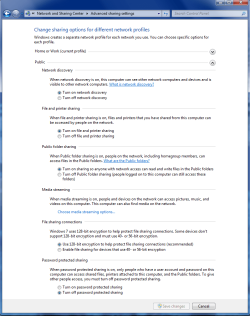
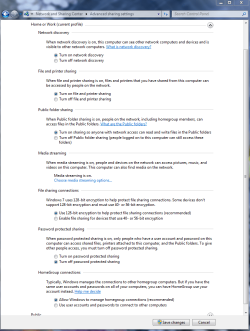
On the XP machine sometimes it helps to run the network setup wizard and allow sharing as you go through the steps. Also make sure that these settings are correct on the Windows 7 machine under the Advanced Network settings.
 

Attachments

  • public sharing enabled all.PNG
    public sharing enabled all.PNG
    39.7 KB · Views: 540
  • Home or work homegroup enable.PNG
    Home or work homegroup enable.PNG
    45 KB · Views: 407

My Computer My Computer

Computer type
PC/Desktop
Computer Manufacturer/Model Number
Home built
OS
Windows 7 Ult, Windows 8.1 Pro,
CPU
Q9650-4.275GHz, E8600 4.5GHz, E6750-3.8GHz
Motherboard
Evga 780i FTW
Memory
G.Skill PC2 9600 1200Mhz 5 5 5 15 2T
Graphics Card(s)
GTX480
Sound Card
Asus Xonar D2
Monitor(s) Displays
HannsG
Screen Resolution
1680X1050
Hard Drives
GSkill Phoenix Pro 120GB SSD
PSU
ThermalTake Toughpower 1000Watt modular
Case
ThermalTake XaserV
Cooling
Xigmatek S1283
Keyboard
Logitech G15
Mouse
Logitech G9
Internet Speed
T1
The simplest (and i mean simplest) of file sharing tutorial - in my sig.

I don't worry about Homegroup or Workgroup, other than on W7 just needed File and Printer Sharing to be ON.
 

My Computer My Computer

Computer Manufacturer/Model Number
Lenovo ThinkPad T60
OS
Windows 7 Ultimate 64Bit
CPU
GenuineIntel Intel(R) Core(TM) DuoCore T2400 @ 1.83GHz
Motherboard
Intel(R) 82801G (ICH7 Family)
Memory
2.00 GB
Graphics Card(s)
Mobile Intel(R) 945 Express Chipset
Sound Card
SoundMAX Integrated Digital HD Audio
Monitor(s) Displays
ThinkPad Display
Screen Resolution
1400x1050
Hard Drives
100Gb SATA
Keyboard
Standard Keyboard
Mouse
HID-compliant Mouse
Internet Speed
Cable Broadband - 54Mbps
Other Info
Intel(R) PRO/1000 PL Network Connection
11a/b/g Wireless LAN Mini PCI Express Adapter
Hi!

im having the same problem!
i cant access folder from w7 even though i already setup the permission in xp home (safe mode).

1) set advance network sharing - done
2) firewall off - done
3) same homegroup named 'WORKGROUP' - done
4) test sharing folder with specific pc (setup permission & password) w7 + w7 - ok
5) test sharing folder with specific pc (setup permission & password) w8 + w7 - ok
6) test sharing folder with 'everyone' xp home + w7/w8 - ok
7) test sharing folder with specific pc (setup permission & password) xp home + w7/w8 - access denied :cry:

can somebody help?

ps. sorry for my bad english


My Computer My Computer

Computer type
PC/Desktop
OS
Windows 7 Home Premium 64bit
Back
Top