
Shortcut Arrow - Change, Remove, or Restore

How to Change, Remove, or Restore the Shortcut Arrow Overlay Icon in Windows


   Information
This tutorial will show you how to change, remove, or restore the default shortcut arrow overlay on all shortcut icons in Vista, Windows 7, and Windows 8.

You must be logged in as an administrator to be able to do the steps in this tutorial.

   Warning
Removing the shortcut arrow will make it harder to tell which files are shortcuts or not.

You can still tell by right clicking or press and hold on the file, and click/tap on Properties to see if you have a Shortcut tab or not.


OPTION ONE

Change Shortcut Arrow using "Vista Shortcut Overlay Remover"


1. If you have not already, click/tap on the Download button below to download the Vista Shortcut Overlay Remover (Vista Shortcut Overlay Manager) program below for the 32-bit or 64-bit Windows you have installed. Save the .msi file to your desktop, and install it.
32-bit (x86) Windows

Download


64-bit (x64) Windows

Download


2. Double click/tap on the program's shortcut to run the program.

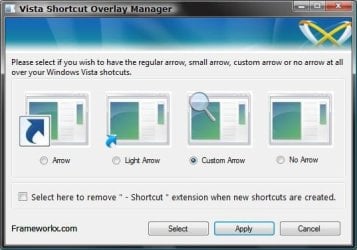
3. To Change, Restore, or Remove the Arrow for All Shortcuts
A) Select (dot) the arrow option you want for the shortcut arrow. (See screenshot below)
NOTE: If you selected Custom Arrow to change the shortcut arrow, then click on Select and navigate to and choose a ICO (icon) file you have downloaded to use as the shortcut arrow.
4. To Remove the "Shortcut" Name from All Shortcuts
NOTE: See also: http://www.sevenforums.com/tutorials/804-shortcut-extension-remove-restore.html
A) Check the box to also remove the - Shortcut name extension for new shortcuts that are created.
5. Click/tap on Apply.
Frameworkx.jpg
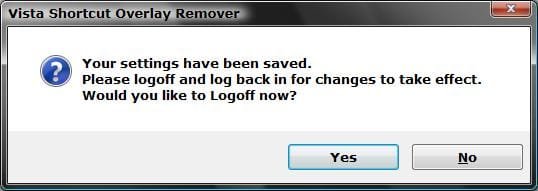
6. Click/tap on Yes to log off to apply the changes. (See screenshot below)
NOTE: If you like, you could also just restart explorer instead to apply your changes.
Logoff_Confirmation.jpg
7. Log back on and your done.


   Warning
If you used the Light Arrow or No Arrow option and uninstall "Vista Shortcut Overlay Remover", then they will be undone the next time you log off/on or restart the computer/explorer.

The Arrow (default) and Custom Arrow options will not be undone if you uninstall "Vista Shortcut Overlay Remover".


OPTION TWO

To Change Shortcut Arrow Overlay Icon in Registry Editor


1. Press the Windows + R keys to open the Run dialog, type regedit, and press Enter.

2. In regedit, navigate to the location below:
NOTE: If Shell Icons it is not in the left pane under Explorer, right click on Explorer, and click on New and Key. Type Shell Icons for the new keys's name, and press Enter.

Code:
HKEY_LOCAL_MACHINE\SOFTWARE\Microsoft\Windows\CurrentVersion\Explorer\Shell Icons

3. In the right pane of Shell Icons, right click on an empty area, and click/tap on New and String Value, and name it 29.

4. Double click/tap on the 29 sting value to modify it.

5. Type in the full path of your custom .ico file within quotes, OR copy and paste the path below for what overlay icon you would like to use, and click/tap on OK.
   Tip
If you like, you can download a transparent.ico file here to use instead.


(No arrow - Transparent) %windir%\System32\shell32.dll,-50

XP_Arrow.png (Classic) %windir%\System32\shell32.dll,-30

Arrow.png (Default) %windir%\System32\shell32.dll,-16769
6. Log off and on, or restart the computer to apply.


OPTION THREE

To Change Shortcut Arrow Overlay Icon using a REG File


NOTE: This option does the same thing as OPTION TWO above, but automatically for you using a .reg file.
1. Do step 2, 3, or 4 below for what you would like to do.

2. To Restore Default Shortcut Arrow Overlay Icon
NOTE: This is the default setting.
A) Click/tap on the Download button below to download the .reg file below, and go to step 5 below.

Arrow.png Default_Shortcut_Arrow.reg


Download


3. To Use Classic Shortcut Arrow Overlay Icon
A) Click/tap on the Download button below to download the .reg file below, and go to step 5 below.

XP_Arrow.png Classic_Shortcut_Arrow.reg


Download


4. To Have No Shortcut Arrow Overlay Icon
A) Click/tap on the Download button below to download the .reg file below, and go to step 5 below.

No_Shortcut_Arrow.reg


Download


5. Log off and log on, or restart the computer to apply.

6. You can now delete the downloaded .reg file if you like.
That's it,
Shawn


Attachments

Last edited:
Thank you !

Hello,

:) I have just been using Method One with win7 ultimate x64...... and it worked beau-ti-fully ! :D

So this is just to say a big THANK YOU !
:party:
 

My Computer My Computer

Computer type
PC/Desktop
OS
win7 x64 ultimate
CPU
3.30 gigahertz Intel Core i5-4590
Motherboard
Asus H97M-PLUS
Memory
8 MB
Graphics Card(s)
PNY Quadro K600
Screen Resolution
1920 x 1080
You're most welcome Icacream, and welcome to Seven Forums. :)
 

My Computer My Computer

Computer type
PC/Desktop
Computer Manufacturer/Model Number
Self built custom
OS
64-bit Windows 11 Pro for Workstations
CPU
Intel i7-8700K OC'd to 5 GHz
Motherboard
ASUS ROG Maximus XI Formula Z390
Memory
64 GB (4x16GB) G.SKILL TridentZ RGB DDR4 3600 MHz
Graphics Card(s)
ASUS ROG-STRIX-GTX1080TI-O11G-GAMING
Sound Card
Integrated
Monitor(s) Displays
2 x Samsung Odyssey G7 27"
Screen Resolution
2560x1440
Hard Drives
1TB Samsung 990 PRO M.2,
4TB Samsung 990 PRO PRO M.2,
TerraMaster F8 SSD Plus NAS
PSU
Seasonic Prime Titanium 850W
Case
Thermaltake Core P3
Cooling
Corsair Hydro H115i
Keyboard
Logitech wireless K800
Mouse
Logitech MX Master 4
Internet Speed
2 Gb/s Download and 100 Mb/s Upload
Antivirus
Malwarebyte Anti-Malware Premium
Browser
Google Chrome
Other Info
Logitech Z625 speaker system,
Logitech BRIO 4K Pro webcam,
HP Color LaserJet Pro MFP M477fdn,
APC SMART-UPS RT 1000 XL - SURT1000XLI,
Galaxy S23 Plus phone
Thank You!

Thank You Brink!!!!

Wish I had located this forum the minute I changed from Vista [(which I only had for a short period of time and never really cared for) as I purchased a new computer with Vista just before the release of 7] to Windows 7 64-bit. What a wonderful site with a plethora of information! Now, after 'tweaks' from this site, I'm almost setup with 7 the way I prefer.

Thanks,
PWT
 

My Computer My Computer

OS
Windows 7 Home Premium 64-bit Operating System
You're most welcome Paul, and welcome to Seven Forums. :)
 

My Computer My Computer

Computer type
PC/Desktop
Computer Manufacturer/Model Number
Self built custom
OS
64-bit Windows 11 Pro for Workstations
CPU
Intel i7-8700K OC'd to 5 GHz
Motherboard
ASUS ROG Maximus XI Formula Z390
Memory
64 GB (4x16GB) G.SKILL TridentZ RGB DDR4 3600 MHz
Graphics Card(s)
ASUS ROG-STRIX-GTX1080TI-O11G-GAMING
Sound Card
Integrated
Monitor(s) Displays
2 x Samsung Odyssey G7 27"
Screen Resolution
2560x1440
Hard Drives
1TB Samsung 990 PRO M.2,
4TB Samsung 990 PRO PRO M.2,
TerraMaster F8 SSD Plus NAS
PSU
Seasonic Prime Titanium 850W
Case
Thermaltake Core P3
Cooling
Corsair Hydro H115i
Keyboard
Logitech wireless K800
Mouse
Logitech MX Master 4
Internet Speed
2 Gb/s Download and 100 Mb/s Upload
Antivirus
Malwarebyte Anti-Malware Premium
Browser
Google Chrome
Other Info
Logitech Z625 speaker system,
Logitech BRIO 4K Pro webcam,
HP Color LaserJet Pro MFP M477fdn,
APC SMART-UPS RT 1000 XL - SURT1000XLI,
Galaxy S23 Plus phone
Worked flawlessly on my new Win 7 Pro x64. The key to success is the blank.ico folks make sure you set that up correctly.
 

My Computer My Computer

Computer Manufacturer/Model Number
Home Brew
OS
Windows 7 Pro x64
CPU
Core 2 Quad 4 Q9650 3GHz
Motherboard
Gigabyte P35-DS3R r2
Memory
4GB
Graphics Card(s)
ATI Radeon HD 5780
Monitor(s) Displays
DELL 2208WFP
Hard Drives
several
Worked perfect :) Thx Brink :)
 

My Computer My Computer

Computer Manufacturer/Model Number
LG Notebook
OS
Windows 7 Ultimate x64
CPU
2.1Ghz
Motherboard
N/A
Memory
3Gb
Graphics Card(s)
nVidia 8600M GT
Sound Card
Realtek HD Audio
Monitor(s) Displays
17.1" TFT ( WSXGA+ ) - Glare
Screen Resolution
17.1"
Hard Drives
320Gig disc
PSU
N/A
Case
Laptop Case =)
Cooling
Laptop again xD
Keyboard
Builtin @ Laptop =)
Mouse
Razer Copperhead
Internet Speed
100/100Mb :) Swe Connection =D
Other Info
i eat metal :D
a more accurate way to do this registry editing...

As a reply to the first post-
use this string instead, its more accurate, and its the "official way" to referring the windows 's installation folder (so it will work even if you've installed your windows in another drive, d:\ for example)...

Code:
%SystemRoot%\system32\shell32.dll,29


if you want a simple and better way input-ing this information without opening the registry tool and using your mouse and keyboard just copy-paste the following text into a new file named "SetShortcutIcon.reg"

Code:
Windows Registry Editor Version 5.00

[HKEY_LOCAL_MACHINE\SOFTWARE\Microsoft\Windows\CurrentVersion\Explorer\Shell Icons]
"29"="%SystemRoot%\\system32\\shell32.dll,29"


now- double click the file and it would get into your registry, log-off and back inside to see changes. you can use CCleaner which cleans the windows 7's icon's cache smooth & nicely.
 

My Computer My Computer

OS
Windows 7 Ultimate x86
This does not work in Windows 7 Ultimate :(
 

My Computer My Computer

Computer Manufacturer/Model Number
HP Pavilion dv4i-2100
OS
Windows 7 Ultimate x86
CPU
Intel Core i3 M350 @ 2.27 GHz
Motherboard
Stock
Memory
3.00 GB
Graphics Card(s)
Intel 1GB HDMI Graphics Card
Sound Card
Stock
Monitor(s) Displays
14.6" HD
Screen Resolution
1200x800 current setting.
Hard Drives
320GB samsung internal
500GB ADATA portable
PSU
Stock
Case
Stock
Cooling
Targus twin-fan chill mat.
Internet Speed
At home, 300kb/sec downloads. At work, 1028kb/sec downloads.
Other Info
Purchased through HP direct, custom build. I highly recommend HP to anyone.
Hello Benjamin,

Yes, both options work perfectly well in Windows 7 Ultimate. :)

Can you give more details? What option or part is not working for you? Have you tried the other option?
 

My Computer My Computer

Computer type
PC/Desktop
Computer Manufacturer/Model Number
Self built custom
OS
64-bit Windows 11 Pro for Workstations
CPU
Intel i7-8700K OC'd to 5 GHz
Motherboard
ASUS ROG Maximus XI Formula Z390
Memory
64 GB (4x16GB) G.SKILL TridentZ RGB DDR4 3600 MHz
Graphics Card(s)
ASUS ROG-STRIX-GTX1080TI-O11G-GAMING
Sound Card
Integrated
Monitor(s) Displays
2 x Samsung Odyssey G7 27"
Screen Resolution
2560x1440
Hard Drives
1TB Samsung 990 PRO M.2,
4TB Samsung 990 PRO PRO M.2,
TerraMaster F8 SSD Plus NAS
PSU
Seasonic Prime Titanium 850W
Case
Thermaltake Core P3
Cooling
Corsair Hydro H115i
Keyboard
Logitech wireless K800
Mouse
Logitech MX Master 4
Internet Speed
2 Gb/s Download and 100 Mb/s Upload
Antivirus
Malwarebyte Anti-Malware Premium
Browser
Google Chrome
Other Info
Logitech Z625 speaker system,
Logitech BRIO 4K Pro webcam,
HP Color LaserJet Pro MFP M477fdn,
APC SMART-UPS RT 1000 XL - SURT1000XLI,
Galaxy S23 Plus phone
The reg file options don't work. I have the reg files on my computer from when I did it to Dream Edition... but instead, it won't show the Blank.ico, it shows the system default icon instead. it's okay, I used that vista program for doing it and it worked alright.
 

My Computer My Computer

Computer Manufacturer/Model Number
HP Pavilion dv4i-2100
OS
Windows 7 Ultimate x86
CPU
Intel Core i3 M350 @ 2.27 GHz
Motherboard
Stock
Memory
3.00 GB
Graphics Card(s)
Intel 1GB HDMI Graphics Card
Sound Card
Stock
Monitor(s) Displays
14.6" HD
Screen Resolution
1200x800 current setting.
Hard Drives
320GB samsung internal
500GB ADATA portable
PSU
Stock
Case
Stock
Cooling
Targus twin-fan chill mat.
Internet Speed
At home, 300kb/sec downloads. At work, 1028kb/sec downloads.
Other Info
Purchased through HP direct, custom build. I highly recommend HP to anyone.
That's great news Benjamin. I'm happy to hear that you got it sorted.

The only thing I can think of off the top of my head is that you may not have unblocked the Blank.ico file before moving it, or didn't use the 32-bit Remove_Shortcut_Arrow.reg file version in the download. :confused:
 

My Computer My Computer

Computer type
PC/Desktop
Computer Manufacturer/Model Number
Self built custom
OS
64-bit Windows 11 Pro for Workstations
CPU
Intel i7-8700K OC'd to 5 GHz
Motherboard
ASUS ROG Maximus XI Formula Z390
Memory
64 GB (4x16GB) G.SKILL TridentZ RGB DDR4 3600 MHz
Graphics Card(s)
ASUS ROG-STRIX-GTX1080TI-O11G-GAMING
Sound Card
Integrated
Monitor(s) Displays
2 x Samsung Odyssey G7 27"
Screen Resolution
2560x1440
Hard Drives
1TB Samsung 990 PRO M.2,
4TB Samsung 990 PRO PRO M.2,
TerraMaster F8 SSD Plus NAS
PSU
Seasonic Prime Titanium 850W
Case
Thermaltake Core P3
Cooling
Corsair Hydro H115i
Keyboard
Logitech wireless K800
Mouse
Logitech MX Master 4
Internet Speed
2 Gb/s Download and 100 Mb/s Upload
Antivirus
Malwarebyte Anti-Malware Premium
Browser
Google Chrome
Other Info
Logitech Z625 speaker system,
Logitech BRIO 4K Pro webcam,
HP Color LaserJet Pro MFP M477fdn,
APC SMART-UPS RT 1000 XL - SURT1000XLI,
Galaxy S23 Plus phone
Brilliant fix! Worked a treat on my Win 7 64bit.

Many thanks Brink :)
 

My Computer My Computer

Computer Manufacturer/Model Number
Acre Aspire 5742
OS
Windows 7 Home Premium 64bit
CPU
Intel Core 13-370M
Memory
4 GB DDR3
Graphics Card(s)
Intel HD Graphics
Monitor(s) Displays
15.6" HD LED LCD
Hard Drives
250 GB
You're most welcome Pineapples, and welcome to Seven Forums. :)
 

My Computer My Computer

Computer type
PC/Desktop
Computer Manufacturer/Model Number
Self built custom
OS
64-bit Windows 11 Pro for Workstations
CPU
Intel i7-8700K OC'd to 5 GHz
Motherboard
ASUS ROG Maximus XI Formula Z390
Memory
64 GB (4x16GB) G.SKILL TridentZ RGB DDR4 3600 MHz
Graphics Card(s)
ASUS ROG-STRIX-GTX1080TI-O11G-GAMING
Sound Card
Integrated
Monitor(s) Displays
2 x Samsung Odyssey G7 27"
Screen Resolution
2560x1440
Hard Drives
1TB Samsung 990 PRO M.2,
4TB Samsung 990 PRO PRO M.2,
TerraMaster F8 SSD Plus NAS
PSU
Seasonic Prime Titanium 850W
Case
Thermaltake Core P3
Cooling
Corsair Hydro H115i
Keyboard
Logitech wireless K800
Mouse
Logitech MX Master 4
Internet Speed
2 Gb/s Download and 100 Mb/s Upload
Antivirus
Malwarebyte Anti-Malware Premium
Browser
Google Chrome
Other Info
Logitech Z625 speaker system,
Logitech BRIO 4K Pro webcam,
HP Color LaserJet Pro MFP M477fdn,
APC SMART-UPS RT 1000 XL - SURT1000XLI,
Galaxy S23 Plus phone
Thanks :) Good to be here.
 

My Computer My Computer

Computer Manufacturer/Model Number
Acre Aspire 5742
OS
Windows 7 Home Premium 64bit
CPU
Intel Core 13-370M
Memory
4 GB DDR3
Graphics Card(s)
Intel HD Graphics
Monitor(s) Displays
15.6" HD LED LCD
Hard Drives
250 GB
I'd like to remove the shortcut arrow, I want to change or use the XP style 'light' arrow...The "Vista Shortcut Overlay Remover" DOES NOT :confused: work on Windows 7 Pro 64bit...anyone have any better luck?? thx.
 

My Computer My Computer

Computer type
Laptop
Computer Manufacturer/Model Number
Dell Precision M6600
OS
Windows 7 Professional 64bit
CPU
Intel Core i7 2820QM 2.3GHz
Memory
8GB ( 1666 MHz )
Graphics Card(s)
ATI Fire Pro M8900
Sound Card
MOTU UltraLite mk3 Hybrid ( external )
Screen Resolution
1200
Hard Drives
250GB 7200 rpm
Keyboard
It lights up
Mouse
Logitech laser
Internet Speed
Blazing
Antivirus
COMODO Internet Security (There is NO OTHER)
Browser
Firefox (There is NO OTHER)...well Opera is cool
Hello voiceartistusa, and welcome to Seven Forums.

It works for me in 64-bit Windows 7 Pro.

Do you have UAC turned on?

At what point in the program does it not work?

Can you upload a copy of the arrow that you are trying to use? I'll test it on my system to see if that may be the issue.
 

My Computer My Computer

Computer type
PC/Desktop
Computer Manufacturer/Model Number
Self built custom
OS
64-bit Windows 11 Pro for Workstations
CPU
Intel i7-8700K OC'd to 5 GHz
Motherboard
ASUS ROG Maximus XI Formula Z390
Memory
64 GB (4x16GB) G.SKILL TridentZ RGB DDR4 3600 MHz
Graphics Card(s)
ASUS ROG-STRIX-GTX1080TI-O11G-GAMING
Sound Card
Integrated
Monitor(s) Displays
2 x Samsung Odyssey G7 27"
Screen Resolution
2560x1440
Hard Drives
1TB Samsung 990 PRO M.2,
4TB Samsung 990 PRO PRO M.2,
TerraMaster F8 SSD Plus NAS
PSU
Seasonic Prime Titanium 850W
Case
Thermaltake Core P3
Cooling
Corsair Hydro H115i
Keyboard
Logitech wireless K800
Mouse
Logitech MX Master 4
Internet Speed
2 Gb/s Download and 100 Mb/s Upload
Antivirus
Malwarebyte Anti-Malware Premium
Browser
Google Chrome
Other Info
Logitech Z625 speaker system,
Logitech BRIO 4K Pro webcam,
HP Color LaserJet Pro MFP M477fdn,
APC SMART-UPS RT 1000 XL - SURT1000XLI,
Galaxy S23 Plus phone
Downloaded first time from Softpedia.

Download again from:
Vista Shortcut Overlay Remover - Free software downloads and software reviews - CNET Download.com
' FXVisor32.msi '

Installs to (x86) folder

"...has been installed, click Close to exit"

Run shortcut, the GUI appears.

Choose "Light Arrow" Click "Apply"
Says "your settings have been saved. Would you like to log off now?"
Choose Yes...and the following pops up:

----------------------------------------------------------------------------
Unhandled exception has occured in your application. If you click Continue, the application
will ignore this error and attempt to continue. If you click quit, the app will close immediately.
The system cannot find the file specified.

[spelling of occurred is wrong]

Before I choose Continue, I copied the details below, then rebooted and it doesn't work.
UAC was on, I changed it to Never Notify, logged off, tried it again, logged off...still doesn't work.


DETAILS BUTTON:

See the end of this message for details on invoking
just-in-time (JIT) debugging instead of this dialog box.

Code:
************** Exception Text **************
System.ComponentModel.Win32Exception: The system cannot find the file specified
at System.Diagnostics.Process.StartWithCreateProcess(ProcessStartInfo startInfo)
at System.Diagnostics.Process.Start()
at VistaArrowGone.Form1.btApply_Click(Object sender, EventArgs e)
at System.Windows.Forms.Control.OnClick(EventArgs e)
at System.Windows.Forms.Button.OnClick(EventArgs e)
at System.Windows.Forms.Button.OnMouseUp(MouseEventArgs mevent)
at System.Windows.Forms.Control.WmMouseUp(Message& m, MouseButtons button, Int32 clicks)
at System.Windows.Forms.Control.WndProc(Message& m)
at System.Windows.Forms.ButtonBase.WndProc(Message& m)
at System.Windows.Forms.Button.WndProc(Message& m)
at System.Windows.Forms.Control.ControlNativeWindow.OnMessage(Message& m)
at System.Windows.Forms.Control.ControlNativeWindow.WndProc(Message& m)
at System.Windows.Forms.NativeWindow.Callback(IntPtr hWnd, Int32 msg, IntPtr wparam, IntPtr lparam)
 
 
************** Loaded Assemblies **************
mscorlib
Assembly Version: 2.0.0.0
Win32 Version: 2.0.50727.4952 (win7RTMGDR.050727-4900)
CodeBase: file:///C:/Windows/Microsoft.NET/Framework/v2.0.50727/mscorlib.dll
----------------------------------------
FxVisor
Assembly Version: 2.0.0.0
Win32 Version: 2.0.0.0
CodeBase: file:///C:/Program%20Files%20(x86)/Frameworkx/Vista%20Shortcut%20Manager/FxVisor.exe
----------------------------------------
System.Windows.Forms
Assembly Version: 2.0.0.0
Win32 Version: 2.0.50727.4927 (NetFXspW7.050727-4900)
CodeBase: file:///C:/Windows/assembly/GAC_MSIL/System.Windows.Forms/2.0.0.0__b77a5c561934e089/System.Windows.Forms.dll
----------------------------------------
System
Assembly Version: 2.0.0.0
Win32 Version: 2.0.50727.4927 (NetFXspW7.050727-4900)
CodeBase: file:///C:/Windows/assembly/GAC_MSIL/System/2.0.0.0__b77a5c561934e089/System.dll
----------------------------------------
System.Drawing
Assembly Version: 2.0.0.0
Win32 Version: 2.0.50727.4927 (NetFXspW7.050727-4900)
CodeBase: file:///C:/Windows/assembly/GAC_MSIL/System.Drawing/2.0.0.0__b03f5f7f11d50a3a/System.Drawing.dll
----------------------------------------
System.Configuration
Assembly Version: 2.0.0.0
Win32 Version: 2.0.50727.4927 (NetFXspW7.050727-4900)
CodeBase: file:///C:/Windows/assembly/GAC_MSIL/System.Configuration/2.0.0.0__b03f5f7f11d50a3a/System.Configuration.dll
----------------------------------------
System.Xml
Assembly Version: 2.0.0.0
Win32 Version: 2.0.50727.4927 (NetFXspW7.050727-4900)
CodeBase: file:///C:/Windows/assembly/GAC_MSIL/System.Xml/2.0.0.0__b77a5c561934e089/System.Xml.dll
----------------------------------------
Accessibility
Assembly Version: 2.0.0.0
Win32 Version: 2.0.50727.4927 (NetFXspW7.050727-4900)
CodeBase: file:///C:/Windows/assembly/GAC_MSIL/Accessibility/2.0.0.0__b03f5f7f11d50a3a/Accessibility.dll
----------------------------------------
************** JIT Debugging **************
To enable just-in-time (JIT) debugging, the .config file for this
application or computer (machine.config) must have the
jitDebugging value set in the system.windows.forms section.
The application must also be compiled with debugging
enabled.

For example:

<configuration>
<system.windows.forms jitDebugging="true" />
</configuration>

When JIT debugging is enabled, any unhandled exception
will be sent to the JIT debugger registered on the computer
rather than be handled by this dialog box.
 
Last edited by a moderator:

My Computer My Computer

Computer type
Laptop
Computer Manufacturer/Model Number
Dell Precision M6600
OS
Windows 7 Professional 64bit
CPU
Intel Core i7 2820QM 2.3GHz
Memory
8GB ( 1666 MHz )
Graphics Card(s)
ATI Fire Pro M8900
Sound Card
MOTU UltraLite mk3 Hybrid ( external )
Screen Resolution
1200
Hard Drives
250GB 7200 rpm
Keyboard
It lights up
Mouse
Logitech laser
Internet Speed
Blazing
Antivirus
COMODO Internet Security (There is NO OTHER)
Browser
Firefox (There is NO OTHER)...well Opera is cool
I Did It !!

;)

I merged the 64-bit_Remove_Shortcut_Arrow.reg file, renamed my arrow to "lighta.ico" opened regedit...


Changed This:
[HKEY_LOCAL_MACHINE\SOFTWARE\Microsoft\Windows\CurrentVersion\explorer\Shell Icons]
"29"="C:\\Windows\\Blank.ico,0"

To This:
[HKEY_LOCAL_MACHINE\SOFTWARE\Microsoft\Windows\CurrentVersion\explorer\Shell Icons]
"29"="C:\\Windows\\lighta.ico,0"

Put my lighta.ico in C:\Windows logged off and back on, and it worked.

The .reg files hosted on this site are HERE
The post I got that from is HERE

Thanks for your help! Great Site !!
 

My Computer My Computer

Computer type
Laptop
Computer Manufacturer/Model Number
Dell Precision M6600
OS
Windows 7 Professional 64bit
CPU
Intel Core i7 2820QM 2.3GHz
Memory
8GB ( 1666 MHz )
Graphics Card(s)
ATI Fire Pro M8900
Sound Card
MOTU UltraLite mk3 Hybrid ( external )
Screen Resolution
1200
Hard Drives
250GB 7200 rpm
Keyboard
It lights up
Mouse
Logitech laser
Internet Speed
Blazing
Antivirus
COMODO Internet Security (There is NO OTHER)
Browser
Firefox (There is NO OTHER)...well Opera is cool
That's great news. I'm happy to hear that you got it sorted. :)
 

My Computer My Computer

Computer type
PC/Desktop
Computer Manufacturer/Model Number
Self built custom
OS
64-bit Windows 11 Pro for Workstations
CPU
Intel i7-8700K OC'd to 5 GHz
Motherboard
ASUS ROG Maximus XI Formula Z390
Memory
64 GB (4x16GB) G.SKILL TridentZ RGB DDR4 3600 MHz
Graphics Card(s)
ASUS ROG-STRIX-GTX1080TI-O11G-GAMING
Sound Card
Integrated
Monitor(s) Displays
2 x Samsung Odyssey G7 27"
Screen Resolution
2560x1440
Hard Drives
1TB Samsung 990 PRO M.2,
4TB Samsung 990 PRO PRO M.2,
TerraMaster F8 SSD Plus NAS
PSU
Seasonic Prime Titanium 850W
Case
Thermaltake Core P3
Cooling
Corsair Hydro H115i
Keyboard
Logitech wireless K800
Mouse
Logitech MX Master 4
Internet Speed
2 Gb/s Download and 100 Mb/s Upload
Antivirus
Malwarebyte Anti-Malware Premium
Browser
Google Chrome
Other Info
Logitech Z625 speaker system,
Logitech BRIO 4K Pro webcam,
HP Color LaserJet Pro MFP M477fdn,
APC SMART-UPS RT 1000 XL - SURT1000XLI,
Galaxy S23 Plus phone
Need Help-White Box Where Shortcut Arrows Were?

I downloaded the zip file and then just hit the 64 bit short cut removal and hit yes and yes.
Now after reading the instructions I should have hit merge-which I didn't. I then followed instructions to reinstall remove and then restore instructions. The blank never showed up and the white box is still there.
What can I do to get back?
Thanks.
 

My Computer My Computer

OS
windows 7 64
Back
Top