
Shortcut images/icons gone after thunderbird update

alexanderward

New member
Local time
6:02 AM
Messages
2
Location
Sweden
Hi!
Last night before i was going to bed i was going to check my email, Thunderbird is set to automatically update on start if there are any updates.
So it started updating and all off a sudden all shortcut icon images disappeared! At the time i was to tired to fix the problem but as soon as i woke up today i have done nothing but trying to fix it. The only thing i have changed with my icons are the icon images. But that was for 8 months ago and i have never had any problems with it.


This is what the taskbar should look like.
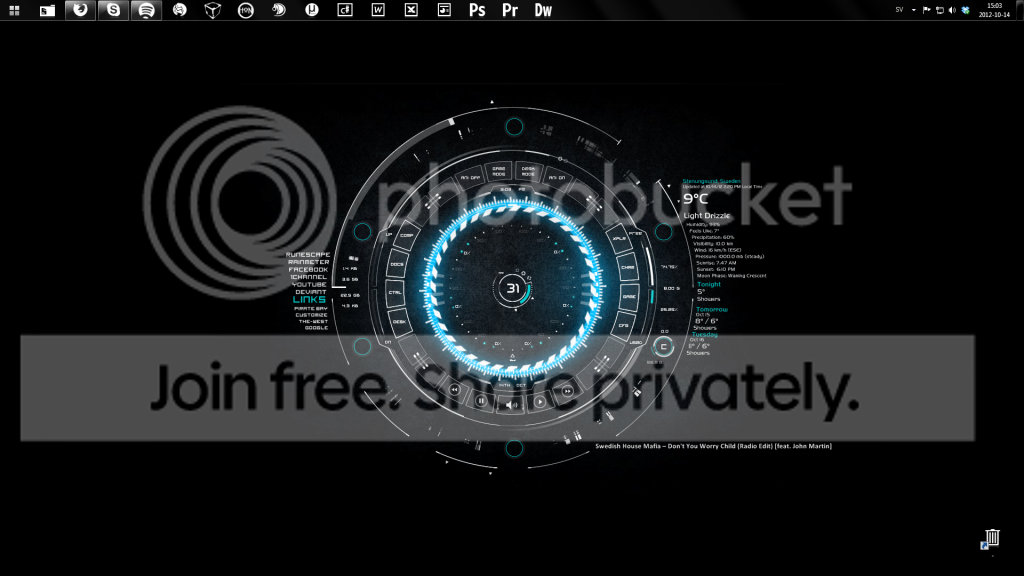
Untitled.png


This is what it looks like now. Also all other shortcuts in my computer have had their images changed to "this"....
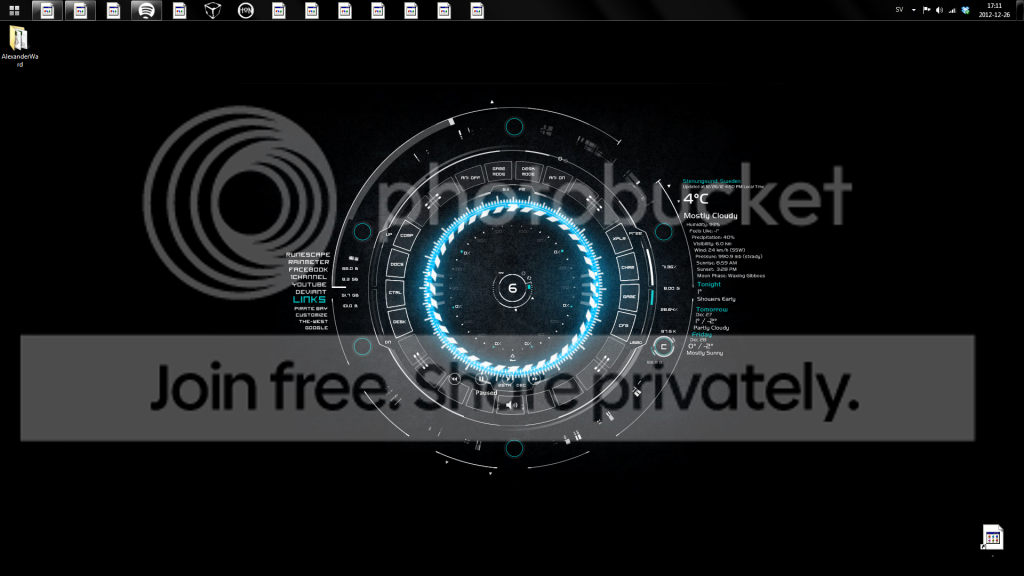
Untitled-1_zpsd74abc98.png


The only icons in the taskbar that are not affected are the ones that are not shortcuts, but exe files.
 

My Computer My Computer

At a glance

Windows 7 Ultimate x64AMD Phenom ii x6 1055tcorsair vengance 2x4GBradeon sapphire 6850
Computer Manufacturer/Model Number
home built
OS
Windows 7 Ultimate x64
CPU
AMD Phenom ii x6 1055t
Motherboard
gigabyte 990fxa-ud5
Memory
corsair vengance 2x4GB
Graphics Card(s)
radeon sapphire 6850
Sound Card
Realtek ALC889 7.1
Monitor(s) Displays
BenQ GL2440
Hard Drives
OCZ ssd 60 GB
500GB seagate barracuda
PSU
OCZ modXstream pro 500w
Case
bitfenix shinobi
Cooling
The 2 fans included in the case

My Computer My Computer

At a glance

64-bit Windows 11 Pro for WorkstationsIntel i7-8700K OC'd to 5 GHz64 GB (4x16GB) G.SKILL TridentZ RGB DDR4 3600...ASUS ROG-STRIX-GTX1080TI-O11G-GAMING
Computer type
PC/Desktop
Computer Manufacturer/Model Number
Self built custom
OS
64-bit Windows 11 Pro for Workstations
CPU
Intel i7-8700K OC'd to 5 GHz
Motherboard
ASUS ROG Maximus XI Formula Z390
Memory
64 GB (4x16GB) G.SKILL TridentZ RGB DDR4 3600 MHz
Graphics Card(s)
ASUS ROG-STRIX-GTX1080TI-O11G-GAMING
Sound Card
Integrated
Monitor(s) Displays
2 x Samsung Odyssey G7 27"
Screen Resolution
2560x1440
Hard Drives
1TB Samsung 990 PRO M.2,
4TB Samsung 990 PRO PRO M.2,
TerraMaster F8 SSD Plus NAS
PSU
Seasonic Prime Titanium 850W
Case
Thermaltake Core P3
Cooling
Corsair Hydro H115i
Keyboard
Logitech wireless K800
Mouse
Logitech MX Master 4
Internet Speed
2 Gb/s Download and 100 Mb/s Upload
Antivirus
Malwarebyte Anti-Malware Premium
Browser
Google Chrome
Other Info
Logitech Z625 speaker system,
Logitech BRIO 4K Pro webcam,
HP Color LaserJet Pro MFP M477fdn,
APC SMART-UPS RT 1000 XL - SURT1000XLI,
Galaxy S23 Plus phone
Hello Alexander,

You could do a system restore using a restore point (if available) dated before this update happened to hopefully fix it.

If that is not an available option, then you might see if downloading and merging the .reg file for the listed lnk (LNK) option in the tutorial below may help. It will restore the default associations and registry entries for shortcuts.

http://www.sevenforums.com/tutorials/19449-default-file-type-associations-restore.html

Hope this helps, :)
Shawn


Thank you for the reply Shawn!
A system restore is not an option(Bad habits not doing backups)

I have tried similar fixes as you mentioned but this one did not to the trick either :/

Either way, i figured out how to manually fix every icon. I have to go into the properties in the shortcut and change the .ico image.

If any one can figure out why this happened i can hopefully prevent it happening again in the future.
 

My Computer My Computer

At a glance

Windows 7 Ultimate x64AMD Phenom ii x6 1055tcorsair vengance 2x4GBradeon sapphire 6850
Computer Manufacturer/Model Number
home built
OS
Windows 7 Ultimate x64
CPU
AMD Phenom ii x6 1055t
Motherboard
gigabyte 990fxa-ud5
Memory
corsair vengance 2x4GB
Graphics Card(s)
radeon sapphire 6850
Sound Card
Realtek ALC889 7.1
Monitor(s) Displays
BenQ GL2440
Hard Drives
OCZ ssd 60 GB
500GB seagate barracuda
PSU
OCZ modXstream pro 500w
Case
bitfenix shinobi
Cooling
The 2 fans included in the case
I'm still using the last 2.x version of Thunderbird. I tried the latest about a month ago. Aside from multiple tabs all it did was work the same only sluggishly. I went back to 2.x So I have to use AutoCopy AddOn instead of it being built in. I can live with that. 2.x just reacts in snappy fashion. And I've never had any weird stuff happen. :)

edit: you can still find 2.0.0.24 TB on one of those Old Versions web sites.
 

My Computer My Computer

At a glance

Windows 7 32 bitAMD 5200+ dual core2 GBNVidia GeForce 6150SE 128 MB
Computer Manufacturer/Model Number
HP Media Center
OS
Windows 7 32 bit
CPU
AMD 5200+ dual core
Memory
2 GB
Graphics Card(s)
NVidia GeForce 6150SE 128 MB
Monitor(s) Displays
CRT
Screen Resolution
1280x1024
Hard Drives
500 GB Sata internal :

SIIG USB 3.0 docking stations w/WD Caviar Black 6 Gb/s drives
Keyboard
PS/2
Mouse
PS/2 Wheel Mouse
Other Info
SIIG USB 3.0 PCIexpress card.
Back
Top