Solved Should I Do a Clean Install?

No, it needs to be with your wireless adapter on a disk or stick where you can install it before you get online to OneDrive.

Once this is done please re-read this thread from the top and check off everything to make sure you're ready.

Then read carefully Clean Reinstall Windows 7 so you understand what's involved. Ask back any questions. I am concerned that I have suggested this several times yet there are no questions about the tutorial steps yet.
 
I think it would be best for me not to do the Clean Install, as I don't know what I am doing. I just need to verify that I have enough space on my C Drive to make sure that I can install the final version of Windows 10. I have a 320 GB HDD with 4 GB RAM. Will that be enough to install 10? I've read that tutorial over and over again, and it still doesn't to make sense to me. It's not you Greg, it's me. I hope you understand!
 

My Computer

Computer type
Laptop
Computer Manufacturer/Model Number
Acer 5250-0450
OS
Windows 10 Home 64-bit
CPU
AMD E-350 Zacate 40nm Technology
Motherboard
Acer HMA51-BZ (Socket FT1)
Memory
4 GB DDR3 Memory
Graphics Card(s)
1909MB ATI AMD Radeon HD
Sound Card
Conexant High Definition Audio
Monitor(s) Displays
Generic PnP Monitor (1366x768@60Hz)
Hard Drives
320 GB HDD
Mouse
ONN Wireless Mouse
Antivirus
Norton Internet Security Online
Browser
Microsoft Edge, Internet Explorer 11, and Google Chrome
Other Info
Other Computers:

Laptop: Acer Aspire 5749 Series

Desktop: Acer Aspire XC603G Series
That's fine, Jesse. If it's performing okay then you might not need to do one anyway. Just let us know of any problems.

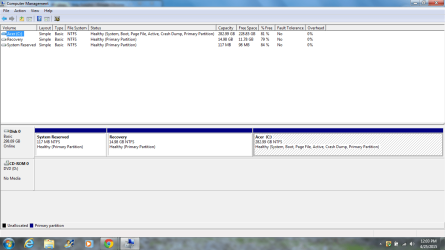
In your Disk Mgmt picture it shows you have a huge amount of unused space, so I wouldn't worry about that.

357170d1429807992t-should-i-do-clean-install-computer-management.png
 
Okay, thanks for your help Greg. I will be sure to let y'all know if I have any problems. I did create a new recovery partition. I will send you a screenshot of what my disk management looks like now.
 

My Computer

Computer type
Laptop
Computer Manufacturer/Model Number
Acer 5250-0450
OS
Windows 10 Home 64-bit
CPU
AMD E-350 Zacate 40nm Technology
Motherboard
Acer HMA51-BZ (Socket FT1)
Memory
4 GB DDR3 Memory
Graphics Card(s)
1909MB ATI AMD Radeon HD
Sound Card
Conexant High Definition Audio
Monitor(s) Displays
Generic PnP Monitor (1366x768@60Hz)
Hard Drives
320 GB HDD
Mouse
ONN Wireless Mouse
Antivirus
Norton Internet Security Online
Browser
Microsoft Edge, Internet Explorer 11, and Google Chrome
Other Info
Other Computers:

Laptop: Acer Aspire 5749 Series

Desktop: Acer Aspire XC603G Series
Computer Management
 

Attachments

  • Computer Management.png
    Computer Management.png
    43.7 KB · Views: 1

My Computer

Computer type
Laptop
Computer Manufacturer/Model Number
Acer 5250-0450
OS
Windows 10 Home 64-bit
CPU
AMD E-350 Zacate 40nm Technology
Motherboard
Acer HMA51-BZ (Socket FT1)
Memory
4 GB DDR3 Memory
Graphics Card(s)
1909MB ATI AMD Radeon HD
Sound Card
Conexant High Definition Audio
Monitor(s) Displays
Generic PnP Monitor (1366x768@60Hz)
Hard Drives
320 GB HDD
Mouse
ONN Wireless Mouse
Antivirus
Norton Internet Security Online
Browser
Microsoft Edge, Internet Explorer 11, and Google Chrome
Other Info
Other Computers:

Laptop: Acer Aspire 5749 Series

Desktop: Acer Aspire XC603G Series
I followed a tutorial on here.
 

My Computer

Computer type
Laptop
Computer Manufacturer/Model Number
Acer 5250-0450
OS
Windows 10 Home 64-bit
CPU
AMD E-350 Zacate 40nm Technology
Motherboard
Acer HMA51-BZ (Socket FT1)
Memory
4 GB DDR3 Memory
Graphics Card(s)
1909MB ATI AMD Radeon HD
Sound Card
Conexant High Definition Audio
Monitor(s) Displays
Generic PnP Monitor (1366x768@60Hz)
Hard Drives
320 GB HDD
Mouse
ONN Wireless Mouse
Antivirus
Norton Internet Security Online
Browser
Microsoft Edge, Internet Explorer 11, and Google Chrome
Other Info
Other Computers:

Laptop: Acer Aspire 5749 Series

Desktop: Acer Aspire XC603G Series
Why would you do that?

The System Reserved partition is only issued during install to make a separate partition to boot Win7, and isn't necessary at all otherwise. The one you made there is not doing anything or it would be marked System Active. To move the System files to it is risky and not advisable.

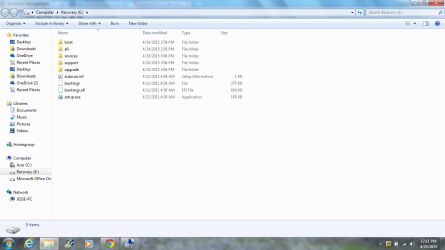
Remaking the Recovery partition is very complicated since it needs to be linked to a boot key or F8 Recovery options. What exactly did you put on it that's 3gb?
 
That's what is in it.
 

Attachments

  • Recovery.png
    Recovery.png
    61.1 KB · Views: 2

My Computer

Computer type
Laptop
Computer Manufacturer/Model Number
Acer 5250-0450
OS
Windows 10 Home 64-bit
CPU
AMD E-350 Zacate 40nm Technology
Motherboard
Acer HMA51-BZ (Socket FT1)
Memory
4 GB DDR3 Memory
Graphics Card(s)
1909MB ATI AMD Radeon HD
Sound Card
Conexant High Definition Audio
Monitor(s) Displays
Generic PnP Monitor (1366x768@60Hz)
Hard Drives
320 GB HDD
Mouse
ONN Wireless Mouse
Antivirus
Norton Internet Security Online
Browser
Microsoft Edge, Internet Explorer 11, and Google Chrome
Other Info
Other Computers:

Laptop: Acer Aspire 5749 Series

Desktop: Acer Aspire XC603G Series

My Computer

Computer type
Laptop
Computer Manufacturer/Model Number
Acer 5250-0450
OS
Windows 10 Home 64-bit
CPU
AMD E-350 Zacate 40nm Technology
Motherboard
Acer HMA51-BZ (Socket FT1)
Memory
4 GB DDR3 Memory
Graphics Card(s)
1909MB ATI AMD Radeon HD
Sound Card
Conexant High Definition Audio
Monitor(s) Displays
Generic PnP Monitor (1366x768@60Hz)
Hard Drives
320 GB HDD
Mouse
ONN Wireless Mouse
Antivirus
Norton Internet Security Online
Browser
Microsoft Edge, Internet Explorer 11, and Google Chrome
Other Info
Other Computers:

Laptop: Acer Aspire 5749 Series

Desktop: Acer Aspire XC603G Series
That tutorial doesn't really create a Recovery partition but merely loads your Win7 DVD into that partition and attempts to make it bootable in a clumsy fashion by creating a Dual Boot menu using EasyBCD which wastes time at boot.

This is not necessary at all because the useful Repair functions on it are all you would need and these should already be on the F8 System Recovery Options on your PC.
 
Okay. So, what should I do? I'm not causing any trouble, am I?
 

My Computer

Computer type
Laptop
Computer Manufacturer/Model Number
Acer 5250-0450
OS
Windows 10 Home 64-bit
CPU
AMD E-350 Zacate 40nm Technology
Motherboard
Acer HMA51-BZ (Socket FT1)
Memory
4 GB DDR3 Memory
Graphics Card(s)
1909MB ATI AMD Radeon HD
Sound Card
Conexant High Definition Audio
Monitor(s) Displays
Generic PnP Monitor (1366x768@60Hz)
Hard Drives
320 GB HDD
Mouse
ONN Wireless Mouse
Antivirus
Norton Internet Security Online
Browser
Microsoft Edge, Internet Explorer 11, and Google Chrome
Other Info
Other Computers:

Laptop: Acer Aspire 5749 Series

Desktop: Acer Aspire XC603G Series
No, I only wish you would have asked me.

Here's what I would do:

Test that you have System Recovery Options by booting into the F8 Advanced Boot Options. When you get the F8 menu is there a Repair My Computer choice at the top? If you choose it will it open and find your install? If so you can close out of it and Reboot.

If those options exist then you don't need the Recovery partition you fashioned because it is only useful to access those same System Recovery Options.

So in that case you can delete again both the Recovery partition and the useless System Reserved partition you made since it is not booting Win7. Partition or Volume - Delete

Since you have so much Free Space on C as you can see on your Disk Management screenshot, it is not worth absorbing the 15gb of Unallocated Space into the C partition.
 
I pressed F8 and am at the System Recovery Options screen. It says to select a keyboard input method.
 

My Computer

Computer type
Laptop
Computer Manufacturer/Model Number
Acer 5250-0450
OS
Windows 10 Home 64-bit
CPU
AMD E-350 Zacate 40nm Technology
Motherboard
Acer HMA51-BZ (Socket FT1)
Memory
4 GB DDR3 Memory
Graphics Card(s)
1909MB ATI AMD Radeon HD
Sound Card
Conexant High Definition Audio
Monitor(s) Displays
Generic PnP Monitor (1366x768@60Hz)
Hard Drives
320 GB HDD
Mouse
ONN Wireless Mouse
Antivirus
Norton Internet Security Online
Browser
Microsoft Edge, Internet Explorer 11, and Google Chrome
Other Info
Other Computers:

Laptop: Acer Aspire 5749 Series

Desktop: Acer Aspire XC603G Series
As it shows in Option One of System Recovery Options:

1. Start or Restart the computer.

2. Boot into the Advanced Boot Options screen.
A) Select Repair your computer and press Enter.
3. Select your keyboard language preferences and click on Next. (See screeshot below).
48466d1263878648-system-recovery-options-step6.jpg

4. Select your user name and type in the password, and then click on OK.
48467d1263878648-system-recovery-options-step6a.jpg


5. Select which operating system you want to restore and the click on Next. (See screenshot below)
NOTE: If Windows 7 is not listed here, or it is blank, then it is ok. Click on Next anyway.
962d1227431645-system-recovery-options-select_os.jpg


If it will make it to Step 5 then you can click the X at the top right of the box to exit the Repair mode. You have an intact F8 Repair function.
 
It didn't make it to Step 5. It just went into Recovery Options after I logged in as a local user.
 

My Computer

Computer type
Laptop
Computer Manufacturer/Model Number
Acer 5250-0450
OS
Windows 10 Home 64-bit
CPU
AMD E-350 Zacate 40nm Technology
Motherboard
Acer HMA51-BZ (Socket FT1)
Memory
4 GB DDR3 Memory
Graphics Card(s)
1909MB ATI AMD Radeon HD
Sound Card
Conexant High Definition Audio
Monitor(s) Displays
Generic PnP Monitor (1366x768@60Hz)
Hard Drives
320 GB HDD
Mouse
ONN Wireless Mouse
Antivirus
Norton Internet Security Online
Browser
Microsoft Edge, Internet Explorer 11, and Google Chrome
Other Info
Other Computers:

Laptop: Acer Aspire 5749 Series

Desktop: Acer Aspire XC603G Series
Yes
 

My Computer

Computer type
Laptop
Computer Manufacturer/Model Number
Acer 5250-0450
OS
Windows 10 Home 64-bit
CPU
AMD E-350 Zacate 40nm Technology
Motherboard
Acer HMA51-BZ (Socket FT1)
Memory
4 GB DDR3 Memory
Graphics Card(s)
1909MB ATI AMD Radeon HD
Sound Card
Conexant High Definition Audio
Monitor(s) Displays
Generic PnP Monitor (1366x768@60Hz)
Hard Drives
320 GB HDD
Mouse
ONN Wireless Mouse
Antivirus
Norton Internet Security Online
Browser
Microsoft Edge, Internet Explorer 11, and Google Chrome
Other Info
Other Computers:

Laptop: Acer Aspire 5749 Series

Desktop: Acer Aspire XC603G Series
Then you have the repair functions on F8 in case Win7 won't start.

That makes the Recovery partition you made unneeded. Did you add it to a Dual Boot menu which is now showing up when you boot the PC?
 
Back
Top