
Should I keep My Documents on C and Videos, Music etc on D ?

adri123

New member
Member
Local time
1:31 AM
Messages
73
Hello all,

Two partitions: C(OS,PROGRAMS) and D(DATA).
Reason: Backups. So i can reinstall an image of C while keeping untouched my personal files.
Question: Is it better to keep the My Documents folder on C ?
Reason: Some programs tend to save their settings and parameters in that folder. In case of crash, I want to be able to put back my OS and programs, and to have them working exactly like before and not having to reajust all of their settings!, or even worse, having some programs bug because of missing/incoherent settings.

Idea: Keeping the My Documents folder on C. Having another "RealDocuments" folder on D where I actually put my personal documents.


What are your thoughts and advises ?

Idea I don't want to implement: Moving the whole Users folder on the D partition.
Reason: It's a system folder. It's considered part of the OS. Therefore If i want to make a backup of the OS and programs I also have to backup the entire D parition which is much bigger. I won't do that.


What do you think ?
 

My Computer My Computer

At a glance

Windows 7 Home Premium 64 bitIntel Core i5 2410M @ 2.30GHz Sandy Bridge 32...8,00 GB Dual-Channel DDR3 @ 1333 MHz (PC3-10600)NVIDIA GeForce GT 555M, Intel HD Graphics 3000
Computer type
Laptop
Computer Manufacturer/Model Number
Asus N55SF
OS
Windows 7 Home Premium 64 bit
CPU
Intel Core i5 2410M @ 2.30GHz Sandy Bridge 32nm Technology
Motherboard
ASUSTeK Computer Inc. N55SF
Memory
8,00 GB Dual-Channel DDR3 @ 1333 MHz (PC3-10600)
Graphics Card(s)
NVIDIA GeForce GT 555M, Intel HD Graphics 3000
Sound Card
Realtek High Definition Audio
Screen Resolution
1600x900@60Hz
Hard Drives
699GB Seagate ST9750423AS (SATA) 5400rpm
Other Info
Optical drive: Slimtype DVD A DS8A5SH
Hello Adri,

I'd say it's best to leave your user folders on C: to avoid getting them corrupted.

I find the easiest way for this would be:
  • Create a new folder on D.
  • Include the new folder in the library (ex: Videos) you want.
  • Make the included new folder the default save location for the library.
  • Repeat for any other folder you like.
This way you can access these folders in your libraries, and the folders and the files in them are actually saved on D. :)
 

My Computer My Computer

At a glance

64-bit Windows 11 Pro for WorkstationsIntel i7-8700K OC'd to 5 GHz64 GB (4x16GB) G.SKILL TridentZ RGB DDR4 3600...ASUS ROG-STRIX-GTX1080TI-O11G-GAMING
Computer type
PC/Desktop
Computer Manufacturer/Model Number
Self built custom
OS
64-bit Windows 11 Pro for Workstations
CPU
Intel i7-8700K OC'd to 5 GHz
Motherboard
ASUS ROG Maximus XI Formula Z390
Memory
64 GB (4x16GB) G.SKILL TridentZ RGB DDR4 3600 MHz
Graphics Card(s)
ASUS ROG-STRIX-GTX1080TI-O11G-GAMING
Sound Card
Integrated
Monitor(s) Displays
2 x Samsung Odyssey G7 27"
Screen Resolution
2560x1440
Hard Drives
1TB Samsung 990 PRO M.2,
4TB Samsung 990 PRO PRO M.2,
TerraMaster F8 SSD Plus NAS
PSU
Seasonic Prime Titanium 850W
Case
Thermaltake Core P3
Cooling
Corsair Hydro H115i
Keyboard
Logitech wireless K800
Mouse
Logitech MX Master 4
Internet Speed
2 Gb/s Download and 100 Mb/s Upload
Antivirus
Malwarebyte Anti-Malware Premium
Browser
Google Chrome
Other Info
Logitech Z625 speaker system,
Logitech BRIO 4K Pro webcam,
HP Color LaserJet Pro MFP M477fdn,
APC SMART-UPS RT 1000 XL - SURT1000XLI,
Galaxy S23 Plus phone
Hello Brink,

thank you for your reply and idea. It seems very simple and easy and indeed no corruption-related problems can occur that way.

Question: So let's say in the Music library I'll have the original "Music" folder and the "MusicOnD" folder. If I set the second one to be the default save location, do you think there is a probability that some programs will also use it as default save location for their own settings. Thus recreating the original problem of having program settings in user folders. I don't know if it's the case. I guess it depends on how each software is made right ?

Actually the computer is for someone else and I'm afraid he'll get confused with two "same" folders for everything. Two music folders, two pictures folders etc..
I understand we're going into details here and therefore it becomes relative and subjective according to each user's ability to cope with these solutions.

Personnaly I'm not a fan of libraries. I like to keep things simple.

So what do you think, making a folder the default save location also changes the default location for the programs and their own settings ?
 

My Computer My Computer

At a glance

Windows 7 Home Premium 64 bitIntel Core i5 2410M @ 2.30GHz Sandy Bridge 32...8,00 GB Dual-Channel DDR3 @ 1333 MHz (PC3-10600)NVIDIA GeForce GT 555M, Intel HD Graphics 3000
Computer type
Laptop
Computer Manufacturer/Model Number
Asus N55SF
OS
Windows 7 Home Premium 64 bit
CPU
Intel Core i5 2410M @ 2.30GHz Sandy Bridge 32nm Technology
Motherboard
ASUSTeK Computer Inc. N55SF
Memory
8,00 GB Dual-Channel DDR3 @ 1333 MHz (PC3-10600)
Graphics Card(s)
NVIDIA GeForce GT 555M, Intel HD Graphics 3000
Sound Card
Realtek High Definition Audio
Screen Resolution
1600x900@60Hz
Hard Drives
699GB Seagate ST9750423AS (SATA) 5400rpm
Other Info
Optical drive: Slimtype DVD A DS8A5SH
All user folders should be on a data partition. Then you don't lose them when the system goes south.

And use the method that Brink suggested. Leave the folders on C as default then the OS/Programs stuff does not get mixed up with your own stuff.

Personally I'm not a fan of libraries. I like to keep things simple.
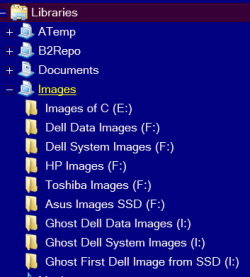
Libraries are the best thing since sliced bread. Nothing could be simpler. What do you do with your 'simple' approach if your user files are spread over 5 disks/partitions. Example my images library:
 

Attachments

  • 2015-01-18_1856.png
    2015-01-18_1856.png
    6.4 KB · Views: 25

My Computer My Computer

At a glance

Vista, Windows7, Mint Mate, Zorin, Windows 8from 1.6GHz Duo to i7
Computer Manufacturer/Model Number
HP, Dell, Gateway, Toshiba - 4 laptops and 2 desktops
OS
Vista, Windows7, Mint Mate, Zorin, Windows 8
CPU
from 1.6GHz Duo to i7
Monitor(s) Displays
2x HP w2207
Hard Drives
5x HDD, 7x SSD, 12x Externals
Keyboard
with trackball - no mices
Mouse
Trackball mice
Internet Speed
DSL 6000
Thanks whs.

Question 1: According to your experience, if separate, "real" user-folders are created on D, isn't it problematic for an average user that these folders where his stuff will be, won't have special icons? (music, videos, pictures etc). Won't that be confusing ? Because libraries do not appear in every situation and software as the default locations. Therefore he will have to chose from two music folders let's say. One with icon (the original that should be kept empty), and one without icon, where he should save his file :)

Question 2: What about the Desktop folder in your solution ? On my computer I have moved it to D too, so that it's backed up with the rest of the data when i back up the D partition. Average users (and not only them!) usually have folders and files on their desktop... With your solution they won't be backed up!

My goal is for the whole thing to be:
- VERY EASY for an average user
- AND easy for me to back up, therefore coherent in its design
- AND with no corruption of program settings in case of image reinstall

By "easy for the user", i mean that, for example: I don't want to give him back the laptop saying: "don't save anything on the desktop, because i haven't set up the computer that way and it won't be backed up." That's not ok. Yet it's what you advise.

I ask you guys because you have a lot of personnal experience and i guess also a lot of experience with setting up computers for others, average users and seeing how they deal with it.

So I want to see what works and what doesn't. In real life. :) It seems it's a compromise thing.
I don't like parial solutions but it seems it's always the case. I could do what you say, but make an exception for the desktop and move it to D.

But if i make exceptions, then why not go with my initial idea of moving everything to D, but making an exception for My Documents and keep it on C, because it's that one that seems to get all the program settings. The others not. Almost never it seems. So the corruption % is pretty low for all folders except My Documents, do you agree ?

Don't worry, i won't discuss this for ages :) yet it's very fruitful to see what you people advise. Get other brains on my stuff. :)

So please feed my mind a little more, taking into account the remarks above which i think are relevant.
 

My Computer My Computer

At a glance

Windows 7 Home Premium 64 bitIntel Core i5 2410M @ 2.30GHz Sandy Bridge 32...8,00 GB Dual-Channel DDR3 @ 1333 MHz (PC3-10600)NVIDIA GeForce GT 555M, Intel HD Graphics 3000
Computer type
Laptop
Computer Manufacturer/Model Number
Asus N55SF
OS
Windows 7 Home Premium 64 bit
CPU
Intel Core i5 2410M @ 2.30GHz Sandy Bridge 32nm Technology
Motherboard
ASUSTeK Computer Inc. N55SF
Memory
8,00 GB Dual-Channel DDR3 @ 1333 MHz (PC3-10600)
Graphics Card(s)
NVIDIA GeForce GT 555M, Intel HD Graphics 3000
Sound Card
Realtek High Definition Audio
Screen Resolution
1600x900@60Hz
Hard Drives
699GB Seagate ST9750423AS (SATA) 5400rpm
Other Info
Optical drive: Slimtype DVD A DS8A5SH
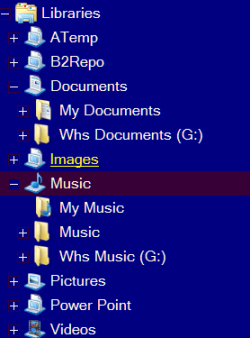
Q1 - I never had this difficulty. The folders have different names like in my case My Documents and Whs documents (see picture)

2015-01-18_1856.png


Q2 - I guess you can do that. I make an image of the C partition at least once per week. So those folders can always be found in my images. That is the #1 advice you should give your guy - image, image image. Then you are safe and can always backpaddle. Use my tutorial as guideline.

http://www.sevenforums.com/tutorials/73828-imaging-free-macrium.html?ltr=I

And there is no problem to discuss this 'for ages'. That's all I do all day long, LOL.
 

My Computer My Computer

At a glance

Vista, Windows7, Mint Mate, Zorin, Windows 8from 1.6GHz Duo to i7
Computer Manufacturer/Model Number
HP, Dell, Gateway, Toshiba - 4 laptops and 2 desktops
OS
Vista, Windows7, Mint Mate, Zorin, Windows 8
CPU
from 1.6GHz Duo to i7
Monitor(s) Displays
2x HP w2207
Hard Drives
5x HDD, 7x SSD, 12x Externals
Keyboard
with trackball - no mices
Mouse
Trackball mice
Internet Speed
DSL 6000
The only problem about moving your user folders is that whatever partition or drive you move them to will now be considered a system drive, and would need to be included in any system image to avoid issues.

Yeah, libraries would be the simplest option to use without worrying about losing or breaking anything. Libraries are designed to be a collection center of folders from different locations that can be accessed from the one library location.
 

My Computer My Computer

At a glance

64-bit Windows 11 Pro for WorkstationsIntel i7-8700K OC'd to 5 GHz64 GB (4x16GB) G.SKILL TridentZ RGB DDR4 3600...ASUS ROG-STRIX-GTX1080TI-O11G-GAMING
Computer type
PC/Desktop
Computer Manufacturer/Model Number
Self built custom
OS
64-bit Windows 11 Pro for Workstations
CPU
Intel i7-8700K OC'd to 5 GHz
Motherboard
ASUS ROG Maximus XI Formula Z390
Memory
64 GB (4x16GB) G.SKILL TridentZ RGB DDR4 3600 MHz
Graphics Card(s)
ASUS ROG-STRIX-GTX1080TI-O11G-GAMING
Sound Card
Integrated
Monitor(s) Displays
2 x Samsung Odyssey G7 27"
Screen Resolution
2560x1440
Hard Drives
1TB Samsung 990 PRO M.2,
4TB Samsung 990 PRO PRO M.2,
TerraMaster F8 SSD Plus NAS
PSU
Seasonic Prime Titanium 850W
Case
Thermaltake Core P3
Cooling
Corsair Hydro H115i
Keyboard
Logitech wireless K800
Mouse
Logitech MX Master 4
Internet Speed
2 Gb/s Download and 100 Mb/s Upload
Antivirus
Malwarebyte Anti-Malware Premium
Browser
Google Chrome
Other Info
Logitech Z625 speaker system,
Logitech BRIO 4K Pro webcam,
HP Color LaserJet Pro MFP M477fdn,
APC SMART-UPS RT 1000 XL - SURT1000XLI,
Galaxy S23 Plus phone
Q2 - I guess you can do that.
What ? Leaving the desktop as it is ? and image it often together with the OS image ?

Q2B: So when i make an image of an entire drive, is it still possible to go in the archive and take out an individual file ?

Remark: Keeping the desktop where it is and backing it up with OS, is error prone in the sense that having some data on C and some on D, they'll have different backup dates and times.
I may back up C once a week and D daily (FreeFileSync, 10 seconds). So the files backed up of D won't be of the same moment than those of the Desktop. In case they are somehow linked that can be problematic. For example if you have many Word documents as part of a project, and some of them are on the dsktop (C) and some on D.
Go put that back in order in case of crash, if you have several backup wih different dates.
Having [/I]some data on C and some on D[/I] isn't good.
 

My Computer My Computer

At a glance

Windows 7 Home Premium 64 bitIntel Core i5 2410M @ 2.30GHz Sandy Bridge 32...8,00 GB Dual-Channel DDR3 @ 1333 MHz (PC3-10600)NVIDIA GeForce GT 555M, Intel HD Graphics 3000
Computer type
Laptop
Computer Manufacturer/Model Number
Asus N55SF
OS
Windows 7 Home Premium 64 bit
CPU
Intel Core i5 2410M @ 2.30GHz Sandy Bridge 32nm Technology
Motherboard
ASUSTeK Computer Inc. N55SF
Memory
8,00 GB Dual-Channel DDR3 @ 1333 MHz (PC3-10600)
Graphics Card(s)
NVIDIA GeForce GT 555M, Intel HD Graphics 3000
Sound Card
Realtek High Definition Audio
Screen Resolution
1600x900@60Hz
Hard Drives
699GB Seagate ST9750423AS (SATA) 5400rpm
Other Info
Optical drive: Slimtype DVD A DS8A5SH
The only problem about moving your user folders is that whatever partition or drive you move them to will now be considered a system drive, and would need to be included in any system image to avoid issues.
That's why I always recommend to only move the user folders and not the ones that were generated by the system or by programs. And leave the folders on C as default folders. Then you do not run into that problem. And DO NOT move the folders with the location tab in properties.
 

My Computer My Computer

At a glance

Vista, Windows7, Mint Mate, Zorin, Windows 8from 1.6GHz Duo to i7
Computer Manufacturer/Model Number
HP, Dell, Gateway, Toshiba - 4 laptops and 2 desktops
OS
Vista, Windows7, Mint Mate, Zorin, Windows 8
CPU
from 1.6GHz Duo to i7
Monitor(s) Displays
2x HP w2207
Hard Drives
5x HDD, 7x SSD, 12x Externals
Keyboard
with trackball - no mices
Mouse
Trackball mice
Internet Speed
DSL 6000
The only problem about moving your user folders is that whatever partition or drive you move them to will now be considered a system drive, and would need to be included in any system image to avoid issues.
That's why I always recommend to only move the user folders and not the ones that were generated by the system or by programs. And leave the folders on C as default folders. Then you do not run into that problem. And DO NOT move the folders with the location tab in properties.

I'm just a libraries fan though. :p ;)
 

My Computer My Computer

At a glance

64-bit Windows 11 Pro for WorkstationsIntel i7-8700K OC'd to 5 GHz64 GB (4x16GB) G.SKILL TridentZ RGB DDR4 3600...ASUS ROG-STRIX-GTX1080TI-O11G-GAMING
Computer type
PC/Desktop
Computer Manufacturer/Model Number
Self built custom
OS
64-bit Windows 11 Pro for Workstations
CPU
Intel i7-8700K OC'd to 5 GHz
Motherboard
ASUS ROG Maximus XI Formula Z390
Memory
64 GB (4x16GB) G.SKILL TridentZ RGB DDR4 3600 MHz
Graphics Card(s)
ASUS ROG-STRIX-GTX1080TI-O11G-GAMING
Sound Card
Integrated
Monitor(s) Displays
2 x Samsung Odyssey G7 27"
Screen Resolution
2560x1440
Hard Drives
1TB Samsung 990 PRO M.2,
4TB Samsung 990 PRO PRO M.2,
TerraMaster F8 SSD Plus NAS
PSU
Seasonic Prime Titanium 850W
Case
Thermaltake Core P3
Cooling
Corsair Hydro H115i
Keyboard
Logitech wireless K800
Mouse
Logitech MX Master 4
Internet Speed
2 Gb/s Download and 100 Mb/s Upload
Antivirus
Malwarebyte Anti-Malware Premium
Browser
Google Chrome
Other Info
Logitech Z625 speaker system,
Logitech BRIO 4K Pro webcam,
HP Color LaserJet Pro MFP M477fdn,
APC SMART-UPS RT 1000 XL - SURT1000XLI,
Galaxy S23 Plus phone
The only problem about moving your user folders is that whatever partition or drive you move them to will now be considered a system drive, and would need to be included in any system image to avoid issues.

I disagree. The D drive will be considered a system drive if you move the whole user folder itself (Users\Adrien\) because it contains the hidden system folder AppData. Therefore indeed an image software would need you to back up the whole D drive too, just because of that folder.

If you move only the Pictures folder though, or the Music, Videos etc, these are not system folders. They're just normal folders. They have specific nicknames ("My Documents" for example, while the real name is Documents), but that doesn't make them system folders.
I've moved these on mine, and the D parition is not considered a system parition at all.
 

My Computer My Computer

At a glance

Windows 7 Home Premium 64 bitIntel Core i5 2410M @ 2.30GHz Sandy Bridge 32...8,00 GB Dual-Channel DDR3 @ 1333 MHz (PC3-10600)NVIDIA GeForce GT 555M, Intel HD Graphics 3000
Computer type
Laptop
Computer Manufacturer/Model Number
Asus N55SF
OS
Windows 7 Home Premium 64 bit
CPU
Intel Core i5 2410M @ 2.30GHz Sandy Bridge 32nm Technology
Motherboard
ASUSTeK Computer Inc. N55SF
Memory
8,00 GB Dual-Channel DDR3 @ 1333 MHz (PC3-10600)
Graphics Card(s)
NVIDIA GeForce GT 555M, Intel HD Graphics 3000
Sound Card
Realtek High Definition Audio
Screen Resolution
1600x900@60Hz
Hard Drives
699GB Seagate ST9750423AS (SATA) 5400rpm
Other Info
Optical drive: Slimtype DVD A DS8A5SH
If you move a user folder (ex: Music, Videos, etc..) to D and try to create a system image, you'll notice that D will be included in the image and cannot be unselected. At least, that's what it does for me.
 

My Computer My Computer

At a glance

64-bit Windows 11 Pro for WorkstationsIntel i7-8700K OC'd to 5 GHz64 GB (4x16GB) G.SKILL TridentZ RGB DDR4 3600...ASUS ROG-STRIX-GTX1080TI-O11G-GAMING
Computer type
PC/Desktop
Computer Manufacturer/Model Number
Self built custom
OS
64-bit Windows 11 Pro for Workstations
CPU
Intel i7-8700K OC'd to 5 GHz
Motherboard
ASUS ROG Maximus XI Formula Z390
Memory
64 GB (4x16GB) G.SKILL TridentZ RGB DDR4 3600 MHz
Graphics Card(s)
ASUS ROG-STRIX-GTX1080TI-O11G-GAMING
Sound Card
Integrated
Monitor(s) Displays
2 x Samsung Odyssey G7 27"
Screen Resolution
2560x1440
Hard Drives
1TB Samsung 990 PRO M.2,
4TB Samsung 990 PRO PRO M.2,
TerraMaster F8 SSD Plus NAS
PSU
Seasonic Prime Titanium 850W
Case
Thermaltake Core P3
Cooling
Corsair Hydro H115i
Keyboard
Logitech wireless K800
Mouse
Logitech MX Master 4
Internet Speed
2 Gb/s Download and 100 Mb/s Upload
Antivirus
Malwarebyte Anti-Malware Premium
Browser
Google Chrome
Other Info
Logitech Z625 speaker system,
Logitech BRIO 4K Pro webcam,
HP Color LaserJet Pro MFP M477fdn,
APC SMART-UPS RT 1000 XL - SURT1000XLI,
Galaxy S23 Plus phone
What ? Leaving the desktop as it is ? and image it often together with the OS image ?
Yes, if you image C, then your desktop folders will be part of the image - and all other user folders on C also.

Q2B: So when i make an image of an entire drive, is it still possible to go in the archive and take out an individual file ?
You never make an image of a whole drive. Images are done by partition. An 'image' of a whole drive is called a "Clone".

But yes, you can retrieve individual files from an image. Very easy with Macrium. Just double click on the image and mount it. Then the image appears in Computer like any other partition where you can open it.

Go put that back in order in case of crash, if you have several backup wih different dates.
Having [/I]some data on C and some on D[/I] isn't good.
So what. You make images either all at the same time or when required. If nothing changes in the partition for 2 weeks, then there is no need to make a new image. If a lot of things change every day, then you may want to make a new image every day. And the frequency of changes on the system partition may be different then the data partition. Just be practical. I don't see where the confusion is.

Btw - it is not a good practice to keep permanent folders on the desktop. I keep only temporary folders there.
 

My Computer My Computer

At a glance

Vista, Windows7, Mint Mate, Zorin, Windows 8from 1.6GHz Duo to i7
Computer Manufacturer/Model Number
HP, Dell, Gateway, Toshiba - 4 laptops and 2 desktops
OS
Vista, Windows7, Mint Mate, Zorin, Windows 8
CPU
from 1.6GHz Duo to i7
Monitor(s) Displays
2x HP w2207
Hard Drives
5x HDD, 7x SSD, 12x Externals
Keyboard
with trackball - no mices
Mouse
Trackball mice
Internet Speed
DSL 6000
Last edited:

My Computer My Computer

At a glance

Vista, Windows7, Mint Mate, Zorin, Windows 8from 1.6GHz Duo to i7
Computer Manufacturer/Model Number
HP, Dell, Gateway, Toshiba - 4 laptops and 2 desktops
OS
Vista, Windows7, Mint Mate, Zorin, Windows 8
CPU
from 1.6GHz Duo to i7
Monitor(s) Displays
2x HP w2207
Hard Drives
5x HDD, 7x SSD, 12x Externals
Keyboard
with trackball - no mices
Mouse
Trackball mice
Internet Speed
DSL 6000
I see it the same way as Brink.
I have been using Libraries for 5+ years...since I first learned about them with Win 7.

Macrium and Acronis imaging programs can backup and restore per partition.
I abandoned the W7 built-in utility 5+ years ago because it decided what to include in an image - not my decision!

I have multi-boot PCs so imaging and backup is very important to me.

I want to keep images smaller, be able to restore any single OS, without losing any User data.
Macrium and Acronis do this for me, with my data stored on a "Data partition" using Libraries.
 

My Computer My Computer

At a glance

Multi-Boot W7_Pro_x64 W8.1_Pro_x64 W10_Pro_x6...AMD Athlon II x4 6206GB GSkill DDR2 800AMD 4670 GPU + AMD 4200 IGP
Computer type
PC/Desktop
Computer Manufacturer/Model Number
home built
OS
Multi-Boot W7_Pro_x64 W8.1_Pro_x64 W10_Pro_x64 +Linux_VMs +Chromium_VM
CPU
AMD Athlon II x4 620
Motherboard
Gigabyte GA-MA785G-UD3H
Memory
6GB GSkill DDR2 800
Graphics Card(s)
AMD 4670 GPU + AMD 4200 IGP
Sound Card
on board Realtek ALC889A
Monitor(s) Displays
RCA 40" LCD TV, Insignia 32" LCD TV, HP 15" LCD monitor
Screen Resolution
1680 x 1050
Hard Drives
OCZ Vertex 3 120GB,
Samsung F3 1TB (3),
Several others - WD, Seagate, Hitachi, ...
PSU
Corsair 500 W
Case
Rosewill mid tower
Cooling
CM 90mm rifle
Keyboard
Gyration wireless, Logitech wireless, Dell USB wired
Mouse
Gyration wireless, Logitech wireless, V7 USB wired
Internet Speed
Spectrum - 100Mbps D / 10Mbps U
Antivirus
Avast, MBAM3, EMET, WinPatrol
Browser
Pale Moon, Firefox, IE
Other Info
2 multi-boot PC's
Mainly HTPC/Office/Gen purpose (no gaming).
Trendnet USB KVM.
LG DVD burner/Blue Ray Player.
Tray system for removable SATA backup drives.

Not currently OCd, under-volted.
I use Hybrid sleep, rarely re-boot or shutdown.

Hauppauge HD-PVR, Avermedia PCIe TV Tuner, Hauppauge PCI TV Tuner.
If you move a user folder (ex: Music, Videos, etc..) to D and try to create a system image, you'll notice that D will be included in the image and cannot be unselected. At least, that's what it does for me.
Because you use the crummy Windows imaging, LOL. And maybe you have system generated folders on the spinner.
I agree, Macrium does that very well, simply because there are no system folders on D when you move Pictures, Videos and so on on it. They are just simple folders and don't include any hidden system data or anything.
I don't know what is the theoretical definition of a system folder though, but in real life these are not system folders.
 

My Computer My Computer

At a glance

Windows 7 Home Premium 64 bitIntel Core i5 2410M @ 2.30GHz Sandy Bridge 32...8,00 GB Dual-Channel DDR3 @ 1333 MHz (PC3-10600)NVIDIA GeForce GT 555M, Intel HD Graphics 3000
Computer type
Laptop
Computer Manufacturer/Model Number
Asus N55SF
OS
Windows 7 Home Premium 64 bit
CPU
Intel Core i5 2410M @ 2.30GHz Sandy Bridge 32nm Technology
Motherboard
ASUSTeK Computer Inc. N55SF
Memory
8,00 GB Dual-Channel DDR3 @ 1333 MHz (PC3-10600)
Graphics Card(s)
NVIDIA GeForce GT 555M, Intel HD Graphics 3000
Sound Card
Realtek High Definition Audio
Screen Resolution
1600x900@60Hz
Hard Drives
699GB Seagate ST9750423AS (SATA) 5400rpm
Other Info
Optical drive: Slimtype DVD A DS8A5SH
I want to keep images smaller, be able to restore any single OS, without losing any User data.
Macrium and Acronis do this for me, with my data stored on a "Data partition" using Libraries.

I'll ask you the same question. What do you do with the files on your desktop ?
You store on the Data partition your data minus the desktop data ? :)

Nice that you also give your way of doing, i learn from all of you. thanks.
 

My Computer My Computer

At a glance

Windows 7 Home Premium 64 bitIntel Core i5 2410M @ 2.30GHz Sandy Bridge 32...8,00 GB Dual-Channel DDR3 @ 1333 MHz (PC3-10600)NVIDIA GeForce GT 555M, Intel HD Graphics 3000
Computer type
Laptop
Computer Manufacturer/Model Number
Asus N55SF
OS
Windows 7 Home Premium 64 bit
CPU
Intel Core i5 2410M @ 2.30GHz Sandy Bridge 32nm Technology
Motherboard
ASUSTeK Computer Inc. N55SF
Memory
8,00 GB Dual-Channel DDR3 @ 1333 MHz (PC3-10600)
Graphics Card(s)
NVIDIA GeForce GT 555M, Intel HD Graphics 3000
Sound Card
Realtek High Definition Audio
Screen Resolution
1600x900@60Hz
Hard Drives
699GB Seagate ST9750423AS (SATA) 5400rpm
Other Info
Optical drive: Slimtype DVD A DS8A5SH
Go put that back in order in case of crash, if you have several backups wih different dates.
Having some data on C and some on D isn't good.
So what. You make images either all at the same time or when required. If nothing changes in the partition for 2 weeks, then there is no need to make a new image. If a lot of things change every day, then you may want to make a new image every day. And the frequency of changes on the system partition may be different then the data partition. Just be practical. I don't see where the confusion is.

Btw - it is not a good practice to keep permanent folders on the desktop. I keep only temporary folders there.

There is no confusion, it's not practical, i find, to have to backup the whole C just because some files changed on the desktop. While all the other data is on D. And yes, I agree it's not good practice to save on desktop.. but why actually ? If you do like me and move it to D, then you can use it as a king. Who does not save some stuff on desktop now and then ?

You say the frequency of backup of C and D may be different. Yes, but not in case their content are logically linked. How else can I say that ? it's hard to explain.. Anyway. I got the advices i was looking for. Libraries is the safest way it seems. For me only "My Documents" had to stay on C. All others can move in my experience without any problem.
 

My Computer My Computer

At a glance

Windows 7 Home Premium 64 bitIntel Core i5 2410M @ 2.30GHz Sandy Bridge 32...8,00 GB Dual-Channel DDR3 @ 1333 MHz (PC3-10600)NVIDIA GeForce GT 555M, Intel HD Graphics 3000
Computer type
Laptop
Computer Manufacturer/Model Number
Asus N55SF
OS
Windows 7 Home Premium 64 bit
CPU
Intel Core i5 2410M @ 2.30GHz Sandy Bridge 32nm Technology
Motherboard
ASUSTeK Computer Inc. N55SF
Memory
8,00 GB Dual-Channel DDR3 @ 1333 MHz (PC3-10600)
Graphics Card(s)
NVIDIA GeForce GT 555M, Intel HD Graphics 3000
Sound Card
Realtek High Definition Audio
Screen Resolution
1600x900@60Hz
Hard Drives
699GB Seagate ST9750423AS (SATA) 5400rpm
Other Info
Optical drive: Slimtype DVD A DS8A5SH
I don't store data on the desktop, I store data on my [D] drive "Data" partition.
Any changes I store on my desktop will be lost if/when I restore that OS image. I even use a custom toolbar (on my [D] drive) rather than "Quick Launch" so I don't lose any of those changes if I do restore the [C] OS partition... I have a lot of shortcuts in my toolbar, I'd rather they break so I know what to fix ...
 

My Computer My Computer

At a glance

Multi-Boot W7_Pro_x64 W8.1_Pro_x64 W10_Pro_x6...AMD Athlon II x4 6206GB GSkill DDR2 800AMD 4670 GPU + AMD 4200 IGP
Computer type
PC/Desktop
Computer Manufacturer/Model Number
home built
OS
Multi-Boot W7_Pro_x64 W8.1_Pro_x64 W10_Pro_x64 +Linux_VMs +Chromium_VM
CPU
AMD Athlon II x4 620
Motherboard
Gigabyte GA-MA785G-UD3H
Memory
6GB GSkill DDR2 800
Graphics Card(s)
AMD 4670 GPU + AMD 4200 IGP
Sound Card
on board Realtek ALC889A
Monitor(s) Displays
RCA 40" LCD TV, Insignia 32" LCD TV, HP 15" LCD monitor
Screen Resolution
1680 x 1050
Hard Drives
OCZ Vertex 3 120GB,
Samsung F3 1TB (3),
Several others - WD, Seagate, Hitachi, ...
PSU
Corsair 500 W
Case
Rosewill mid tower
Cooling
CM 90mm rifle
Keyboard
Gyration wireless, Logitech wireless, Dell USB wired
Mouse
Gyration wireless, Logitech wireless, V7 USB wired
Internet Speed
Spectrum - 100Mbps D / 10Mbps U
Antivirus
Avast, MBAM3, EMET, WinPatrol
Browser
Pale Moon, Firefox, IE
Other Info
2 multi-boot PC's
Mainly HTPC/Office/Gen purpose (no gaming).
Trendnet USB KVM.
LG DVD burner/Blue Ray Player.
Tray system for removable SATA backup drives.

Not currently OCd, under-volted.
I use Hybrid sleep, rarely re-boot or shutdown.

Hauppauge HD-PVR, Avermedia PCIe TV Tuner, Hauppauge PCI TV Tuner.
For me only My Documents had to stay on C. All others can move in my experience without any problem.
Now this I do not understand by your logic. You worry about a couple of folders on the desktop but the usually largest user folder (documents) you want to leave on C. There you lost me.
 

My Computer My Computer

At a glance

Vista, Windows7, Mint Mate, Zorin, Windows 8from 1.6GHz Duo to i7
Computer Manufacturer/Model Number
HP, Dell, Gateway, Toshiba - 4 laptops and 2 desktops
OS
Vista, Windows7, Mint Mate, Zorin, Windows 8
CPU
from 1.6GHz Duo to i7
Monitor(s) Displays
2x HP w2207
Hard Drives
5x HDD, 7x SSD, 12x Externals
Keyboard
with trackball - no mices
Mouse
Trackball mice
Internet Speed
DSL 6000
Back
Top