
Should I keep My Documents on C and Videos, Music etc on D ?

Btw - I am not sure why that was not clear from my previous posting.
Because I think you're confusing two different things in what I'm saying.

Default system folder, let's say My Music (on C). It's the default system folder because it's the one with the special music icon, it's the one you can right click>Location>Move.
That's one thing.

ANOTHER THING, is the default save location of the Music library, let's say Music-Adri123 (on D).

So my Music Library would look like that:

Music Library:
--- Music-Adri123 (D:) * default save location
--- My Music (C:) * default system folder, since it's still this folder that has the special music icon, is movable etc. even though it's not the default save location of the library.


Hence my question that i was trying to ask you. Do the programs store their settings in the default system folder or in the default save location ?
 

My Computer My Computer

At a glance

Windows 7 Home Premium 64 bitIntel Core i5 2410M @ 2.30GHz Sandy Bridge 32...8,00 GB Dual-Channel DDR3 @ 1333 MHz (PC3-10600)NVIDIA GeForce GT 555M, Intel HD Graphics 3000
Computer type
Laptop
Computer Manufacturer/Model Number
Asus N55SF
OS
Windows 7 Home Premium 64 bit
CPU
Intel Core i5 2410M @ 2.30GHz Sandy Bridge 32nm Technology
Motherboard
ASUSTeK Computer Inc. N55SF
Memory
8,00 GB Dual-Channel DDR3 @ 1333 MHz (PC3-10600)
Graphics Card(s)
NVIDIA GeForce GT 555M, Intel HD Graphics 3000
Sound Card
Realtek High Definition Audio
Screen Resolution
1600x900@60Hz
Hard Drives
699GB Seagate ST9750423AS (SATA) 5400rpm
Other Info
Optical drive: Slimtype DVD A DS8A5SH
If they save their settings in the default system folder, then it's ok to set the default save location on D.
But if they save them in the the default save location, that would be dangerous since I would have set it to be on D.
 

My Computer My Computer

At a glance

Windows 7 Home Premium 64 bitIntel Core i5 2410M @ 2.30GHz Sandy Bridge 32...8,00 GB Dual-Channel DDR3 @ 1333 MHz (PC3-10600)NVIDIA GeForce GT 555M, Intel HD Graphics 3000
Computer type
Laptop
Computer Manufacturer/Model Number
Asus N55SF
OS
Windows 7 Home Premium 64 bit
CPU
Intel Core i5 2410M @ 2.30GHz Sandy Bridge 32nm Technology
Motherboard
ASUSTeK Computer Inc. N55SF
Memory
8,00 GB Dual-Channel DDR3 @ 1333 MHz (PC3-10600)
Graphics Card(s)
NVIDIA GeForce GT 555M, Intel HD Graphics 3000
Sound Card
Realtek High Definition Audio
Screen Resolution
1600x900@60Hz
Hard Drives
699GB Seagate ST9750423AS (SATA) 5400rpm
Other Info
Optical drive: Slimtype DVD A DS8A5SH
Slartybart thank you very much that's the kind of answer i was expecting. It's clear now:

Program settings are not part of the default save location.

Question 7: But they could right ?
If a program is programmed so that it stores its settings to the default save location, instead of the default folder.

Question 8: The whole thread is about how can I back up C (os+progs) without omitting the program settings AND by avoiding libraries if possible. Do you think that's possible ?

Sure, you can tell a program to store the settings or even data in a different location.
Not all programs have this capability though.

Two examples:
GIMP, a graphics editor: I can tell it to store the settings in one place and the different tool options (gradients, brushes, fonts...) in another place. There has to be a known config file (small text file that says look over there for this) that points at the other location information.

Window Essential Mail: The configuration is static, but the message store can be moved to a new location defined in the configuration

As I mentioned, not all applications allow you this flexibility.
I should probably read post 1 to better understand what you want to do and why.
I understand why I did store data off of C:\ using various means (environment variables, application configuration, Libraries, Location, etc.

Libraries is the easiest and safest, once you grasp all of it. It took me a while and I'm sure I only know the top layer.

Bill
.
 

My Computer My Computer

At a glance

x64 (6.3.9600) Win8.1 Pro & soon dual boot x6...AMD A6-3420M APU with Radeon(tm) HD Graphics6.00 GBAMD Radeon(TM) HD 6520G
Computer type
Laptop
Computer Manufacturer/Model Number
HP Pavilion dv6-6c10us
OS
x64 (6.3.9600) Win8.1 Pro & soon dual boot x64 (6.1.7601) Win7_SP1 HomePrem
CPU
AMD A6-3420M APU with Radeon(tm) HD Graphics
Motherboard
Hewlett-Packard 1805
Memory
6.00 GB
Graphics Card(s)
AMD Radeon(TM) HD 6520G
Sound Card
(1) AMD High Definition Audio Device (2) IDT High Definiti
Monitor(s) Displays
HP W2072a 20" LCD (1600 x 900) @ 60 Hz
Screen Resolution
1366 x 768 x 32 bits (4294967296 colors) @ 60 Hz
Hard Drives
ST640LM0 00 HM641JI SATA Disk Device
Keyboard
Logitech k520 wireless KB
Mouse
Logitech m320 wireless mouse (bundled with KB)
Internet Speed
15/5 | 54 MB Wireless 'n'
Antivirus
Realtime: Defender or Avast | On-demand: Malwarebytes, ESET
Browser
IE 11 on Win8, IE 10 on win 7
Other Info
Media: [Gimp, Audacity, VLC] || Comm: [WEmail 2012, Skype] || Productivity: [OpenOffice,| Textpad] || Utils: [Sysinternals, cCleaner, Speccy, Defraggler]
Question 8? I think that is possible, just don't store any configuration files outside your User Profile.

I'm not positive though

In theory
Image (backup) your C: drive (OS+pgms+User Profile)
the Libraries definition gets carried along from your appdata (I forget the exact location, but it's under there)
the definition only says what folders are included in the Library (pointers to the real folders which are on D:)

What I'm not sure about is if the imaging (or backup) software will follow the pointers and grab your data too

You do plan to backup your data too, right? You're just trying to separate the two.
 

My Computer My Computer

At a glance

x64 (6.3.9600) Win8.1 Pro & soon dual boot x6...AMD A6-3420M APU with Radeon(tm) HD Graphics6.00 GBAMD Radeon(TM) HD 6520G
Computer type
Laptop
Computer Manufacturer/Model Number
HP Pavilion dv6-6c10us
OS
x64 (6.3.9600) Win8.1 Pro & soon dual boot x64 (6.1.7601) Win7_SP1 HomePrem
CPU
AMD A6-3420M APU with Radeon(tm) HD Graphics
Motherboard
Hewlett-Packard 1805
Memory
6.00 GB
Graphics Card(s)
AMD Radeon(TM) HD 6520G
Sound Card
(1) AMD High Definition Audio Device (2) IDT High Definiti
Monitor(s) Displays
HP W2072a 20" LCD (1600 x 900) @ 60 Hz
Screen Resolution
1366 x 768 x 32 bits (4294967296 colors) @ 60 Hz
Hard Drives
ST640LM0 00 HM641JI SATA Disk Device
Keyboard
Logitech k520 wireless KB
Mouse
Logitech m320 wireless mouse (bundled with KB)
Internet Speed
15/5 | 54 MB Wireless 'n'
Antivirus
Realtime: Defender or Avast | On-demand: Malwarebytes, ESET
Browser
IE 11 on Win8, IE 10 on win 7
Other Info
Media: [Gimp, Audacity, VLC] || Comm: [WEmail 2012, Skype] || Productivity: [OpenOffice,| Textpad] || Utils: [Sysinternals, cCleaner, Speccy, Defraggler]
This might also help.

The four folders (Documents, Music, Pictures, Videos) under your User Profile are special folders, not system folders.

Terminology can confuse the discussion - better to use real names and examples.
 

My Computer My Computer

At a glance

x64 (6.3.9600) Win8.1 Pro & soon dual boot x6...AMD A6-3420M APU with Radeon(tm) HD Graphics6.00 GBAMD Radeon(TM) HD 6520G
Computer type
Laptop
Computer Manufacturer/Model Number
HP Pavilion dv6-6c10us
OS
x64 (6.3.9600) Win8.1 Pro & soon dual boot x64 (6.1.7601) Win7_SP1 HomePrem
CPU
AMD A6-3420M APU with Radeon(tm) HD Graphics
Motherboard
Hewlett-Packard 1805
Memory
6.00 GB
Graphics Card(s)
AMD Radeon(TM) HD 6520G
Sound Card
(1) AMD High Definition Audio Device (2) IDT High Definiti
Monitor(s) Displays
HP W2072a 20" LCD (1600 x 900) @ 60 Hz
Screen Resolution
1366 x 768 x 32 bits (4294967296 colors) @ 60 Hz
Hard Drives
ST640LM0 00 HM641JI SATA Disk Device
Keyboard
Logitech k520 wireless KB
Mouse
Logitech m320 wireless mouse (bundled with KB)
Internet Speed
15/5 | 54 MB Wireless 'n'
Antivirus
Realtime: Defender or Avast | On-demand: Malwarebytes, ESET
Browser
IE 11 on Win8, IE 10 on win 7
Other Info
Media: [Gimp, Audacity, VLC] || Comm: [WEmail 2012, Skype] || Productivity: [OpenOffice,| Textpad] || Utils: [Sysinternals, cCleaner, Speccy, Defraggler]
pot#1 said:
Reason: Some programs tend to save their settings and parameters in that folder. In case of crash, I want to be able to put back my OS and programs, and to have them working exactly like before and not having to reajust all of their settings!, or even worse, having some programs bug because of missing/incoherent settings.

I'm not aware of any programs that save their settings to Documents. I think you either have a wonky program, or a misconception.

Please give me a real world example from your machine. Thanks
 

My Computer My Computer

At a glance

x64 (6.3.9600) Win8.1 Pro & soon dual boot x6...AMD A6-3420M APU with Radeon(tm) HD Graphics6.00 GBAMD Radeon(TM) HD 6520G
Computer type
Laptop
Computer Manufacturer/Model Number
HP Pavilion dv6-6c10us
OS
x64 (6.3.9600) Win8.1 Pro & soon dual boot x64 (6.1.7601) Win7_SP1 HomePrem
CPU
AMD A6-3420M APU with Radeon(tm) HD Graphics
Motherboard
Hewlett-Packard 1805
Memory
6.00 GB
Graphics Card(s)
AMD Radeon(TM) HD 6520G
Sound Card
(1) AMD High Definition Audio Device (2) IDT High Definiti
Monitor(s) Displays
HP W2072a 20" LCD (1600 x 900) @ 60 Hz
Screen Resolution
1366 x 768 x 32 bits (4294967296 colors) @ 60 Hz
Hard Drives
ST640LM0 00 HM641JI SATA Disk Device
Keyboard
Logitech k520 wireless KB
Mouse
Logitech m320 wireless mouse (bundled with KB)
Internet Speed
15/5 | 54 MB Wireless 'n'
Antivirus
Realtime: Defender or Avast | On-demand: Malwarebytes, ESET
Browser
IE 11 on Win8, IE 10 on win 7
Other Info
Media: [Gimp, Audacity, VLC] || Comm: [WEmail 2012, Skype] || Productivity: [OpenOffice,| Textpad] || Utils: [Sysinternals, cCleaner, Speccy, Defraggler]
Question 8? I think that is possible, just don't store any configuration files outside your User Profile.
Actually that's what I'm having here since three years: I "moved" (right click>settings>move) all special folders to D.
So that I have one and only one My Music folder, one and only one My Pictures folder and so on. All of them on D so they're part of the "Data backup".
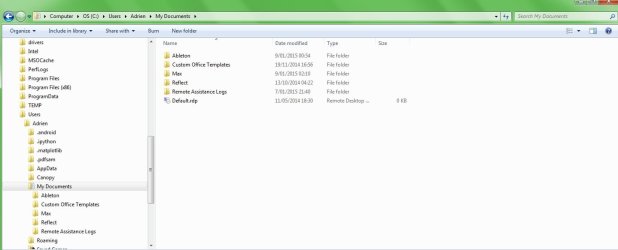
This allows me to not have to deal with libraries and 2 "My Music" folders and 2 "My Pictures" folders and so on. I find it much more clean. And for me Libraries are just a way to mask a mess. Which I don't have in my configuration. The only exception I made, is for the special folder My Documents. I kept it on C and made another one on D, because I observed that it is mostly in that folder that the programs store their settings, if they do.
I'm not aware of any programs that save their settings to Documents. I think you either have a wonky program, or a misconception.

Please give me a real world example from your machine. Thanks
347029d1421720969-should-i-keep-my-documents-c-videos-music-etc-d-mydocuments.jpg

I'm not positive though
I haven't had any problem but indeed some programs could use other special folders than My Documents..
And since in my configuration I have moved them to D, that would break the concept of prog/data separation.
In theory
Image (backup) your C: drive (OS+pgms+User Profile)
the Libraries definition gets carried along from your appdata (I forget the exact location, but it's under there)
the definition only says what folders are included in the Library (pointers to the real folders which are on D:)

What I'm not sure about is if the imaging (or backup) software will follow the pointers and grab your data too
I think imaging software will include D in the image if the whole User Profile folder has been moved on it, sicne it contains the hidden AppData system folder
You do plan to backup your data too, right? You're just trying to separate the two.
Yup.
---
Image appears twice, i don't know why..
 

Attachments

  • mydocuments.jpg
    mydocuments.jpg
    47.3 KB · Views: 15

My Computer My Computer

At a glance

Windows 7 Home Premium 64 bitIntel Core i5 2410M @ 2.30GHz Sandy Bridge 32...8,00 GB Dual-Channel DDR3 @ 1333 MHz (PC3-10600)NVIDIA GeForce GT 555M, Intel HD Graphics 3000
Computer type
Laptop
Computer Manufacturer/Model Number
Asus N55SF
OS
Windows 7 Home Premium 64 bit
CPU
Intel Core i5 2410M @ 2.30GHz Sandy Bridge 32nm Technology
Motherboard
ASUSTeK Computer Inc. N55SF
Memory
8,00 GB Dual-Channel DDR3 @ 1333 MHz (PC3-10600)
Graphics Card(s)
NVIDIA GeForce GT 555M, Intel HD Graphics 3000
Sound Card
Realtek High Definition Audio
Screen Resolution
1600x900@60Hz
Hard Drives
699GB Seagate ST9750423AS (SATA) 5400rpm
Other Info
Optical drive: Slimtype DVD A DS8A5SH
pot#1 said:
Reason: Some programs tend to save their settings and parameters in that folder. In case of crash, I want to be able to put back my OS and programs, and to have them working exactly like before and not having to reajust all of their settings!, or even worse, having some programs bug because of missing/incoherent settings.

I'm not aware of any programs that save their settings to Documents. I think you either have a wonky program, or a misconception.

Please give me a real world example from your machine. Thanks
Look at page 3 post #25 in this thread. There you have plenty of real world examples.
 

My Computer My Computer

At a glance

Vista, Windows7, Mint Mate, Zorin, Windows 8from 1.6GHz Duo to i7
Computer Manufacturer/Model Number
HP, Dell, Gateway, Toshiba - 4 laptops and 2 desktops
OS
Vista, Windows7, Mint Mate, Zorin, Windows 8
CPU
from 1.6GHz Duo to i7
Monitor(s) Displays
2x HP w2207
Hard Drives
5x HDD, 7x SSD, 12x Externals
Keyboard
with trackball - no mices
Mouse
Trackball mice
Internet Speed
DSL 6000
Here how my system looks like for the moment.
Pay attention that it's the D partition. Where I have moved my special folders. Except My Documents which contains program settings and i have kept on C. Only for that one folder I did create a "duplicate" user folder. The others are just nice, special user folders, on my D.
 

Attachments

  • userond.jpg
    userond.jpg
    43.4 KB · Views: 0

My Computer My Computer

At a glance

Windows 7 Home Premium 64 bitIntel Core i5 2410M @ 2.30GHz Sandy Bridge 32...8,00 GB Dual-Channel DDR3 @ 1333 MHz (PC3-10600)NVIDIA GeForce GT 555M, Intel HD Graphics 3000
Computer type
Laptop
Computer Manufacturer/Model Number
Asus N55SF
OS
Windows 7 Home Premium 64 bit
CPU
Intel Core i5 2410M @ 2.30GHz Sandy Bridge 32nm Technology
Motherboard
ASUSTeK Computer Inc. N55SF
Memory
8,00 GB Dual-Channel DDR3 @ 1333 MHz (PC3-10600)
Graphics Card(s)
NVIDIA GeForce GT 555M, Intel HD Graphics 3000
Sound Card
Realtek High Definition Audio
Screen Resolution
1600x900@60Hz
Hard Drives
699GB Seagate ST9750423AS (SATA) 5400rpm
Other Info
Optical drive: Slimtype DVD A DS8A5SH
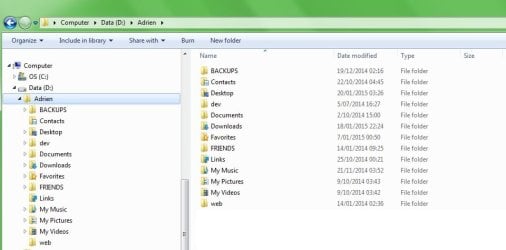
This is Windows backwards. It must be a pain to maintain that.
 

My Computer My Computer

At a glance

Vista, Windows7, Mint Mate, Zorin, Windows 8from 1.6GHz Duo to i7
Computer Manufacturer/Model Number
HP, Dell, Gateway, Toshiba - 4 laptops and 2 desktops
OS
Vista, Windows7, Mint Mate, Zorin, Windows 8
CPU
from 1.6GHz Duo to i7
Monitor(s) Displays
2x HP w2207
Hard Drives
5x HDD, 7x SSD, 12x Externals
Keyboard
with trackball - no mices
Mouse
Trackball mice
Internet Speed
DSL 6000
This is Windows backwards.
If it was Windows backwards there wouldn't be a special Move option on every special user folder.

It must be a pain to maintain that.
What makes you think so ?


By the way, having My Music, My Videos, My Documents, My Pictures, with no actual user files in them this is really Windows backwards, when you think about it. So weird that everybody does it..
Actually not weird, it's just because of stupid programmers who pollute the user special folders with their software settings. Shouldn't be in these folders, made for the average user to store his excel and word documents and family photos! Soo wrong.
 

My Computer My Computer

At a glance

Windows 7 Home Premium 64 bitIntel Core i5 2410M @ 2.30GHz Sandy Bridge 32...8,00 GB Dual-Channel DDR3 @ 1333 MHz (PC3-10600)NVIDIA GeForce GT 555M, Intel HD Graphics 3000
Computer type
Laptop
Computer Manufacturer/Model Number
Asus N55SF
OS
Windows 7 Home Premium 64 bit
CPU
Intel Core i5 2410M @ 2.30GHz Sandy Bridge 32nm Technology
Motherboard
ASUSTeK Computer Inc. N55SF
Memory
8,00 GB Dual-Channel DDR3 @ 1333 MHz (PC3-10600)
Graphics Card(s)
NVIDIA GeForce GT 555M, Intel HD Graphics 3000
Sound Card
Realtek High Definition Audio
Screen Resolution
1600x900@60Hz
Hard Drives
699GB Seagate ST9750423AS (SATA) 5400rpm
Other Info
Optical drive: Slimtype DVD A DS8A5SH
Guys it's really late here i go sleep. I'll check again, I'm very curious where this discussion will lead in terms of widening my points of view and/or reinforcing my present ones.

Best, and thanks to you all

Adrien.
 

My Computer My Computer

At a glance

Windows 7 Home Premium 64 bitIntel Core i5 2410M @ 2.30GHz Sandy Bridge 32...8,00 GB Dual-Channel DDR3 @ 1333 MHz (PC3-10600)NVIDIA GeForce GT 555M, Intel HD Graphics 3000
Computer type
Laptop
Computer Manufacturer/Model Number
Asus N55SF
OS
Windows 7 Home Premium 64 bit
CPU
Intel Core i5 2410M @ 2.30GHz Sandy Bridge 32nm Technology
Motherboard
ASUSTeK Computer Inc. N55SF
Memory
8,00 GB Dual-Channel DDR3 @ 1333 MHz (PC3-10600)
Graphics Card(s)
NVIDIA GeForce GT 555M, Intel HD Graphics 3000
Sound Card
Realtek High Definition Audio
Screen Resolution
1600x900@60Hz
Hard Drives
699GB Seagate ST9750423AS (SATA) 5400rpm
Other Info
Optical drive: Slimtype DVD A DS8A5SH
pot#1 said:
Reason: Some programs tend to save their settings and parameters in that folder. In case of crash, I want to be able to put back my OS and programs, and to have them working exactly like before and not having to reajust all of their settings!, or even worse, having some programs bug because of missing/incoherent settings.

I'm not aware of any programs that save their settings to Documents. I think you either have a wonky program, or a misconception.

Please give me a real world example from your machine. Thanks
Look at page 3 post #25 in this thread. There you have plenty of real world examples.

Thanks, I meant from adri123's machine :p

As I said, I'm not aware of any programs that save their settings to Documents ... now I'm aware of some. Are they data folders or do those programs store settings in those folders?

I'm not trying to be difficult, but Applications shouldn't store settings in Documents.
Appdata, ProgramData... settings.
Documents ... data

You make an interesting distinction though. OneNote and OneDrive might store some settings or other configuration mechanism connected to the folder.

Help me out a bit more and connect the dots for me on your machine. What file in <pick a folder, any folder> under Documents has the settings for the application associated with the folder?

Or maybe I should read the thread ;) Yes, that's what I'm going to do.

Thanks Wolfgang,

Bill
.
 

My Computer My Computer

At a glance

x64 (6.3.9600) Win8.1 Pro & soon dual boot x6...AMD A6-3420M APU with Radeon(tm) HD Graphics6.00 GBAMD Radeon(TM) HD 6520G
Computer type
Laptop
Computer Manufacturer/Model Number
HP Pavilion dv6-6c10us
OS
x64 (6.3.9600) Win8.1 Pro & soon dual boot x64 (6.1.7601) Win7_SP1 HomePrem
CPU
AMD A6-3420M APU with Radeon(tm) HD Graphics
Motherboard
Hewlett-Packard 1805
Memory
6.00 GB
Graphics Card(s)
AMD Radeon(TM) HD 6520G
Sound Card
(1) AMD High Definition Audio Device (2) IDT High Definiti
Monitor(s) Displays
HP W2072a 20" LCD (1600 x 900) @ 60 Hz
Screen Resolution
1366 x 768 x 32 bits (4294967296 colors) @ 60 Hz
Hard Drives
ST640LM0 00 HM641JI SATA Disk Device
Keyboard
Logitech k520 wireless KB
Mouse
Logitech m320 wireless mouse (bundled with KB)
Internet Speed
15/5 | 54 MB Wireless 'n'
Antivirus
Realtime: Defender or Avast | On-demand: Malwarebytes, ESET
Browser
IE 11 on Win8, IE 10 on win 7
Other Info
Media: [Gimp, Audacity, VLC] || Comm: [WEmail 2012, Skype] || Productivity: [OpenOffice,| Textpad] || Utils: [Sysinternals, cCleaner, Speccy, Defraggler]
Thanks, I meant from adri123's machine
Does that make a difference - shouldn't.

Are they data folders or do those programs store settings in those folders?
Yes they store setting. E.g. Macrium stores their XML files that are generated each time you define a new image backup. Camtasia stores all kind of files. Format Factory stores it's output files, etc.

Help me out a bit more and connect the dots for me on your machine. What file in <pick a folder, any folder> under Documents has the settings for the application associated with the folder?
Love to help you out. But I don't understand the question. LOL.
 

My Computer My Computer

At a glance

Vista, Windows7, Mint Mate, Zorin, Windows 8from 1.6GHz Duo to i7
Computer Manufacturer/Model Number
HP, Dell, Gateway, Toshiba - 4 laptops and 2 desktops
OS
Vista, Windows7, Mint Mate, Zorin, Windows 8
CPU
from 1.6GHz Duo to i7
Monitor(s) Displays
2x HP w2207
Hard Drives
5x HDD, 7x SSD, 12x Externals
Keyboard
with trackball - no mices
Mouse
Trackball mice
Internet Speed
DSL 6000
Should it make a difference? It might ... I don't have any settings stored in my Documents folder (no special changes made), Adrien might have settings stored in his Documents folder I don't know - that 's why I asked.

I know you have settings stored in your Documents folder :)

Your point is valid - if I don't, and you do, then Adrien might now or at some point in the future.

You did help me out - you answered that the XML file(s) in the Documents\Macrium folder has settings for Macrium Reflect application.

I should really finish reading this thread.

Bill
.
 

My Computer My Computer

At a glance

x64 (6.3.9600) Win8.1 Pro & soon dual boot x6...AMD A6-3420M APU with Radeon(tm) HD Graphics6.00 GBAMD Radeon(TM) HD 6520G
Computer type
Laptop
Computer Manufacturer/Model Number
HP Pavilion dv6-6c10us
OS
x64 (6.3.9600) Win8.1 Pro & soon dual boot x64 (6.1.7601) Win7_SP1 HomePrem
CPU
AMD A6-3420M APU with Radeon(tm) HD Graphics
Motherboard
Hewlett-Packard 1805
Memory
6.00 GB
Graphics Card(s)
AMD Radeon(TM) HD 6520G
Sound Card
(1) AMD High Definition Audio Device (2) IDT High Definiti
Monitor(s) Displays
HP W2072a 20" LCD (1600 x 900) @ 60 Hz
Screen Resolution
1366 x 768 x 32 bits (4294967296 colors) @ 60 Hz
Hard Drives
ST640LM0 00 HM641JI SATA Disk Device
Keyboard
Logitech k520 wireless KB
Mouse
Logitech m320 wireless mouse (bundled with KB)
Internet Speed
15/5 | 54 MB Wireless 'n'
Antivirus
Realtime: Defender or Avast | On-demand: Malwarebytes, ESET
Browser
IE 11 on Win8, IE 10 on win 7
Other Info
Media: [Gimp, Audacity, VLC] || Comm: [WEmail 2012, Skype] || Productivity: [OpenOffice,| Textpad] || Utils: [Sysinternals, cCleaner, Speccy, Defraggler]
I was just joking about the difference. I hope you did not mind.

The Macrium folder is called 'Reflect" and I sometimes have to go in and delete xml files that are no more applicable because I changed the setting.

The really big folder is 'Virtual System' which is one or several VMware Player virtual machines. Most of the virtual machines I moved outboard to an external SSD because they were over 100GB, but a couple most used I keep in Documents. Then I need not switch my external SSD on. Avoids bending forward and pushing a button. LOL
 

My Computer My Computer

At a glance

Vista, Windows7, Mint Mate, Zorin, Windows 8from 1.6GHz Duo to i7
Computer Manufacturer/Model Number
HP, Dell, Gateway, Toshiba - 4 laptops and 2 desktops
OS
Vista, Windows7, Mint Mate, Zorin, Windows 8
CPU
from 1.6GHz Duo to i7
Monitor(s) Displays
2x HP w2207
Hard Drives
5x HDD, 7x SSD, 12x Externals
Keyboard
with trackball - no mices
Mouse
Trackball mice
Internet Speed
DSL 6000
If you move a user folder (ex: Music, Videos, etc..) to D and try to create a system image, you'll notice that D will be included in the image and cannot be unselected. At least, that's what it does for me.

I'm a bit late to this thread so forgive me if I'm duplicating anything.

I'm guessing you are using Windows imaging. If so, then yes, that is true, However, it isn't true for Macrium Reflect's imaging.
 

My Computer My Computer

At a glance

Win 7 Ultimate 64 bitIntel i7-3930KKingston HyperX Genesis 32GB Kit (8x4GB Modul...MSI R7850 Twin Frozr 2GD5/OC Radeon HD 7850 2...
Computer type
PC/Desktop
Computer Manufacturer/Model Number
Custom Build
OS
Win 7 Ultimate 64 bit
CPU
Intel i7-3930K
Motherboard
ASUS P9X79 WS
Memory
Kingston HyperX Genesis 32GB Kit (8x4GB Modules) 1600MHz DDR
Graphics Card(s)
MSI R7850 Twin Frozr 2GD5/OC Radeon HD 7850 2GB 256-bit GDDR
Sound Card
Asus Xonar Essence STX
Monitor(s) Displays
3x Asus VG248QE 24", Vizio 32" TV
Screen Resolution
1920 x 1080, ?
Hard Drives
Samsung 128GB 840 Pro SSD (1),
Samsung 4TB 850 EVO SSDs (4)
Samsung 4TB 850 EVO SSDs (16) external backup drives used in 2.5" hot swap bays in the computer.
PSU
Corsair HX750w
Case
Antec Two Hundred v2 (modified)
Cooling
Cooler Master GeminII S524 120mm (fan replaced with a 140mm)
Keyboard
Logitech G510s
Mouse
Logitech M525 (two in use)
Internet Speed
=< 32Mbps down, 8Mbps up
Antivirus
AVAST!, MBAM, SAS, Spybot S&D (all but MBAM free) Glary Util
Browser
IE11
Other Info
LSI 9211-8i HBA card (8 SATA III ports), 2.5" & 3.5" Hot Swap Bays, HooToo HT-CR001 PCI-E to USB 3.0 Internal Hub + 6 Slot Card Reader, and LG Model CH12LS28 BD-ROM Optical Drive. Also, ScanSnap S1500 ADF duplexing scanner, Canon 9000F flat bed scanner, Corsair SP2500 2.1 speakers, Samsung CLP 415nw laser color printer, Cyberpower PP2200SW UPS
If you move a user folder (ex: Music, Videos, etc..) to D and try to create a system image, you'll notice that D will be included in the image and cannot be unselected. At least, that's what it does for me.

I'm a bit late to this thread so forgive me if I'm duplicating anything.

I'm guessing you are using Windows imaging. If so, then yes, that is true, However, it isn't true for Macrium Reflect's imaging.

Yep, that's with Windows imaging.
 

My Computer My Computer

At a glance

64-bit Windows 11 Pro for WorkstationsIntel i7-8700K OC'd to 5 GHz64 GB (4x16GB) G.SKILL TridentZ RGB DDR4 3600...ASUS ROG-STRIX-GTX1080TI-O11G-GAMING
Computer type
PC/Desktop
Computer Manufacturer/Model Number
Self built custom
OS
64-bit Windows 11 Pro for Workstations
CPU
Intel i7-8700K OC'd to 5 GHz
Motherboard
ASUS ROG Maximus XI Formula Z390
Memory
64 GB (4x16GB) G.SKILL TridentZ RGB DDR4 3600 MHz
Graphics Card(s)
ASUS ROG-STRIX-GTX1080TI-O11G-GAMING
Sound Card
Integrated
Monitor(s) Displays
2 x Samsung Odyssey G7 27"
Screen Resolution
2560x1440
Hard Drives
1TB Samsung 990 PRO M.2,
4TB Samsung 990 PRO PRO M.2,
TerraMaster F8 SSD Plus NAS
PSU
Seasonic Prime Titanium 850W
Case
Thermaltake Core P3
Cooling
Corsair Hydro H115i
Keyboard
Logitech wireless K800
Mouse
Logitech MX Master 4
Internet Speed
2 Gb/s Download and 100 Mb/s Upload
Antivirus
Malwarebyte Anti-Malware Premium
Browser
Google Chrome
Other Info
Logitech Z625 speaker system,
Logitech BRIO 4K Pro webcam,
HP Color LaserJet Pro MFP M477fdn,
APC SMART-UPS RT 1000 XL - SURT1000XLI,
Galaxy S23 Plus phone
...You never make an image of a whole drive. Images are done by partition. An 'image' of a whole drive is called a "Clone"...

Hunh? I'm thinking you may have misspoke. It's true you can make images of individual partitions but you can also make images of multiple partitions, including an entire drive. I frequently make a single image of both the system reserved and C: partitions on my notebook drive and do so weekly for the entire boot drive (which has only the system reserved and C: partitions on it) of my desktop rig.

A clone is a completely different beast. A clone is an exact, functional (including bootable if system files are involved) duplicate of an entire drive. While an image is like a photo negative, which can be used to create a print, a clone is the equivalent of the print itself. One can image single partitions, multiple partitions, and entire drives but one can clone only an entire drive.

....Btw - it is not a good practice to keep permanent folders on the desktop. I keep only temporary folders there.

I avoid keeping too much data directly on the desktop of my desktop rig to keep the C: partition size down (which reduces time to make images, keeps image size down, and avoids filling up the SSD) and to reduce the number of writes on the SSD. Instead, I keep several temporary folders on my E: drive and put shortcuts to them on my desktop. That way, they are easily accessed from the desktop. I also keep some links on the desktop to permanent folders on my E: drive to also make access to them easier.

When I set my machines up, I simply drag my data folders (Documents, Music, Pictures, Videos) from my user folder to the data drive (or partition in the case of my single drive notebooks). Since I use Macrium Reflect for imaging, this has not been a problem for me. I backup my data daily using FreeFileSync so if any of my programs save data in documents (a few do), I don't lose any thing when I restore an image. I also use FreeFileSync to backup my Favorites to my data drive. My post it note program automatically backs up to a folder on my data drive and I can easily manually backup my calendar program to the data drive.
 

My Computer My Computer

At a glance

Win 7 Ultimate 64 bitIntel i7-3930KKingston HyperX Genesis 32GB Kit (8x4GB Modul...MSI R7850 Twin Frozr 2GD5/OC Radeon HD 7850 2...
Computer type
PC/Desktop
Computer Manufacturer/Model Number
Custom Build
OS
Win 7 Ultimate 64 bit
CPU
Intel i7-3930K
Motherboard
ASUS P9X79 WS
Memory
Kingston HyperX Genesis 32GB Kit (8x4GB Modules) 1600MHz DDR
Graphics Card(s)
MSI R7850 Twin Frozr 2GD5/OC Radeon HD 7850 2GB 256-bit GDDR
Sound Card
Asus Xonar Essence STX
Monitor(s) Displays
3x Asus VG248QE 24", Vizio 32" TV
Screen Resolution
1920 x 1080, ?
Hard Drives
Samsung 128GB 840 Pro SSD (1),
Samsung 4TB 850 EVO SSDs (4)
Samsung 4TB 850 EVO SSDs (16) external backup drives used in 2.5" hot swap bays in the computer.
PSU
Corsair HX750w
Case
Antec Two Hundred v2 (modified)
Cooling
Cooler Master GeminII S524 120mm (fan replaced with a 140mm)
Keyboard
Logitech G510s
Mouse
Logitech M525 (two in use)
Internet Speed
=< 32Mbps down, 8Mbps up
Antivirus
AVAST!, MBAM, SAS, Spybot S&D (all but MBAM free) Glary Util
Browser
IE11
Other Info
LSI 9211-8i HBA card (8 SATA III ports), 2.5" & 3.5" Hot Swap Bays, HooToo HT-CR001 PCI-E to USB 3.0 Internal Hub + 6 Slot Card Reader, and LG Model CH12LS28 BD-ROM Optical Drive. Also, ScanSnap S1500 ADF duplexing scanner, Canon 9000F flat bed scanner, Corsair SP2500 2.1 speakers, Samsung CLP 415nw laser color printer, Cyberpower PP2200SW UPS
LF, you are splitting hair. Of course you can image a bunch of partitions in one swoop. But that is still by partition. If you make a clone, you get a bare metal copy sector by sector of the whole disk.

Disadvantage with cloning is that it takes a lot longer than an image and the receiving disk must be at least the size of the originating disk. An image you can restore to a smaller disk as long as the data fits.

Btw - why do you worry about the time it takes to write an image. Just 'hide' Macrium and go on using your computer. It will telkl you when it is done. I have never seen an image take longer than 15 minutes - on my system.
 

My Computer My Computer

At a glance

Vista, Windows7, Mint Mate, Zorin, Windows 8from 1.6GHz Duo to i7
Computer Manufacturer/Model Number
HP, Dell, Gateway, Toshiba - 4 laptops and 2 desktops
OS
Vista, Windows7, Mint Mate, Zorin, Windows 8
CPU
from 1.6GHz Duo to i7
Monitor(s) Displays
2x HP w2207
Hard Drives
5x HDD, 7x SSD, 12x Externals
Keyboard
with trackball - no mices
Mouse
Trackball mice
Internet Speed
DSL 6000
Back
Top