Should I make C drive Active?

gordon99

New member
Local time
2:48 PM
Messages
38
I cannot get my HP Compaq Presario CQ56 notebook to recover if I put it into sleep mode. I have tried a number of 'cures', non of which have worked. The latest 'solution' I have read is to go into Disk Management and make C: drive 'Active'. However, the process throws up dire warnings that, if I proceed it may make the notebook inoperable.
Apart from C: drive partition (297 GBs), which shows as "Healthy (Boot, Page File, Crash Dump, Primary Partition)", I also have a System partition (199 MBs) which shows as "Healthy (System, Active, Primary Partition)" and an HP Tools partition which I guess has no bearing on this inquiry.
Am I correct in assuming that the System partition contains the Operating System and not C: drive and this being the case I should definitely NOT make C: drive active? Very sorry if this is pretty basic to most.
 

My Computer

Computer Manufacturer/Model Number
compaq presario CQ56
OS
Windows 7 Home Premium 64bit
Not likely you should make the C drive active.

Your system partition is active and that's fine.

Windows is on the C partition. The boot files for Windows are on the system partition.

Some machines do NOT have a system partition. In those cases, yes, the C drive should be marked active.

I know nothing about HP notebooks, but it appears the cause of your problem is not related to which partition is marked active. Look elsewhere.
 

My Computer

Computer type
PC/Desktop
Computer Manufacturer/Model Number
Ignatz Special; 4 speed manual gearbox; factory air conditioning; one of one
OS
Windows 7 Home Premium SP1, 64-bit
CPU
Intel Skylake i5-6600K, not overclocked
Motherboard
AsRock Z170M Extreme 4, micro ATX
Memory
8 GB HyperX DDR4-2666 (2 x 4 GB)
Graphics Card(s)
none; graphics are integrated on CPU
Sound Card
onboard: Realtek ALC1150; external: USB Behringer UF0-202
Monitor(s) Displays
Dell S2340M 23 inch IPS
Screen Resolution
1600 x 900
Hard Drives
System: Crucial MX100 series SSD, 128 GB;
Data: Samsung Spinpoint 103SJ, 1 TB;
Backup: WD Caviar Green WD30EZRX-00D8PB0, 3 TB
PSU
Rosewill SilentNight 500 watt fanless, semi-modular
Case
Antec Solo II
Cooling
Noctua NH-U12S; Noctua F12 intake, Noctua S12A exhaust
Keyboard
Microsoft 200 6JH-00001 USB
Mouse
Dell or Microsoft optical wired; USB
Antivirus
Microsoft Security Essentials and Malwarebytes Premium
Browser
Pale Moon
Other Info
All fans PWM; speeds at idle: CPU circa 500 rpm; intake circa 600 rpm; exhaust circa 600 rpm; CPU temps 27 idle and 47 C load in a warm room (27 C/81 F) when running Intel Extreme Tuning Utility stress test.
Thanks I. My understanding is that there must be only one active partition which seems, in my case, to be the System partition. Should the active partition be the one with the boot files? If boot files are on the System partition why does the word 'boot' appear in the C partition brackets?
 

My Computer

Computer Manufacturer/Model Number
compaq presario CQ56
OS
Windows 7 Home Premium 64bit
Yes, the active partition should contain the boot files. The active partition must be primary.

The "boot" flag simply means that the PC is now booted from that partition--not to be confused with the boot files location.

My C partition is flagged as "system, boot, page file, active, crash dump, primary partition". I do not have a separate "system" partition. My boot files are on C.
 

My Computer

Computer type
PC/Desktop
Computer Manufacturer/Model Number
Ignatz Special; 4 speed manual gearbox; factory air conditioning; one of one
OS
Windows 7 Home Premium SP1, 64-bit
CPU
Intel Skylake i5-6600K, not overclocked
Motherboard
AsRock Z170M Extreme 4, micro ATX
Memory
8 GB HyperX DDR4-2666 (2 x 4 GB)
Graphics Card(s)
none; graphics are integrated on CPU
Sound Card
onboard: Realtek ALC1150; external: USB Behringer UF0-202
Monitor(s) Displays
Dell S2340M 23 inch IPS
Screen Resolution
1600 x 900
Hard Drives
System: Crucial MX100 series SSD, 128 GB;
Data: Samsung Spinpoint 103SJ, 1 TB;
Backup: WD Caviar Green WD30EZRX-00D8PB0, 3 TB
PSU
Rosewill SilentNight 500 watt fanless, semi-modular
Case
Antec Solo II
Cooling
Noctua NH-U12S; Noctua F12 intake, Noctua S12A exhaust
Keyboard
Microsoft 200 6JH-00001 USB
Mouse
Dell or Microsoft optical wired; USB
Antivirus
Microsoft Security Essentials and Malwarebytes Premium
Browser
Pale Moon
Other Info
All fans PWM; speeds at idle: CPU circa 500 rpm; intake circa 600 rpm; exhaust circa 600 rpm; CPU temps 27 idle and 47 C load in a warm room (27 C/81 F) when running Intel Extreme Tuning Utility stress test.
Your Sleep problem is probably not caused by System/Active partition, etc.
I would leave that as-is for now.

Did sleep/wakeup work before, and is this a recent problem ?

I recently had a wakeup problem on my PC where Sleep/Wakeup had been working reliably for 5+ years.
It started after one of the recent rounds of Windows Update.
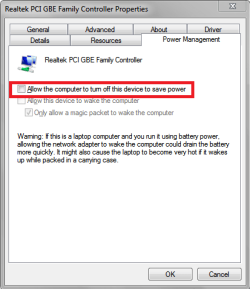
I finally found how to fix it, by changing my NIC setting to not allow it to turn off to save power.

Here is a tutorial by Brink you can look through for ideas and things to look at:
Power Options and Sleep Mode Problems

pic of the setting i changed to fix my issue, and this setting was checked and working for 5+ years ...

NIC_Power_01.png
 

My Computer

Computer type
PC/Desktop
Computer Manufacturer/Model Number
home built
OS
Multi-Boot W7_Pro_x64 W8.1_Pro_x64 W10_Pro_x64 +Linux_VMs +Chromium_VM
CPU
AMD Athlon II x4 620
Motherboard
Gigabyte GA-MA785G-UD3H
Memory
6GB GSkill DDR2 800
Graphics Card(s)
AMD 4670 GPU + AMD 4200 IGP
Sound Card
on board Realtek ALC889A
Monitor(s) Displays
RCA 40" LCD TV, Insignia 32" LCD TV, HP 15" LCD monitor
Screen Resolution
1680 x 1050
Hard Drives
OCZ Vertex 3 120GB,
Samsung F3 1TB (3),
Several others - WD, Seagate, Hitachi, ...
PSU
Corsair 500 W
Case
Rosewill mid tower
Cooling
CM 90mm rifle
Keyboard
Gyration wireless, Logitech wireless, Dell USB wired
Mouse
Gyration wireless, Logitech wireless, V7 USB wired
Internet Speed
Spectrum - 100Mbps D / 10Mbps U
Antivirus
Avast, MBAM3, EMET, WinPatrol
Browser
Pale Moon, Firefox, IE
Other Info
2 multi-boot PC's
Mainly HTPC/Office/Gen purpose (no gaming).
Trendnet USB KVM.
LG DVD burner/Blue Ray Player.
Tray system for removable SATA backup drives.

Not currently OCd, under-volted.
I use Hybrid sleep, rarely re-boot or shutdown.

Hauppauge HD-PVR, Avermedia PCIe TV Tuner, Hauppauge PCI TV Tuner.
Leave your partitions as they are, do not touch them.
 

My Computer

Computer type
PC/Desktop
Computer Manufacturer/Model Number
Skylake Special #666
OS
Windows 10 Pro x64
CPU
Intel Core i7 6700K
Motherboard
Asus Sabertooth Z170 Mark 1
Memory
GSkill TridentZ RGB 16GB 3600 16-16-16-36
Graphics Card(s)
EVGA GTX 980 Ti SC x2
Sound Card
Realtek High Definition
Monitor(s) Displays
AOC G2460PG
Screen Resolution
1920 x 1080 144Hz
Hard Drives
Samsung 860 Pro 256GB, Seagate Barracuda 4TB x2
PSU
EVGA 1000 P2, EVGA White Custom Braided Cables
Case
Corsair Vengeance C70 Gunmetal Black
Cooling
Corsair H100i v2, Corsair ML120 x2, Thermal Grizzly Kryonaut
Keyboard
Logitech G910 Orion Spectrum
Mouse
Logitech G700s
Internet Speed
Verizon Fios Quantum Gateway 75/75
Antivirus
Windows Defender, Malwarebytes Free 3.8.3
Browser
Chrome
Other Info
Corsair SP120 x4, LG Blu-ray Drive, Durabrand HT-395 100 Watt Dolby Digital Amp, Corsair H2100 Wireless 7.1 Headset
Thanks all. At least I understand the message NOT to interfere with the partitions. I am not at all sure when sleep mode became comatose but it was some months ago when I first discovered the fault. Hibernation mode seems to work ok as far as I can tell, in that, the laptop powers off after about 30 seconds or so and when I switch back on it brings up 'Resume Windows'. I will now work my way through the tutorial.
 

My Computer

Computer Manufacturer/Model Number
compaq presario CQ56
OS
Windows 7 Home Premium 64bit
Do you have Hybrid Sleep enabled in Power Options ?
Hybrid Sleep does a Sleep and a Hibernate when the PC sleeps, so if the power goes out it can Resume from Hibernate if it can't Wake from Sleep.
It's something easy to try if you don't have it enabled now.

Sleep stores the Windows session in RAM, and a small amount of power must be maintained to RAM while sleeping, or it can't wake from sleep.
Hibernate stores the Windows session to the HD/SSD and does not require any power to "preserve" the session saved to HD/SSD to be able to resume from hibernate.

Maybe there is a power issue when sleeping ?
 

My Computer

Computer type
PC/Desktop
Computer Manufacturer/Model Number
home built
OS
Multi-Boot W7_Pro_x64 W8.1_Pro_x64 W10_Pro_x64 +Linux_VMs +Chromium_VM
CPU
AMD Athlon II x4 620
Motherboard
Gigabyte GA-MA785G-UD3H
Memory
6GB GSkill DDR2 800
Graphics Card(s)
AMD 4670 GPU + AMD 4200 IGP
Sound Card
on board Realtek ALC889A
Monitor(s) Displays
RCA 40" LCD TV, Insignia 32" LCD TV, HP 15" LCD monitor
Screen Resolution
1680 x 1050
Hard Drives
OCZ Vertex 3 120GB,
Samsung F3 1TB (3),
Several others - WD, Seagate, Hitachi, ...
PSU
Corsair 500 W
Case
Rosewill mid tower
Cooling
CM 90mm rifle
Keyboard
Gyration wireless, Logitech wireless, Dell USB wired
Mouse
Gyration wireless, Logitech wireless, V7 USB wired
Internet Speed
Spectrum - 100Mbps D / 10Mbps U
Antivirus
Avast, MBAM3, EMET, WinPatrol
Browser
Pale Moon, Firefox, IE
Other Info
2 multi-boot PC's
Mainly HTPC/Office/Gen purpose (no gaming).
Trendnet USB KVM.
LG DVD burner/Blue Ray Player.
Tray system for removable SATA backup drives.

Not currently OCd, under-volted.
I use Hybrid sleep, rarely re-boot or shutdown.

Hauppauge HD-PVR, Avermedia PCIe TV Tuner, Hauppauge PCI TV Tuner.
Have enabled Hybrid sleep, both when running on battery and on power line, but it seems to make no difference. There may well be power issues because when I run energy reports I receive two two error notices relating to USB root hub and device which both say:
"The USB device did not enter the Suspend state. Processor power management may be prevented if a USB device does not enter the Suspend state when not in use".
I do not know if the USB problems are the source of sleep mode failure or the result of some other issue. The need to update the graphics driver is often quoted as a possible cause of sleep mode problems but I have let both Windows and the manufacturers website attempt to update the graphics driver. They both seem to conclude the driver is up-to-date.
I will work through the tutorial.
 

My Computer

Computer Manufacturer/Model Number
compaq presario CQ56
OS
Windows 7 Home Premium 64bit
Back
Top