Should I reformat this HD?

Ok here it is:

Capture7977.JPG

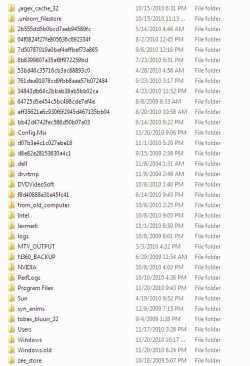
its the ones with multiple numbers and letters. maybe something else bad in there?
 

My Computer My Computer

Computer Manufacturer/Model Number
Dell Dimension 3000
OS
Windows 7 Home Premium 32-bit
CPU
Intel Pentium 4 Processor 2.8GHz Prescott 90mm Technology
Motherboard
Dell Computer Corp. 0F8403 (Microprocessor)
Memory
1.00GB Dual-Channel DDR @ 166MHz (2.5-3-3-7)
Graphics Card(s)
82865G Graphics Controller
Sound Card
SoundMax Integrated Digital Audio
Monitor(s) Displays
Dell E171FP
Screen Resolution
1280x1024
Hard Drives
156GB Western Digital WDC WD1600AAJB-56WRAQ ATA Device
Case
Dell Dimesion 3000 Stock Case
Keyboard
Dell RT7D20
Mouse
HP R41126
Internet Speed
8 Mbps(Downloading) 1Mbps(Uploading)
the first two seem a bit suspect to me, since the file name starts with a "dot". the next ten are probably windows installation files.

you can probably delete the following folders (in my opinion ONLY) :

dell
drvrtemp
from_old_computer (if you cleaned it out)
intel
lexmark
MTV_OUTPUT (again, if you cleaned it out)
N360_BACKUP (probably norton. could be pretty large)
NVIDIA
SUN
the next two i dont recognize but probably safe to delete. use your discretion
windows.old
dont recognize the last one either, but again, probably safe to delete
 

My Computer My Computer

Computer Manufacturer/Model Number
Alienware AREA-51 M17x
OS
windows 7 ultimate 64bit
CPU
Intel Core2 Extreme x9000 2.8GHZ
Motherboard
Asus P965 Intel chipset
Memory
4Gig
Graphics Card(s)
2 NVidia GeForce 8800M GTX (SLi)
Sound Card
onboard
Monitor(s) Displays
17in. built-in, 47in JVC LCD
Screen Resolution
1080p
Hard Drives
2 250Gig Hitachi (RAID 0) @ 7200RPM
Case
17in. laptop
Mouse
touchpad, Logitech Anywhere Mouse cordless laser
Internet Speed
cable
The file dell is where are all the drivers are at so I will not be deleting that.
The Intel folder is for my extreme graphics so no to that one.
The file lexmark is for a driver for my printer so no delete.
The folder sun is for my java I think so don't know about that one.
Ok I deleted everything but the above and got 1GB out of the system.
 

My Computer My Computer

Computer Manufacturer/Model Number
Dell Dimension 3000
OS
Windows 7 Home Premium 32-bit
CPU
Intel Pentium 4 Processor 2.8GHz Prescott 90mm Technology
Motherboard
Dell Computer Corp. 0F8403 (Microprocessor)
Memory
1.00GB Dual-Channel DDR @ 166MHz (2.5-3-3-7)
Graphics Card(s)
82865G Graphics Controller
Sound Card
SoundMax Integrated Digital Audio
Monitor(s) Displays
Dell E171FP
Screen Resolution
1280x1024
Hard Drives
156GB Western Digital WDC WD1600AAJB-56WRAQ ATA Device
Case
Dell Dimesion 3000 Stock Case
Keyboard
Dell RT7D20
Mouse
HP R41126
Internet Speed
8 Mbps(Downloading) 1Mbps(Uploading)
I would just partition the disk and move all your data that you want kept to the other one, i would then wipe the free space on both drives. I would then defrag both and also defrag the Reg. (Some people will disagree).
 

My Computer My Computer

Computer Manufacturer/Model Number
Customised
OS
Windows 7 64Bit Ultimate Edition SP1
CPU
AMD Phenom II X5 955 @ 3200 Mhz
Motherboard
Asus M5A99X EVO
Memory
G.Skill 12GB DDR3 1333MHz
Graphics Card(s)
Palit GeForce GTX 550 Ti OC Sonic 1GB
Sound Card
Onboard
Monitor(s) Displays
LG 32" HDTV
Screen Resolution
1920x1080 @ 60Hz
Hard Drives
Internal 250GB SATA 3.0 Western Digital WDC WD25 00AAKX-001CA0

Internal 500GB SATA 2.0 Seagate ST350041 3AS

Internal 500GB SATA 2.0 Western Digital WDC WD50 00AAKS-00WWP

External 1TB USB 2.0 Western Digital

External 2TB USB 2.0 Buffalo
PSU
Colors-IT 750w BLACK 12CM Silent
Case
Xigamatek CPC-T45UB-U01 Asgard Chassis
Cooling
4 120mm Fans In Total
Keyboard
ADVENT Illuminated Keyboard
Mouse
Genius
Internet Speed
30MB
Other Info
CPU Cooler - Cooler Master Hyper 212 Plus Cooler
Doesn't partitioning means wiping out the HD entirely? Then putting two separate drives? This is what is screaming in head right now when I saw this. No offense.
 

My Computer My Computer

Computer Manufacturer/Model Number
Dell Dimension 3000
OS
Windows 7 Home Premium 32-bit
CPU
Intel Pentium 4 Processor 2.8GHz Prescott 90mm Technology
Motherboard
Dell Computer Corp. 0F8403 (Microprocessor)
Memory
1.00GB Dual-Channel DDR @ 166MHz (2.5-3-3-7)
Graphics Card(s)
82865G Graphics Controller
Sound Card
SoundMax Integrated Digital Audio
Monitor(s) Displays
Dell E171FP
Screen Resolution
1280x1024
Hard Drives
156GB Western Digital WDC WD1600AAJB-56WRAQ ATA Device
Case
Dell Dimesion 3000 Stock Case
Keyboard
Dell RT7D20
Mouse
HP R41126
Internet Speed
8 Mbps(Downloading) 1Mbps(Uploading)
The file dell is where are all the drivers are at so I will not be deleting that.
The Intel folder is for my extreme graphics so no to that one.
The file lexmark is for a driver for my printer so no delete.
The folder sun is for my java I think so don't know about that one.
Ok I deleted everything but the above and got 1GB out of the system.

the dell folder is from 2004. i doubt you need it. intel, lexmark, and sun were probably created during installation and can be deleted. if something doesnt work, they are easily replaceable.
 

My Computer My Computer

Computer Manufacturer/Model Number
Alienware AREA-51 M17x
OS
windows 7 ultimate 64bit
CPU
Intel Core2 Extreme x9000 2.8GHZ
Motherboard
Asus P965 Intel chipset
Memory
4Gig
Graphics Card(s)
2 NVidia GeForce 8800M GTX (SLi)
Sound Card
onboard
Monitor(s) Displays
17in. built-in, 47in JVC LCD
Screen Resolution
1080p
Hard Drives
2 250Gig Hitachi (RAID 0) @ 7200RPM
Case
17in. laptop
Mouse
touchpad, Logitech Anywhere Mouse cordless laser
Internet Speed
cable
Alright I will delete them then.
 

My Computer My Computer

Computer Manufacturer/Model Number
Dell Dimension 3000
OS
Windows 7 Home Premium 32-bit
CPU
Intel Pentium 4 Processor 2.8GHz Prescott 90mm Technology
Motherboard
Dell Computer Corp. 0F8403 (Microprocessor)
Memory
1.00GB Dual-Channel DDR @ 166MHz (2.5-3-3-7)
Graphics Card(s)
82865G Graphics Controller
Sound Card
SoundMax Integrated Digital Audio
Monitor(s) Displays
Dell E171FP
Screen Resolution
1280x1024
Hard Drives
156GB Western Digital WDC WD1600AAJB-56WRAQ ATA Device
Case
Dell Dimesion 3000 Stock Case
Keyboard
Dell RT7D20
Mouse
HP R41126
Internet Speed
8 Mbps(Downloading) 1Mbps(Uploading)
In total I gained about 300MB out of that.
 

My Computer My Computer

Computer Manufacturer/Model Number
Dell Dimension 3000
OS
Windows 7 Home Premium 32-bit
CPU
Intel Pentium 4 Processor 2.8GHz Prescott 90mm Technology
Motherboard
Dell Computer Corp. 0F8403 (Microprocessor)
Memory
1.00GB Dual-Channel DDR @ 166MHz (2.5-3-3-7)
Graphics Card(s)
82865G Graphics Controller
Sound Card
SoundMax Integrated Digital Audio
Monitor(s) Displays
Dell E171FP
Screen Resolution
1280x1024
Hard Drives
156GB Western Digital WDC WD1600AAJB-56WRAQ ATA Device
Case
Dell Dimesion 3000 Stock Case
Keyboard
Dell RT7D20
Mouse
HP R41126
Internet Speed
8 Mbps(Downloading) 1Mbps(Uploading)
I think the weird files I talked about earlier doesn't appear on everybody HD. I checked a few days ago with one of my friends computer he also upgraded from XP to Win7 HP and I didn't see those files on his HD so I think they are the culprit. Maybe there are?
 

My Computer My Computer

Computer Manufacturer/Model Number
Dell Dimension 3000
OS
Windows 7 Home Premium 32-bit
CPU
Intel Pentium 4 Processor 2.8GHz Prescott 90mm Technology
Motherboard
Dell Computer Corp. 0F8403 (Microprocessor)
Memory
1.00GB Dual-Channel DDR @ 166MHz (2.5-3-3-7)
Graphics Card(s)
82865G Graphics Controller
Sound Card
SoundMax Integrated Digital Audio
Monitor(s) Displays
Dell E171FP
Screen Resolution
1280x1024
Hard Drives
156GB Western Digital WDC WD1600AAJB-56WRAQ ATA Device
Case
Dell Dimesion 3000 Stock Case
Keyboard
Dell RT7D20
Mouse
HP R41126
Internet Speed
8 Mbps(Downloading) 1Mbps(Uploading)
you mean the ones with a long string of letters and numbers? i think those are created by windows and windows update.

were you able to delete the N360_BACKUP folder? (assuming you dont have norton installed anymore)

and those first two folders in the list? the ones that started with a "dot"?
 

My Computer My Computer

Computer Manufacturer/Model Number
Alienware AREA-51 M17x
OS
windows 7 ultimate 64bit
CPU
Intel Core2 Extreme x9000 2.8GHZ
Motherboard
Asus P965 Intel chipset
Memory
4Gig
Graphics Card(s)
2 NVidia GeForce 8800M GTX (SLi)
Sound Card
onboard
Monitor(s) Displays
17in. built-in, 47in JVC LCD
Screen Resolution
1080p
Hard Drives
2 250Gig Hitachi (RAID 0) @ 7200RPM
Case
17in. laptop
Mouse
touchpad, Logitech Anywhere Mouse cordless laser
Internet Speed
cable
Yes, I got rid of all of of the ones listed in your post and like I said before 300MB regained from it.
 

My Computer My Computer

Computer Manufacturer/Model Number
Dell Dimension 3000
OS
Windows 7 Home Premium 32-bit
CPU
Intel Pentium 4 Processor 2.8GHz Prescott 90mm Technology
Motherboard
Dell Computer Corp. 0F8403 (Microprocessor)
Memory
1.00GB Dual-Channel DDR @ 166MHz (2.5-3-3-7)
Graphics Card(s)
82865G Graphics Controller
Sound Card
SoundMax Integrated Digital Audio
Monitor(s) Displays
Dell E171FP
Screen Resolution
1280x1024
Hard Drives
156GB Western Digital WDC WD1600AAJB-56WRAQ ATA Device
Case
Dell Dimesion 3000 Stock Case
Keyboard
Dell RT7D20
Mouse
HP R41126
Internet Speed
8 Mbps(Downloading) 1Mbps(Uploading)
theres not much else i can think of, unless you have a hidden partition (you can look in DISK MANAGEMENT to see if your HDD is partitioned). and you could also clean out your browser cache and temp files.
other than that, i guess everything else is necessary files.
 

My Computer My Computer

Computer Manufacturer/Model Number
Alienware AREA-51 M17x
OS
windows 7 ultimate 64bit
CPU
Intel Core2 Extreme x9000 2.8GHZ
Motherboard
Asus P965 Intel chipset
Memory
4Gig
Graphics Card(s)
2 NVidia GeForce 8800M GTX (SLi)
Sound Card
onboard
Monitor(s) Displays
17in. built-in, 47in JVC LCD
Screen Resolution
1080p
Hard Drives
2 250Gig Hitachi (RAID 0) @ 7200RPM
Case
17in. laptop
Mouse
touchpad, Logitech Anywhere Mouse cordless laser
Internet Speed
cable
Well I checked and is all on one partition. Thank you for helping me out with this problem and toke some time from your day to deal with me. If I could rep you again I would and I learned a lot today from you and know I can carry that knowledge with pride. Again Thank you and have a nice day(or night depending where your at). :D
 

My Computer My Computer

Computer Manufacturer/Model Number
Dell Dimension 3000
OS
Windows 7 Home Premium 32-bit
CPU
Intel Pentium 4 Processor 2.8GHz Prescott 90mm Technology
Motherboard
Dell Computer Corp. 0F8403 (Microprocessor)
Memory
1.00GB Dual-Channel DDR @ 166MHz (2.5-3-3-7)
Graphics Card(s)
82865G Graphics Controller
Sound Card
SoundMax Integrated Digital Audio
Monitor(s) Displays
Dell E171FP
Screen Resolution
1280x1024
Hard Drives
156GB Western Digital WDC WD1600AAJB-56WRAQ ATA Device
Case
Dell Dimesion 3000 Stock Case
Keyboard
Dell RT7D20
Mouse
HP R41126
Internet Speed
8 Mbps(Downloading) 1Mbps(Uploading)
no problem. and you might want to run a virus scan also if you havent already.
 

My Computer My Computer

Computer Manufacturer/Model Number
Alienware AREA-51 M17x
OS
windows 7 ultimate 64bit
CPU
Intel Core2 Extreme x9000 2.8GHZ
Motherboard
Asus P965 Intel chipset
Memory
4Gig
Graphics Card(s)
2 NVidia GeForce 8800M GTX (SLi)
Sound Card
onboard
Monitor(s) Displays
17in. built-in, 47in JVC LCD
Screen Resolution
1080p
Hard Drives
2 250Gig Hitachi (RAID 0) @ 7200RPM
Case
17in. laptop
Mouse
touchpad, Logitech Anywhere Mouse cordless laser
Internet Speed
cable
Ran every scan possible and all came back negative. Well, I see you around.
 

My Computer My Computer

Computer Manufacturer/Model Number
Dell Dimension 3000
OS
Windows 7 Home Premium 32-bit
CPU
Intel Pentium 4 Processor 2.8GHz Prescott 90mm Technology
Motherboard
Dell Computer Corp. 0F8403 (Microprocessor)
Memory
1.00GB Dual-Channel DDR @ 166MHz (2.5-3-3-7)
Graphics Card(s)
82865G Graphics Controller
Sound Card
SoundMax Integrated Digital Audio
Monitor(s) Displays
Dell E171FP
Screen Resolution
1280x1024
Hard Drives
156GB Western Digital WDC WD1600AAJB-56WRAQ ATA Device
Case
Dell Dimesion 3000 Stock Case
Keyboard
Dell RT7D20
Mouse
HP R41126
Internet Speed
8 Mbps(Downloading) 1Mbps(Uploading)
No, and sorry, i never took into consideration how much data you would want to keep etc. Sorry m8.
 

My Computer My Computer

Computer Manufacturer/Model Number
Customised
OS
Windows 7 64Bit Ultimate Edition SP1
CPU
AMD Phenom II X5 955 @ 3200 Mhz
Motherboard
Asus M5A99X EVO
Memory
G.Skill 12GB DDR3 1333MHz
Graphics Card(s)
Palit GeForce GTX 550 Ti OC Sonic 1GB
Sound Card
Onboard
Monitor(s) Displays
LG 32" HDTV
Screen Resolution
1920x1080 @ 60Hz
Hard Drives
Internal 250GB SATA 3.0 Western Digital WDC WD25 00AAKX-001CA0

Internal 500GB SATA 2.0 Seagate ST350041 3AS

Internal 500GB SATA 2.0 Western Digital WDC WD50 00AAKS-00WWP

External 1TB USB 2.0 Western Digital

External 2TB USB 2.0 Buffalo
PSU
Colors-IT 750w BLACK 12CM Silent
Case
Xigamatek CPC-T45UB-U01 Asgard Chassis
Cooling
4 120mm Fans In Total
Keyboard
ADVENT Illuminated Keyboard
Mouse
Genius
Internet Speed
30MB
Other Info
CPU Cooler - Cooler Master Hyper 212 Plus Cooler
its alright.
 

My Computer My Computer

Computer Manufacturer/Model Number
Dell Dimension 3000
OS
Windows 7 Home Premium 32-bit
CPU
Intel Pentium 4 Processor 2.8GHz Prescott 90mm Technology
Motherboard
Dell Computer Corp. 0F8403 (Microprocessor)
Memory
1.00GB Dual-Channel DDR @ 166MHz (2.5-3-3-7)
Graphics Card(s)
82865G Graphics Controller
Sound Card
SoundMax Integrated Digital Audio
Monitor(s) Displays
Dell E171FP
Screen Resolution
1280x1024
Hard Drives
156GB Western Digital WDC WD1600AAJB-56WRAQ ATA Device
Case
Dell Dimesion 3000 Stock Case
Keyboard
Dell RT7D20
Mouse
HP R41126
Internet Speed
8 Mbps(Downloading) 1Mbps(Uploading)
I haven't read the entire thread so I may be suggesting something already discussed. A rather unorthodox solution. Buy and install another HD. They are rather cheap now. You can get a 500GB from Newegg for about $50. Do a clean install of windows on the new hard drive. Backup everything first. especially your docs.,music,photos ect. During this time you will be able to continue using what you already have. Take your time and set your new drive up exactly how you want it. when you have it like you want it, go into bios and change the boot order to nstart booting into your new HD. Then you can run clean all in diskpart on the old drive and wipe it perfectly clean. Use it as a media drive to house your personal folders and for whatever storage you need. In the long run you will be better off and will get rid of whatever is filling up your current HD., and have plenty of space to use. I have had to do that before and it was a simple solution and later I was glad I did.
 

My Computers My Computers

System One System Two

  • Computer type
    PC/Desktop
    Computer Manufacturer/Model Number
    ALWAYS UNDER CONSTRUCTION
    OS
    Windows 11 Pro
    CPU
    Ryzen 9 5900X
    Motherboard
    Asus X570 Crosshair Viii Hero
    Memory
    32GB G Skill DDR4-3600
    Graphics Card(s)
    EVGA RTX 3080 FTW 3 Ultra
    Sound Card
    On Board/Sennheiser PC37X Headset
    Monitor(s) Displays
    3 X Asus 27"
    Screen Resolution
    2560x1440
    Hard Drives
    2 X 1 TB NVME drives
    PSU
    EVGA 850
    Case
    Phanteks Eclipse P400A
    Cooling
    EVGA 280 AIO
    Keyboard
    Logitech G510s/ Logitech G13
    Mouse
    Logitech G502
    Internet Speed
    24/1
    Antivirus
    ESET/MBAM Pro/SAS Pro
    Browser
    Chrome/ Firefox/ Edge
  • Computer type
    Laptop
    System Manufacturer/Model Number
    Dell 16 Plus
    OS
    Windows 11 Pro
    CPU
    Intel Ultra 9 288V
    Memory
    32 GB LPDDR5X 8533
    Monitor(s) Displays
    16" Mini-LED HDR600 Touch 90 Hz
    Screen Resolution
    2560X1600
    Hard Drives
    1 TB NVME
Back
Top