Show Us Your Rig [3]

Status
Not open for further replies.
Andreas- N+I+C+E job on that cable management, and I never thought anyone would use the brownish fans, so they are a first I see in a chassis, all in all very nice and clean look

Thanks a lot. Yeah they are maybe not the most desirable color but I am to afraid to paint them, scared I might do something that destroy them. But I am happy on how it looks. Gotten a few ideas also on how to have the fans so I might change directions on them, so far the 3 top are exhausting, the one in the back exhaust and the 2 at bottom are intake

Well, from my xperiance (and anyone reading this correct me if i am wrong) I found its better having more intake fans then out take, i read a review on google, and it showed that more intake creates possative airflow and its better to have say 8 fans then 6 willl be intake, the air that gets taken in will xcape via the litle holes and openings in your chassis,so as far as I know its better to have more intake than out take, but i could be wrong, so hopefully someoneelse can add on

Ya I was thinking on that last night, so I am planing on turning the top 3 fans around and turn the cpu around so all fans are intake while the cpu and back fan is exhaust, maybe it does it help it should I belive and maybe even help cool down the motherboard?
 

My Computer My Computer

Computer type
PC/Desktop
OS
Windows 7 Home Premium x64
CPU
Intel Core i7 860 (Lynnfield)
Motherboard
Asus P7P55D (LGA1156)
Memory
Corsair Vengeance 9,9,9,24 1600Mhz 1.50v 2x4G
Graphics Card(s)
Asus nVidia 560 GTX
Sound Card
Asus Xonar DG
Monitor(s) Displays
Acer P235H & NEC E201W
Screen Resolution
1920x1080 & 900x1600
Hard Drives
2
PSU
Corsair 650 Modular
Case
Corsair 800D
Cooling
Corsair H80 with Noctua fans
Keyboard
Ducky Shine
Mouse
tT Theron
Internet Speed
100/100
Browser
IE10
Well, from my xperiance (and anyone reading this correct me if i am wrong) I found its better having more intake fans then out take, i read a review on google, and it showed that more intake creates possative airflow and its better to have say 8 fans then 6 willl be intake, the air that gets taken in will xcape via the litle holes and openings in your chassis,so as far as I know its better to have more intake than out take, but i could be wrong, so hopefully someoneelse can add on

Ya I was thinking on that last night, so I am planing on turning the top 3 fans around and turn the cpu around so all fans are intake while the cpu and back fan is exhaust, maybe it does it help it should I belive and maybe even help cool down the motherboard?

I don't think it really makes much difference to temps overall, might be very slightly cooler with more intake, but my guess is that's because fans pushing air is more efficient than pulling it... But that's just speculation.

One thing I can say for sure though, positive pressure in a case helps keep it cleaner than negative pressure, especially when dust filters are involved.. :) It stops tiny dust particles from entering the case through the cracks and holes where there aren't any fans.
 

My Computer My Computer

Computer type
PC/Desktop
OS
Win 10 x64 Pro x64 / Ubuntu 15.10 x64
CPU
Intel i7-4960X
Motherboard
Asus Rampage IV Black Edition
Memory
4x8GB Corsair Dominator Platinum @2400MHz 10-12-12-31
Graphics Card(s)
2x MSI GTX780Ti 3GB (SLI)
Sound Card
Onboard SupremeFX (Cirrus Logic CS4398)
Monitor(s) Displays
3x LG Cinema 27" IPS LED (27MP65)
Screen Resolution
[1920x1080]x3
Hard Drives
Crucial M500 120GB, Crucial M500 480GB, Toshiba DT01ACA200 2TB
PSU
CoolerMaster V1000
Case
Corsair Obsidian 750D
Cooling
ThermalTake Water 3.0 Extreme, 4xSP120, 3xAF120
Keyboard
Moshi Luna
Mouse
Logitech G700s / Roccat Tyon
Internet Speed
4Mb uncapped ADSL (Afrihost)
Antivirus
MS Security Essentials
Browser
Chrome... Duh. (:
Ya I was thinking on that last night, so I am planing on turning the top 3 fans around and turn the cpu around so all fans are intake while the cpu and back fan is exhaust, maybe it does it help it should I belive and maybe even help cool down the motherboard?

Well I would keep the top ones at out take,cause heat rises to the top, and change all the rest to intake.
 

My Computer My Computer

Computer type
PC/Desktop
Computer Manufacturer/Model Number
Custom built
OS
64bit Windows 10
CPU
Intel i9
Motherboard
MSI X299 Carbon pro
Memory
64g-8x8gig DDR4 3600
Graphics Card(s)
Asus ROg Strix 1080ti
Monitor(s) Displays
Samsung 49" Odyssey g9
Screen Resolution
5210x1440
Hard Drives
1 x 512GB m.2 OS Drive
2 x 512gb ssd
1 x 2tb

4x 1TB's
PSU
Corsair AX1200w
Case
Silverstone TJ11 B-W
Cooling
AIC
Keyboard
Asus Rog Claymore 2
Mouse
Asus Rog Apatha
Internet Speed
1gb Fibre
Ya I was thinking on that last night, so I am planing on turning the top 3 fans around and turn the cpu around so all fans are intake while the cpu and back fan is exhaust, maybe it does it help it should I belive and maybe even help cool down the motherboard?

Well I would keep the top ones at out take,cause heat rises to the top, and change all the rest to intake.

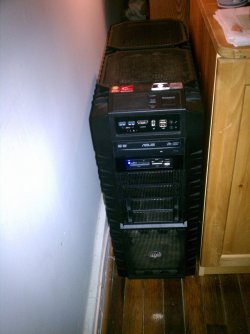
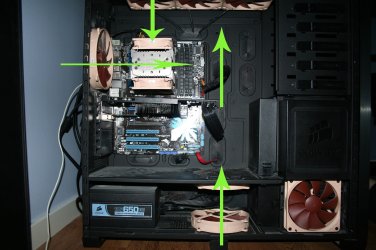
I have tried turning the back fan around for intake and that created some weird noise with the heat pipes for cpu, but looking at the image bellow I will draw up an image that I saw one guy had his fans on a different site with the same case, the heat pipes are aligned wrong but with the image and imagination I think you can see what I mean. and just the 1 fan on the top would be intake the 2 others would be exhaust
 

Attachments

  • IMG_0704.jpg
    IMG_0704.jpg
    405.5 KB · Views: 31

My Computer My Computer

Computer type
PC/Desktop
OS
Windows 7 Home Premium x64
CPU
Intel Core i7 860 (Lynnfield)
Motherboard
Asus P7P55D (LGA1156)
Memory
Corsair Vengeance 9,9,9,24 1600Mhz 1.50v 2x4G
Graphics Card(s)
Asus nVidia 560 GTX
Sound Card
Asus Xonar DG
Monitor(s) Displays
Acer P235H & NEC E201W
Screen Resolution
1920x1080 & 900x1600
Hard Drives
2
PSU
Corsair 650 Modular
Case
Corsair 800D
Cooling
Corsair H80 with Noctua fans
Keyboard
Ducky Shine
Mouse
tT Theron
Internet Speed
100/100
Browser
IE10
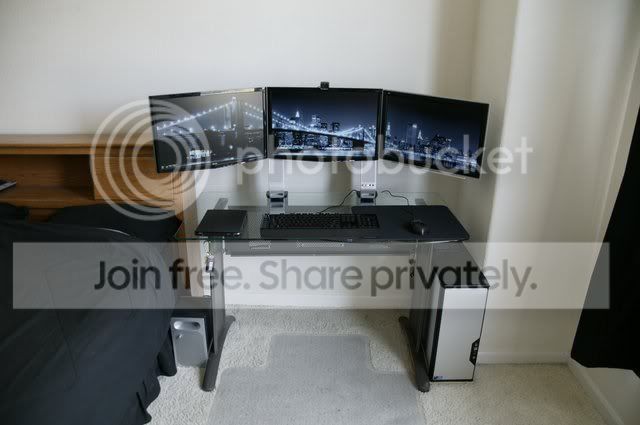
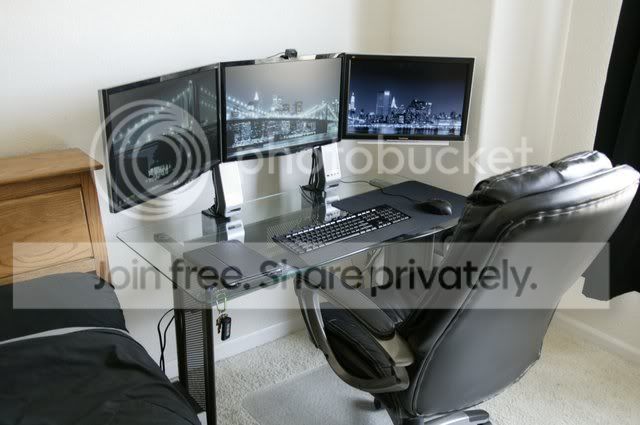
I haven't posted in Show Us Your Rig [3] yet, so here i go!

910V6672_JPG_640x640_q85.jpg


910V6677_JPG_640x640_q85.jpg

That looks AMAZING. It looks so clean and tidy, if I had enough money to buy a desk like that (hell, if I had any money) i'd definetely do that. Nice! :)
 

My Computer My Computer

Computer type
PC/Desktop
Computer Manufacturer/Model Number
HP
OS
Windows 7 Ultimate
CPU
DualCore Intel Pentium D 930, 3000 MHz (15 x 200)
Motherboard
Asus P5LP-LE (Emery)
Memory
3x512mb 1x1GB
Graphics Card(s)
NVIDIA GeForce 7800 GTX
Sound Card
Realtek ALC882/D/M @ Intel 82801GB ICH7
Monitor(s) Displays
Iiyama ProLite E2407HDS
Screen Resolution
1920 x 1080 70 Hz
Hard Drives
1TB WD10EARS-00Y5B1 ATA Device
Keyboard
Hewlett Packard Wireless Ergo
Mouse
Logitech USB Wheel Mouse
Internet Speed
20mbps Download - 2mbps Upload
Antivirus
Windows Defender - Malwarebytes Anti Malware
Browser
Google Chrome
I have tried turning the back fan around for intake and that created some weird noise with the heat pipes for cpu, but looking at the image bellow I will draw up an image that I saw one guy had his fans on a different site with the same case, the heat pipes are aligned wrong but with the image and imagination I think you can see what I mean. and just the 1 fan on the top would be intake the 2 others would be exhaust

Thanx 4 the pic, now i would rather change the back fan to out take, so it doesn't disrupt your cpu coolers fans airflow, but it would then be good imho
 

My Computer My Computer

Computer type
PC/Desktop
Computer Manufacturer/Model Number
Custom built
OS
64bit Windows 10
CPU
Intel i9
Motherboard
MSI X299 Carbon pro
Memory
64g-8x8gig DDR4 3600
Graphics Card(s)
Asus ROg Strix 1080ti
Monitor(s) Displays
Samsung 49" Odyssey g9
Screen Resolution
5210x1440
Hard Drives
1 x 512GB m.2 OS Drive
2 x 512gb ssd
1 x 2tb

4x 1TB's
PSU
Corsair AX1200w
Case
Silverstone TJ11 B-W
Cooling
AIC
Keyboard
Asus Rog Claymore 2
Mouse
Asus Rog Apatha
Internet Speed
1gb Fibre
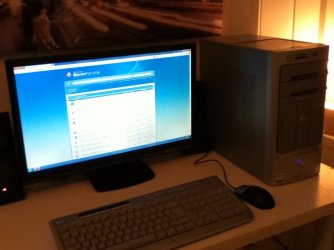
I didn't know if I should post mine or not as i'm not sure if it qualifies as a rig :P

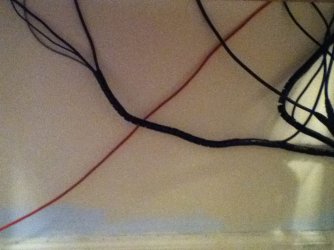
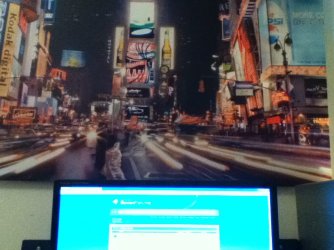
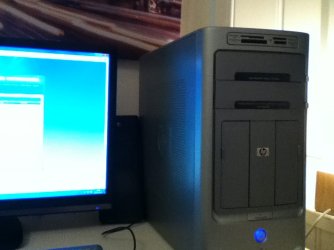
It's a fairly standard HP Media Center m7000kr with the exception of a nVidia GeForce 7800 GTX (which was good back when I got this machine). A set of medium range Logitech speakers and the only good think i've got is my iiYama Prolite 24" monitor. I used to use it for my Xbox but now it's for my PC :) I tried my best to hide the cables but as you can see, it didn't go well :huh: I've got a nice New York canvas picture behind aswell :P
 

Attachments

  • IMG_0169.JPG
    IMG_0169.JPG
    90.6 KB · Views: 4
  • IMG_0166.JPG
    IMG_0166.JPG
    61.3 KB · Views: 6
  • IMG_0167.JPG
    IMG_0167.JPG
    96 KB · Views: 8
  • IMG_0168.JPG
    IMG_0168.JPG
    58.7 KB · Views: 6

My Computer My Computer

Computer type
PC/Desktop
Computer Manufacturer/Model Number
HP
OS
Windows 7 Ultimate
CPU
DualCore Intel Pentium D 930, 3000 MHz (15 x 200)
Motherboard
Asus P5LP-LE (Emery)
Memory
3x512mb 1x1GB
Graphics Card(s)
NVIDIA GeForce 7800 GTX
Sound Card
Realtek ALC882/D/M @ Intel 82801GB ICH7
Monitor(s) Displays
Iiyama ProLite E2407HDS
Screen Resolution
1920 x 1080 70 Hz
Hard Drives
1TB WD10EARS-00Y5B1 ATA Device
Keyboard
Hewlett Packard Wireless Ergo
Mouse
Logitech USB Wheel Mouse
Internet Speed
20mbps Download - 2mbps Upload
Antivirus
Windows Defender - Malwarebytes Anti Malware
Browser
Google Chrome
I didn't know if I should post mine or not as i'm not sure if it qualifies as a rig :P

It's a fairly standard HP Media Center m7000kr with the exception of a nVidia GeForce 7800 GTX (which was good back when I got this machine). A set of medium range Logitech speakers and the only good think i've got is my iiYama Prolite 24" monitor. I used to use it for my Xbox but now it's for my PC :) I tried my best to hide the cables but as you can see, it didn't go well :huh: I've got a nice New York canvas picture behind aswell :P

Pretty nice professional looking PC. People nowadays don't appreciate classic designs any more :( I for one am using a "gaming" computer case just because of the large space inside, not the leds & everything.
 

My Computer My Computer

Computer type
PC/Desktop
Computer Manufacturer/Model Number
Home brewed
OS
Windows 7 Ultimate 64bit
CPU
Core2Quad Q6600
Motherboard
Asus P5N-E sli
Memory
8GB DDR 2 Kingmax
Graphics Card(s)
2x GT520 1GB/64bit
Sound Card
Realtek ALC883 :P
Monitor(s) Displays
LG Flatron W245
Screen Resolution
1920x1200
Hard Drives
2x STM3250820AS; 2x SP2014N; ST310005AS; WD3200BEVT; WD10EARS; WD1600AAJB; 6Y200M0; ST9160310AS;
PSU
Chieftec 650W
Case
Antec Twelve Hundred
Keyboard
Microsoft Wireless 800
Mouse
Microsoft Wireless 1000
I didn't know if I should post mine or not as i'm not sure if it qualifies as a rig :P

It's a fairly standard HP Media Center m7000kr with the exception of a nVidia GeForce 7800 GTX (which was good back when I got this machine). A set of medium range Logitech speakers and the only good think i've got is my iiYama Prolite 24" monitor. I used to use it for my Xbox but now it's for my PC :) I tried my best to hide the cables but as you can see, it didn't go well :huh: I've got a nice New York canvas picture behind aswell :P
Pretty nice professional looking PC. People nowadays don't appreciate classic designs any more :( I for one am using a "gaming" computer case just because of the large space inside, not the leds & everything.

I don't see the point in spending more money on a PC case with fancy leds and things when no-one else gets to see it. I managed to pickup this PC a year ago for only £150 when it was worth atleast £300. The people who were selling it had no idea how much it was worth. It needed a right clean though, it was reeking of marijuana.
 

My Computer My Computer

Computer type
PC/Desktop
Computer Manufacturer/Model Number
HP
OS
Windows 7 Ultimate
CPU
DualCore Intel Pentium D 930, 3000 MHz (15 x 200)
Motherboard
Asus P5LP-LE (Emery)
Memory
3x512mb 1x1GB
Graphics Card(s)
NVIDIA GeForce 7800 GTX
Sound Card
Realtek ALC882/D/M @ Intel 82801GB ICH7
Monitor(s) Displays
Iiyama ProLite E2407HDS
Screen Resolution
1920 x 1080 70 Hz
Hard Drives
1TB WD10EARS-00Y5B1 ATA Device
Keyboard
Hewlett Packard Wireless Ergo
Mouse
Logitech USB Wheel Mouse
Internet Speed
20mbps Download - 2mbps Upload
Antivirus
Windows Defender - Malwarebytes Anti Malware
Browser
Google Chrome
So does mine =)) I clean the intake filters at least twice a month though. Dust in the air is the real nightmare since i have 2 cats and a dog running around the room all the time. Luckily for me the thing is modular in design (another plus for these "gaming" cases) and real easy maintenance.
 

My Computer My Computer

Computer type
PC/Desktop
Computer Manufacturer/Model Number
Home brewed
OS
Windows 7 Ultimate 64bit
CPU
Core2Quad Q6600
Motherboard
Asus P5N-E sli
Memory
8GB DDR 2 Kingmax
Graphics Card(s)
2x GT520 1GB/64bit
Sound Card
Realtek ALC883 :P
Monitor(s) Displays
LG Flatron W245
Screen Resolution
1920x1200
Hard Drives
2x STM3250820AS; 2x SP2014N; ST310005AS; WD3200BEVT; WD10EARS; WD1600AAJB; 6Y200M0; ST9160310AS;
PSU
Chieftec 650W
Case
Antec Twelve Hundred
Keyboard
Microsoft Wireless 800
Mouse
Microsoft Wireless 1000
Ya I was thinking on that last night, so I am planing on turning the top 3 fans around and turn the cpu around so all fans are intake while the cpu and back fan is exhaust, maybe it does it help it should I belive and maybe even help cool down the motherboard?

Well I would keep the top ones at out take,cause heat rises to the top, and change all the rest to intake.

Heat won't rise if there are fans pushing it out the back. That's the whole point of having case fans, to direct air flow.
 

My Computer My Computer

Computer Manufacturer/Model Number
tw33k
OS
Windows 7 Ultimate (x64) SP1
CPU
Intel 3770k 4.6GHz
Motherboard
ASUS Maximus V Formula
Memory
8GB (2x 4GB) Crucial Ballistix
Graphics Card(s)
Sapphire 7950 (1060/1600)
Sound Card
On Board Realtek HD Audio
Monitor(s) Displays
27" Acer B273HU (via HDMI)
Screen Resolution
2048 x 1152
Hard Drives
Crucial M4 128GB
2TB WD Black
1TB Samsung F3 SATA
1TB WD Elite External
2TB WD USB 3.0
PSU
Corsair AX750 Gold
Case
Corsair Obsidian 800DW
Cooling
Corsair H100 (2x AP-121/2x UK-3000 push/pull)
Keyboard
Microsoft Wireless 5000
Mouse
Microsoft Wireless 5000
Internet Speed
5mb/s
Other Info
Logitech z-2300 2.1 speakers
Lamptron FC-5 v2
I haven't posted in Show Us Your Rig [3] yet, so here i go!

910V6672_JPG_640x640_q85.jpg


910V6677_JPG_640x640_q85.jpg

That looks AMAZING. It looks so clean and tidy, if I had enough money to buy a desk like that (hell, if I had any money) i'd definetely do that. Nice! :)

that's the beauty
 

My Computer My Computer

Computer type
PC/Desktop
Computer Manufacturer/Model Number
Self Built
OS
Windows 10 Pro
CPU
Core i5 9600K
Motherboard
ASUS ROG Strix Z390-F Gaming
Memory
Corsair Vengeance Pro 2x 8GB (16GB) 3200MHz DDR4
Graphics Card(s)
MSI GTX 1070 Gaming X 8GB
Sound Card
ASRock A-Style Purity Sound
Monitor(s) Displays
ASUS VX239H IPS
Screen Resolution
1920x1080
Hard Drives
XPG SPECTRIX S40G 2566GB M.2 NVMe | Patriot P210 512GB SSD | Seagate BarraCuda 4TB 5400RPM
PSU
Thermaltake Smart 600w RGB 80Plus
Case
NZXT H500 with 3x Corsair HD120 RGB w/Node Pro
Cooling
Cryorig H7
Keyboard
Corsair K70 RapidFire RGB (Cherry MX Speed)
Mouse
Logitech G402 Hyperion Fury
Internet Speed
20MB Cable Broadband
Browser
Chrome
Other Info
Corsair MM300 Extended Anti-Fray Mouse Pad | Edifier C2 2.1ch Sound System | XBOX One S Controller | XBOX 360 Wireless Controller for Windows | APC SUA1000i Smart-UPS | PS4 Slim 500GB [Region 1 - USA]
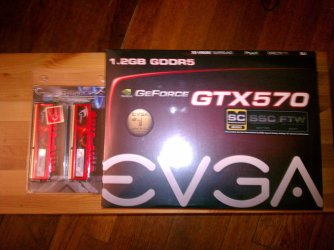
So the UPS man came today!:party: (sorry for bad phone pics) (Specs have been updated):geek:
 

Attachments

  • IMG_20120120_211616.jpg
    IMG_20120120_211616.jpg
    595.8 KB · Views: 26
  • IMG_20120120_211533.jpg
    IMG_20120120_211533.jpg
    672 KB · Views: 78
  • IMG_20120117_205548.jpg
    IMG_20120117_205548.jpg
    767.4 KB · Views: 31
  • IMG_20120117_205526.jpg
    IMG_20120117_205526.jpg
    814.3 KB · Views: 38
  • IMG_20120117_184758.jpg
    IMG_20120117_184758.jpg
    873.8 KB · Views: 27

My Computer My Computer

Computer type
PC/Desktop
Computer Manufacturer/Model Number
Jeepmann/Custom Built
OS
Windows 7 Ultimate 64bit
CPU
Intel Core i7-2600K Sandy Bridge 3.4GHz (@[email protected])
Motherboard
Asus Maximus IV Extreme LGA 1155 Intel P67
Memory
G.SKILL Ripjaws X Series 16GB 1600Mhz (4 x 4GB) (Stock)
Graphics Card(s)
x2 EVGA GeForce GTX 760's w/ACXCoolers in SLI Surround
Sound Card
On-Board
Monitor(s) Displays
3x Acer 24" HDMI Widescreen LCD Monitor
Screen Resolution
3@ 1920x1080 (5760x1080 In Surround)
Hard Drives
Samsung 830 128gb ssd
Western Digital Caviar Black 640GB 7200 RPM
Western Digital Caviar Black 500GB 7200 RPM
Seagate 2tb 7200 RPM
PSU
COOLER MASTER Silent Pro 1000W
Case
COOLER MASTER HAF X Black
Cooling
CORSAIR Hydro H70
Keyboard
Logitech G510
Mouse
Zalman M300
Internet Speed
100mbps-ish Down & 5mbps-ish Up
Other Info
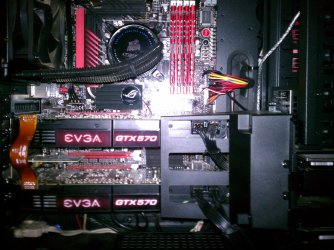
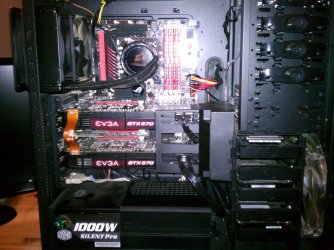
I installed the stock 140mm case fan outside of case then installed the H70+ 1 of its 120mm fans inside case. Used the 2nd 120mm from the H70 to go in the Gpu tunnel.
230mm Front,200mm side,200mm top,120mm Gpu tunnel,120mm&140mm on H70.
Jeepmann 4x4 - Congratulations on having a super sweet rig, I am drooling over the multi monitor setup you have going on there, and the 570 sli is AWESOME! All you need now is 6gb/s ssd and your rig is complete.

What temp do you get on your 570's now?
 

My Computer My Computer

Computer type
PC/Desktop
Computer Manufacturer/Model Number
Custom built
OS
64bit Windows 10
CPU
Intel i9
Motherboard
MSI X299 Carbon pro
Memory
64g-8x8gig DDR4 3600
Graphics Card(s)
Asus ROg Strix 1080ti
Monitor(s) Displays
Samsung 49" Odyssey g9
Screen Resolution
5210x1440
Hard Drives
1 x 512GB m.2 OS Drive
2 x 512gb ssd
1 x 2tb

4x 1TB's
PSU
Corsair AX1200w
Case
Silverstone TJ11 B-W
Cooling
AIC
Keyboard
Asus Rog Claymore 2
Mouse
Asus Rog Apatha
Internet Speed
1gb Fibre
Jeepmann 4x4 - Congratulations on having a super sweet rig, I am drooling over the multi monitor setup you have going on there, and the 570 sli is AWESOME! All you need now is 6gb/s ssd and your rig is complete.

What temp do you get on your 570's now?
Thanks I'm having fun with it! Yeah I'll get around to getting an ssd sometime. Maybe when the bigger ones come down in price. (I dont want to take the time to make my c:drive smaller...lol)

The first row is current while on the web and watching a video, 2nd row "min" is mostly idle (I was playing with folders at the time) and 3rd row "max" is while gaming (Driver)
 

Attachments

  • Temps with SLI.PNG
    Temps with SLI.PNG
    22.6 KB · Views: 40
Last edited:

My Computer My Computer

Computer type
PC/Desktop
Computer Manufacturer/Model Number
Jeepmann/Custom Built
OS
Windows 7 Ultimate 64bit
CPU
Intel Core i7-2600K Sandy Bridge 3.4GHz (@[email protected])
Motherboard
Asus Maximus IV Extreme LGA 1155 Intel P67
Memory
G.SKILL Ripjaws X Series 16GB 1600Mhz (4 x 4GB) (Stock)
Graphics Card(s)
x2 EVGA GeForce GTX 760's w/ACXCoolers in SLI Surround
Sound Card
On-Board
Monitor(s) Displays
3x Acer 24" HDMI Widescreen LCD Monitor
Screen Resolution
3@ 1920x1080 (5760x1080 In Surround)
Hard Drives
Samsung 830 128gb ssd
Western Digital Caviar Black 640GB 7200 RPM
Western Digital Caviar Black 500GB 7200 RPM
Seagate 2tb 7200 RPM
PSU
COOLER MASTER Silent Pro 1000W
Case
COOLER MASTER HAF X Black
Cooling
CORSAIR Hydro H70
Keyboard
Logitech G510
Mouse
Zalman M300
Internet Speed
100mbps-ish Down & 5mbps-ish Up
Other Info
I installed the stock 140mm case fan outside of case then installed the H70+ 1 of its 120mm fans inside case. Used the 2nd 120mm from the H70 to go in the Gpu tunnel.
230mm Front,200mm side,200mm top,120mm Gpu tunnel,120mm&140mm on H70.
So the UPS man came today!:party: (sorry for bad phone pics) (Specs have been updated):geek:

Very nice indeed...I too am jealous of the 3 monitor setup as I only have a dual setup.

Only advice I can give you is give that monster some breathing room...up off the floor and out of that small confined space.
 

My Computer My Computer

Computer Manufacturer/Model Number
Custom built
OS
Windows 7 Ultimate 64 bit
CPU
AMD Phenom II X4 965 Black Edition
Motherboard
Gigabyte GA-MA790X-DS4
Memory
GSkill 4 X 2 GB PC 8500
Graphics Card(s)
XFX Radeon HD 6790 D
Sound Card
On board RealTek HD
Monitor(s) Displays
Dual monitors:Samsung SyncMaster S20B300
Screen Resolution
1600 X 900
Hard Drives
Seagate Barracuda 1TB (primary)
Seagate Barracuda 2 X 320 GB
PSU
Ultra X4 750 watt fully modular
Case
Thermaltake Overseer RX 1 full tower
Cooling
Core-Contact 92 mm CPU Cooler
Keyboard
Logitech G510
Mouse
Razor DeathAdder
Internet Speed
50/5 Mbps UL/DL
Other Info
Optical: Super Muliti DVD burner w/lightscribe, Hauppauge WinTV HVR-1800

My Computer My Computer

Computer type
PC/Desktop
Computer Manufacturer/Model Number
HP
OS
Windows 7 Ultimate
CPU
DualCore Intel Pentium D 930, 3000 MHz (15 x 200)
Motherboard
Asus P5LP-LE (Emery)
Memory
3x512mb 1x1GB
Graphics Card(s)
NVIDIA GeForce 7800 GTX
Sound Card
Realtek ALC882/D/M @ Intel 82801GB ICH7
Monitor(s) Displays
Iiyama ProLite E2407HDS
Screen Resolution
1920 x 1080 70 Hz
Hard Drives
1TB WD10EARS-00Y5B1 ATA Device
Keyboard
Hewlett Packard Wireless Ergo
Mouse
Logitech USB Wheel Mouse
Internet Speed
20mbps Download - 2mbps Upload
Antivirus
Windows Defender - Malwarebytes Anti Malware
Browser
Google Chrome
jeepmann4x4,
Wicked job on the new parts. I'm sure the performance gains are palpable and fun. As mentioned before I would raise the rig off the floor for air flow but as well it will collect less dust if raised. Not sure of the best way and how high you would want to go but if you make it slightly lower than the desk the amount of dust collected will be cut in half.....or should that be "cut in HAF X". Side clearance is just enough for good flow. Great work on the new components.
 

My Computer My Computer

Computer type
PC/Desktop
Computer Manufacturer/Model Number
A blend of brains, brawn and dumb luck.
OS
Windows 7 Ultimate 64
CPU
i7 3770k OC'd 4.6 @ 1.17v, also FX 8120 & i5 miniITX
Motherboard
MSI P67A-GD80 b3
Memory
32 gb G.Skill Sniper DDR3 10-12-12-31 @ 2133
Graphics Card(s)
XFX Radeon 7870 2GB DDR5
Sound Card
Sound Blaster Z Series Card
Monitor(s) Displays
(2) LG LED 23" 1920 x 1080 2ms Monitors via mini d-port
Screen Resolution
1680 X 1050 p
Hard Drives
Samsung 256 gb 830 SSD sata III
(1) 1 tb WD Black
(2) 1 tb Hitachi deskmates/sata II
(2) 1 tb WD green/sata II
(2) 3 tb Seagate Barracuda
(1) 120 gb OCZ Vertex SS
(1) Drobo 5N w/5 Seagate 3tb
PSU
EVGA modular 1000G2 80% gold rating & APC 1200 RS
Case
CoolerMaster Storm Styker
Cooling
7 case fans 140mm & 120mm, NZXT Kraken X60
Keyboard
(2) Logitech Illuminated Keyboards (1) usb (1) wireless
Mouse
Logitech G700 & T-BC21 - nano nx for the laptop
Internet Speed
Basic 120mbps down
Antivirus
Trend Micro Titanium Max Security & Malwarebytes Premium
Browser
Chrome and IE 10
Other Info
5 Noctua case fans + 3 Noctua in p/p on NZXT cooler
Integrated hot swap drive bays for 2.5" Drives
(2) Lite-on dvd/cd/Blu Ray optical 22X
Integrated fan controller and led on/off
HP Officejet Pro 8630 all-n-one
Hot-swappable 3.5" hard drive bay
Netgear Nighthawk router
Asus USB 3 & sata 6 PCIe card
Vantec IDE to sata adptr./Ultra sata adptr
Lenovo L420 i5 lappy with m sata
Drobo 5N advanced NAS
Thanks everyone!!

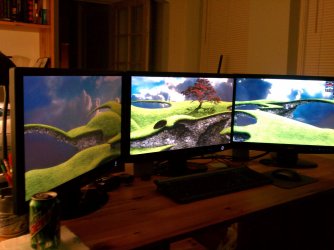
I'm lovin the tri-screens so far, though its a little harder to find backgrounds now...lol

My tower is usually about 2in more from the wall and also on a stand, but i've been doing some work in my office and moving things alot. It has its case wheels on it (easier than picking it up all the time) So it does have about 2in of space even when on the floor.
 

My Computer My Computer

Computer type
PC/Desktop
Computer Manufacturer/Model Number
Jeepmann/Custom Built
OS
Windows 7 Ultimate 64bit
CPU
Intel Core i7-2600K Sandy Bridge 3.4GHz (@[email protected])
Motherboard
Asus Maximus IV Extreme LGA 1155 Intel P67
Memory
G.SKILL Ripjaws X Series 16GB 1600Mhz (4 x 4GB) (Stock)
Graphics Card(s)
x2 EVGA GeForce GTX 760's w/ACXCoolers in SLI Surround
Sound Card
On-Board
Monitor(s) Displays
3x Acer 24" HDMI Widescreen LCD Monitor
Screen Resolution
3@ 1920x1080 (5760x1080 In Surround)
Hard Drives
Samsung 830 128gb ssd
Western Digital Caviar Black 640GB 7200 RPM
Western Digital Caviar Black 500GB 7200 RPM
Seagate 2tb 7200 RPM
PSU
COOLER MASTER Silent Pro 1000W
Case
COOLER MASTER HAF X Black
Cooling
CORSAIR Hydro H70
Keyboard
Logitech G510
Mouse
Zalman M300
Internet Speed
100mbps-ish Down & 5mbps-ish Up
Other Info
I installed the stock 140mm case fan outside of case then installed the H70+ 1 of its 120mm fans inside case. Used the 2nd 120mm from the H70 to go in the Gpu tunnel.
230mm Front,200mm side,200mm top,120mm Gpu tunnel,120mm&140mm on H70.
Thanks everyone!!

I'm lovin the tri-screens so far, though its a little harder to find backgrounds now...lol

My tower is usually about 2in more from the wall and also on a stand, but i've been doing some work in my office and moving things alot. It has its case wheels on it (easier than picking it up all the time) So it does have about 2in of space even when on the floor.

Triple Monitor Backgrounds

A Guy ;)
 

My Computer My Computer

Computer type
PC/Desktop
OS
Windows 10 Home x64
CPU
INTEL Core i5-750 Quad-Core 3.37GHz
Motherboard
ASUS P7P55D
Memory
HyperX Fury Black Series 8GB (2 x 4GB) 1866Mhz
Graphics Card(s)
EVGA GeForce GTX 750 Superclocked 1GB 128-Bit GDDR5
Monitor(s) Displays
LG 32MA68HY 32" IPS
Screen Resolution
1920 x 1080
Hard Drives
Samsung 840 Evo 120GB, SEAGATE 500GB Barracuda® 7200.12, SATA 3 Gb/s, 7200 RPM, 16MB cache
PSU
ANTEC TruePower New TP-550, 80 PLUS, 550W
Case
ANTEC Three Hundred Illusion
Cooling
COOLER MASTER Hyper 212 Plus, 4 x 120mm 1 x 140mm Noctua's
Internet Speed
85 + Mbps
Antivirus
Avast
Browser
Vivaldi
Status
Not open for further replies.
Back
Top