Show us your SSD performance 2

Having a scratch disk for your type of work is really beneficial. I hope you get great results with it!
 

My Computer My Computer

Computer type
PC/Desktop
Computer Manufacturer/Model Number
Custom Built
OS
Windows 7 Professional 64bit SP1
CPU
Intel Core i5-3570K @ 4.5GHz
Motherboard
Asus Sabertooth Z77
Memory
Corsair Vengeance 16GB (4x4) @1866MHz CL 9-9-9-24 1T
Graphics Card(s)
EVGA GTX 750 Ti FTW
Sound Card
Onboard Audio
Monitor(s) Displays
Dell S2309W
Screen Resolution
1920x1080
Hard Drives
Samsung 830 128GB SSD - OS
(4) Seagate 5TB HDD
(1) Seagate 2TB HDD
PSU
Seasonic X750 80+ Gold Full Modular
Case
Antec Eleven Hundred Super Mid Tower
Cooling
Intel Liquid Cooler
Keyboard
Max Nighthawk X8 Mechanical keyboard
Mouse
Mionix Naos 7000
Internet Speed
50 Mbps Down / 10 Mbps Up
Antivirus
Microsoft Security Essentials/Malwarebytes Anti-Malware
Browser
Chrome/Firefox
Other Info
Klipsch ProMedia 2.1's
Asus RT-N66R Wireless Router
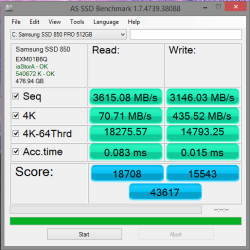
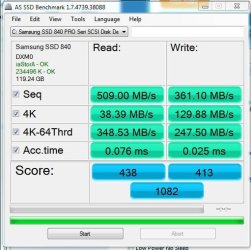
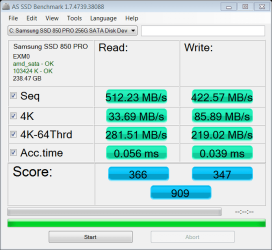
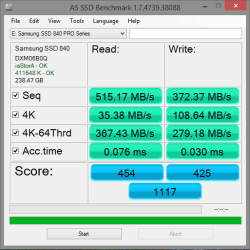
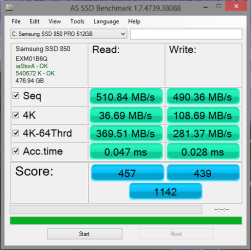
So last week I received my Samsung 850 Pro (512gig) SSD drive but had to wait to install it because I wanted to reinstall the OS, but could only do that till after my finals. Finals done (yay, I passed), I got the drive installed with a fresh OS (Windows 8.1) install, and most of my programs installed as well. With that I was finally able to get AS SSD to run without error (after the OS reinstall), unlike previous attempts as posted here.

Anyway here are the results...

840 Pro (256 gig)
840 Pro.PNG

850 Pro (512 gig)
850 Pro.PNG

850 after OS optimization and Rapid Drive enabled
850 Pro RS on.PNG

Accounting for the placebo effect, and the fact that I did a clean OS install, still, things seem a bit snappier with this drive. But I won't argue the placebo and OS install effect.

Anyway I'm more interested in the added storage space as I can now move some files around and use the 840 as the secondary drive and my test bed for Windows 10.

@ kbrady, yes I always use a scratch drive, and usually put it on the secondary drive.

Thoughts?
 

My Computer My Computer

Computer type
PC/Desktop
Computer Manufacturer/Model Number
Custom built by me.
OS
Windows 10 Pro
CPU
Intel Core i7-4770K (3.5Ghz)
Motherboard
Gigabyte G1 Sniper 5 (F10 Bios)
Memory
32 gig Corsair Dominator Platinum (4x8Gig)
Graphics Card(s)
Sapphire Tri-X R9 Fury
Sound Card
Soundblaster ZXR
Monitor(s) Displays
NEC PA242W 24" LCD Monitor
Screen Resolution
1920 x 1200
Hard Drives
Primary - Samsung 850 Pro (512gig), Samsung 840 Pro (256gig), 2TB WD Caviar Black.
PSU
EVGA Supernova 1000 G2
Case
Cooler Master HAF X
Cooling
Corsair H100i with Corsair Air Series SP120 Quiet Fans
Keyboard
Logitech Wireless Wave
Mouse
Logitech Performance MX
Internet Speed
High Speed Cable
Antivirus
Norton Security
Browser
IE11
Other Info
Memory Timings - 1866MHz @ 9-9-9-27-1T @ 1.5 volts
It seems the 850 and the 840 Pro score about the same without rapid. With rapid though, the 850 almost doubles the score of the 840 Pro. Must be something special about the new 3D ram. Great scores.
 

My Computers My Computers

System One System Two

  • Computer type
    PC/Desktop
    Computer Manufacturer/Model Number
    ALWAYS UNDER CONSTRUCTION
    OS
    Windows 11 Pro
    CPU
    Ryzen 9 5900X
    Motherboard
    Asus X570 Crosshair Viii Hero
    Memory
    32GB G Skill DDR4-3600
    Graphics Card(s)
    EVGA RTX 3080 FTW 3 Ultra
    Sound Card
    On Board/Sennheiser PC37X Headset
    Monitor(s) Displays
    3 X Asus 27"
    Screen Resolution
    2560x1440
    Hard Drives
    2 X 1 TB NVME drives
    PSU
    EVGA 850
    Case
    Phanteks Eclipse P400A
    Cooling
    EVGA 280 AIO
    Keyboard
    Logitech G510s/ Logitech G13
    Mouse
    Logitech G502
    Internet Speed
    24/1
    Antivirus
    ESET/MBAM Pro/SAS Pro
    Browser
    Chrome/ Firefox/ Edge
  • Computer type
    Laptop
    System Manufacturer/Model Number
    Dell 16 Plus
    OS
    Windows 11 Pro
    CPU
    Intel Ultra 9 288V
    Memory
    32 GB LPDDR5X 8533
    Monitor(s) Displays
    16" Mini-LED HDR600 Touch 90 Hz
    Screen Resolution
    2560X1600
    Hard Drives
    1 TB NVME
Thanks Steve. Everything seems to be working well. Now all I need to do is finish my programs installs, wipe the 840 and install Windows 10 on it through VM.
 

My Computer My Computer

Computer type
PC/Desktop
Computer Manufacturer/Model Number
Custom built by me.
OS
Windows 10 Pro
CPU
Intel Core i7-4770K (3.5Ghz)
Motherboard
Gigabyte G1 Sniper 5 (F10 Bios)
Memory
32 gig Corsair Dominator Platinum (4x8Gig)
Graphics Card(s)
Sapphire Tri-X R9 Fury
Sound Card
Soundblaster ZXR
Monitor(s) Displays
NEC PA242W 24" LCD Monitor
Screen Resolution
1920 x 1200
Hard Drives
Primary - Samsung 850 Pro (512gig), Samsung 840 Pro (256gig), 2TB WD Caviar Black.
PSU
EVGA Supernova 1000 G2
Case
Cooler Master HAF X
Cooling
Corsair H100i with Corsair Air Series SP120 Quiet Fans
Keyboard
Logitech Wireless Wave
Mouse
Logitech Performance MX
Internet Speed
High Speed Cable
Antivirus
Norton Security
Browser
IE11
Other Info
Memory Timings - 1866MHz @ 9-9-9-27-1T @ 1.5 volts
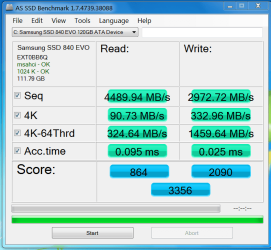
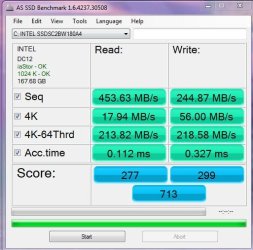
Bought a new Samsung 840 120GB SSD for my main rig (See Specs) and does it ever Leave my Intel 530 drive in the dust, especially when they were both tested just after install.


HAF.PNG

Samsung 840

Capture%202.JPG

Intel 530
 

My Computer My Computer

Computer type
PC/Desktop
Computer Manufacturer/Model Number
My own abomination, I call it the Money Pit
OS
Windows 10 Pro x 2/Windows 11 Home
CPU
Intel i7 2600K @ 3.40 GHz
Motherboard
ASUS Sabertooth P67
Memory
Corsair Vengeance 16GB DDR3 1600MHz CL8 Dual Channel Kit
Graphics Card(s)
EVGA GeForce RTX 3080 XC3 ULTRA GAMING 10GB GDDR6X
Sound Card
Onboard Realtek or Nvidia High Definition Audio (HDMI)
Monitor(s) Displays
Samsung JS7000 50" SUHD TV or Samsung 27" FHD 60Hz 8ms GTG V
Screen Resolution
1920 x 1080
Hard Drives
1 x Samsung 870 EVO 250 GB SSD (Windows 10 Pro), 1 x Samsung 850 EVO 250 GB SSD (Windows 10 Pro)
PSU
Corsair AX860 - 860W Modular Power Supply
Case
Phanteks Enthoo Luxe Full Tower Case - Black
Cooling
CORSAIR Hydro Series H150i PRO RGB 360mm Liquid CPU Cooler
Keyboard
Logitech K830 Illuminated Living-Room Keyboard
Mouse
Logitech MX Anywhere 2S Wireless Mouse
Internet Speed
100 Mbps
Antivirus
ESET Internet Security
Browser
Latest Version Of Firefox & Microsoft Edge Chromium Stable
Other Info
LG Super Multi Blue Internal Blu-ray Disk Rewriter - BH10LS30
6x2 HDMI Switcher (6 inputs, 2 outputs) so I can send the output of my Cable Box, Roku, or any my 4 computers to either my TV or Monitor separately or simultaneously.
SSDs: Win7Ultimate vs Win10TP

Both SSDs are configured for max performance and rapid mode enabled but in Win10 the score is half that of Win 7. Anyone else experiencing the same? Hopefully it's the OS and not the SSD. TIA. Top image is Win 7, bottom Win 10.
 

Attachments

  • 840Pro Windows 7 Ult.JPG
    840Pro Windows 7 Ult.JPG
    67.2 KB · Views: 59
  • 840Pro Windows 10.JPG
    840Pro Windows 10.JPG
    64.9 KB · Views: 59

My Computer My Computer

Computer Manufacturer/Model Number
Dell XPS 8300
OS
Windows 7 Home Premium 64bit
CPU
i7-2600
Memory
8gb
Graphics Card(s)
AMD Radeon 6770
Monitor(s) Displays
hp w2007
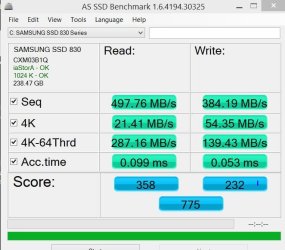
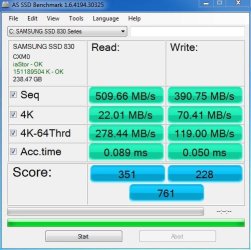
Mine are pretty much the same. This ia a Samsung 830 in dual boot with Windows 10 preview, both on the same drive.

Windows 10
W10 Sansung 830.JPG

Windows 7
W7 Samsung 830.JPG
 

My Computers My Computers

System One System Two

  • Computer type
    PC/Desktop
    Computer Manufacturer/Model Number
    ALWAYS UNDER CONSTRUCTION
    OS
    Windows 11 Pro
    CPU
    Ryzen 9 5900X
    Motherboard
    Asus X570 Crosshair Viii Hero
    Memory
    32GB G Skill DDR4-3600
    Graphics Card(s)
    EVGA RTX 3080 FTW 3 Ultra
    Sound Card
    On Board/Sennheiser PC37X Headset
    Monitor(s) Displays
    3 X Asus 27"
    Screen Resolution
    2560x1440
    Hard Drives
    2 X 1 TB NVME drives
    PSU
    EVGA 850
    Case
    Phanteks Eclipse P400A
    Cooling
    EVGA 280 AIO
    Keyboard
    Logitech G510s/ Logitech G13
    Mouse
    Logitech G502
    Internet Speed
    24/1
    Antivirus
    ESET/MBAM Pro/SAS Pro
    Browser
    Chrome/ Firefox/ Edge
  • Computer type
    Laptop
    System Manufacturer/Model Number
    Dell 16 Plus
    OS
    Windows 11 Pro
    CPU
    Intel Ultra 9 288V
    Memory
    32 GB LPDDR5X 8533
    Monitor(s) Displays
    16" Mini-LED HDR600 Touch 90 Hz
    Screen Resolution
    2560X1600
    Hard Drives
    1 TB NVME
Thanks Essenbe. I thought it was just me.
 

My Computer My Computer

Computer Manufacturer/Model Number
Dell XPS 8300
OS
Windows 7 Home Premium 64bit
CPU
i7-2600
Memory
8gb
Graphics Card(s)
AMD Radeon 6770
Monitor(s) Displays
hp w2007
I was playing around and uninstalled IRST. Score shot up. Windows 10 score almost similar to Windows 7. Just wanna let you all know.
 

Attachments

  • Capture.JPG
    Capture.JPG
    63.1 KB · Views: 55

My Computer My Computer

Computer Manufacturer/Model Number
Dell XPS 8300
OS
Windows 7 Home Premium 64bit
CPU
i7-2600
Memory
8gb
Graphics Card(s)
AMD Radeon 6770
Monitor(s) Displays
hp w2007
Bought a new Samsung 840 120GB SSD for my main rig (See Specs) and does it ever Leave my Intel 530 drive in the dust, especially when they were both tested just after install.


View attachment 338545

Samsung 840

View attachment 338546

Intel 530


I thought testing the Samsung with rapid mode was deceiving and not indicative of real World performance , what are the differences without rapid mode enabled .


This is how i understood it :


The max actual transfer speed of a sata III port is around 475-515 MB/s, depending on your motherboard and several other things, but that is around the max even the fastest SSD can transfer data. The benchmark scores are really nothing but show. What an OS SSD does is the 4kb read speeds and access times. No matter if my Raid score is way faster than your score, but look at only the 4kb read speed and the access times. There is only slight differences.

I will bet you if I took my Raid set up and put it in your machine and didn't tell you, you would turn your computer on the next day and notice no difference in actual usage. That is how much difference benchmark scores matter. So, don't be discouraged because yours benchmark lower than others. It does not matter at all in actual usage. I have 2 or 3 Crucial drives, in other machines.

This Samsung 840 Pro will eat them alive in any benchmark you want them to run. In actual usage, there is little to no difference. Sometimes I can tell a slight difference, but 95% of the time there is none. I don't like raid and don't like running it and advise everyone else not to. The only reason I did it is I have 2 X 256GB SSDs. My OS takes up about 40-45GB which leaves a lot of wasred space, but my Games or data will not fit on the other 256 GB drive or on the extra space of my OS drive. So, basically I have a whole lot of expensive space left over and pretty much useless, for the way I want to organize things.

So, I raided them to give me close to about 480-485GB. With that space, I can run my OS and games on the 2 SSDs. But, I am taking a big risk, but I backup every night and only have the OS and games on the raid. So, if one died today, it would cost me a clean install which I have down to a fine science. I could be up and functional in an hour after the updates are finished, and most of those I have in the ISO I use for installs. Just so you understand. Benchmarks mean nothing but bragging rites. There are only 2 numbers that really matter.
 

My Computer My Computer

Computer type
Laptop
Computer Manufacturer/Model Number
Asus laptop U56E
OS
Microsoft Windows 7 Home Premium 64-bit 7601 Multiprocessor Free Service Pack 1
CPU
Intel(R) Core(TM) i5-2430M CPU @ 2.40GHz
Motherboard
ASUSTeK Computer Inc. U56E
Memory
6.00 GB
Graphics Card(s)
Intel(R) HD Graphics 3000
Sound Card
(1) High Definition Audio Device (2) High Definition Audio
Screen Resolution
1366 x 768 x 32 bits (4294967296 colors) @ 60 Hz
Hard Drives
WDC WD6400BPVT-80HXZT3
Sounds like something I said.
 

My Computers My Computers

System One System Two

  • Computer type
    PC/Desktop
    Computer Manufacturer/Model Number
    ALWAYS UNDER CONSTRUCTION
    OS
    Windows 11 Pro
    CPU
    Ryzen 9 5900X
    Motherboard
    Asus X570 Crosshair Viii Hero
    Memory
    32GB G Skill DDR4-3600
    Graphics Card(s)
    EVGA RTX 3080 FTW 3 Ultra
    Sound Card
    On Board/Sennheiser PC37X Headset
    Monitor(s) Displays
    3 X Asus 27"
    Screen Resolution
    2560x1440
    Hard Drives
    2 X 1 TB NVME drives
    PSU
    EVGA 850
    Case
    Phanteks Eclipse P400A
    Cooling
    EVGA 280 AIO
    Keyboard
    Logitech G510s/ Logitech G13
    Mouse
    Logitech G502
    Internet Speed
    24/1
    Antivirus
    ESET/MBAM Pro/SAS Pro
    Browser
    Chrome/ Firefox/ Edge
  • Computer type
    Laptop
    System Manufacturer/Model Number
    Dell 16 Plus
    OS
    Windows 11 Pro
    CPU
    Intel Ultra 9 288V
    Memory
    32 GB LPDDR5X 8533
    Monitor(s) Displays
    16" Mini-LED HDR600 Touch 90 Hz
    Screen Resolution
    2560X1600
    Hard Drives
    1 TB NVME
To be honest most people couldn't tell the difference between a good SATA II SSD and a SATA III SSD.........as far as felt performance goes.
 

My Computer My Computer

Computer type
PC/Desktop
Computer Manufacturer/Model Number
Custom Built
OS
Windows 7 Professional 64bit SP1
CPU
Intel Core i5-3570K @ 4.5GHz
Motherboard
Asus Sabertooth Z77
Memory
Corsair Vengeance 16GB (4x4) @1866MHz CL 9-9-9-24 1T
Graphics Card(s)
EVGA GTX 750 Ti FTW
Sound Card
Onboard Audio
Monitor(s) Displays
Dell S2309W
Screen Resolution
1920x1080
Hard Drives
Samsung 830 128GB SSD - OS
(4) Seagate 5TB HDD
(1) Seagate 2TB HDD
PSU
Seasonic X750 80+ Gold Full Modular
Case
Antec Eleven Hundred Super Mid Tower
Cooling
Intel Liquid Cooler
Keyboard
Max Nighthawk X8 Mechanical keyboard
Mouse
Mionix Naos 7000
Internet Speed
50 Mbps Down / 10 Mbps Up
Antivirus
Microsoft Security Essentials/Malwarebytes Anti-Malware
Browser
Chrome/Firefox
Other Info
Klipsch ProMedia 2.1's
Asus RT-N66R Wireless Router
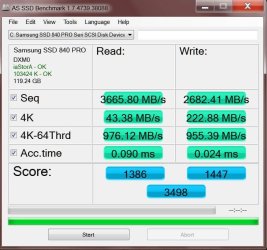
Just another data point. I am running Z87 with a custom BIOS that has Intel RST option ROM 13.5.0.2118 and windows driver 13.5.0.1056 on an Asus Hero VI.

128GB Samsung 840 Pro

-
 

Attachments

  • Capture.JPG
    Capture.JPG
    51.3 KB · Views: 71

My Computer My Computer

Computer type
PC/Desktop
Computer Manufacturer/Model Number
Home built (GeneO industries)/Model 4
OS
Windows 10 Pro. EFI boot partition, full EFI boot
CPU
i7 4770k 4.4GHz (44-44-43-43 turbo) @ 1.248V
Motherboard
ASUS Maximus VI Hero
Memory
16GB (8GBx2) @2200 MHz G.skill Sniper 10-11-10-30-1, 1.6V
Graphics Card(s)
MSI GTX 970 Gaming 4G
Sound Card
Onboard SupremeFX Audio
Monitor(s) Displays
NEC Spectraview 2490WUXi-SV
Screen Resolution
1920 x 1200
Hard Drives
Samsung 850 Pro 256GB (OS), Samsung 2x 128GB 840 Pro SSD in RAID0, 3x WD Blue 6Gb/s 1TB RAID0, WD 2TB Black external USB 3.0, 2TB WD20EARS Green external USB 3.0, 2x 500GB Seagate and 1 750 GB external USB, 1x 350GB external USB3
PSU
Seasonic X-850 (2012 KM3 model)
Case
Fractal Design Define R4
Cooling
NH-D14, NF-F12, NF-A15; NF-P14, NF-P12,NF-A14, S12A PWM
Keyboard
Cooler Master Storm Quickfire Rapid - Brown
Mouse
Logitech G602
Internet Speed
126.4 Mb/s down, 24.3 Mb/s up
Other Info
USB 3.0 x8 , SATA III x8, eSATA, USB 2.0 x6. Samsung DVD R/W drive.

WEI: CPU 7.8, Memory 7.9, Graphics 7.9, Disk 7.9
I don't have a ripsnorting power pc (fx 4300, gtx 750 ti 16 gb ddr3 1600) but it's more than fast enough for me. But I have one of those Samsung 850 pro 256 magic boxes. AS SSD gives various results, here are with and without the rapid mode.
 

Attachments

  • as-ssd-bench Samsung SSD 850  04.11.2014 17-18-13 rapid off.png
    as-ssd-bench Samsung SSD 850 04.11.2014 17-18-13 rapid off.png
    18.1 KB · Views: 56
  • as-ssd-bench Samsung SSD 850  04.11.2014 17-34-01 rapid mode 4.png
    as-ssd-bench Samsung SSD 850 04.11.2014 17-34-01 rapid mode 4.png
    18.2 KB · Views: 57

My Computer My Computer

Computer type
PC/Desktop
OS
w7 ult 64 and w7 hp 64 X 2 mint 64 8.1 64 10wtp 64
To be honest most people couldn't tell the difference between a good SATA II SSD and a SATA III SSD.........as far as felt performance goes.

I kind of somewhat agree... but you would if you're paying attention as SATA III just feels a bit snappier. For example, when I moved from my 128 gig OCZ Vertex 2 (SATA II) to my 256 OCZ Vertex 4 (SATA III) I didn't need benchmarks to tell me the system was snappier. I just felt it.

On the other hand I will say that when I subsequently moved from my Samsung 840 Pro to the Samsung 850 Pro (both SATA III), other than the bench numbers telling me differently, I haven't "felt" an increase in performance like that felt by moving from SATA II to III. That was a bit interesting since the 850 Pro was supposed to be all that and a bag of chips. Not disappointed though.

I know that last paragraph is a bit off point, but I just wanted to point that out. So yeah, moving from one interface to another, yeah, a little. Staying on the same interface but increasing performance... maybe not felt so much.

My two cents.
 

My Computer My Computer

Computer type
PC/Desktop
Computer Manufacturer/Model Number
Custom built by me.
OS
Windows 10 Pro
CPU
Intel Core i7-4770K (3.5Ghz)
Motherboard
Gigabyte G1 Sniper 5 (F10 Bios)
Memory
32 gig Corsair Dominator Platinum (4x8Gig)
Graphics Card(s)
Sapphire Tri-X R9 Fury
Sound Card
Soundblaster ZXR
Monitor(s) Displays
NEC PA242W 24" LCD Monitor
Screen Resolution
1920 x 1200
Hard Drives
Primary - Samsung 850 Pro (512gig), Samsung 840 Pro (256gig), 2TB WD Caviar Black.
PSU
EVGA Supernova 1000 G2
Case
Cooler Master HAF X
Cooling
Corsair H100i with Corsair Air Series SP120 Quiet Fans
Keyboard
Logitech Wireless Wave
Mouse
Logitech Performance MX
Internet Speed
High Speed Cable
Antivirus
Norton Security
Browser
IE11
Other Info
Memory Timings - 1866MHz @ 9-9-9-27-1T @ 1.5 volts
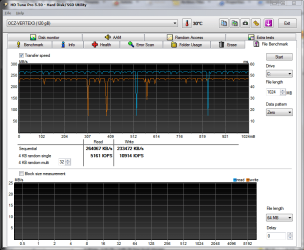
Man, I can't wait to get a new motherboard for that SATAIII support...
 

Attachments

  • SSDHDTune2.PNG
    SSDHDTune2.PNG
    33.9 KB · Views: 1

My Computer My Computer

Computer type
PC/Desktop
Computer Manufacturer/Model Number
Specced Out
OS
Win 7 Home Premium x64
CPU
AMD Phenom II X4 955 Black Edition Deneb Quad-Core 3.2GHz
Motherboard
ASUSTeK Computer INC. M4A77TD
Memory
20GB G.SKILL Ripjaws DDR3 1600 (PC3 12800)
Graphics Card(s)
SAPPHIRE Radeon HD 5750 (1GB)
Sound Card
Sound Blaster Audigy
Monitor(s) Displays
Dual Monitors
Hard Drives
128GB OCZ Vertex 3 SSD
1TB Hitachi HDS721010CLA332
1TB Western Digital WD1001FALS
3TB Toshiba DT01ACA300
3x1TB External Seagate
PSU
Corsair TX CMPSU-750TX 750W ATX12V - SLI & Crossfire Ready
Case
Cooler Master Elite 310 ATX
I have another pc with a Verbatim 128 gb sata 2 (Athlon 235e onboard graphics 8 gb ddr3 1333) which runs quite well, admittedly on 8.1 with very different AS SSD results.
 

Attachments

  • as-ssd-bench SATA SSD 04.11.2014 20-39-42 verbatim 128 sata2.png
    as-ssd-bench SATA SSD 04.11.2014 20-39-42 verbatim 128 sata2.png
    16.4 KB · Views: 53

My Computer My Computer

Computer type
PC/Desktop
OS
w7 ult 64 and w7 hp 64 X 2 mint 64 8.1 64 10wtp 64
To be honest most people couldn't tell the difference between a good SATA II SSD and a SATA III SSD.........as far as felt performance goes.

I kind of somewhat agree... but you would if you're paying attention as SATA III just feels a bit snappier. For example, when I moved from my 128 gig OCZ Vertex 2 (SATA II) to my 256 OCZ Vertex 4 (SATA III) I didn't need benchmarks to tell me the system was snappier. I just felt it.

On the other hand I will say that when I subsequently moved from my Samsung 840 Pro to the Samsung 850 Pro (both SATA III), other than the bench numbers telling me differently, I haven't "felt" an increase in performance like that felt by moving from SATA II to III. That was a bit interesting since the 850 Pro was supposed to be all that and a bag of chips. Not disappointed though.

I know that last paragraph is a bit off point, but I just wanted to point that out. So yeah, moving from one interface to another, yeah, a little. Staying on the same interface but increasing performance... maybe not felt so much.

My two cents.

Do you think the felt difference was from a fresh install? Or the actual difference in drives?
 

My Computer My Computer

Computer type
PC/Desktop
Computer Manufacturer/Model Number
Custom Built
OS
Windows 7 Professional 64bit SP1
CPU
Intel Core i5-3570K @ 4.5GHz
Motherboard
Asus Sabertooth Z77
Memory
Corsair Vengeance 16GB (4x4) @1866MHz CL 9-9-9-24 1T
Graphics Card(s)
EVGA GTX 750 Ti FTW
Sound Card
Onboard Audio
Monitor(s) Displays
Dell S2309W
Screen Resolution
1920x1080
Hard Drives
Samsung 830 128GB SSD - OS
(4) Seagate 5TB HDD
(1) Seagate 2TB HDD
PSU
Seasonic X750 80+ Gold Full Modular
Case
Antec Eleven Hundred Super Mid Tower
Cooling
Intel Liquid Cooler
Keyboard
Max Nighthawk X8 Mechanical keyboard
Mouse
Mionix Naos 7000
Internet Speed
50 Mbps Down / 10 Mbps Up
Antivirus
Microsoft Security Essentials/Malwarebytes Anti-Malware
Browser
Chrome/Firefox
Other Info
Klipsch ProMedia 2.1's
Asus RT-N66R Wireless Router
Do you think the felt difference was from a fresh install? Or the actual difference in drives?

Well looking at the records on my system builds reveals that I bought my Gigabyte GA-X58A-UD5 motherboard in June of 2010. On that board the Intel controllers were SATA II, which is where I installed my first SSD drive (OCZVertex 2 (128 gig)) I bought in Dec of 2010.

When I bought the Vertex 4, in Aug of 2012, I still had my Gigabyte X58A system (i7-950) which didn’t get replaced until Nov. of 2013.

This means both drives were install on the same board; And no, I didn’t do an OS reinstall, I did a hard drive migrate using Paragon Migrate as discussed here from posts 924-941.

So, no OS reinstall, or system rebuilds, just a simple drive swap, mainly from smaller to larger drive (128-256)

FYI, I keep an excel spreadsheet of all my purchases and builds by components installed in any one system. This is how I can be so precise. I know exactly what I have, where it’s at and when it was purchased. This of course includes serial numbers and any other pertinent info

But again, no OS reinstall, or system rebuild. So yeah, I think this was really felt, but…
 

My Computer My Computer

Computer type
PC/Desktop
Computer Manufacturer/Model Number
Custom built by me.
OS
Windows 10 Pro
CPU
Intel Core i7-4770K (3.5Ghz)
Motherboard
Gigabyte G1 Sniper 5 (F10 Bios)
Memory
32 gig Corsair Dominator Platinum (4x8Gig)
Graphics Card(s)
Sapphire Tri-X R9 Fury
Sound Card
Soundblaster ZXR
Monitor(s) Displays
NEC PA242W 24" LCD Monitor
Screen Resolution
1920 x 1200
Hard Drives
Primary - Samsung 850 Pro (512gig), Samsung 840 Pro (256gig), 2TB WD Caviar Black.
PSU
EVGA Supernova 1000 G2
Case
Cooler Master HAF X
Cooling
Corsair H100i with Corsair Air Series SP120 Quiet Fans
Keyboard
Logitech Wireless Wave
Mouse
Logitech Performance MX
Internet Speed
High Speed Cable
Antivirus
Norton Security
Browser
IE11
Other Info
Memory Timings - 1866MHz @ 9-9-9-27-1T @ 1.5 volts
Back
Top