Show us your SSD performance

Status
Not open for further replies.
First day with my new M4. Nums look a bit strange but what really counts are the 4K nums. The thing is lightning fast with a 7.8 WEI.

Very nice. In fact the ATTO bench does not do justice to your drive. The sandforce based SSD's use ATTO because it in turn uses compressible data in its bench data. Your crucial M4 should blow through both compressible and incompressible data at the high 4K numbers. Once you throw in its reputed high boot times, you have one heck of a drive. If it is your new boot drive, with a fresh install, could you please post your boot times. Cheers
 

My Computer My Computer

Computer Manufacturer/Model Number
Homemade
OS
Win 7 64 bit professional
CPU
CPU: 3930K @ 4.8 MHz Stable as a rock
Motherboard
ASUS Rampage IV Extreme LGA 2011
Memory
CORSAIR DOMINATOR GT 16GB (4 x 4GB) 240-Pin DDR3
Graphics Card(s)
EVGA SuperClocked+ GeForce GTX 680
Monitor(s) Displays
Dell 3007WFP
Screen Resolution
2560 x 1600
Hard Drives
Vector(256gb) x 2
RevoDrive 3 X2 space (240 GB)
Crucial C300 256 GB SSD
PSU
CORSAIR AX1200i 1200W Digital ATX12V v2.31 and EPS 2.92 SLI
Cooling
Water cooling EK Supremacy ELITE
Mouse
ratZ-7
Other Info
WEI-7.8
First day with my new M4. Nums look a bit strange but what really counts are the 4K nums. The thing is lightning fast with a 7.8 WEI.

Congrats, those M4s are nice.

It's still on my short component list.
Would be interested in the boot times as well.
 

My Computer My Computer

Computer type
PC/Desktop
Computer Manufacturer/Model Number
76~2.0
OS
Windows 7 Ult x64 - SP1/ Windows 8 Pro x64
CPU
Intel Core i5-3570K 4.6GHz
Motherboard
Gigabyte GA-Z77X UD3H, f18
Memory
8GB (2X4GB) DDR3 1600 Corsair Vengeance CL8 1.5v
Graphics Card(s)
Sapphire HD 7770 Vapor-X OC 1GB DDR5
Sound Card
Onboard VIA VT2021
Monitor(s) Displays
22" LCD Dell
Screen Resolution
1680x1050
Hard Drives
Samsung 840Pro 128GB SSD,
Seagate Barracuda 500GB SATA2 7200rpm 32MB cache, Seagate Barracuda 1TB SATA2 7200rpm 32MB cache,
PSU
Corsair HX650W
Case
Cooler Master Storm Scout
Cooling
Corsair H80 2x12cm Noctua NF P12 , 2x14cm case fans
Keyboard
Logitech Wave
Mouse
CM Sentinel
Internet Speed
Dismal
Antivirus
Avast
Browser
Opera Next
Other Info
Haswell laptop: HP Envy 17t-j, i7-4700MQ, GeForce 740M 2GB DDR3, 17.3" Full HD 1920x1080, 16GB RAM, Samsung 840 Pro 128GB, 1TB Hitachi 7200 HDD,
Desktop: eSATA ports,
External eSATA Seagate 500GB SATA2 7200rpm,
External WD USB 500GB
4K and 8K speeds are outstanding.

Msahci or iastor drivers can make a difference also on some SSD's.

Xtremeforums m4 test SSD is averaging 80MiB/s for Anvils testing app.
This is an average speed of several sizes of data and assorted compression.

Yours is no slacker. :thumbsup:
 

My Computer My Computer

Computer Manufacturer/Model Number
Hopalong/ Godzilla
OS
Windows7 Pro 64bit SP-1; Windows XP Pro 32bit
CPU
Intel Core i7-870 Lynnfield 2.93GHz LGA 1156 95W Quad-Core
Motherboard
ASUS P7P55D-E PRO
Memory
8GB@1400MHz Crucial Ballistix DDR3-1600 4x2GB
Graphics Card(s)
ASUS ENGTX460 DirectCU/2DI/1GD5 1GB 256-bit GDDR5
Sound Card
VIA Onboard
Monitor(s) Displays
Asus VS248H-P 24"; Samsung SyncMaster 941BW 19"ws
Screen Resolution
1920x1080; 1440x900
Hard Drives
Samsung 830 120GB SSD
Intel 320 120GB SSD
Western Digital Caviar Black WD7501AALS 750GB 7200 RPM SATA 3.0Gb/s
Western Digital Caviar Black WD6401AALS 640GB 7200 RPM SATA 3.0Gb/s
PSU
COOLER MASTER Silent Pro RS850-AMBAJ3-US 850W Modular
Case
COOLER MASTER HAF 932 RC-932-KKN5-GP Black
Cooling
Scythe "Mugen-2 Rev.B" (2 ScytheKaze-Jyuni PWM fans)
Keyboard
Logitech K-320
Mouse
Kensington
Antivirus
Avast Inernet Suite
Browser
IE 9 ; Chrome
well, I think that says an awful lot about the WEI system, don't you?
Yeah, nums and real life are different. That is why I always caution the guys that get all excited about the measurements. At the end what counts is whether you like it or not.
 

My Computer My Computer

Computer Manufacturer/Model Number
HP, Dell, Gateway, Toshiba - 4 laptops and 2 desktops
OS
Vista, Windows7, Mint Mate, Zorin, Windows 8
CPU
from 1.6GHz Duo to i7
Monitor(s) Displays
2x HP w2207
Hard Drives
5x HDD, 7x SSD, 12x Externals
Keyboard
with trackball - no mices
Mouse
Trackball mice
Internet Speed
DSL 6000
well, I think that says an awful lot about the WEI system, don't you?
Yeah, nums and real life are different. That is why I always caution the guys that get all excited about the measurements. At the end what counts is whether you like it or not.

+1 .
 

My Computer My Computer

Computer Manufacturer/Model Number
Homemade
OS
Win 7 64 bit professional
CPU
CPU: 3930K @ 4.8 MHz Stable as a rock
Motherboard
ASUS Rampage IV Extreme LGA 2011
Memory
CORSAIR DOMINATOR GT 16GB (4 x 4GB) 240-Pin DDR3
Graphics Card(s)
EVGA SuperClocked+ GeForce GTX 680
Monitor(s) Displays
Dell 3007WFP
Screen Resolution
2560 x 1600
Hard Drives
Vector(256gb) x 2
RevoDrive 3 X2 space (240 GB)
Crucial C300 256 GB SSD
PSU
CORSAIR AX1200i 1200W Digital ATX12V v2.31 and EPS 2.92 SLI
Cooling
Water cooling EK Supremacy ELITE
Mouse
ratZ-7
Other Info
WEI-7.8
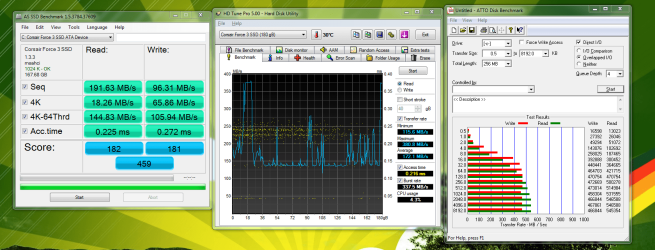
Corsair Force Series 3 -180GB
SATA3 on AHCI


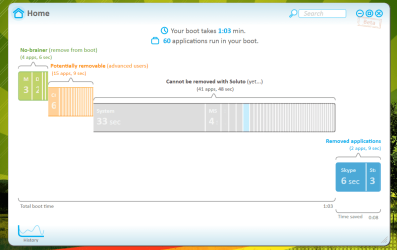
Very happy with it so far. Soluto gives it a 1 min boot with everything installed, and restart time is something like 80 seconds.
 

Attachments

  • Capture.PNG
    Capture.PNG
    124.4 KB · Views: 27

My Computer My Computer

OS
7 Professional x64 - SP1
CPU
Phenom II x4 955BE
Motherboard
Asus M4A88TD-V
Memory
2 x 4GB GSkill Ripjaws DDR3-1333
Graphics Card(s)
XFX Radeon 5770
Monitor(s) Displays
Samsung P2770HD - 27"; Samsung 953BW - 19"
Screen Resolution
1920x1080; 1440x900
Hard Drives
Corsair Force Series 3 180 GB; Samsung 7200RPM/500GB; Samsung 5400RPM/2TB (Backup)
PSU
Antec BP550 (80+ Cert.)
Case
Cooler Master HAF 912
Cooling
Cooler Master Hyper 212 Plus + 5x120mm fans
Keyboard
Logitech K750 Solar
Mouse
Razer Mamba
Nice.
Soluto is a great evolving software. I bet (with your drive) if you use its "pause" and "delay" features your boot up time could decrease even more.
 

My Computer My Computer

Computer Manufacturer/Model Number
Homemade
OS
Win 7 64 bit professional
CPU
CPU: 3930K @ 4.8 MHz Stable as a rock
Motherboard
ASUS Rampage IV Extreme LGA 2011
Memory
CORSAIR DOMINATOR GT 16GB (4 x 4GB) 240-Pin DDR3
Graphics Card(s)
EVGA SuperClocked+ GeForce GTX 680
Monitor(s) Displays
Dell 3007WFP
Screen Resolution
2560 x 1600
Hard Drives
Vector(256gb) x 2
RevoDrive 3 X2 space (240 GB)
Crucial C300 256 GB SSD
PSU
CORSAIR AX1200i 1200W Digital ATX12V v2.31 and EPS 2.92 SLI
Cooling
Water cooling EK Supremacy ELITE
Mouse
ratZ-7
Other Info
WEI-7.8
Nice.
Soluto is a great evolving software. I bet (with your drive) if you use its "pause" and "delay" features your boot up time could decrease even more.

I actually delayed two programs, the rest are pretty insignificant. I'm plenty happy with 1 minute though. :D
 

My Computer My Computer

OS
7 Professional x64 - SP1
CPU
Phenom II x4 955BE
Motherboard
Asus M4A88TD-V
Memory
2 x 4GB GSkill Ripjaws DDR3-1333
Graphics Card(s)
XFX Radeon 5770
Monitor(s) Displays
Samsung P2770HD - 27"; Samsung 953BW - 19"
Screen Resolution
1920x1080; 1440x900
Hard Drives
Corsair Force Series 3 180 GB; Samsung 7200RPM/500GB; Samsung 5400RPM/2TB (Backup)
PSU
Antec BP550 (80+ Cert.)
Case
Cooler Master HAF 912
Cooling
Cooler Master Hyper 212 Plus + 5x120mm fans
Keyboard
Logitech K750 Solar
Mouse
Razer Mamba
Nice.
Soluto is a great evolving software. I bet (with your drive) if you use its "pause" and "delay" features your boot up time could decrease even more.

I actually delayed two programs, the rest are pretty insignificant. I'm plenty happy with 1 minute though. :D
1 minute is too long for a Soluto number. Something is not right. This is the Soluto num on one of my systems. I have not measured my new (3 day old) system yet, but I bet it is shorter. Maybe you can elaborate a bit more so that we get some insight.
 

Attachments

  • 2011-03-02_1937.png
    2011-03-02_1937.png
    16.3 KB · Views: 0

My Computer My Computer

Computer Manufacturer/Model Number
HP, Dell, Gateway, Toshiba - 4 laptops and 2 desktops
OS
Vista, Windows7, Mint Mate, Zorin, Windows 8
CPU
from 1.6GHz Duo to i7
Monitor(s) Displays
2x HP w2207
Hard Drives
5x HDD, 7x SSD, 12x Externals
Keyboard
with trackball - no mices
Mouse
Trackball mice
Internet Speed
DSL 6000
Here's the summary of my boot. 60 apps also.

I guess the standout is "system", but I'm not sure what it's supposed to be. What's yours/normal?
 

Attachments

  • soluto 1.PNG
    soluto 1.PNG
    48 KB · Views: 15

My Computer My Computer

OS
7 Professional x64 - SP1
CPU
Phenom II x4 955BE
Motherboard
Asus M4A88TD-V
Memory
2 x 4GB GSkill Ripjaws DDR3-1333
Graphics Card(s)
XFX Radeon 5770
Monitor(s) Displays
Samsung P2770HD - 27"; Samsung 953BW - 19"
Screen Resolution
1920x1080; 1440x900
Hard Drives
Corsair Force Series 3 180 GB; Samsung 7200RPM/500GB; Samsung 5400RPM/2TB (Backup)
PSU
Antec BP550 (80+ Cert.)
Case
Cooler Master HAF 912
Cooling
Cooler Master Hyper 212 Plus + 5x120mm fans
Keyboard
Logitech K750 Solar
Mouse
Razer Mamba
To follow up, I did a "Diagnostic Startup" in 50 seconds. Shutdown was much faster, though.
 

My Computer My Computer

OS
7 Professional x64 - SP1
CPU
Phenom II x4 955BE
Motherboard
Asus M4A88TD-V
Memory
2 x 4GB GSkill Ripjaws DDR3-1333
Graphics Card(s)
XFX Radeon 5770
Monitor(s) Displays
Samsung P2770HD - 27"; Samsung 953BW - 19"
Screen Resolution
1920x1080; 1440x900
Hard Drives
Corsair Force Series 3 180 GB; Samsung 7200RPM/500GB; Samsung 5400RPM/2TB (Backup)
PSU
Antec BP550 (80+ Cert.)
Case
Cooler Master HAF 912
Cooling
Cooler Master Hyper 212 Plus + 5x120mm fans
Keyboard
Logitech K750 Solar
Mouse
Razer Mamba
It should be about half of that, was it a clean install?

This is from last year with my old X25-V 40GB Intel (in my laptop now), not much tweaking done.
Best time SSD.PNG

Haven't done one for the X25-M 120GB Intel, maybe when Win8 beta gets installed ;)
 

My Computer My Computer

Computer type
PC/Desktop
Computer Manufacturer/Model Number
76~2.0
OS
Windows 7 Ult x64 - SP1/ Windows 8 Pro x64
CPU
Intel Core i5-3570K 4.6GHz
Motherboard
Gigabyte GA-Z77X UD3H, f18
Memory
8GB (2X4GB) DDR3 1600 Corsair Vengeance CL8 1.5v
Graphics Card(s)
Sapphire HD 7770 Vapor-X OC 1GB DDR5
Sound Card
Onboard VIA VT2021
Monitor(s) Displays
22" LCD Dell
Screen Resolution
1680x1050
Hard Drives
Samsung 840Pro 128GB SSD,
Seagate Barracuda 500GB SATA2 7200rpm 32MB cache, Seagate Barracuda 1TB SATA2 7200rpm 32MB cache,
PSU
Corsair HX650W
Case
Cooler Master Storm Scout
Cooling
Corsair H80 2x12cm Noctua NF P12 , 2x14cm case fans
Keyboard
Logitech Wave
Mouse
CM Sentinel
Internet Speed
Dismal
Antivirus
Avast
Browser
Opera Next
Other Info
Haswell laptop: HP Envy 17t-j, i7-4700MQ, GeForce 740M 2GB DDR3, 17.3" Full HD 1920x1080, 16GB RAM, Samsung 840 Pro 128GB, 1TB Hitachi 7200 HDD,
Desktop: eSATA ports,
External eSATA Seagate 500GB SATA2 7200rpm,
External WD USB 500GB
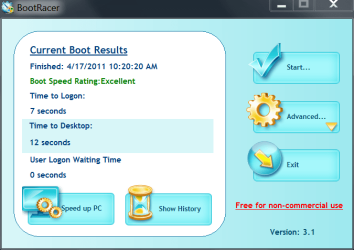
I did this when I first built this computer about 8 Months ago. I think I used my 80GB Intel X25-M

Bootracer.PNG
 

My Computers My Computers

System One System Two

  • Computer type
    PC/Desktop
    Computer Manufacturer/Model Number
    ALWAYS UNDER CONSTRUCTION
    OS
    Windows 11 Pro
    CPU
    Ryzen 9 5900X
    Motherboard
    Asus X570 Crosshair Viii Hero
    Memory
    32GB G Skill DDR4-3600
    Graphics Card(s)
    EVGA RTX 3080 FTW 3 Ultra
    Sound Card
    On Board/Sennheiser PC37X Headset
    Monitor(s) Displays
    3 X Asus 27"
    Screen Resolution
    2560x1440
    Hard Drives
    2 X 1 TB NVME drives
    PSU
    EVGA 850
    Case
    Phanteks Eclipse P400A
    Cooling
    EVGA 280 AIO
    Keyboard
    Logitech G510s/ Logitech G13
    Mouse
    Logitech G502
    Internet Speed
    24/1
    Antivirus
    ESET/MBAM Pro/SAS Pro
    Browser
    Chrome/ Firefox/ Edge
  • Computer type
    Laptop
    System Manufacturer/Model Number
    Dell 16 Plus
    OS
    Windows 11 Pro
    CPU
    Intel Ultra 9 288V
    Memory
    32 GB LPDDR5X 8533
    Monitor(s) Displays
    16" Mini-LED HDR600 Touch 90 Hz
    Screen Resolution
    2560X1600
    Hard Drives
    1 TB NVME
Here's the summary of my boot. 60 apps also.

I guess the standout is "system", but I'm not sure what it's supposed to be. What's yours/normal?

One of the primary benefits of Soluto is the ease with which boot programs can be either bypassed or delayed. You have a fairly large number of start up programs. Try going through all of the green and orange colored choices in your Soluto list and aggressively pause every single one with the exception of any antivirus programs. You can easily reboot and turn them on or delay them.
Once you have done that, restart at least twice and check your Soluto times. it is possible that while the decrease in overall boot time is obvious, your "system" time could also decrease considerably from its presently high level. If it does not then there is something clearly wrong in your setup as Dave76 and essenbe have pointed out.
 

My Computer My Computer

Computer Manufacturer/Model Number
Homemade
OS
Win 7 64 bit professional
CPU
CPU: 3930K @ 4.8 MHz Stable as a rock
Motherboard
ASUS Rampage IV Extreme LGA 2011
Memory
CORSAIR DOMINATOR GT 16GB (4 x 4GB) 240-Pin DDR3
Graphics Card(s)
EVGA SuperClocked+ GeForce GTX 680
Monitor(s) Displays
Dell 3007WFP
Screen Resolution
2560 x 1600
Hard Drives
Vector(256gb) x 2
RevoDrive 3 X2 space (240 GB)
Crucial C300 256 GB SSD
PSU
CORSAIR AX1200i 1200W Digital ATX12V v2.31 and EPS 2.92 SLI
Cooling
Water cooling EK Supremacy ELITE
Mouse
ratZ-7
Other Info
WEI-7.8
It should be about half of that, was it a clean install?

This is my second installation on it. My first installation was short lived. I deleted the volume and recreated it using the installation CD.


One of the primary benefits of Soluto is the ease with which boot programs can be either bypassed or delayed. You have a fairly large number of start up programs. Try going through all of the green and orange colored choices in your Soluto list and aggressively pause every single one with the exception of any antivirus programs. You can easily reboot and turn them on or delay them.
Once you have done that, restart at least twice and check your Soluto times. it is possible that while the decrease in overall boot time is obvious, your "system" time could also decrease considerably from its presently high level. If it does not then there is something clearly wrong in your setup as Dave76 and essenbe have pointed out.

Thanks, I'll try that now. I don't mind reinstalling in general, but I've done it several times recently and am getting a little burned out. ;) So hopefully it doesn't come to that.
 

My Computer My Computer

OS
7 Professional x64 - SP1
CPU
Phenom II x4 955BE
Motherboard
Asus M4A88TD-V
Memory
2 x 4GB GSkill Ripjaws DDR3-1333
Graphics Card(s)
XFX Radeon 5770
Monitor(s) Displays
Samsung P2770HD - 27"; Samsung 953BW - 19"
Screen Resolution
1920x1080; 1440x900
Hard Drives
Corsair Force Series 3 180 GB; Samsung 7200RPM/500GB; Samsung 5400RPM/2TB (Backup)
PSU
Antec BP550 (80+ Cert.)
Case
Cooler Master HAF 912
Cooling
Cooler Master Hyper 212 Plus + 5x120mm fans
Keyboard
Logitech K750 Solar
Mouse
Razer Mamba
I chopped all the blue ones (except Afterburner) and the orange ones I was comfortable with, and still got 1:04. Then took off Afterburner too, and got :52, which is better.

Is there a cmd prompt or something to check for potential startup hiccups? I.e. to see if the computer is hanging at a particular spot each time?
 

My Computer My Computer

OS
7 Professional x64 - SP1
CPU
Phenom II x4 955BE
Motherboard
Asus M4A88TD-V
Memory
2 x 4GB GSkill Ripjaws DDR3-1333
Graphics Card(s)
XFX Radeon 5770
Monitor(s) Displays
Samsung P2770HD - 27"; Samsung 953BW - 19"
Screen Resolution
1920x1080; 1440x900
Hard Drives
Corsair Force Series 3 180 GB; Samsung 7200RPM/500GB; Samsung 5400RPM/2TB (Backup)
PSU
Antec BP550 (80+ Cert.)
Case
Cooler Master HAF 912
Cooling
Cooler Master Hyper 212 Plus + 5x120mm fans
Keyboard
Logitech K750 Solar
Mouse
Razer Mamba
Hold down the Windows key (the one with the flag) and press R. Type msconfig in the run box and go to the startup tab. Uncheck as many as you want. Those unchecked will not run at startup. I have everything unchecked except Windows OS and anti virus. With an SSD you don't need everything to run at startup, they will open instantly when needed. I don't even have CCC or Afterburner checked and have no problems at all.
 

My Computers My Computers

System One System Two

  • Computer type
    PC/Desktop
    Computer Manufacturer/Model Number
    ALWAYS UNDER CONSTRUCTION
    OS
    Windows 11 Pro
    CPU
    Ryzen 9 5900X
    Motherboard
    Asus X570 Crosshair Viii Hero
    Memory
    32GB G Skill DDR4-3600
    Graphics Card(s)
    EVGA RTX 3080 FTW 3 Ultra
    Sound Card
    On Board/Sennheiser PC37X Headset
    Monitor(s) Displays
    3 X Asus 27"
    Screen Resolution
    2560x1440
    Hard Drives
    2 X 1 TB NVME drives
    PSU
    EVGA 850
    Case
    Phanteks Eclipse P400A
    Cooling
    EVGA 280 AIO
    Keyboard
    Logitech G510s/ Logitech G13
    Mouse
    Logitech G502
    Internet Speed
    24/1
    Antivirus
    ESET/MBAM Pro/SAS Pro
    Browser
    Chrome/ Firefox/ Edge
  • Computer type
    Laptop
    System Manufacturer/Model Number
    Dell 16 Plus
    OS
    Windows 11 Pro
    CPU
    Intel Ultra 9 288V
    Memory
    32 GB LPDDR5X 8533
    Monitor(s) Displays
    16" Mini-LED HDR600 Touch 90 Hz
    Screen Resolution
    2560X1600
    Hard Drives
    1 TB NVME
Yeah, I've done that stuff. I was thinking more like for 10 seconds the OS is trying to find a peripheral or file that doesn't exist, therefore making the "system" boot take longer than it should.
 

My Computer My Computer

OS
7 Professional x64 - SP1
CPU
Phenom II x4 955BE
Motherboard
Asus M4A88TD-V
Memory
2 x 4GB GSkill Ripjaws DDR3-1333
Graphics Card(s)
XFX Radeon 5770
Monitor(s) Displays
Samsung P2770HD - 27"; Samsung 953BW - 19"
Screen Resolution
1920x1080; 1440x900
Hard Drives
Corsair Force Series 3 180 GB; Samsung 7200RPM/500GB; Samsung 5400RPM/2TB (Backup)
PSU
Antec BP550 (80+ Cert.)
Case
Cooler Master HAF 912
Cooling
Cooler Master Hyper 212 Plus + 5x120mm fans
Keyboard
Logitech K750 Solar
Mouse
Razer Mamba
You can go to bios and disable anything you don't use, thus keeping the bios from looking for it. Example, if you have an entry in bios for a floppy but don't use one, disable it. If you have 2 sata controllers, but don't use one, disable the one you don't use. I have 2 sata controllers, by disabling the one I don't use, my reboot time went from 29 seconds to 23 seconds.
 

My Computers My Computers

System One System Two

  • Computer type
    PC/Desktop
    Computer Manufacturer/Model Number
    ALWAYS UNDER CONSTRUCTION
    OS
    Windows 11 Pro
    CPU
    Ryzen 9 5900X
    Motherboard
    Asus X570 Crosshair Viii Hero
    Memory
    32GB G Skill DDR4-3600
    Graphics Card(s)
    EVGA RTX 3080 FTW 3 Ultra
    Sound Card
    On Board/Sennheiser PC37X Headset
    Monitor(s) Displays
    3 X Asus 27"
    Screen Resolution
    2560x1440
    Hard Drives
    2 X 1 TB NVME drives
    PSU
    EVGA 850
    Case
    Phanteks Eclipse P400A
    Cooling
    EVGA 280 AIO
    Keyboard
    Logitech G510s/ Logitech G13
    Mouse
    Logitech G502
    Internet Speed
    24/1
    Antivirus
    ESET/MBAM Pro/SAS Pro
    Browser
    Chrome/ Firefox/ Edge
  • Computer type
    Laptop
    System Manufacturer/Model Number
    Dell 16 Plus
    OS
    Windows 11 Pro
    CPU
    Intel Ultra 9 288V
    Memory
    32 GB LPDDR5X 8533
    Monitor(s) Displays
    16" Mini-LED HDR600 Touch 90 Hz
    Screen Resolution
    2560X1600
    Hard Drives
    1 TB NVME
(Let me know if I should start a separate topic at this point.)

So I tried a few more things.

I enabled boot logging, and saw that "NDProxy.SYS" loaded then failed 4 times. Looking that up, I see many posts about that coinciding with people hanging at boot (much longer than I, but with normal HDDs). Apparently it's related to a network device.

I have a WIFI card in a PCI slot but it is disabled, so that's not it.

I also tried running sfc /scannow in the cmd prompt. No errors found.

A MS help page suggested starting in Safe Mode. When I start in it, it always seems to hang at "classpnp.sys," or the driver right after that - I can't really tell. Same deal with Safe Mode w/ Networking.

I haven't really started searching that particular driver yet. I'm gonna go eat dinner then keep looking. Any of these things ringing any bells with people?

Thanks.
 

My Computer My Computer

OS
7 Professional x64 - SP1
CPU
Phenom II x4 955BE
Motherboard
Asus M4A88TD-V
Memory
2 x 4GB GSkill Ripjaws DDR3-1333
Graphics Card(s)
XFX Radeon 5770
Monitor(s) Displays
Samsung P2770HD - 27"; Samsung 953BW - 19"
Screen Resolution
1920x1080; 1440x900
Hard Drives
Corsair Force Series 3 180 GB; Samsung 7200RPM/500GB; Samsung 5400RPM/2TB (Backup)
PSU
Antec BP550 (80+ Cert.)
Case
Cooler Master HAF 912
Cooling
Cooler Master Hyper 212 Plus + 5x120mm fans
Keyboard
Logitech K750 Solar
Mouse
Razer Mamba
Status
Not open for further replies.
Back
Top