Show us your SSD performance

Status
Not open for further replies.
I enabled boot logging, and saw that "NDProxy.SYS" loaded then failed 4 times. Looking that up, I see many posts about that coinciding with people hanging at boot (much longer than I, but with normal HDDs). Apparently it's related to a network device.

I have a WIFI card in a PCI slot but it is disabled, so that's not it.
Are these two related?

....or loading the driver and searching for the hardware it can't find?
Just a thought.

That might not have anything to do with it.
 

My Computer My Computer

Computer Manufacturer/Model Number
Hopalong/ Godzilla
OS
Windows7 Pro 64bit SP-1; Windows XP Pro 32bit
CPU
Intel Core i7-870 Lynnfield 2.93GHz LGA 1156 95W Quad-Core
Motherboard
ASUS P7P55D-E PRO
Memory
8GB@1400MHz Crucial Ballistix DDR3-1600 4x2GB
Graphics Card(s)
ASUS ENGTX460 DirectCU/2DI/1GD5 1GB 256-bit GDDR5
Sound Card
VIA Onboard
Monitor(s) Displays
Asus VS248H-P 24"; Samsung SyncMaster 941BW 19"ws
Screen Resolution
1920x1080; 1440x900
Hard Drives
Samsung 830 120GB SSD
Intel 320 120GB SSD
Western Digital Caviar Black WD7501AALS 750GB 7200 RPM SATA 3.0Gb/s
Western Digital Caviar Black WD6401AALS 640GB 7200 RPM SATA 3.0Gb/s
PSU
COOLER MASTER Silent Pro RS850-AMBAJ3-US 850W Modular
Case
COOLER MASTER HAF 932 RC-932-KKN5-GP Black
Cooling
Scythe "Mugen-2 Rev.B" (2 ScytheKaze-Jyuni PWM fans)
Keyboard
Logitech K-320
Mouse
Kensington
Antivirus
Avast Inernet Suite
Browser
IE 9 ; Chrome
I enabled boot logging, and saw that "NDProxy.SYS" loaded then failed 4 times. Looking that up, I see many posts about that coinciding with people hanging at boot (much longer than I, but with normal HDDs). Apparently it's related to a network device.

I have a WIFI card in a PCI slot but it is disabled, so that's not it.
Are these two related?

....or loading the driver and searching for the hardware it can't find?
Just a thought.

That might not have anything to do with it.

Yeah, sorry, one of the things I read is it might be due to multiple network connections. The fix was to disable one, but I had already disabled mine.

Here's my boot log fwiw. I bolded the ones that didn't load.

Code:
 Service Pack 112 30 2011 17:02:37.109
Loaded driver \SystemRoot\system32\ntoskrnl.exe
Loaded driver \SystemRoot\system32\hal.dll
Loaded driver \SystemRoot\system32\kdcom.dll
Loaded driver \SystemRoot\system32\mcupdate_AuthenticAMD.dll
Loaded driver \SystemRoot\system32\PSHED.dll
Loaded driver \SystemRoot\system32\CLFS.SYS
Loaded driver \SystemRoot\system32\CI.dll
Loaded driver \SystemRoot\system32\drivers\Wdf01000.sys
Loaded driver \SystemRoot\system32\drivers\WDFLDR.SYS
Loaded driver \SystemRoot\system32\drivers\ACPI.sys
Loaded driver \SystemRoot\system32\drivers\WMILIB.SYS
Loaded driver \SystemRoot\system32\drivers\msisadrv.sys
Loaded driver \SystemRoot\system32\drivers\pci.sys
Loaded driver \SystemRoot\system32\drivers\vdrvroot.sys
Loaded driver \SystemRoot\System32\drivers\partmgr.sys
Loaded driver \SystemRoot\system32\drivers\volmgr.sys
Loaded driver \SystemRoot\System32\drivers\volmgrx.sys
Loaded driver \SystemRoot\system32\drivers\pciide.sys
Loaded driver \SystemRoot\system32\drivers\PCIIDEX.SYS
Loaded driver \SystemRoot\System32\drivers\mountmgr.sys
Loaded driver \SystemRoot\system32\drivers\vmbus.sys
Loaded driver \SystemRoot\system32\drivers\winhv.sys
Loaded driver \SystemRoot\system32\drivers\atapi.sys
Loaded driver \SystemRoot\system32\drivers\ataport.SYS
Loaded driver \SystemRoot\system32\drivers\msahci.sys
Loaded driver \SystemRoot\system32\drivers\amdxata.sys
Loaded driver \SystemRoot\system32\drivers\fltmgr.sys
Loaded driver \SystemRoot\system32\drivers\fileinfo.sys
Loaded driver \SystemRoot\System32\Drivers\Ntfs.sys
Loaded driver \SystemRoot\System32\Drivers\msrpc.sys
Loaded driver \SystemRoot\System32\Drivers\ksecdd.sys
Loaded driver \SystemRoot\System32\Drivers\cng.sys
Loaded driver \SystemRoot\System32\drivers\pcw.sys
Loaded driver \SystemRoot\System32\Drivers\Fs_Rec.sys
Loaded driver \SystemRoot\system32\drivers\ndis.sys
Loaded driver \SystemRoot\system32\drivers\NETIO.SYS
Loaded driver \SystemRoot\System32\Drivers\ksecpkg.sys
Loaded driver \SystemRoot\System32\drivers\tcpip.sys
Loaded driver \SystemRoot\System32\drivers\fwpkclnt.sys
Loaded driver \SystemRoot\system32\drivers\vmstorfl.sys
Loaded driver \SystemRoot\system32\drivers\volsnap.sys
Loaded driver \SystemRoot\System32\Drivers\spldr.sys
Loaded driver \SystemRoot\system32\DRIVERS\Soluto.sys
Loaded driver \SystemRoot\System32\drivers\rdyboost.sys
Loaded driver \SystemRoot\System32\Drivers\mup.sys
Loaded driver \SystemRoot\System32\drivers\hwpolicy.sys
Loaded driver \SystemRoot\System32\DRIVERS\fvevol.sys
Loaded driver \SystemRoot\system32\DRIVERS\disk.sys
Loaded driver \SystemRoot\system32\DRIVERS\CLASSPNP.SYS
Loaded driver \SystemRoot\system32\drivers\cdrom.sys
Loaded driver \SystemRoot\system32\DRIVERS\MpFilter.sys
Loaded driver \SystemRoot\System32\Drivers\Null.SYS
Loaded driver \SystemRoot\System32\Drivers\Beep.SYS
Loaded driver \SystemRoot\System32\drivers\vga.sys
Loaded driver \SystemRoot\System32\DRIVERS\RDPCDD.sys
Loaded driver \SystemRoot\system32\drivers\rdpencdd.sys
Loaded driver \SystemRoot\system32\drivers\rdprefmp.sys
Loaded driver \SystemRoot\System32\Drivers\Msfs.SYS
Loaded driver \SystemRoot\System32\Drivers\Npfs.SYS
Loaded driver \SystemRoot\system32\DRIVERS\tdx.sys
Loaded driver \SystemRoot\system32\drivers\afd.sys
Loaded driver \SystemRoot\System32\DRIVERS\netbt.sys
Loaded driver \SystemRoot\system32\DRIVERS\wfplwf.sys
Loaded driver \SystemRoot\system32\DRIVERS\pacer.sys
Loaded driver \SystemRoot\system32\DRIVERS\vwififlt.sys
Loaded driver \SystemRoot\system32\DRIVERS\netbios.sys
Loaded driver \SystemRoot\system32\DRIVERS\serial.sys
Loaded driver \SystemRoot\system32\DRIVERS\wanarp.sys
Loaded driver \SystemRoot\system32\drivers\termdd.sys
Loaded driver \SystemRoot\system32\DRIVERS\rdbss.sys
Loaded driver \SystemRoot\system32\drivers\nsiproxy.sys
Loaded driver \SystemRoot\system32\drivers\mssmbios.sys
Loaded driver \SystemRoot\System32\drivers\discache.sys
Loaded driver \SystemRoot\system32\drivers\csc.sys
Loaded driver \SystemRoot\System32\Drivers\dfsc.sys
Loaded driver \SystemRoot\system32\DRIVERS\blbdrive.sys
Loaded driver \SystemRoot\system32\DRIVERS\tunnel.sys
Loaded driver \SystemRoot\system32\DRIVERS\amdppm.sys
Loaded driver \SystemRoot\system32\DRIVERS\atikmdag.sys
Loaded driver \SystemRoot\System32\drivers\dxgkrnl.sys
Loaded driver \SystemRoot\system32\DRIVERS\atikmpag.sys
Loaded driver \SystemRoot\system32\drivers\HDAudBus.sys
Loaded driver \SystemRoot\system32\drivers\1394ohci.sys
Loaded driver \SystemRoot\system32\DRIVERS\nusb3xhc.sys
Loaded driver \SystemRoot\system32\DRIVERS\usbohci.sys
Loaded driver \SystemRoot\system32\DRIVERS\usbehci.sys
Loaded driver \SystemRoot\system32\DRIVERS\ASACPI.sys
Loaded driver \SystemRoot\system32\DRIVERS\serenum.sys
Loaded driver \SystemRoot\system32\DRIVERS\Rt64win7.sys
Loaded driver \SystemRoot\system32\drivers\wmiacpi.sys
Loaded driver \SystemRoot\system32\drivers\CompositeBus.sys
Loaded driver \SystemRoot\system32\DRIVERS\AgileVpn.sys
Loaded driver \SystemRoot\system32\DRIVERS\rasl2tp.sys
Loaded driver \SystemRoot\system32\DRIVERS\ndistapi.sys
Loaded driver \SystemRoot\system32\DRIVERS\ndiswan.sys
Loaded driver \SystemRoot\system32\DRIVERS\raspppoe.sys
Loaded driver \SystemRoot\system32\DRIVERS\raspptp.sys
Loaded driver \SystemRoot\system32\DRIVERS\rassstp.sys
Loaded driver \SystemRoot\system32\DRIVERS\rdpbus.sys
Loaded driver \SystemRoot\system32\drivers\kbdclass.sys
Loaded driver \SystemRoot\system32\drivers\mouclass.sys
Loaded driver \SystemRoot\system32\drivers\swenum.sys
Loaded driver \SystemRoot\system32\DRIVERS\amdiox64.sys
Loaded driver \SystemRoot\system32\drivers\umbus.sys
[B]Did not load driver \SystemRoot\System32\drivers\vga.sys[/B]
Loaded driver \SystemRoot\system32\DRIVERS\nusb3hub.sys
Loaded driver \SystemRoot\system32\DRIVERS\usbhub.sys
Loaded driver \SystemRoot\System32\Drivers\NDProxy.SYS
[B]Did not load driver \SystemRoot\System32\Drivers\NDProxy.SYS
Did not load driver \SystemRoot\System32\Drivers\NDProxy.SYS
Did not load driver \SystemRoot\System32\Drivers\NDProxy.SYS[/B]
Loaded driver \SystemRoot\system32\drivers\AtihdW76.sys
Loaded driver \SystemRoot\system32\drivers\ksthunk.sys
Loaded driver \SystemRoot\system32\drivers\HdAudio.sys
Loaded driver \SystemRoot\system32\DRIVERS\usbccgp.sys
Loaded driver \SystemRoot\system32\drivers\hidusb.sys
Loaded driver \SystemRoot\system32\DRIVERS\mouhid.sys
Loaded driver \SystemRoot\system32\drivers\kbdhid.sys
Loaded driver \SystemRoot\system32\DRIVERS\USBSTOR.SYS
Loaded driver \SystemRoot\system32\DRIVERS\monitor.sys
Loaded driver \SystemRoot\system32\drivers\luafv.sys
Loaded driver \SystemRoot\system32\drivers\WudfPf.sys
[B]Did not load driver \SystemRoot\system32\DRIVERS\MpFilter.sys[/B]
Loaded driver \SystemRoot\system32\DRIVERS\lltdio.sys
Loaded driver \SystemRoot\system32\DRIVERS\nwifi.sys
Loaded driver \SystemRoot\system32\DRIVERS\ndisuio.sys
Loaded driver \SystemRoot\system32\DRIVERS\rspndr.sys
Loaded driver \SystemRoot\system32\drivers\HTTP.sys
Loaded driver \SystemRoot\system32\DRIVERS\bowser.sys
Loaded driver \SystemRoot\System32\drivers\mpsdrv.sys
Loaded driver \SystemRoot\system32\DRIVERS\mrxsmb.sys
Loaded driver \SystemRoot\system32\DRIVERS\mrxsmb10.sys
Loaded driver \SystemRoot\system32\DRIVERS\mrxsmb20.sys
Loaded driver \??\C:\Program Files\ATI Technologies\ATI.ACE\Fuel\amd64\AODDriver2.sys
Loaded driver \SystemRoot\system32\drivers\peauth.sys
Loaded driver \SystemRoot\System32\Drivers\secdrv.SYS
Loaded driver \SystemRoot\System32\DRIVERS\srvnet.sys
Loaded driver \SystemRoot\System32\drivers\tcpipreg.sys
Loaded driver \SystemRoot\System32\DRIVERS\srv2.sys
Loaded driver \SystemRoot\System32\DRIVERS\srv.sys
[B]Did not load driver \SystemRoot\System32\DRIVERS\srv.sys[/B]
Loaded driver \SystemRoot\system32\DRIVERS\MpNWMon.sys
Loaded driver \SystemRoot\system32\DRIVERS\NisDrvWFP.sys
Loaded driver \??\D:\fftemp\cpuz135\cpuz135_x64.sys
 

My Computer My Computer

OS
7 Professional x64 - SP1
CPU
Phenom II x4 955BE
Motherboard
Asus M4A88TD-V
Memory
2 x 4GB GSkill Ripjaws DDR3-1333
Graphics Card(s)
XFX Radeon 5770
Monitor(s) Displays
Samsung P2770HD - 27"; Samsung 953BW - 19"
Screen Resolution
1920x1080; 1440x900
Hard Drives
Corsair Force Series 3 180 GB; Samsung 7200RPM/500GB; Samsung 5400RPM/2TB (Backup)
PSU
Antec BP550 (80+ Cert.)
Case
Cooler Master HAF 912
Cooling
Cooler Master Hyper 212 Plus + 5x120mm fans
Keyboard
Logitech K750 Solar
Mouse
Razer Mamba
To update,

set BIOS to defaults, nothing. Changed my settings back, nothing.

Enabled PnP (hunch from classpnp.sys thing), nothing.

At this point I'd be willing to reinstall, but it'd be nice if I could figure it out.

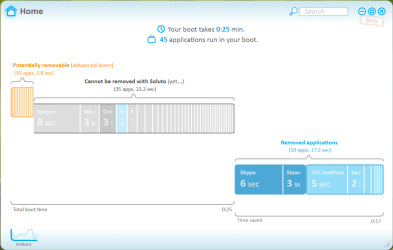
EDIT: FOUND THE CULPRIT!

I'd seen posts about external HDDs causing issues, so I unplugged my 2TB internal HDD (5400rpm, used only for backups) and boom, 24 second boot.

Now, what can I do to the drive to let me keep it installed? If I disable it in the bios, does that completely disable it or just nix it from boot options?
 

My Computer My Computer

OS
7 Professional x64 - SP1
CPU
Phenom II x4 955BE
Motherboard
Asus M4A88TD-V
Memory
2 x 4GB GSkill Ripjaws DDR3-1333
Graphics Card(s)
XFX Radeon 5770
Monitor(s) Displays
Samsung P2770HD - 27"; Samsung 953BW - 19"
Screen Resolution
1920x1080; 1440x900
Hard Drives
Corsair Force Series 3 180 GB; Samsung 7200RPM/500GB; Samsung 5400RPM/2TB (Backup)
PSU
Antec BP550 (80+ Cert.)
Case
Cooler Master HAF 912
Cooling
Cooler Master Hyper 212 Plus + 5x120mm fans
Keyboard
Logitech K750 Solar
Mouse
Razer Mamba
Do a startup/repair on your SSD. That may fix it. I supect there is a connection of the SSD bootmgr with the HDD.
 

My Computer My Computer

Computer Manufacturer/Model Number
HP, Dell, Gateway, Toshiba - 4 laptops and 2 desktops
OS
Vista, Windows7, Mint Mate, Zorin, Windows 8
CPU
from 1.6GHz Duo to i7
Monitor(s) Displays
2x HP w2207
Hard Drives
5x HDD, 7x SSD, 12x Externals
Keyboard
with trackball - no mices
Mouse
Trackball mice
Internet Speed
DSL 6000
Do a startup/repair on your SSD. That may fix it. I supect there is a connection of the SSD bootmgr with the HDD.

That makes sense, I had to do some startup recovery before.

Reformatted it to a different drive letter and all seems ok.

Thanks everyone!
 

Attachments

  • soluto 1.PNG
    soluto 1.PNG
    27.6 KB · Views: 14

My Computer My Computer

OS
7 Professional x64 - SP1
CPU
Phenom II x4 955BE
Motherboard
Asus M4A88TD-V
Memory
2 x 4GB GSkill Ripjaws DDR3-1333
Graphics Card(s)
XFX Radeon 5770
Monitor(s) Displays
Samsung P2770HD - 27"; Samsung 953BW - 19"
Screen Resolution
1920x1080; 1440x900
Hard Drives
Corsair Force Series 3 180 GB; Samsung 7200RPM/500GB; Samsung 5400RPM/2TB (Backup)
PSU
Antec BP550 (80+ Cert.)
Case
Cooler Master HAF 912
Cooling
Cooler Master Hyper 212 Plus + 5x120mm fans
Keyboard
Logitech K750 Solar
Mouse
Razer Mamba
Good suggestion whs.

Since your setup in AHCI or RAID you don't need to keep the external HDD plugged in all the time.
Is it USB or eSATA?
Same for either one actually, they can be 'hot swapped' when needed.

I have eSATA and USB external HDDs and that is how I run them, only when needed.
 

My Computer My Computer

Computer type
PC/Desktop
Computer Manufacturer/Model Number
76~2.0
OS
Windows 7 Ult x64 - SP1/ Windows 8 Pro x64
CPU
Intel Core i5-3570K 4.6GHz
Motherboard
Gigabyte GA-Z77X UD3H, f18
Memory
8GB (2X4GB) DDR3 1600 Corsair Vengeance CL8 1.5v
Graphics Card(s)
Sapphire HD 7770 Vapor-X OC 1GB DDR5
Sound Card
Onboard VIA VT2021
Monitor(s) Displays
22" LCD Dell
Screen Resolution
1680x1050
Hard Drives
Samsung 840Pro 128GB SSD,
Seagate Barracuda 500GB SATA2 7200rpm 32MB cache, Seagate Barracuda 1TB SATA2 7200rpm 32MB cache,
PSU
Corsair HX650W
Case
Cooler Master Storm Scout
Cooling
Corsair H80 2x12cm Noctua NF P12 , 2x14cm case fans
Keyboard
Logitech Wave
Mouse
CM Sentinel
Internet Speed
Dismal
Antivirus
Avast
Browser
Opera Next
Other Info
Haswell laptop: HP Envy 17t-j, i7-4700MQ, GeForce 740M 2GB DDR3, 17.3" Full HD 1920x1080, 16GB RAM, Samsung 840 Pro 128GB, 1TB Hitachi 7200 HDD,
Desktop: eSATA ports,
External eSATA Seagate 500GB SATA2 7200rpm,
External WD USB 500GB
Good suggestion whs.

Since your setup in AHCI or RAID you don't need to keep the external HDD plugged in all the time.
Is it USB or eSATA?
Same for either one actually, they can be 'hot swapped' when needed.

I have eSATA and USB external HDDs and that is how I run them, only when needed.

It's actually a separate internal HDD that I use for backups. Was cheaper and more convenient than an external.
 

My Computer My Computer

OS
7 Professional x64 - SP1
CPU
Phenom II x4 955BE
Motherboard
Asus M4A88TD-V
Memory
2 x 4GB GSkill Ripjaws DDR3-1333
Graphics Card(s)
XFX Radeon 5770
Monitor(s) Displays
Samsung P2770HD - 27"; Samsung 953BW - 19"
Screen Resolution
1920x1080; 1440x900
Hard Drives
Corsair Force Series 3 180 GB; Samsung 7200RPM/500GB; Samsung 5400RPM/2TB (Backup)
PSU
Antec BP550 (80+ Cert.)
Case
Cooler Master HAF 912
Cooling
Cooler Master Hyper 212 Plus + 5x120mm fans
Keyboard
Logitech K750 Solar
Mouse
Razer Mamba
If you think it is the wi-fi card that has been disabled, just find the driver and rename it to NDProxy.BAK and windows won't try to load it. If it causes problems, just name it back to .sys. Does it still hang if you boot into safe mode without networking? Try just safe mode and see if it hangs. That would give you a good indication whether that is the problem. I would consider removing the wi-fi card if it is not being used. Bios still knows it is there. You may try updating all of your drivers and see if that helps. They should be available on your motherboards web page. Just mu thoughts, but no, I'm not familar with the drivers except the last one sounds like a windows driver, which hardly ever cause problems.
 

My Computers My Computers

System One System Two

  • Computer type
    PC/Desktop
    Computer Manufacturer/Model Number
    ALWAYS UNDER CONSTRUCTION
    OS
    Windows 11 Pro
    CPU
    Ryzen 9 5900X
    Motherboard
    Asus X570 Crosshair Viii Hero
    Memory
    32GB G Skill DDR4-3600
    Graphics Card(s)
    EVGA RTX 3080 FTW 3 Ultra
    Sound Card
    On Board/Sennheiser PC37X Headset
    Monitor(s) Displays
    3 X Asus 27"
    Screen Resolution
    2560x1440
    Hard Drives
    2 X 1 TB NVME drives
    PSU
    EVGA 850
    Case
    Phanteks Eclipse P400A
    Cooling
    EVGA 280 AIO
    Keyboard
    Logitech G510s/ Logitech G13
    Mouse
    Logitech G502
    Internet Speed
    24/1
    Antivirus
    ESET/MBAM Pro/SAS Pro
    Browser
    Chrome/ Firefox/ Edge
  • Computer type
    Laptop
    System Manufacturer/Model Number
    Dell 16 Plus
    OS
    Windows 11 Pro
    CPU
    Intel Ultra 9 288V
    Memory
    32 GB LPDDR5X 8533
    Monitor(s) Displays
    16" Mini-LED HDR600 Touch 90 Hz
    Screen Resolution
    2560X1600
    Hard Drives
    1 TB NVME
  • Like
Reactions: whs
Looks like Emcee is running on a VPN. Doesn't that slow down the start-up? That's what all the "rasxxx.sys" drivers are.
 

My Computer My Computer

Computer type
PC/Desktop
Computer Manufacturer/Model Number
Built 2/11/2011
OS
Windows 7 Pro-x64
CPU
i7-2600 3.4GHz - 3.8GHz Turbo
Motherboard
Intel DH67BL-B3
Memory
8Gb - 2x4GB, Muskin 991770 PC3-1333
Graphics Card(s)
Integrated Intel HD 2000
Sound Card
Integrated Intel 10.1 HD, RealTek ALC892
Monitor(s) Displays
Asus LCD VH222H, Haier HL24XSL2a
Screen Resolution
1920x1080, 1920x1080
Hard Drives
Crucial SSD C300-128Gb,
Western Digital WD5002AALX - 500Gb,
Western Digital WD7501AALS - 750Gb
PSU
Seasonic 650W 80+ Gold Modular
Case
Rosewill Defender
Cooling
Stock CPU, Four 120mm case fans, PCH fan added
Keyboard
Logitech EX100 Y-RBH94 Wireless
Mouse
Logitech EX100 M-RCE95 Wireless
Internet Speed
3.0/1.5 Mbs
Antivirus
Microsoft Security Essentials
Browser
Microsoft Internet Explorer 11
Other Info
Antec Veris Premier-Multimedia IR Station,
Cyber Accoustics-3602 Speakers,
AFT XM-5U Card Reader,
Hauppauge TV-HVR-2250,
Sony LX300 USB Turntable
No vpn here. I removed the wifi card earlier to no avail, but I'll just leave it out for now anyways.
 

My Computer My Computer

OS
7 Professional x64 - SP1
CPU
Phenom II x4 955BE
Motherboard
Asus M4A88TD-V
Memory
2 x 4GB GSkill Ripjaws DDR3-1333
Graphics Card(s)
XFX Radeon 5770
Monitor(s) Displays
Samsung P2770HD - 27"; Samsung 953BW - 19"
Screen Resolution
1920x1080; 1440x900
Hard Drives
Corsair Force Series 3 180 GB; Samsung 7200RPM/500GB; Samsung 5400RPM/2TB (Backup)
PSU
Antec BP550 (80+ Cert.)
Case
Cooler Master HAF 912
Cooling
Cooler Master Hyper 212 Plus + 5x120mm fans
Keyboard
Logitech K750 Solar
Mouse
Razer Mamba
Good suggestion whs.

Since your setup in AHCI or RAID you don't need to keep the external HDD plugged in all the time.
Is it USB or eSATA?
Same for either one actually, they can be 'hot swapped' when needed.

I have eSATA and USB external HDDs and that is how I run them, only when needed.

It's actually a separate internal HDD that I use for backups. Was cheaper and more convenient than an external.

Did you have it connected when you installed the OS on the SSD?
If yes, then you boot files might be on the slow spinner, run startup repair from the installation disk/USB with all the other HDDs un-plugged.

I also run a internal HDD for backups, I just un-plug it until needed.
 

My Computer My Computer

Computer type
PC/Desktop
Computer Manufacturer/Model Number
76~2.0
OS
Windows 7 Ult x64 - SP1/ Windows 8 Pro x64
CPU
Intel Core i5-3570K 4.6GHz
Motherboard
Gigabyte GA-Z77X UD3H, f18
Memory
8GB (2X4GB) DDR3 1600 Corsair Vengeance CL8 1.5v
Graphics Card(s)
Sapphire HD 7770 Vapor-X OC 1GB DDR5
Sound Card
Onboard VIA VT2021
Monitor(s) Displays
22" LCD Dell
Screen Resolution
1680x1050
Hard Drives
Samsung 840Pro 128GB SSD,
Seagate Barracuda 500GB SATA2 7200rpm 32MB cache, Seagate Barracuda 1TB SATA2 7200rpm 32MB cache,
PSU
Corsair HX650W
Case
Cooler Master Storm Scout
Cooling
Corsair H80 2x12cm Noctua NF P12 , 2x14cm case fans
Keyboard
Logitech Wave
Mouse
CM Sentinel
Internet Speed
Dismal
Antivirus
Avast
Browser
Opera Next
Other Info
Haswell laptop: HP Envy 17t-j, i7-4700MQ, GeForce 740M 2GB DDR3, 17.3" Full HD 1920x1080, 16GB RAM, Samsung 840 Pro 128GB, 1TB Hitachi 7200 HDD,
Desktop: eSATA ports,
External eSATA Seagate 500GB SATA2 7200rpm,
External WD USB 500GB
Your last driver list shows you're still loading all the drivers for VPN. Does it show as a network connection?
 

My Computer My Computer

Computer type
PC/Desktop
Computer Manufacturer/Model Number
Built 2/11/2011
OS
Windows 7 Pro-x64
CPU
i7-2600 3.4GHz - 3.8GHz Turbo
Motherboard
Intel DH67BL-B3
Memory
8Gb - 2x4GB, Muskin 991770 PC3-1333
Graphics Card(s)
Integrated Intel HD 2000
Sound Card
Integrated Intel 10.1 HD, RealTek ALC892
Monitor(s) Displays
Asus LCD VH222H, Haier HL24XSL2a
Screen Resolution
1920x1080, 1920x1080
Hard Drives
Crucial SSD C300-128Gb,
Western Digital WD5002AALX - 500Gb,
Western Digital WD7501AALS - 750Gb
PSU
Seasonic 650W 80+ Gold Modular
Case
Rosewill Defender
Cooling
Stock CPU, Four 120mm case fans, PCH fan added
Keyboard
Logitech EX100 Y-RBH94 Wireless
Mouse
Logitech EX100 M-RCE95 Wireless
Internet Speed
3.0/1.5 Mbs
Antivirus
Microsoft Security Essentials
Browser
Microsoft Internet Explorer 11
Other Info
Antec Veris Premier-Multimedia IR Station,
Cyber Accoustics-3602 Speakers,
AFT XM-5U Card Reader,
Hauppauge TV-HVR-2250,
Sony LX300 USB Turntable
Your last driver list shows you're still loading all the drivers for VPN. Does it show as a network connection?

I don't see one, and I certainly never set one up.
 

My Computer My Computer

OS
7 Professional x64 - SP1
CPU
Phenom II x4 955BE
Motherboard
Asus M4A88TD-V
Memory
2 x 4GB GSkill Ripjaws DDR3-1333
Graphics Card(s)
XFX Radeon 5770
Monitor(s) Displays
Samsung P2770HD - 27"; Samsung 953BW - 19"
Screen Resolution
1920x1080; 1440x900
Hard Drives
Corsair Force Series 3 180 GB; Samsung 7200RPM/500GB; Samsung 5400RPM/2TB (Backup)
PSU
Antec BP550 (80+ Cert.)
Case
Cooler Master HAF 912
Cooling
Cooler Master Hyper 212 Plus + 5x120mm fans
Keyboard
Logitech K750 Solar
Mouse
Razer Mamba
Corsair 128GB, 177MB/s

Here's a relatively older SSD used as Win7 x64 system disk, and temporary store for video work. Paging is turned off (6GB memory hardly ever goes above 50% used). First time using this utility. Interesting that most of the time the utility reported about 160MB/s, but jumped to 210 at the end ... don't know what that's about.

Edit: the picture disappeared from this post.
 
Last edited:

My Computer My Computer

OS
Windows 7
For all you SSD fans I made a little tutorial on how to fix a misalignment on an SSD with an active OS. It may come in handy when the case arises.
 

My Computer My Computer

Computer Manufacturer/Model Number
HP, Dell, Gateway, Toshiba - 4 laptops and 2 desktops
OS
Vista, Windows7, Mint Mate, Zorin, Windows 8
CPU
from 1.6GHz Duo to i7
Monitor(s) Displays
2x HP w2207
Hard Drives
5x HDD, 7x SSD, 12x Externals
Keyboard
with trackball - no mices
Mouse
Trackball mice
Internet Speed
DSL 6000
Thank you whs, another well done tutorial.
 

My Computer My Computer

Computer type
PC/Desktop
Computer Manufacturer/Model Number
76~2.0
OS
Windows 7 Ult x64 - SP1/ Windows 8 Pro x64
CPU
Intel Core i5-3570K 4.6GHz
Motherboard
Gigabyte GA-Z77X UD3H, f18
Memory
8GB (2X4GB) DDR3 1600 Corsair Vengeance CL8 1.5v
Graphics Card(s)
Sapphire HD 7770 Vapor-X OC 1GB DDR5
Sound Card
Onboard VIA VT2021
Monitor(s) Displays
22" LCD Dell
Screen Resolution
1680x1050
Hard Drives
Samsung 840Pro 128GB SSD,
Seagate Barracuda 500GB SATA2 7200rpm 32MB cache, Seagate Barracuda 1TB SATA2 7200rpm 32MB cache,
PSU
Corsair HX650W
Case
Cooler Master Storm Scout
Cooling
Corsair H80 2x12cm Noctua NF P12 , 2x14cm case fans
Keyboard
Logitech Wave
Mouse
CM Sentinel
Internet Speed
Dismal
Antivirus
Avast
Browser
Opera Next
Other Info
Haswell laptop: HP Envy 17t-j, i7-4700MQ, GeForce 740M 2GB DDR3, 17.3" Full HD 1920x1080, 16GB RAM, Samsung 840 Pro 128GB, 1TB Hitachi 7200 HDD,
Desktop: eSATA ports,
External eSATA Seagate 500GB SATA2 7200rpm,
External WD USB 500GB
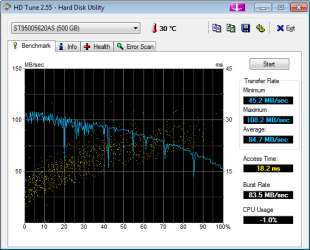
My 500 Gig SSD Seagate on dell AR3 Alienware overclocked

:cry:[ I am embarressed to show this. Windows Experence Index rate this 5.9. All else has over 7.9 except one-don't remember what is 7.5. This is a Dell Alienware AR3 with 8 Gig Ram Overclocked to 3.4 I7 Procerror.
harmie


Benchmark Program Links:
[/QUOTE]
 

Attachments

  • HDTune_Benchmark_ST95005620AS.png
    HDTune_Benchmark_ST95005620AS.png
    11.9 KB · Views: 8

My Computer My Computer

Computer Manufacturer/Model Number
Dell Alienware Aurora R3
OS
Windows 7 Ultimate x64
CPU
AMD 9600 Series
Motherboard
Mainboard : Alienware 046MHW
Memory
Physical Memory : 8192MB DDR3-SDRAM
Graphics Card(s)
Video Card : AMD Radeon HD 6900 Series
Sound Card
Sound Card Device : Realtek HD-AMD HD
Monitor(s) Displays
Monitor Type : Dell Computer DELL S2209W
Screen Resolution
1920x1080
Hard Drives
Drive C:\ 250Gig OCZ SSD- Not in use a 500 Gig Seagate SSD- a 2T Seagate HHD-not in use
PSU
Term unknown. If Power Supply Unit-unknown
Case
Black Standard Tower AR3
Cooling
Water Cooled + fans
Keyboard
Standard Wired USB
Mouse
Microsoft Wireless
Internet Speed
Cable-20Gig down-4 Gb up
Other Info
Can't get but a 7.2 on WEI. I would like to set the HHD up for storage but don't know how to get them formatted to work together!

My Computer My Computer

Computer type
PC/Desktop
Computer Manufacturer/Model Number
76~2.0
OS
Windows 7 Ult x64 - SP1/ Windows 8 Pro x64
CPU
Intel Core i5-3570K 4.6GHz
Motherboard
Gigabyte GA-Z77X UD3H, f18
Memory
8GB (2X4GB) DDR3 1600 Corsair Vengeance CL8 1.5v
Graphics Card(s)
Sapphire HD 7770 Vapor-X OC 1GB DDR5
Sound Card
Onboard VIA VT2021
Monitor(s) Displays
22" LCD Dell
Screen Resolution
1680x1050
Hard Drives
Samsung 840Pro 128GB SSD,
Seagate Barracuda 500GB SATA2 7200rpm 32MB cache, Seagate Barracuda 1TB SATA2 7200rpm 32MB cache,
PSU
Corsair HX650W
Case
Cooler Master Storm Scout
Cooling
Corsair H80 2x12cm Noctua NF P12 , 2x14cm case fans
Keyboard
Logitech Wave
Mouse
CM Sentinel
Internet Speed
Dismal
Antivirus
Avast
Browser
Opera Next
Other Info
Haswell laptop: HP Envy 17t-j, i7-4700MQ, GeForce 740M 2GB DDR3, 17.3" Full HD 1920x1080, 16GB RAM, Samsung 840 Pro 128GB, 1TB Hitachi 7200 HDD,
Desktop: eSATA ports,
External eSATA Seagate 500GB SATA2 7200rpm,
External WD USB 500GB
Is my disk in bad condition?

02enero20121916.png


Is it right the performance graphic above?
 

My Computer My Computer

Computer Manufacturer/Model Number
Intel(R) Core(TM) i5-2500K CPU @ 3.30GHz
OS
Microsoft Windows 7 Ultimate 64 bits 7601 Multiprocessor Free Service Pack 1
CPU
Intel(R) Core(TM) i5-2500K CPU @ 3.30GHz
Motherboard
Gigabyte Technology Co., Ltd. Z68XP-UD4
Memory
16,00 GB. Usable: 15,92 GB
Graphics Card(s)
NVIDIA GeForce GTX 560 Ti
Sound Card
Internal NVIDIA High Definition Audio
Monitor(s) Displays
DELL 24'' 16:10
Screen Resolution
1920 x 1200 x 32 bits (4294967296 colors) @ 60 Hz
Hard Drives
5, a total of 4 TB

(1) OCZ-AGILITY3 ATA Device (2) ST3500320AS ATA Device (3) ST3500320AS ATA Device (4) ST3500418AS ATA Device (5) ST3500418AS ATA Device (6) ST2000DL 003-9VT166 USB Device
PSU
700W
Case
Cooler Master
Cooling
Air
Keyboard
Microsoft
Mouse
Microsoft
Internet Speed
Jazztel
I add another screenshot:

asssdbenchoczagility3at.png


Don't know if I had to make changes on my config. I'm using Win7 Ultimate 64 bits.
 

My Computer My Computer

Computer Manufacturer/Model Number
Intel(R) Core(TM) i5-2500K CPU @ 3.30GHz
OS
Microsoft Windows 7 Ultimate 64 bits 7601 Multiprocessor Free Service Pack 1
CPU
Intel(R) Core(TM) i5-2500K CPU @ 3.30GHz
Motherboard
Gigabyte Technology Co., Ltd. Z68XP-UD4
Memory
16,00 GB. Usable: 15,92 GB
Graphics Card(s)
NVIDIA GeForce GTX 560 Ti
Sound Card
Internal NVIDIA High Definition Audio
Monitor(s) Displays
DELL 24'' 16:10
Screen Resolution
1920 x 1200 x 32 bits (4294967296 colors) @ 60 Hz
Hard Drives
5, a total of 4 TB

(1) OCZ-AGILITY3 ATA Device (2) ST3500320AS ATA Device (3) ST3500320AS ATA Device (4) ST3500418AS ATA Device (5) ST3500418AS ATA Device (6) ST2000DL 003-9VT166 USB Device
PSU
700W
Case
Cooler Master
Cooling
Air
Keyboard
Microsoft
Mouse
Microsoft
Internet Speed
Jazztel
Status
Not open for further replies.
Back
Top