Show us your SSD performance

Status
Not open for further replies.

My Computer

Computer Manufacturer/Model Number
Sytemax
OS
7 Pro 64 Bit
CPU
8300 Quad 2.53Ghz
Motherboard
Asus
Memory
4GB DDR Crucial
Graphics Card(s)
Intel
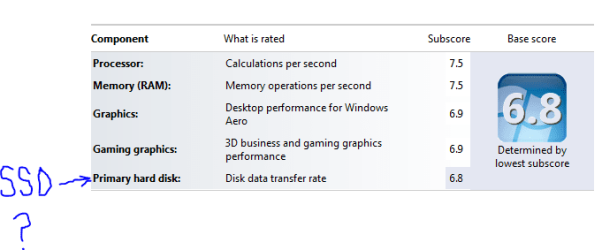
I thought you SSD guys would be interested in this. I just updated my WEI and my SSD is now my "choke point" It does not seem right to me. It should be the video card or maybe RAM....but not the SSD.

weissdlow.PNG
 

My Computer

Computer Manufacturer/Model Number
Keeps changing - (Custom)
OS
Windows 7 Professional x64
CPU
Intel Core i7 860
Motherboard
Gigabyte GA-P55-UD4P
Memory
4GB DDR3 Mushkin 1600Mhz @ 7-8-7-20
Graphics Card(s)
MSI GTS250 1GB DDR3 Twin Frozr
Sound Card
Onboard realtek
Monitor(s) Displays
Samsung SyncMaster 24" P2450 + Samsung 20" 2033
Screen Resolution
1920 X 1080 and 1600 X 900 (#2 system 1440 X 900)
Hard Drives
Patriot Inferno 120GB SSD + 3 WD Blue 640GB drives
PSU
Corsair 750 HX Modular
Case
Lancool PC-K62
Cooling
Cooler Master TX3 CPU cooler and 4-140mm and 1-120mm case
Keyboard
Gigabyte USB keyboard
Mouse
Microsoft wireless laser mouse 5000
Internet Speed
7 Mb down 1.5 up
Other Info
System #2: AMD Phenom II X6 1055T (Freezer 7 Pro cooler) - Gigabyte 880GMA-UD2H - WD 500GB Black - 9500GT (1GB) 500W OCZ modular PSU - Antec 200 case. System #3 (LapTop) Core 2 Duo T6670 - 320GB 7200RPM HD - 4GB DDR3 RAM.
Not that the WEI means much, but mine is only 7.1 too.
 

My Computer

Computer Manufacturer/Model Number
HP, Dell, Gateway, Toshiba - 4 laptops and 2 desktops
OS
Vista, Windows7, Mint Mate, Zorin, Windows 8
CPU
from 1.6GHz Duo to i7
Monitor(s) Displays
2x HP w2207
Hard Drives
5x HDD, 7x SSD, 12x Externals
Keyboard
with trackball - no mices
Mouse
Trackball mice
Internet Speed
DSL 6000
I thought you SSD guys would be interested in this. I just updated my WEI and my SSD is now my "choke point" It does not seem right to me. It should be the video card or maybe RAM....but not the SSD.

View attachment 58778

Which SSD drive? 6.8 is not bad by any means...I think my best score with the Intel was 7.4
 

My Computer

Computer Manufacturer/Model Number
Self-Built in July 2009
OS
Windows 7 Ultimate x64
CPU
Intel Q9550 2.83Ghz OC'd to 3.40Ghz
Motherboard
Gigabyte GA-EP45-UD3R rev. 1.1, F12 BIOS
Memory
8GB G.Skill PI DDR2-800, 4-4-4-12 timings
Graphics Card(s)
EVGA 1280MB Nvidia GeForce GTX570
Sound Card
Realtek ALC899A 8 channel onboard audio
Monitor(s) Displays
23" Acer x233H
Screen Resolution
1920x1080
Hard Drives
Intel X25-M 80GB Gen 2 SSD
Western Digital 1TB Caviar Black, 32MB cache. WD1001FALS
PSU
Corsair 620HX modular
Case
Antec P182
Cooling
stock
Keyboard
ABS M1 Mechanical
Mouse
Logitech G9 Laser Mouse
Internet Speed
15/2 cable modem
Other Info
Windows and Linux enthusiast. Logitech G35 Headset.
I thought you SSD guys would be interested in this. I just updated my WEI and my SSD is now my "choke point" It does not seem right to me. It should be the video card or maybe RAM....but not the SSD.

View attachment 58778

Which SSD drive? 6.8 is not bad by any means...I think my best score with the Intel was 7.4

This is on the one in my system specs. Patriot Torqx indilinx with the latest 1881 FW and everything updated. It's fast and has zero problems. I think it's wrong....but I may be wrong....I just can't imagine that SSD is my "bottleneck"
 

My Computer

Computer Manufacturer/Model Number
Keeps changing - (Custom)
OS
Windows 7 Professional x64
CPU
Intel Core i7 860
Motherboard
Gigabyte GA-P55-UD4P
Memory
4GB DDR3 Mushkin 1600Mhz @ 7-8-7-20
Graphics Card(s)
MSI GTS250 1GB DDR3 Twin Frozr
Sound Card
Onboard realtek
Monitor(s) Displays
Samsung SyncMaster 24" P2450 + Samsung 20" 2033
Screen Resolution
1920 X 1080 and 1600 X 900 (#2 system 1440 X 900)
Hard Drives
Patriot Inferno 120GB SSD + 3 WD Blue 640GB drives
PSU
Corsair 750 HX Modular
Case
Lancool PC-K62
Cooling
Cooler Master TX3 CPU cooler and 4-140mm and 1-120mm case
Keyboard
Gigabyte USB keyboard
Mouse
Microsoft wireless laser mouse 5000
Internet Speed
7 Mb down 1.5 up
Other Info
System #2: AMD Phenom II X6 1055T (Freezer 7 Pro cooler) - Gigabyte 880GMA-UD2H - WD 500GB Black - 9500GT (1GB) 500W OCZ modular PSU - Antec 200 case. System #3 (LapTop) Core 2 Duo T6670 - 320GB 7200RPM HD - 4GB DDR3 RAM.
nate, I think you worry too much and give the WEI more credit than it deserves.
 

My Computer

Computer Manufacturer/Model Number
HP, Dell, Gateway, Toshiba - 4 laptops and 2 desktops
OS
Vista, Windows7, Mint Mate, Zorin, Windows 8
CPU
from 1.6GHz Duo to i7
Monitor(s) Displays
2x HP w2207
Hard Drives
5x HDD, 7x SSD, 12x Externals
Keyboard
with trackball - no mices
Mouse
Trackball mice
Internet Speed
DSL 6000
nate, I think you worry too much and give the WEI more credit than it deserves.

Isn't the wei score based on the "winsat disk" in command prompt if you run it elevated? :huh:
 

My Computer

Computer Manufacturer/Model Number
Dell Studio XPS 8000
OS
Windows 7 Home Premium
This is on the one in my system specs. Patriot Torqx indilinx with the latest 1881 FW and everything updated. It's fast and has zero problems. I think it's wrong....but I may be wrong....I just can't imagine that SSD is my "bottleneck"
That score is not indicating a bottleneck on your system. People spend way too much time on that number I'm afraid. You can clearly see the MASSIVE difference between a mechanical drive (which would score a 5.9) and this SSD (which your case is a 6.8). Your drive is not bottlenecking your computer.
 

My Computer

Computer Manufacturer/Model Number
Self-Built in July 2009
OS
Windows 7 Ultimate x64
CPU
Intel Q9550 2.83Ghz OC'd to 3.40Ghz
Motherboard
Gigabyte GA-EP45-UD3R rev. 1.1, F12 BIOS
Memory
8GB G.Skill PI DDR2-800, 4-4-4-12 timings
Graphics Card(s)
EVGA 1280MB Nvidia GeForce GTX570
Sound Card
Realtek ALC899A 8 channel onboard audio
Monitor(s) Displays
23" Acer x233H
Screen Resolution
1920x1080
Hard Drives
Intel X25-M 80GB Gen 2 SSD
Western Digital 1TB Caviar Black, 32MB cache. WD1001FALS
PSU
Corsair 620HX modular
Case
Antec P182
Cooling
stock
Keyboard
ABS M1 Mechanical
Mouse
Logitech G9 Laser Mouse
Internet Speed
15/2 cable modem
Other Info
Windows and Linux enthusiast. Logitech G35 Headset.
nate, I think you worry too much and give the WEI more credit than it deserves.

You are right.

nate, I think you worry too much and give the WEI more credit than it deserves.

Isn't the wei score based on the "winsat disk" in command prompt if you run it elevated? :huh:

Yes, it IS based on the WinSAT disk tool.

This is on the one in my system specs. Patriot Torqx indilinx with the latest 1881 FW and everything updated. It's fast and has zero problems. I think it's wrong....but I may be wrong....I just can't imagine that SSD is my "bottleneck"
That score is not indicating a bottleneck on your system. People spend way too much time on that number I'm afraid. You can clearly see the MASSIVE difference between a mechanical drive (which would score a 5.9) and this SSD (which your case is a 6.8). Your drive is not bottlenecking your computer.

I think in SOME cases the WinSAT disk tool is finding problems I am not seeing in everyday use. I just thought it was interesting.
 

My Computer

Computer Manufacturer/Model Number
Keeps changing - (Custom)
OS
Windows 7 Professional x64
CPU
Intel Core i7 860
Motherboard
Gigabyte GA-P55-UD4P
Memory
4GB DDR3 Mushkin 1600Mhz @ 7-8-7-20
Graphics Card(s)
MSI GTS250 1GB DDR3 Twin Frozr
Sound Card
Onboard realtek
Monitor(s) Displays
Samsung SyncMaster 24" P2450 + Samsung 20" 2033
Screen Resolution
1920 X 1080 and 1600 X 900 (#2 system 1440 X 900)
Hard Drives
Patriot Inferno 120GB SSD + 3 WD Blue 640GB drives
PSU
Corsair 750 HX Modular
Case
Lancool PC-K62
Cooling
Cooler Master TX3 CPU cooler and 4-140mm and 1-120mm case
Keyboard
Gigabyte USB keyboard
Mouse
Microsoft wireless laser mouse 5000
Internet Speed
7 Mb down 1.5 up
Other Info
System #2: AMD Phenom II X6 1055T (Freezer 7 Pro cooler) - Gigabyte 880GMA-UD2H - WD 500GB Black - 9500GT (1GB) 500W OCZ modular PSU - Antec 200 case. System #3 (LapTop) Core 2 Duo T6670 - 320GB 7200RPM HD - 4GB DDR3 RAM.
ahci makes quite the difference so make sure you are using it. It bumped mine from 7.4 to 7.8 (6.6 to 6.9 on my old adata s596). Also I have noticed that if I set the drives to sleep my score drops over time (down to 7.6). With drive sleep disabled my score returns to normal after a day or two and stays there. Weird but thought it might help
 

My Computer

Computer type
PC/Desktop
Computer Manufacturer/Model Number
Elsa
OS
windows 8.1 Pro x64
CPU
intel [email protected]
Motherboard
msi mpower max ac
Memory
2x8gb ripjaws x @2133
Graphics Card(s)
asus r9-290@1100/1300
Sound Card
creative sbz
Monitor(s) Displays
dell u3011
Hard Drives
840 evo 250 & 8.5tb
PSU
evga supernova p2-1000
Case
corsair air 540
Cooling
corsair h100
Keyboard
logitech g710+
Mouse
logitech g502
Internet Speed
50/10
Antivirus
avg
Browser
firefox
ahci makes quite the difference so make sure you are using it. It bumped mine from 7.4 to 7.8 (6.6 to 6.9 on my old adata s596). Also I have noticed that if I set the drives to sleep my score drops over time (down to 7.6). With drive sleep disabled my score returns to normal after a day or two and stays there. Weird but thought it might help

Well, AHCI is a mixed bag. When I had AHCI enabled, my WEI score was higher, but all of the benchmarks tools showed a 2-5MB/s drop on average. Plus, when AHCI is on, my mobo has an extra 8 second delay while it initializes the AHCI controller. Thus, it slows every single boot down by 8 seconds. At the end of the day, I couldn't measure enough tangible performance benefit to earn those 8 seconds back that I would lose on each and every boot.

Therefore, I leave AHCI off on my box. My WEI might be lower, but real world performance is the same and it shaves 8 seconds off my boot times.
 

My Computer

Computer Manufacturer/Model Number
Self-Built in July 2009
OS
Windows 7 Ultimate x64
CPU
Intel Q9550 2.83Ghz OC'd to 3.40Ghz
Motherboard
Gigabyte GA-EP45-UD3R rev. 1.1, F12 BIOS
Memory
8GB G.Skill PI DDR2-800, 4-4-4-12 timings
Graphics Card(s)
EVGA 1280MB Nvidia GeForce GTX570
Sound Card
Realtek ALC899A 8 channel onboard audio
Monitor(s) Displays
23" Acer x233H
Screen Resolution
1920x1080
Hard Drives
Intel X25-M 80GB Gen 2 SSD
Western Digital 1TB Caviar Black, 32MB cache. WD1001FALS
PSU
Corsair 620HX modular
Case
Antec P182
Cooling
stock
Keyboard
ABS M1 Mechanical
Mouse
Logitech G9 Laser Mouse
Internet Speed
15/2 cable modem
Other Info
Windows and Linux enthusiast. Logitech G35 Headset.
Yup I remember my ud3p adding an extra boot screen with ahci too but eight secs seems like a lot. I have noticed the opposite with benches though; AS ssd bench 408 vs. 421. Probably depends on the board/bios a little even if on the same controller
 

My Computer

Computer type
PC/Desktop
Computer Manufacturer/Model Number
Elsa
OS
windows 8.1 Pro x64
CPU
intel [email protected]
Motherboard
msi mpower max ac
Memory
2x8gb ripjaws x @2133
Graphics Card(s)
asus r9-290@1100/1300
Sound Card
creative sbz
Monitor(s) Displays
dell u3011
Hard Drives
840 evo 250 & 8.5tb
PSU
evga supernova p2-1000
Case
corsair air 540
Cooling
corsair h100
Keyboard
logitech g710+
Mouse
logitech g502
Internet Speed
50/10
Antivirus
avg
Browser
firefox
Yup I remember my ud3p adding an extra boot screen with ahci too but eight secs seems like a lot.
I have the UD3R...and with a stopwatch, having AHCI enabled extended my post by 8 seconds.
 

My Computer

Computer Manufacturer/Model Number
Self-Built in July 2009
OS
Windows 7 Ultimate x64
CPU
Intel Q9550 2.83Ghz OC'd to 3.40Ghz
Motherboard
Gigabyte GA-EP45-UD3R rev. 1.1, F12 BIOS
Memory
8GB G.Skill PI DDR2-800, 4-4-4-12 timings
Graphics Card(s)
EVGA 1280MB Nvidia GeForce GTX570
Sound Card
Realtek ALC899A 8 channel onboard audio
Monitor(s) Displays
23" Acer x233H
Screen Resolution
1920x1080
Hard Drives
Intel X25-M 80GB Gen 2 SSD
Western Digital 1TB Caviar Black, 32MB cache. WD1001FALS
PSU
Corsair 620HX modular
Case
Antec P182
Cooling
stock
Keyboard
ABS M1 Mechanical
Mouse
Logitech G9 Laser Mouse
Internet Speed
15/2 cable modem
Other Info
Windows and Linux enthusiast. Logitech G35 Headset.
I believe you, just saying it seems like a really long wait
 

My Computer

Computer type
PC/Desktop
Computer Manufacturer/Model Number
Elsa
OS
windows 8.1 Pro x64
CPU
intel [email protected]
Motherboard
msi mpower max ac
Memory
2x8gb ripjaws x @2133
Graphics Card(s)
asus r9-290@1100/1300
Sound Card
creative sbz
Monitor(s) Displays
dell u3011
Hard Drives
840 evo 250 & 8.5tb
PSU
evga supernova p2-1000
Case
corsair air 540
Cooling
corsair h100
Keyboard
logitech g710+
Mouse
logitech g502
Internet Speed
50/10
Antivirus
avg
Browser
firefox
I believe you, just saying it seems like a really long wait
It is a long wait and that is why I leave AHCI disabled. Any performance benefits gained are offset by 8 seconds at boot. So, in the course or 2-3 hours of heavy computer use, I'm not getting those 8 seconds back. And if I am applying patches and rebooting a fair number of times, it starts to add up.
 

My Computer

Computer Manufacturer/Model Number
Self-Built in July 2009
OS
Windows 7 Ultimate x64
CPU
Intel Q9550 2.83Ghz OC'd to 3.40Ghz
Motherboard
Gigabyte GA-EP45-UD3R rev. 1.1, F12 BIOS
Memory
8GB G.Skill PI DDR2-800, 4-4-4-12 timings
Graphics Card(s)
EVGA 1280MB Nvidia GeForce GTX570
Sound Card
Realtek ALC899A 8 channel onboard audio
Monitor(s) Displays
23" Acer x233H
Screen Resolution
1920x1080
Hard Drives
Intel X25-M 80GB Gen 2 SSD
Western Digital 1TB Caviar Black, 32MB cache. WD1001FALS
PSU
Corsair 620HX modular
Case
Antec P182
Cooling
stock
Keyboard
ABS M1 Mechanical
Mouse
Logitech G9 Laser Mouse
Internet Speed
15/2 cable modem
Other Info
Windows and Linux enthusiast. Logitech G35 Headset.
I believe you, just saying it seems like a really long wait
It is a long wait and that is why I leave AHCI disabled. Any performance benefits gained are offset by 8 seconds at boot. So, in the course or 2-3 hours of heavy computer use, I'm not getting those 8 seconds back. And if I am applying patches and rebooting a fair number of times, it starts to add up.

I noticed this issue when I tried to switch from IDE to AHCI through the REGEDIT OS fix. I lost about 20 seconds of boot time, going from about 35 sec. to 55 sec. When I did a reinstall using the AHCI drivers from the "get go," I got that wait time cut back pretty close to original time, about ~35. It also helps to disable SATA3, IDE, etc. from the BIOS, so that the AHCI gets noticed right away.
 

My Computer

Computer type
PC/Desktop
Computer Manufacturer/Model Number
Home Build - Acuarius
OS
Triple Boot - Win 10 x64Pro + Win 7 x64 Ultimate + WinXP-mce x1
CPU
AMD FX 8370e
Motherboard
AsRock Fx990 Extreme 9
Memory
Patriot 32GB Viper III DDR3 2133
Graphics Card(s)
Sapphire Radeon VAPOR-X R9 290X 8GB + Asus 5870 [V2]
Sound Card
Realtek ALC 898
Monitor(s) Displays
LCD 1) ASUS PB287Q - LCD 2) HP 2304 - LCD 3) Asus VW266H
Screen Resolution
1) 4k - 2) 1920 x 1200 - 3) 1920 x 1200
Hard Drives
- System C: - 128GB Corsair Force GT SSD
- System D: - 128GB Crucial C-300 SSD
- Seagate 3 TB x2 Hitachi SATA 3 [6Gb/s]

- MediaSonic HF2-SU3S2
- 5 TB backup
PSU
CoolerMaster Silent Pro Gold 1000
Case
Cosmos - Cooler Master 1000
Cooling
CoolerMaster 240M Liquid
Keyboard
Logitec MK-700
Mouse
Logitec MK-700
Internet Speed
DSL - ~ 15 Mb
Antivirus
F-Secure
Browser
Chrome / Opera / EI9
Other Info
I miss my C-64...1541 5 1/4 DD ... and my A-500...
hi there
I got Patriot Warp PE64GS25SSDR 2.5" 64GB SATA II Internal Solid State Drive a while ago
I installed windows 7 on it , my computer spec :
pentum D 3.2GHz
MB: Intel(R) 975X Express Chipset (Asus)
Ram 4 GB (2 x 1 GB corsair , 1 x 2 GB Kingstone)
Video Card nVedia 1GB DDRAM2
My computer is so slow
I changed the controller on the BIOS to AHCI , then reformated my computer again , installed win 7 and still to slow
4416466413_4147feb66e_o_d.png


also my computer is not loading windows 7 animation at the startup on the SSD ; (loads on HDD)
the restart time average is more than 100 Seconds

I reformated my computer again today
this is HD Tune score after the format
4420010151_2aefa7f81f_o_d.png


is this score acceptable on SSD? also it is not stable at all
is there any way to make it faser or I should buy a new INTEL X25 2G
 

My Computer

OS
Win 7
CPU
Intel Pentium D
Motherboard
Intel 975X
Memory
4 GB
Graphics Card(s)
nVidea 1 GB
Monitor(s) Displays
Acer 22''
Hard Drives
Patriot Wrap 64 SSD
PSU
ThermalTech
Case
ThermalTech
I have never seen a performance graph like this. Besides the slow average, the ups and downs are not normal. Maybe it is an alignment problem. Check the alignment (in msinfo32 > Components > Storage > Disks > Partition Starting Offset - for the first partition).
 

My Computer

Computer Manufacturer/Model Number
HP, Dell, Gateway, Toshiba - 4 laptops and 2 desktops
OS
Vista, Windows7, Mint Mate, Zorin, Windows 8
CPU
from 1.6GHz Duo to i7
Monitor(s) Displays
2x HP w2207
Hard Drives
5x HDD, 7x SSD, 12x Externals
Keyboard
with trackball - no mices
Mouse
Trackball mice
Internet Speed
DSL 6000
I have never seen a performance graph like this. Besides the slow average, the ups and downs are not normal. Maybe it is an alignment problem. Check the alignment (in msinfo32 > Components > Storage > Disks > Partition Starting Offset - for the first partition).


here is the info

Description Disk drive
Manufacturer (Standard disk drives)
Model Patriot Warp V2 64GB SSD ATA Device
Bytes/Sector 512
Media Loaded Yes
Media Type Fixed hard disk
Partitions 2
SCSI Bus 0
SCSI Logical Unit 0
SCSI Port 2
SCSI Target ID 0
Sectors/Track 19
Size 60.16 GB (64,592,052,224 bytes)
Total Cylinders 29,642
Total Sectors 126,156,352
Total Tracks 6,639,808
Tracks/Cylinder 224
Partition Disk #0, Partition #0
Partition Size 100.00 MB (104,857,600 bytes)
Partition Starting Offset 1,048,576 bytes
Partition Disk #0, Partition #1
Partition Size 60.06 GB (64,485,326,848 bytes)
Partition Starting Offset 105,906,176 bytes
 

My Computer

OS
Win 7
CPU
Intel Pentium D
Motherboard
Intel 975X
Memory
4 GB
Graphics Card(s)
nVidea 1 GB
Monitor(s) Displays
Acer 22''
Hard Drives
Patriot Wrap 64 SSD
PSU
ThermalTech
Case
ThermalTech
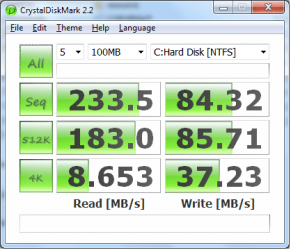
Intel X-25M 80GB Low 4K Benchmark

Model: INTEL SSDSA2M080G2GC X-25M 80GB
Firmware: 2CV102HD

New drive, updated firmware, installed Win 7 Pro x64. AHCI was enabled in the BIOS.

Is this a sign that the partition was not aligned? I let Windows do everything.

Is there a way to confirm that it is aligned correctly?

I did install Intel Matrix Storage Manager, could this be the problem?
 

Attachments

  • SSD_1.png
    SSD_1.png
    23.1 KB · Views: 2

My Computer

OS
Windows 7
Status
Not open for further replies.
Back
Top