Show us your SSD performance

Status
Not open for further replies.
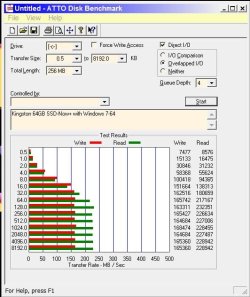
Kingston 64GB SSD-Now+ with Windows 7-64

Kingston 64GB SSD-Now+ with Windows 7-64
 

Attachments

  • Capture.JPG
    Capture.JPG
    61.3 KB · Views: 92

My Computer

Computer type
PC/Desktop
Computer Manufacturer/Model Number
Custom built
OS
Win7-64
CPU
Intel i7-3770S
Motherboard
ASUS P8Z77-M
Memory
16GB
Graphics Card(s)
nVidia GT630
Sound Card
onboard
Monitor(s) Displays
dual
Screen Resolution
1920x1200 (primary) 1050x1680 (secondary)
Hard Drives
128GB SSD (boot)
64GB SSD (Temp/My Documents)
500GB (photos/videos)
1TB (rendered video, backups)
PSU
650W
Case
Thermaltake A30
Cooling
Thermaltake
Keyboard
Logitech Lighted
Mouse
Kensington Expert Mouse (trackball)
Internet Speed
FIOS 35/35
Antivirus
MS Security Essentials
Browser
Chrome (beta)
I don't understand why my 4k random read is so slow. Any idea?

ssdscore.png
 

My Computer

Computer Manufacturer/Model Number
Dell E4300
OS
Windows 7 Ultimate
CPU
Intel C2D SP9400
Motherboard
Intel GS45
Memory
2GB DDR3
Graphics Card(s)
Integrated =(
Sound Card
Integrated =(
Monitor(s) Displays
Matte LCD
Screen Resolution
1280x800
Hard Drives
Intel X25-M Gen 2 SSD
WD Caviar Black
Mouse
MX 518, V470 - Logitech
My best guess is it has to do with the cluster size used to format the SSD. A small cluster size means the SSD firmware has to chase more pointers to get to the next cluster. Large cluster sizes reduce this, but then force small files to take up more space.
 

My Computer

Computer type
PC/Desktop
Computer Manufacturer/Model Number
Custom built
OS
Win7-64
CPU
Intel i7-3770S
Motherboard
ASUS P8Z77-M
Memory
16GB
Graphics Card(s)
nVidia GT630
Sound Card
onboard
Monitor(s) Displays
dual
Screen Resolution
1920x1200 (primary) 1050x1680 (secondary)
Hard Drives
128GB SSD (boot)
64GB SSD (Temp/My Documents)
500GB (photos/videos)
1TB (rendered video, backups)
PSU
650W
Case
Thermaltake A30
Cooling
Thermaltake
Keyboard
Logitech Lighted
Mouse
Kensington Expert Mouse (trackball)
Internet Speed
FIOS 35/35
Antivirus
MS Security Essentials
Browser
Chrome (beta)
just updated the firmware to 20HD on my X-25M 80GB G2

ssdbenchmark.jpg
 

My Computer

Computer Manufacturer/Model Number
Goonie Build 8 2010
OS
Windows 7 64bit Ultimate SP1, VMware Windows 7 64bit Ultimate SP1
CPU
Intel Core i7 920 @ 3.8 or 4.2 when i need it
Motherboard
Gigabyte GA-X58-UD5
Memory
Corsair XMS3 12GB DDR3 1600 1.5v
Graphics Card(s)
MSI GeForce GTX 560Ti OC Twin FrozR II
Sound Card
7.1 HD
Monitor(s) Displays
2x BenQ 24 LED 1080p + LG 50PK590 1080p
Screen Resolution
3840 x 1080p
Hard Drives
Intel X25-M 80GB OS/
Intel X25-M 160GB
Data Robotics Drobo V2 8TB
PSU
Corsair AX 750W ATX Modular
Case
Antec Fusion Remote Max
Cooling
Noctua NH D14
Keyboard
Logitech
Mouse
Logitech
Internet Speed
15Mbs Down 1.3Mbs Up
Other Info
Hauppauge HD PVR/
Pioneer 1017-k - 7.1 THX/
Xbox 360 250 Slim
SkyHD/LG 50PK590 TV
My best guess is it has to do with the cluster size used to format the SSD. A small cluster size means the SSD firmware has to chase more pointers to get to the next cluster. Large cluster sizes reduce this, but then force small files to take up more space.

My cluster size is pretty standard. 512 bytes per sector, 8 sectors per cluster. So 4096 bytes per cluster.

I'm really puzzled my only my 4k random access is affected.
-----------------------------
Fixed my problem. I didn't install the Intel Chipset Driver. Now it's all good

ssdscore2.png
 
Last edited:

My Computer

Computer Manufacturer/Model Number
Dell E4300
OS
Windows 7 Ultimate
CPU
Intel C2D SP9400
Motherboard
Intel GS45
Memory
2GB DDR3
Graphics Card(s)
Integrated =(
Sound Card
Integrated =(
Monitor(s) Displays
Matte LCD
Screen Resolution
1280x800
Hard Drives
Intel X25-M Gen 2 SSD
WD Caviar Black
Mouse
MX 518, V470 - Logitech
Maybe the problem is the benchmark software

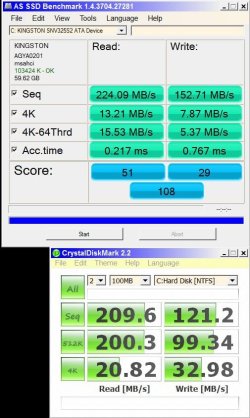
Here are 2 benchmarks I ran on my Kingston 64GB SSD wiht #2 immediately following #1:

Capture.JPG
 

Attachments

  • Capture.JPG
    Capture.JPG
    75 KB · Views: 52

My Computer

Computer type
PC/Desktop
Computer Manufacturer/Model Number
Custom built
OS
Win7-64
CPU
Intel i7-3770S
Motherboard
ASUS P8Z77-M
Memory
16GB
Graphics Card(s)
nVidia GT630
Sound Card
onboard
Monitor(s) Displays
dual
Screen Resolution
1920x1200 (primary) 1050x1680 (secondary)
Hard Drives
128GB SSD (boot)
64GB SSD (Temp/My Documents)
500GB (photos/videos)
1TB (rendered video, backups)
PSU
650W
Case
Thermaltake A30
Cooling
Thermaltake
Keyboard
Logitech Lighted
Mouse
Kensington Expert Mouse (trackball)
Internet Speed
FIOS 35/35
Antivirus
MS Security Essentials
Browser
Chrome (beta)
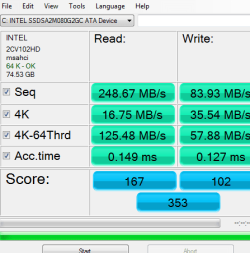
Intel 80gb ssd 2nd gen. On vostro 1310, mobile 965 chipset.
As SSD.
 

Attachments

  • 80gbssd.PNG
    80gbssd.PNG
    11 KB · Views: 5

My Computer

OS
7 Pro x86
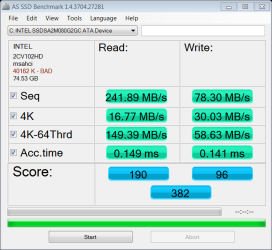
Here are my screenshots from my Dell Studio 17 ... so what does 40162 K -Bad mean? :confused:

as-ssd-bench INTEL SSDSA2M080 2.25.2010 8-09-31 PM.png
HDTune_Benchmark_INTEL_SSDSA2M080G2GC.png
 
Last edited:

My Computer

Computer Manufacturer/Model Number
HP M9040N
OS
Win7 Ultimate x64
CPU
Intel Core 2 Extreme Q6850 3.0GHz
Motherboard
Asus Berkley IPLb
Memory
8GB
Graphics Card(s)
Nvidia GeForce 8600GTS
Sound Card
Realtek HD Audio
Monitor(s) Displays
HP w2207
Screen Resolution
1680x1050
Hard Drives
WD VelociRaptor 300GB
WD Caviar Black 750GB
PSU
Antec 430 Watt
Case
HP M9040N
Cooling
Intel
Keyboard
Logitech G15
Mouse
MS LaserMouse 6000
Internet Speed
Verizon FiOS 20/5
Hmm, the HD Tune picture is not all that bright. I have the same SSD but as G1 and the nums are a lot better. What happened?

Intel.png
 

My Computer

Computer Manufacturer/Model Number
HP, Dell, Gateway, Toshiba - 4 laptops and 2 desktops
OS
Vista, Windows7, Mint Mate, Zorin, Windows 8
CPU
from 1.6GHz Duo to i7
Monitor(s) Displays
2x HP w2207
Hard Drives
5x HDD, 7x SSD, 12x Externals
Keyboard
with trackball - no mices
Mouse
Trackball mice
Internet Speed
DSL 6000
Hmm, the HD Tune picture is not all that bright. I have the same SSD but as G1 and the nums are a lot better. What happened?

Intel.png

I'm not sure. I received the drive today from Zip Zoom Fly, upgraded the firmware, cloned the drive and swapped them out. I did check to see if trim was on, both crystal disk info and command line fsutil showed that it was on.
 

My Computer

Computer Manufacturer/Model Number
HP M9040N
OS
Win7 Ultimate x64
CPU
Intel Core 2 Extreme Q6850 3.0GHz
Motherboard
Asus Berkley IPLb
Memory
8GB
Graphics Card(s)
Nvidia GeForce 8600GTS
Sound Card
Realtek HD Audio
Monitor(s) Displays
HP w2207
Screen Resolution
1680x1050
Hard Drives
WD VelociRaptor 300GB
WD Caviar Black 750GB
PSU
Antec 430 Watt
Case
HP M9040N
Cooling
Intel
Keyboard
Logitech G15
Mouse
MS LaserMouse 6000
Internet Speed
Verizon FiOS 20/5
But something is not right. My first suspect would be the firmware. Trim should not make a difference. The HD Tune numbers are reads and on a brand new disk even writes would run at top speed.
 

My Computer

Computer Manufacturer/Model Number
HP, Dell, Gateway, Toshiba - 4 laptops and 2 desktops
OS
Vista, Windows7, Mint Mate, Zorin, Windows 8
CPU
from 1.6GHz Duo to i7
Monitor(s) Displays
2x HP w2207
Hard Drives
5x HDD, 7x SSD, 12x Externals
Keyboard
with trackball - no mices
Mouse
Trackball mice
Internet Speed
DSL 6000
Any suggestions as to what troubleshooting steps i should take?
 

My Computer

Computer Manufacturer/Model Number
HP M9040N
OS
Win7 Ultimate x64
CPU
Intel Core 2 Extreme Q6850 3.0GHz
Motherboard
Asus Berkley IPLb
Memory
8GB
Graphics Card(s)
Nvidia GeForce 8600GTS
Sound Card
Realtek HD Audio
Monitor(s) Displays
HP w2207
Screen Resolution
1680x1050
Hard Drives
WD VelociRaptor 300GB
WD Caviar Black 750GB
PSU
Antec 430 Watt
Case
HP M9040N
Cooling
Intel
Keyboard
Logitech G15
Mouse
MS LaserMouse 6000
Internet Speed
Verizon FiOS 20/5
I would first snoop around at the Intel forum or ask Intel directly whether there is a known problem with your level of firmware. Testing firmware is probably beyond our capability.
 

My Computer

Computer Manufacturer/Model Number
HP, Dell, Gateway, Toshiba - 4 laptops and 2 desktops
OS
Vista, Windows7, Mint Mate, Zorin, Windows 8
CPU
from 1.6GHz Duo to i7
Monitor(s) Displays
2x HP w2207
Hard Drives
5x HDD, 7x SSD, 12x Externals
Keyboard
with trackball - no mices
Mouse
Trackball mice
Internet Speed
DSL 6000
Thanks ...
 

My Computer

Computer Manufacturer/Model Number
HP M9040N
OS
Win7 Ultimate x64
CPU
Intel Core 2 Extreme Q6850 3.0GHz
Motherboard
Asus Berkley IPLb
Memory
8GB
Graphics Card(s)
Nvidia GeForce 8600GTS
Sound Card
Realtek HD Audio
Monitor(s) Displays
HP w2207
Screen Resolution
1680x1050
Hard Drives
WD VelociRaptor 300GB
WD Caviar Black 750GB
PSU
Antec 430 Watt
Case
HP M9040N
Cooling
Intel
Keyboard
Logitech G15
Mouse
MS LaserMouse 6000
Internet Speed
Verizon FiOS 20/5
Intel X25-M G2 80GB. I just copied the screen shot from another forum as I do not have the pic anymore.
 

Attachments

  • 140874d1265785953-crystaldiskmark-ssd-bench-thread-crystalmark1.png
    140874d1265785953-crystaldiskmark-ssd-bench-thread-crystalmark1.png
    254.3 KB · Views: 43

My Computer

OS
Windows 7 Ultimate X64
CPU
Q6600 @3.6
Motherboard
DFI X38-T2R
Memory
2X2 Mushkin
Graphics Card(s)
XFX 4870X2
Monitor(s) Displays
Philips 240PW
Hard Drives
Intel X25-M 80GB
PSU
PCP&C 750W
Case
Antec 900
Cooling
TRUE 120
Any suggestions as to what troubleshooting steps i should take?
You could also try posting your results over at the Anandtech forum. Lots of knowledgeable SSD folks over there as well.
 

My Computer

Computer Manufacturer/Model Number
Rivendell Enterprises
OS
Win 7 Pro x64
CPU
Intel i7-920
Motherboard
MSI Pro-E
Memory
6 GB Corsair Dominator
Graphics Card(s)
Radeon HD 5870
Sound Card
Asus D2X
Monitor(s) Displays
Asus 25.5" LCD
Screen Resolution
1920x1200
Hard Drives
Intel 160 GB G2 SSD.
A few TBs worth of Seagate's and WD's
PSU
Corsair 750
Case
Cooler Master HAF932
Keyboard
Logitech MX-5500
Mouse
Logitech MX-5500
Internet Speed
FIOS
Here are my screenshots from my Dell Studio 17 ... so what does 40162 K -Bad mean? :confused:

It could mean the 4KB speeds are out of normal range for that drive. You should be getting around what I posted above with your SSD. I have not read this whole thread to find out your specs or the issue but here are some suggestions.

Make sure your firmware is up to date. 1.5 (02HD) is the newest. You need at least V1.4 with the Intel drives for TRIM to be enabled. Install Intel SSD toolbox to find out firmware version

   Note
How to update Intel SSD Firmware

1. burn Intel SSD update firmware image (file.iso) to disc using imgbrn or similar application
2. Reboot computer and Enter BIOS and make sure SATA controllers are set to IDE (I think F12 for Dell)
3. Also check that boot from CD/DVD listed in boot priority section (may need to be listed first)
4. Insert firmware update cd into computer and select to save changes to BIOS and reboot.
5. Let cd boot up and follow instructions to update firmware.
6. Once firmware flash completion is confirmed you can remove the CD and reboot again


Now this is where it can be tricky depending on your current set up.

If you had your SATA controller originally set up to AHCI (which you need for TRIM) in the BIOS then you can enter the BIOS again and set it back to AHCI. If you did not have it like that before then you will need to back up your files or image your OS to another drive (both methods should be here in the tutorial section) and format the SSD with AHCI enabled and reinstall Windows 7. I know this sucks but the drive needs to be formatted with AHCI enabled to have the benefits that come with AHCI. Now that is if you can use AHCI at all as some dells may not have this feature or not allow you into the BIOS at all (you can Google how to get into the BIOS. If you are locked out or some features are hidden, ie. may need to do something to enable advanced settings)

Another thing that can hold back TRIM is if you install your Motherboard AHCI drivers over top of the default Microsoft ones. Note: Chipset drivers are different from AHCI drivers. If you do not know what that means or you just installed Windows 7 and nothing else for drivers (besides audio, graphics and peripherals) then you are already using the Microsoft ones.

With those three components (well actually four because you need Windows 7 also): AHCI enabled, V1.4 or V1.5 (latest firmware) and Microsoft AHCI drivers then TRIM is automatic and needs no intervention from you. As soon as you delete a file (read: delete file and empty recycling bin) then the TRIM command is sent to the SSD and it will be performed once the drive is idle (for efficiency and performance reasons)

Another thing that can affect performance is how full the drive is. The more free space the drive has the better the drive can perform because even though most SSDs have cache, they still use the free space as kind of a kind of buffer. HDDs that are 80GB are actually 74GB once formatted. SSDs that are 80GB are still 80GB but only show the 74GB as free space and use this remaining space as the buffer space because SSDs need to move files around due to the way they write to the drive. I would recommend having at least 20-30% free space (no particular reason for that number, just a recommendation) to help keep performance up. That is why you will see people recommending (depending on the SSD size) to install games and other large files on another hard drive to free up space on the SSD. Games really only benefit from faster level loading having them on the SSD, so having them on another drive so that the OS and apps can benefit from the SSD is better for the user.
 
Last edited:

My Computer

OS
Windows 7 Ultimate X64
CPU
Q6600 @3.6
Motherboard
DFI X38-T2R
Memory
2X2 Mushkin
Graphics Card(s)
XFX 4870X2
Monitor(s) Displays
Philips 240PW
Hard Drives
Intel X25-M 80GB
PSU
PCP&C 750W
Case
Antec 900
Cooling
TRUE 120
You can still pass TRIM in IDE mode. Maybe the default IDE drivers won't do this automatically, but you can always use the SSD toolbox to do it. It will take seconds if you've disabled Windows Restore, or and hour or two depending on the size of your restore points. The more points you have, the longer it will take. TRIM however will not make your read speeds any faster. TRIM only affect writes, and hardly ever will you need blazingly fast writes.

You main problem is your alignment is out. Google up all the topics you can find about fixing your alignment. The best way is to delete all the partition. Create a new partition that is aligned, then reinstall Windows. Your sequential reads will improve 20-30% and your random reads will double. Trust me. It took me two month to realize the problem with my SSD was the alignment.
 

My Computer

Computer Manufacturer/Model Number
Dell E4300
OS
Windows 7 Ultimate
CPU
Intel C2D SP9400
Motherboard
Intel GS45
Memory
2GB DDR3
Graphics Card(s)
Integrated =(
Sound Card
Integrated =(
Monitor(s) Displays
Matte LCD
Screen Resolution
1280x800
Hard Drives
Intel X25-M Gen 2 SSD
WD Caviar Black
Mouse
MX 518, V470 - Logitech
i dont think you need to format if you install win7 in ide, there is a simply Reg edit you can make and then switch to AHCI in bios. ive done this and it works. TRIM,SMART,NCQ all works.

http://support.microsoft.com/kb/922976

also follow this guide to get your SSD if Cloned from a HDD Alignment right.

How to setup Core V1/2, Solid, Apex, Vertex SSD with aligned partitions using USB (if available on the drive) or SATA. Updated to show how to use Vista recovery disk

or

Guide Partition alignment importance under Windows XP (32-bit and 64-bit)..why it helps with stuttering and increases drive working life.

he also has a video on youtbe on how to do this. works a treat.

http://www.youtube.com/watch?v=tUu9InlfD_c


30675640.jpg
 

My Computer

Computer Manufacturer/Model Number
Goonie Build 8 2010
OS
Windows 7 64bit Ultimate SP1, VMware Windows 7 64bit Ultimate SP1
CPU
Intel Core i7 920 @ 3.8 or 4.2 when i need it
Motherboard
Gigabyte GA-X58-UD5
Memory
Corsair XMS3 12GB DDR3 1600 1.5v
Graphics Card(s)
MSI GeForce GTX 560Ti OC Twin FrozR II
Sound Card
7.1 HD
Monitor(s) Displays
2x BenQ 24 LED 1080p + LG 50PK590 1080p
Screen Resolution
3840 x 1080p
Hard Drives
Intel X25-M 80GB OS/
Intel X25-M 160GB
Data Robotics Drobo V2 8TB
PSU
Corsair AX 750W ATX Modular
Case
Antec Fusion Remote Max
Cooling
Noctua NH D14
Keyboard
Logitech
Mouse
Logitech
Internet Speed
15Mbs Down 1.3Mbs Up
Other Info
Hauppauge HD PVR/
Pioneer 1017-k - 7.1 THX/
Xbox 360 250 Slim
SkyHD/LG 50PK590 TV
Here are my screenshots from my Dell Studio 17 ... so what does 40162 K -Bad mean? :confused:

View attachment 56649
View attachment 56650

The C:\ partition is not aligned. The only way to get it aligned is to create a new partition. If you use W7 to create the new partition, W7 will create it properly aligned.
If you create an image of the current partition with Acronis True Image, more times than not, Acronis will apply the image to the new partition properly aligned, particularly if you give attention when deciding whether to restore MBR and Track 0.

The OCZ forums mentioned are a good place for information. There are conflicting posts regarding the Tutuorial/YouTube video regarding whether or not to restore MBR and Track 0 when restoring a misaligned partition to a newly created aligned partition. You could always try it both ways and see what diskpar.exe (or AS SSD) reports. The first time through, I'd restore the image without restoring MBR and Track 0.
Tom
 

My Computer

Computer type
PC/Desktop
Computer Manufacturer/Model Number
Dell: XPS 420 (2), XPS M1330 (several), XPS 14z, Mini 9, Mini 10v
OS
W8 Pro, W7 Ultimate, XP Pro x64, Vista x64, Ubuntu
CPU
Q6600, Q6700, T7500, T7500, N270, N270
Motherboard
Dell
Memory
8GB, 8GB, 4GB, 4GB, 2GB, 2GB
Graphics Card(s)
ATI, nVidia, nVidia, nVidia, Intel, Intel
Monitor(s) Displays
Dell 2408WFP
Hard Drives
A drawer full. OCZ Vertex's in RAID 0. Vertex 3's, Vertex 4, Samsung 830's, Samsung 840's, Intel 330. Don't use dino drives any more except for servers.
Keyboard
Logitech Wave
Internet Speed
29 Mbps DL / .95 Mbps UL
Other Info
New project(2013)...Another low power server. Zotac H67ITX, i3-2100T, Windows Server 2012 Essentials on Samsung SSD.
Previous project...Low power (38-40 watts using Kill-a-Watt) Windows Home Server. Zotac ION (Atom 330, GeForce9400), 4GB RAM, 2x2TB WD Green, IN WIM miniITX Case. Fits on a shelf in laundry closet, practically silent.
Status
Not open for further replies.
Back
Top