Show us your SSD performance

Status
Not open for further replies.
nate, it's As SSD Benchmark, a German Tool. There is an English version - look on the bottom of the linked page (above Donate)..
 

My Computer

Computer Manufacturer/Model Number
HP, Dell, Gateway, Toshiba - 4 laptops and 2 desktops
OS
Vista, Windows7, Mint Mate, Zorin, Windows 8
CPU
from 1.6GHz Duo to i7
Monitor(s) Displays
2x HP w2207
Hard Drives
5x HDD, 7x SSD, 12x Externals
Keyboard
with trackball - no mices
Mouse
Trackball mice
Internet Speed
DSL 6000
Welcome to the forum and thanks for posting the results. Very interesting to see,. What are you using there to test? I recognize it from somewhere, but can't remember what program that is....
Thanks for the welcome. I am loving the SSD, despite the steep price of entry. The benchmark I am using is as whs says.
nate, it's As SSD Benchmark, a German Tool. There is an English version - look on the bottom of the linked page (above Donate)..
Also, at the top of the page the word "download" is clickable. The version is switchable between English and German.

Its a nice tool, developed especially for benchmarking SSD's. There is even a handy Screenshot function to generate the picture you see posted.
 

My Computer

Computer Manufacturer/Model Number
Rivendell Enterprises
OS
Win 7 Pro x64
CPU
Intel i7-920
Motherboard
MSI Pro-E
Memory
6 GB Corsair Dominator
Graphics Card(s)
Radeon HD 5870
Sound Card
Asus D2X
Monitor(s) Displays
Asus 25.5" LCD
Screen Resolution
1920x1200
Hard Drives
Intel 160 GB G2 SSD.
A few TBs worth of Seagate's and WD's
PSU
Corsair 750
Case
Cooler Master HAF932
Keyboard
Logitech MX-5500
Mouse
Logitech MX-5500
Internet Speed
FIOS
Welcome to the forum and thanks for posting the results. Very interesting to see,. What are you using there to test? I recognize it from somewhere, but can't remember what program that is....
Thanks for the welcome. I am loving the SSD, despite the steep price of entry. The benchmark I am using is as whs says.
nate, it's As SSD Benchmark, a German Tool. There is an English version - look on the bottom of the linked page (above Donate)..
Also, at the top of the page the word "download" is clickable. The version is switchable between English and German.

Its a nice tool, developed especially for benchmarking SSD's. There is even a handy Screenshot function to generate the picture you see posted.

Thanks a lot for the info.
 

My Computer

Computer Manufacturer/Model Number
Keeps changing - (Custom)
OS
Windows 7 Professional x64
CPU
Intel Core i7 860
Motherboard
Gigabyte GA-P55-UD4P
Memory
4GB DDR3 Mushkin 1600Mhz @ 7-8-7-20
Graphics Card(s)
MSI GTS250 1GB DDR3 Twin Frozr
Sound Card
Onboard realtek
Monitor(s) Displays
Samsung SyncMaster 24" P2450 + Samsung 20" 2033
Screen Resolution
1920 X 1080 and 1600 X 900 (#2 system 1440 X 900)
Hard Drives
Patriot Inferno 120GB SSD + 3 WD Blue 640GB drives
PSU
Corsair 750 HX Modular
Case
Lancool PC-K62
Cooling
Cooler Master TX3 CPU cooler and 4-140mm and 1-120mm case
Keyboard
Gigabyte USB keyboard
Mouse
Microsoft wireless laser mouse 5000
Internet Speed
7 Mb down 1.5 up
Other Info
System #2: AMD Phenom II X6 1055T (Freezer 7 Pro cooler) - Gigabyte 880GMA-UD2H - WD 500GB Black - 9500GT (1GB) 500W OCZ modular PSU - Antec 200 case. System #3 (LapTop) Core 2 Duo T6670 - 320GB 7200RPM HD - 4GB DDR3 RAM.
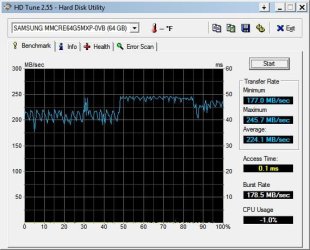
Here is my Patriot M28 64-G (using the evil :devil: forbidden unapproved (at least by patriot)VBM19C1Q firmware) in Win 7 64-bit (optimized mine further for SSD)...

HDTune-01082010.jpg
 

My Computer

Computer Manufacturer/Model Number
HP DV7-2270US
OS
Windows 7 64-bit
CPU
Intel Core 2 quad (2000MHZ, 4 core)
Motherboard
HP
Memory
4 Gig
Graphics Card(s)
ATI HD4650
Sound Card
IDT HD and ATI HD
Monitor(s) Displays
17" wide laptop and 65" secondary (for 'work' :) )
Screen Resolution
1600X900
Hard Drives
Patriot 64-Gig M28 SSD in bay 1
Seagate ST9500420AS 500 Gig in bay 2(laptop)
Case
HP Laptop
Internet Speed
T3
Hmm, how come it jerks around so much. Usually it is pretty much a flat line. And 2ms access time sounds very high - it should be in the nanosec range (which this program cannot show, it usually shows 0.0ms or 0.1ms instead). Maybe your unapproved firmware is not all that good for the bit.
 

My Computer

Computer Manufacturer/Model Number
HP, Dell, Gateway, Toshiba - 4 laptops and 2 desktops
OS
Vista, Windows7, Mint Mate, Zorin, Windows 8
CPU
from 1.6GHz Duo to i7
Monitor(s) Displays
2x HP w2207
Hard Drives
5x HDD, 7x SSD, 12x Externals
Keyboard
with trackball - no mices
Mouse
Trackball mice
Internet Speed
DSL 6000
Samsung based SSD has always had the jagged line from HDTune. My guess is that it is the 128M cache... The older firmware did not have trim support in Win 7... This run was done 10 minutes after filling up the drive and deleting the file to test trim support. When I did it with the old version, reads went down to 100 MBS and were a lot 'spikier'. Still fast! (7.2 Win experience... Ya, could be better)
ALTHOUGH.... A few more charges on the CC and I can get an Intel X25 drive with the points.....:D

PLUS... This is on my laptop with the MS AHCI drivers with 3 VMs running in the background.
 

My Computer

Computer Manufacturer/Model Number
HP DV7-2270US
OS
Windows 7 64-bit
CPU
Intel Core 2 quad (2000MHZ, 4 core)
Motherboard
HP
Memory
4 Gig
Graphics Card(s)
ATI HD4650
Sound Card
IDT HD and ATI HD
Monitor(s) Displays
17" wide laptop and 65" secondary (for 'work' :) )
Screen Resolution
1600X900
Hard Drives
Patriot 64-Gig M28 SSD in bay 1
Seagate ST9500420AS 500 Gig in bay 2(laptop)
Case
HP Laptop
Internet Speed
T3
Samsung based SSD has always had the jagged line from HDTune. My guess is that it is the 128M cache... The older firmware did not have trim support in Win 7... This run was done 10 minutes after filling up the drive and deleting the file to test trim support. When I did it with the old version, reads went down to 100 MBS and were a lot 'spikier'. Still fast!
ALTHOUGH.... A few more charges on the CC and I can get an Intel X25 drive with the points.....:D

PLUS... This is on my laptop with the MS AHCI drivers with 3 VMs running in the background.

Understand. Trim is worth having. I had to mail my OCZ Vertex to OCZ to upgrade it to FW 1.4. My firmware level was so old, I could not flash it myself. But they did it free of charge - even paid the return postage. But on this system I have an 80GB Intel.
 

My Computer

Computer Manufacturer/Model Number
HP, Dell, Gateway, Toshiba - 4 laptops and 2 desktops
OS
Vista, Windows7, Mint Mate, Zorin, Windows 8
CPU
from 1.6GHz Duo to i7
Monitor(s) Displays
2x HP w2207
Hard Drives
5x HDD, 7x SSD, 12x Externals
Keyboard
with trackball - no mices
Mouse
Trackball mice
Internet Speed
DSL 6000
I think the 0.2ms is actually accurate..... I have seen quite a few that reported 0.0ms with HDTune that got worse read performance than my hard drive... The fastest theoretical access speed would be limited to just how many clock ticks it takes to execute the command plus drive speed plus overhead, so it could never be 0.0.. Must be the way some MFGRs do the caching.... For me, HDTune numbers are only a reference in the reads and I take the other stats with a grain of salt.:cool:
 

My Computer

Computer Manufacturer/Model Number
HP DV7-2270US
OS
Windows 7 64-bit
CPU
Intel Core 2 quad (2000MHZ, 4 core)
Motherboard
HP
Memory
4 Gig
Graphics Card(s)
ATI HD4650
Sound Card
IDT HD and ATI HD
Monitor(s) Displays
17" wide laptop and 65" secondary (for 'work' :) )
Screen Resolution
1600X900
Hard Drives
Patriot 64-Gig M28 SSD in bay 1
Seagate ST9500420AS 500 Gig in bay 2(laptop)
Case
HP Laptop
Internet Speed
T3
OK... Here is my latest HDTune... The reason my other screenshot was so wierd is that I was running HDTune on my boot disk with everything running.
Here it is when running in safe mode (no virus scanner slowing it down (Darn MS virus scanner!)):
HDT01252010SM.jpg
Better??? :devil2:
Ok... Little more tweaks to the M28... New numbers from top to bottom:
179.7, 246.1, 224.4, 0.1, 180.4, -1
 
Last edited:

My Computer

Computer Manufacturer/Model Number
HP DV7-2270US
OS
Windows 7 64-bit
CPU
Intel Core 2 quad (2000MHZ, 4 core)
Motherboard
HP
Memory
4 Gig
Graphics Card(s)
ATI HD4650
Sound Card
IDT HD and ATI HD
Monitor(s) Displays
17" wide laptop and 65" secondary (for 'work' :) )
Screen Resolution
1600X900
Hard Drives
Patriot 64-Gig M28 SSD in bay 1
Seagate ST9500420AS 500 Gig in bay 2(laptop)
Case
HP Laptop
Internet Speed
T3
^^^^^Wow! nice numbers......245.7 is a good looking number, my Torqx has never been that high at it's peak!

Thanks for posting, keep us updated.
 

My Computer

Computer Manufacturer/Model Number
Keeps changing - (Custom)
OS
Windows 7 Professional x64
CPU
Intel Core i7 860
Motherboard
Gigabyte GA-P55-UD4P
Memory
4GB DDR3 Mushkin 1600Mhz @ 7-8-7-20
Graphics Card(s)
MSI GTS250 1GB DDR3 Twin Frozr
Sound Card
Onboard realtek
Monitor(s) Displays
Samsung SyncMaster 24" P2450 + Samsung 20" 2033
Screen Resolution
1920 X 1080 and 1600 X 900 (#2 system 1440 X 900)
Hard Drives
Patriot Inferno 120GB SSD + 3 WD Blue 640GB drives
PSU
Corsair 750 HX Modular
Case
Lancool PC-K62
Cooling
Cooler Master TX3 CPU cooler and 4-140mm and 1-120mm case
Keyboard
Gigabyte USB keyboard
Mouse
Microsoft wireless laser mouse 5000
Internet Speed
7 Mb down 1.5 up
Other Info
System #2: AMD Phenom II X6 1055T (Freezer 7 Pro cooler) - Gigabyte 880GMA-UD2H - WD 500GB Black - 9500GT (1GB) 500W OCZ modular PSU - Antec 200 case. System #3 (LapTop) Core 2 Duo T6670 - 320GB 7200RPM HD - 4GB DDR3 RAM.
Nice performance. I still wonder how that -1% CPU usage comes about. Several samples show that.
 

My Computer

Computer Manufacturer/Model Number
HP, Dell, Gateway, Toshiba - 4 laptops and 2 desktops
OS
Vista, Windows7, Mint Mate, Zorin, Windows 8
CPU
from 1.6GHz Duo to i7
Monitor(s) Displays
2x HP w2207
Hard Drives
5x HDD, 7x SSD, 12x Externals
Keyboard
with trackball - no mices
Mouse
Trackball mice
Internet Speed
DSL 6000
Nice performance. I still wonder how that -1% CPU usage comes about. Several samples show that.

I have looked around the net a bit. It's showing up everywhere. I am going to watch the task manager next time I do a test. It's not real great for SSDs to do HDTune tests over and over. It writes to them.......what I'm trying to avoid.
 

My Computer

Computer Manufacturer/Model Number
Keeps changing - (Custom)
OS
Windows 7 Professional x64
CPU
Intel Core i7 860
Motherboard
Gigabyte GA-P55-UD4P
Memory
4GB DDR3 Mushkin 1600Mhz @ 7-8-7-20
Graphics Card(s)
MSI GTS250 1GB DDR3 Twin Frozr
Sound Card
Onboard realtek
Monitor(s) Displays
Samsung SyncMaster 24" P2450 + Samsung 20" 2033
Screen Resolution
1920 X 1080 and 1600 X 900 (#2 system 1440 X 900)
Hard Drives
Patriot Inferno 120GB SSD + 3 WD Blue 640GB drives
PSU
Corsair 750 HX Modular
Case
Lancool PC-K62
Cooling
Cooler Master TX3 CPU cooler and 4-140mm and 1-120mm case
Keyboard
Gigabyte USB keyboard
Mouse
Microsoft wireless laser mouse 5000
Internet Speed
7 Mb down 1.5 up
Other Info
System #2: AMD Phenom II X6 1055T (Freezer 7 Pro cooler) - Gigabyte 880GMA-UD2H - WD 500GB Black - 9500GT (1GB) 500W OCZ modular PSU - Antec 200 case. System #3 (LapTop) Core 2 Duo T6670 - 320GB 7200RPM HD - 4GB DDR3 RAM.
I wonder why my SSD numbers are so much better in safe mode than normal mode in Windows 7.... Still trying to analyze what different is running that would account for the differences. Something is definately odd, or is it supposed to be this way? Any ideas?:p
 

My Computer

Computer Manufacturer/Model Number
HP DV7-2270US
OS
Windows 7 64-bit
CPU
Intel Core 2 quad (2000MHZ, 4 core)
Motherboard
HP
Memory
4 Gig
Graphics Card(s)
ATI HD4650
Sound Card
IDT HD and ATI HD
Monitor(s) Displays
17" wide laptop and 65" secondary (for 'work' :) )
Screen Resolution
1600X900
Hard Drives
Patriot 64-Gig M28 SSD in bay 1
Seagate ST9500420AS 500 Gig in bay 2(laptop)
Case
HP Laptop
Internet Speed
T3
I wonder why my SSD numbers are so much better in safe mode than normal mode in Windows 7.... Still trying to analyze what different is running that would account for the differences. Something is definately odd, or is it supposed to be this way? Any ideas?:p

SafeMode uses default drivers ;)
 
I wonder why my SSD numbers are so much better in safe mode than normal mode in Windows 7.... Still trying to analyze what different is running that would account for the differences. Something is definately odd, or is it supposed to be this way? Any ideas?:p

SafeMode uses default drivers ;)

Uses the same drivers on my machine... I checked...
I finally ran procmon while HDTune was running... It is all the little things that run (like services, etc) that sive the apparent differences. Perhaps we should do our bench-marking in safe mode to keep everyone even as far as the OS goes?

And yes, I run with minimal services for what I do... BUT I like the Windows 7 look, so will put up with slower benchmark but faster 'feel'. :)

As far as the -1 processor usage goes, it looks like HDTune sends the ATA command to read and lets the controller do the work so HDTune is not consuming any real measurable processor time. I think the author needed to add an if statement... If <0 then 0.
 

My Computer

Computer Manufacturer/Model Number
HP DV7-2270US
OS
Windows 7 64-bit
CPU
Intel Core 2 quad (2000MHZ, 4 core)
Motherboard
HP
Memory
4 Gig
Graphics Card(s)
ATI HD4650
Sound Card
IDT HD and ATI HD
Monitor(s) Displays
17" wide laptop and 65" secondary (for 'work' :) )
Screen Resolution
1600X900
Hard Drives
Patriot 64-Gig M28 SSD in bay 1
Seagate ST9500420AS 500 Gig in bay 2(laptop)
Case
HP Laptop
Internet Speed
T3
This is where I'm at currently with my 60GB Vertex upgraded firmware w/ TRIM ...

hdtunebenchmarkoczverte.jpg


On an AMD 785G chipset (SB710) with a 9950 BE OC'ed ...

screenshot001na.jpg
 

My Computer

OS
Windows 7 Professional x64
CPU
AMD Phenom 9950 BE
Motherboard
Gigabyte GA-MA785G-UD3H
Memory
4x OCZ 2GB DDR2 800
Graphics Card(s)
HD 4670 1GB DDR2
Hard Drives
OCZ Vertex 60GB | WD Raptor 150GB | 2x WD Caviar 500GB
PSU
OCZ 600W
Case
Antec 300
Cooling
Zalman Cooler | 140mm + 4x 120mm
I was reading yesterday regarding SSD that the format will not be mainstream until 2012, this is to sort out the life logativity of the units. particularly to in conjunction with constant programs that perform short read/write sequences. I may be wrong, but is it not really the case that SSD is really more use at the moment for data storage rather than using as OS HD or projects that require constant read/write like audio (DAWS) and rendering?

Just a thought of what I read
 

My Computer

Computer Manufacturer/Model Number
EVGA X55
OS
Windows 7 Ultimate x64
CPU
i7920 2.66ghz
Motherboard
MSI
Memory
12gb Triple DDr
Graphics Card(s)
ATI HD4870
Sound Card
RME Fireface 800
Monitor(s) Displays
Samsung 22" / Philips 17''
Screen Resolution
1650x1080
Hard Drives
OCX SSD Vertex2
Maxtor Raptor
Samsung
PSU
Silent 650w
Case
Custom designed SilentCase
Cooling
Air
Keyboard
Microsoft Digital Media Pro Keyboard
Mouse
Logitech
Internet Speed
50MB Virgin
Other Info
I'm no Pro but try to learn quickly!
2012 is the year "they" say SSDs will become price competitive (or not price prohibitive) You can pretty much do anything with an SSD now you would like. They're just expensive.

There are some problems, but new controllers are coming out every few months to combat the problems. They are ready for prime time now.....just have to spend a lot of money.
 

My Computer

Computer Manufacturer/Model Number
Keeps changing - (Custom)
OS
Windows 7 Professional x64
CPU
Intel Core i7 860
Motherboard
Gigabyte GA-P55-UD4P
Memory
4GB DDR3 Mushkin 1600Mhz @ 7-8-7-20
Graphics Card(s)
MSI GTS250 1GB DDR3 Twin Frozr
Sound Card
Onboard realtek
Monitor(s) Displays
Samsung SyncMaster 24" P2450 + Samsung 20" 2033
Screen Resolution
1920 X 1080 and 1600 X 900 (#2 system 1440 X 900)
Hard Drives
Patriot Inferno 120GB SSD + 3 WD Blue 640GB drives
PSU
Corsair 750 HX Modular
Case
Lancool PC-K62
Cooling
Cooler Master TX3 CPU cooler and 4-140mm and 1-120mm case
Keyboard
Gigabyte USB keyboard
Mouse
Microsoft wireless laser mouse 5000
Internet Speed
7 Mb down 1.5 up
Other Info
System #2: AMD Phenom II X6 1055T (Freezer 7 Pro cooler) - Gigabyte 880GMA-UD2H - WD 500GB Black - 9500GT (1GB) 500W OCZ modular PSU - Antec 200 case. System #3 (LapTop) Core 2 Duo T6670 - 320GB 7200RPM HD - 4GB DDR3 RAM.
I was reading yesterday regarding SSD that the format will not be mainstream until 2012, this is to sort out the life logativity of the units. particularly to in conjunction with constant programs that perform short read/write sequences. I may be wrong, but is it not really the case that SSD is really more use at the moment for data storage rather than using as OS HD or projects that require constant read/write like audio (DAWS) and rendering?

Just a thought of what I read
SSD's are easily on par with spindle based hard drives in terms of being ready to host the OS. They are now at least as reliable as mechanical hard drives. There are a few things you need to pay attention to when using them, although its getting to the point where it's on par with spindle drives, which have their own set of maintenance issues. As nate says, the only real barrier now is price. Its definitely in the luxury/enthusiast class of computer hardware right now. Hopefully this will change in the next year or two.

You have to be careful when reading articles on SSD's. The technology is in a period of rapid change right now. In many cases, what was true just six month ago, is no longer applicable today.
 

My Computer

Computer Manufacturer/Model Number
Rivendell Enterprises
OS
Win 7 Pro x64
CPU
Intel i7-920
Motherboard
MSI Pro-E
Memory
6 GB Corsair Dominator
Graphics Card(s)
Radeon HD 5870
Sound Card
Asus D2X
Monitor(s) Displays
Asus 25.5" LCD
Screen Resolution
1920x1200
Hard Drives
Intel 160 GB G2 SSD.
A few TBs worth of Seagate's and WD's
PSU
Corsair 750
Case
Cooler Master HAF932
Keyboard
Logitech MX-5500
Mouse
Logitech MX-5500
Internet Speed
FIOS
Yeah and even among all the currently selling SSDs the technology ranges widly. Some are current and robust and there are still others for sale that have all the same old problems.

Definately an area to research before buying.

The Intel drives and the OCZ Vertex drives seem top notch (I have an Intel one). There may be others that have caught up as well, But definately research and seek out the good reivew sites for reviews of any particular model before buying.
 

My Computer

Computer Manufacturer/Model Number
Scratch built
OS
Windows 7 x64 Ultimate
CPU
i7 960
Motherboard
Asus P6X58D
Memory
12 Gig Corsair Dominator
Graphics Card(s)
Nvidia 480
Sound Card
Maudio Delta 44 + breakout box
Monitor(s) Displays
Dell UltraSharp U2410 24in and Samsung 21 dual monitors
Screen Resolution
1920x1200 and 1280x1024
Hard Drives
Primary: Intel X-25M G2 160G SSD
Secondary: Segate baracuda 1.0 TB
HDs in AHCI mode.
PSU
Corasair TX850
Case
Cooler Master HAF
Cooling
Corsair H50
Keyboard
Logitech G15 + N52 game pad
Mouse
Logitech MX518
Internet Speed
15kbs down 4.5kbps up
Other Info
WEI 7.6
CPU & RAM 7.6
Graphics 7.9
Hard disk 7.7
Status
Not open for further replies.
Back
Top