Show us your SSD performance

Status
Not open for further replies.
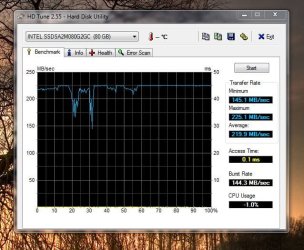
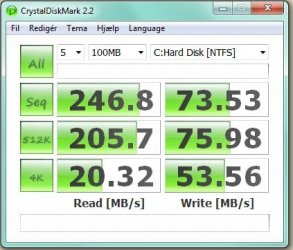
Thanks for the replies guys, I have been trying to find out what people are running (IDE - ACHI) and what kind of bandwidth they are getting.

I've been having trouble getting my Adobe CS3 products to work well in ACHI mode so I switched back to IDE.
Since I did, I reran the test to compare...

ACHI on the left and IDE on the right...Interesting, huh?
 

Attachments

  • ssd_test.JPG
    ssd_test.JPG
    83.2 KB · Views: 58
  • ssd_test_2.JPG
    ssd_test_2.JPG
    69.3 KB · Views: 56

My Computer

OS
Windows 7 Profesional 64bit
CPU
AMD Phenom II X4 965 - 3.99 GHz
Motherboard
ASRock A780GXE
Memory
8GB DDR2 1066 Dual Channel
Graphics Card(s)
ATI Radeon HD 3650
Sound Card
Realtek ALC888 (on board)
Monitor(s) Displays
Acer 22" wide and Acer 17"
Screen Resolution
1680x1050 and 1280x1024
Hard Drives
Intel 80G SSD G2, WD1001FALS, WD1001FALS, WD1001FALS, Cavarlry 500GB external
PSU
Ultra LSP650 650w
Case
? something I had
Cooling
AeroFlow FX92
Keyboard
Logitech
Mouse
Logitech
Internet Speed
ATT DSL top level
Thanks for the replies guys, I have been trying to find out what people are running (IDE - ACHI) and what kind of bandwidth they are getting.

I've been having trouble getting my Adobe CS3 products to work well in ACHI mode so I switched back to IDE.
Since I did, I reran the test to compare...

ACHI on the left and IDE on the right...Interesting, huh?
You should remember that that program is NOT intended for SSDs.

This should be looked at if anyone has an SSD: Guide Windows 7 Tweaks & Utilities - OCZ Forum

Also, this benchmark would be the most accurate for SSDs (Built for them) : As SSD

Single member raid will give you the best performance in the 4k and 4k64bit (real world)

Also, is your power plan set to max performace?

Why isnt this stickedm hdd and a ssd result sticky....
 

My Computer

OS
Windows 7 PRO x64
CPU
Phenom II 1090T @ 4.00GHz
Motherboard
Crosshair IV Formula
Memory
8gb DDR3
Graphics Card(s)
1x ATI Diamond 5850
Monitor(s) Displays
50in HDTV (HDMI)
Screen Resolution
1080P
Hard Drives
2x 1TB barracuda
1x 1TB WD Black
1x 2TB WD
1x OCZ Vertex 2 40GB
PSU
1000w Xion
Case
Armor+ VH6000BWS
Cooling
W/C
Internet Speed
60Mbps down, 7 up
Thanks for the replies guys, I have been trying to find out what people are running (IDE - ACHI) and what kind of bandwidth they are getting.

I've been having trouble getting my Adobe CS3 products to work well in ACHI mode so I switched back to IDE.
Since I did, I reran the test to compare...

ACHI on the left and IDE on the right...Interesting, huh?

That IS interesting. I have had the same type of results. Mine has a little higher average in IDE but a higher maximum on AHCI. I know Patriot recommends IDE for running SSDs and I think OCZ does too.

Thanks for sharing.

I think this thread should be a sticky but I am not a moderator.......
 

My Computer

Computer Manufacturer/Model Number
Keeps changing - (Custom)
OS
Windows 7 Professional x64
CPU
Intel Core i7 860
Motherboard
Gigabyte GA-P55-UD4P
Memory
4GB DDR3 Mushkin 1600Mhz @ 7-8-7-20
Graphics Card(s)
MSI GTS250 1GB DDR3 Twin Frozr
Sound Card
Onboard realtek
Monitor(s) Displays
Samsung SyncMaster 24" P2450 + Samsung 20" 2033
Screen Resolution
1920 X 1080 and 1600 X 900 (#2 system 1440 X 900)
Hard Drives
Patriot Inferno 120GB SSD + 3 WD Blue 640GB drives
PSU
Corsair 750 HX Modular
Case
Lancool PC-K62
Cooling
Cooler Master TX3 CPU cooler and 4-140mm and 1-120mm case
Keyboard
Gigabyte USB keyboard
Mouse
Microsoft wireless laser mouse 5000
Internet Speed
7 Mb down 1.5 up
Other Info
System #2: AMD Phenom II X6 1055T (Freezer 7 Pro cooler) - Gigabyte 880GMA-UD2H - WD 500GB Black - 9500GT (1GB) 500W OCZ modular PSU - Antec 200 case. System #3 (LapTop) Core 2 Duo T6670 - 320GB 7200RPM HD - 4GB DDR3 RAM.
Hi guys,
That's good info on the OCZ site. Some of it conflicts with suggestions here (like setting the number of processors at boot) but it's good information.

It can be miserable trying to find anything on the OCZ Forums but I think they left off recommending IDE with native MS drivers for W7 (with the new firmware that supports W7 TRIM). That doesn't help with my 2x30GB RAID0 because I need to use Matrix Storage Manager and AHCI to turn on write-back cache.

Nate, I think we've discussed that the Torx and the Vertex use essentially the same Indilinx controller? Has Patriot recently released a new firmware to support TRIM in W7?
Tom
 

My Computer

Computer type
PC/Desktop
Computer Manufacturer/Model Number
Dell: XPS 420 (2), XPS M1330 (several), XPS 14z, Mini 9, Mini 10v
OS
W8 Pro, W7 Ultimate, XP Pro x64, Vista x64, Ubuntu
CPU
Q6600, Q6700, T7500, T7500, N270, N270
Motherboard
Dell
Memory
8GB, 8GB, 4GB, 4GB, 2GB, 2GB
Graphics Card(s)
ATI, nVidia, nVidia, nVidia, Intel, Intel
Monitor(s) Displays
Dell 2408WFP
Hard Drives
A drawer full. OCZ Vertex's in RAID 0. Vertex 3's, Vertex 4, Samsung 830's, Samsung 840's, Intel 330. Don't use dino drives any more except for servers.
Keyboard
Logitech Wave
Internet Speed
29 Mbps DL / .95 Mbps UL
Other Info
New project(2013)...Another low power server. Zotac H67ITX, i3-2100T, Windows Server 2012 Essentials on Samsung SSD.
Previous project...Low power (38-40 watts using Kill-a-Watt) Windows Home Server. Zotac ION (Atom 330, GeForce9400), 4GB RAM, 2x2TB WD Green, IN WIM miniITX Case. Fits on a shelf in laundry closet, practically silent.
I run my SSD (Intel) in IDE mode. When I run AHCI, my machine takes an extra 8-10 seconds during the POST process to initialize and bring up the AHCI drive. Since that 8-10 seconds impacts me during every single boot, I didn't feel any extra performance on AHCI would get me that time back.
 

My Computer

Computer Manufacturer/Model Number
Self-Built in July 2009
OS
Windows 7 Ultimate x64
CPU
Intel Q9550 2.83Ghz OC'd to 3.40Ghz
Motherboard
Gigabyte GA-EP45-UD3R rev. 1.1, F12 BIOS
Memory
8GB G.Skill PI DDR2-800, 4-4-4-12 timings
Graphics Card(s)
EVGA 1280MB Nvidia GeForce GTX570
Sound Card
Realtek ALC899A 8 channel onboard audio
Monitor(s) Displays
23" Acer x233H
Screen Resolution
1920x1080
Hard Drives
Intel X25-M 80GB Gen 2 SSD
Western Digital 1TB Caviar Black, 32MB cache. WD1001FALS
PSU
Corsair 620HX modular
Case
Antec P182
Cooling
stock
Keyboard
ABS M1 Mechanical
Mouse
Logitech G9 Laser Mouse
Internet Speed
15/2 cable modem
Other Info
Windows and Linux enthusiast. Logitech G35 Headset.
I run my SSD (Intel) in IDE mode. When I run AHCI, my machine takes an extra 8-10 seconds during the POST process to initialize and bring up the AHCI drive. Since that 8-10 seconds impacts me during every single boot, I didn't feel any extra performance on AHCI would get me that time back.

This may not help and you might have even tried it already but the OCZ forums are filled with suggestions to clear the NVRAM (particularly after an SSD firmware flash). That sometimes clears the computer BIOS' "confusion" and brings back the normal time in POST (even in AHCI mode).
 

My Computer

Computer type
PC/Desktop
Computer Manufacturer/Model Number
Dell: XPS 420 (2), XPS M1330 (several), XPS 14z, Mini 9, Mini 10v
OS
W8 Pro, W7 Ultimate, XP Pro x64, Vista x64, Ubuntu
CPU
Q6600, Q6700, T7500, T7500, N270, N270
Motherboard
Dell
Memory
8GB, 8GB, 4GB, 4GB, 2GB, 2GB
Graphics Card(s)
ATI, nVidia, nVidia, nVidia, Intel, Intel
Monitor(s) Displays
Dell 2408WFP
Hard Drives
A drawer full. OCZ Vertex's in RAID 0. Vertex 3's, Vertex 4, Samsung 830's, Samsung 840's, Intel 330. Don't use dino drives any more except for servers.
Keyboard
Logitech Wave
Internet Speed
29 Mbps DL / .95 Mbps UL
Other Info
New project(2013)...Another low power server. Zotac H67ITX, i3-2100T, Windows Server 2012 Essentials on Samsung SSD.
Previous project...Low power (38-40 watts using Kill-a-Watt) Windows Home Server. Zotac ION (Atom 330, GeForce9400), 4GB RAM, 2x2TB WD Green, IN WIM miniITX Case. Fits on a shelf in laundry closet, practically silent.
This may not help and you might have even tried it already but the OCZ forums are filled with suggestions to clear the NVRAM (particularly after an SSD firmware flash). That sometimes clears the computer BIOS' "confusion" and brings back the normal time in POST (even in AHCI mode).

Thanks...but it's not that anything is broken. It's simply the way that my Gigabyte motherboard initializes the SATA interfaces when AHCI mode is enabled. I think it's even discussed in my manual. So, since I saw next to no performance gain with it enabled, but slower boots each time, I simply stuck with IDE mode.
 

My Computer

Computer Manufacturer/Model Number
Self-Built in July 2009
OS
Windows 7 Ultimate x64
CPU
Intel Q9550 2.83Ghz OC'd to 3.40Ghz
Motherboard
Gigabyte GA-EP45-UD3R rev. 1.1, F12 BIOS
Memory
8GB G.Skill PI DDR2-800, 4-4-4-12 timings
Graphics Card(s)
EVGA 1280MB Nvidia GeForce GTX570
Sound Card
Realtek ALC899A 8 channel onboard audio
Monitor(s) Displays
23" Acer x233H
Screen Resolution
1920x1080
Hard Drives
Intel X25-M 80GB Gen 2 SSD
Western Digital 1TB Caviar Black, 32MB cache. WD1001FALS
PSU
Corsair 620HX modular
Case
Antec P182
Cooling
stock
Keyboard
ABS M1 Mechanical
Mouse
Logitech G9 Laser Mouse
Internet Speed
15/2 cable modem
Other Info
Windows and Linux enthusiast. Logitech G35 Headset.
Not trying to offend... just curious!

What about the price you pay for that performance?

Personally, I cant see spending the outrageous prices being asked (now) for SSD's. True, like everything else in the PC/Electronics world economies of scale will inevitably kick in and the prices will drop. That's when I will switch... probably when OEM start putting them in new systems as standard practice.

Currently on newegg I can get a single 120GB SSD for an average price of approx $400.00 USD (price ranges from $255-$1285), or I can buy over 4TB of mechanical drives for the same price! That's bang for the buck performance!

Those of you running SSD's... are you running them in laptops where there is a strong need, in a desktop used for power computing/gaming, or did you all just win the lottery?
:eek:
 

My Computer

Computer Manufacturer/Model Number
Homebrew PC - "Alpha_Dawg"
OS
Windows 7 Ultimate 64 bit Steve Ballmer Signature Edition
CPU
Intel Core 2 Quad - Q9550 - 2.83GHz stock - OC'd to 3.6GHz
Motherboard
Gigabyte EP45-UD3P
Memory
4GB DDR2 800MHz (PC6400) OCZ Reaper
Graphics Card(s)
Nvidia GE Force 8800 GTS
Sound Card
Asus Xonar DX
Monitor(s) Displays
Samsung SyncMaster 2333HD
Screen Resolution
1920 x 1080
Hard Drives
WD Caviar Black 750GB - 7200RPM - 32MB cache
WD Caviar Green 1.5TB - 5400RPM - 64MB cache
WD Caviar Green 2.0TB - 5400RPM - 64MB cache
PSU
PC Power & Cooling Silencer 750
Case
Gigabyte 3D Aurora
Cooling
Case is Air - 5ea. 120mm fans (mix of Arctic and Xigmatec)
Keyboard
MS Natural Wireless KB
Mouse
MS Wireless Mouse
Internet Speed
50 mbps down/5 mbps up
Other Info
AVerMedia - AVerTVHD G2 Dual Tuner Card
Personally I just saved some money and purchased one. It's the single most "mind-blowing" upgrade you can do to a PC. I run two of them. one in my desktop and one in my "backup" desktop. haha
 

My Computer

Computer Manufacturer/Model Number
Keeps changing - (Custom)
OS
Windows 7 Professional x64
CPU
Intel Core i7 860
Motherboard
Gigabyte GA-P55-UD4P
Memory
4GB DDR3 Mushkin 1600Mhz @ 7-8-7-20
Graphics Card(s)
MSI GTS250 1GB DDR3 Twin Frozr
Sound Card
Onboard realtek
Monitor(s) Displays
Samsung SyncMaster 24" P2450 + Samsung 20" 2033
Screen Resolution
1920 X 1080 and 1600 X 900 (#2 system 1440 X 900)
Hard Drives
Patriot Inferno 120GB SSD + 3 WD Blue 640GB drives
PSU
Corsair 750 HX Modular
Case
Lancool PC-K62
Cooling
Cooler Master TX3 CPU cooler and 4-140mm and 1-120mm case
Keyboard
Gigabyte USB keyboard
Mouse
Microsoft wireless laser mouse 5000
Internet Speed
7 Mb down 1.5 up
Other Info
System #2: AMD Phenom II X6 1055T (Freezer 7 Pro cooler) - Gigabyte 880GMA-UD2H - WD 500GB Black - 9500GT (1GB) 500W OCZ modular PSU - Antec 200 case. System #3 (LapTop) Core 2 Duo T6670 - 320GB 7200RPM HD - 4GB DDR3 RAM.
I wanted to improve performance on my desktoip. Obvious options were a) use a SSD as boot drive, b) replace motherboard, CPU, heatsink, and memory to upgrade to Core i7, or c) a new hardware RAID controller and four drives in RAID 0 for C:. The SSD was the least expensive of these options.

Performance has been delightful. Installing Windows XP from DVD to hard drive usually took me 45 minutes or so. Installing Windows 7 from USB to SSD took 11:50 mm:ss. When I boot the system, it takes 35 seconds before the hardware starts reading the MBR. Then it is only 19 seconds before I am logged in, startup apps are running, and the desktop is working. Windows XP from a Raptor was much slower. Even hardware prep prior to MBR reading was 8 to 10 seconds slower because the SATA drives were configured as RAID on XP and AHCI on Windows 7. (Why? Because Windows 7 didn't work correctly with SATA data drives configured as RAID0 and took forever to boot.)
 

My Computer

Computer Manufacturer/Model Number
home-built
OS
Win 7-32, XP Pro-32
CPU
Xeon 3070 (2.66 GHz)
Motherboard
Asus P5W DH Deluxe, BIOS 2901
Memory
4 GB
Graphics Card(s)
PowerColor ATI Radeon HD 5750 (fanless)
Sound Card
on-board
Monitor(s) Displays
Dell U2711
Screen Resolution
2560x1440
Hard Drives
All SATA:
ICH7R (AHCI): 1 Intel X-25M 80GB SSD, 2 Samsung HD103UJ 1TB, 1 Seagate ST3750330MS 750GB;
JMB363: Samsung SH-S223L DVD;
Promise TX4302: two mobile racks, normally powered off
PSU
Seasonic SS-650HT
Case
Antec P180
Cooling
Sunbeam Tuniq Tower 120, 4 120mm fans (variable rpm)
Keyboard
Lexmark IBM Type "M" - PS/2 connector
Mouse
Wacom Intous4, Logitech Wheel Mouse as backup
Internet Speed
Cable ~ 6 mbps
Other Info
DVD: Samsung SH-S223L (SATA),
SanDisk CompactFlash reader,
Epson R280 printer,
HP Laserjet 4100dtn,
Epson scanner,
NeatReceipts scanner

Laptops: Dell XPS 15 L501x, Dell E5420
Personally I just saved some money and purchased one. It's the single most "mind-blowing" upgrade you can do to a PC. I run two of them. one in my desktop and one in my "backup" desktop. haha

"Mindblowing" is the perfect description for it :D

Sure will be nice when they drop in price, but using one as a boot/primary app drive alone, even a small 60-80 gig one is a /major/ speed boost. Makes my 3.5 year old 6700 seem like a brand new machine. (A new nvidia 285 didn't hurt either).

Put off a new machine build for another couple years at this point.
 

My Computer

Computer Manufacturer/Model Number
Scratch built
OS
Windows 7 x64 Ultimate
CPU
i7 960
Motherboard
Asus P6X58D
Memory
12 Gig Corsair Dominator
Graphics Card(s)
Nvidia 480
Sound Card
Maudio Delta 44 + breakout box
Monitor(s) Displays
Dell UltraSharp U2410 24in and Samsung 21 dual monitors
Screen Resolution
1920x1200 and 1280x1024
Hard Drives
Primary: Intel X-25M G2 160G SSD
Secondary: Segate baracuda 1.0 TB
HDs in AHCI mode.
PSU
Corasair TX850
Case
Cooler Master HAF
Cooling
Corsair H50
Keyboard
Logitech G15 + N52 game pad
Mouse
Logitech MX518
Internet Speed
15kbs down 4.5kbps up
Other Info
WEI 7.6
CPU & RAM 7.6
Graphics 7.9
Hard disk 7.7
What about the price you pay for that performance? Personally, I cant see spending the outrageous prices being asked (now) for SSD's. True, like everything else in the PC/Electronics world economies of scale will inevitably kick in and the prices will drop.
The prices are the thing that is holding back widespread adoption of the technology. And prices have been dropping and will continue to do so. When I first started looking at the technology, the 80GB Intel drives were pushing nearly $600. Today, you can find the generation 2 of that drive for $250.

Currently on newegg I can get a single 120GB SSD for an average price of approx $400.00 USD (price ranges from $255-$1285), or I can buy over 4TB of mechanical drives for the same price! That's bang for the buck performance!
Well, 4TB of space is great if you need lots of storage. But I don't need that much space...it will simply sit there unused. However, with my SSD drive, I reap the benefits every single day of that drive. I boot faster, I scan for viruses and malware faster, I don't have to defrag, I don't run Prefetch, I don't have to have Windows search enabled, my games load almost instantly, and my machine shuts down in about 5 seconds.

Those of you running SSD's... are you running them in laptops where there is a strong need, in a desktop used for power computing/gaming, or did you all just win the lottery?
:eek:
I'm running mine in a desktop. I built the machine in July of 2009, and I went with a 1TB mechanical hard drive. While I had no qualms about my performance, being a Systems Engineer for a living and living and breathing technology, I had to find out for myself just how good/bad were these SSD drives. Once the price dropped to under $300 for the Intel X25-M G2 drive, it wasn't much more costly than a Raptor or Velociraptor drive..so I decided to splurge and ponied up $289 for my 80GB hard drive.

My overall opinion is that the drive is fantastic...but nowhere near necessary for most average computer users. The cost is simply prohibitive. But for a gamer, techie, or computer enthusiast..it's one of the most beneficial upgrades that you can make to most PC's. Lots of people invest money in new video cards to get a few more Frames Per Second, they upgrade from Dual core CPU's to Quad core CPU's to get more crunching power, they increase RAM hoping to see a nice return on investment. In some respects, they get some performance gains, but usually in the area of 2%-10%. With the SSD drive though, the performance gains are substantial and they come into play every second that you run your operating system. I think it speaks for itself that most people who have invested in the technology, generally don't try to persuade others against a purchase. There is often very little buyers regret with SSD drives.

 

My Computer

Computer Manufacturer/Model Number
Self-Built in July 2009
OS
Windows 7 Ultimate x64
CPU
Intel Q9550 2.83Ghz OC'd to 3.40Ghz
Motherboard
Gigabyte GA-EP45-UD3R rev. 1.1, F12 BIOS
Memory
8GB G.Skill PI DDR2-800, 4-4-4-12 timings
Graphics Card(s)
EVGA 1280MB Nvidia GeForce GTX570
Sound Card
Realtek ALC899A 8 channel onboard audio
Monitor(s) Displays
23" Acer x233H
Screen Resolution
1920x1080
Hard Drives
Intel X25-M 80GB Gen 2 SSD
Western Digital 1TB Caviar Black, 32MB cache. WD1001FALS
PSU
Corsair 620HX modular
Case
Antec P182
Cooling
stock
Keyboard
ABS M1 Mechanical
Mouse
Logitech G9 Laser Mouse
Internet Speed
15/2 cable modem
Other Info
Windows and Linux enthusiast. Logitech G35 Headset.
Yea, people don't realize how much they are waiting for their hard drive until they get an SSD. Even with the problems they have had, an Intel or Indilinx controlled SSD (Patriot Torqx, OCZ vertex, and many more) is just outstanding. Start putting $20 a week in jar and before you know it you will have enough to get a 80-128GB SSD. You'll never regret it.
 

My Computer

Computer Manufacturer/Model Number
Keeps changing - (Custom)
OS
Windows 7 Professional x64
CPU
Intel Core i7 860
Motherboard
Gigabyte GA-P55-UD4P
Memory
4GB DDR3 Mushkin 1600Mhz @ 7-8-7-20
Graphics Card(s)
MSI GTS250 1GB DDR3 Twin Frozr
Sound Card
Onboard realtek
Monitor(s) Displays
Samsung SyncMaster 24" P2450 + Samsung 20" 2033
Screen Resolution
1920 X 1080 and 1600 X 900 (#2 system 1440 X 900)
Hard Drives
Patriot Inferno 120GB SSD + 3 WD Blue 640GB drives
PSU
Corsair 750 HX Modular
Case
Lancool PC-K62
Cooling
Cooler Master TX3 CPU cooler and 4-140mm and 1-120mm case
Keyboard
Gigabyte USB keyboard
Mouse
Microsoft wireless laser mouse 5000
Internet Speed
7 Mb down 1.5 up
Other Info
System #2: AMD Phenom II X6 1055T (Freezer 7 Pro cooler) - Gigabyte 880GMA-UD2H - WD 500GB Black - 9500GT (1GB) 500W OCZ modular PSU - Antec 200 case. System #3 (LapTop) Core 2 Duo T6670 - 320GB 7200RPM HD - 4GB DDR3 RAM.
Just read the whole thread and it's hightly tempting to get an SSD now.
 

My Computer

Computer type
PC/Desktop
Computer Manufacturer/Model Number
Custom Built
OS
Windows 8.1 Pro x64
CPU
Intel Core i7 4790k
Motherboard
MSI Z97S Krait Edition
Memory
8GB Corsair Dominator 1600MHz
Graphics Card(s)
MSI TwinFrozr GeForce GTX770
Sound Card
ASUS Xonar DX/XD 7.1
Monitor(s) Displays
Dell 24" S2409W + Dell 20" E207WFP
Screen Resolution
1920x1080 + 1680x1050
Hard Drives
1x 120GB OCZ Agility 3, 1x 750GB Western Digital Caviar Black, 1x 1TB Western Digital Caviar Blue
PSU
Corsair HX850 modular
Case
Fractal Design Define R4
Cooling
Corsair H60 w/ twin Corsair SP120 fans
Keyboard
Logitech G510S Keyboard
Mouse
Logitech G500S Laser Mouse
Internet Speed
40Mbps
Antivirus
Microsoft Security Essentials
Browser
Google Chrome
Other Info
LG Blu-Ray player
It's the single most "mind-blowing" upgrade you can do to a PC.

Absolutely! There is no other upgrade that I've seen that even comes close. I have four OCZ Vertexs (Vertices??); two in RAID0 on my main desktop, one in one of my XPS laptops and one in my netbook. After you use one, its hard to labor through 55 second dino-drive reboot times when these reboot in 30-35 seconds.;)

And then there is the considerable increase in battery life for laptops.... I can get almost an hour more out of a 56 watt-hour battery on my M1330 compared with a good (high performance/power conserving) hard drive.
 

My Computer

Computer type
PC/Desktop
Computer Manufacturer/Model Number
Dell: XPS 420 (2), XPS M1330 (several), XPS 14z, Mini 9, Mini 10v
OS
W8 Pro, W7 Ultimate, XP Pro x64, Vista x64, Ubuntu
CPU
Q6600, Q6700, T7500, T7500, N270, N270
Motherboard
Dell
Memory
8GB, 8GB, 4GB, 4GB, 2GB, 2GB
Graphics Card(s)
ATI, nVidia, nVidia, nVidia, Intel, Intel
Monitor(s) Displays
Dell 2408WFP
Hard Drives
A drawer full. OCZ Vertex's in RAID 0. Vertex 3's, Vertex 4, Samsung 830's, Samsung 840's, Intel 330. Don't use dino drives any more except for servers.
Keyboard
Logitech Wave
Internet Speed
29 Mbps DL / .95 Mbps UL
Other Info
New project(2013)...Another low power server. Zotac H67ITX, i3-2100T, Windows Server 2012 Essentials on Samsung SSD.
Previous project...Low power (38-40 watts using Kill-a-Watt) Windows Home Server. Zotac ION (Atom 330, GeForce9400), 4GB RAM, 2x2TB WD Green, IN WIM miniITX Case. Fits on a shelf in laundry closet, practically silent.

Attachments

  • intel_SSD.JPG
    intel_SSD.JPG
    44.6 KB · Views: 37
  • intel_SSD_2.JPG
    intel_SSD_2.JPG
    44.7 KB · Views: 15

My Computer

OS
Windows 7 Ultimate x64
CPU
Intel E6850 3,0 running 3,6 Ghz
Motherboard
Gigabyte DS4 P35
Memory
2x2 and Gb Corsair PC6400 CAS5 - 4GB total
Graphics Card(s)
Nvidia Geforce 260GTX
Sound Card
Creative X-Fi Fata1ty Gamer Extreme
Monitor(s) Displays
Samsung 2493hm
Screen Resolution
1920*1200
Hard Drives
Intel X25-M SSD for system
2x 1Tb Samsung F1 as seperate discs
PSU
Zahlman 850HP
Case
Shg
Cooling
Evo 120
Keyboard
Logitech G15 (blue backlight)
Mouse
Logitech G5 laser
Internet Speed
25/25 mbit
Other Info
1 Samsung SATA dvd-burner
1 LiteOn SATA dvd-burner
My Kingston SSD's in RAID 0

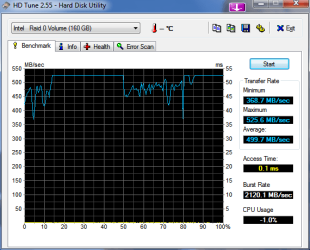
Just thought I'd post my SSD performance to add to the board. I have two Kingston 80GB Intel X-25M SSD's. I got these two SSD's back in June. Installed them in RAID 0. I got a firmware update back in July. As you can see they are nice and fast! I just upgraded from Vista 64 to Win 7. So far I haven't noticed any decrease in performance since installing them or doing the upgrade to Win 7. In fact Win 7 seems to be a bit quicker.

If your looking to do an upgrade that really makes a difference SSD's are the way to go!!:D

Luca

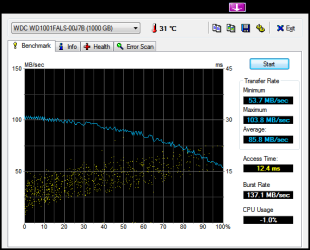
I also included my Western Digital 1TB Caviar Black HD performance for comparison. Actually, there is no comparison.;)
 

Attachments

  • HDTune_Benchmark_Intel___Raid_0_Volume.png
    HDTune_Benchmark_Intel___Raid_0_Volume.png
    48.7 KB · Views: 51
  • HDTune_Benchmark_WDC_WD1001FALS-00J7B.png
    HDTune_Benchmark_WDC_WD1001FALS-00J7B.png
    24.1 KB · Views: 34

My Computer

Computer Manufacturer/Model Number
Asus
OS
Windows 7
CPU
Core I7 920
Motherboard
P6T Deluxe V2
Memory
6 GB Corsair
Graphics Card(s)
ATI 4870X2
Monitor(s) Displays
Samsung SyncMaster 2333HD
Screen Resolution
1920 X 1080
Hard Drives
2 Kingston 80GB Intel X25M SSD drives in RAID 0
1 Western Digital 1TB Caviar Black
PSU
Corsair 1000
Case
CoolerMaster HAF
lucaa09, that RAID volume with your 2 80GB Intel drives is beautiful!

Those numbers are something to behold. Thanks for posting them.
 

My Computer

Computer Manufacturer/Model Number
Keeps changing - (Custom)
OS
Windows 7 Professional x64
CPU
Intel Core i7 860
Motherboard
Gigabyte GA-P55-UD4P
Memory
4GB DDR3 Mushkin 1600Mhz @ 7-8-7-20
Graphics Card(s)
MSI GTS250 1GB DDR3 Twin Frozr
Sound Card
Onboard realtek
Monitor(s) Displays
Samsung SyncMaster 24" P2450 + Samsung 20" 2033
Screen Resolution
1920 X 1080 and 1600 X 900 (#2 system 1440 X 900)
Hard Drives
Patriot Inferno 120GB SSD + 3 WD Blue 640GB drives
PSU
Corsair 750 HX Modular
Case
Lancool PC-K62
Cooling
Cooler Master TX3 CPU cooler and 4-140mm and 1-120mm case
Keyboard
Gigabyte USB keyboard
Mouse
Microsoft wireless laser mouse 5000
Internet Speed
7 Mb down 1.5 up
Other Info
System #2: AMD Phenom II X6 1055T (Freezer 7 Pro cooler) - Gigabyte 880GMA-UD2H - WD 500GB Black - 9500GT (1GB) 500W OCZ modular PSU - Antec 200 case. System #3 (LapTop) Core 2 Duo T6670 - 320GB 7200RPM HD - 4GB DDR3 RAM.
Something I didn't know. Only MS storage drivers support TRIM. For all of you SSD guys out there. This is good to know. I just updated my Patriot Torqx to the 1819 F/W. TRIM is supposedly working right now in Windows 7. I didn't know Intel storage drivers didn't support it.

There’s a major problem with TRIM today. The only Windows storage drivers to support it are written by Microsoft. The Intel Matrix Storage Manager (IMSM) driver will not pass the TRIM instruction to your SSD. This means you can't use anything but the drivers that ship with Windows 7. To make matters worse, if you enable non-member RAID on an Intel motherboard the default Windows 7 driver is an older version of IMSM so TRIM won't work there either - even if you don't have a RAID array created. Your best bet is to install Windows 7 with your I/O controller in AHCI mode (for Intel chipsets) and don't install any storage drivers. Intel is working on an updated IMSM that will pass the TRIM instruction to SSDs but it won't be ready for at least a couple of months.

Source : Our friend Anand
 

My Computer

Computer Manufacturer/Model Number
Keeps changing - (Custom)
OS
Windows 7 Professional x64
CPU
Intel Core i7 860
Motherboard
Gigabyte GA-P55-UD4P
Memory
4GB DDR3 Mushkin 1600Mhz @ 7-8-7-20
Graphics Card(s)
MSI GTS250 1GB DDR3 Twin Frozr
Sound Card
Onboard realtek
Monitor(s) Displays
Samsung SyncMaster 24" P2450 + Samsung 20" 2033
Screen Resolution
1920 X 1080 and 1600 X 900 (#2 system 1440 X 900)
Hard Drives
Patriot Inferno 120GB SSD + 3 WD Blue 640GB drives
PSU
Corsair 750 HX Modular
Case
Lancool PC-K62
Cooling
Cooler Master TX3 CPU cooler and 4-140mm and 1-120mm case
Keyboard
Gigabyte USB keyboard
Mouse
Microsoft wireless laser mouse 5000
Internet Speed
7 Mb down 1.5 up
Other Info
System #2: AMD Phenom II X6 1055T (Freezer 7 Pro cooler) - Gigabyte 880GMA-UD2H - WD 500GB Black - 9500GT (1GB) 500W OCZ modular PSU - Antec 200 case. System #3 (LapTop) Core 2 Duo T6670 - 320GB 7200RPM HD - 4GB DDR3 RAM.
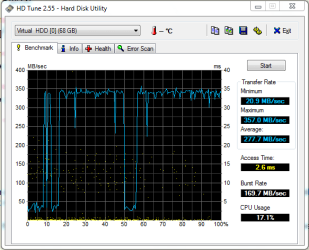
Hmm, could someone maybe explain these crazy numbers? I decided to run HDtune on my regular HD, a laptop drive, 200GB 7200rpm. I'm running windows 7 in a virtual machine with 2gb of ram and 2 cpu cores, and my HD speeds were about 100MB/s higher than the SSD scores:sarc:
Does anyone have any idea how this is possible? Thanks!
 

Attachments

  • hdspeed.PNG
    hdspeed.PNG
    41.2 KB · Views: 27

My Computer

Computer Manufacturer/Model Number
Apple Macbook Pro 4,1
OS
Windows 7
CPU
Intel Core 2 Duo Penryn 2.5GHz
Memory
4GB 667MHz
Graphics Card(s)
Nvidia 8600M
Sound Card
Realtek HD Onboard
Hard Drives
200GB 7200RPM
PSU
85W
Cooling
Fan
Status
Not open for further replies.
Back
Top