Show us your SSD performance

Status
Not open for further replies.
The write/erase cycle for SSD is limited, it could only stand for 1,000 to 10,000 write cycle or a maximum of 100,000 cycles. A conventional hard disk could stand 1-5 million write cycles. This means that the performance of the SSD will decrease during time and usage. ( is this true by any chance?)
 

My Computer My Computer

Computer Manufacturer/Model Number
Myself
OS
Windows 7 64bit
CPU
Core i5 2500k @ 4.5Ghz 1.34v
Motherboard
ASRock Z77 Extreme 6
Memory
Corsair XMS3 DDR3 1333MHz 8GB
Graphics Card(s)
MSI GTX 670
Sound Card
ASUS Xonar DS
Monitor(s) Displays
ASUS PB248Q
Screen Resolution
1920X1200
Hard Drives
SAMSUNG HD103SJ 1TB X2
SAMSUNG SSD 250GB
PSU
Cooler Master 750W
Case
Zalman Z9 plus
Cooling
standard
Mouse
Corsair M60
Internet Speed
10/1
This is true. And as the cell size gets smaller, the # of write cycles decreases unfortunately.

However, the firmware works around that using unallocated cells (much like a HD does in fact since they all contain inperfections as well). That combined with nternal ware levelling means that on todays 34nm SSDs you should get something like (I'm paraphrasing here) 20 gig of writing a day every day for 5 years straight.

Here is a quote talking about Intels x25-m drives (using cells with 5-10k write cycles):

"Using a write-amplification factor of 1.1 and a wear-leveling efficiency factor of 1.1, 20GB of write-erase per day for five years should consume only about 550 cycles on an 80GB X25-M."

Article here:
Intel's X25-M solid-state drive - The Tech Report - Page 1

So for the curent crop of SSDs, they should perform very well for a long time when used in most "normal" ways. If the drive is a temp cache drive used for some large database indexing or something then yes it would probably burn out pretty fast, like months instead of years.
 

My Computer My Computer

Computer Manufacturer/Model Number
Scratch built
OS
Windows 7 x64 Ultimate
CPU
i7 960
Motherboard
Asus P6X58D
Memory
12 Gig Corsair Dominator
Graphics Card(s)
Nvidia 480
Sound Card
Maudio Delta 44 + breakout box
Monitor(s) Displays
Dell UltraSharp U2410 24in and Samsung 21 dual monitors
Screen Resolution
1920x1200 and 1280x1024
Hard Drives
Primary: Intel X-25M G2 160G SSD
Secondary: Segate baracuda 1.0 TB
HDs in AHCI mode.
PSU
Corasair TX850
Case
Cooler Master HAF
Cooling
Corsair H50
Keyboard
Logitech G15 + N52 game pad
Mouse
Logitech MX518
Internet Speed
15kbs down 4.5kbps up
Other Info
WEI 7.6
CPU & RAM 7.6
Graphics 7.9
Hard disk 7.7
  • Like
Reactions: whs
Revodrive

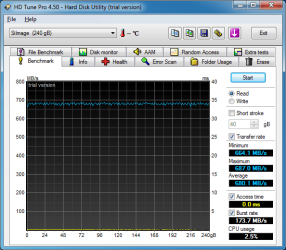
I just loaded everything on the new drive and tested it. I must say I have never seen a SSD this fast in my life!
 

Attachments

  • Revodrive.PNG
    Revodrive.PNG
    29.8 KB · Views: 24

My Computer My Computer

Computer type
PC/Desktop
Computer Manufacturer/Model Number
Self made
OS
windows 7 home premium 64, and Windows 10 64 bit
CPU
I7 940
Motherboard
ASUS P6TX58D Premium- BIOS VERSION 1402
Memory
12 GB Dominator 3 channel 1600
Graphics Card(s)
Radeon R9 Fury Nitro
Sound Card
Z1
Monitor(s) Displays
50 Inch Panasonic TV
Screen Resolution
1920x1080
Hard Drives
Main drive OCZ Revodrive V2 and 8 TB multi drives
PSU
Coolermaster 1000
Case
CoolerMaster 932
Cooling
Coolermaster Dual fan
Keyboard
mx 5500 revolution
Mouse
mx 5500 revolution
Internet Speed
12 mb
Browser
Chrome
Other Info
set up for 3D Blue Ray applications with a surround room of 12 speaker Definitive Technology and multi amps, main is driven by yamaha M-65
Amazing - I bet you have a lot of fun with the device.
 

My Computer My Computer

Computer Manufacturer/Model Number
HP, Dell, Gateway, Toshiba - 4 laptops and 2 desktops
OS
Vista, Windows7, Mint Mate, Zorin, Windows 8
CPU
from 1.6GHz Duo to i7
Monitor(s) Displays
2x HP w2207
Hard Drives
5x HDD, 7x SSD, 12x Externals
Keyboard
with trackball - no mices
Mouse
Trackball mice
Internet Speed
DSL 6000
I do the same old things...........................just faster! LOL
 

My Computer My Computer

Computer type
PC/Desktop
Computer Manufacturer/Model Number
Self made
OS
windows 7 home premium 64, and Windows 10 64 bit
CPU
I7 940
Motherboard
ASUS P6TX58D Premium- BIOS VERSION 1402
Memory
12 GB Dominator 3 channel 1600
Graphics Card(s)
Radeon R9 Fury Nitro
Sound Card
Z1
Monitor(s) Displays
50 Inch Panasonic TV
Screen Resolution
1920x1080
Hard Drives
Main drive OCZ Revodrive V2 and 8 TB multi drives
PSU
Coolermaster 1000
Case
CoolerMaster 932
Cooling
Coolermaster Dual fan
Keyboard
mx 5500 revolution
Mouse
mx 5500 revolution
Internet Speed
12 mb
Browser
Chrome
Other Info
set up for 3D Blue Ray applications with a surround room of 12 speaker Definitive Technology and multi amps, main is driven by yamaha M-65
I just loaded everything on the new drive and tested it. I must say I have never seen a SSD this fast in my life!

Those are some pretty impressive numbers. Thanks for sharing your experience with the drive.

Peace :cool:
 

My Computer My Computer

Computer type
PC/Desktop
Computer Manufacturer/Model Number
Custom built by me.
OS
Windows 10 Pro
CPU
Intel Core i7-4770K (3.5Ghz)
Motherboard
Gigabyte G1 Sniper 5 (F10 Bios)
Memory
32 gig Corsair Dominator Platinum (4x8Gig)
Graphics Card(s)
Sapphire Tri-X R9 Fury
Sound Card
Soundblaster ZXR
Monitor(s) Displays
NEC PA242W 24" LCD Monitor
Screen Resolution
1920 x 1200
Hard Drives
Primary - Samsung 850 Pro (512gig), Samsung 840 Pro (256gig), 2TB WD Caviar Black.
PSU
EVGA Supernova 1000 G2
Case
Cooler Master HAF X
Cooling
Corsair H100i with Corsair Air Series SP120 Quiet Fans
Keyboard
Logitech Wireless Wave
Mouse
Logitech Performance MX
Internet Speed
High Speed Cable
Antivirus
Norton Security
Browser
IE11
Other Info
Memory Timings - 1866MHz @ 9-9-9-27-1T @ 1.5 volts
I must say that have to thank the barefootkid for the ahci hack!
 

My Computer My Computer

Computer type
PC/Desktop
Computer Manufacturer/Model Number
Self made
OS
windows 7 home premium 64, and Windows 10 64 bit
CPU
I7 940
Motherboard
ASUS P6TX58D Premium- BIOS VERSION 1402
Memory
12 GB Dominator 3 channel 1600
Graphics Card(s)
Radeon R9 Fury Nitro
Sound Card
Z1
Monitor(s) Displays
50 Inch Panasonic TV
Screen Resolution
1920x1080
Hard Drives
Main drive OCZ Revodrive V2 and 8 TB multi drives
PSU
Coolermaster 1000
Case
CoolerMaster 932
Cooling
Coolermaster Dual fan
Keyboard
mx 5500 revolution
Mouse
mx 5500 revolution
Internet Speed
12 mb
Browser
Chrome
Other Info
set up for 3D Blue Ray applications with a surround room of 12 speaker Definitive Technology and multi amps, main is driven by yamaha M-65
I must say that have to thank the barefootkid for the ahci hack!

For future reference you can just enable AHCI in the BIOS before installing the OS on the affected drive. The hack usually comes in play if you don't do this before installing the OS, or if you have problems installing the OS with AHCI enabled in the BIOS, thus being forced to use IDE to get the OS to install.
 

My Computer My Computer

Computer type
PC/Desktop
Computer Manufacturer/Model Number
Custom built by me.
OS
Windows 10 Pro
CPU
Intel Core i7-4770K (3.5Ghz)
Motherboard
Gigabyte G1 Sniper 5 (F10 Bios)
Memory
32 gig Corsair Dominator Platinum (4x8Gig)
Graphics Card(s)
Sapphire Tri-X R9 Fury
Sound Card
Soundblaster ZXR
Monitor(s) Displays
NEC PA242W 24" LCD Monitor
Screen Resolution
1920 x 1200
Hard Drives
Primary - Samsung 850 Pro (512gig), Samsung 840 Pro (256gig), 2TB WD Caviar Black.
PSU
EVGA Supernova 1000 G2
Case
Cooler Master HAF X
Cooling
Corsair H100i with Corsair Air Series SP120 Quiet Fans
Keyboard
Logitech Wireless Wave
Mouse
Logitech Performance MX
Internet Speed
High Speed Cable
Antivirus
Norton Security
Browser
IE11
Other Info
Memory Timings - 1866MHz @ 9-9-9-27-1T @ 1.5 volts
I just loaded everything on the new drive and tested it. I must say I have never seen a SSD this fast in my life!

Hello Mike,

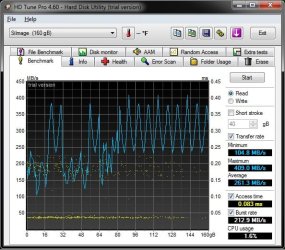
I have the RevoDrive X2 160GB, and I'm not hitting anywhere near that speed. I know it's a bit slower than the 240GB model, but shouldn't be that much.

I used the 64 KB block size while doing the test. Did you use a different size?

You have practically the same motherboard as I do. What PCI-E slots (1, 2, or 3) do you have your RevoDrive and graphics card in? I have the graphics card in PCI-E 1 (closest to CPU), and the RevoDrive in PCI-E 2 at 16x16x1.

Did you make any BIOS setting changes other than to AHCI?

Test using 64 KB block size:
RevoDrive_X2_160GB.jpg

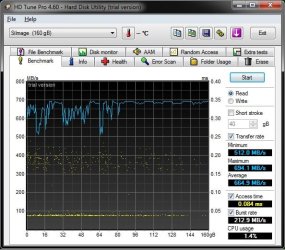
Test using 8 MB block size:
8MB.jpg
 

My Computer My Computer

Computer type
PC/Desktop
Computer Manufacturer/Model Number
Self built custom
OS
64-bit Windows 11 Pro for Workstations
CPU
Intel i7-8700K OC'd to 5 GHz
Motherboard
ASUS ROG Maximus XI Formula Z390
Memory
64 GB (4x16GB) G.SKILL TridentZ RGB DDR4 3600 MHz
Graphics Card(s)
ASUS ROG-STRIX-GTX1080TI-O11G-GAMING
Sound Card
Integrated
Monitor(s) Displays
2 x Samsung Odyssey G7 27"
Screen Resolution
2560x1440
Hard Drives
1TB Samsung 990 PRO M.2,
4TB Samsung 990 PRO PRO M.2,
TerraMaster F8 SSD Plus NAS
PSU
Seasonic Prime Titanium 850W
Case
Thermaltake Core P3
Cooling
Corsair Hydro H115i
Keyboard
Logitech wireless K800
Mouse
Logitech MX Master 4
Internet Speed
2 Gb/s Download and 100 Mb/s Upload
Antivirus
Malwarebyte Anti-Malware Premium
Browser
Google Chrome
Other Info
Logitech Z625 speaker system,
Logitech BRIO 4K Pro webcam,
HP Color LaserJet Pro MFP M477fdn,
APC SMART-UPS RT 1000 XL - SURT1000XLI,
Galaxy S23 Plus phone
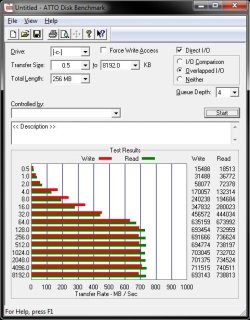
Shawn, I think HD Tune is not a good reliable tool for the measurements. It seems to do strange jerking things. I prefer Atto which gives more consistent results.
 

My Computer My Computer

Computer Manufacturer/Model Number
HP, Dell, Gateway, Toshiba - 4 laptops and 2 desktops
OS
Vista, Windows7, Mint Mate, Zorin, Windows 8
CPU
from 1.6GHz Duo to i7
Monitor(s) Displays
2x HP w2207
Hard Drives
5x HDD, 7x SSD, 12x Externals
Keyboard
with trackball - no mices
Mouse
Trackball mice
Internet Speed
DSL 6000
I ran this test in the 8 MB block size. The drive is in the 3rd PCIe slot. The Video card is in the 1st PCIe slot. I left the second as later I plan to get another video card to run along with the one I have now. I made a few changes in bios. I did not write the specifics down so I will have to go back into bios and do so then post them here. I did try a few different ways of loading the drive as I had to do a complete reinstall of the OS. Setting the drive to "idle" then going back in and changing the configuration to AHCI.

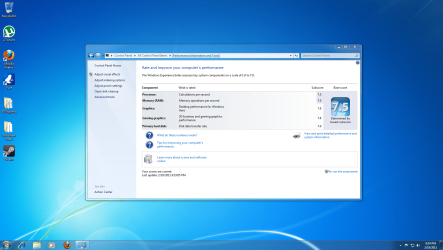
The regedit was already set to AHCI. I did find that this single change enhanced both the gaming and graphics by .1 in the windows experience.

There were some other changes in the Bios and I know one was setting the DDR3 to 1333 as it was defaulting at DDR3 1066. I am going to see how this runs for a bit then try it at DDR3 1600.
I also enabled a few settings that were set at disable, that part I have to look up. Turbo is enabled. Sorry I do not recall the exact changes from my head!
 

Attachments

  • INdex score.PNG
    INdex score.PNG
    369.2 KB · Views: 19

My Computer My Computer

Computer type
PC/Desktop
Computer Manufacturer/Model Number
Self made
OS
windows 7 home premium 64, and Windows 10 64 bit
CPU
I7 940
Motherboard
ASUS P6TX58D Premium- BIOS VERSION 1402
Memory
12 GB Dominator 3 channel 1600
Graphics Card(s)
Radeon R9 Fury Nitro
Sound Card
Z1
Monitor(s) Displays
50 Inch Panasonic TV
Screen Resolution
1920x1080
Hard Drives
Main drive OCZ Revodrive V2 and 8 TB multi drives
PSU
Coolermaster 1000
Case
CoolerMaster 932
Cooling
Coolermaster Dual fan
Keyboard
mx 5500 revolution
Mouse
mx 5500 revolution
Internet Speed
12 mb
Browser
Chrome
Other Info
set up for 3D Blue Ray applications with a surround room of 12 speaker Definitive Technology and multi amps, main is driven by yamaha M-65
Mike,

That's fine. I got close to what you had running it with a 8 MB block size.


Wolfgang (WHS),

Thank you. Here's what I got with ATTO.

ATTO.jpg
 

My Computer My Computer

Computer type
PC/Desktop
Computer Manufacturer/Model Number
Self built custom
OS
64-bit Windows 11 Pro for Workstations
CPU
Intel i7-8700K OC'd to 5 GHz
Motherboard
ASUS ROG Maximus XI Formula Z390
Memory
64 GB (4x16GB) G.SKILL TridentZ RGB DDR4 3600 MHz
Graphics Card(s)
ASUS ROG-STRIX-GTX1080TI-O11G-GAMING
Sound Card
Integrated
Monitor(s) Displays
2 x Samsung Odyssey G7 27"
Screen Resolution
2560x1440
Hard Drives
1TB Samsung 990 PRO M.2,
4TB Samsung 990 PRO PRO M.2,
TerraMaster F8 SSD Plus NAS
PSU
Seasonic Prime Titanium 850W
Case
Thermaltake Core P3
Cooling
Corsair Hydro H115i
Keyboard
Logitech wireless K800
Mouse
Logitech MX Master 4
Internet Speed
2 Gb/s Download and 100 Mb/s Upload
Antivirus
Malwarebyte Anti-Malware Premium
Browser
Google Chrome
Other Info
Logitech Z625 speaker system,
Logitech BRIO 4K Pro webcam,
HP Color LaserJet Pro MFP M477fdn,
APC SMART-UPS RT 1000 XL - SURT1000XLI,
Galaxy S23 Plus phone
It's reccomended that Sandforce drives use ATTO when testing.

I made a post about that here - http://www.sevenforums.com/hardware-devices/18229-show-us-your-ssd-performance-100.html#post1166247

SANDFORCE Disclaimer:
This benchmark uses non-compressible completely RANDOM data, so Sandforce drives won't produce "super-fast" numbers like they do in ATTO.
Also writing a whole bunch of non-compressible data to the drive quickly has reportedly pushed a few Sandforce drives into "write throttled" mode, basically Sandforce users have been warned
AS SSD Benchmark thread - Overclock.net - Overclocking.net

Impressive numbers btw :)
 

My Computer My Computer

Computer type
PC/Desktop
Computer Manufacturer/Model Number
Custom built by me.
OS
Windows 10 Pro
CPU
Intel Core i7-4770K (3.5Ghz)
Motherboard
Gigabyte G1 Sniper 5 (F10 Bios)
Memory
32 gig Corsair Dominator Platinum (4x8Gig)
Graphics Card(s)
Sapphire Tri-X R9 Fury
Sound Card
Soundblaster ZXR
Monitor(s) Displays
NEC PA242W 24" LCD Monitor
Screen Resolution
1920 x 1200
Hard Drives
Primary - Samsung 850 Pro (512gig), Samsung 840 Pro (256gig), 2TB WD Caviar Black.
PSU
EVGA Supernova 1000 G2
Case
Cooler Master HAF X
Cooling
Corsair H100i with Corsair Air Series SP120 Quiet Fans
Keyboard
Logitech Wireless Wave
Mouse
Logitech Performance MX
Internet Speed
High Speed Cable
Antivirus
Norton Security
Browser
IE11
Other Info
Memory Timings - 1866MHz @ 9-9-9-27-1T @ 1.5 volts
Mike,

That's fine. I got close to what you had running it with a 8 MB block size.


Wolfgang (WHS),

Thank you. Here's what I got with ATTO.

View attachment 142100
Shawn, Those are awsome numbers. Did you notice a significant performance improvement as compared to a regular SSD - e.g. a Vertex2?
 

My Computer My Computer

Computer Manufacturer/Model Number
HP, Dell, Gateway, Toshiba - 4 laptops and 2 desktops
OS
Vista, Windows7, Mint Mate, Zorin, Windows 8
CPU
from 1.6GHz Duo to i7
Monitor(s) Displays
2x HP w2207
Hard Drives
5x HDD, 7x SSD, 12x Externals
Keyboard
with trackball - no mices
Mouse
Trackball mice
Internet Speed
DSL 6000
It only seemed a tiny bit faster for the random read and writes of Windows 7 than with the Vertex 2, but there was a huge difference in file transfers and running virtual machines with the RevoDrive. It was like it was when going from a HDD to a SSD. :party:
 

My Computer My Computer

Computer type
PC/Desktop
Computer Manufacturer/Model Number
Self built custom
OS
64-bit Windows 11 Pro for Workstations
CPU
Intel i7-8700K OC'd to 5 GHz
Motherboard
ASUS ROG Maximus XI Formula Z390
Memory
64 GB (4x16GB) G.SKILL TridentZ RGB DDR4 3600 MHz
Graphics Card(s)
ASUS ROG-STRIX-GTX1080TI-O11G-GAMING
Sound Card
Integrated
Monitor(s) Displays
2 x Samsung Odyssey G7 27"
Screen Resolution
2560x1440
Hard Drives
1TB Samsung 990 PRO M.2,
4TB Samsung 990 PRO PRO M.2,
TerraMaster F8 SSD Plus NAS
PSU
Seasonic Prime Titanium 850W
Case
Thermaltake Core P3
Cooling
Corsair Hydro H115i
Keyboard
Logitech wireless K800
Mouse
Logitech MX Master 4
Internet Speed
2 Gb/s Download and 100 Mb/s Upload
Antivirus
Malwarebyte Anti-Malware Premium
Browser
Google Chrome
Other Info
Logitech Z625 speaker system,
Logitech BRIO 4K Pro webcam,
HP Color LaserJet Pro MFP M477fdn,
APC SMART-UPS RT 1000 XL - SURT1000XLI,
Galaxy S23 Plus phone
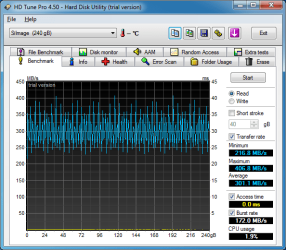
I reran the test today and here are the results from the 8 MB and 64 KB tests.

In bios I changed these settings. We do have the exact same MB Shawn.
Main: storage configuration set to AHCI
Advanced: Marvell storage controller set to AHCI Mode
Chipset: set to auto.
Plug and Play is set to no
Ai Tweaker: CPU spread spectrum to disable
PCIE spread spectrum to disable
Dram frequency set to DDR3-1600 MHZ
Power: ACPI 2.0 support is enabled

There are two things I noticed about this particular MB.
1- It defaults to 1066 MHZ
2- With the sata III plugged in this MB always looks at it first before the Revo. This also lowers the windows experience from a 7.9 to a 5.9 as I can only guess that program looks at the sata III. With the sata III unplugged then it goes back to a 7.9.
 

Attachments

  • 8 MB test.png
    8 MB test.png
    20.9 KB · Views: 6
  • 64 kb.png
    64 kb.png
    22.8 KB · Views: 7
Last edited:

My Computer My Computer

Computer type
PC/Desktop
Computer Manufacturer/Model Number
Self made
OS
windows 7 home premium 64, and Windows 10 64 bit
CPU
I7 940
Motherboard
ASUS P6TX58D Premium- BIOS VERSION 1402
Memory
12 GB Dominator 3 channel 1600
Graphics Card(s)
Radeon R9 Fury Nitro
Sound Card
Z1
Monitor(s) Displays
50 Inch Panasonic TV
Screen Resolution
1920x1080
Hard Drives
Main drive OCZ Revodrive V2 and 8 TB multi drives
PSU
Coolermaster 1000
Case
CoolerMaster 932
Cooling
Coolermaster Dual fan
Keyboard
mx 5500 revolution
Mouse
mx 5500 revolution
Internet Speed
12 mb
Browser
Chrome
Other Info
set up for 3D Blue Ray applications with a surround room of 12 speaker Definitive Technology and multi amps, main is driven by yamaha M-65
There are two things I noticed about this particular MB.
1- It defaults to 1066 MHZ

That's not unusual as anything above 1066MHz needs to be manually set in the BIOS, same for voltage settings above the standard 1.5volts.

So if you have performance memory (1600MHZ for example) your board will only run it at 1066 because that is the "standard".

If you want your memory ran in "performance" mode and your board, and memory, supports XMP profiles you can enable that in the BIOS and the MB will use the XMP profile from the memory and run it at 1600MHZ at say 1.6volts.

Since you have Corsair's Dominator memory you should be running at 1600 @1.6volt.

Bottom line is you need to either use XMP or manually set the memory settings. Personally I set my memory manually even though my board supports my memory's XMP profile.

BTW my board will do the same thing if I don't either use XMP or set the memory manually.

Just info.
 

My Computer My Computer

Computer type
PC/Desktop
Computer Manufacturer/Model Number
Custom built by me.
OS
Windows 10 Pro
CPU
Intel Core i7-4770K (3.5Ghz)
Motherboard
Gigabyte G1 Sniper 5 (F10 Bios)
Memory
32 gig Corsair Dominator Platinum (4x8Gig)
Graphics Card(s)
Sapphire Tri-X R9 Fury
Sound Card
Soundblaster ZXR
Monitor(s) Displays
NEC PA242W 24" LCD Monitor
Screen Resolution
1920 x 1200
Hard Drives
Primary - Samsung 850 Pro (512gig), Samsung 840 Pro (256gig), 2TB WD Caviar Black.
PSU
EVGA Supernova 1000 G2
Case
Cooler Master HAF X
Cooling
Corsair H100i with Corsair Air Series SP120 Quiet Fans
Keyboard
Logitech Wireless Wave
Mouse
Logitech Performance MX
Internet Speed
High Speed Cable
Antivirus
Norton Security
Browser
IE11
Other Info
Memory Timings - 1866MHz @ 9-9-9-27-1T @ 1.5 volts
It only seemed a tiny bit faster for the random read and writes of Windows 7 than with the Vertex 2, but there was a huge difference in file transfers and running virtual machines with the RevoDrive. It was like it was when going from a HDD to a SSD. :party:
Thanks for the update. Once I get a modern machine (my desktops are from 2007), I might consider it as an additional feature. But right now my finance minister is sitting on the purse - LOL.
 

My Computer My Computer

Computer Manufacturer/Model Number
HP, Dell, Gateway, Toshiba - 4 laptops and 2 desktops
OS
Vista, Windows7, Mint Mate, Zorin, Windows 8
CPU
from 1.6GHz Duo to i7
Monitor(s) Displays
2x HP w2207
Hard Drives
5x HDD, 7x SSD, 12x Externals
Keyboard
with trackball - no mices
Mouse
Trackball mice
Internet Speed
DSL 6000
I did read up on the overclocking but I just do not understand the details behind it so I did what I could based on what I read.

I forgot to mention that I flashed the Bios to version 1301.
 

My Computer My Computer

Computer type
PC/Desktop
Computer Manufacturer/Model Number
Self made
OS
windows 7 home premium 64, and Windows 10 64 bit
CPU
I7 940
Motherboard
ASUS P6TX58D Premium- BIOS VERSION 1402
Memory
12 GB Dominator 3 channel 1600
Graphics Card(s)
Radeon R9 Fury Nitro
Sound Card
Z1
Monitor(s) Displays
50 Inch Panasonic TV
Screen Resolution
1920x1080
Hard Drives
Main drive OCZ Revodrive V2 and 8 TB multi drives
PSU
Coolermaster 1000
Case
CoolerMaster 932
Cooling
Coolermaster Dual fan
Keyboard
mx 5500 revolution
Mouse
mx 5500 revolution
Internet Speed
12 mb
Browser
Chrome
Other Info
set up for 3D Blue Ray applications with a surround room of 12 speaker Definitive Technology and multi amps, main is driven by yamaha M-65
It only seemed a tiny bit faster for the random read and writes of Windows 7 than with the Vertex 2, but there was a huge difference in file transfers and running virtual machines with the RevoDrive. It was like it was when going from a HDD to a SSD. :party:
Thanks for the update. Once I get a modern machine (my desktops are from 2007), I might consider it as an additional feature. But right now my finance minister is sitting on the purse - LOL.

LOL, I can understand that. I only got it at the time since Newegg had a great 20% off promo code special on all SSDs on top of it already being on sale $60 off about a month ago. I just couldn't resist since it will still be much faster than the newer Vertex 3 (SATA III) SSDs coming out later.
 
Last edited:

My Computer My Computer

Computer type
PC/Desktop
Computer Manufacturer/Model Number
Self built custom
OS
64-bit Windows 11 Pro for Workstations
CPU
Intel i7-8700K OC'd to 5 GHz
Motherboard
ASUS ROG Maximus XI Formula Z390
Memory
64 GB (4x16GB) G.SKILL TridentZ RGB DDR4 3600 MHz
Graphics Card(s)
ASUS ROG-STRIX-GTX1080TI-O11G-GAMING
Sound Card
Integrated
Monitor(s) Displays
2 x Samsung Odyssey G7 27"
Screen Resolution
2560x1440
Hard Drives
1TB Samsung 990 PRO M.2,
4TB Samsung 990 PRO PRO M.2,
TerraMaster F8 SSD Plus NAS
PSU
Seasonic Prime Titanium 850W
Case
Thermaltake Core P3
Cooling
Corsair Hydro H115i
Keyboard
Logitech wireless K800
Mouse
Logitech MX Master 4
Internet Speed
2 Gb/s Download and 100 Mb/s Upload
Antivirus
Malwarebyte Anti-Malware Premium
Browser
Google Chrome
Other Info
Logitech Z625 speaker system,
Logitech BRIO 4K Pro webcam,
HP Color LaserJet Pro MFP M477fdn,
APC SMART-UPS RT 1000 XL - SURT1000XLI,
Galaxy S23 Plus phone
Status
Not open for further replies.
Back
Top