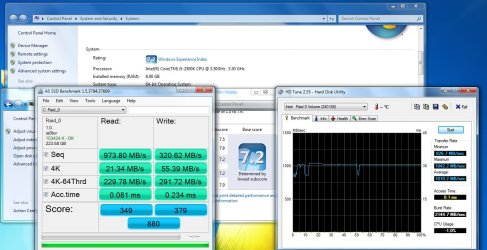
Show us your SSD performance

Status
Not open for further replies.
I got snipper tool just had pic on camera. I was at work.
The only worry is that SSD's dont last that long.I better back some stuff up (game wise)

The rumors that SSDs don't last long were exaggerated.

SSD Write Endurance 25nm Vs 34nm


The SSds are being written to as fast as possible to get actual life expectancy data.

They are lasting a very long time, much longer than the manufactures stated amount of writes.

At these amounts, an SSD will last a average user 10-20 years or more.

The Crucial m4 wrote over 800TB before it quit working.
This is what Britta is using.
That should be a good system for them.

m4 became undetectable on multiple mother boards.
Cause of failure of the m4 was inconclusive.
Internal electronic part failure. As simple as a capacitor or resistor.
The controller could have failed.

NAND did not wear out from bad sectors/blocks etc.
RAS- 00 Reallocated sectors. None. :shock:

B.A.T. Post #2528 > http://www.xtremesystems.org/forums/showthread.php?271063-SSD-Write-Endurance-25nm-Vs-34nm/page102
This was my last result update.
m4
768.5687 TiB
2749 hours
Avg speed 88.43 MiB/s.
AD gone from 171 to 169.
P/E 13330.
Value 01 (raw read error rate) has changed from 43 to 46.
MD5 OK.
Reallocated sectors : 00

The M4 passed MWI-1 at 170.8 TiB.

There were no problems before I turned my rig off the 28th oct. It just didn't like 9 days without power.
 

My Computer My Computer

Computer Manufacturer/Model Number
Hopalong/ Godzilla
OS
Windows7 Pro 64bit SP-1; Windows XP Pro 32bit
CPU
Intel Core i7-870 Lynnfield 2.93GHz LGA 1156 95W Quad-Core
Motherboard
ASUS P7P55D-E PRO
Memory
8GB@1400MHz Crucial Ballistix DDR3-1600 4x2GB
Graphics Card(s)
ASUS ENGTX460 DirectCU/2DI/1GD5 1GB 256-bit GDDR5
Sound Card
VIA Onboard
Monitor(s) Displays
Asus VS248H-P 24"; Samsung SyncMaster 941BW 19"ws
Screen Resolution
1920x1080; 1440x900
Hard Drives
Samsung 830 120GB SSD
Intel 320 120GB SSD
Western Digital Caviar Black WD7501AALS 750GB 7200 RPM SATA 3.0Gb/s
Western Digital Caviar Black WD6401AALS 640GB 7200 RPM SATA 3.0Gb/s
PSU
COOLER MASTER Silent Pro RS850-AMBAJ3-US 850W Modular
Case
COOLER MASTER HAF 932 RC-932-KKN5-GP Black
Cooling
Scythe "Mugen-2 Rev.B" (2 ScytheKaze-Jyuni PWM fans)
Keyboard
Logitech K-320
Mouse
Kensington
Antivirus
Avast Inernet Suite
Browser
IE 9 ; Chrome
Received my OCZ Vertex 2 SATA II SSD today, did clean installation of windows. Downloaded and executed benchmark and here is the result

SSDbenchmark.png


something doesn't seem right, the result is quite low compared to what says on the box - Read 285 MB/s Write 275MB/s :confused:
 

My Computer My Computer

Computer type
PC/Desktop
Computer Manufacturer/Model Number
Self Built
OS
Windows 8.1 - 64 Bit
CPU
Intel Core i5-4670K (Haswell)
Motherboard
Gigabyte GA-Z87X-D3H
Memory
8GB DDR3-RAM PC1600 CL9 ADATA XPG V1.0 black
Graphics Card(s)
Gigabyte NVIDIA GTX 770 Graphics Card (2GB, DDR5, PCI-E)
Sound Card
ASUS Xonar DX 7.1 | Turtle Beach HPA 2
Monitor(s) Displays
Samsung SyncMaster P2270HD
Screen Resolution
1080p
Hard Drives
Samsung 840 Evo 250 GB (OS only)
Seagate Barracuda 1TB S-ATA
Seagate Barracuda 250GB S-ATA
Maxtor 250GB S-ATA (Backup only)
WD Elements 500Gb/Go
PSU
750 watts
Case
Zalman GS-1000 Special Edition
Cooling
Zalman CNPS10X Performa
Keyboard
Logitech K350
Mouse
Logitech M705 | Razer Vespula Mouse Pad
Internet Speed
Virgin Media - 60Mbps
Antivirus
Microsoft Security Essentials
Other Info
120mm fans x 4
(2 on top, 1 at rear, 1 at bottom)
Received my OCZ Vertex 2 SATA II SSD today, did clean installation of windows. Downloaded and executed benchmark and here is the result
something doesn't seem right, the result is quite low compared to what says on the box - Read 285 MB/s Write 275MB/s :confused:

I hate to be the bearer of bad news, but.. You are in IDE mode. You need to be in AHCI mode. This tutorial on how to change to AHCI will show you how to do it.
 

My Computers My Computers

System One System Two

  • Computer type
    PC/Desktop
    Computer Manufacturer/Model Number
    ALWAYS UNDER CONSTRUCTION
    OS
    Windows 11 Pro
    CPU
    Ryzen 9 5900X
    Motherboard
    Asus X570 Crosshair Viii Hero
    Memory
    32GB G Skill DDR4-3600
    Graphics Card(s)
    EVGA RTX 3080 FTW 3 Ultra
    Sound Card
    On Board/Sennheiser PC37X Headset
    Monitor(s) Displays
    3 X Asus 27"
    Screen Resolution
    2560x1440
    Hard Drives
    2 X 1 TB NVME drives
    PSU
    EVGA 850
    Case
    Phanteks Eclipse P400A
    Cooling
    EVGA 280 AIO
    Keyboard
    Logitech G510s/ Logitech G13
    Mouse
    Logitech G502
    Internet Speed
    24/1
    Antivirus
    ESET/MBAM Pro/SAS Pro
    Browser
    Chrome/ Firefox/ Edge
  • Computer type
    Laptop
    System Manufacturer/Model Number
    Dell 16 Plus
    OS
    Windows 11 Pro
    CPU
    Intel Ultra 9 288V
    Memory
    32 GB LPDDR5X 8533
    Monitor(s) Displays
    16" Mini-LED HDR600 Touch 90 Hz
    Screen Resolution
    2560X1600
    Hard Drives
    1 TB NVME

My Computer My Computer

Computer type
PC/Desktop
OS
Windows 10 Home x64
CPU
INTEL Core i5-750 Quad-Core 3.37GHz
Motherboard
ASUS P7P55D
Memory
HyperX Fury Black Series 8GB (2 x 4GB) 1866Mhz
Graphics Card(s)
EVGA GeForce GTX 750 Superclocked 1GB 128-Bit GDDR5
Monitor(s) Displays
LG 32MA68HY 32" IPS
Screen Resolution
1920 x 1080
Hard Drives
Samsung 840 Evo 120GB, SEAGATE 500GB Barracuda® 7200.12, SATA 3 Gb/s, 7200 RPM, 16MB cache
PSU
ANTEC TruePower New TP-550, 80 PLUS, 550W
Case
ANTEC Three Hundred Illusion
Cooling
COOLER MASTER Hyper 212 Plus, 4 x 120mm 1 x 140mm Noctua's
Internet Speed
85 + Mbps
Antivirus
Avast
Browser
Vivaldi
Never mind. I was watching a movie. :o

Everybody beat me to it.
 

My Computer My Computer

Computer type
PC/Desktop
Computer Manufacturer/Model Number
Built 2/11/2011
OS
Windows 7 Pro-x64
CPU
i7-2600 3.4GHz - 3.8GHz Turbo
Motherboard
Intel DH67BL-B3
Memory
8Gb - 2x4GB, Muskin 991770 PC3-1333
Graphics Card(s)
Integrated Intel HD 2000
Sound Card
Integrated Intel 10.1 HD, RealTek ALC892
Monitor(s) Displays
Asus LCD VH222H, Haier HL24XSL2a
Screen Resolution
1920x1080, 1920x1080
Hard Drives
Crucial SSD C300-128Gb,
Western Digital WD5002AALX - 500Gb,
Western Digital WD7501AALS - 750Gb
PSU
Seasonic 650W 80+ Gold Modular
Case
Rosewill Defender
Cooling
Stock CPU, Four 120mm case fans, PCH fan added
Keyboard
Logitech EX100 Y-RBH94 Wireless
Mouse
Logitech EX100 M-RCE95 Wireless
Internet Speed
3.0/1.5 Mbs
Antivirus
Microsoft Security Essentials
Browser
Microsoft Internet Explorer 11
Other Info
Antec Veris Premier-Multimedia IR Station,
Cyber Accoustics-3602 Speakers,
AFT XM-5U Card Reader,
Hauppauge TV-HVR-2250,
Sony LX300 USB Turntable
The guys are right - you will get better nums in AHCI mode. That, however, may not translate into a big difference in real (OS) life. Just to warn you in case your performance does not change significantly and you wonder why. Reason is because the access time is not going to change.
 

My Computer My Computer

Computer Manufacturer/Model Number
HP, Dell, Gateway, Toshiba - 4 laptops and 2 desktops
OS
Vista, Windows7, Mint Mate, Zorin, Windows 8
CPU
from 1.6GHz Duo to i7
Monitor(s) Displays
2x HP w2207
Hard Drives
5x HDD, 7x SSD, 12x Externals
Keyboard
with trackball - no mices
Mouse
Trackball mice
Internet Speed
DSL 6000
I'm pretty sure it will increase significantly. The access time shown is a measurement of how long it takes to address the first block. After that, sequential transfers are measured in nano-seconds. The OS makes frequent use of sequential reads and writes, especially when loading programs or paging memory. The limitation will fall on SATAII.
 

My Computer My Computer

Computer type
PC/Desktop
Computer Manufacturer/Model Number
Built 2/11/2011
OS
Windows 7 Pro-x64
CPU
i7-2600 3.4GHz - 3.8GHz Turbo
Motherboard
Intel DH67BL-B3
Memory
8Gb - 2x4GB, Muskin 991770 PC3-1333
Graphics Card(s)
Integrated Intel HD 2000
Sound Card
Integrated Intel 10.1 HD, RealTek ALC892
Monitor(s) Displays
Asus LCD VH222H, Haier HL24XSL2a
Screen Resolution
1920x1080, 1920x1080
Hard Drives
Crucial SSD C300-128Gb,
Western Digital WD5002AALX - 500Gb,
Western Digital WD7501AALS - 750Gb
PSU
Seasonic 650W 80+ Gold Modular
Case
Rosewill Defender
Cooling
Stock CPU, Four 120mm case fans, PCH fan added
Keyboard
Logitech EX100 Y-RBH94 Wireless
Mouse
Logitech EX100 M-RCE95 Wireless
Internet Speed
3.0/1.5 Mbs
Antivirus
Microsoft Security Essentials
Browser
Microsoft Internet Explorer 11
Other Info
Antec Veris Premier-Multimedia IR Station,
Cyber Accoustics-3602 Speakers,
AFT XM-5U Card Reader,
Hauppauge TV-HVR-2250,
Sony LX300 USB Turntable
I'm pretty sure it will increase significantly. The access time shown is a measurement of how long it takes to address the first block. After that, sequential transfers are measured in nano-seconds. The OS makes frequent use of sequential reads and writes, especially when loading programs or paging memory. The limitation will fall on SATAII.
The theory is right. But in practice we are talking about very little data that the OS manipulates at each time - and that mostly in 4K blocks. So the real impact of a slow data transfer speed should be minimal.
 

My Computer My Computer

Computer Manufacturer/Model Number
HP, Dell, Gateway, Toshiba - 4 laptops and 2 desktops
OS
Vista, Windows7, Mint Mate, Zorin, Windows 8
CPU
from 1.6GHz Duo to i7
Monitor(s) Displays
2x HP w2207
Hard Drives
5x HDD, 7x SSD, 12x Externals
Keyboard
with trackball - no mices
Mouse
Trackball mice
Internet Speed
DSL 6000
So the real impact of a slow data transfer speed should be minimal.
If that were the case, there would be no reason to use a SSD. Are you saying we should all go back to IDE drives because there's no benefit to SATA? Sorry, but I disagree.
 

My Computer My Computer

Computer type
PC/Desktop
Computer Manufacturer/Model Number
Built 2/11/2011
OS
Windows 7 Pro-x64
CPU
i7-2600 3.4GHz - 3.8GHz Turbo
Motherboard
Intel DH67BL-B3
Memory
8Gb - 2x4GB, Muskin 991770 PC3-1333
Graphics Card(s)
Integrated Intel HD 2000
Sound Card
Integrated Intel 10.1 HD, RealTek ALC892
Monitor(s) Displays
Asus LCD VH222H, Haier HL24XSL2a
Screen Resolution
1920x1080, 1920x1080
Hard Drives
Crucial SSD C300-128Gb,
Western Digital WD5002AALX - 500Gb,
Western Digital WD7501AALS - 750Gb
PSU
Seasonic 650W 80+ Gold Modular
Case
Rosewill Defender
Cooling
Stock CPU, Four 120mm case fans, PCH fan added
Keyboard
Logitech EX100 Y-RBH94 Wireless
Mouse
Logitech EX100 M-RCE95 Wireless
Internet Speed
3.0/1.5 Mbs
Antivirus
Microsoft Security Essentials
Browser
Microsoft Internet Explorer 11
Other Info
Antec Veris Premier-Multimedia IR Station,
Cyber Accoustics-3602 Speakers,
AFT XM-5U Card Reader,
Hauppauge TV-HVR-2250,
Sony LX300 USB Turntable
Received my OCZ Vertex 2 SATA II SSD today, did clean installation of windows. Downloaded and executed benchmark and here is the result

SSDbenchmark.png


something doesn't seem right, the result is quite low compared to what says on the box - Read 285 MB/s Write 275MB/s :confused:

I agree there is a benefit when using AHCI or RAID (same benefit for both, they are basically the same).

The red font letters "pciide - BAD" indicates you are in IDE mode, as already mentioned.

The "BAD" indicates your SSD is not correctly aligned, this will cause poor performance.

The best way to ensure proper alignment is to point the Windows 7 installer to a unformatted SSD, it will align and format the drive for you.
Cloning or using a backup from a HDD will not have the right alignment.

Here is a good tutorial that will help you with alignment.
SSD Alignment
 

My Computer My Computer

Computer type
PC/Desktop
Computer Manufacturer/Model Number
76~2.0
OS
Windows 7 Ult x64 - SP1/ Windows 8 Pro x64
CPU
Intel Core i5-3570K 4.6GHz
Motherboard
Gigabyte GA-Z77X UD3H, f18
Memory
8GB (2X4GB) DDR3 1600 Corsair Vengeance CL8 1.5v
Graphics Card(s)
Sapphire HD 7770 Vapor-X OC 1GB DDR5
Sound Card
Onboard VIA VT2021
Monitor(s) Displays
22" LCD Dell
Screen Resolution
1680x1050
Hard Drives
Samsung 840Pro 128GB SSD,
Seagate Barracuda 500GB SATA2 7200rpm 32MB cache, Seagate Barracuda 1TB SATA2 7200rpm 32MB cache,
PSU
Corsair HX650W
Case
Cooler Master Storm Scout
Cooling
Corsair H80 2x12cm Noctua NF P12 , 2x14cm case fans
Keyboard
Logitech Wave
Mouse
CM Sentinel
Internet Speed
Dismal
Antivirus
Avast
Browser
Opera Next
Other Info
Haswell laptop: HP Envy 17t-j, i7-4700MQ, GeForce 740M 2GB DDR3, 17.3" Full HD 1920x1080, 16GB RAM, Samsung 840 Pro 128GB, 1TB Hitachi 7200 HDD,
Desktop: eSATA ports,
External eSATA Seagate 500GB SATA2 7200rpm,
External WD USB 500GB
After changing to ACHI mode in BIOS and registery file, here is new improved result

SSDACHImode.png


Better numbers now, as per alignment tutorial, I don't need alignment doing cause I did clean install of windows 7. My wei score also boosted from 5.9 to 7.7 :D

ssdwei.png
 

My Computer My Computer

Computer type
PC/Desktop
Computer Manufacturer/Model Number
Self Built
OS
Windows 8.1 - 64 Bit
CPU
Intel Core i5-4670K (Haswell)
Motherboard
Gigabyte GA-Z87X-D3H
Memory
8GB DDR3-RAM PC1600 CL9 ADATA XPG V1.0 black
Graphics Card(s)
Gigabyte NVIDIA GTX 770 Graphics Card (2GB, DDR5, PCI-E)
Sound Card
ASUS Xonar DX 7.1 | Turtle Beach HPA 2
Monitor(s) Displays
Samsung SyncMaster P2270HD
Screen Resolution
1080p
Hard Drives
Samsung 840 Evo 250 GB (OS only)
Seagate Barracuda 1TB S-ATA
Seagate Barracuda 250GB S-ATA
Maxtor 250GB S-ATA (Backup only)
WD Elements 500Gb/Go
PSU
750 watts
Case
Zalman GS-1000 Special Edition
Cooling
Zalman CNPS10X Performa
Keyboard
Logitech K350
Mouse
Logitech M705 | Razer Vespula Mouse Pad
Internet Speed
Virgin Media - 60Mbps
Antivirus
Microsoft Security Essentials
Other Info
120mm fans x 4
(2 on top, 1 at rear, 1 at bottom)
So the real impact of a slow data transfer speed should be minimal.
If that were the case, there would be no reason to use a SSD. Are you saying we should all go back to IDE drives because there's no benefit to SATA? Sorry, but I disagree.
No, I am not saying that. What I say is the the performance kick of the SSD comes from the ultra short access time and that the data transfer speed has only a minor role to play (when the SSD is used for the OS).

That will be different once we have large affordable SSDs where we move a lot of data around - e.g. use them to store images. In that case, the data trnsfer speed will become more significant for the overall performance. But the OS does not R/W a lot of data at any given point in time.

Of my 5 SSDs 2 run in AHCI and 3 run in IDE and I really see no difference. When you measure them, the differences show up, but in the daily operation it does not.
 

My Computer My Computer

Computer Manufacturer/Model Number
HP, Dell, Gateway, Toshiba - 4 laptops and 2 desktops
OS
Vista, Windows7, Mint Mate, Zorin, Windows 8
CPU
from 1.6GHz Duo to i7
Monitor(s) Displays
2x HP w2207
Hard Drives
5x HDD, 7x SSD, 12x Externals
Keyboard
with trackball - no mices
Mouse
Trackball mice
Internet Speed
DSL 6000
After changing to ACHI mode in BIOS and registery file, here is new improved result

SSDACHImode.png


Better numbers now, as per alignment tutorial, I don't need alignment doing cause I did clean install of windows 7. My wei score also boosted from 5.9 to 7.7 :D

ssdwei.png

Much better, good work :thumbsup:

A Guy
 

My Computer My Computer

Computer type
PC/Desktop
OS
Windows 10 Home x64
CPU
INTEL Core i5-750 Quad-Core 3.37GHz
Motherboard
ASUS P7P55D
Memory
HyperX Fury Black Series 8GB (2 x 4GB) 1866Mhz
Graphics Card(s)
EVGA GeForce GTX 750 Superclocked 1GB 128-Bit GDDR5
Monitor(s) Displays
LG 32MA68HY 32" IPS
Screen Resolution
1920 x 1080
Hard Drives
Samsung 840 Evo 120GB, SEAGATE 500GB Barracuda® 7200.12, SATA 3 Gb/s, 7200 RPM, 16MB cache
PSU
ANTEC TruePower New TP-550, 80 PLUS, 550W
Case
ANTEC Three Hundred Illusion
Cooling
COOLER MASTER Hyper 212 Plus, 4 x 120mm 1 x 140mm Noctua's
Internet Speed
85 + Mbps
Antivirus
Avast
Browser
Vivaldi
After changing to ACHI mode in BIOS and registery file, here is new improved result

SSDACHImode.png


Better numbers now, as per alignment tutorial, I don't need alignment doing cause I did clean install of windows 7. My wei score also boosted from 5.9 to 7.7 :D

That's more like it, well done.

Enjoy the speed :cool:
 

My Computer My Computer

Computer type
PC/Desktop
Computer Manufacturer/Model Number
76~2.0
OS
Windows 7 Ult x64 - SP1/ Windows 8 Pro x64
CPU
Intel Core i5-3570K 4.6GHz
Motherboard
Gigabyte GA-Z77X UD3H, f18
Memory
8GB (2X4GB) DDR3 1600 Corsair Vengeance CL8 1.5v
Graphics Card(s)
Sapphire HD 7770 Vapor-X OC 1GB DDR5
Sound Card
Onboard VIA VT2021
Monitor(s) Displays
22" LCD Dell
Screen Resolution
1680x1050
Hard Drives
Samsung 840Pro 128GB SSD,
Seagate Barracuda 500GB SATA2 7200rpm 32MB cache, Seagate Barracuda 1TB SATA2 7200rpm 32MB cache,
PSU
Corsair HX650W
Case
Cooler Master Storm Scout
Cooling
Corsair H80 2x12cm Noctua NF P12 , 2x14cm case fans
Keyboard
Logitech Wave
Mouse
CM Sentinel
Internet Speed
Dismal
Antivirus
Avast
Browser
Opera Next
Other Info
Haswell laptop: HP Envy 17t-j, i7-4700MQ, GeForce 740M 2GB DDR3, 17.3" Full HD 1920x1080, 16GB RAM, Samsung 840 Pro 128GB, 1TB Hitachi 7200 HDD,
Desktop: eSATA ports,
External eSATA Seagate 500GB SATA2 7200rpm,
External WD USB 500GB
Hi SevenForums,

I'm a new convert to SSD technology. Its only a Samsung 470 series 64 gig I have installed for my laptop. I use it as a boot disk for O.S and my music D.A.W and Pro DJ software.

My laptop is optimized for music production, so we are talking no web access at all totally stripped down Win 7 home premium 64 bit so it can produce and play real time music professionally in and out the studio.

Before the SSD upgrade the system was quick as it has so many features disabled and tweaked out to transform a business - mid level multimedia machine into a fully fledged real time dj/producers machine.

Even then it took about 30 seconds to fire up. The laptop was quick and I enjoyed Win 7.

I would press the on button.... machine fires up.. then into my music D.A.W which are Cubase and Sony Soundforge pro 10.

Now she fires up in about 7 seconds from cold.

But the most important thing is the way the music D.A.W loads and reacts with serious amounts of virtual outboard and soft synths. These are all programs.. within programs if you catch my drift and they all respond very well to the SSD.

I use external USB drives for my samples as I did not want them on the machine, as I have about 700 gb of WAV and they all fire up when needed quickly within the projects lovely.

I use Native Instruments Traktor Pro 2 DJ software to perform out, this has transformed the software a lot, as it uses stripes and other data that is saved on the SSD when Traktor analyses the data for example when you add a track to your collection or playlist. The software reacts very quickly when loading 24 bit WAV music files as the core data is scanned in and just the music file is external on my various USB drives. Less than 1 second.

This is all fantastic, you can see why so much has been said about the bottleneck effect conventional 2.5 mechanical drives can have on a laptop system. The Samsung drive I have is a very modest SSD and my machine reacts in such a fantastic way its really is profound and Win 7 really is lovely experience to use.

Have a great week all.
 

My Computer My Computer

Computer Manufacturer/Model Number
Asus (tweaked music only laptop)
OS
Windows 7 Home Premuim 64 bit custom build. XP Professional on other studio machines.
CPU
i5 430, Plus Pentuim machines in studio as well.
Motherboard
?
Memory
8 gig ddr 3 on Laptops and 4 gig on XP music machines.
Graphics Card(s)
NVIDIA Genforce GT 540m 1 gig ram on music studio laptop.
Sound Card
Native Instruments Kontrol 1, DJ 8 , DJ 6.
Hard Drives
Samsung 470 Series 64 Gb SSD for boot and O.S and music apps.
Loads of external USB 2.0 drives that contain samples and WAV for music production and playing out.
PSU
N/A
Case
N/A
Cooling
Machine sits on usb coolermaster Notepal (17 inch 3 fans)
Other Info
I have basic Dell machine for web running XP. Other machines are custom builds for music production only. (No web or games)
Glad you like it, enjoy.
 

My Computer My Computer

Computer type
PC/Desktop
Computer Manufacturer/Model Number
76~2.0
OS
Windows 7 Ult x64 - SP1/ Windows 8 Pro x64
CPU
Intel Core i5-3570K 4.6GHz
Motherboard
Gigabyte GA-Z77X UD3H, f18
Memory
8GB (2X4GB) DDR3 1600 Corsair Vengeance CL8 1.5v
Graphics Card(s)
Sapphire HD 7770 Vapor-X OC 1GB DDR5
Sound Card
Onboard VIA VT2021
Monitor(s) Displays
22" LCD Dell
Screen Resolution
1680x1050
Hard Drives
Samsung 840Pro 128GB SSD,
Seagate Barracuda 500GB SATA2 7200rpm 32MB cache, Seagate Barracuda 1TB SATA2 7200rpm 32MB cache,
PSU
Corsair HX650W
Case
Cooler Master Storm Scout
Cooling
Corsair H80 2x12cm Noctua NF P12 , 2x14cm case fans
Keyboard
Logitech Wave
Mouse
CM Sentinel
Internet Speed
Dismal
Antivirus
Avast
Browser
Opera Next
Other Info
Haswell laptop: HP Envy 17t-j, i7-4700MQ, GeForce 740M 2GB DDR3, 17.3" Full HD 1920x1080, 16GB RAM, Samsung 840 Pro 128GB, 1TB Hitachi 7200 HDD,
Desktop: eSATA ports,
External eSATA Seagate 500GB SATA2 7200rpm,
External WD USB 500GB
Just got my SSDs hooked up. I never expected results like this :D
 

Attachments

  • NerdP0rn2.jpg
    NerdP0rn2.jpg
    129.3 KB · Views: 38

My Computer My Computer

Computer Manufacturer/Model Number
Custom
OS
W7 Ultimate 64
CPU
Core i5 2500k
Motherboard
ASUS P8Z68 Deluxe LGA 1155 Intel Z68
Memory
G.SKILL 8GB (2 x 4GB) DDR3 @ 1600
Graphics Card(s)
Evga GTX 260 216
Screen Resolution
1920x1080
Hard Drives
2 x 120GB OCZ Vertex 3 in RAID 0
1010 MBps average read
PSU
Corsair 750W
Case
Antec P183
Keyboard
G510
Amazing indeed. I think this is the highest transfer rate I have ever seen.
 

My Computer My Computer

Computer Manufacturer/Model Number
HP, Dell, Gateway, Toshiba - 4 laptops and 2 desktops
OS
Vista, Windows7, Mint Mate, Zorin, Windows 8
CPU
from 1.6GHz Duo to i7
Monitor(s) Displays
2x HP w2207
Hard Drives
5x HDD, 7x SSD, 12x Externals
Keyboard
with trackball - no mices
Mouse
Trackball mice
Internet Speed
DSL 6000
Really?? I'm glad I decided to go with OCZ then.

I was getting 200-300 mbps but after I updated my storage controller the transfer rate sky rocketed.
Im kinda interested to see if a true hardware card could squeeze some more out of it. . . Tempted to pull my RAID 5 array out for a few mins and hook these up.
 

My Computer My Computer

Computer Manufacturer/Model Number
Custom
OS
W7 Ultimate 64
CPU
Core i5 2500k
Motherboard
ASUS P8Z68 Deluxe LGA 1155 Intel Z68
Memory
G.SKILL 8GB (2 x 4GB) DDR3 @ 1600
Graphics Card(s)
Evga GTX 260 216
Screen Resolution
1920x1080
Hard Drives
2 x 120GB OCZ Vertex 3 in RAID 0
1010 MBps average read
PSU
Corsair 750W
Case
Antec P183
Keyboard
G510
Just got my SSDs hooked up. I never expected results like this :D

Yikes! :shock: Those are great numbers. Be careful or you will go back in time. A Guy
 

My Computer My Computer

Computer type
PC/Desktop
OS
Windows 10 Home x64
CPU
INTEL Core i5-750 Quad-Core 3.37GHz
Motherboard
ASUS P7P55D
Memory
HyperX Fury Black Series 8GB (2 x 4GB) 1866Mhz
Graphics Card(s)
EVGA GeForce GTX 750 Superclocked 1GB 128-Bit GDDR5
Monitor(s) Displays
LG 32MA68HY 32" IPS
Screen Resolution
1920 x 1080
Hard Drives
Samsung 840 Evo 120GB, SEAGATE 500GB Barracuda® 7200.12, SATA 3 Gb/s, 7200 RPM, 16MB cache
PSU
ANTEC TruePower New TP-550, 80 PLUS, 550W
Case
ANTEC Three Hundred Illusion
Cooling
COOLER MASTER Hyper 212 Plus, 4 x 120mm 1 x 140mm Noctua's
Internet Speed
85 + Mbps
Antivirus
Avast
Browser
Vivaldi
Status
Not open for further replies.
Back
Top