Show us your SSD performance

Status
Not open for further replies.
Thanks for the info. I knew I left it as IDE for a reason :p
 

My Computer

Computer Manufacturer/Model Number
tw33k
OS
Windows 7 Ultimate (x64) SP1
CPU
Intel 3770k 4.6GHz
Motherboard
ASUS Maximus V Formula
Memory
8GB (2x 4GB) Crucial Ballistix
Graphics Card(s)
Sapphire 7950 (1060/1600)
Sound Card
On Board Realtek HD Audio
Monitor(s) Displays
27" Acer B273HU (via HDMI)
Screen Resolution
2048 x 1152
Hard Drives
Crucial M4 128GB
2TB WD Black
1TB Samsung F3 SATA
1TB WD Elite External
2TB WD USB 3.0
PSU
Corsair AX750 Gold
Case
Corsair Obsidian 800DW
Cooling
Corsair H100 (2x AP-121/2x UK-3000 push/pull)
Keyboard
Microsoft Wireless 5000
Mouse
Microsoft Wireless 5000
Internet Speed
5mb/s
Other Info
Logitech z-2300 2.1 speakers
Lamptron FC-5 v2
Not to mention a lot of manufacturers recommend IDE and you will have problems running F/W updates and wiper.exe in AHCI

FYI
Intel doesn't.

From what I have read on wiper programs, you must use the wiper program as supplied by the manufacturer. They are not mix and match.

Again, just to re-iterate, if you want to use AHCI mode with your SSD, you must install the OS with AHCI enabled in BIOS. Switching after the install will break your OS.
 

My Computer

Computer Manufacturer/Model Number
Rivendell Enterprises
OS
Win 7 Pro x64
CPU
Intel i7-920
Motherboard
MSI Pro-E
Memory
6 GB Corsair Dominator
Graphics Card(s)
Radeon HD 5870
Sound Card
Asus D2X
Monitor(s) Displays
Asus 25.5" LCD
Screen Resolution
1920x1200
Hard Drives
Intel 160 GB G2 SSD.
A few TBs worth of Seagate's and WD's
PSU
Corsair 750
Case
Cooler Master HAF932
Keyboard
Logitech MX-5500
Mouse
Logitech MX-5500
Internet Speed
FIOS
I've switched back and forth between AHCI and IDE on several different computers with a couple registry changes under \CurrentControlSet\services\

Something along these lines:
Result How to enable Ide, Ahci, n/m raid mode without reinstalling.

Intel doesn't.

From what I have read on wiper programs, you must use the wiper program as supplied by the manufacturer. They are not mix and match.

Again, just to re-iterate, if you want to use AHCI mode with your SSD, you must install the OS with AHCI enabled in BIOS. Switching after the install will break your OS.
 

My Computer

Computer type
PC/Desktop
Computer Manufacturer/Model Number
Dell: XPS 420 (2), XPS M1330 (several), XPS 14z, Mini 9, Mini 10v
OS
W8 Pro, W7 Ultimate, XP Pro x64, Vista x64, Ubuntu
CPU
Q6600, Q6700, T7500, T7500, N270, N270
Motherboard
Dell
Memory
8GB, 8GB, 4GB, 4GB, 2GB, 2GB
Graphics Card(s)
ATI, nVidia, nVidia, nVidia, Intel, Intel
Monitor(s) Displays
Dell 2408WFP
Hard Drives
A drawer full. OCZ Vertex's in RAID 0. Vertex 3's, Vertex 4, Samsung 830's, Samsung 840's, Intel 330. Don't use dino drives any more except for servers.
Keyboard
Logitech Wave
Internet Speed
29 Mbps DL / .95 Mbps UL
Other Info
New project(2013)...Another low power server. Zotac H67ITX, i3-2100T, Windows Server 2012 Essentials on Samsung SSD.
Previous project...Low power (38-40 watts using Kill-a-Watt) Windows Home Server. Zotac ION (Atom 330, GeForce9400), 4GB RAM, 2x2TB WD Green, IN WIM miniITX Case. Fits on a shelf in laundry closet, practically silent.

My Computer

Computer Manufacturer/Model Number
Rivendell Enterprises
OS
Win 7 Pro x64
CPU
Intel i7-920
Motherboard
MSI Pro-E
Memory
6 GB Corsair Dominator
Graphics Card(s)
Radeon HD 5870
Sound Card
Asus D2X
Monitor(s) Displays
Asus 25.5" LCD
Screen Resolution
1920x1200
Hard Drives
Intel 160 GB G2 SSD.
A few TBs worth of Seagate's and WD's
PSU
Corsair 750
Case
Cooler Master HAF932
Keyboard
Logitech MX-5500
Mouse
Logitech MX-5500
Internet Speed
FIOS
been reading thru your posts and you all know your stuff!:thumbsup:

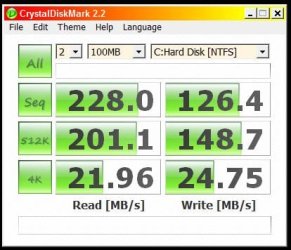
i bought an ssd yesterday--a poor man's ssd at that. had a few dollars to spend, but nothing in the area of the drives that have been referred to within this post. i got this: Patriot Memory - Products . i admit that i have really no knowledge about the subject, but wanted to "jump on the bandwagon" without sacrificing too much money right now. later this year, i expect that i'll be in a position to purchase a better drive, at which time this drive will go into the computer i have for my daughter.

just wanted to share my two cents--and a question:
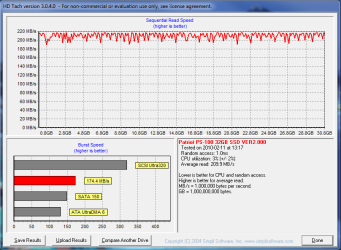
i've used hd tune pro 4.01 trial, hd tach 3.0.4.0, and atto disk benchmark. all three give somewhat similar result in read and write speeds but there is a big difference in the burst speed shown by hd tune and hd tach. have any reason(s) why that would be?
 

Attachments

  • hdtune bench.PNG
    hdtune bench.PNG
    29.9 KB · Views: 49
  • day two bench after more tweaking hdtach long.PNG
    day two bench after more tweaking hdtach long.PNG
    20.6 KB · Views: 26

My Computer

Computer Manufacturer/Model Number
Rig 1
OS
Windows 7 Ultimate x64
CPU
AMD Phenom II X4 940 Black Edition @ 3.4GHz (AM2+)
Motherboard
Gigabyte GA-MA790X-UD4P (AM2+)
Memory
Corsair CM2X4096-8500C5 (4 X 2GB)
Graphics Card(s)
XFX Radeon HD 5770 / Diamond Radeon HD 5770 CrossFireX
Sound Card
Asus Xonar DS (PCI)
Monitor(s) Displays
Samsung SyncMaster 932bw+ (3)
Screen Resolution
4320x900
Hard Drives
OCZ Vertex 2 80 GB - Windows 7 System --
WD Caviar Black 1TB - Music, Movies, Vids, Pics --
WD Caviar Black 640GB - User Profiles & Games --
WD My Book 320GB external
PSU
Corsair CMPSU-750TX
Case
Cooler Master HAF 932
Cooling
Corsair Hydro Series H50
Keyboard
Logitech Desktop Wave
Mouse
Logitech LX8 Laser
Internet Speed
20 down / 2 up
Other Info
LG GGC-H20L Blu-Ray / HDDVD combo --
Hauppauge HVR-1250 --
Silverstone MFP-51 --
Logitech Webcam C600
This is a good entry level drive. Nice choice!

The difference in the tests is probably due to the way the tests are set up. I know in HDTune you can set up the test for different criteria. Tach is the same way I'm sure.

It looks good! Post some more numbers in a month or so next to these so we can see if it's degraded. I don't think you can use the Patriot "wiper.exe" or firmware updates for these (unless you want to void your warranty and go to Samsung's site, but that's another story.

Congrats on the purchase and welcome to the SSD club.
 

My Computer

Computer Manufacturer/Model Number
Keeps changing - (Custom)
OS
Windows 7 Professional x64
CPU
Intel Core i7 860
Motherboard
Gigabyte GA-P55-UD4P
Memory
4GB DDR3 Mushkin 1600Mhz @ 7-8-7-20
Graphics Card(s)
MSI GTS250 1GB DDR3 Twin Frozr
Sound Card
Onboard realtek
Monitor(s) Displays
Samsung SyncMaster 24" P2450 + Samsung 20" 2033
Screen Resolution
1920 X 1080 and 1600 X 900 (#2 system 1440 X 900)
Hard Drives
Patriot Inferno 120GB SSD + 3 WD Blue 640GB drives
PSU
Corsair 750 HX Modular
Case
Lancool PC-K62
Cooling
Cooler Master TX3 CPU cooler and 4-140mm and 1-120mm case
Keyboard
Gigabyte USB keyboard
Mouse
Microsoft wireless laser mouse 5000
Internet Speed
7 Mb down 1.5 up
Other Info
System #2: AMD Phenom II X6 1055T (Freezer 7 Pro cooler) - Gigabyte 880GMA-UD2H - WD 500GB Black - 9500GT (1GB) 500W OCZ modular PSU - Antec 200 case. System #3 (LapTop) Core 2 Duo T6670 - 320GB 7200RPM HD - 4GB DDR3 RAM.
Well, your transfer rate is within the norm. The access time is a little high - usually it shows 0.1ms which is probably in the nanosec range that HD Tune cannot measure. I would say that the burst speed of HD Tune is more correct. The other 174MB/sec seems to be very high. My Intel does about 132MB/sec - but then you never know..
 

My Computer

Computer Manufacturer/Model Number
HP, Dell, Gateway, Toshiba - 4 laptops and 2 desktops
OS
Vista, Windows7, Mint Mate, Zorin, Windows 8
CPU
from 1.6GHz Duo to i7
Monitor(s) Displays
2x HP w2207
Hard Drives
5x HDD, 7x SSD, 12x Externals
Keyboard
with trackball - no mices
Mouse
Trackball mice
Internet Speed
DSL 6000
Congrats on the purchase and welcome to the SSD club.

thanks. just repeating myself, but i'd say within the next 6 to 8 months, i'll be in a position to get a "real" ssd (LOL) :)

as far as posting more benches in a month, you betcha.
 

My Computer

Computer Manufacturer/Model Number
Rig 1
OS
Windows 7 Ultimate x64
CPU
AMD Phenom II X4 940 Black Edition @ 3.4GHz (AM2+)
Motherboard
Gigabyte GA-MA790X-UD4P (AM2+)
Memory
Corsair CM2X4096-8500C5 (4 X 2GB)
Graphics Card(s)
XFX Radeon HD 5770 / Diamond Radeon HD 5770 CrossFireX
Sound Card
Asus Xonar DS (PCI)
Monitor(s) Displays
Samsung SyncMaster 932bw+ (3)
Screen Resolution
4320x900
Hard Drives
OCZ Vertex 2 80 GB - Windows 7 System --
WD Caviar Black 1TB - Music, Movies, Vids, Pics --
WD Caviar Black 640GB - User Profiles & Games --
WD My Book 320GB external
PSU
Corsair CMPSU-750TX
Case
Cooler Master HAF 932
Cooling
Corsair Hydro Series H50
Keyboard
Logitech Desktop Wave
Mouse
Logitech LX8 Laser
Internet Speed
20 down / 2 up
Other Info
LG GGC-H20L Blu-Ray / HDDVD combo --
Hauppauge HVR-1250 --
Silverstone MFP-51 --
Logitech Webcam C600
unless you want to void your warranty and go to Samsung's site, but that's another story.

you've piqued my interest...
what are you saying about this? give me the scoop :eek:
 

My Computer

Computer Manufacturer/Model Number
Rig 1
OS
Windows 7 Ultimate x64
CPU
AMD Phenom II X4 940 Black Edition @ 3.4GHz (AM2+)
Motherboard
Gigabyte GA-MA790X-UD4P (AM2+)
Memory
Corsair CM2X4096-8500C5 (4 X 2GB)
Graphics Card(s)
XFX Radeon HD 5770 / Diamond Radeon HD 5770 CrossFireX
Sound Card
Asus Xonar DS (PCI)
Monitor(s) Displays
Samsung SyncMaster 932bw+ (3)
Screen Resolution
4320x900
Hard Drives
OCZ Vertex 2 80 GB - Windows 7 System --
WD Caviar Black 1TB - Music, Movies, Vids, Pics --
WD Caviar Black 640GB - User Profiles & Games --
WD My Book 320GB external
PSU
Corsair CMPSU-750TX
Case
Cooler Master HAF 932
Cooling
Corsair Hydro Series H50
Keyboard
Logitech Desktop Wave
Mouse
Logitech LX8 Laser
Internet Speed
20 down / 2 up
Other Info
LG GGC-H20L Blu-Ray / HDDVD combo --
Hauppauge HVR-1250 --
Silverstone MFP-51 --
Logitech Webcam C600
unless you want to void your warranty and go to Samsung's site, but that's another story.

you've piqued my interest...

what are you saying about this? give me the scoop :eek:

I believe your SSD has a Samsung controller. They don't have F/W updates on the Patriot site *YET* but I hear you can find F/W updates if you look in the correct places but you viod the warranty so....Patriot is saying they expect to have updates ready in Feb. so I would check here:

Patriot Memory - Support

But you can read all about it on the forums...however they have removed some links so you may just want to wait for Patriot to release the official ones. Here is the link for the PS-100 thread.

Patriot PS-100 Solid State Drive - Page 5 - Patriot Memory Support Forums
 

My Computer

Computer Manufacturer/Model Number
Keeps changing - (Custom)
OS
Windows 7 Professional x64
CPU
Intel Core i7 860
Motherboard
Gigabyte GA-P55-UD4P
Memory
4GB DDR3 Mushkin 1600Mhz @ 7-8-7-20
Graphics Card(s)
MSI GTS250 1GB DDR3 Twin Frozr
Sound Card
Onboard realtek
Monitor(s) Displays
Samsung SyncMaster 24" P2450 + Samsung 20" 2033
Screen Resolution
1920 X 1080 and 1600 X 900 (#2 system 1440 X 900)
Hard Drives
Patriot Inferno 120GB SSD + 3 WD Blue 640GB drives
PSU
Corsair 750 HX Modular
Case
Lancool PC-K62
Cooling
Cooler Master TX3 CPU cooler and 4-140mm and 1-120mm case
Keyboard
Gigabyte USB keyboard
Mouse
Microsoft wireless laser mouse 5000
Internet Speed
7 Mb down 1.5 up
Other Info
System #2: AMD Phenom II X6 1055T (Freezer 7 Pro cooler) - Gigabyte 880GMA-UD2H - WD 500GB Black - 9500GT (1GB) 500W OCZ modular PSU - Antec 200 case. System #3 (LapTop) Core 2 Duo T6670 - 320GB 7200RPM HD - 4GB DDR3 RAM.
thanks. i'll get lookin

you know, ususally i'm not so johnny-come-lately when it come to keeping up with anything relating to pc's. however, i didn't think that i'd be in a position so soon to get an ssd--even a "poor man's" ssd. i haven't read thru every single post within this thread (so forgive me if i'm bringing up something already covered), but it seems, in my opinion, that the manufacturers haven't been up to snuff with support. from the links you provided and others that i've found, it seems that with the exception of a firmware update, all info concerning ssd and their setting up is from end users. it would seem to me that manufacturer A would have in plain english, something to the effect: "This is our product. We have extensively tested it with various Windows environments. Although every system configuration is different, we are certain that you will have the best performance if your system is configured as such: ....."
every tweak i've found has been of an end user, not the manufacturer. that's not standing behind the product, in my opinion.
my two cents
 
Last edited:

My Computer

Computer Manufacturer/Model Number
Rig 1
OS
Windows 7 Ultimate x64
CPU
AMD Phenom II X4 940 Black Edition @ 3.4GHz (AM2+)
Motherboard
Gigabyte GA-MA790X-UD4P (AM2+)
Memory
Corsair CM2X4096-8500C5 (4 X 2GB)
Graphics Card(s)
XFX Radeon HD 5770 / Diamond Radeon HD 5770 CrossFireX
Sound Card
Asus Xonar DS (PCI)
Monitor(s) Displays
Samsung SyncMaster 932bw+ (3)
Screen Resolution
4320x900
Hard Drives
OCZ Vertex 2 80 GB - Windows 7 System --
WD Caviar Black 1TB - Music, Movies, Vids, Pics --
WD Caviar Black 640GB - User Profiles & Games --
WD My Book 320GB external
PSU
Corsair CMPSU-750TX
Case
Cooler Master HAF 932
Cooling
Corsair Hydro Series H50
Keyboard
Logitech Desktop Wave
Mouse
Logitech LX8 Laser
Internet Speed
20 down / 2 up
Other Info
LG GGC-H20L Blu-Ray / HDDVD combo --
Hauppauge HVR-1250 --
Silverstone MFP-51 --
Logitech Webcam C600
OCZ Solid 2 30GB, 70 CAD$.


My Computer

OS
Win7 64 bits FR
CPU
2500K @ 4.5 GHz
Motherboard
Asrock Z68 Gen3 Extreme3
Memory
4x4GB 1600MHz GSkill CL9.
Graphics Card(s)
HD6850 Powercolor stock
Sound Card
Integrated
Monitor(s) Displays
Samsung 2343 + Dell 20in 4/3
Screen Resolution
2048x1152, 1600x1200
Hard Drives
OCZ Vertex LE SSD, 50GB
OCZ Solid 3 120GB
OCZ Vertex 2 240GB
Western Digital Scorpio 320GB 5400 rpm
PSU
KingWin Lazer Platinum (90+) 550Watts
Case
HAF912
Cooling
CPU: OCZ Vendetta 2
Keyboard
MX5500 revolution bluetooth
Mouse
MX5500 revolution bluetooth
Internet Speed
Cable 7 Mbps
thanks. i'll get lookin

you know, ususally i'm not so johnny-come-lately when it come to keeping up with anything relating to pc's. however, i didn't think that i'd be in a position so soon to get an ssd--even a "poor man's" ssd. i haven't read thru every single post within this thread (so forgive me if i'm bringing up something already covered), but it seems, in my opinion, that the manufacturers haven't been up to snuff with support. from the links you provided and others that i've found, it seems that with the exception of a firmware update, all info concerning ssd and their setting up is from end users. it would seem to me that manufacturer A would have in plain english, something to the effect: "This is our product. We have extensively tested it with various Windows environments. Although every system configuration is different, we are certain that you will have the best performance if your system is configured as such: ....."
every tweak i've found has been of an end user, not the manufacturer. that's not standing behind the product, in my opinion.
my two cents

I have been saying this for a long time. You have to do a lot of research on SSDs and how they interact with a normal desktop environment.....or you can just buy one and install it and hope for the best. I think there should be "manuals" to tell you what tweaks you can make in a Windows environment and something about TRIM and firmware when you buy an SSD, but I understand the manufacturer's reluctance to do this.

OCZ Solid 2 30GB, 70 CAD$.


Thanks for the data kensiko, these are respectable numbers. From what I've read...the Solid 2 has an Indilinx controller but only seems to use part of the channels or something. Have you had much problem with it? Has it performed pretty well?
 

My Computer

Computer Manufacturer/Model Number
Keeps changing - (Custom)
OS
Windows 7 Professional x64
CPU
Intel Core i7 860
Motherboard
Gigabyte GA-P55-UD4P
Memory
4GB DDR3 Mushkin 1600Mhz @ 7-8-7-20
Graphics Card(s)
MSI GTS250 1GB DDR3 Twin Frozr
Sound Card
Onboard realtek
Monitor(s) Displays
Samsung SyncMaster 24" P2450 + Samsung 20" 2033
Screen Resolution
1920 X 1080 and 1600 X 900 (#2 system 1440 X 900)
Hard Drives
Patriot Inferno 120GB SSD + 3 WD Blue 640GB drives
PSU
Corsair 750 HX Modular
Case
Lancool PC-K62
Cooling
Cooler Master TX3 CPU cooler and 4-140mm and 1-120mm case
Keyboard
Gigabyte USB keyboard
Mouse
Microsoft wireless laser mouse 5000
Internet Speed
7 Mb down 1.5 up
Other Info
System #2: AMD Phenom II X6 1055T (Freezer 7 Pro cooler) - Gigabyte 880GMA-UD2H - WD 500GB Black - 9500GT (1GB) 500W OCZ modular PSU - Antec 200 case. System #3 (LapTop) Core 2 Duo T6670 - 320GB 7200RPM HD - 4GB DDR3 RAM.
I have been saying this for a long time. You have to do a lot of research on SSDs and how they interact with a normal desktop environment.....or you can just buy one and install it and hope for the best. I think there should be "manuals" to tell you what tweaks you can make in a Windows environment and something about TRIM and firmware when you buy an SSD, but I understand the manufacturer's reluctance to do this.
Not to be argumentative, but that view of tweaking SSD's is not universally held across the SSD user community.

First off, I am assuming the more recent generation of SSD's. It may apply to the older, first generation models, it may not. I am not even going to worry about JMicron or Samsung controller based models.

Basically, the opposing view is that if you have a latest generation Intel or Indilink controller based SSD, and you install it in Win 7, you are done. No further "tweaks" needed. The tweaks will not get you any significant performance gains and they are not necessary to keep the drive from "wearing out" any faster.

That's the approach I am taking with my Gen2 Intel. The only tweaking I have done is to move some system files and some application data files off the C drive onto a spindle based drive. This was done for space saving reasons however, not performance reasons. We'll see what happens as the months go by.

I agree that manufacturers should be more forthcoming about under what configurations to install the SSD. I also think, with this latest generation, that SSD's have passed that threshold from a hobbyists toy that needs lots of attention to a consumer level computer part that you can pretty much install and forget.
 

My Computer

Computer Manufacturer/Model Number
Rivendell Enterprises
OS
Win 7 Pro x64
CPU
Intel i7-920
Motherboard
MSI Pro-E
Memory
6 GB Corsair Dominator
Graphics Card(s)
Radeon HD 5870
Sound Card
Asus D2X
Monitor(s) Displays
Asus 25.5" LCD
Screen Resolution
1920x1200
Hard Drives
Intel 160 GB G2 SSD.
A few TBs worth of Seagate's and WD's
PSU
Corsair 750
Case
Cooler Master HAF932
Keyboard
Logitech MX-5500
Mouse
Logitech MX-5500
Internet Speed
FIOS

Attachments

  • Capture.JPG
    Capture.JPG
    35.2 KB · Views: 24

My Computer

Computer type
PC/Desktop
Computer Manufacturer/Model Number
Custom built
OS
Win7-64
CPU
Intel i7-3770S
Motherboard
ASUS P8Z77-M
Memory
16GB
Graphics Card(s)
nVidia GT630
Sound Card
onboard
Monitor(s) Displays
dual
Screen Resolution
1920x1200 (primary) 1050x1680 (secondary)
Hard Drives
128GB SSD (boot)
64GB SSD (Temp/My Documents)
500GB (photos/videos)
1TB (rendered video, backups)
PSU
650W
Case
Thermaltake A30
Cooling
Thermaltake
Keyboard
Logitech Lighted
Mouse
Kensington Expert Mouse (trackball)
Internet Speed
FIOS 35/35
Antivirus
MS Security Essentials
Browser
Chrome (beta)
Hi

Question for you guru's here. When I built my new machine last year I toyed with the idea of an SSD but went with the 150GB Velociraptor instead. Now with the new G2 160GB drive available from Intel that supports TRIM I am beginning to get the upgrade bug. The only issue I have at this point is that I do NOT want to have to reinstall Windows and start all over again. Is there any way to "clone" the raptor onto the Intel and just swap them out or will Windows have a meltdown. Any advice would be greatly appreciated.

Tom

Would this do what I need?
EASEUS Partition Master Professional Edition: Magic Partition Manager for Windows 2000/XP/Vista/Windows 7 (32bit and 64bit).

Thanks again. :D
 
Last edited:

My Computer

Computer Manufacturer/Model Number
Home Brew
OS
Windows7 Home Premium X64
CPU
Intel Q9650 3.00 Ghz OC'd to 3.60
Motherboard
Asus P5Q Pro Turbo
Memory
4X2GB Corsair Dominator
Graphics Card(s)
XFX HD4890 (ATI)
Sound Card
On Board
Monitor(s) Displays
2X Dell 2405FPW
Screen Resolution
2X 1920X1200
Hard Drives
1 Intel X25-M 160GB SSD SATA Drive
1 WD Velociraptor 150GB SATA Drive
1 WD Velociraptor 300GB SATA Drive
2 Lite-on SATA CD/DVD Burners
PSU
Thermaltake 850 Watt
Case
Lian Li
Cooling
Thermaltake Bigwater for CPU and 4 additional fans
Keyboard
Sunbeamtech
Mouse
Logitec Trackman
Internet Speed
5 MB DSL
Thanks for the data kensiko, these are respectable numbers. From what I've read...the Solid 2 has an Indilinx controller but only seems to use part of the channels or something. Have you had much problem with it? Has it performed pretty well?

Yes, it's Indilinx. It uses cheaper flash chips, some say it is the same as in Intel X25-V, but I'm not sure. I won't open it to verify :D

No problem. Just putted it in my laptop, pressed power ON and installed Win7 in 10 minutes with an SD card. I can't feel the difference with my Vertex on my desktop. It's simply fast.

For the US, the deal is still good: NCIXUS.com - Buy OCZ Solid 2 Series Indilinx 30GB 2.5IN SATA2 Solid State Disk Flash Drive SSD - OCZSSD2-2SLD30G.
 

My Computer

OS
Win7 64 bits FR
CPU
2500K @ 4.5 GHz
Motherboard
Asrock Z68 Gen3 Extreme3
Memory
4x4GB 1600MHz GSkill CL9.
Graphics Card(s)
HD6850 Powercolor stock
Sound Card
Integrated
Monitor(s) Displays
Samsung 2343 + Dell 20in 4/3
Screen Resolution
2048x1152, 1600x1200
Hard Drives
OCZ Vertex LE SSD, 50GB
OCZ Solid 3 120GB
OCZ Vertex 2 240GB
Western Digital Scorpio 320GB 5400 rpm
PSU
KingWin Lazer Platinum (90+) 550Watts
Case
HAF912
Cooling
CPU: OCZ Vendetta 2
Keyboard
MX5500 revolution bluetooth
Mouse
MX5500 revolution bluetooth
Internet Speed
Cable 7 Mbps
At NewEgg, they sometims offer the 30GB Vertex for $99. That makes for a good OS disk too. My Win7 hovers around 15GBs since months, but my data files are in another partition.
 

My Computer

Computer Manufacturer/Model Number
HP, Dell, Gateway, Toshiba - 4 laptops and 2 desktops
OS
Vista, Windows7, Mint Mate, Zorin, Windows 8
CPU
from 1.6GHz Duo to i7
Monitor(s) Displays
2x HP w2207
Hard Drives
5x HDD, 7x SSD, 12x Externals
Keyboard
with trackball - no mices
Mouse
Trackball mice
Internet Speed
DSL 6000
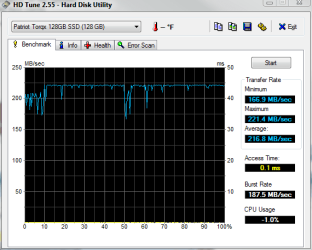
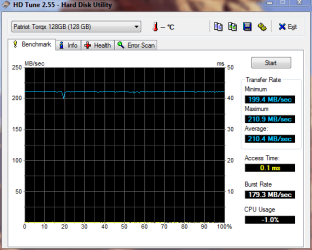
8 month test Patriot Torqx

Here is an HDTune test on an 8 month old Patriot Torqx. I have treated it good, but it's been on constantly for 8 months and I have used it at least 4 hours per day for 8 months. It has had Windows 7 RC, RTM, and now Pro 64bit, so it has had an OS on it since the day I got it. I have done several image restores to update firmware too. (I think 3-4 times) I am posting this for me as much as you. I want to be able to look back and see these numbers.

Patriot Torqx 128GB SSD Review

bit-tech.net | Review - Patriot Torqx 128GB SSD Review

1881 firmware today (2/14/10)
1881_021410.PNG

1571 firmware about 6 months ago
Pat1571.PNG

Also, anyone with a Patriot PS-100....go to the Patriot forums, they are asking for beta F/W testers if you're interested.

Patriot PS-100 Solid State Drive - Page 11 - Patriot Memory Support Forums
 

My Computer

Computer Manufacturer/Model Number
Keeps changing - (Custom)
OS
Windows 7 Professional x64
CPU
Intel Core i7 860
Motherboard
Gigabyte GA-P55-UD4P
Memory
4GB DDR3 Mushkin 1600Mhz @ 7-8-7-20
Graphics Card(s)
MSI GTS250 1GB DDR3 Twin Frozr
Sound Card
Onboard realtek
Monitor(s) Displays
Samsung SyncMaster 24" P2450 + Samsung 20" 2033
Screen Resolution
1920 X 1080 and 1600 X 900 (#2 system 1440 X 900)
Hard Drives
Patriot Inferno 120GB SSD + 3 WD Blue 640GB drives
PSU
Corsair 750 HX Modular
Case
Lancool PC-K62
Cooling
Cooler Master TX3 CPU cooler and 4-140mm and 1-120mm case
Keyboard
Gigabyte USB keyboard
Mouse
Microsoft wireless laser mouse 5000
Internet Speed
7 Mb down 1.5 up
Other Info
System #2: AMD Phenom II X6 1055T (Freezer 7 Pro cooler) - Gigabyte 880GMA-UD2H - WD 500GB Black - 9500GT (1GB) 500W OCZ modular PSU - Antec 200 case. System #3 (LapTop) Core 2 Duo T6670 - 320GB 7200RPM HD - 4GB DDR3 RAM.
Well I haven't even given you guys enough time to answer my first question and I'm already back with more. After reading through this thread I decided to do a little more investigating about SSD's and drivers and TRIM but the more I read the more confusing it became, I can't imagine how you are able to really understand all of this stuff, I mean after all I just want to replace a hard drive in my system, surely it can't be that difficult, can it? I read many conflicting things first there is AHCI, the major opinion seems to be that AHCI needs to be active in order for TRIM to function properly. I tried to turn it on in the bios but the PC would not boot. I discovered a post in this thread that has a registry hack that will allow you to do this but I have not tried that yet. Next onto the driver, when I first built the system I installed the Intel driver (not the RAID driver that gets installed from the floppy when you first install Windows) so I currently have version 9.1.1.1013 on my controller, I see in another thread that there is a version 1025 available but according to posts in that thread this is really not a driver update only some INF files, but again it seems that that is really not the best thing to have done, apparently I would have been better off with the Windows driver which supports TRIM. Reading Intel's website it appear that they will be bringing out a driver that supports TRIM "any day now". But they also talk about the new RST drivers instead of the current MST drivers but neither of them are actually released yet. So with that said here are my questions.


1. Should I try to go back to the Windows 7 driver or should I stick with the Intel driver (and is it worth it to install the 1025 update) and use the toolkit to clean up the drive manually until a new TRIM supporting driver is released.


2. Should I hack the registry to get AHCI turned on, or don't I really need that?


3. Should I face the fact that I am too @^%#*^$ stupid to do a drive replacement and be happy with my Raptor. :(

Thanks for taking the time to read this rant and any help will be greatly appreciated

Tom
 

My Computer

Computer Manufacturer/Model Number
Home Brew
OS
Windows7 Home Premium X64
CPU
Intel Q9650 3.00 Ghz OC'd to 3.60
Motherboard
Asus P5Q Pro Turbo
Memory
4X2GB Corsair Dominator
Graphics Card(s)
XFX HD4890 (ATI)
Sound Card
On Board
Monitor(s) Displays
2X Dell 2405FPW
Screen Resolution
2X 1920X1200
Hard Drives
1 Intel X25-M 160GB SSD SATA Drive
1 WD Velociraptor 150GB SATA Drive
1 WD Velociraptor 300GB SATA Drive
2 Lite-on SATA CD/DVD Burners
PSU
Thermaltake 850 Watt
Case
Lian Li
Cooling
Thermaltake Bigwater for CPU and 4 additional fans
Keyboard
Sunbeamtech
Mouse
Logitec Trackman
Internet Speed
5 MB DSL
Status
Not open for further replies.
Back
Top