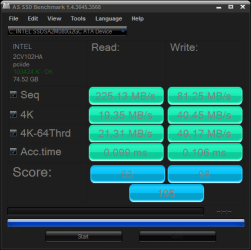
Show us your SSD performance

Status
Not open for further replies.
1. Should I try to go back to the Windows 7 driver or should I stick with the Intel driver (and is it worth it to install the 1025 update) and use the toolkit to clean up the drive manually until a new TRIM supporting driver is released.


2. Should I hack the registry to get AHCI turned on, or don't I really need that?


3. Should I face the fact that I am too @^%#*^$ stupid to do a drive replacement and be happy with my Raptor. :(

Thanks for taking the time to read this rant and any help will be greatly appreciated

Tom
Basically, what I would recommend is that you bite the bullet and do a clean install of Win 7 on your SSD. Windows is smart enough to recognize you have an SSD and install the right drivers and other things so that it is optimized for the SSD. Make sure you have the latest firmware and AHCI enabled prior to installation and you should be good to go.

I realize its a PITA to re-install, but to get the best out of your system, that's what you should do. If you just clone your mechanical HD based install, the above mentioned optimazations will not be there and you will have to jump through a bunch of hoops to get your system up to par. Maybe you'll be lucky and it will be minimal amount of work to get it working and maybe you will be unlucky you never will get it to work properly. There just isn't a whole lot of data yet on how to get the most out of SSD's when you start off from less than optimum configurations. Unfortunately there just isn't any step by step procedures for situations such as yours.

I did a clean install with my G2 160 and I found it to "just work", without having to go through all the gyrations you see on the Net. Good luck and welcome to the SSD club!
 

My Computer

Computer Manufacturer/Model Number
Rivendell Enterprises
OS
Win 7 Pro x64
CPU
Intel i7-920
Motherboard
MSI Pro-E
Memory
6 GB Corsair Dominator
Graphics Card(s)
Radeon HD 5870
Sound Card
Asus D2X
Monitor(s) Displays
Asus 25.5" LCD
Screen Resolution
1920x1200
Hard Drives
Intel 160 GB G2 SSD.
A few TBs worth of Seagate's and WD's
PSU
Corsair 750
Case
Cooler Master HAF932
Keyboard
Logitech MX-5500
Mouse
Logitech MX-5500
Internet Speed
FIOS
You don't need AHCI to have TRIM

Stick with the Microsoft driver for now, Intel will be a god option soon, but for now (as far as I know) stick with MS.

Yes, get an SSD as soon as you know enough to buy one confidently.

The current SSDs don't need a bunch of "hacks" if you don't want to bother. just get a good one and enjoy it.
 

My Computer

Computer Manufacturer/Model Number
Keeps changing - (Custom)
OS
Windows 7 Professional x64
CPU
Intel Core i7 860
Motherboard
Gigabyte GA-P55-UD4P
Memory
4GB DDR3 Mushkin 1600Mhz @ 7-8-7-20
Graphics Card(s)
MSI GTS250 1GB DDR3 Twin Frozr
Sound Card
Onboard realtek
Monitor(s) Displays
Samsung SyncMaster 24" P2450 + Samsung 20" 2033
Screen Resolution
1920 X 1080 and 1600 X 900 (#2 system 1440 X 900)
Hard Drives
Patriot Inferno 120GB SSD + 3 WD Blue 640GB drives
PSU
Corsair 750 HX Modular
Case
Lancool PC-K62
Cooling
Cooler Master TX3 CPU cooler and 4-140mm and 1-120mm case
Keyboard
Gigabyte USB keyboard
Mouse
Microsoft wireless laser mouse 5000
Internet Speed
7 Mb down 1.5 up
Other Info
System #2: AMD Phenom II X6 1055T (Freezer 7 Pro cooler) - Gigabyte 880GMA-UD2H - WD 500GB Black - 9500GT (1GB) 500W OCZ modular PSU - Antec 200 case. System #3 (LapTop) Core 2 Duo T6670 - 320GB 7200RPM HD - 4GB DDR3 RAM.
[/QUOTE]
Basically, what I would recommend is that you bite the bullet and do a clean install of Win 7 on your SSD. Windows is smart enough to recognize you have an SSD and install the right drivers and other things so that it is optimized for the SSD. Make sure you have the latest firmware and AHCI enabled prior to installation and you should be good to go.

I realize its a PITA to re-install, but to get the best out of your system, that's what you should do. If you just clone your mechanical HD based install, the above mentioned optimazations will not be there and you will have to jump through a bunch of hoops to get your system up to par. Maybe you'll be lucky and it will be minimal amount of work to get it working and maybe you will be unlucky you never will get it to work properly. There just isn't a whole lot of data yet on how to get the most out of SSD's when you start off from less than optimum configurations. Unfortunately there just isn't any step by step procedures for situations such as yours.

I did a clean install with my G2 160 and I found it to "just work", without having to go through all the gyrations you see on the Net. Good luck and welcome to the SSD club![/QUOTE]

Just so I am clear you are saying I should be sure the firmware in the SSD is at the latest version and that I should turn on AHCI in the bios BEFORE I start the install.

Thanks for the info.

Tom
 

My Computer

Computer Manufacturer/Model Number
Home Brew
OS
Windows7 Home Premium X64
CPU
Intel Q9650 3.00 Ghz OC'd to 3.60
Motherboard
Asus P5Q Pro Turbo
Memory
4X2GB Corsair Dominator
Graphics Card(s)
XFX HD4890 (ATI)
Sound Card
On Board
Monitor(s) Displays
2X Dell 2405FPW
Screen Resolution
2X 1920X1200
Hard Drives
1 Intel X25-M 160GB SSD SATA Drive
1 WD Velociraptor 150GB SATA Drive
1 WD Velociraptor 300GB SATA Drive
2 Lite-on SATA CD/DVD Burners
PSU
Thermaltake 850 Watt
Case
Lian Li
Cooling
Thermaltake Bigwater for CPU and 4 additional fans
Keyboard
Sunbeamtech
Mouse
Logitec Trackman
Internet Speed
5 MB DSL
You don't need AHCI to have TRIM

Stick with the Microsoft driver for now, Intel will be a god option soon, but for now (as far as I know) stick with MS.

Yes, get an SSD as soon as you know enough to buy one confidently.

The current SSDs don't need a bunch of "hacks" if you don't want to bother. just get a good one and enjoy it.

How would I go about getting the Windows driver back into the system. The roll back driver button is grayed out in the device driver. Is it as straight foward as just telling it to update the driver and having to search for it on the net.

Thanks for the help.

Tom
 

My Computer

Computer Manufacturer/Model Number
Home Brew
OS
Windows7 Home Premium X64
CPU
Intel Q9650 3.00 Ghz OC'd to 3.60
Motherboard
Asus P5Q Pro Turbo
Memory
4X2GB Corsair Dominator
Graphics Card(s)
XFX HD4890 (ATI)
Sound Card
On Board
Monitor(s) Displays
2X Dell 2405FPW
Screen Resolution
2X 1920X1200
Hard Drives
1 Intel X25-M 160GB SSD SATA Drive
1 WD Velociraptor 150GB SATA Drive
1 WD Velociraptor 300GB SATA Drive
2 Lite-on SATA CD/DVD Burners
PSU
Thermaltake 850 Watt
Case
Lian Li
Cooling
Thermaltake Bigwater for CPU and 4 additional fans
Keyboard
Sunbeamtech
Mouse
Logitec Trackman
Internet Speed
5 MB DSL
By far, most of what I have read, including on the Intel website, say you should use AHCI to get the most out of your SSD.

You can burn the the firmware from Intel to a bootable disc. You can boot and install from the firmware disc without even having an OS installed on the SSD. And yes, switch to AHCI in BIOS prior to installing the OS. In AHCI mode, Windows will know to install the proper drivers during the install.
 

My Computer

Computer Manufacturer/Model Number
Rivendell Enterprises
OS
Win 7 Pro x64
CPU
Intel i7-920
Motherboard
MSI Pro-E
Memory
6 GB Corsair Dominator
Graphics Card(s)
Radeon HD 5870
Sound Card
Asus D2X
Monitor(s) Displays
Asus 25.5" LCD
Screen Resolution
1920x1200
Hard Drives
Intel 160 GB G2 SSD.
A few TBs worth of Seagate's and WD's
PSU
Corsair 750
Case
Cooler Master HAF932
Keyboard
Logitech MX-5500
Mouse
Logitech MX-5500
Internet Speed
FIOS
you can enable ahci without doing a clean install, but you must change the registry first. i did it just last night. (http://thewindows7site.com/forum/threads/14171-Switch-from-IDE-to-AHCI-after-Installation). for my board (gigabyte 790X), i first changed the registry. i then went into bios and changed the setting to ahci. rebooted, no problems. after logging in, the default microsoft drivers installed which required another reboot. after logging on again, i went to gigabyte's website, downloaded the amd ahci drivers, unzipped, updated the microsoft drivers to amd's drivers, then rebooted. no problems at all.

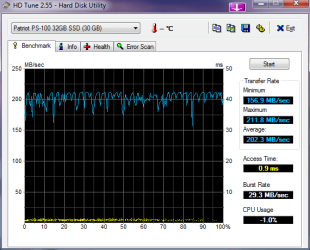
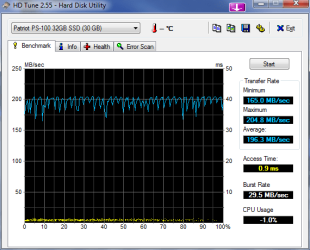
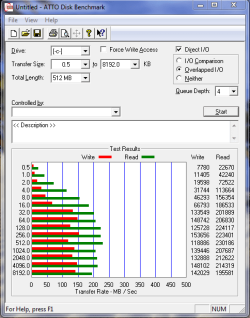
switching to ahci on my system gave me a negligible increase (?) (more like a negligible decrease, huh) i'm going to stick with it like this for a few days to see how it performs. first hd tune pic is prior to enabling ahci. for atto bench, the first pic is prior to enabling ahci (the second pic was a bench just ran about 5 mins ago)
 

Attachments

  • HDTune_Benchmark_Patriot_PS-100_32GB_SSD 2-13-10.png
    HDTune_Benchmark_Patriot_PS-100_32GB_SSD 2-13-10.png
    13.8 KB · Views: 28
  • HDTune_Benchmark_Patriot_PS-100_32GB_SSD after AHCI.png
    HDTune_Benchmark_Patriot_PS-100_32GB_SSD after AHCI.png
    14.2 KB · Views: 21
  • atto bench 2-13-10.PNG
    atto bench 2-13-10.PNG
    14.7 KB · Views: 12
  • atto bench 2-14-10 w ahci.PNG
    atto bench 2-14-10 w ahci.PNG
    17 KB · Views: 21

My Computer

Computer Manufacturer/Model Number
Rig 1
OS
Windows 7 Ultimate x64
CPU
AMD Phenom II X4 940 Black Edition @ 3.4GHz (AM2+)
Motherboard
Gigabyte GA-MA790X-UD4P (AM2+)
Memory
Corsair CM2X4096-8500C5 (4 X 2GB)
Graphics Card(s)
XFX Radeon HD 5770 / Diamond Radeon HD 5770 CrossFireX
Sound Card
Asus Xonar DS (PCI)
Monitor(s) Displays
Samsung SyncMaster 932bw+ (3)
Screen Resolution
4320x900
Hard Drives
OCZ Vertex 2 80 GB - Windows 7 System --
WD Caviar Black 1TB - Music, Movies, Vids, Pics --
WD Caviar Black 640GB - User Profiles & Games --
WD My Book 320GB external
PSU
Corsair CMPSU-750TX
Case
Cooler Master HAF 932
Cooling
Corsair Hydro Series H50
Keyboard
Logitech Desktop Wave
Mouse
Logitech LX8 Laser
Internet Speed
20 down / 2 up
Other Info
LG GGC-H20L Blu-Ray / HDDVD combo --
Hauppauge HVR-1250 --
Silverstone MFP-51 --
Logitech Webcam C600
Vertex 30GB FW1.5
ICH9R AHCI mode w/Intel Drivers
 

Attachments

  • Vertex30.jpg
    Vertex30.jpg
    39.1 KB · Views: 10

My Computer

Computer Manufacturer/Model Number
Custom (Self Build)
OS
Windows 7 Home Premium 64bit
CPU
Intel Core i7 2700k
Motherboard
eVGA P67 SLI
Memory
8GB Mushkin Redline Ridgebacks @1866
Graphics Card(s)
EVGA GTX570 SC
Sound Card
XiFi Titanium HD
Monitor(s) Displays
LG W2453V
Screen Resolution
1920x1080
Hard Drives
Intel 320 80GB -- Intel X25-V 40GB --WD Black 1TB x2 -- WD Blue 640GB
PSU
Seasonic x750
Case
Corsair 600T SE White
Cooling
eVGA Superclocked CPU Cooler
Keyboard
Saitek Cyborg
Antivirus
Kaspersky
Browser
IE
Other Info
LG BD/DVD
Hi

Question for you guru's here. When I built my new machine last year I toyed with the idea of an SSD but went with the 150GB Velociraptor instead. Now with the new G2 160GB drive available from Intel that supports TRIM I am beginning to get the upgrade bug. The only issue I have at this point is that I do NOT want to have to reinstall Windows and start all over again. Is there any way to "clone" the raptor onto the Intel and just swap them out or will Windows have a meltdown. Any advice would be greatly appreciated.

Tom

Would this do what I need?
EASEUS Partition Master Professional Edition: Magic Partition Manager for Windows 2000/XP/Vista/Windows 7 (32bit and 64bit).

Thanks again. :D

Personally, I cloned my velociraptor using Windows 7 image backup of the first 2 partitions (100 Meg and the next)... BUT first I had to shrimnk the second partition to fit the SSD. I only did this because it was easier for me AND (big AND) the OS on the HD was WINDOWS 7....
IF you are running windows 7: After you restore your images to the SSD and run it the first time, insert the Windows 7 DVD (or usb :cool:) and click setup following the guide here (upgrade install): http://www.sevenforums.com/tutorials/3413-repair-install.html

This will force Windows 7 to recognize the SSD and apply all the optimizations for it without losing your settings and installed software.

After all is dona and you have any other drivers installed, make sure the system is set to ask for password on return from sleep. put your system to sleep, then resume but LEAVE IT AT THE PASSWORD PROMPT for about 30 minutes. This will force the drives garbage collection to work and optimize the drive.
 

My Computer

Computer Manufacturer/Model Number
HP DV7-2270US
OS
Windows 7 64-bit
CPU
Intel Core 2 quad (2000MHZ, 4 core)
Motherboard
HP
Memory
4 Gig
Graphics Card(s)
ATI HD4650
Sound Card
IDT HD and ATI HD
Monitor(s) Displays
17" wide laptop and 65" secondary (for 'work' :) )
Screen Resolution
1600X900
Hard Drives
Patriot 64-Gig M28 SSD in bay 1
Seagate ST9500420AS 500 Gig in bay 2(laptop)
Case
HP Laptop
Internet Speed
T3
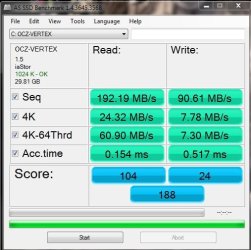
Just tested with AS SSD Benchmark. IDE mode with Windows drivers.
 

Attachments

  • as-ssd-bench INTEL SSDSA2M080 15.02.2010 20-25-54.png
    as-ssd-bench INTEL SSDSA2M080 15.02.2010 20-25-54.png
    11.7 KB · Views: 15

My Computer

Computer Manufacturer/Model Number
tw33k
OS
Windows 7 Ultimate (x64) SP1
CPU
Intel 3770k 4.6GHz
Motherboard
ASUS Maximus V Formula
Memory
8GB (2x 4GB) Crucial Ballistix
Graphics Card(s)
Sapphire 7950 (1060/1600)
Sound Card
On Board Realtek HD Audio
Monitor(s) Displays
27" Acer B273HU (via HDMI)
Screen Resolution
2048 x 1152
Hard Drives
Crucial M4 128GB
2TB WD Black
1TB Samsung F3 SATA
1TB WD Elite External
2TB WD USB 3.0
PSU
Corsair AX750 Gold
Case
Corsair Obsidian 800DW
Cooling
Corsair H100 (2x AP-121/2x UK-3000 push/pull)
Keyboard
Microsoft Wireless 5000
Mouse
Microsoft Wireless 5000
Internet Speed
5mb/s
Other Info
Logitech z-2300 2.1 speakers
Lamptron FC-5 v2
you can enable ahci without doing a clean install, but you must change the registry first. i did it just last night. (http://thewindows7site.com/forum/threads/14171-Switch-from-IDE-to-AHCI-after-Installation). for my board (gigabyte 790X), i first changed the registry. i then went into bios and changed the setting to ahci. rebooted, no problems. after logging in, the default microsoft drivers installed which required another reboot. after logging on again, i went to gigabyte's website, downloaded the amd ahci drivers, unzipped, updated the microsoft drivers to amd's drivers, then rebooted. no problems at all.

switching to ahci on my system gave me a negligible increase (?) (more like a negligible decrease, huh) i'm going to stick with it like this for a few days to see how it performs. first hd tune pic is prior to enabling ahci. for atto bench, the first pic is prior to enabling ahci (the second pic was a bench just ran about 5 mins ago)

While I don't have my SSD yet (but soon) I decided to give this a whirl, it worked great I now have the Microsoft AHCI driver installed and am feeling confident about moving ahead with the purchase of the drive. I reran my WEI after enabling the AHCI and my disk index went from 5.9 to 6.2. In my case with what I have read sp far about the Intel drivers I think that it would be better if I waited to change over until some new ones are released.

I want to thank ALL of you guys for the help and support with this issue and although I doubt it I hope that I can return the favor someday.


Tom
 

My Computer

Computer Manufacturer/Model Number
Home Brew
OS
Windows7 Home Premium X64
CPU
Intel Q9650 3.00 Ghz OC'd to 3.60
Motherboard
Asus P5Q Pro Turbo
Memory
4X2GB Corsair Dominator
Graphics Card(s)
XFX HD4890 (ATI)
Sound Card
On Board
Monitor(s) Displays
2X Dell 2405FPW
Screen Resolution
2X 1920X1200
Hard Drives
1 Intel X25-M 160GB SSD SATA Drive
1 WD Velociraptor 150GB SATA Drive
1 WD Velociraptor 300GB SATA Drive
2 Lite-on SATA CD/DVD Burners
PSU
Thermaltake 850 Watt
Case
Lian Li
Cooling
Thermaltake Bigwater for CPU and 4 additional fans
Keyboard
Sunbeamtech
Mouse
Logitec Trackman
Internet Speed
5 MB DSL
By far, most of what I have read, including on the Intel website, say you should use AHCI to get the most out of your SSD.

You can burn the the firmware from Intel to a bootable disc. You can boot and install from the firmware disc without even having an OS installed on the SSD. And yes, switch to AHCI in BIOS prior to installing the OS. In AHCI mode, Windows will know to install the proper drivers during the install.

I downloaded the latest firmware and burned it to a disk so when I get the drive I will be ready to upgrade it.

I appreciate all the help and support thanks thanks thanks


Tom
 

My Computer

Computer Manufacturer/Model Number
Home Brew
OS
Windows7 Home Premium X64
CPU
Intel Q9650 3.00 Ghz OC'd to 3.60
Motherboard
Asus P5Q Pro Turbo
Memory
4X2GB Corsair Dominator
Graphics Card(s)
XFX HD4890 (ATI)
Sound Card
On Board
Monitor(s) Displays
2X Dell 2405FPW
Screen Resolution
2X 1920X1200
Hard Drives
1 Intel X25-M 160GB SSD SATA Drive
1 WD Velociraptor 150GB SATA Drive
1 WD Velociraptor 300GB SATA Drive
2 Lite-on SATA CD/DVD Burners
PSU
Thermaltake 850 Watt
Case
Lian Li
Cooling
Thermaltake Bigwater for CPU and 4 additional fans
Keyboard
Sunbeamtech
Mouse
Logitec Trackman
Internet Speed
5 MB DSL
For those that consider cloning a Win7 installation to an SSD, here is a tweak utility that makes the necessary settings for you (not sure about turning on Trim though).
For those who make a clean Win7 install on the SSD, this article may be interesting reading.
 

My Computer

Computer Manufacturer/Model Number
HP, Dell, Gateway, Toshiba - 4 laptops and 2 desktops
OS
Vista, Windows7, Mint Mate, Zorin, Windows 8
CPU
from 1.6GHz Duo to i7
Monitor(s) Displays
2x HP w2207
Hard Drives
5x HDD, 7x SSD, 12x Externals
Keyboard
with trackball - no mices
Mouse
Trackball mice
Internet Speed
DSL 6000
Here is 2 Vertex Turbo's in raid.

2eyhssz.jpg
 

My Computer

OS
win 7
Here is 2 Vertex Turbo's in raid.

2eyhssz.jpg

Out standing numbers. My goodness! that's fast! These are MLC Indilinx drives too.

Very nice.
 

My Computer

Computer Manufacturer/Model Number
Keeps changing - (Custom)
OS
Windows 7 Professional x64
CPU
Intel Core i7 860
Motherboard
Gigabyte GA-P55-UD4P
Memory
4GB DDR3 Mushkin 1600Mhz @ 7-8-7-20
Graphics Card(s)
MSI GTS250 1GB DDR3 Twin Frozr
Sound Card
Onboard realtek
Monitor(s) Displays
Samsung SyncMaster 24" P2450 + Samsung 20" 2033
Screen Resolution
1920 X 1080 and 1600 X 900 (#2 system 1440 X 900)
Hard Drives
Patriot Inferno 120GB SSD + 3 WD Blue 640GB drives
PSU
Corsair 750 HX Modular
Case
Lancool PC-K62
Cooling
Cooler Master TX3 CPU cooler and 4-140mm and 1-120mm case
Keyboard
Gigabyte USB keyboard
Mouse
Microsoft wireless laser mouse 5000
Internet Speed
7 Mb down 1.5 up
Other Info
System #2: AMD Phenom II X6 1055T (Freezer 7 Pro cooler) - Gigabyte 880GMA-UD2H - WD 500GB Black - 9500GT (1GB) 500W OCZ modular PSU - Antec 200 case. System #3 (LapTop) Core 2 Duo T6670 - 320GB 7200RPM HD - 4GB DDR3 RAM.
Finally made the jump and i have to say it has been one of the best upgrades ever!

These are from the cheapest 100GB+ ssd I could find, the 128gb the adata s596. Not too bad for a jmicron based ssd

crystalssdbench.png

asssdbench.png
 

My Computer

Computer type
PC/Desktop
Computer Manufacturer/Model Number
Elsa
OS
windows 8.1 Pro x64
CPU
intel [email protected]
Motherboard
msi mpower max ac
Memory
2x8gb ripjaws x @2133
Graphics Card(s)
asus r9-290@1100/1300
Sound Card
creative sbz
Monitor(s) Displays
dell u3011
Hard Drives
840 evo 250 & 8.5tb
PSU
evga supernova p2-1000
Case
corsair air 540
Cooling
corsair h100
Keyboard
logitech g710+
Mouse
logitech g502
Internet Speed
50/10
Antivirus
avg
Browser
firefox
Finally made the jump and i have to say it has been one of the best upgrades ever!

That's what I tell people all of the time. And I've yet to come across a single person who invested the cash into the SSD and said anything different. That speaks volumes. Even though it was costly and space is limited, us SSD owners seem to be perfectly happy with your hardware.
 

My Computer

Computer Manufacturer/Model Number
Self-Built in July 2009
OS
Windows 7 Ultimate x64
CPU
Intel Q9550 2.83Ghz OC'd to 3.40Ghz
Motherboard
Gigabyte GA-EP45-UD3R rev. 1.1, F12 BIOS
Memory
8GB G.Skill PI DDR2-800, 4-4-4-12 timings
Graphics Card(s)
EVGA 1280MB Nvidia GeForce GTX570
Sound Card
Realtek ALC899A 8 channel onboard audio
Monitor(s) Displays
23" Acer x233H
Screen Resolution
1920x1080
Hard Drives
Intel X25-M 80GB Gen 2 SSD
Western Digital 1TB Caviar Black, 32MB cache. WD1001FALS
PSU
Corsair 620HX modular
Case
Antec P182
Cooling
stock
Keyboard
ABS M1 Mechanical
Mouse
Logitech G9 Laser Mouse
Internet Speed
15/2 cable modem
Other Info
Windows and Linux enthusiast. Logitech G35 Headset.
Yup no joke. Usually I feel some regret when I overspend but this time it felt worth it. Although to be honest I really wanted an intel drive but I could not afford the 160gb and the 80gb did not feel as worth it compared to this 128gb. Maybe next time
Enjoy the speedy ssd's:)
 

My Computer

Computer type
PC/Desktop
Computer Manufacturer/Model Number
Elsa
OS
windows 8.1 Pro x64
CPU
intel [email protected]
Motherboard
msi mpower max ac
Memory
2x8gb ripjaws x @2133
Graphics Card(s)
asus r9-290@1100/1300
Sound Card
creative sbz
Monitor(s) Displays
dell u3011
Hard Drives
840 evo 250 & 8.5tb
PSU
evga supernova p2-1000
Case
corsair air 540
Cooling
corsair h100
Keyboard
logitech g710+
Mouse
logitech g502
Internet Speed
50/10
Antivirus
avg
Browser
firefox
Finally made the jump and i have to say it has been one of the best upgrades ever!

That's what I tell people all of the time. And I've yet to come across a single person who invested the cash into the SSD and said anything different. That speaks volumes. Even though it was costly and space is limited, us SSD owners seem to be perfectly happy with your hardware.

Yup no joke. Usually I feel some regret when I overspend but this time it felt worth it. Although to be honest I really wanted an intel drive but I could not afford the 160gb and the 80gb did not feel as worth it compared to this 128gb. Maybe next time
Enjoy the speedy ssd's:)

my sentiments as well. matter of fact, i'm seriously going to look into purchasing another within the next couple of weeks to put in a raid array (32 GB Patriot PS-100)
 

My Computer

Computer Manufacturer/Model Number
Rig 1
OS
Windows 7 Ultimate x64
CPU
AMD Phenom II X4 940 Black Edition @ 3.4GHz (AM2+)
Motherboard
Gigabyte GA-MA790X-UD4P (AM2+)
Memory
Corsair CM2X4096-8500C5 (4 X 2GB)
Graphics Card(s)
XFX Radeon HD 5770 / Diamond Radeon HD 5770 CrossFireX
Sound Card
Asus Xonar DS (PCI)
Monitor(s) Displays
Samsung SyncMaster 932bw+ (3)
Screen Resolution
4320x900
Hard Drives
OCZ Vertex 2 80 GB - Windows 7 System --
WD Caviar Black 1TB - Music, Movies, Vids, Pics --
WD Caviar Black 640GB - User Profiles & Games --
WD My Book 320GB external
PSU
Corsair CMPSU-750TX
Case
Cooler Master HAF 932
Cooling
Corsair Hydro Series H50
Keyboard
Logitech Desktop Wave
Mouse
Logitech LX8 Laser
Internet Speed
20 down / 2 up
Other Info
LG GGC-H20L Blu-Ray / HDDVD combo --
Hauppauge HVR-1250 --
Silverstone MFP-51 --
Logitech Webcam C600
I am not sure whether Raid is a good choice for SSDs. Does it really matter whether your access is in 2ms or in 1ms - the perception will be the same.
That is a different story with e.g. large Raptors and a mirrored Raid 1 setup. That would increase the data transfer speed to something close to an SSD and provide safety against a crash of one disk at the same time.
But with the small size of the SSDs, you usually cannot afford mirroring.
 

My Computer

Computer Manufacturer/Model Number
HP, Dell, Gateway, Toshiba - 4 laptops and 2 desktops
OS
Vista, Windows7, Mint Mate, Zorin, Windows 8
CPU
from 1.6GHz Duo to i7
Monitor(s) Displays
2x HP w2207
Hard Drives
5x HDD, 7x SSD, 12x Externals
Keyboard
with trackball - no mices
Mouse
Trackball mice
Internet Speed
DSL 6000
hadn't thought about that. hmmm... no need in wasting money i guess
 

My Computer

Computer Manufacturer/Model Number
Rig 1
OS
Windows 7 Ultimate x64
CPU
AMD Phenom II X4 940 Black Edition @ 3.4GHz (AM2+)
Motherboard
Gigabyte GA-MA790X-UD4P (AM2+)
Memory
Corsair CM2X4096-8500C5 (4 X 2GB)
Graphics Card(s)
XFX Radeon HD 5770 / Diamond Radeon HD 5770 CrossFireX
Sound Card
Asus Xonar DS (PCI)
Monitor(s) Displays
Samsung SyncMaster 932bw+ (3)
Screen Resolution
4320x900
Hard Drives
OCZ Vertex 2 80 GB - Windows 7 System --
WD Caviar Black 1TB - Music, Movies, Vids, Pics --
WD Caviar Black 640GB - User Profiles & Games --
WD My Book 320GB external
PSU
Corsair CMPSU-750TX
Case
Cooler Master HAF 932
Cooling
Corsair Hydro Series H50
Keyboard
Logitech Desktop Wave
Mouse
Logitech LX8 Laser
Internet Speed
20 down / 2 up
Other Info
LG GGC-H20L Blu-Ray / HDDVD combo --
Hauppauge HVR-1250 --
Silverstone MFP-51 --
Logitech Webcam C600
Status
Not open for further replies.
Back
Top