Show us your SSD performance

Status
Not open for further replies.
I have never seen a performance graph like this. Besides the slow average, the ups and downs are not normal. Maybe it is an alignment problem. Check the alignment (in msinfo32 > Components > Storage > Disks > Partition Starting Offset - for the first partition).


here is the info

Description Disk drive
Manufacturer (Standard disk drives)
Model Patriot Warp V2 64GB SSD ATA Device
Bytes/Sector 512
Media Loaded Yes
Media Type Fixed hard disk
Partitions 2
SCSI Bus 0
SCSI Logical Unit 0
SCSI Port 2
SCSI Target ID 0
Sectors/Track 19
Size 60.16 GB (64,592,052,224 bytes)
Total Cylinders 29,642
Total Sectors 126,156,352
Total Tracks 6,639,808
Tracks/Cylinder 224
Partition Disk #0, Partition #0
Partition Size 100.00 MB (104,857,600 bytes)
Partition Starting Offset 1,048,576 bytes
Partition Disk #0, Partition #1
Partition Size 60.06 GB (64,485,326,848 bytes)
Partition Starting Offset 105,906,176 bytes

I'm not sure what's going on here, but something is wrong. I will start looking for what would cause this. If I can find out I will let you know. This isn't normal at all.
 

My Computer My Computer

Computer Manufacturer/Model Number
Keeps changing - (Custom)
OS
Windows 7 Professional x64
CPU
Intel Core i7 860
Motherboard
Gigabyte GA-P55-UD4P
Memory
4GB DDR3 Mushkin 1600Mhz @ 7-8-7-20
Graphics Card(s)
MSI GTS250 1GB DDR3 Twin Frozr
Sound Card
Onboard realtek
Monitor(s) Displays
Samsung SyncMaster 24" P2450 + Samsung 20" 2033
Screen Resolution
1920 X 1080 and 1600 X 900 (#2 system 1440 X 900)
Hard Drives
Patriot Inferno 120GB SSD + 3 WD Blue 640GB drives
PSU
Corsair 750 HX Modular
Case
Lancool PC-K62
Cooling
Cooler Master TX3 CPU cooler and 4-140mm and 1-120mm case
Keyboard
Gigabyte USB keyboard
Mouse
Microsoft wireless laser mouse 5000
Internet Speed
7 Mb down 1.5 up
Other Info
System #2: AMD Phenom II X6 1055T (Freezer 7 Pro cooler) - Gigabyte 880GMA-UD2H - WD 500GB Black - 9500GT (1GB) 500W OCZ modular PSU - Antec 200 case. System #3 (LapTop) Core 2 Duo T6670 - 320GB 7200RPM HD - 4GB DDR3 RAM.
MSAKSA, the alignment looks fine.
 

My Computer My Computer

Computer Manufacturer/Model Number
HP, Dell, Gateway, Toshiba - 4 laptops and 2 desktops
OS
Vista, Windows7, Mint Mate, Zorin, Windows 8
CPU
from 1.6GHz Duo to i7
Monitor(s) Displays
2x HP w2207
Hard Drives
5x HDD, 7x SSD, 12x Externals
Keyboard
with trackball - no mices
Mouse
Trackball mice
Internet Speed
DSL 6000
I have never seen a performance graph like this. Besides the slow average, the ups and downs are not normal. Maybe it is an alignment problem. Check the alignment (in msinfo32 > Components > Storage > Disks > Partition Starting Offset - for the first partition).


here is the info

Description Disk drive
Manufacturer (Standard disk drives)
Model Patriot Warp V2 64GB SSD ATA Device
Bytes/Sector 512
Media Loaded Yes
Media Type Fixed hard disk
Partitions 2
SCSI Bus 0
SCSI Logical Unit 0
SCSI Port 2
SCSI Target ID 0
Sectors/Track 19
Size 60.16 GB (64,592,052,224 bytes)
Total Cylinders 29,642
Total Sectors 126,156,352
Total Tracks 6,639,808
Tracks/Cylinder 224
Partition Disk #0, Partition #0
Partition Size 100.00 MB (104,857,600 bytes)
Partition Starting Offset 1,048,576 bytes
Partition Disk #0, Partition #1
Partition Size 60.06 GB (64,485,326,848 bytes)
Partition Starting Offset 105,906,176 bytes

I'm not sure what's going on here, but something is wrong. I will start looking for what would cause this. If I can find out I will let you know. This isn't normal at all.

Thank You

MSAKSA, the alignment looks fine.

ok what's wrong then?
do you think that I need to replace my Mother Board??
we can keep discussing in this thread
http://www.sevenforums.com/performance-maintenance/69736-whats-wrong-my-ssd.html

thanks all
 

My Computer My Computer

OS
Win 7
CPU
Intel Pentium D
Motherboard
Intel 975X
Memory
4 GB
Graphics Card(s)
nVidea 1 GB
Monitor(s) Displays
Acer 22''
Hard Drives
Patriot Wrap 64 SSD
PSU
ThermalTech
Case
ThermalTech
To tell you the truth, I do not know what's wrong. The mobo is the most unlikely culprit. It could be the firmware or some setting in the BIOS. It may also be wise to run the test with another tool - e.g. Everest Disk Benchmark. I have seen a lot "smoother" read results of the same disk with that - e.g. here.
 

My Computer My Computer

Computer Manufacturer/Model Number
HP, Dell, Gateway, Toshiba - 4 laptops and 2 desktops
OS
Vista, Windows7, Mint Mate, Zorin, Windows 8
CPU
from 1.6GHz Duo to i7
Monitor(s) Displays
2x HP w2207
Hard Drives
5x HDD, 7x SSD, 12x Externals
Keyboard
with trackball - no mices
Mouse
Trackball mice
Internet Speed
DSL 6000
Hi all,

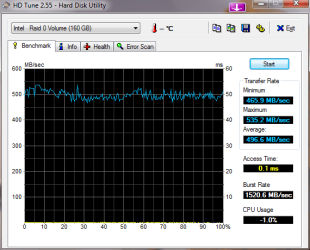
I just ran this test this evening. My system is as follows:

Windows 7 Pro x64, clean install
FireFox v3.6 x86
ZoneAlarm Extreme Security v9.1.008.000

Intel Core i7 920 with stock cooler
Intel X25-M 80GB SSD G1 x 2EA in a RAID 0 configuration 128 KB stripe
ASUS P6T Deluxe mobo with OC Palm Remote (BIOS 1102)
Corsair Dominator 6GB (3 x 2GB) TR3XG1600C8D DDR3 1600
Cooler Master 700W 80 PLUS SILVER Certified PSU
EVGA NVIDIA GeForce 9800 GTX+ (G92) 512MB 256-bit GDDR3

Anyway, here's what I got.

-roadtrip-
 

Attachments

  • HDTune_Benchmark_Intel___Raid_0_Volume with SSD cache ON II.png
    HDTune_Benchmark_Intel___Raid_0_Volume with SSD cache ON II.png
    13.5 KB · Views: 60

My Computer My Computer

Computer Manufacturer/Model Number
I bolted it together myself
OS
Windows 7 Professional
CPU
Intel Core i7 920 with stock cooler
Motherboard
ASUS P6T Deluxe with OC Palm Remote (BIOS 1102)
Memory
Corsair Dominator 6GB (3 x 2GB) TR3XG1600C8D DDR3 1600
Graphics Card(s)
EVGA NVIDIA GeForce 9800 GTX (G92) 512MB 256-bit GDDR3
Monitor(s) Displays
Samsung SyncMaster 953BW 19"
Screen Resolution
1440 x 900
Hard Drives
Intel X25-M 80GB SSD G1 x 2EA in a RAID 0 configuration 128 KB stripe
PSU
Cooler Master 700W 80 PLUS SILVER Certified PSU
Case
Antec Nine Hundred ATX Mid Tower Case (it has blue LEDs)
Cooling
case has 5 fans, stock CPU fan, graphic card and PSU fans
Keyboard
Logitech cordless keyboard
Mouse
Logitech V22 cordless optical
Internet Speed
Wildblue Satellite (1.5 mbps)
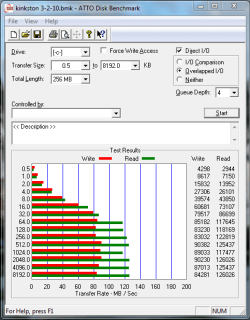
i ran into some problems with my ps-100. so i rushed out and bought a new kingston ssdnow v series 64gb. it works well for me and since i've had it, it has been very stable and steady in its performance--not as fast read speeds as the ps-100 but consistently better write speeds. i'm sending the ps-100 to patriot for rma :cry:

because i rushed out and got this, i didn't do the necessary homework on it first. i found out after the fact that this is sata 1.5 :eek:

but, as i stated, the performance has been stable and steady--no complaints.
 

Attachments

  • kingston 3-2-10.PNG
    kingston 3-2-10.PNG
    16.6 KB · Views: 32

My Computer My Computer

Computer Manufacturer/Model Number
Rig 1
OS
Windows 7 Ultimate x64
CPU
AMD Phenom II X4 940 Black Edition @ 3.4GHz (AM2+)
Motherboard
Gigabyte GA-MA790X-UD4P (AM2+)
Memory
Corsair CM2X4096-8500C5 (4 X 2GB)
Graphics Card(s)
XFX Radeon HD 5770 / Diamond Radeon HD 5770 CrossFireX
Sound Card
Asus Xonar DS (PCI)
Monitor(s) Displays
Samsung SyncMaster 932bw+ (3)
Screen Resolution
4320x900
Hard Drives
OCZ Vertex 2 80 GB - Windows 7 System --
WD Caviar Black 1TB - Music, Movies, Vids, Pics --
WD Caviar Black 640GB - User Profiles & Games --
WD My Book 320GB external
PSU
Corsair CMPSU-750TX
Case
Cooler Master HAF 932
Cooling
Corsair Hydro Series H50
Keyboard
Logitech Desktop Wave
Mouse
Logitech LX8 Laser
Internet Speed
20 down / 2 up
Other Info
LG GGC-H20L Blu-Ray / HDDVD combo --
Hauppauge HVR-1250 --
Silverstone MFP-51 --
Logitech Webcam C600
after i was given the tech reference # from patriot, i was told in the email that the # would be valid for 30 days. so, i took the time to give the disk one last chance. on my daughter's computer, i imaged her vista installation and installed it on the ps-100. everything was very good (that was approx feb 22). i performed a bench on it this morning (atto) and the highest read speed i got was ~37000 :cry:. needless to say, i'm going to get started on the rma process over this weekend (after i find a replacement for this drive).

the kingston drive referenced in my previous post was purchased to replace the ps-100 for my windows 7 installation. as stated, flawless operation thus far.

when it's all said and done, looks like i'll be having a spare ssd laying around (the ps-100 once i get it back from patriot). i guess i'll put it to use on my xp machine in the garage... it's a little too expensive and small in storage size to be used as an external drive :(. oh well.
 

My Computer My Computer

Computer Manufacturer/Model Number
Rig 1
OS
Windows 7 Ultimate x64
CPU
AMD Phenom II X4 940 Black Edition @ 3.4GHz (AM2+)
Motherboard
Gigabyte GA-MA790X-UD4P (AM2+)
Memory
Corsair CM2X4096-8500C5 (4 X 2GB)
Graphics Card(s)
XFX Radeon HD 5770 / Diamond Radeon HD 5770 CrossFireX
Sound Card
Asus Xonar DS (PCI)
Monitor(s) Displays
Samsung SyncMaster 932bw+ (3)
Screen Resolution
4320x900
Hard Drives
OCZ Vertex 2 80 GB - Windows 7 System --
WD Caviar Black 1TB - Music, Movies, Vids, Pics --
WD Caviar Black 640GB - User Profiles & Games --
WD My Book 320GB external
PSU
Corsair CMPSU-750TX
Case
Cooler Master HAF 932
Cooling
Corsair Hydro Series H50
Keyboard
Logitech Desktop Wave
Mouse
Logitech LX8 Laser
Internet Speed
20 down / 2 up
Other Info
LG GGC-H20L Blu-Ray / HDDVD combo --
Hauppauge HVR-1250 --
Silverstone MFP-51 --
Logitech Webcam C600
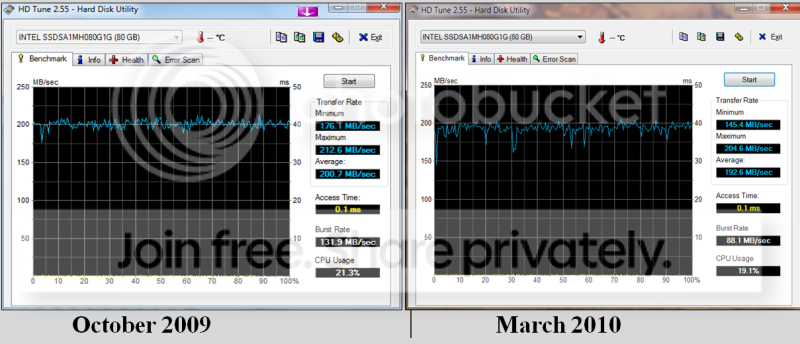
My Intel G1 after 5 months

SSD_after_5_months.png
 

My Computer My Computer

Computer Manufacturer/Model Number
HP, Dell, Gateway, Toshiba - 4 laptops and 2 desktops
OS
Vista, Windows7, Mint Mate, Zorin, Windows 8
CPU
from 1.6GHz Duo to i7
Monitor(s) Displays
2x HP w2207
Hard Drives
5x HDD, 7x SSD, 12x Externals
Keyboard
with trackball - no mices
Mouse
Trackball mice
Internet Speed
DSL 6000
^^^ VERY VERY good whs. Thanks for sharing that. ^^^
 

My Computer My Computer

Computer Manufacturer/Model Number
Keeps changing - (Custom)
OS
Windows 7 Professional x64
CPU
Intel Core i7 860
Motherboard
Gigabyte GA-P55-UD4P
Memory
4GB DDR3 Mushkin 1600Mhz @ 7-8-7-20
Graphics Card(s)
MSI GTS250 1GB DDR3 Twin Frozr
Sound Card
Onboard realtek
Monitor(s) Displays
Samsung SyncMaster 24" P2450 + Samsung 20" 2033
Screen Resolution
1920 X 1080 and 1600 X 900 (#2 system 1440 X 900)
Hard Drives
Patriot Inferno 120GB SSD + 3 WD Blue 640GB drives
PSU
Corsair 750 HX Modular
Case
Lancool PC-K62
Cooling
Cooler Master TX3 CPU cooler and 4-140mm and 1-120mm case
Keyboard
Gigabyte USB keyboard
Mouse
Microsoft wireless laser mouse 5000
Internet Speed
7 Mb down 1.5 up
Other Info
System #2: AMD Phenom II X6 1055T (Freezer 7 Pro cooler) - Gigabyte 880GMA-UD2H - WD 500GB Black - 9500GT (1GB) 500W OCZ modular PSU - Antec 200 case. System #3 (LapTop) Core 2 Duo T6670 - 320GB 7200RPM HD - 4GB DDR3 RAM.
One thing I do not understand though is why my "burst rate" dropped so much.
 

My Computer My Computer

Computer Manufacturer/Model Number
HP, Dell, Gateway, Toshiba - 4 laptops and 2 desktops
OS
Vista, Windows7, Mint Mate, Zorin, Windows 8
CPU
from 1.6GHz Duo to i7
Monitor(s) Displays
2x HP w2207
Hard Drives
5x HDD, 7x SSD, 12x Externals
Keyboard
with trackball - no mices
Mouse
Trackball mice
Internet Speed
DSL 6000
One thing I do not understand though is why my "burst rate" dropped so much.


I think the Burst Rate test (whatever it does) is flaky sometimes, particularly on SSDs. I've had it vary by as much as a factor of 2 in tests run in succession. Maybe it occurs so quick on SSDs that if the OS happens to be starting something at that very moment, the OS sucks up the bandwidth. On regular drives the results may be evened out because of the smoothing effect of the (relatively) longer period of time it takes to run on them. Who knows.

Great performance, by the way.
Tom
 

My Computer My Computer

Computer type
PC/Desktop
Computer Manufacturer/Model Number
Dell: XPS 420 (2), XPS M1330 (several), XPS 14z, Mini 9, Mini 10v
OS
W8 Pro, W7 Ultimate, XP Pro x64, Vista x64, Ubuntu
CPU
Q6600, Q6700, T7500, T7500, N270, N270
Motherboard
Dell
Memory
8GB, 8GB, 4GB, 4GB, 2GB, 2GB
Graphics Card(s)
ATI, nVidia, nVidia, nVidia, Intel, Intel
Monitor(s) Displays
Dell 2408WFP
Hard Drives
A drawer full. OCZ Vertex's in RAID 0. Vertex 3's, Vertex 4, Samsung 830's, Samsung 840's, Intel 330. Don't use dino drives any more except for servers.
Keyboard
Logitech Wave
Internet Speed
29 Mbps DL / .95 Mbps UL
Other Info
New project(2013)...Another low power server. Zotac H67ITX, i3-2100T, Windows Server 2012 Essentials on Samsung SSD.
Previous project...Low power (38-40 watts using Kill-a-Watt) Windows Home Server. Zotac ION (Atom 330, GeForce9400), 4GB RAM, 2x2TB WD Green, IN WIM miniITX Case. Fits on a shelf in laundry closet, practically silent.
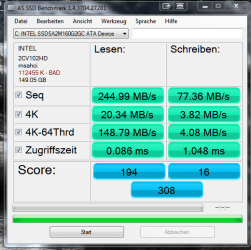
Well I'm back, it only took me a month to get my drive and install it. However as you can see my numbers are less than stellar compared to the other Intel drives posted here and I believe that my issue is the dreaded alignment problem (I guess cloning the drive was not the way to go). So I have another question, if I reinstall Windows can I then take my system restore image and just put everything back at one time or am I going to have to reinstall everything individually in order to keep it all "aligned". Thanks in advance for your help.

Tom

BTW Where do I have to stick the english dll (be nice) for the benchmark to find it.
 

Attachments

  • SSD Benchmark.png
    SSD Benchmark.png
    27.2 KB · Views: 5

My Computer My Computer

Computer Manufacturer/Model Number
Home Brew
OS
Windows7 Home Premium X64
CPU
Intel Q9650 3.00 Ghz OC'd to 3.60
Motherboard
Asus P5Q Pro Turbo
Memory
4X2GB Corsair Dominator
Graphics Card(s)
XFX HD4890 (ATI)
Sound Card
On Board
Monitor(s) Displays
2X Dell 2405FPW
Screen Resolution
2X 1920X1200
Hard Drives
1 Intel X25-M 160GB SSD SATA Drive
1 WD Velociraptor 150GB SATA Drive
1 WD Velociraptor 300GB SATA Drive
2 Lite-on SATA CD/DVD Burners
PSU
Thermaltake 850 Watt
Case
Lian Li
Cooling
Thermaltake Bigwater for CPU and 4 additional fans
Keyboard
Sunbeamtech
Mouse
Logitec Trackman
Internet Speed
5 MB DSL
Trick to clone an unaligned partition and align it

Well I'm back, it only took me a month to get my drive and install it. However as you can see my numbers are less than stellar compared to the other Intel drives posted here and I believe that my issue is the dreaded alignment problem (I guess cloning the drive was not the way to go). So I have another question, if I reinstall Windows can I then take my system restore image and just put everything back at one time or am I going to have to reinstall everything individually in order to keep it all "aligned". Thanks in advance for your help.

Tom

BTW Where do I have to stick the english dll (be nice) for the benchmark to find it.


I came up with a trick to clone an unaligned partition into an aligned partition. I wanted to run Windows Home Server on an OCZ Vertex and with WHS there isn't the luxury of reinstalling and have the installer properly align it like in Vista and W7.

So I created the smallest partition possible (8MB) on the Vertex using Windows 7, leaving the rest of the drive as unallocated space. The 8MB partition was aligned and the starting partition boundary for the unallocated space was also aligned. Then I cloned my WHS install partition to the unallocated space. I've used both Acronis 2010 and Partition Magic free for this. On two eSATA docks, the 3GB clone took only a couple minutes. Now my cloned WHS OS partition is aligned. I deleted the 8MB partition, marked the cloned OS partition active and now the OS is the "first" paritition on the disk and bootable. Put it back in the WHS box and it worked like a charm... WHS running on a 30GB Vertex (installing WHS to a drive less than the required 75GB was a whole 'nuther trick).

For your system restore image, maybe creating the "dummy" partition will solve that alignment problem too.
Tom
 

My Computer My Computer

Computer type
PC/Desktop
Computer Manufacturer/Model Number
Dell: XPS 420 (2), XPS M1330 (several), XPS 14z, Mini 9, Mini 10v
OS
W8 Pro, W7 Ultimate, XP Pro x64, Vista x64, Ubuntu
CPU
Q6600, Q6700, T7500, T7500, N270, N270
Motherboard
Dell
Memory
8GB, 8GB, 4GB, 4GB, 2GB, 2GB
Graphics Card(s)
ATI, nVidia, nVidia, nVidia, Intel, Intel
Monitor(s) Displays
Dell 2408WFP
Hard Drives
A drawer full. OCZ Vertex's in RAID 0. Vertex 3's, Vertex 4, Samsung 830's, Samsung 840's, Intel 330. Don't use dino drives any more except for servers.
Keyboard
Logitech Wave
Internet Speed
29 Mbps DL / .95 Mbps UL
Other Info
New project(2013)...Another low power server. Zotac H67ITX, i3-2100T, Windows Server 2012 Essentials on Samsung SSD.
Previous project...Low power (38-40 watts using Kill-a-Watt) Windows Home Server. Zotac ION (Atom 330, GeForce9400), 4GB RAM, 2x2TB WD Green, IN WIM miniITX Case. Fits on a shelf in laundry closet, practically silent.
Hi zrtom

While I appreciate your fast reply to my dilemma, unfortunately you are way beyond my ability when it comes to Windows 7. I was barely able to do this the first time and have no experience with either of the programs that you mentioned. Unless you want to drop by to help I really need an answer as to whether or not I can reinstall and restore the drive. Thanks again.

Tom
 

My Computer My Computer

Computer Manufacturer/Model Number
Home Brew
OS
Windows7 Home Premium X64
CPU
Intel Q9650 3.00 Ghz OC'd to 3.60
Motherboard
Asus P5Q Pro Turbo
Memory
4X2GB Corsair Dominator
Graphics Card(s)
XFX HD4890 (ATI)
Sound Card
On Board
Monitor(s) Displays
2X Dell 2405FPW
Screen Resolution
2X 1920X1200
Hard Drives
1 Intel X25-M 160GB SSD SATA Drive
1 WD Velociraptor 150GB SATA Drive
1 WD Velociraptor 300GB SATA Drive
2 Lite-on SATA CD/DVD Burners
PSU
Thermaltake 850 Watt
Case
Lian Li
Cooling
Thermaltake Bigwater for CPU and 4 additional fans
Keyboard
Sunbeamtech
Mouse
Logitec Trackman
Internet Speed
5 MB DSL
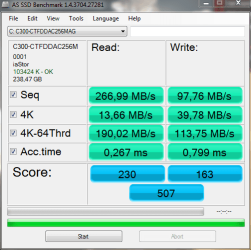
Hi all. Here is mine Crucial C300 SSD Bench on a SATA II.
 

Attachments

  • Cattura.PNG
    Cattura.PNG
    17.1 KB · Views: 7

My Computer My Computer

Computer Manufacturer/Model Number
Self made
OS
Windows 7 Ultimate 64-bit
CPU
Intel i7 3770k
Motherboard
ASRock Z68 Pro Gen.3
Memory
Corsair Vengeance 16GB 1600 Mhz
Graphics Card(s)
Asus GTX580 Direct Cu II
Sound Card
Asus Xonar D2
Monitor(s) Displays
Dell u2711 IPS 27"
Screen Resolution
2560X1440
Hard Drives
OCZ Vertex 4 256 Gb SSD
Case
Cooler Master Cosmos 1000
Keyboard
Logitech Illuminated Keyboard
Mouse
Logitech Laser Mouse M505
Internet Speed
Wifi operator
Hi zrtom

While I appreciate your fast reply to my dilemma, unfortunately you are way beyond my ability when it comes to Windows 7. I was barely able to do this the first time and have no experience with either of the programs that you mentioned. Unless you want to drop by to help I really need an answer as to whether or not I can reinstall and restore the drive. Thanks again.

Tom


hi, i had the same problem with my intel 80GB, what really help me was this guide.

How to setup Core V1/2, Solid, Apex, Vertex SSD with aligned partitions using USB (if available on the drive) or SATA. Updated to show how to use Vista recovery disk

then once i had the alignment, i just used Acronis and cloned my windows 7 64bit over..
works perfect. :)

he also made a video on how to do it. http://www.youtube.com/watch?v=tUu9InlfD_c
 

My Computer My Computer

Computer Manufacturer/Model Number
Goonie Build 8 2010
OS
Windows 7 64bit Ultimate SP1, VMware Windows 7 64bit Ultimate SP1
CPU
Intel Core i7 920 @ 3.8 or 4.2 when i need it
Motherboard
Gigabyte GA-X58-UD5
Memory
Corsair XMS3 12GB DDR3 1600 1.5v
Graphics Card(s)
MSI GeForce GTX 560Ti OC Twin FrozR II
Sound Card
7.1 HD
Monitor(s) Displays
2x BenQ 24 LED 1080p + LG 50PK590 1080p
Screen Resolution
3840 x 1080p
Hard Drives
Intel X25-M 80GB OS/
Intel X25-M 160GB
Data Robotics Drobo V2 8TB
PSU
Corsair AX 750W ATX Modular
Case
Antec Fusion Remote Max
Cooling
Noctua NH D14
Keyboard
Logitech
Mouse
Logitech
Internet Speed
15Mbs Down 1.3Mbs Up
Other Info
Hauppauge HD PVR/
Pioneer 1017-k - 7.1 THX/
Xbox 360 250 Slim
SkyHD/LG 50PK590 TV
Hi

If I follow this can I use my current windows restore image or MUST I use Acronis. Thanks.

Tom
 

My Computer My Computer

Computer Manufacturer/Model Number
Home Brew
OS
Windows7 Home Premium X64
CPU
Intel Q9650 3.00 Ghz OC'd to 3.60
Motherboard
Asus P5Q Pro Turbo
Memory
4X2GB Corsair Dominator
Graphics Card(s)
XFX HD4890 (ATI)
Sound Card
On Board
Monitor(s) Displays
2X Dell 2405FPW
Screen Resolution
2X 1920X1200
Hard Drives
1 Intel X25-M 160GB SSD SATA Drive
1 WD Velociraptor 150GB SATA Drive
1 WD Velociraptor 300GB SATA Drive
2 Lite-on SATA CD/DVD Burners
PSU
Thermaltake 850 Watt
Case
Lian Li
Cooling
Thermaltake Bigwater for CPU and 4 additional fans
Keyboard
Sunbeamtech
Mouse
Logitec Trackman
Internet Speed
5 MB DSL
You are probably better off with an Acronis clone because that can adjust to the disk size.
 

My Computer My Computer

Computer Manufacturer/Model Number
HP, Dell, Gateway, Toshiba - 4 laptops and 2 desktops
OS
Vista, Windows7, Mint Mate, Zorin, Windows 8
CPU
from 1.6GHz Duo to i7
Monitor(s) Displays
2x HP w2207
Hard Drives
5x HDD, 7x SSD, 12x Externals
Keyboard
with trackball - no mices
Mouse
Trackball mice
Internet Speed
DSL 6000
Forgive me for being so dense but after looking at the link and watching the video, I am still confused. It appears that the drive has to be a spare drive, so that means that the SSD has to be moved to a different SATA connection and I have to put back my old drive to make the clone from and boot from that drive to accomplish this. Can someone just explain it to me VERY SLOWLY as to why reinstalling windows on the SSD and allowing it to reformat the drive to the proper size and then restoring it from the restore image will not work. Quite frankly I don't have the confidence that I can accomplish the currently outlined method and might just live with what I have rather than screw it up completely. Thanks again for your patience and help.

Tom
 

My Computer My Computer

Computer Manufacturer/Model Number
Home Brew
OS
Windows7 Home Premium X64
CPU
Intel Q9650 3.00 Ghz OC'd to 3.60
Motherboard
Asus P5Q Pro Turbo
Memory
4X2GB Corsair Dominator
Graphics Card(s)
XFX HD4890 (ATI)
Sound Card
On Board
Monitor(s) Displays
2X Dell 2405FPW
Screen Resolution
2X 1920X1200
Hard Drives
1 Intel X25-M 160GB SSD SATA Drive
1 WD Velociraptor 150GB SATA Drive
1 WD Velociraptor 300GB SATA Drive
2 Lite-on SATA CD/DVD Burners
PSU
Thermaltake 850 Watt
Case
Lian Li
Cooling
Thermaltake Bigwater for CPU and 4 additional fans
Keyboard
Sunbeamtech
Mouse
Logitec Trackman
Internet Speed
5 MB DSL
Forgive me for being so dense but after looking at the link and watching the video, I am still confused. It appears that the drive has to be a spare drive, so that means that the SSD has to be moved to a different SATA connection and I have to put back my old drive to make the clone from and boot from that drive to accomplish this. Can someone just explain it to me VERY SLOWLY as to why reinstalling windows on the SSD and allowing it to reformat the drive to the proper size and then restoring it from the restore image will not work. Quite frankly I don't have the confidence that I can accomplish the currently outlined method and might just live with what I have rather than screw it up completely. Thanks again for your patience and help.

Tom

Because

Window's 7 backup and other backup programs image the whole drive, including the free unformated space before any partition. By alignment, it means that you are creating your first partition after the 63rd sector or the 1023rd sector or any other setup that makes it aligned. The point is there has to be a predetermined amount of free space before the fire partition to ensure that it is aligned.

If you were to simply reinstall windows, it will not delete any existing partition but will just install itself on the already misaligned partition. Misaligned means it's not starting at the proper sector.

If you were to delete all the partitions, then reinstall Windows, it will create a partition for you, which will be aligned and it's fine until there. But when you restore the image, it will restore the whole drive back to how it was before. It doesn't matter what partitions you've already aligned on the drive.

Alignment refers to the position of a partition, not some physical property of the drive. So when you restore restore the image, you're restoring one or more of the misaligned partitions back to the drive.

Now you could back an image of just the misaligned partition and attempt to restore it onto an aligned partition. The success of this depends on how the backup program works. If it simply write the data bit to bit in order on the new partition, then it stays aligned. But if it deletes the partition and creates a new partition to write the image on, it depends if the software creates the new partition aligned or not
 

My Computer My Computer

Computer Manufacturer/Model Number
Dell E4300
OS
Windows 7 Ultimate
CPU
Intel C2D SP9400
Motherboard
Intel GS45
Memory
2GB DDR3
Graphics Card(s)
Integrated =(
Sound Card
Integrated =(
Monitor(s) Displays
Matte LCD
Screen Resolution
1280x800
Hard Drives
Intel X25-M Gen 2 SSD
WD Caviar Black
Mouse
MX 518, V470 - Logitech
Status
Not open for further replies.
Back
Top