Show us your SSD performance

Status
Not open for further replies.
of course but it does show how good this drive is. over at AS SSD Benchmark thread the Crucial is beating everything (as a single drive) by a long way

Thought you might notice that ;)

They're getting good benchmarks and reviews.
Why did you have to point this out? My student loan dough should be here in a few days - hope I get a good deal on used textbooks and have some money left over for, uh...pencils... ;)
 

My Computer

Computer Manufacturer/Model Number
Self
OS
Main - Windows 7 Pro SP1 64-Bit; 2nd - Windows Server 2008 R2
CPU
Main - Core i7 2600K; 2nd - Core i7 920
Motherboard
Main - Asus P8Z68-V Pro/Gen3; 2nd - Gigabyte GA-EX58-UDR3
Memory
Main - 16GB Corsair Vengeance; 2nd - 12GB Corsair Vengeance
Graphics Card(s)
Main - XFX Radeon 6870 1GB; 2nd - XFX Radeon 4870 1GB
Sound Card
Both: Onboard Realtek Azalia
Monitor(s) Displays
Main - Hann 25" + I-INC 25" + Acer 23"; 2nd - Upgrading Soon
Screen Resolution
Main - 1920x1080 (All Three Monitors); 2nd - Upgrading Soon
Hard Drives
Main - (1) Crucial M4 128GB (Boot)
Main - (1) Seagate 2TB 64MB Cache (Data)
Main - (1) Seagate 2TB 64MB Cache (Data Backup)
2nd - (1) Intel X25-M SSD 80GB (Boot)
2nd - (3) Seagate 1TB 32MB Cache (Data Backup)
2nd - (1) Seagate 320GB (Because)
PSU
Main - OCZ 600W Modular; 2nd - OCZ 600W
Case
Main - Thermaltake Element G; 2nd - NZXT something or other
Cooling
Main - Corsair H80; 2nd - Prolimatech Megahalems
Keyboard
Main - Razer Reclusa; 2nd - Old MS Keyboard
Mouse
Main - Logitech MX Revolution; 2nd - Old MS Mouse
Internet Speed
20Mbps Time-Warner Cable
You might want to hold off on those...uh....pencils for a month or two ;)

It's been predicted by several sources that the SSD prices are going to drop in Q4 this year.

The release of the new 25nm G3 Intel SSDs are going to be in the next month or two.

For these two reasons I would wait for a while.
 
Last edited:

My Computer

Computer type
PC/Desktop
Computer Manufacturer/Model Number
76~2.0
OS
Windows 7 Ult x64 - SP1/ Windows 8 Pro x64
CPU
Intel Core i5-3570K 4.6GHz
Motherboard
Gigabyte GA-Z77X UD3H, f18
Memory
8GB (2X4GB) DDR3 1600 Corsair Vengeance CL8 1.5v
Graphics Card(s)
Sapphire HD 7770 Vapor-X OC 1GB DDR5
Sound Card
Onboard VIA VT2021
Monitor(s) Displays
22" LCD Dell
Screen Resolution
1680x1050
Hard Drives
Samsung 840Pro 128GB SSD,
Seagate Barracuda 500GB SATA2 7200rpm 32MB cache, Seagate Barracuda 1TB SATA2 7200rpm 32MB cache,
PSU
Corsair HX650W
Case
Cooler Master Storm Scout
Cooling
Corsair H80 2x12cm Noctua NF P12 , 2x14cm case fans
Keyboard
Logitech Wave
Mouse
CM Sentinel
Internet Speed
Dismal
Antivirus
Avast
Browser
Opera Next
Other Info
Haswell laptop: HP Envy 17t-j, i7-4700MQ, GeForce 740M 2GB DDR3, 17.3" Full HD 1920x1080, 16GB RAM, Samsung 840 Pro 128GB, 1TB Hitachi 7200 HDD,
Desktop: eSATA ports,
External eSATA Seagate 500GB SATA2 7200rpm,
External WD USB 500GB
i pointed it out because a few of us here have been having a friendly debate about which drive performs best "in the real world". it's not that I'm a Crucial fanboy. If/when new drives come out that out perform this one (noticeably outperform that is) then I'll get one no matter who makes it
 

My Computer

Computer Manufacturer/Model Number
tw33k
OS
Windows 7 Ultimate (x64) SP1
CPU
Intel 3770k 4.6GHz
Motherboard
ASUS Maximus V Formula
Memory
8GB (2x 4GB) Crucial Ballistix
Graphics Card(s)
Sapphire 7950 (1060/1600)
Sound Card
On Board Realtek HD Audio
Monitor(s) Displays
27" Acer B273HU (via HDMI)
Screen Resolution
2048 x 1152
Hard Drives
Crucial M4 128GB
2TB WD Black
1TB Samsung F3 SATA
1TB WD Elite External
2TB WD USB 3.0
PSU
Corsair AX750 Gold
Case
Corsair Obsidian 800DW
Cooling
Corsair H100 (2x AP-121/2x UK-3000 push/pull)
Keyboard
Microsoft Wireless 5000
Mouse
Microsoft Wireless 5000
Internet Speed
5mb/s
Other Info
Logitech z-2300 2.1 speakers
Lamptron FC-5 v2
But to perform at this speed you need SATA III interface?!
 

My Computer

Computer Manufacturer/Model Number
Asus
OS
Windows 7 32bit
CPU
[email protected] - 4.4GHz
Motherboard
Asus P5Q
Memory
2GB DDRII 4-4-4-12 2T Mushkin
Graphics Card(s)
5850 HD MSI Ati Radeon
Sound Card
Onboard
Monitor(s) Displays
Nec 20WGX2 Pro
Screen Resolution
1680x1050
Hard Drives
Intel G2 80GB SSD +
Intel G2 40GB SSD
PSU
500W Enermax
Cooling
Noctua 8
Keyboard
Razer Tarantula
Mouse
Typhoon
Internet Speed
1-10Mbits
That's why I have this
 

My Computer

Computer Manufacturer/Model Number
tw33k
OS
Windows 7 Ultimate (x64) SP1
CPU
Intel 3770k 4.6GHz
Motherboard
ASUS Maximus V Formula
Memory
8GB (2x 4GB) Crucial Ballistix
Graphics Card(s)
Sapphire 7950 (1060/1600)
Sound Card
On Board Realtek HD Audio
Monitor(s) Displays
27" Acer B273HU (via HDMI)
Screen Resolution
2048 x 1152
Hard Drives
Crucial M4 128GB
2TB WD Black
1TB Samsung F3 SATA
1TB WD Elite External
2TB WD USB 3.0
PSU
Corsair AX750 Gold
Case
Corsair Obsidian 800DW
Cooling
Corsair H100 (2x AP-121/2x UK-3000 push/pull)
Keyboard
Microsoft Wireless 5000
Mouse
Microsoft Wireless 5000
Internet Speed
5mb/s
Other Info
Logitech z-2300 2.1 speakers
Lamptron FC-5 v2
Some motherboards have 6Gb/s controllers or you can get an add on card.
 

My Computer

Computer type
PC/Desktop
Computer Manufacturer/Model Number
76~2.0
OS
Windows 7 Ult x64 - SP1/ Windows 8 Pro x64
CPU
Intel Core i5-3570K 4.6GHz
Motherboard
Gigabyte GA-Z77X UD3H, f18
Memory
8GB (2X4GB) DDR3 1600 Corsair Vengeance CL8 1.5v
Graphics Card(s)
Sapphire HD 7770 Vapor-X OC 1GB DDR5
Sound Card
Onboard VIA VT2021
Monitor(s) Displays
22" LCD Dell
Screen Resolution
1680x1050
Hard Drives
Samsung 840Pro 128GB SSD,
Seagate Barracuda 500GB SATA2 7200rpm 32MB cache, Seagate Barracuda 1TB SATA2 7200rpm 32MB cache,
PSU
Corsair HX650W
Case
Cooler Master Storm Scout
Cooling
Corsair H80 2x12cm Noctua NF P12 , 2x14cm case fans
Keyboard
Logitech Wave
Mouse
CM Sentinel
Internet Speed
Dismal
Antivirus
Avast
Browser
Opera Next
Other Info
Haswell laptop: HP Envy 17t-j, i7-4700MQ, GeForce 740M 2GB DDR3, 17.3" Full HD 1920x1080, 16GB RAM, Samsung 840 Pro 128GB, 1TB Hitachi 7200 HDD,
Desktop: eSATA ports,
External eSATA Seagate 500GB SATA2 7200rpm,
External WD USB 500GB
i pointed it out because a few of us here have been having a friendly debate about which drive performs best "in the real world". it's not that I'm a Crucial fanboy. If/when new drives come out that out perform this one (noticeably outperform that is) then I'll get one no matter who makes it

Of course, one always has to remember that the raw throughput numbers do not tell the whole story. When it comes to an OS drive, your random I/O scores count more than anything else. This is not to say that the Crucial isn't a great drive...it's fantastic...but benchmarks can be misleading.
 

My Computer

Computer Manufacturer/Model Number
Self-Built in July 2009
OS
Windows 7 Ultimate x64
CPU
Intel Q9550 2.83Ghz OC'd to 3.40Ghz
Motherboard
Gigabyte GA-EP45-UD3R rev. 1.1, F12 BIOS
Memory
8GB G.Skill PI DDR2-800, 4-4-4-12 timings
Graphics Card(s)
EVGA 1280MB Nvidia GeForce GTX570
Sound Card
Realtek ALC899A 8 channel onboard audio
Monitor(s) Displays
23" Acer x233H
Screen Resolution
1920x1080
Hard Drives
Intel X25-M 80GB Gen 2 SSD
Western Digital 1TB Caviar Black, 32MB cache. WD1001FALS
PSU
Corsair 620HX modular
Case
Antec P182
Cooling
stock
Keyboard
ABS M1 Mechanical
Mouse
Logitech G9 Laser Mouse
Internet Speed
15/2 cable modem
Other Info
Windows and Linux enthusiast. Logitech G35 Headset.
I agree that they can be misleading but benchmarks are what people want to see (otherwise threads like this wouldn't exist) ;)
 

My Computer

Computer Manufacturer/Model Number
tw33k
OS
Windows 7 Ultimate (x64) SP1
CPU
Intel 3770k 4.6GHz
Motherboard
ASUS Maximus V Formula
Memory
8GB (2x 4GB) Crucial Ballistix
Graphics Card(s)
Sapphire 7950 (1060/1600)
Sound Card
On Board Realtek HD Audio
Monitor(s) Displays
27" Acer B273HU (via HDMI)
Screen Resolution
2048 x 1152
Hard Drives
Crucial M4 128GB
2TB WD Black
1TB Samsung F3 SATA
1TB WD Elite External
2TB WD USB 3.0
PSU
Corsair AX750 Gold
Case
Corsair Obsidian 800DW
Cooling
Corsair H100 (2x AP-121/2x UK-3000 push/pull)
Keyboard
Microsoft Wireless 5000
Mouse
Microsoft Wireless 5000
Internet Speed
5mb/s
Other Info
Logitech z-2300 2.1 speakers
Lamptron FC-5 v2
I agree that they can be misleading but benchmarks are what people want to see (otherwise threads like this wouldn't exist) ;)
True, but a drive that is number 1 on a benchmark might not perform number in the real world. Far too many people don't know what to pay attention to to truly get the best performance possible.
 

My Computer

Computer Manufacturer/Model Number
Self-Built in July 2009
OS
Windows 7 Ultimate x64
CPU
Intel Q9550 2.83Ghz OC'd to 3.40Ghz
Motherboard
Gigabyte GA-EP45-UD3R rev. 1.1, F12 BIOS
Memory
8GB G.Skill PI DDR2-800, 4-4-4-12 timings
Graphics Card(s)
EVGA 1280MB Nvidia GeForce GTX570
Sound Card
Realtek ALC899A 8 channel onboard audio
Monitor(s) Displays
23" Acer x233H
Screen Resolution
1920x1080
Hard Drives
Intel X25-M 80GB Gen 2 SSD
Western Digital 1TB Caviar Black, 32MB cache. WD1001FALS
PSU
Corsair 620HX modular
Case
Antec P182
Cooling
stock
Keyboard
ABS M1 Mechanical
Mouse
Logitech G9 Laser Mouse
Internet Speed
15/2 cable modem
Other Info
Windows and Linux enthusiast. Logitech G35 Headset.
While I understand that SSD's are great with read speeds and almost non-existent access times.....there is no denying that their write speeds are staggeringly bad.

So, my question for the SSD's users out here is what you really think overall about the SSD drive? I'm not talking about a screenshot of a benchmark, or a timed reboot of your machine...but rather what is performance like installing the OS, installing some software, installing some games, etc.
I just upgraded my system drive to an SSD drive, and let me say that the word "upgrade" is almost not even the right word to use. The speeds are so insane that I've never experienced such a shift in performance before, not when I upgraded my CPU, or RAM, or anything. I haven't even done a benchmark (and won't be doing one as it's pointless and silly, unless you suspect problems and need to confirm that something isn't quite right), but other than that, read speeds and write speeds are both substantially faster. Loading Windows is faster, though it doesn't blow me away, but once I'm in Windows, it's like night and day from using an HDD as a system drive. From the moment I press the power button, to the moment Windows is ready is about 10-12 seconds. Shutting down, so, from the point of clicking on 'Shut down" to the the moment when the power light on my tower goes off is about 2-4 seconds. I timed them both btw, but instead of giving the average, I gave the min and max times. Impressive. I can click on anything, within seconds of Windows starting, and there's no delay. Windows having to "warm up" is a thing of the past. Installing small to medium programs are so fast that I swear sometimes I don't even see that installation progress screen. It just goes from the installation confirmation screen to the "installation completed" screen. I thought something was wrong actually, but to my joy I realized that's just the nature of SSD performance. Games, Office 2010, etc install fast also. :)
 

My Computer

OS
Windows 7 Professional x64
CPU
AMD Phenom II 940BE @3.6
Motherboard
Gigabyte GA-MA770-UD3 (Rev 2.1)
Memory
4x2GB G.Skill PC2-8000
Graphics Card(s)
Gigabyte GTX 460 1gb (GV-N460OC-1GI)
Sound Card
x-Fi XtremeGamer
Monitor(s) Displays
Samsung T240
Screen Resolution
1920x1200 (native)
Hard Drives
G.SKILL Phoenix Pro 60GB SSD
Samsung & Western Digital 5Tb total
PSU
Corsair 650TX
Case
Antec Three Hundred
Cooling
Air cooling all the way!
Internet Speed
Teksavvy (DSL)
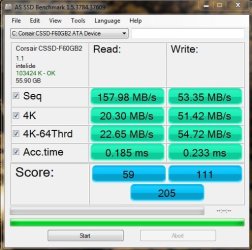
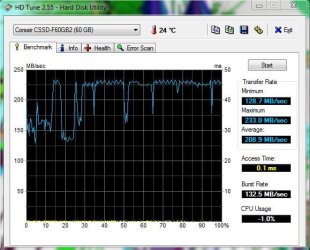
Heres mine , not sure what to make of the AS results , doesnt look good.
 

Attachments

  • AS.JPG
    AS.JPG
    49.6 KB · Views: 4
  • HD tune.JPG
    HD tune.JPG
    51.3 KB · Views: 22

My Computer

OS
Windows 7 Professional 64 bit
That does not look too bad. You apparently had something else running when you took the HD Tune test.
 

My Computer

Computer Manufacturer/Model Number
HP, Dell, Gateway, Toshiba - 4 laptops and 2 desktops
OS
Vista, Windows7, Mint Mate, Zorin, Windows 8
CPU
from 1.6GHz Duo to i7
Monitor(s) Displays
2x HP w2207
Hard Drives
5x HDD, 7x SSD, 12x Externals
Keyboard
with trackball - no mices
Mouse
Trackball mice
Internet Speed
DSL 6000
Just did a quick search on your SSD, seems to be some issues with the low benchmark scores.

Even the Corsair site review posted them a little low, Corsair Labs Report: Force Series F40 SSD.

Check the Corsair forum F60 Disgusting Performance, search the site for more info.
Looks like everyone is waiting for a firmware update.


Have you updated your BIOS?
Some issues mentioned about Corsair SSDs and Gigabyte MOBO.

Check for new SSD firmware from Corsair.

You will get better performance if using AHCI instead of IDE.

AHCI : Enable in Windows 7 / Vista

A more thorough review and comparison of benchmarks can be found at the AnandTech SSD Bench site.
 

My Computer

Computer type
PC/Desktop
Computer Manufacturer/Model Number
76~2.0
OS
Windows 7 Ult x64 - SP1/ Windows 8 Pro x64
CPU
Intel Core i5-3570K 4.6GHz
Motherboard
Gigabyte GA-Z77X UD3H, f18
Memory
8GB (2X4GB) DDR3 1600 Corsair Vengeance CL8 1.5v
Graphics Card(s)
Sapphire HD 7770 Vapor-X OC 1GB DDR5
Sound Card
Onboard VIA VT2021
Monitor(s) Displays
22" LCD Dell
Screen Resolution
1680x1050
Hard Drives
Samsung 840Pro 128GB SSD,
Seagate Barracuda 500GB SATA2 7200rpm 32MB cache, Seagate Barracuda 1TB SATA2 7200rpm 32MB cache,
PSU
Corsair HX650W
Case
Cooler Master Storm Scout
Cooling
Corsair H80 2x12cm Noctua NF P12 , 2x14cm case fans
Keyboard
Logitech Wave
Mouse
CM Sentinel
Internet Speed
Dismal
Antivirus
Avast
Browser
Opera Next
Other Info
Haswell laptop: HP Envy 17t-j, i7-4700MQ, GeForce 740M 2GB DDR3, 17.3" Full HD 1920x1080, 16GB RAM, Samsung 840 Pro 128GB, 1TB Hitachi 7200 HDD,
Desktop: eSATA ports,
External eSATA Seagate 500GB SATA2 7200rpm,
External WD USB 500GB
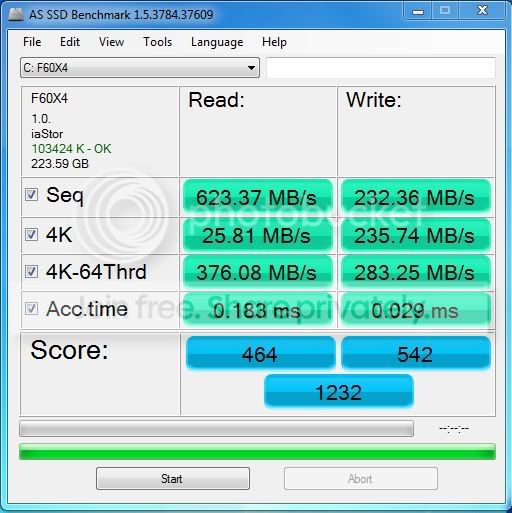
4 x F60's in Raid 0

Well I've been real happy with my Corsair F60's, picked up 4 of them and I'm still waiting on my raid controller card but the intel onboard raid controller is doing very well. I would highly recommend these SSD's.
Bench1-1.jpg
 

My Computer

OS
Windows 7 Enterprise
CPU
Intel 920
Motherboard
EVGA Classified 759
Memory
Corsiar 6G
Graphics Card(s)
3x 285 EVGA SSC
Monitor(s) Displays
Gateway 24
Hard Drives
4 Corsiar F60 RAID 0
2 WD 150 Raptors RAID 0
1 WD 300 Raptor
PSU
Tagan 1100W
Case
Cosmos 1000
Cooling
All water 2 loops
Looks good, four of them has got to be fast.

Nice set up.
 

My Computer

Computer type
PC/Desktop
Computer Manufacturer/Model Number
76~2.0
OS
Windows 7 Ult x64 - SP1/ Windows 8 Pro x64
CPU
Intel Core i5-3570K 4.6GHz
Motherboard
Gigabyte GA-Z77X UD3H, f18
Memory
8GB (2X4GB) DDR3 1600 Corsair Vengeance CL8 1.5v
Graphics Card(s)
Sapphire HD 7770 Vapor-X OC 1GB DDR5
Sound Card
Onboard VIA VT2021
Monitor(s) Displays
22" LCD Dell
Screen Resolution
1680x1050
Hard Drives
Samsung 840Pro 128GB SSD,
Seagate Barracuda 500GB SATA2 7200rpm 32MB cache, Seagate Barracuda 1TB SATA2 7200rpm 32MB cache,
PSU
Corsair HX650W
Case
Cooler Master Storm Scout
Cooling
Corsair H80 2x12cm Noctua NF P12 , 2x14cm case fans
Keyboard
Logitech Wave
Mouse
CM Sentinel
Internet Speed
Dismal
Antivirus
Avast
Browser
Opera Next
Other Info
Haswell laptop: HP Envy 17t-j, i7-4700MQ, GeForce 740M 2GB DDR3, 17.3" Full HD 1920x1080, 16GB RAM, Samsung 840 Pro 128GB, 1TB Hitachi 7200 HDD,
Desktop: eSATA ports,
External eSATA Seagate 500GB SATA2 7200rpm,
External WD USB 500GB
I am still puzzled with this benchmark program. Why are the 4K reads always so slow and how come the access time for reads is a lot slower than for writes. (see post 714 as example)
 

My Computer

Computer Manufacturer/Model Number
HP, Dell, Gateway, Toshiba - 4 laptops and 2 desktops
OS
Vista, Windows7, Mint Mate, Zorin, Windows 8
CPU
from 1.6GHz Duo to i7
Monitor(s) Displays
2x HP w2207
Hard Drives
5x HDD, 7x SSD, 12x Externals
Keyboard
with trackball - no mices
Mouse
Trackball mice
Internet Speed
DSL 6000
Part of the problem with Paulpicks21 setup is that he is using IDE mode instead of AHCI. That /kills/ the 4k multi threaded read mode at least. Not sure how much impact o nthe plain read write scrores there is but it seems pretty common that ide mode does not work for multi threaded disk reads.
 

My Computer

Computer Manufacturer/Model Number
Scratch built
OS
Windows 7 x64 Ultimate
CPU
i7 960
Motherboard
Asus P6X58D
Memory
12 Gig Corsair Dominator
Graphics Card(s)
Nvidia 480
Sound Card
Maudio Delta 44 + breakout box
Monitor(s) Displays
Dell UltraSharp U2410 24in and Samsung 21 dual monitors
Screen Resolution
1920x1200 and 1280x1024
Hard Drives
Primary: Intel X-25M G2 160G SSD
Secondary: Segate baracuda 1.0 TB
HDs in AHCI mode.
PSU
Corasair TX850
Case
Cooler Master HAF
Cooling
Corsair H50
Keyboard
Logitech G15 + N52 game pad
Mouse
Logitech MX518
Internet Speed
15kbs down 4.5kbps up
Other Info
WEI 7.6
CPU & RAM 7.6
Graphics 7.9
Hard disk 7.7
Part of the problem with Paulpicks21 setup is that he is using IDE mode instead of AHCI. That /kills/ the 4k multi threaded read mode at least. Not sure how much impact o nthe plain read write scrores there is but it seems pretty common that ide mode does not work for multi threaded disk reads.

For me, switching to AHCI really did bring up the 4k benchmark numbers. The other scores didn't move much at all. In real life use through, i have been totally unable to quantify any change from switching from IDE to AHCI...other than the couple of seconds that I lose at boot time now.
 

My Computer

Computer Manufacturer/Model Number
Self-Built in July 2009
OS
Windows 7 Ultimate x64
CPU
Intel Q9550 2.83Ghz OC'd to 3.40Ghz
Motherboard
Gigabyte GA-EP45-UD3R rev. 1.1, F12 BIOS
Memory
8GB G.Skill PI DDR2-800, 4-4-4-12 timings
Graphics Card(s)
EVGA 1280MB Nvidia GeForce GTX570
Sound Card
Realtek ALC899A 8 channel onboard audio
Monitor(s) Displays
23" Acer x233H
Screen Resolution
1920x1080
Hard Drives
Intel X25-M 80GB Gen 2 SSD
Western Digital 1TB Caviar Black, 32MB cache. WD1001FALS
PSU
Corsair 620HX modular
Case
Antec P182
Cooling
stock
Keyboard
ABS M1 Mechanical
Mouse
Logitech G9 Laser Mouse
Internet Speed
15/2 cable modem
Other Info
Windows and Linux enthusiast. Logitech G35 Headset.
Ok so I have a new motherboard being delivered tomorrow as the current one is very cheap.

I know how to enable AHCI in windows now.

Apart from that , where is the best place to plug the SSD on the new mobo?

And I keep hearing about RAID , is this something I need to know about that will benefit the SSD?

Heres the ports on the new mobo -

5 xSATA 3 Gb/s ports
Intel® Matrix Storage Technology Support RAID 0,1,5,10
JMicron® JMB361 SATA & PATA controllers:
1 x Ultra DMA 133 / 100 / 66 for up to 2 PATA devices
1 x External SATA 3Gb/s port (SATA On-the-Go)
Silicon Image Sil5723 (Drive Xpert technology):
2 x SATA 3Gb/s ports

Thanks for the help guys

Paul.
 

My Computer

OS
Windows 7 Professional 64 bit
I don't think it matters where on the mobo you plug it in. You can always arrange the boot sequence in the BIOS.
Raid is complex and I don't think it gives you a lot of benefit for the SSD as system disk. It shows impressive data transfer rates in the test programs, but your access time will not be any better - and the access time of the SSD gives you the punch. The amount of data that the system reads/writes is small and a fast data transfer rate will not impact the overall performance a lot. Maybe installing a big program would be a little faster - but how often do you do that.
 

My Computer

Computer Manufacturer/Model Number
HP, Dell, Gateway, Toshiba - 4 laptops and 2 desktops
OS
Vista, Windows7, Mint Mate, Zorin, Windows 8
CPU
from 1.6GHz Duo to i7
Monitor(s) Displays
2x HP w2207
Hard Drives
5x HDD, 7x SSD, 12x Externals
Keyboard
with trackball - no mices
Mouse
Trackball mice
Internet Speed
DSL 6000
Status
Not open for further replies.
Back
Top